After the Rancher container is upgraded, the application initialization command and the database migration command are automatically run based on the configuration of the environment variables
1. The current upgrade plan, after the Rancher container is upgraded, enter the Docker container and run it in sequence on the command line:
// 开发环境 / 测试环境
php /sobey/www/pcs-api/init --env=Development --overwrite=All
// 演示环境 / 生产环境
php /sobey/www/pcs-api/init --env=Production --overwrite=All
// 数据库迁移(日志的数据库模式,仅在第一次安装时运行)
php /sobey/www/pcs-api/yii migrate --migrationPath=@yii/log/migrations/ --interactive=0
// 数据库迁移(MySQL 5.7.7 之前的版本:innodb_large_prefix=1、innodb_file_format=BARRACUDA)
php /sobey/www/pcs-api/yii migrate --interactive=0
2. The problem with the current upgrade plan is that sometimes after the Rancher container is upgraded, the operation and maintenance personnel need to paste and run at least 2 commands in each container, that is, No. 2, 4 It is easy to miss a container, which leads to the error of the program running, and there is a certain amount of work. Prepare a shell script to automatically run the command line to ensure that each container is initialized successfully and save the workload of operators.
3. Create new \build\c_files\config\init\pcs-api_init.sh
Note:
If the environment variable is not set: PCS_API_CFG_ENV, set its default value to: dev
If the environment variable is set: PCS_API_CFG_ENV, whose value is: dev, then execute the command: php /sobey/www/pcs-api/init –env=development –overwrite=all; its value is: prod, then execute the command: php /sobey/www/pcs-api/init –env=production –overwrite=all; otherwise output: please SET ENVIRONMENT VARIABLE PCS_API_CFG_ENV DEV OR PROD
If the environment variable is not set: pcs_api_cfg_migrate, set its default value to: false
If the environment variable has been set: pcs_api_cfg_migrate, its value is: true, then execute the command in sequence: php /sobey/www/pcs-api/yii migrate –migrationpath=@yii/log/migrations/ –interactive=0, php /sobey/www/pcs-api/yii migrate –interactive=0; its value is: FALSE, then output: Running without DB migrate; otherwise output: please set environment variable pcs_api_cfg_migrate true or false
#!/bin/bash
env | grep PCS_API_CFG_ENV || export PCS_API_CFG_ENV="dev"
if [[ $PCS_API_CFG_ENV == "dev" ]]
then
    php /sobey/www/pcs-api/init --env=Development --overwrite=All
elif [[ $PCS_API_CFG_ENV == "prod" ]]
then
    php /sobey/www/pcs-api/init --env=Production --overwrite=All
else
    echo "please set environment variable PCS_API_CFG_ENV dev or prod"
fi
env | grep PCS_API_CFG_MIGRATE || export PCS_API_CFG_MIGRATE="false"
if [[ $PCS_API_CFG_MIGRATE == "true" ]]
then
    php /sobey/www/pcs-api/yii migrate --migrationPath=@yii/log/migrations/ --interactive=0
    php /sobey/www/pcs-api/yii migrate --interactive=0
elif [[ $PCS_API_CFG_MIGRATE == "false" ]]
then
    echo "running without db migrate"
else
    echo "please set environment variable PCS_API_CFG_MIGRATE true or false"
fi
4. Delete all the tables in the database in the development environment, the environment variables are not set: PCS_API_CFG_ENV, PCS_API_CFG_MIGrate, to test whether the default value setting is effective when the environment variable is not set, which is in line with the expected
Note:
If the environment variable is not set: pcs_api_cfg_env, set its default value to: dev, execute the command: php /sobey/www/pcs-api/init –env=development –overwrite=all, as shown in Figure 1

Figure 1
If the environment variable is not set: pcs_api_cfg_migrate, set its default value to: false, output: running without db migrate, as shown in Figure 2

Figure 2
5. Delete all the tables in the database in the development environment, the environment variables have been set: pcs_api_cfg_env, the value is: dev, the environment variables have been set: pcs_api_cfg_migrate, its value is: true, to test whether the corresponding command is executed when the environment variable is set, which is in line with expectations, as shown in Figure 3

Figure 3
Note:
If the environment variable has been set: pcs_api_cfg_env, whose value is: dev, then execute the command: php /sobey/www/pcs-api/init –env=development –overwrite=all
If the environment variable has been set: pcs_api_cfg_migrate, its value is: true, then execute the command in sequence: php /sobey/www/pcs-api/yii migrate –migrationpath=@yii/log/migrations/ –interactive=0, php /sobey/www/pcs-api/yii migrate –interactive=0, as shown in Figure 4, Figure 5
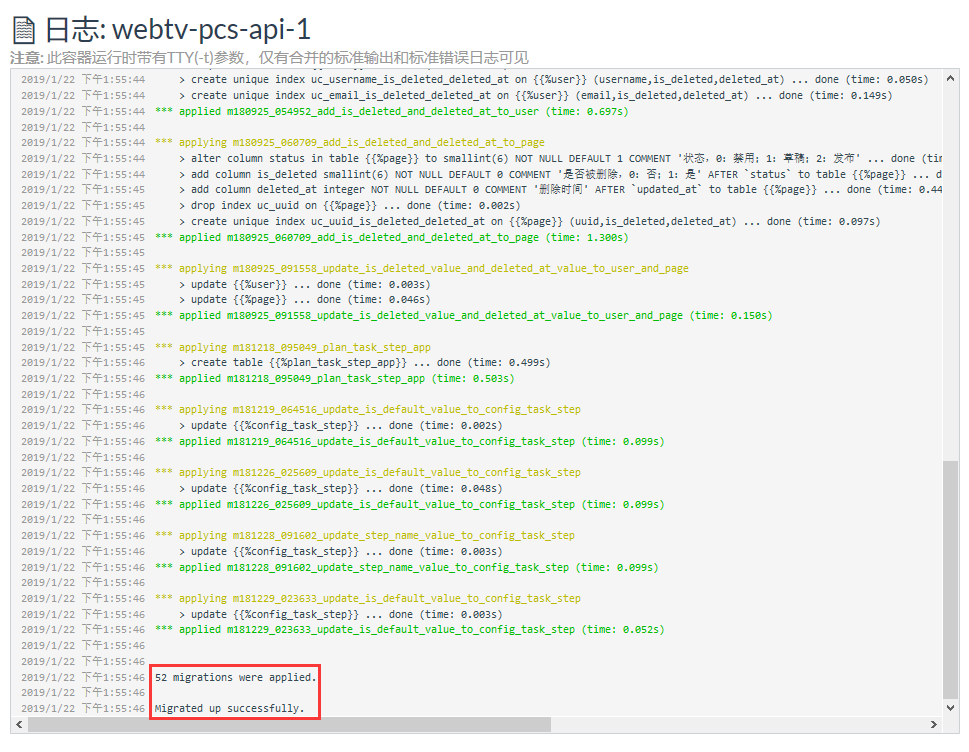
Figure 4

Figure 5
6. Delete all the tables in the database in the development environment, the environment variables have been set: pcs_api_cfg_env, the value is: prod, set environment variables: p cs_api_cfg_migrate, its value is: FALSE, to test whether the corresponding command is executed when the environment variable is set, which is in line with expectations, as shown in Figure 6 and Figure 7

Figure 6

Figure 7
Note:
If the environment variable has been set: pcs_api_cfg_env, whose value is: prod, execute the command: php /sobey/www/pcs-api/init –env=production –overwrite=all
If the environment variable has been set: PCS_API_CFG_MIGrate, its value is: FALSE, output: Running without DB migrate
7. Delete all the tables in the database in the development environment, the environment variables have been set: pcs_api_cfg_env, the value is:, set environment variables: pcs_a PI_CFG_MIGrate, its value is:, to test that the environment variable has been set, but when its value does not meet the specified, whether the corresponding prompt is output, which is in line with expectations, as shown in Figure 8 and Figure 9

8

Figure 9
Note:
If the environment variable is set: PCS_API_CFG_ENV, otherwise output: Please set environment Variable PCS_API_CFG_ENV or prod
If the environment variable has been set: PCS_API_CFG_MIGRATE, otherwise output: Please set environment Variable PCS_API_CFG_MIGrate TRUE or FALSE
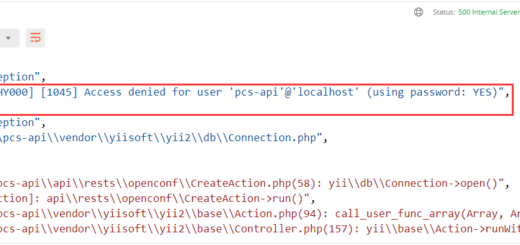
8. Delete all the tables in the database in the development environment, and set the environment variables: PCS_API_CFG_ENV, whose value is: dev, the environment variables that have been set: pcs_api_cfg_migrate, its value is: true, The value of pcs_api_cfg_db_password is set to the wrong password to test the situation when the corresponding command error occurs, which is in line with the expectations, and the container upgrade failed, as shown in Figure 10

Figure 10
Note:
If the environment variable has been set: pcs_api_cfg_env, whose value is: dev, then execute the command: php /sobey/www/pcs-api/init –env=development –overwrite=all
If the environment variable has been set: pcs_api_cfg_migrate, its value is: true, then execute the command in sequence: php /sobey/www/pcs-api/yii migrate –migrationpath=@yii/log/migrations/ –interactive=0, php /sobey/www/pcs-api/yii migrate –interactive=0, check the container log, the database password is wrong, as shown in Figure 11

Figure 11
9. The Rancher environment variable is described as follows. At this stage, if the machine upgrade of the database migration fails, even if the upgrade of other machines is successful, there will still be problems, and this problem is suspended. as shown in Figure 12

Figure 12
	PCS_API_CFG_ENV=dev # 环境,dev:开发环境 / 测试环境;prod:演示环境 / 生产环境,默认:dev
	PCS_API_CFG_MIGRATE=false # 数据库迁移是否执行(单机部署时,需设置为 true;集群部署时,仅需一台机器设置为 true,其他机器需设置为 false),true:是;false:否,默认:false
10. In another project, when the container is upgraded in Rancher, the database migration command is automatically executed and reports an error: Exceptionyii\db\exceptionwith messagesqlstate[HY000][2002]php_network_getaddresses: getaddrinfo failed: name or service not known, as shown in Figure 13
![在另一个项目中,在 Rancher 中升级容器时,自动执行数据库迁移命令报错:Exception 'yii\db\Exception' with message 'SQLSTATE[HY000] [2002] php_network_getaddresses: getaddrinfo failed: Name or service not known'](https://www.shuijingwanwq.com/wp-content/uploads/2019/01/13.png)
Figure 13
2019/1/22 下午3:49:43CHANNEL_PUB_API_CFG_MIGRATE=true
2019/1/22 下午3:49:43Yii Migration Tool (based on Yii v2.0.15.1)
2019/1/22 下午3:49:43
2019/1/22 下午3:49:43Exception 'yii\db\Exception' with message 'SQLSTATE[HY000] [2002] php_network_getaddresses: getaddrinfo failed: Name or service not known'
2019/1/22 下午3:49:43
2019/1/22 下午3:49:43in /sobey/www/channel-pub-api/vendor/yiisoft/yii2/db/Connection.php:624
2019/1/22 下午3:49:43
2019/1/22 下午3:49:43Stack trace:
2019/1/22 下午3:49:43#0 /sobey/www/channel-pub-api/vendor/yiisoft/yii2/db/Connection.php(996): yii\db\Connection->open()
2019/1/22 下午3:49:43#1 /sobey/www/channel-pub-api/vendor/yiisoft/yii2/db/Connection.php(983): yii\db\Connection->getMasterPdo()
2019/1/22 下午3:49:43#2 /sobey/www/channel-pub-api/vendor/yiisoft/yii2/db/Command.php(253): yii\db\Connection->getSlavePdo()
2019/1/22 下午3:49:43#3 /sobey/www/channel-pub-api/vendor/yiisoft/yii2/db/Command.php(1143): yii\db\Command->prepare(true)
2019/1/22 下午3:49:43#4 /sobey/www/channel-pub-api/vendor/yiisoft/yii2/db/Command.php(399): yii\db\Command->queryInternal('fetchAll', NULL)
2019/1/22 下午3:49:43#5 /sobey/www/channel-pub-api/vendor/yiisoft/yii2/db/mysql/Schema.php(312): yii\db\Command->queryAll()
2019/1/22 下午3:49:43#6 /sobey/www/channel-pub-api/vendor/yiisoft/yii2/db/mysql/Schema.php(125): yii\db\mysql\Schema->findColumns(Object(yii\db\TableSchema))
2019/1/22 下午3:49:43#7 /sobey/www/channel-pub-api/vendor/yiisoft/yii2/db/Schema.php(744): yii\db\mysql\Schema->loadTableSchema('CHANNEL_PUB_API...')
2019/1/22 下午3:49:43#8 /sobey/www/channel-pub-api/vendor/yiisoft/yii2/db/Schema.php(194): yii\db\Schema->getTableMetadata('{{%migration}}', 'schema', true)
2019/1/22 下午3:49:43#9 /sobey/www/channel-pub-api/vendor/yiisoft/yii2/console/controllers/MigrateController.php(210): yii\db\Schema->getTableSchema('{{%migration}}', true)
2019/1/22 下午3:49:43#10 /sobey/www/channel-pub-api/vendor/yiisoft/yii2/console/controllers/BaseMigrateController.php(875): yii\console\controllers\MigrateController->getMigrationHistory(NULL)
2019/1/22 下午3:49:43#11 /sobey/www/channel-pub-api/vendor/yiisoft/yii2/console/controllers/BaseMigrateController.php(166): yii\console\controllers\BaseMigrateController->getNewMigrations()
2019/1/22 下午3:49:43#12 [internal function]: yii\console\controllers\BaseMigrateController->actionUp(0)
2019/1/22 下午3:49:43#13 /sobey/www/channel-pub-api/vendor/yiisoft/yii2/base/InlineAction.php(57): call_user_func_array(Array, Array)
2019/1/22 下午3:49:43#14 /sobey/www/channel-pub-api/vendor/yiisoft/yii2/base/Controller.php(157): yii\base\InlineAction->runWithParams(Array)
2019/1/22 下午3:49:43#15 /sobey/www/channel-pub-api/vendor/yiisoft/yii2/console/Controller.php(148): yii\base\Controller->runAction('', Array)
2019/1/22 下午3:49:43#16 /sobey/www/channel-pub-api/vendor/yiisoft/yii2/base/Module.php(528): yii\console\Controller->runAction('', Array)
2019/1/22 下午3:49:43#17 /sobey/www/channel-pub-api/vendor/yiisoft/yii2/console/Application.php(180): yii\base\Module->runAction('migrate', Array)
2019/1/22 下午3:49:43#18 /sobey/www/channel-pub-api/vendor/yiisoft/yii2/console/Application.php(147): yii\console\Application->runAction('migrate', Array)
2019/1/22 下午3:49:43#19 /sobey/www/channel-pub-api/vendor/yiisoft/yii2/base/Application.php(386): yii\console\Application->handleRequest(Object(yii\console\Request))
2019/1/22 下午3:49:43#20 /sobey/www/channel-pub-api/yii(23): yii\base\Application->run()
2019/1/22 下午3:49:43#21 {main}
11, \build\c_files\config\init\channel-pub-api_init.sh, the shell script is as follows:
#!/bin/bash
env | grep CHANNEL_PUB_API_CFG_ENV || export CHANNEL_PUB_API_CFG_ENV="dev"
if [[ $CHANNEL_PUB_API_CFG_ENV == "dev" ]]
then
    php /sobey/www/channel-pub-api/init --env=Development --overwrite=All
elif [[ $CHANNEL_PUB_API_CFG_ENV == "prod" ]]
then
    php /sobey/www/channel-pub-api/init --env=Production --overwrite=All
else
    echo "please set environment variable CHANNEL_PUB_API_CFG_ENV dev or prod"
fi
env | grep CHANNEL_PUB_API_CFG_MIGRATE || export CHANNEL_PUB_API_CFG_MIGRATE="false"
if [[ $CHANNEL_PUB_API_CFG_MIGRATE == "true" ]]
then
    php /sobey/www/channel-pub-api/yii migrate --migrationPath=@yii/log/migrations/ --interactive=0
    php /sobey/www/channel-pub-api/yii migrate --interactive=0
    php /sobey/www/channel-pub-api/yii qq-tp-app/init-sync
    php /sobey/www/channel-pub-api/yii qq-cw-app/init-sync
    php /sobey/www/channel-pub-api/yii weibo-weibo-connect-web-app/init-sync
elif [[ $CHANNEL_PUB_API_CFG_MIGRATE == "false" ]]
then
    echo "running without db migrate"
else
    echo "please set environment variable CHANNEL_PUB_API_CFG_MIGRATE true or false"
fi
12. The upgrade failed, roll back to the old version, manually execute the command, all successful
13. Compare the difference between the two projects, because the difference in the execution order of the files in the \build\c_files\config\init directory is caused by the difference in the execution order of the files in the directory. To ensure the successful execution of the command line, you need to ensure that config0.sh After the file is executed, the pcs-api_init.sh/channel-pub-api_init.sh file is executed again, but in the channel-pub-api, it is channel-pub-api_init.sh Execute before config0.sh, as shown in Figure 14

Figure 14
14. In both projects, rename pcs-api_init.sh/channel-pub-api_init.sh to console_init.sh to ensure config0.sh After the file is executed, the console_init.sh file is executed again, as shown in Figure 15

Figure 15
15. After the PCS-API upgrade, check the logs, which is in line with expectations, as shown in Figure 16

Figure 16
16. After the channel-pub-api upgrade, check the log, which is in line with expectations, as shown in Figure 17

Figure 17