When installing WordPress based on Nginx under CentOS 7.6 64-bit, an error is reported: HTTP Error 500 analysis solution
1. Open the URL:http://www.aaaacn.net/wp-admin/install.php,报错:HTTPError 500, as shown in Figure 1
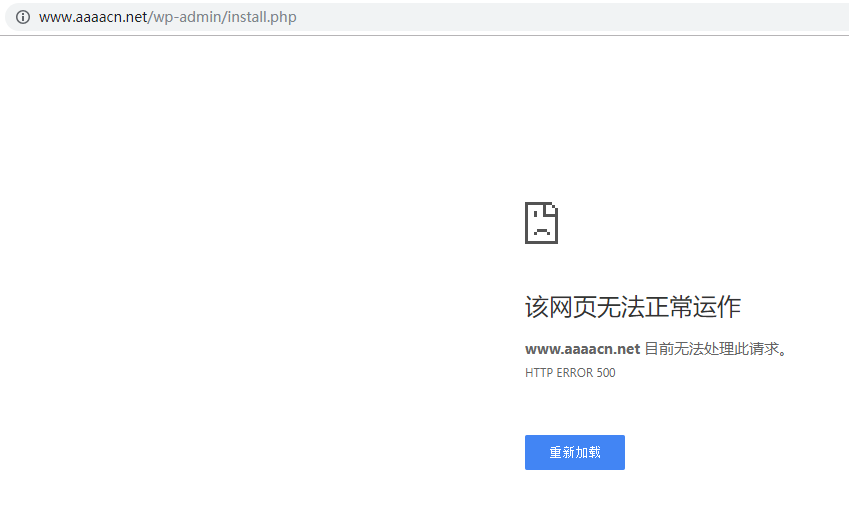
Figure 1
2. Open the URL:http://www.aaaacn.net/phpinfo.php,正常运行,如图2

Figure 2
3. Check virtualhost conf: /usr/local/nginx/conf/vhost/www.aaaacn.net.conf
	server {
	  listen 80;
	  server_name www.aaaacn.net aaaacn.net;
	  access_log /data/wwwlogs/www.aaaacn.net_nginx.log combined;
	  index index.html index.htm index.php;
	  root /data/wwwroot/www.aaaacn.net;
	  if ($host != www.aaaacn.net) {  return 301 $scheme://www.aaaacn.net$request_uri;  }
	  include /usr/local/nginx/conf/rewrite/wordpress.conf;
	  #error_page 404 /404.html;
	  #error_page 502 /502.html;

	  location ~ [^/]\.php(/|$) {
		#fastcgi_pass remote_php_ip:9000;
		fastcgi_pass unix:/dev/shm/php-cgi.sock;
		fastcgi_index index.php;
		include fastcgi.conf;
	  }

	  location ~ .*\.(gif|jpg|jpeg|png|bmp|swf|flv|mp4|ico)$ {
		expires 30d;
		access_log off;
	  }
	  location ~ .*\.(js|css)?$ {
		expires 7d;
		access_log off;
	  }
	  location ~ /\.ht {
		deny all;
	  }
	}
4. Check rewrite rule: /usr/local/nginx/conf/rewrite/wordpress.conf
	location / {
	  try_files $uri $uri/ /index.php?$args;
	}
	rewrite /wp-admin$ $scheme://$host$uri/ permanent;
	location ~* ^/wp-content/uploads/.*\.php$ {
	  deny all;
	}
5. Check the directory permissions, and find that the files in the WordPress directory, permission users and user groups are no longer WWW, but root, it should be because the files in the WordPress directory are roots Caused by user copying, as shown in Figure 3

Figure 3
6. When there is a file permission problem, execute the following 3 commands in turn, set the permission user and user group to www, and reset the entire /data/wwwroot/ directory, as shown in Figure 4

Figure 4
chown -R www.www /data/wwwroot/
find /data/wwwroot/ -type d -exec chmod 755 {} \;
find /data/wwwroot/ -type f -exec chmod 644 {} \;
7. Edit /data/wwwroot/www.aaaacn.net/wp-config.php,设置身份认证密钥与盐,如图5

Figure 5
8. Trigger the “debugging” mode in the entire WordPress, edit /data/wwwroot/www.aaaacn.net/wp-config.php
define('WP_DEBUG', true);
define( 'WP_DEBUG_LOG', true );
9. Set whether to display the error message to the screen as part of the output, set to Yes, edit /data/wwwroot/www.aaaacn.net/wp-admin/install.php,在These two items in phpinfo are closed, as shown in Figure 6

Figure 6
error_reporting(-1);
ini_set('display_errors', '1');
ini_set('log_errors', '1');
10. Open the URL:http://www.aaaacn.net/wp-admin/install.php,报错:HTTPThe details of Error 500 appear, as shown in Figure 7

Figure 7
Warning: require(/data/wwwroot/www.aaaacn.net/wp-includes/load.php): failed to open stream: No such file or directory in /data/wwwroot/www.aaaacn.net/wp-settings.php on line 19

Warning: require(/data/wwwroot/www.aaaacn.net/wp-includes/load.php): failed to open stream: No such file or directory in /data/wwwroot/www.aaaacn.net/wp-settings.php on line 19

Fatal error: require(): Failed opening required '/data/wwwroot/www.aaaacn.net/wp-includes/load.php' (include_path='.:/usr/local/php/lib/php') in /data/wwwroot/www.aaaacn.net/wp-settings.php on line 19
11. Analysis: /data/wwwroot/www.aaaacn.net/wp-includes/load.php,文件不存在,如图8

8
12. Decide to delete /data/wwwroot/www.aaaacn.netAll files in, download the installation package again, unzip and copy to /data/wwwroot/www.aaaacn.net,检查load.php already exists, set the permissions user and user group to www, as shown in Figure 9

Figure 9
wget https://cn.wordpress.org/latest-zh_CN.tar.gz
tar -xzvf latest-zh_CN.tar.gz
cp -rf /root/wordpress/* /data/wwwroot/www.aaaacn.net
chown -R www.www /data/wwwroot/
find /data/wwwroot/ -type d -exec chmod 755 {} \;
find /data/wwwroot/ -type f -exec chmod 644 {} \;
13. Open the URL:http://www.aaaacn.net/wp-admin/install.php,正常,符合预期,不确定之前为何解压后Load.php will be lost? As shown in Figure 10

Figure 10