CMC framework menu, permission refactoring
1. At this stage, the menu and permissions are one by one. The management interface in the framework, as shown in Figure 1

Figure 1
2. The design structure is as follows:
	选题管理:/plans(plan/index-category)
		我的选题:/plans/have(plan/have)
			新建(创建选题):/plans(plan/create)
			获取选题栏目设置列表(创建选题时必需):/plan-config-columns(plan-config-column/index)
			编辑选题:/plans/edit/{id}(plan/edit)
			编辑(更新选题):/plans/{id}(plan/update)
			删除(删除选题):/plans/{id}(plan/delete)
			启用(启用选题):/plans/enable/{ids}(plan/enable)
			禁用(禁用选题):/plans/disable/{ids}(plan/disable)
			提交(提交选题):/plans/submit/{id}(plan/submit)
			上移/下移(排序选题):/plans/sort/{id}(plan/sort)
			退回(退回选题):/plans/return/{id}(plan/return)
			获取舆情(舆情大数据)详情:/yqdsj-article/{id}(yqdsj-article/view)
			邀请(联合选题):/plans/invite/{id}(plan/invite)
			获取选题的 CMC 的租户列表:/plans/cmc-group/{id}(plan/cmc-group)
			获取选题(联合)的已邀请的租户列表:/plan-group-relations(plan-group-relation/index)
			接受邀请(联合选题):/plans/invite-accept/{id}(plan/invite-accept)
			拒绝邀请(联合选题):/plans/invite-refuse/{id}(plan/invite-refuse)
			获取选题的 IM 群组 的详情:/im-groups/{id}(im-group/view)
			获取 IM 群组 的用户列表:/im-group-users(im-group-user/index)
			上传选题资源:/plan-assets/upload(plan-asset/upload)
			创建选题资源:/plan-assets(plan-asset/create)
            删除选题资源:/plan-assets/{id}(plan-asset/delete)
			获取选题栏目人员配置列表(创建、编辑、更新选题时必需):/plan-config-column-users(plan-config-column-user/index)
		待审选题:/plans/wait-review(plan/wait-review)
			拒绝(拒绝选题):/plans/refuse/{id}(plan/refuse)
			通过(通过选题):/plans/pass/{id}(plan/pass)
		选题查询:/plans(plan/index)
			详情(获取选题详情):/plans/{id}(plan/view)
			获取选题日志列表:/plan-logs(plan-log/index)
			获取选题素材列表:/plan-resources(plan-resource/index)
	任务管理:/plan-tasks(plan-task/index-category)
		我的任务:/plan-tasks(plan-task/index)
			详情(获取任务详情):/plan-tasks/{id}(plan-task/view)
			指派(创建任务):/plan-tasks(plan-task/create)
			编辑(获取编辑任务数据):/plan-tasks/edit/{id}(plan-task/edit)
			编辑(更新任务):/plan-tasks/{id}(plan-task/update)
			删除(删除任务):/plan-tasks/{ids}(plan-task/delete)
			认领(认领任务):/plan-tasks/claim/{ids}(plan-task/claim)
			转派(转派任务):/plan-tasks/transfer/{id}(plan-task/transfer)
			完成(完成任务):/plan-tasks/finish/{ids}(plan-task/finish)
			禁用(禁用任务):/plan-tasks/disable/{ids}(plan-task/disable)
			启用(启用任务):/plan-tasks/enable/{ids}(plan-task/enable)
			获取撰写稿件(SCMS)链接:/plan-tasks/write/{id}(plan-task/write)
			获取提交稿件(SCMS)链接:/plan-tasks/commit-article/{id}(plan-task/commit-article)
			获取稿件审查(SCMS)链接:/plan-tasks/article-review/{id}(plan-task/article-review)
			获取视频编辑(Jove微编、Nova精编)链接:/plan-tasks/video-edit/{id}(plan-task/video-edit)
			获取上传素材(CPU)链接:/plan-tasks/upload/{id}(plan-task/upload)
			相关素材:/plan-task-resources(plan-task-resource/index)
			删除素材:/plan-task-resources/{ids}(plan-task-resource/delete)
			获取配置的任务步骤(创建任务时必需):/config-task-steps(config-task-step/index)
			创建任务日志:/plan-tasks/log/{id}(plan-task/log-create)
			获取任务日志列表:/plan-task-logs(plan-task-log/index)
			获取任务栏目人员配置列表(创建任务、创建任务的参与用户、编辑任务的参与用户时必需):/plan-task-config-column-users(plan-task-config-column-user/index)
			获取选题任务的参与用户:/plan-task-attended-users(plan-task-attended-user/index)
			更新、删除、添加选题任务的参与用户:/plan-task-attended-users/{plan_task_id}(plan-task-attended-user/update)
			删除选题任务的参与用户:/plan-task-attended-users/{ids}(plan-task-attended-user/delete)
	基础设置:/config-columns(config-column/index-category)
		栏目设置:/config-columns(config-column/index-link)
			栏目管理(获取栏目设置列表):/config-columns(config-column/index)
			新建(创建栏目设置):/config-columns(config-column/create)
			修改(更新栏目设置):/config-columns/{id}(config-column/update)
			删除(删除栏目设置):/config-columns/{id}(config-column/delete)
			是否启用(启用/禁用栏目设置):/config-columns/enable-disable/{id}(config-column/enable-disable)
			栏目人员管理(获取栏目人员设置列表):/config-column-users(config-column-user/index)
			人员变更(更新栏目人员设置):/config-column-users/{config_column_id}(config-column-user/update)
			删除(删除栏目人员配置):/config-column-users/{ids}(config-column-user/delete)
			身份变更(更新栏目人员设置的角色标识):/config-column-users/role-code/{id}(config-column-user/role-code)
			获取CMC的用户列表:/cmc-users(cmc-user/index)
			获取角色(成员身份)列表:/roles(role/index)
		基地设置:/config-base-locations/edit/my-group-id(config-base-location/edit)
			更新基地设置:/config-base-locations/my-group-id(config-base-location/update)
		系统日志:/logs(log/index-link)
			获取日志列表:/logs(log/index)
			获取日志详情:/logs/{id}(log/view)
		任务设置(获取任务设置列表):/config-plan-tasks(config-plan-task/index)
	GIS大屏:/gis/index.html(gis/index-category)
		GIS大屏:https://pcs.wjdev.chinamcloud.cn/gis/index.html(gis/index-link)
			获取GIS大屏的任务列表:/gis-tasks/list(gis-task/list)
			获取GIS大屏的记者列表:/gis-user-places/list(gis-user-place/list)
			获取GIS大屏的选题列表:/gis-plans/index(gis-plan/index)
			获取GIS大屏的租户列表:/gis-groups/index(gis-group/index)
			获取GIS大屏的选题数量趋势列表:/gis-plan-quantity-trends/index(gis-plan-quantity-trend/index)
		GIS大屏接口:/gis-tasks/list(gis-task/list-link)
			RTC邀请通话关闭:/gis-rtcs/room-close(gis-rtc/room-close)
			RTC邀请通话:/gis-rtcs/invite(gis-rtc/invite)
			RTC配置:/gis-rtcs/config(gis-rtc/config)
			基地数据:/gis-locations(gis-location/one)
			RTC通话踢人:/gis-rtcs/room-remove-user(gis-rtc/room-remove-user)
		统计排行:/gis-top-plans(gis-top-plan/index-link)
			任务一览:/gis-top-plan-tasks(gis-top-plan-task/index)
			素材列表:/gis-resources/list(gis-resource/list)
			记者绩效:/gis-top-reporters(gis-top-reporter/index)
			选题策划:/gis-top-plans(gis-top-plan/index)
	跨租户的选题管理:/cross-group-plans(cross-group-plan/index-category)
		跨租户的我的选题(获取选题列表):/cross-group-plans/have(cross-group-plan/have)
			跨租户的启用(启用选题):/cross-group-plans/enable/{ids}(cross-group-plan/enable)
			跨租户的禁用(禁用选题):/cross-group-plans/disable/{ids}(cross-group-plan/disable)
			跨租户的详情(获取选题详情):/cross-group-plans/{id}(cross-group-plan/view)
	移动端:/mobiles(mobile/index-category)
		选题:/mobile/plans(mobile/plan/index-link)
			获取选题栏目人员配置列表(创建、编辑、更新选题时必需):/mobile/plan-config-column-users(mobile/plan-config-column-user/index)
			获取选题栏目设置列表:/mobile/plan-config-columns(mobile/plan-config-column/index)
			新建(创建选题):/mobile/plans(mobile/plan/create)
			编辑选题:/mobile/plans/edit/{id}(mobile/plan/edit)
			更新选题:/mobile/plans/{id}(mobile/plan/update)
			我的选题(获取选题列表):/mobile/plans/have(mobile/plan/have)
			详情(获取选题详情):/mobile/plans/{id}(mobile/plan/view)
			待审核选题(获取选题列表):/mobile/plans/wait-review(mobile/plan/wait-review)
			选题查询(获取选题列表):/mobile/plans(mobile/plan/index)
			拒绝(拒绝选题):/mobile/plans/refuse/{id}(mobile/plan/refuse)
			通过(通过选题):/mobile/plans/pass/{id}(mobile/plan/pass)
			获取选题日志列表:/mobile/plan-logs(mobile/plan-log/index)
			获取选题素材列表:/mobile/plan-resources(mobile/plan-resource/index)
		任务:/mobile/plan-tasks(mobile/plan-task/index-link)
			我的任务(获取任务列表):/mobile/plan-tasks(mobile/plan-task/index)
			获取任务栏目人员配置列表(创建任务、创建任务的参与用户、编辑任务的参与用户时必需):/mobile/plan-task-config-column-users/{plan_id}(mobile/plan-task-config-column-user/index)
			获取配置的任务步骤(创建任务时必需):/mobile/config-task-steps(mobile/config-task-step/index)
			指派(创建任务):/mobile/plan-tasks(mobile/plan-task/create)
			详情(获取任务详情):/mobile/plan-tasks/{id}(mobile/plan-task/view)
			认领(认领任务):/mobile/plan-tasks/claim/{ids}(mobile/plan-task/claim)
			转派(转派任务):/mobile/plan-tasks/transfer/{id}(mobile/plan-task/transfer)
			相关素材:/mobile/plan-task-resources(mobile/plan-task-resource/index)
			删除素材:/mobile/plan-task-resources/{id}(mobile/plan-task-resource/delete)
			创建任务日志:/mobile/plan-tasks/log/{id}(mobile/plan-task/log-create)
			获取任务日志列表:/mobile/plan-task-logs(mobile/plan-task-log/index)
			获取选题任务的参与用户:/mobile/plan-task-attended-users(mobile/plan-task-attended-user/index)
			更新、删除、添加选题任务的参与用户:/mobile/plan-task-attended-users/{plan_task_id}(mobile/plan-task-attended-user/update)
			编辑(获取编辑任务数据):/mobile/plan-tasks/edit/{id}(mobile/plan-task/edit)
			更新任务:/mobile/plan-tasks/{id}(mobile/plan-task/update)
			完成(完成任务):/mobile/plan-tasks/finish/{ids}(mobile/plan-task/finish)
			IM全量用户列表:/mobile/ims/users(mobile/im/users)
			RTC用户房间:/mobile/rtcs/rooms(mobile/rtc/rooms)
			RTC配置:/mobile/rtcs/config(mobile/rtc/config)
			任务步骤完成:/mobile/plan-task-steps/end/{task_step_id}(mobile/plan-task-step/end)
			按任务状态统计:/mobile/plan-tasks/status-count(mobile/plan-task/status-count)
			极光删除别名:/mobile/jgs/{id}(mobile/jg/delete)
			素材上传:/mobile/resources/resource(mobile/resource/create)
			记者位置上传:/mobile/user-places(mobile/user-place/create)
		我的:/mobile/mys(mobile/my/index-link)
		    任务一览:/mobile/my-top-plan-tasks(mobile/my-top-plan-task/index)
			记者绩效:/mobile/my-top-reporters(mobile/my-top-reporter/index)
3. If you need to add a new menu/permission (eg: mobile – task – To complete the task: /mobile/plan-tasks/finish/{ids}(mobile/plan-task/finish)), then its operation steps are roughly as follows, the first step is to add a menu at the service level, as shown in Figure 2

Figure 2
4. In the second step, edit/check the menu in the service under the tenant level, as shown in Figure 3

Figure 3
5. In the third step, edit/check the menu in the role under the user level, as shown in Figure 4

Figure 4
6. The problems encountered at this stage, if the PCS is used by 10 tenants, and under these 10 tenants, there are 3 of the roles. Each character needs to check the newly added menu, then if you need to add a new menu/authority, you need to perform the number of operations: 1 + 10 + (10 * 3) = 41. In fact, in a cloud environment, the number of tenants is far more than 10, and even if the management of menu/rights is implemented based on the program, it can only implement the first and second steps, and the third step is not possible (the number of operations: 1 + 10 + (10) * 3) – 1 – 10 = 30.). Because: the roles below each tenant are inconsistent and can be completely customized by the user.
7. For the problems encountered at this stage, the solution is generally planned as: the refactoring of the menu and permissions (the separation of permissions and the menu, the classification of permissions), that is, the separation of permissions and the menu, There is no one-to-one correspondence. In this case, the need on the display of the menu can reduce the number of menu configurations, because the menu display is generally enough for the first and second levels. as shown in Figure 5

Figure 5
8. Permission classification, all permissions are divided into different categories, and the temporary decision of the classification is only divided into four levels, and the permissions under a certain category are configured in the program. To complete (complete task): /mobile/plan-tasks/finish/{ids}(mobile/plan-task/finish)), you only need to add a new configuration item in the program. Because the classification to which it belongs already exists in the framework. Only when a newly added menu/permission belongs to a classification that does not exist in the framework, the first, second and third steps need to be performed based on the previous steps.
9. The final structure of the menu is as follows (in order to prevent the permission identification conflict, the menu of the category type is added with the suffix: -menu-category, and the menu of the link type is added with the suffix: -menu-link):
菜单结构:
选题管理:/plans(plan/index-menu-category)
    我的选题:/plans/have(plan/have-menu-link)
    待审选题:/plans/wait-review(plan/wait-review-menu-link)
    选题查询:/plans(plan/index-menu-link)
任务管理:/plan-tasks(plan-task/index-menu-category)
    我的任务:/plan-tasks(plan-task/index-menu-link)
基础设置:/config-columns(config-column/index-menu-category)
    栏目设置:/config-columns(config-column/index-menu-link)
    基地设置:/config-base-locations/edit/my-group-id(config-base-location/edit-menu-link)
    系统日志:/logs(log/index-menu-link)
GIS大屏:/gis/index.html(gis/index-menu-category)
    GIS大屏:https://pcs.wjdev.chinamcloud.cn/gis/index.html(gis/index-menu-link)
10. The final structure of permissions is as follows Permissions of the type are added with the suffix: -permission-link, the permission of the button type is added with the suffix: -permission-button):
权限结构:
[权限] 选题管理:/plans(plan/index-permission-category)
    [权限] 我的选题:/plans/have(plan/have-permission-link)
        [权限] 新建选题:/plans(plan/create-permission-button)
            我的选题(获取选题列表):/plans/have(plan/have)
            获取选题栏目设置列表(创建选题时必需):/plan-config-columns(plan-config-column/index)
            获取选题栏目人员配置列表(创建、编辑、更新选题时必需):/plan-config-column-users(plan-config-column-user/index)
            新建(创建选题):/plans(plan/create)
            详情(获取选题详情):/plans/{id}(plan/view)
        [权限] 我的选题(获取选题列表):/plans/have(plan/have-permission-button)
            我的选题(获取选题列表):/plans/have(plan/have)
            获取选题栏目人员配置列表(创建、编辑、更新选题时必需):/plan-config-column-users(plan-config-column-user/index)
            编辑选题:/plans/edit/{id}(plan/edit)
            更新选题:/plans/{id}(plan/update)
            删除选题:/plans/{id}(plan/delete)
            启用选题:/plans/enable/{ids}(plan/enable)
            禁用选题:/plans/disable/{ids}(plan/disable)
            提交选题:/plans/submit/{id}(plan/submit)
            拒绝选题:/plans/refuse/{id}(plan/refuse)
            通过选题:/plans/pass/{id}(plan/pass)
            退回选题:/plans/return/{id}(plan/return)
            获取舆情(舆情大数据)详情:/yqdsj-articles/{id}(yqdsj-article/view)
            获取舆情(三方舆情大数据)详情:/sfyqdsj-articles(sfyqdsj-article/fill)
            邀请(联合选题):/plans/invite/{id}(plan/invite)
            获取选题的 CMC 的租户列表:/plans/cmc-group/{id}(plan/cmc-group)
            获取选题(联合)的已邀请的租户列表:/plan-group-relations(plan-group-relation/index)
            接受邀请(联合选题):/plans/invite-accept/{id}(plan/invite-accept)
            获取选题的 IM 群组 的详情:/im-groups/{id}(im-group/view)
            获取 IM 群组 的用户列表:/im-group-users(im-group-user/index)
            上传选题资源:/plan-assets/upload(plan-asset/upload)
            详情(获取选题详情):/plans/{id}(plan/view)
            获取选题日志列表:/plan-logs(plan-log/index)
            获取选题素材列表:/plan-resources(plan-resource/index)
            我的任务(获取任务列表):/plan-tasks(plan-task/index)
            获取配置的任务步骤(创建任务时必需):/config-task-steps(config-task-step/index)
            获取任务栏目人员配置列表(创建任务、创建任务的参与用户、编辑任务的参与用户时必需):/plan-task-config-column-users(plan-task-config-column-user/index)
            指派(创建任务):/plan-tasks(plan-task/create)
    [权限] 待审选题:/plans/wait-review(plan/wait-review-permission-link)
        待审核选题(获取选题列表):/plans/wait-review(plan/wait-review)
        拒绝选题:/plans/refuse/{id}(plan/refuse)
        通过选题:/plans/pass/{id}(plan/pass)
        详情(获取选题详情):/plans/{id}(plan/view)
    [权限] 选题查询:/plans(plan/index-permission-link)
        选题查询(获取选题列表):/plans(plan/index)
        详情(获取选题详情):/plans/{id}(plan/view)
        获取选题日志列表:/plan-logs(plan-log/index)
        获取选题素材列表:/plan-resources(plan-resource/index)
        我的任务(获取任务列表):/plan-tasks(plan-task/index)
[权限] 任务管理:/plan-tasks(plan-task/index-permission-category)
    [权限] 我的任务:/plan-tasks(plan-task/index-permission-link)
        我的任务(获取任务列表):/plan-tasks(plan-task/index)
        详情(获取任务详情):/plan-tasks/{id}(plan-task/view)
        获取配置的任务步骤(创建任务时必需):/config-task-steps(config-task-step/index)
        获取任务栏目人员配置列表(创建任务、创建任务的参与用户、编辑任务的参与用户时必需):/plan-task-config-column-users(plan-task-config-column-user/index)
        指派(创建任务):/plan-tasks(plan-task/create)
        编辑任务:/plan-tasks/edit/{id}(plan-task/edit)
        更新任务:/plan-tasks/{id}(plan-task/update)
        删除任务:/plan-tasks/{ids}(plan-task/delete)
        认领任务:/plan-tasks/claim/{ids}(plan-task/claim)
        转派任务:/plan-tasks/transfer/{id}(plan-task/transfer)
        完成任务:/plan-tasks/finish/{ids}(plan-task/finish)
        禁用任务:/plan-tasks/disable/{ids}(plan-task/disable)
        启用任务:/plan-tasks/enable/{ids}(plan-task/enable)
        获取撰写稿件(SCMS)链接:/plan-tasks/write/{id}(plan-task/write)
        获取提交稿件(SCMS)链接:/plan-tasks/commit-article/{id}(plan-task/commit-article)
        获取稿件审查(SCMS)链接:/plan-tasks/article-review/{id}(plan-task/article-review)
        获取视频编辑(Jove微编、Nova精编)链接:/plan-tasks/video-edit/{id}(plan-task/video-edit)
        获取上传素材(CPU)链接:/plan-tasks/upload/{id}(plan-task/upload)
        相关素材:/plan-task-resources(plan-task-resource/index)
        删除素材:/plan-task-resources/{ids}(plan-task-resource/delete)
        创建任务日志:/plan-tasks/log/{id}(plan-task/log-create)
        获取任务日志列表:/plan-task-logs(plan-task-log/index)
        获取选题任务的参与用户:/plan-task-attended-users(plan-task-attended-user/index)
        更新、删除、添加选题任务的参与用户:/plan-task-attended-users/{plan_task_id}(plan-task-attended-user/update)
        删除选题任务的参与用户:/plan-task-attended-users/{ids}(plan-task-attended-user/delete)
[权限] 基础设置:/config-columns(config-column/index-permission-category)
    [权限] 栏目管理:/config-columns(config-column/index-permission-link)
        获取栏目设置列表:/config-columns(config-column/index)
        新建(创建栏目设置):/config-columns(config-column/create)
        修改(更新栏目设置):/config-columns/{id}(config-column/update)
        删除(删除栏目设置):/config-columns/{id}(config-column/delete)
        栏目人员管理(获取栏目人员设置列表):/config-column-users(config-column-user/index)
        人员变更(更新栏目人员设置):/config-column-users/{config_column_id}(config-column-user/update)
        删除(删除栏目人员配置):/config-column-users/{ids}(config-column-user/delete)
        身份变更(更新栏目人员设置的角色标识):/config-column-users/role-code/{id}(config-column-user/role-code)
        获取CMC的用户列表:/cmc-users(cmc-user/index)
        获取角色(成员身份)列表:/roles(role/index)
    [权限] 基地设置:/config-base-locations/edit/my-group-id(config-base-location/edit-permission-link)
        编辑基地设置:/config-base-locations/edit/my-group-id(config-base-location/edit)
        更新基地设置:/config-base-locations/my-group-id(config-base-location/update)
    [权限] 系统日志:/logs(log/index-permission-link)
        获取日志列表:/logs(log/index)
        获取日志详情:/logs/{id}(log/view)
[权限] GIS大屏:/gis/index.html(gis/index-permission-category)
    [权限] GIS大屏:/gis-tasks/list(gis-task/list-permission-link)
        获取GIS大屏的任务列表:/gis-tasks/list(gis-task/list)
        获取GIS大屏的记者列表:/gis-user-places/list(gis-user-place/list)
        RTC邀请通话关闭:/gis-rtcs/room-close(gis-rtc/room-close)
        RTC邀请通话:/gis-rtcs/invite(gis-rtc/invite)
        RTC配置:/gis-rtcs/config(gis-rtc/config)
        基地数据:/gis-locations(gis-location/one)
        RTC通话踢人:/gis-rtcs/room-remove-user(gis-rtc/room-remove-user)
    [权限] 统计排行:/gis-top-plans(gis-top-plan/index-permission-link)
        任务一览:/gis-top-plan-tasks(gis-top-plan-task/index)
        素材列表:/gis-resources/list(gis-resource/list)
        记者绩效:/gis-top-reporters(gis-top-reporter/index)
        选题策划:/gis-top-plans(gis-top-plan/index)
[权限] 跨租户的选题管理:/cross-group-plans/have(cross-group-plan/have-permission-category)
    [权限] 跨租户的我的选题:/cross-group-plans/have(cross-group-plan/have-permission-link)
        跨租户的我的选题(获取选题列表):/cross-group-plans/have(cross-group-plan/have)
        跨租户的获取选题的 CMC 的租户列表:/cross-group-plans/cmc-group/{id}(cross-group-plan/cmc-group)
        跨租户的启用(启用选题):/cross-group-plans/enable/{ids}(cross-group-plan/enable)
        跨租户的禁用(禁用选题):/cross-group-plans/disable/{ids}(cross-group-plan/disable)
        跨租户的详情(获取选题详情):/cross-group-plans/{id}(cross-group-plan/view)
[权限] 移动端:/mobiles(mobile/index-permission-category)
    [权限] 选题管理:/mobile/plans(mobile/plan/index-permission-category)
        [权限] 我的选题:/mobile/plans/have(mobile/plan/have-permission-link)
            [权限] 新建选题:/mobile/plans(mobile/plan/create-permission-button)
                我的选题(获取选题列表):/mobile/plans/have(mobile/plan/have)
                获取选题栏目设置列表(创建选题时必需):/mobile/plan-config-columns(mobile/plan-config-column/index)
                获取选题栏目人员配置列表(创建、编辑、更新选题时必需):/mobile/plan-config-column-users(mobile/plan-config-column-user/index)
                新建(创建选题):/mobile/plans(mobile/plan/create)
                详情(获取选题详情):/mobile/plans/{id}(mobile/plan/view)
            [权限] 我的选题(获取选题列表):/mobile/plans/have(mobile/plan/have-permission-button)
                我的选题(获取选题列表):/mobile/plans/have(mobile/plan/have)
                获取选题栏目人员配置列表(创建、编辑、更新选题时必需):/mobile/plan-config-column-users(mobile/plan-config-column-user/index)
                编辑选题:/mobile/plans/edit/{id}(mobile/plan/edit)
                更新选题:/mobile/plans/{id}(mobile/plan/update)
                拒绝选题:/mobile/plans/refuse/{id}(mobile/plan/refuse)
                通过选题:/mobile/plans/pass/{id}(mobile/plan/pass)
                详情(获取选题详情):/mobile/plans/{id}(mobile/plan/view)
                获取选题日志列表:/mobile/plan-logs(mobile/plan-log/index)
                获取选题素材列表:/mobile/plan-resources(mobile/plan-resource/index)
                我的任务(获取任务列表):/mobile/plan-tasks(mobile/plan-task/index)
                获取配置的任务步骤(创建任务时必需):/mobile/config-task-steps(mobile/config-task-step/index)
                获取任务栏目人员配置列表(创建任务、创建任务的参与用户、编辑任务的参与用户时必需):/mobile/plan-task-config-column-users/{plan_id}(mobile/plan-task-config-column-user/index)
                指派(创建任务):/mobile/plan-tasks(mobile/plan-task/create)
        [权限] 待审选题:/mobile/plans/wait-review(mobile/plan/wait-review-permission-link)
            待审核选题(获取选题列表):/mobile/plans/wait-review(mobile/plan/wait-review)
            拒绝选题:/mobile/plans/refuse/{id}(mobile/plan/refuse)
            通过选题:/mobile/plans/pass/{id}(mobile/plan/pass)
            详情(获取选题详情):/mobile/plans/{id}(mobile/plan/view)
        [权限] 选题查询:/mobile/plans(mobile/plan/index-permission-link)
            选题查询(获取选题列表):/mobile/plans(mobile/plan/index)
            详情(获取选题详情):/mobile/plans/{id}(mobile/plan/view)
            获取选题日志列表:/mobile/plan-logs(mobile/plan-log/index)
            获取选题素材列表:/mobile/plan-resources(mobile/plan-resource/index)
            我的任务(获取任务列表):/mobile/plan-tasks(mobile/plan-task/index)
    [权限] 任务管理:/mobile/plan-tasks(mobile/plan-task/index-permission-category)
        [权限] 我的任务:/mobile/plan-tasks(mobile/plan-task/index-permission-link)
            我的任务(获取任务列表):/mobile/plan-tasks(mobile/plan-task/index)
            详情(获取任务详情):/mobile/plan-tasks/{id}(mobile/plan-task/view)
            获取配置的任务步骤(创建任务时必需):/mobile/config-task-steps(mobile/config-task-step/index)
            获取任务栏目人员配置列表(创建任务、创建任务的参与用户、编辑任务的参与用户时必需):/mobile/plan-task-config-column-users/{plan_id}(mobile/plan-task-config-column-user/index)
            指派(创建任务):/mobile/plan-tasks(mobile/plan-task/create)
            编辑任务:/mobile/plan-tasks/edit/{id}(mobile/plan-task/edit)
            更新任务:/mobile/plan-tasks/{id}(mobile/plan-task/update)
            认领任务:/mobile/plan-tasks/claim/{ids}(mobile/plan-task/claim)
            转派任务:/mobile/plan-tasks/transfer/{id}(mobile/plan-task/transfer)
            完成任务:/mobile/plan-tasks/finish/{ids}(mobile/plan-task/finish)
            相关素材:/mobile/plan-task-resources(mobile/plan-task-resource/index)
            删除素材:/mobile/plan-task-resources/{id}(mobile/plan-task-resource/delete)
            创建任务日志:/mobile/plan-tasks/log/{id}(mobile/plan-task/log-create)
            获取任务日志列表:/mobile/plan-task-logs(mobile/plan-task-log/index)
            获取选题任务的参与用户:/mobile/plan-task-attended-users(mobile/plan-task-attended-user/index)
            更新、删除、添加选题任务的参与用户:/mobile/plan-task-attended-users/{plan_task_id}(mobile/plan-task-attended-user/update)
            IM全量用户列表:/mobile/ims/users(mobile/im/users)
            RTC用户房间:/mobile/rtcs/rooms(mobile/rtc/rooms)
            RTC配置:/mobile/rtcs/config(mobile/rtc/config)
            完成任务步骤:/mobile/plan-task-steps/end/{task_step_id}(mobile/plan-task-step/end)
            统计任务(按状态):/mobile/plan-tasks/status-count(mobile/plan-task/status-count)
            删除极光推送的别名:/mobile/jgs/{id}(mobile/jg/delete)
            上传素材:/mobile/resources/resource(mobile/resource/create)
            记者位置上传:/mobile/user-places(mobile/user-place/create)
    [权限] 我的:/mobile/mys(mobile/my/index-permission-category)
        [权限] 我的:/mobile/mys(mobile/my/index-permission-link)
            任务一览:/mobile/my-top-plan-tasks(mobile/my-top-plan-task/index)
            记者绩效:/mobile/my-top-reporters(mobile/my-top-reporter/index)
11. After adding the menu at the service level, edit/check the menu in the service under the tenant level, as shown in Figure 6
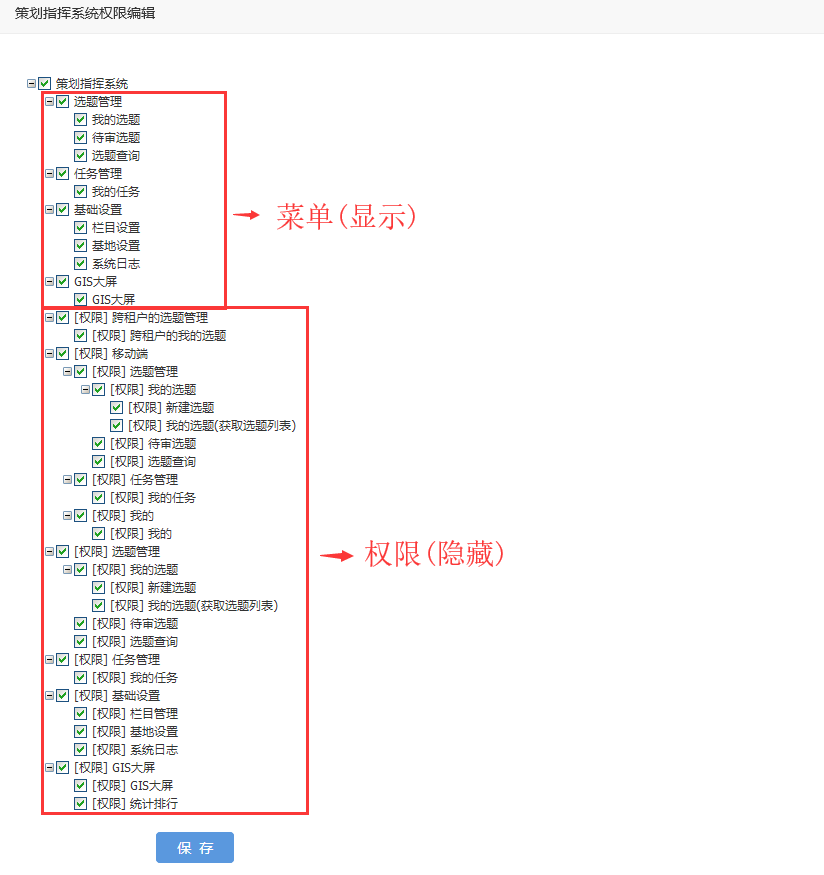
Figure 6
12. Edit the file: \common\config\params.php, add framework service permission configuration
    // 框架服务权限
    'cmcPermission' => [
        'plan/index-permission-category' => [
            'plan/have-permission-link' => [
                'plan/create-permission-button' => [
                    'plan/have',
                    'plan-config-column/index',
                    'plan-config-column-user/index',
                    'plan/create',
                    'plan/view',
                ],
                'plan/have-permission-button' => [
                    'plan/have',
                    'plan-config-column-user/index',
                    'plan/edit',
                    'plan/update',
                    'plan/delete',
                    'plan/enable',
                    'plan/disable',
                    'plan/submit',
                    'plan/refuse',
                    'plan/pass',
                    'plan/return',
                    'yqdsj-article/view',
                    'sfyqdsj-article/fill',
                    'plan/invite',
                    'plan/cmc-group',
                    'plan-group-relation/index',
                    'plan/invite-accept',
                    'im-group/view',
                    'im-group-user/index',
                    'plan-asset/upload',
                    'plan/view',
                    'plan-log/index',
                    'plan-resource/index',
                    'plan-task/index',
                    'config-task-step/index',
                    'plan-task-config-column-user/index',
                    'plan-task/create',
                ],
            ],
            'plan/wait-review-permission-link' => [
                'plan/wait-review',
                'plan/refuse',
                'plan/pass',
                'plan/view',
            ],
            'plan/index-permission-link' => [
                'plan/index',
                'plan/view',
                'plan-log/index',
                'plan-resource/index',
                'plan-task/index',
            ],
        ],
        'plan-task/index-permission-category' => [
            'plan-task/index-permission-link' => [
                'plan-task/index',
                'plan-task/view',
                'config-task-step/index',
                'plan-task-config-column-user/index',
                'plan-task/create',
                'plan-task/edit',
                'plan-task/update',
                'plan-task/delete',
                'plan-task/claim',
                'plan-task/transfer',
                'plan-task/finish',
                'plan-task/disable',
                'plan-task/enable',
                'plan-task/write',
                'plan-task/commit-article',
                'plan-task/article-review',
                'plan-task/video-edit',
                'plan-task/upload',
                'plan-task-resource/index',
                'plan-task-resource/delete',
                'plan-task/log-create',
                'plan-task-log/index',
                'plan-task-attended-user/index',
                'plan-task-attended-user/update',
                'plan-task-attended-user/delete',
            ],
        ],
        'config-column/index-permission-category' => [
            'config-column/index-permission-link' => [
                'config-column/index',
                'config-column/create',
                'config-column/update',
                'config-column/delete',
                'config-column-user/index',
                'config-column-user/update',
                'config-column-user/delete',
                'config-column-user/role-code',
                'cmc-user/index',
                'role/index',
            ],
            'config-base-location/edit-permission-link' => [
                'config-base-location/edit',
                'config-base-location/update',
            ],
            'log/index-permission-link' => [
                'log/index',
                'log/view',
            ],
        ],
        'gis/index-permission-category' => [
            'gis-task/list-permission-link' => [
                'gis-task/list',
                'gis-user-place/list',
                'gis-rtc/room-close',
                'gis-rtc/invite',
                'gis-rtc/config',
                'gis-location/one',
                'gis-rtc/room-remove-user',
            ],
            'gis-top-plan/index-permission-link' => [
                'gis-top-plan-task/index',
                'gis-resource/list',
                'gis-top-reporter/index',
                'gis-top-plan/index',
            ],
        ],
        'cross-group-plan/have-permission-category' => [
            'cross-group-plan/have-permission-link' => [
                'cross-group-plan/have',
                'cross-group-plan/cmc-group',
                'cross-group-plan/enable',
                'cross-group-plan/disable',
                'cross-group-plan/view',
            ],
        ],
        'mobile/index-permission-category' => [
            'mobile/plan/index-permission-category' => [
                'mobile/plan/have-permission-link' => [
                    'mobile/plan/create-permission-button' => [
                        'mobile/plan/have',
                        'mobile/plan-config-column/index',
                        'mobile/plan-config-column-user/index',
                        'mobile/plan/create',
                        'mobile/plan/view',
                    ],
                    'mobile/plan/have-permission-button' => [
                        'mobile/plan/have',
                        'mobile/plan-config-column-user/index',
                        'mobile/plan/edit',
                        'mobile/plan/update',
                        'mobile/plan/refuse',
                        'mobile/plan/pass',
                        'mobile/plan/view',
                        'mobile/plan-log/index',
                        'mobile/plan-resource/index',
                        'mobile/plan-task/index',
                        'mobile/config-task-step/index',
                        'mobile/plan-task-config-column-user/index',
                        'mobile/plan-task/create',
                    ],
                ],
                'mobile/plan/wait-review-permission-link' => [
                    'mobile/plan/wait-review',
                    'mobile/plan/refuse',
                    'mobile/plan/pass',
                    'mobile/plan/view',
                ],
                'mobile/plan/index-permission-link' => [
                    'mobile/plan/index',
                    'mobile/plan/view',
                    'mobile/plan-log/index',
                    'mobile/plan-resource/index',
                    'mobile/plan-task/index',
                ],
            ],
            'mobile/plan-task/index-permission-category' => [
                'mobile/plan-task/index-permission-link' => [
                    'mobile/plan-task/index',
                    'mobile/plan-task/view',
                    'mobile/config-task-step/index',
                    'mobile/plan-task-config-column-user/index',
                    'mobile/plan-task/create',
                    'mobile/plan-task/edit',
                    'mobile/plan-task/update',
                    'mobile/plan-task/claim',
                    'mobile/plan-task/transfer',
                    'mobile/plan-task/finish',
                    'mobile/plan-task-resource/index',
                    'mobile/plan-task-resource/delete',
                    'mobile/plan-task/log-create',
                    'mobile/plan-task-log/index',
                    'mobile/plan-task-attended-user/index',
                    'mobile/plan-task-attended-user/update',
                    'mobile/im/users',
                    'mobile/rtc/rooms',
                    'mobile/rtc/config',
                    'mobile/plan-task-step/end',
                    'mobile/plan-task/status-count',
                    'mobile/jg/delete',
                    'mobile/resource/create',
                    'mobile/user-place/create',
                ],
            ],
            'mobile/my/index-permission-category' => [
                'mobile/my/index-permission-link' => [
                    'mobile/my-top-plan-task/index',
                    'mobile/my-top-reporter/index',
                ],
            ],
        ],
    ],
13. When an interface is called, the confirmation of its classification permission identification is to obtain the array keys in the previous dimension. There may be multiple array keys. There may be more than one permission classification on the same interface. For example: to obtain the personnel configuration list of the topic selection column (required when creating, editing, and updating the topic), it also exists in the categories of newly created topics and updated topics. When this occurs, the CMC framework interface is called sequentially based on the permission classification ID until there is a permission classification identifier. Or until the end still does not have the permission classification ID, at this time there is no corresponding interface permission. Note: Subsequent CMC frameworks need to support the permission identification as an array format to avoid multiple calls to the CMC framework interface. Invoking interface: When obtaining the personnel configuration list of the topic selection column (required when creating, editing, and updating the topic), the value of the classification permission is:[‘plan/create-permission-button’, ‘plan/have-permission-button’]. as shown in Figure 7

Figure 7
14. Invoke the interface in Postman:http://api.pcs-api.localhost/v1/plan-config-column-users?login_id=2e368664c41b8bf511bcc9c65d86dbc3&login_tid=0b0f8b3f90a7afc91bf5416c283053df&filter[config_column_id]=1 , the response is as follows
{
    "name": "Forbidden",
    "message": "用户授权失败:plan-config-column-user/index,不允许访问",
    "code": 201012,
    "status": 403,
    "type": "yii\\web\\ForbiddenHttpException"
}
15. Check the log, obtain the user permission through the framework service permission ID, and the permission identification is the ID of the interface itself, as shown in Figure 8

8
16. Edit \Common\Behaviors\GlobalAccessBehavior.php, add a new method, obtain the array key name of its parent based on the interface ID, and the format is an array.
 * @since 1.0
 */
class GlobalAccessBehavior extends Behavior
{

    /**
     * @inheritdoc
     *
     * @throws HttpException 未登录
     * @throws InvalidConfigException 如果注册的解析器没有实现 [[RequestParserInterface]]
     * @throws ServerErrorHttpException
     * @throws ForbiddenHttpException 当前用户是否允许访问指定的 API 末端:否
     * @throws NotFoundHttpException
     * @throws UnprocessableEntityHttpException
     */
    public function beforeAction()
    {


        $bodyParams = $request->getBodyParams();

        /* 判断请求参数中框架服务用户标识、框架服务登录标识是否存在 */
        if (!empty($loginId) && !empty($loginTid)) {

            $authKey = Yii::$app->controller->id . '/' . Yii::$app->requestedAction->id;

            // 框架服务权限
            $cmcPermission = Yii::$app->params['cmcPermission'];
            // 返回框架服务权限中的键名(基于权限值、一维数组)
            $cmcPermissionKeys = static::cmcPermissionKeys($cmcPermission, $authKey);

            // 如果框架服务权限为空,则设置默认值:接口权限标识
            if (empty($cmcPermissionKeys)) {
                $cmcPermissionKeys[] = $authKey;
            }

            // 通过框架服务权限标识、框架服务用户标识、框架服务登录标识获取用户权限
            foreach ($cmcPermissionKeys as $cmcPermissionKey) {
                $userAuth = static::userAuth($cmcPermissionKey, $loginId, $loginTid);
                /* 当前用户是否允许访问指定的 API 末端 */
                if ($userAuth['data']['user_auth'] === true) {
                    break;
                }
            }

            /* 权限标识(当前用户是否允许访问指定的 API 末端,例外) */
            $exceptionAuthKey = Yii::$app->params['exceptionAuthKey'];

            /* 当前用户是否允许访问指定的 API 末端 */
            if (!in_array($authKey, $exceptionAuthKey) && $userAuth['data']['user_auth'] === false) {
                throw new ForbiddenHttpException(Yii::t('error', Yii::t('error', Yii::t('error', '201012'), ['requested_route' => $authKey])), 201012);
            }

            $groupInfo = $userAuth['data']['group_info'];
            $userInfo = $userAuth['data']['user_info'];

            /* 判断请求参数中来源租户ID是否存在 */
            if (!empty($bodyParams['source_group_id'])) {
                /* 判断请求参数中来源租户ID是否等于用户的租户ID */
                if ($bodyParams['source_group_id'] != $groupInfo['group_id']) {
                    throw new ServerErrorHttpException(Yii::t('error', Yii::t('error', Yii::t('error', '201009'), ['source_group_id' => $bodyParams['source_group_id']])), 201009);
                }
                /* 判断请求参数中租户ID是否存在 */
                if (empty($get['group_id'])) {
                    throw new UnprocessableEntityHttpException(Yii::t('error', '201007'), 201007);
                }
            } else {
                /* 判断请求参数中租户ID是否存在 */
                if (!empty($get['group_id'])) {
                    /* 判断请求参数中租户ID是否等于用户的租户ID */
                    if ($get['group_id'] != $groupInfo['group_id']) {
                        throw new ServerErrorHttpException(Yii::t('error', Yii::t('error', Yii::t('error', '201008'), ['group_id' => $get['group_id']])), 201008);
                    }
                } else {
                    $get['group_id'] = $groupInfo['group_id'];
                }
            }

            Yii::$app->params['groupId'] = $get['group_id'];
            Yii::$app->params['groupName'] = $groupInfo['group_name'];

            $redisCmcConsoleUser = new RedisCmcConsoleUser();
            $redisCmcConsoleUserResult = $redisCmcConsoleUser->initSync(['group_id' => $groupInfo['group_id']], $loginId, $loginTid);
            if ($redisCmcConsoleUserResult === false) {
                throw new NotFoundHttpException(Yii::t('error', Yii::t('error', Yii::t('error', '201041'), ['id' => $loginId])), 201041);
            }

            $redisCmcConsoleUserItem = $redisCmcConsoleUser::find()->where(['id' => $userInfo['id'], 'group_id' => Yii::$app->params['groupId']])->one();

            /* 如果资源不存在,则插入;否则更新 */
            $redisCmcConsoleUserAttributes = [
                'id' => $userInfo['id'],
                'group_id' => $groupInfo['group_id'],
                'login_name' => $userInfo['login_name'],
                'user_token' => $userInfo['user_token'],
                'user_nick' => $userInfo['user_nick'],
                'user_pic' => $userInfo['user_pic'],
                'user_mobile' => $userInfo['user_mobile'] ? $userInfo['user_mobile'] : '',
                'user_email' => $userInfo['user_email'] ? $userInfo['user_email'] : '',
                'user_sex' => $userInfo['user_sex'],
                'user_type' => $userInfo['user_type'],
                'user_birthday' => $userInfo['user_birthday'],
                'user_chat_id' => $userInfo['user_chat_id'] ? $userInfo['user_chat_id'] : '',
                'is_open' => $userInfo['is_open'],
                'add_time' => $userInfo['add_time'],
                'update_time' => $userInfo['update_time'],
                'im_identity' => md5($groupInfo['group_id'] . $userInfo['login_name']),
            ];
            if (!isset($redisCmcConsoleUserItem)) {
                $redisCmcConsoleUser->attributes = $redisCmcConsoleUserAttributes;
                $redisCmcConsoleUser->insert();
                // 设置用户身份为已认证
                Yii::$app->user->setIdentity($redisCmcConsoleUser);
            } else {
                $redisCmcConsoleUserItem->attributes = $redisCmcConsoleUserAttributes;
                $redisCmcConsoleUserItem->save();
                // 设置用户身份为已认证
                Yii::$app->user->setIdentity($redisCmcConsoleUserItem);
            }
        }
    }

    /**
     * 返回用户权限
     *
     * @param string $authKey 权限标识
     * @param string $loginId 用户标识
     * @param string $loginTid 登录标识
     *
     * @return array
     *
     * @throws ServerErrorHttpException 如果响应状态码不等于20x
     * @throws HttpException 如果登录超时
     */
    public static function userAuth($authKey, $loginId, $loginTid)
    {
        // 通过框架服务权限标识、框架服务用户标识、框架服务登录标识获取用户权限
        $httpCmcConsoleUserAuth = new HttpCmcConsoleUserAuth();
        $userAuth = $httpCmcConsoleUserAuth->getUserAuth($authKey, $loginId, $loginTid);
        if ($userAuth === false) {
            if ($httpCmcConsoleUserAuth->hasErrors()) {
                $firstError = '';
                foreach ($httpCmcConsoleUserAuth->getFirstErrors() as $message) {
                    $firstError = $message;
                    break;
                }
                throw new ServerErrorHttpException(Yii::t('error', Yii::t('error', Yii::t('error', '201002'), ['first_error' => $firstError])), 201002);
            } elseif (!$httpCmcConsoleUserAuth->hasErrors()) {
                throw new ServerErrorHttpException('Framework Service Console HTTP request fail for unknown reasons.');
            }
        }

        /* 未登录 */
        if ($userAuth['data']['login_status'] === false) {
            throw new HttpException(302, Yii::t('error', '201006'), 201003);
        }

        return $userAuth;
    }

    /**
     * 返回框架服务权限中的键名(基于权限值、一维数组)
     *
     * @param array $array 框架服务权限
     * @param string $needle 待搜索的值
     * 格式如下:plan-config-column-user/index
     *
     * @return array
     * 格式如下:
     * ['plan/create-permission-button', 'plan/have-permission-button']
     *
     */
    public static function cmcPermissionKeys($array, $needle)
    {
        $keys = [];
        foreach($array as $k => $v) {
            if (is_array($v)) {
                if (in_array($needle, $v)) {
                    $keys[] = $k;
                }
                $keys = array_merge($keys, static::cmcPermissionKeys($v, $needle));
            }
        }
        return $keys;
    }

}
17. Invoke the interface, and the permission of the interface is marked as: plan-config-column-user/index. At this time, the key name in the framework service permission is:[‘plan/create-permission-button’, ‘plan/have-permission-button’], the permission configuration of the current user’s role, since the two key names are checked, only 1 authorization request will be executed, as shown in Figure 9
![调用接口,接口的权限标识为:plan-config-column-user/index,此时,框架服务权限中的键名为:['plan/create-permission-button', 'plan/have-permission-button'],当前用户所属角色的权限配置,由于 2 个键名皆为勾选,则仅会执行 1 次授权请求](https://www.shuijingwanwq.com/wp-content/uploads/2019/06/9.png)
Figure 9
![调用接口,接口的权限标识为:plan-config-column-user/index,此时,框架服务权限中的键名为:['plan/create-permission-button', 'plan/have-permission-button'],当前用户所属角色的权限配置,由于仅勾选了第 2 个键名](https://www.shuijingwanwq.com/wp-content/uploads/2019/06/10.png)
Figure 10
![调用接口,接口的权限标识为:plan-config-column-user/index,此时,框架服务权限中的键名为:['plan/create-permission-button', 'plan/have-permission-button'],当前用户所属角色的权限配置,由于仅勾选了第 2 个键名,则会执行 2 次授权请求](https://www.shuijingwanwq.com/wp-content/uploads/2019/06/11.png)
Figure 11
![调用接口,接口的权限标识为:plan-config-column-user/index,此时,框架服务权限中的键名为:['plan/create-permission-button', 'plan/have-permission-button'],当前用户所属角色的权限配置,由于 2 个键名皆未勾选](https://www.shuijingwanwq.com/wp-content/uploads/2019/06/12.png)
Figure 12

Figure 13

Figure 14
20. Invoke the interface, the permission of the interface is marked as: plan-config-column-user/index. At this time, the key name in the framework service permission is:[‘plan/create-permission-button’, ‘plan/have-permission-button’], the permission configuration of the current user’s role, since only the 1st key name is checked, the execution process is the same as step 17
21. The design principles of permissions are summarized as follows:
(1) Permissions (level 4) are isolated from the menu (level 2), which can ensure flexible processing when the structure displayed in the menu is inconsistent with the structure of the permissions.
(2) The permissions and menus need to maintain a certain correspondence to a certain extent (the hierarchy and name are as consistent as possible), so as to solve the following situation: when the user has the display of a certain menu When it is displayed, such as the menu: the topic to be reviewed, but does not have an interface in the permissions: the permission classification of the topic to be reviewed (get the topic list), and a prompt pops up: does not have interface permissions. At this time, the deployment implementer can intuitively check the corresponding permissions in the permission structure based on the menu structure.
(3) In the same classification, it is necessary to ensure that the dependencies between the interfaces are completely satisfied. For example: In the permission category to which the editing topic belongs, there must be an interface: other interfaces that the editing topic depends on, such as (interface: get the personnel configuration list of the topic selection column (required when creating, editing, and updating the topic)).
(4) Interface: editing topic, exists on both the desktop and mobile terminals, whether it is necessary to divide the interfaces in the two ends into different categories. Final decision: Since interface routing has been clearly distinguished, its classification should also be clearly distinguished. The overall structure of permissions is clearer.
(5) The structure of permissions In the program configuration file, the format is a four-dimensional array.
(6) There may be more than one permission classification on the same interface. For example, to obtain the personnel configuration list of the topic selection column (required when creating, editing, and updating the topic), it also exists in the categories of new topic selection and update topic selection. When this occurs, the CMC framework interface is called sequentially based on the permission classification ID until there is a permission classification identifier. Or until the end still does not have the permission classification ID, at this time there is no corresponding interface permission. Note: Subsequent CMC frameworks need to support the permission identification as an array format to avoid multiple calls to the CMC framework interface.
(7) When an interface is called, the confirmation of its classification permission identification is to obtain the array key in the previous dimension.