Set and use variables in Postman, when you need to update the value, you only need to make changes in one location, no need to make changes in multiple locations
1. Open the URL of the variable and environment variable:https://learning.postman.com/docs/postman/variables-and-environments/variables/, variables and environment variables. With variables, variables allow you to store and reuse values in requests and scripts. as shown in Figure 1
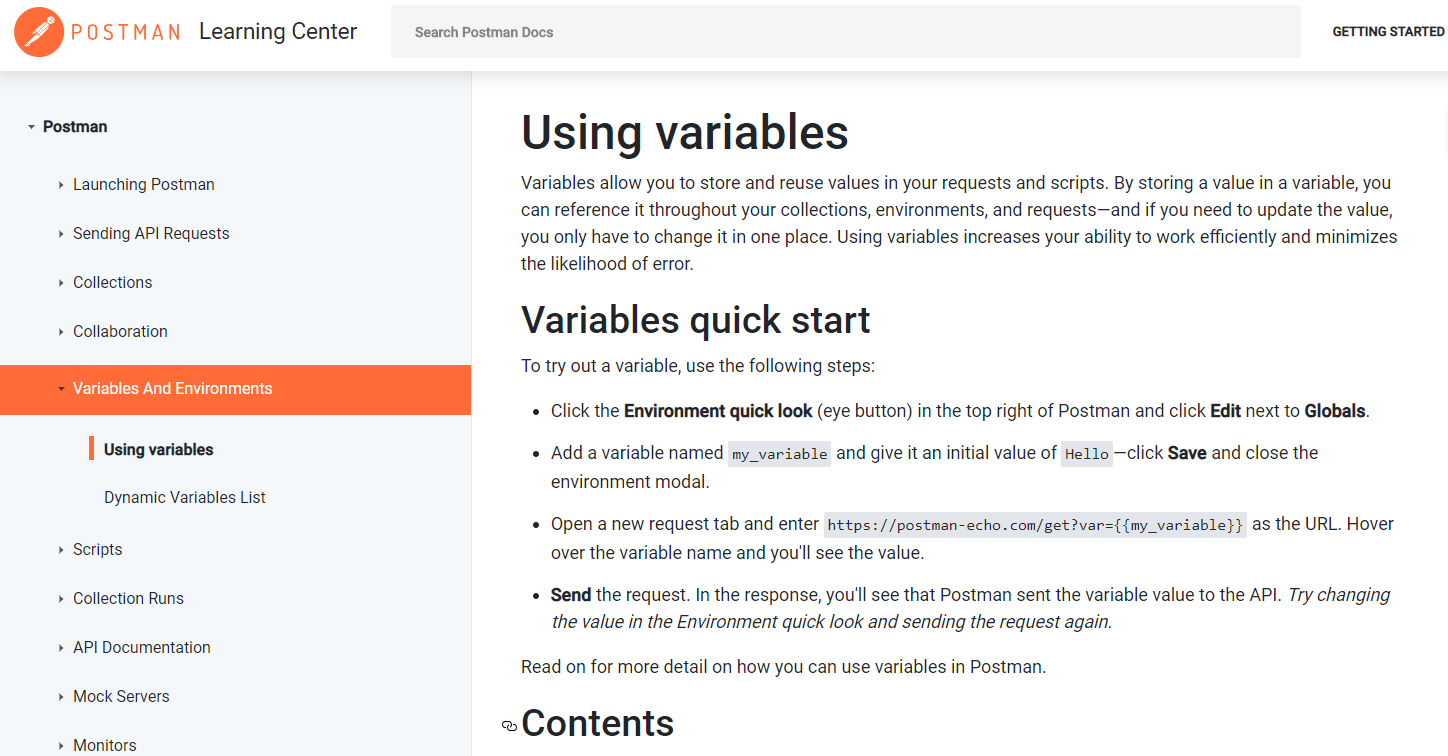
Figure 1
2. Click the Environment Quick Look in the upper right corner of Postman, and then click the Add button next to the Environment. as shown in Figure 2

Figure 2
3. Add a variable named channel_pub_api_host_info and set its initial value tohttp://api.channel-pub-api.localhost, add a variable named channel_pub_api_base_url and set its initial value to /v1 , and click the Add button. as shown in Figure 3
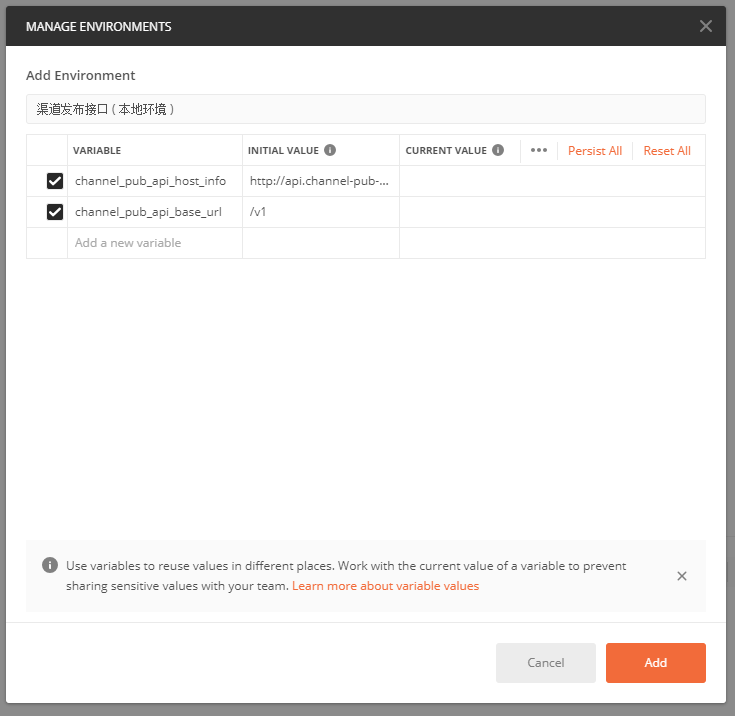
Figure 3
4. Get requests in Postman:http://api.channel-pub-api.localhost/qq/v1/qq-cw-apps?group_id=015ce30b116ce86058fa6ab4fea4ac63, as shown in Figure 4
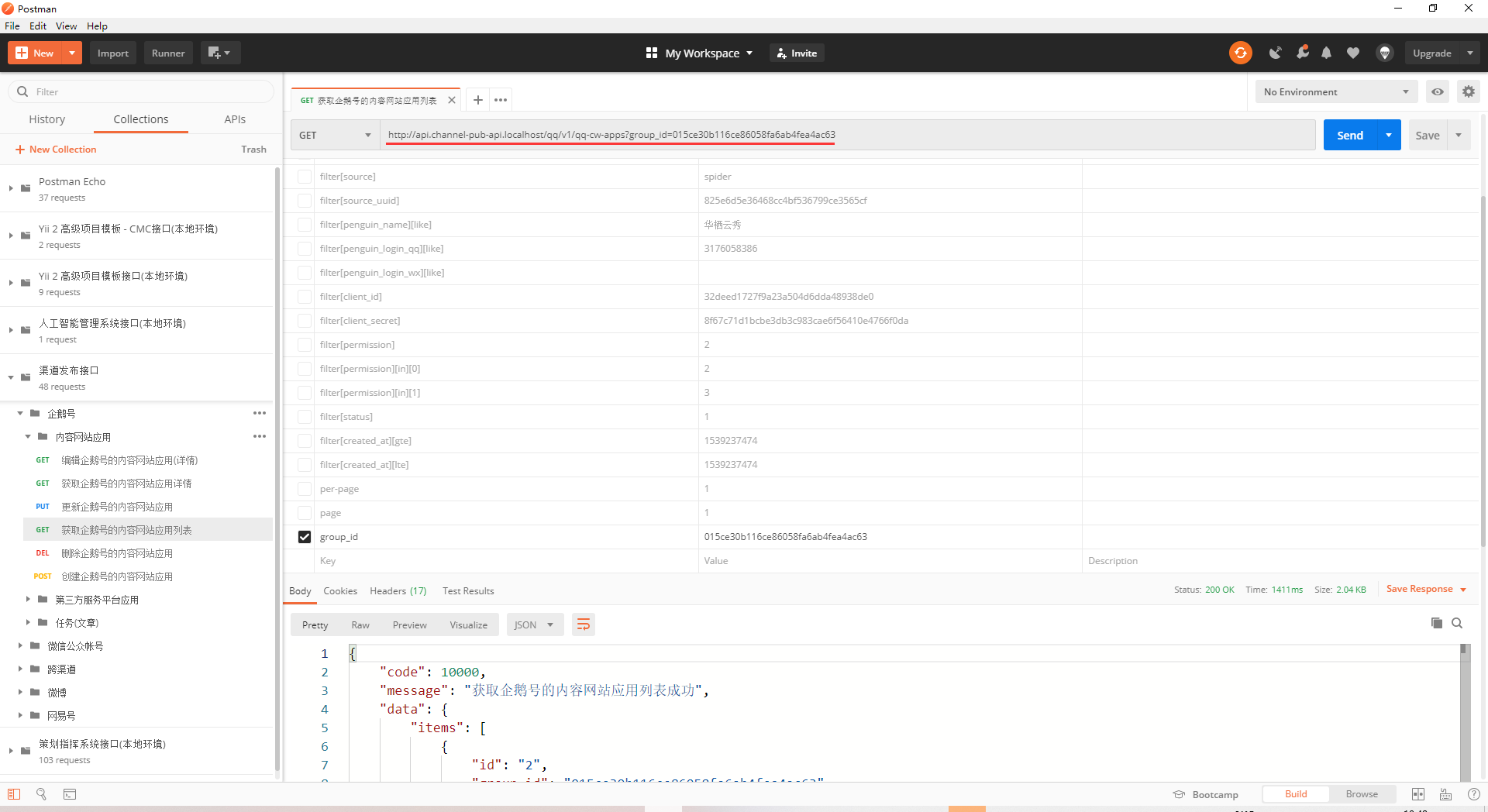
Figure 4
5. Willhttp://api.channel-pub-api.localhostReplace with: {{channel_pub_api_host_info}}, replace /v1 with: {{channel_pub_api_url}}, and click NO in the upper right corner of Postman The Environment drop-down list, select the Channel Publishing Interface (Local Environment). Hover the mouse over the variable name: {{channel_pub_api_host_info}}, you can see the value as:http://api.channel-pub-api.localhost. as shown in Figure 5
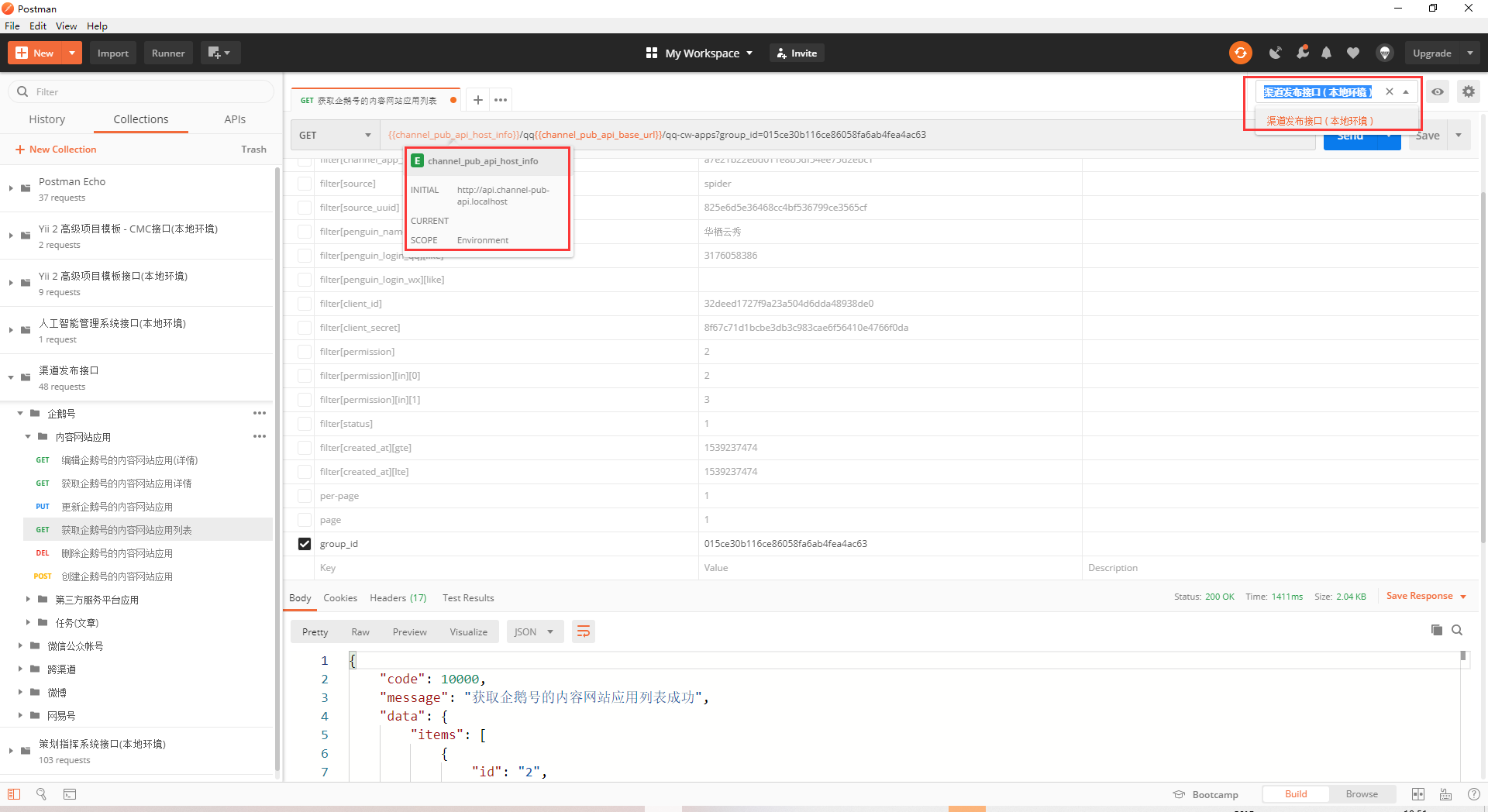
Figure 5
6. Get in Postman Request: {{channel_pub_api_host_info}}/qq{{channel_pub_api_base_ url}/qq-cw-apps?group_id=015ce30b116ce86058fa6ab4fea4ac63 , the actual request URL:http:///qq/qq-cw-apps?group_id=015ce30b116ce86058fa6ab4fea4ac63, the environment variables are not replaced and do not meet the expectations. as shown in Figure 6
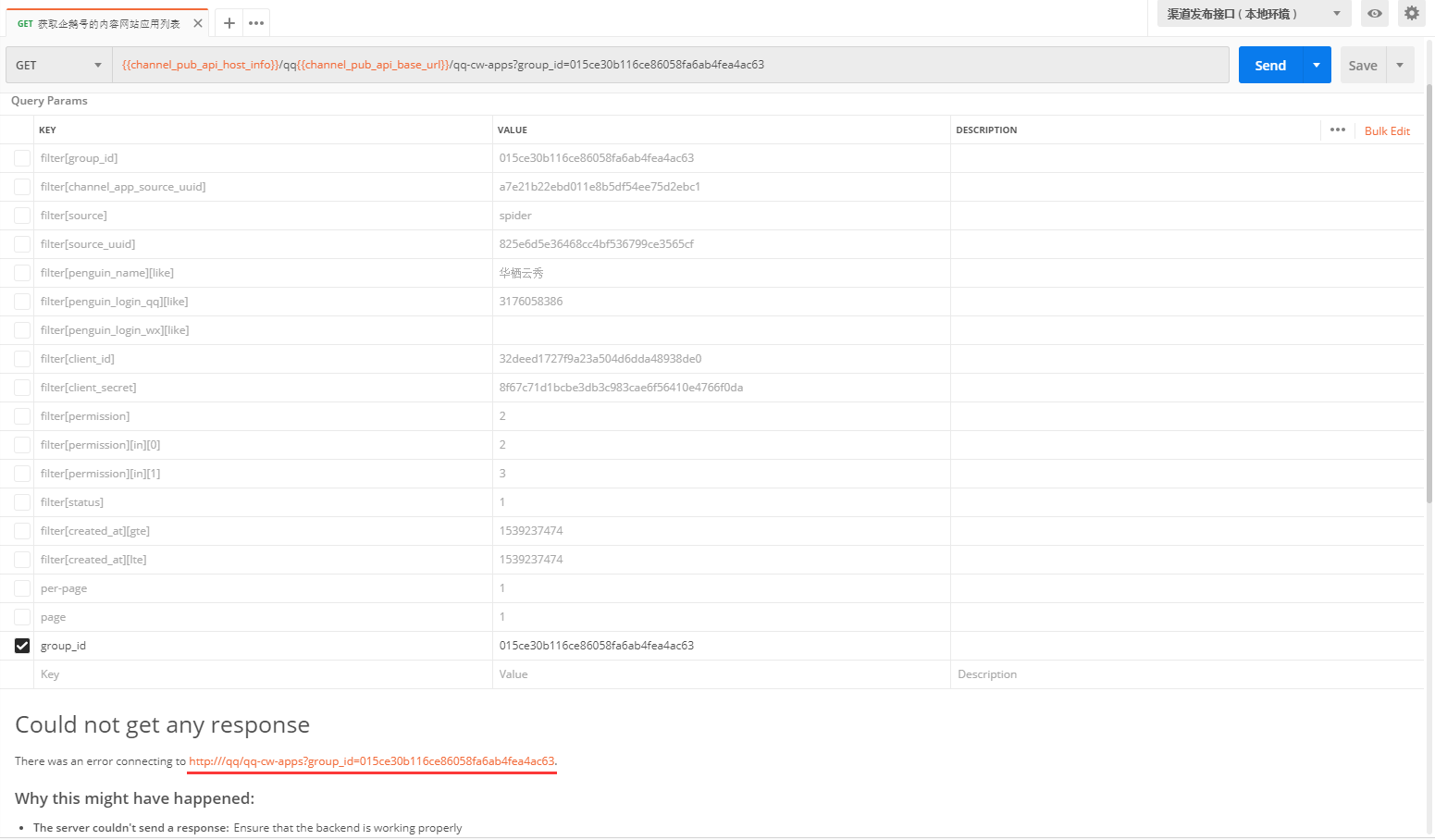
Figure 6
7. Reset the environment variables and set the current value, as shown in Figure 7
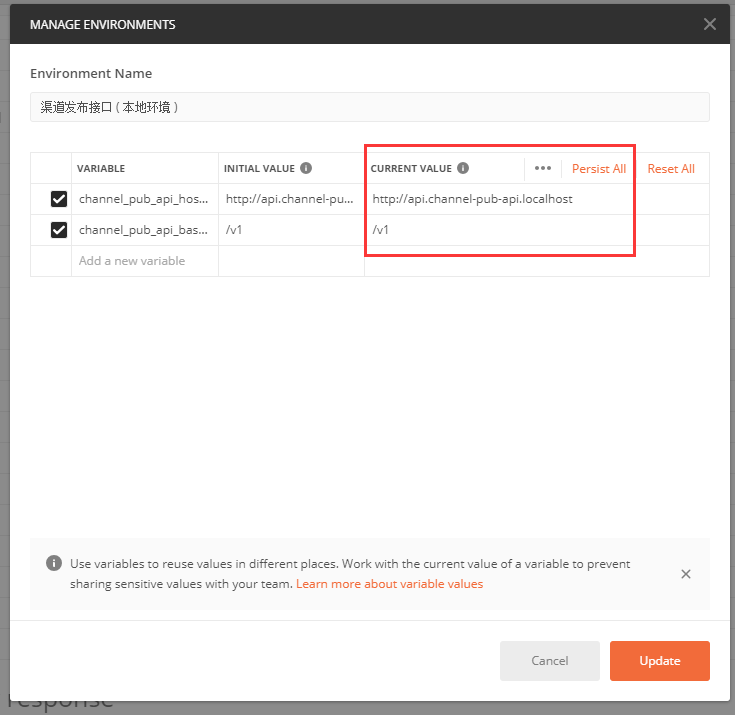
Figure 7
8. Get in Postman Request: {{channel_pub_api_host_info}}/qq{{channel_pub_api_base_ url}/qq-cw-apps?group_id=015ce30b116ce86058fa6ab4fea4ac63 , the actual request URL:http://api.channel-pub-api.localhost/qq/v1/qq-cw-apps?group_id=015ce30b116ce86058fa6ab4fea4ac63, the environment variable has been replaced, in line with expectations. as shown in Figure 8
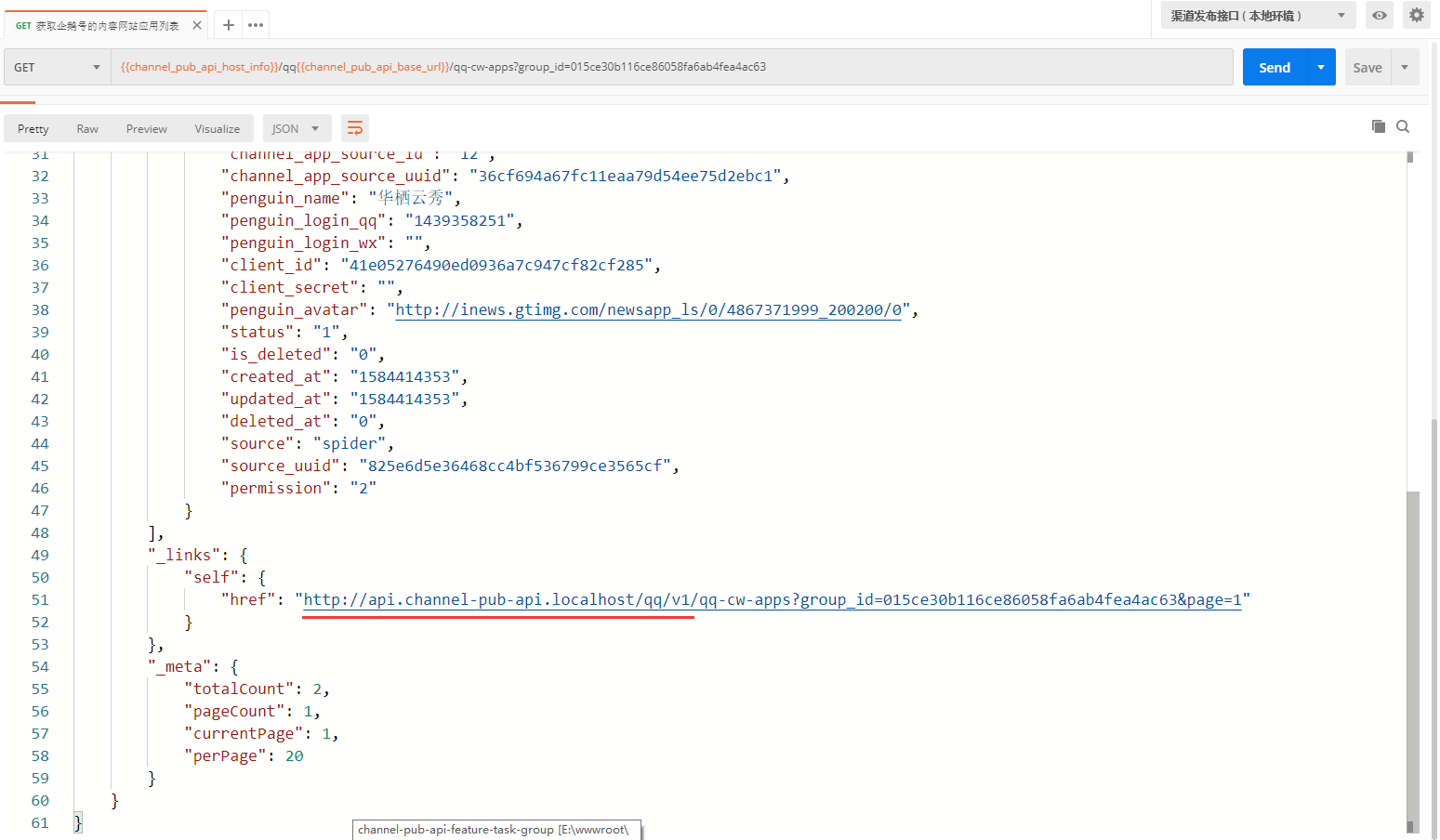
8
9. At this time, the request URL is the local environment, prepare the URL of the development environment, and add a new set of environment variables: the channel publishing interface (development environment), as shown in Figure 9
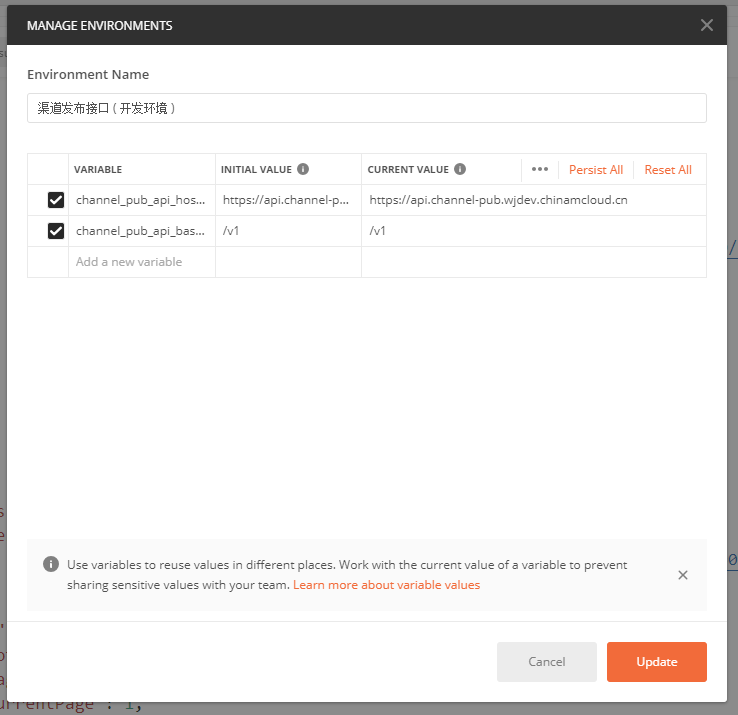
Figure 9
10. Click the No Environment drop-down list in the upper right corner of Postman, and select the Channel Publishing Interface (Development Environment). Get in Postman Request: {{channel_pub_api_host_info}}/qq{{channel_pub_api_base_ url}/qq-cw-apps?group_id=015ce30b116ce86058fa6ab4fea4ac63 , the actual request URL:https://api.channel-pub.wjdev.chinamcloud.cn/qq/v1/qq-cw-apps?group_id=015ce30b116ce86058fa6ab4fea4ac63, the environment variable has been replaced, in line with expectations. Note: The response is http, not https, because the development environment itself has nothing to do with postman. As shown in Figure 10
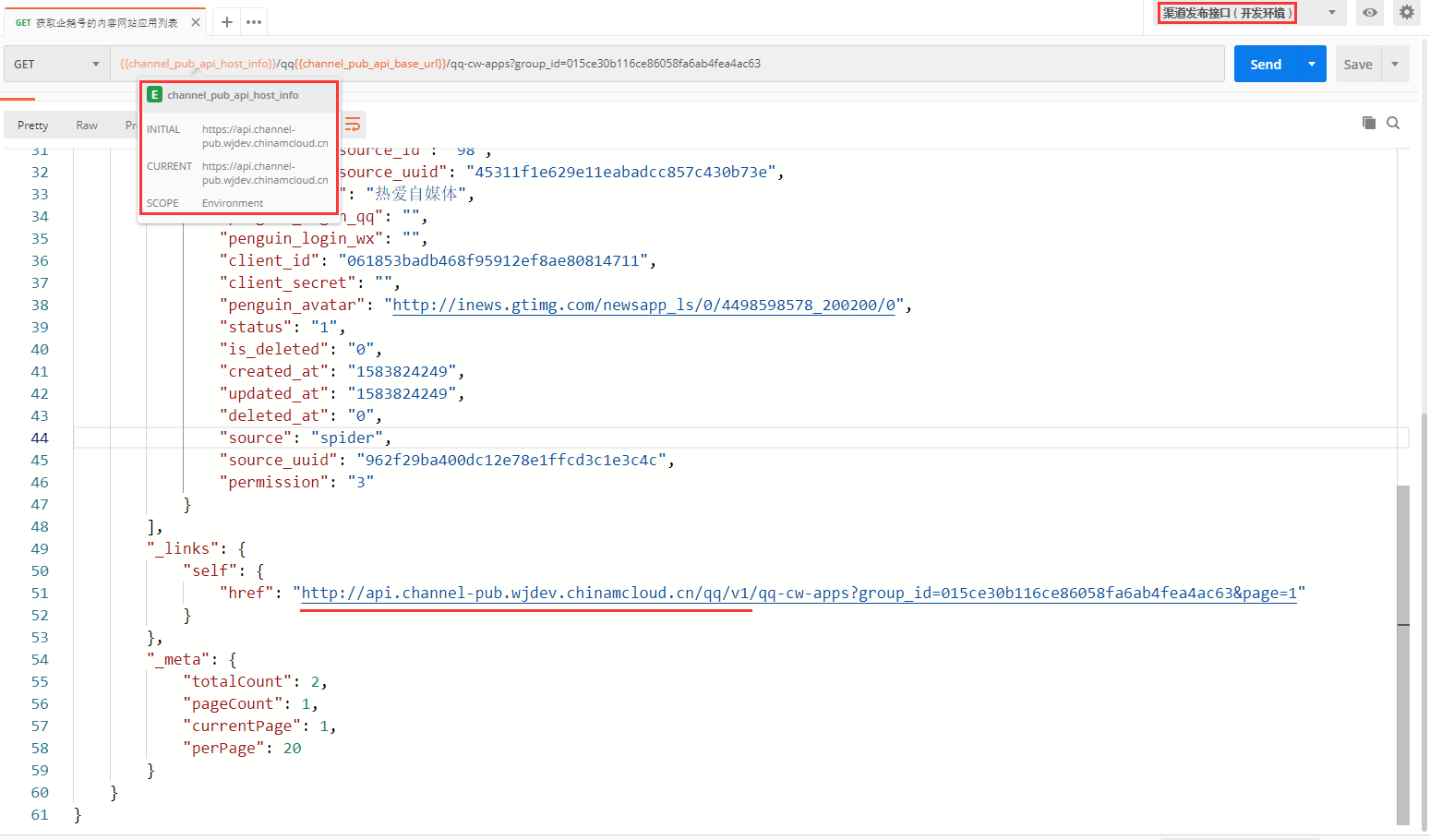
Figure 10
11. Click the Environment Quick Look in the upper right corner of Postman, and then click the Edit button next to Globals. Add a variable named group_id and set its initial value, current value to 015ce30b116ce86058fa6ab4fea4ac63 , as shown in Figure 11
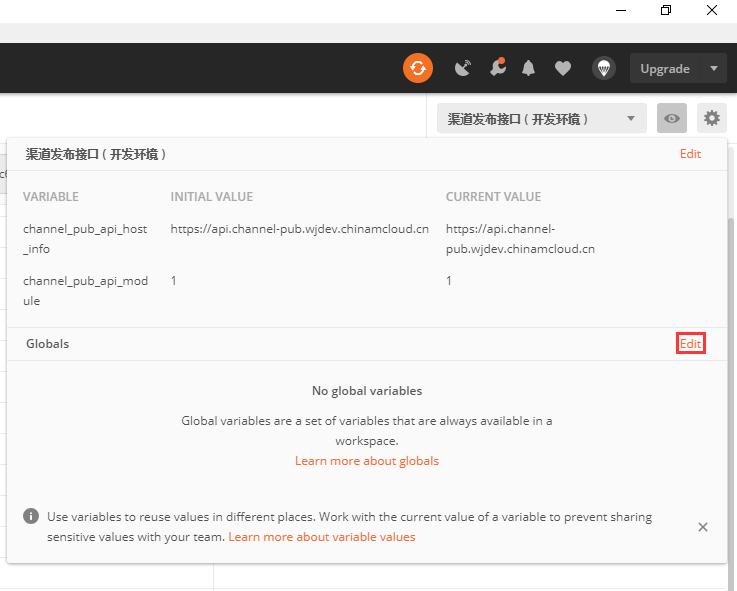
Figure 11
12. Get in Postman Request: {{channel_pub_api_host_info}}/qq{{channel_pub_api_base_url}}/qq-cw-apps?group_id={{group_id}} , the actual request URL:http://api.channel-pub-api.localhost/qq/v1/qq-cw-apps?group_id=015ce30b116ce86058fa6ab4fea4ac63, the environment variable has been replaced, in line with expectations. Switch to 2 environments, and the values of {{group_id}} will be automatically replaced as: 015ce30b116ce86058fa6ab4fea4ac63. i.e. global variables can be used in all environments. as shown in Figure 12
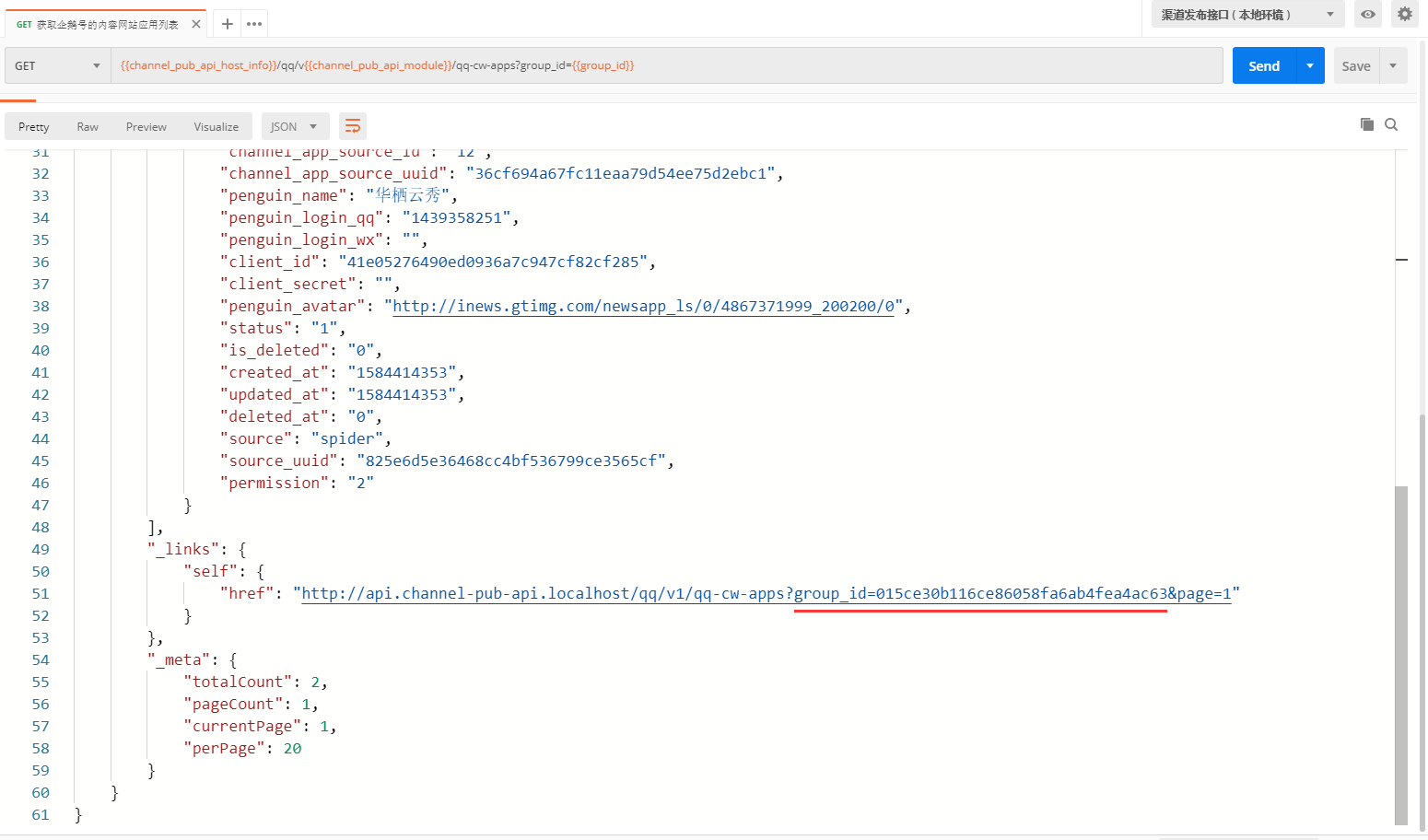
Figure 12
13. If a variable with the same name is declared in two different scopes, the value stored in the variable with the narrowest scope will be used. At this stage, only the scopes are used: global, environment. Global variables allow you to access data between collections, requests, test scripts and environments. Environment variables allow you to customize processing for different environments, such as local development and testing or production. Only one environment can be activated at a time. as shown in Figure 13

Figure 13
14. In the local environment, add a variable called group_id, and set its initial value and current value to 5EA4502C6F2F11EAA9874577D836AD48 , click The No Environment drop-down list in the upper right corner of Postman, select the Channel Publishing Interface (Local Environment). Get in Postman Request: {{channel_pub_api_host_info}}/qq{{channel_pub_api_base_url}}/qq-cw-apps?group_id={{group_id}} , the actual request URL:http://api.channel-pub-api.localhost/qq/v1/qq-cw-apps?group_id=5ea4502c6f2f11eaa9874577d836ad48, the environment variable has been replaced, in line with expectations. That is, the environment variables cover the global variable {{group_id}}. Figure 14
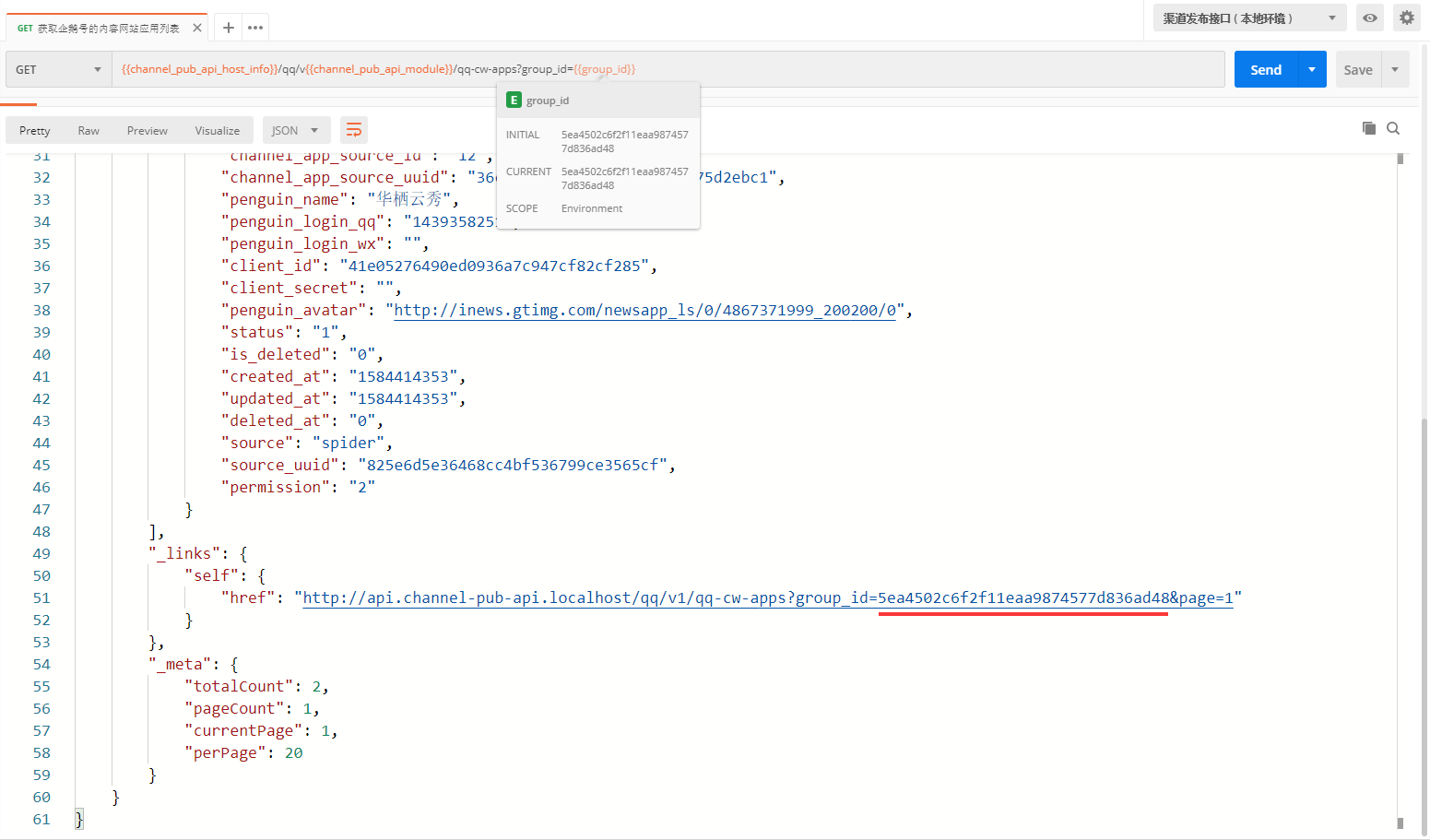
Figure 14