


The background of the problem
I run a WordPress-based bilingual website (Chinese/English), using polylang Plugins to manage multilingual content. In order to create corresponding English translations for existing Chinese categories/labels in batches, I wrote a php script polylang-batch-zh-to-en-tags.php.
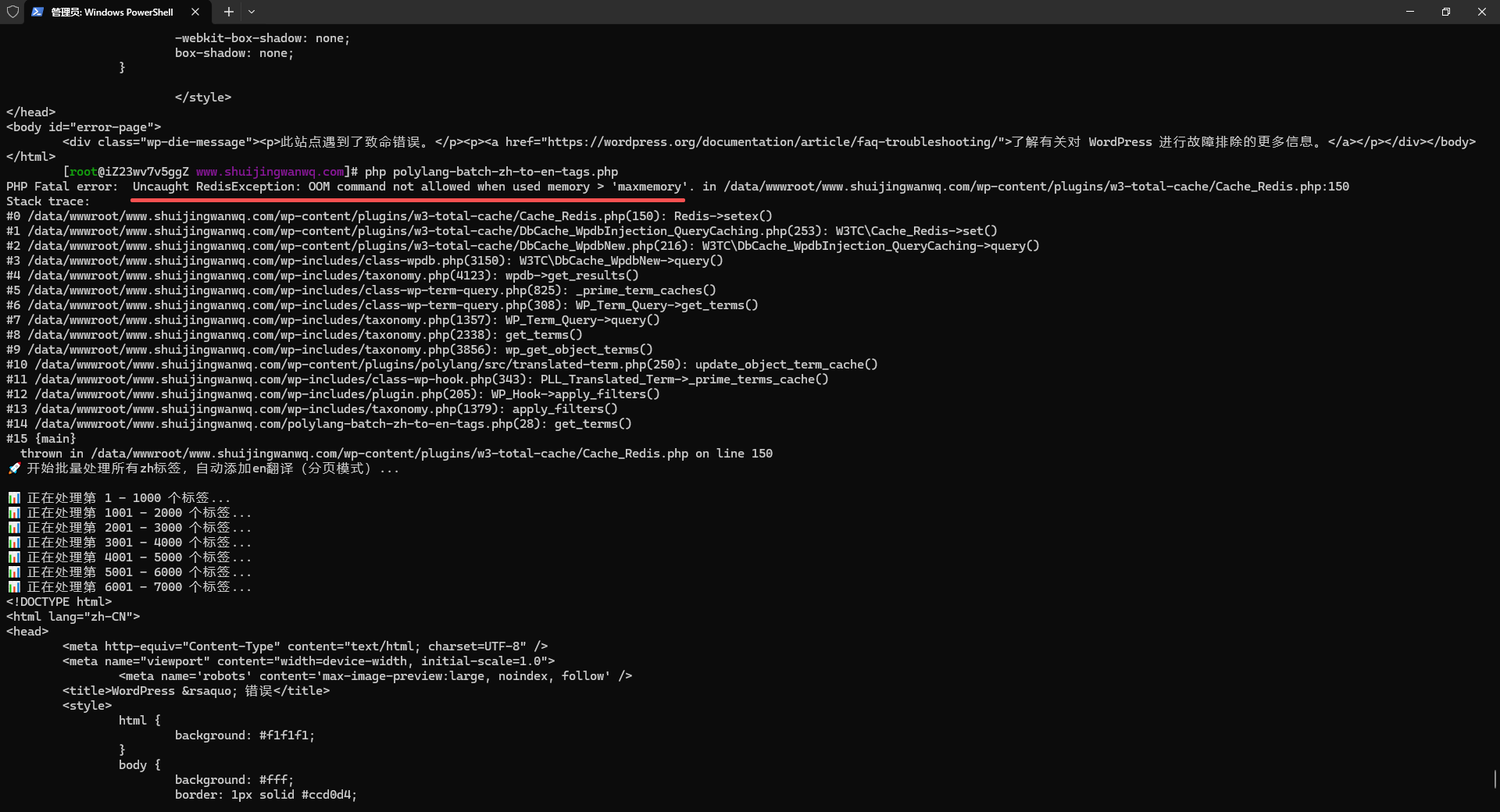
However, when executing the script, the terminal suddenly reported a fatal error:
[root@iZ23wv7v5ggZ www.shuijingwanwq.com]# php polylang-batch-zh-to-en-tags.php
PHP Fatal error:  Uncaught RedisException: OOM command not allowed when used memory > 'maxmemory'. in /data/wwwroot/www.shuijingwanwq.com/wp-content/plugins/w3-total-cache/Cache_Redis.php:150
Stack trace:
#0 /data/wwwroot/www.shuijingwanwq.com/wp-content/plugins/w3-total-cache/Cache_Redis.php(150): Redis->setex()
#1 /data/wwwroot/www.shuijingwanwq.com/wp-content/plugins/w3-total-cache/DbCache_WpdbInjection_QueryCaching.php(253): W3TC\Cache_Redis->set()
#2 /data/wwwroot/www.shuijingwanwq.com/wp-content/plugins/w3-total-cache/DbCache_WpdbNew.php(216): W3TC\DbCache_WpdbInjection_QueryCaching->query()
#3 /data/wwwroot/www.shuijingwanwq.com/wp-includes/class-wpdb.php(3150): W3TC\DbCache_WpdbNew->query()
#4 /data/wwwroot/www.shuijingwanwq.com/wp-includes/taxonomy.php(4123): wpdb->get_results()
#5 /data/wwwroot/www.shuijingwanwq.com/wp-includes/class-wp-term-query.php(825): _prime_term_caches()
#6 /data/wwwroot/www.shuijingwanwq.com/wp-includes/class-wp-term-query.php(308): WP_Term_Query->get_terms()
#7 /data/wwwroot/www.shuijingwanwq.com/wp-includes/taxonomy.php(1357): WP_Term_Query->query()
#8 /data/wwwroot/www.shuijingwanwq.com/wp-includes/taxonomy.php(2338): get_terms()
#9 /data/wwwroot/www.shuijingwanwq.com/wp-includes/taxonomy.php(3856): wp_get_object_terms()
#10 /data/wwwroot/www.shuijingwanwq.com/wp-content/plugins/polylang/src/translated-term.php(250): update_object_term_cache()
#11 /data/wwwroot/www.shuijingwanwq.com/wp-includes/class-wp-hook.php(343): PLL_Translated_Term->_prime_terms_cache()
#12 /data/wwwroot/www.shuijingwanwq.com/wp-includes/plugin.php(205): WP_Hook->apply_filters()
#13 /data/wwwroot/www.shuijingwanwq.com/wp-includes/taxonomy.php(1379): apply_filters()
#14 /data/wwwroot/www.shuijingwanwq.com/polylang-batch-zh-to-en-tags.php(28): get_terms()
#15 {main}
  thrown in /data/wwwroot/www.shuijingwanwq.com/wp-content/plugins/w3-total-cache/Cache_Redis.php on line 150
The script crashes directly and cannot continue processing. as shown in Figure 1
2. Error analysis
As can be seen from the error message:
- throw position: The Redis cache driver of the W3 Total Cache plugin.
- Direct reason: redis returned
oom command not allowed, which means that the memory usage of Redis has exceededmaxmemorylimit, and the configuration policy is Any writes are prohibited((noeviction). - indirect reason: The term cache update of WordPress will be triggered during the script execution (
_prime_term_caches), and then call the W3 Total Cache object cache to write data to Redis.
Key clue: Redis’s memory elimination strategy is noeviction. This means that once the memory usage reaches the upper limit, all write operations will be rejected until the memory is manually cleaned.
3. Check steps
1. Check the current memory status of Redis
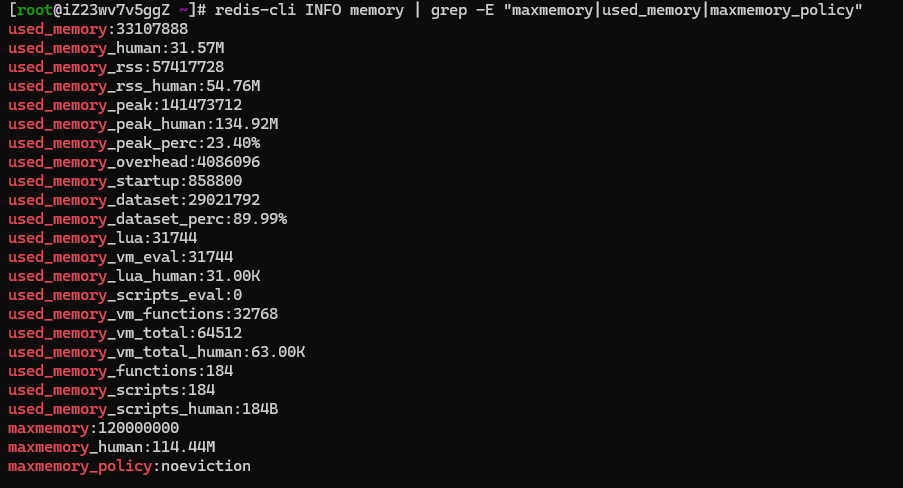
redis-cli INFO memory | grep -E "maxmemory|used_memory|maxmemory_policy"
The output is as follows:
used_memory:33107888
used_memory_human:31.57M
maxmemory:120000000
maxmemory_human:114.44M
maxmemory_policy:noeviction
can see:
- Maximum memory is only 114 MB(It is obviously too small for the modern WordPress + multi-plug-in environment).
- The elimination strategy is
noeviction(the culprit).
2. Check the overall memory of the server

free -h
Result:
              total        used        free      shared  buff/cache   available
Mem:          1.9Gi       321Mi       184Mi        90Mi       1.4Gi       1.3Gi
Swap:         2.0Gi       130Mi       1.9Gi
The total memory of the server is about 2GB, and the available physical memory is sufficient (1.3GB), which can be allocated to Redis more space.
The solution
1. Temporary repair (immediate effect, no need to restart)
redis-cli CONFIG SET maxmemory 1024mb
redis-cli CONFIG SET maxmemory-policy allkeys-lru
MaxMemory 1024MB: Increases Redis max memory to 1GB.maxmemory-policy allkeys-lru: When the memory is full, it will be automatically eliminated least recently used key.
2. Permanent effect (modify the configuration file)
Since my redis is through oneinstack Compile and install, the configuration file is located in /usr/local/redis/etc/redis.conf.
vim /usr/local/redis/etc/redis.conf
Find or add the following two lines:
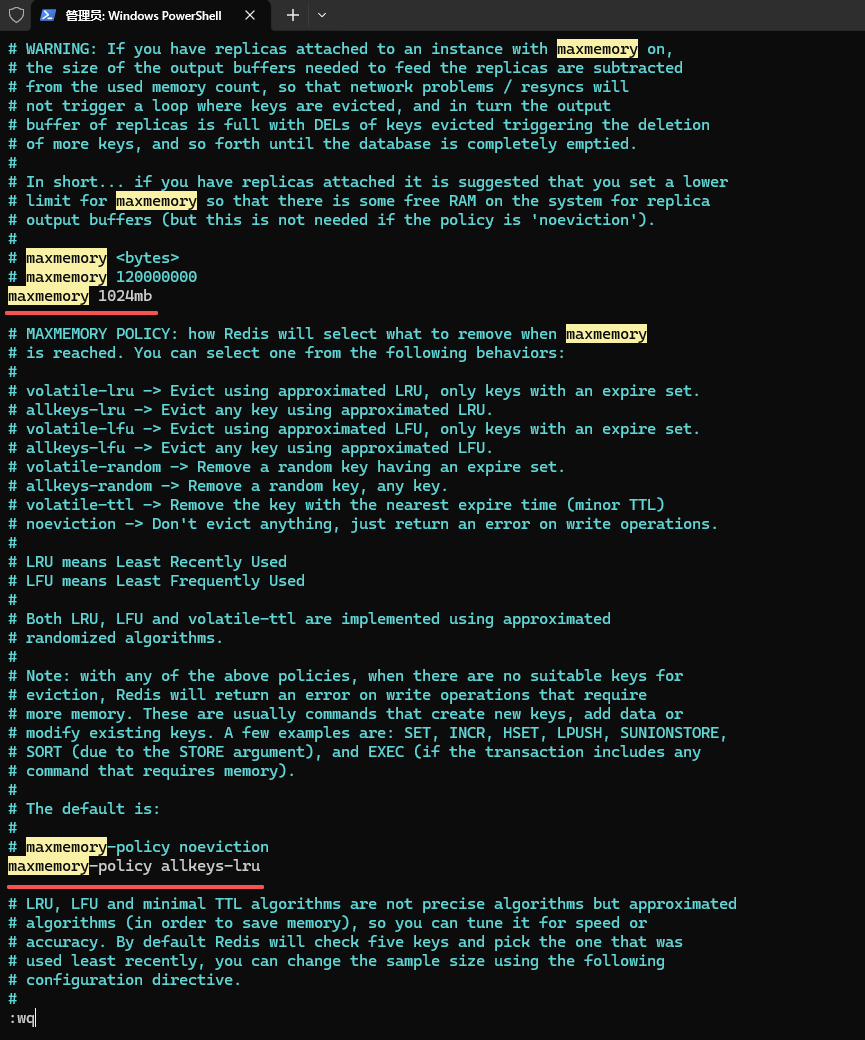
maxmemory 1024mb
maxmemory-policy allkeys-lru
After saving, restart redis (the service name of oneinstack is redis-server):
service redis-server restart
3. Verify the modification
redis-cli CONFIG GET maxmemory
# 输出:1073741824 (即 1GB)

redis-cli CONFIG GET maxmemory-policy
# 输出:allkeys-lru
The final result
Execute the batch processing script again:
php polylang-batch-zh-to-en-tags.php
output:
🚀 开始批量处理所有zh标签,自动添加en翻译(分页模式)...
📊 正在处理第 1 - 1000 个标签...
📊 正在处理第 1001 - 2000 个标签...
...
🎉 全部处理完成!
📊 统计:
   已处理新标签: 0
   已跳过已有翻译: 8289
✅ 所有标签都已经处理完毕,和手动添加的完全一样!
No more redis errors, the script runs smoothly!
6. Summary of experience
- Redis defaults
noevictionPolicies are not suitable for caching scenarios, especially in a limited memory environment. recommendedallkeys-lruOrVolatile-Lru. - WordPress + W3 Total Cache + Redis object cacheIt will consume a lot of memory, be sure to set a reasonable one according to the actual situation of the server
maxmemory. - The redis service name installed by OneInStack is
redis-serverinstead of commonredisOrredis.service, you need to pay attention when managing. - When a bulk operation triggers a large number of cache writes, the object cache can be temporarily disabled (
define(DonotCacheObject, true);), but a better practice is to adjust the Redis policy to allow the system to adapt automatically.
7. Extension Suggestions
- If website traffic increases, you can
maxmemoryFurther upgrade to 1.5GB ~ 2GB (depending on the total memory). - Monitor Redis memory usage regularly:
redis-cli --stator integrateredis_exporter+ Prometheus. - The object cache of the W3 Total Cache can appropriately shorten the ‘junk collection interval’ (such as 3600 seconds) to avoid the accumulation of expired keys.
I hope this blog can help friends who have similar problems. If you also have experience in stepping on Redis + WordPress, welcome to exchange and discuss in the comment area!
WordPress Maintenance, Performance Optimization & Blog Growth Consulting
I have been running my personal technology blog for more than 10 years and have published over 1,000 original articles. My long-term practice covers WordPress website maintenance, CDN / Cloudflare configuration, caching optimization, Google SEO, ad monetization, and multilingual website operations.
If your WordPress website is slow, unstable, affected by plugin conflicts, showing caching issues, having AdSense display problems, or facing CDN / Cloudflare / DNS configuration uncertainty, feel free to contact me for remote troubleshooting.
Ideal For:
✅ Personal blog owners
✅ WordPress website operators
✅ Independent developers and content creators
✅ SaaS website owners
✅ Website owners who want better speed and stability
What I Offer:
✅ WordPress performance optimization
✅ Cloudflare / CDN / caching configuration checks
✅ Plugin conflict and layout issue troubleshooting
✅ AdSense display issue troubleshooting
✅ Basic SEO structure review
✅ Blog growth and monetization consulting
If you would like to discuss your website, please contact me and mention: WordPress Maintenance Consultation.
Contact Me:
Telegram: @shuijingwan
WeChat: 13980074657
Email: shuijingwanwq@gmail.com
Leave a Reply