Completely uninstall Cygwin in Windows 10 64 bit
1. Check the c drive, cygwin has been installed, c:\cygwin64. as shown in Figure 1
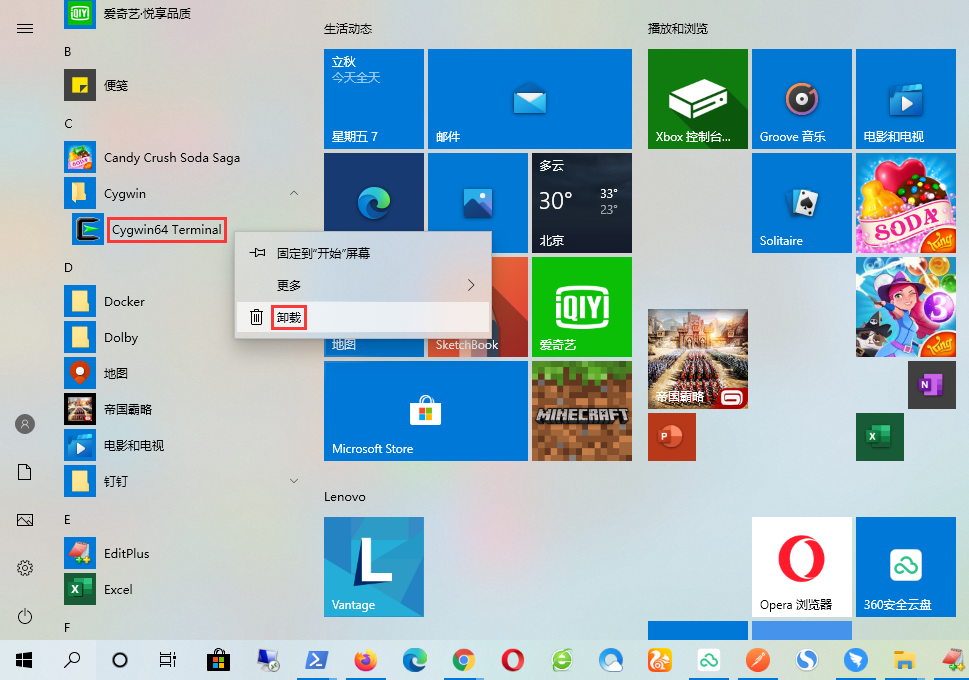
2. Find cygwin64 Terminal in the navigation, right-click – uninstall. as shown in Figure 2
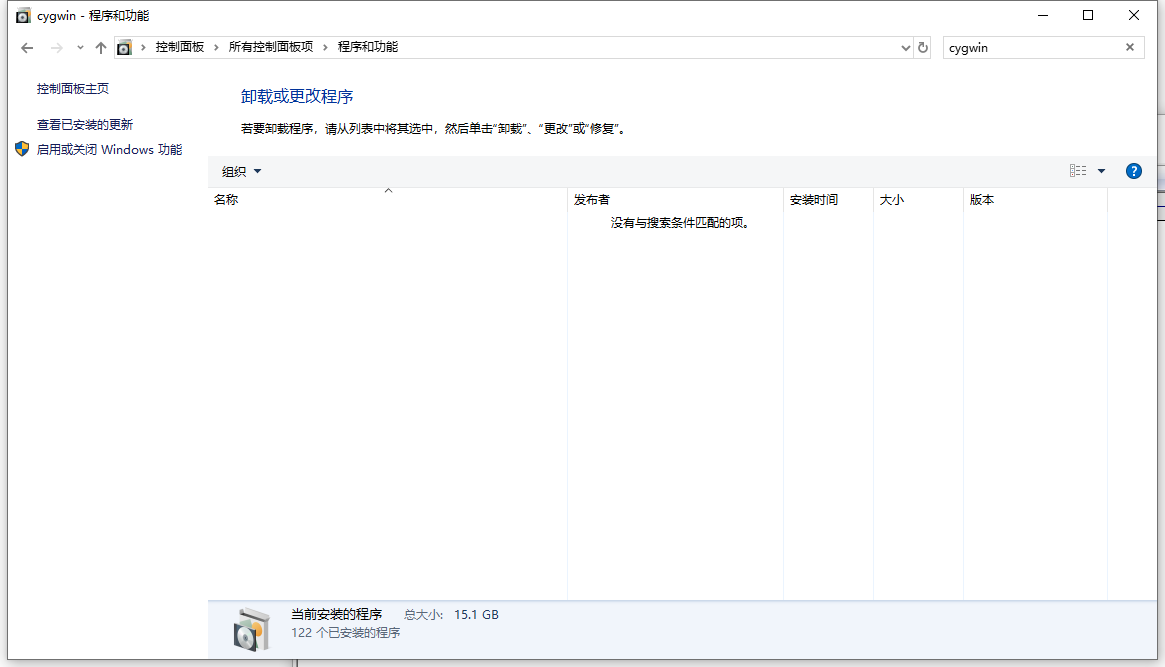
3. Search program and function: cygwin, the result is empty. as shown in Figure 3
4. Find the previous installation package, D:\soft\setup-x86_64.exe. as shown in Figure 4
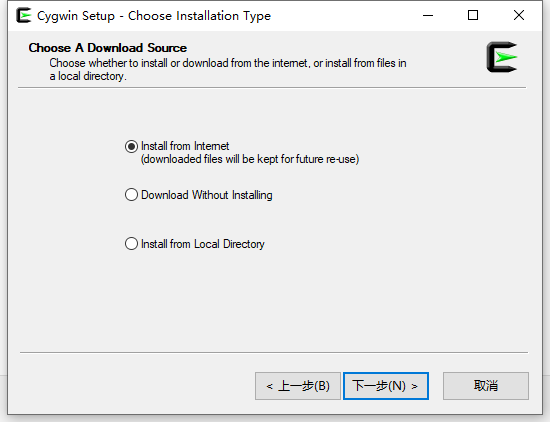
5. Select item 1 and install from Intemet (the downloaded file will be reserved for future use). If you have downloaded it before and have reservations, it is recommended to select item 3 and install it from the local directory. as shown in Figure 5
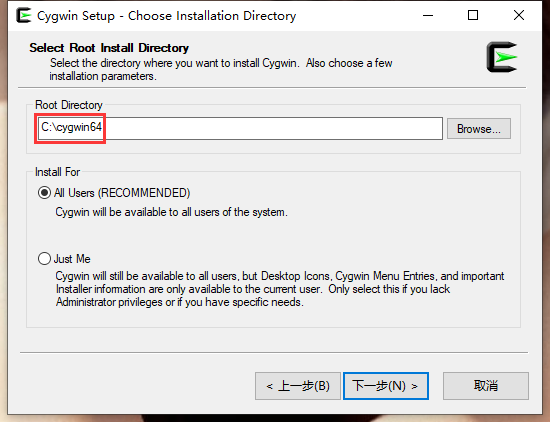
6. Select the previously installed directory of cygwin, the default is: c:\cygwin64, no need to change. as shown in Figure 6
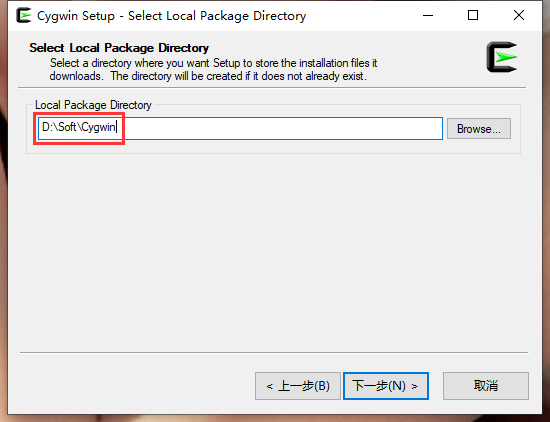
7. Select the local package directory. Modified to: D:\soft\cygwin. as shown in Figure 7
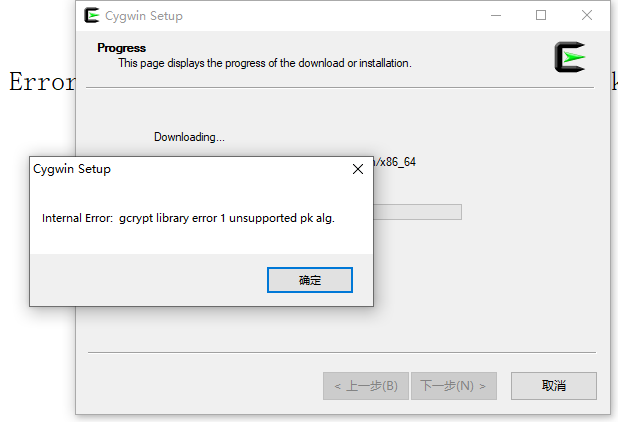
8. Progress. This page shows the progress of the download or installation. Error: Internal Error: Gcrypt Library Error 1 Unsupported PK alg. as shown in Figure 8
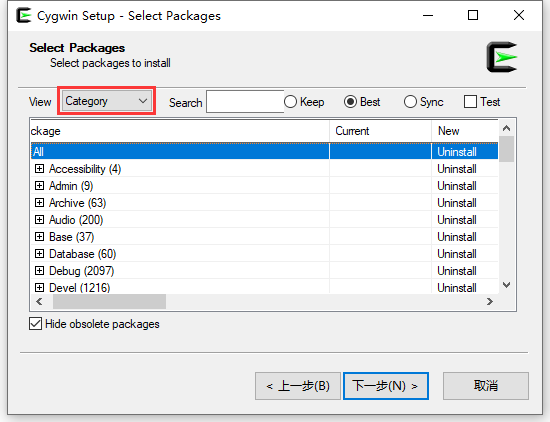
9. Decide to download the latest version of the installation package: http://www.cygwin.com/setup-x86_64.exe . Then repeat the above steps again. The latest version of the installation package, no errors are reported again. Successfully entered the Select Packages interface. as shown in Figure 9
10. In the View drop-down list, select: Category, and then in the new column of the all row, select uninstall. Click Next. As shown in Figure 10
11. Uninstall is complete. as shown in Figure 11
12, but found the installation directory: C:\cygwin64 still exists. as shown in Figure 12
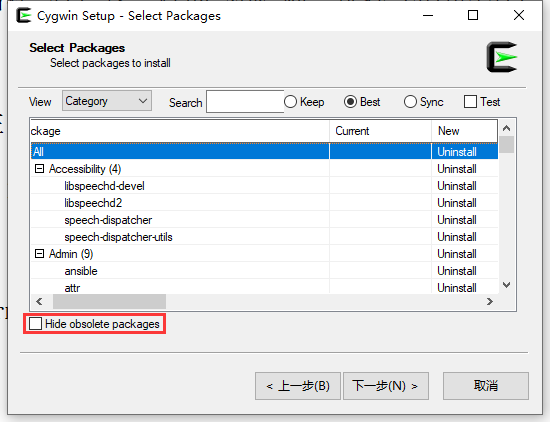
13. Decided to uninstall again. Uncheck Hide Obsoleete Packages. That is to display outdated packages. Repeat step 10. as shown in Figure 13
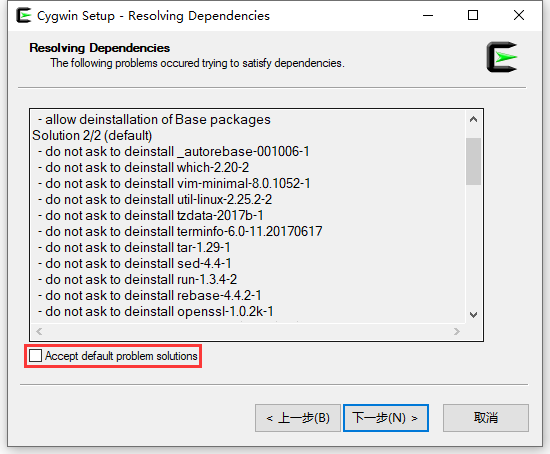
14. In the Resolving Dependencies page, uncheck Accept Default Problem Solutions. That is, the default problem solution is not accepted. Uninstall all. Figure 14
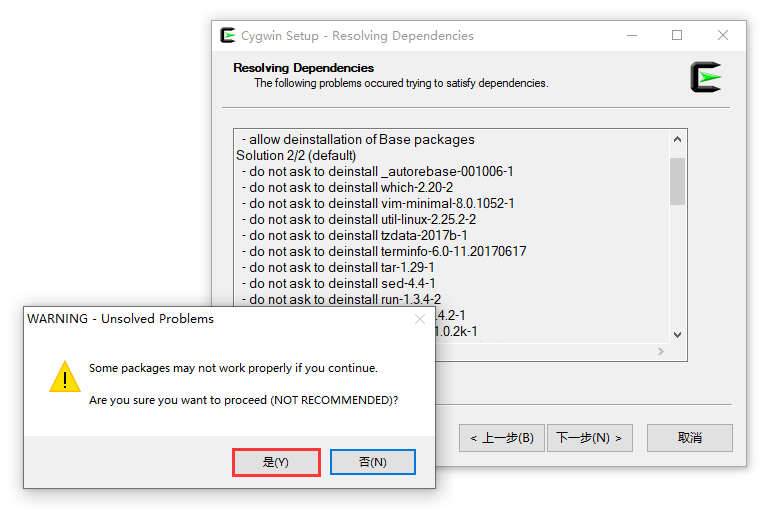
15. If it continues, some packages may not work properly. Are you sure you want to continue (not recommended)? OK. as shown in Figure 15
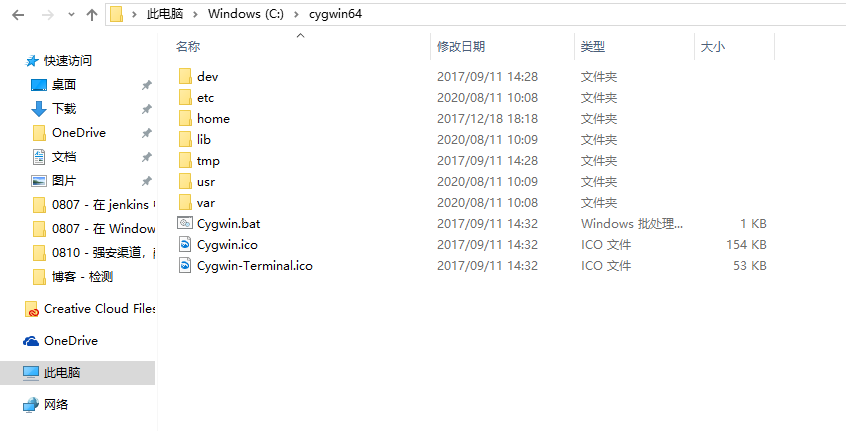
16. But I found that the installation directory: C:\cygwin64 still exists. Although the directory has been reduced. as shown in Figure 16
17. Create a new file: uninstall.bat, the content is as follows.
SET DIRECTORY_NAME="C:\cygwin64" C:\Windows\System32\TakeOwn /f %directory_name% /r /d y C:\Windows\System32\icacls %directory_name% /grant administrators:f /t pause
18. After the operation is successful, it is found that the installation directory: C:\cygwin64 still exists. Not as expected. as shown in Figure 17
E:\develop\2020\0807 - Uninstall Cygwin>Set directory_name="c:\cygwin64" in Windows 10 64-bit" E:\Develop\2020\0807 - Uninstall Cygwin>C:\Windows\System32\TakeOwn /f in Windows 10 64-bit "C:\cygwin64" /r /d y Success: This file (or folder): "C:\cygwin64" is now owned by the user "laptop-9s1inv5o\administrator". Success: This file (or folder): "C:\cygwin64\cygwin-terminal.ico" is now owned by the user "laptop-9s1inv5o\administrator". Success: This file (or folder): "C:\cygwin64\cygwin.bat" is now owned by the user "laptop-9s1inv5o\administrator". Success: This file (or folder): "C:\cygwin64\cygwin.ico" is now owned by the user "laptop-9s1inv5o\administrator". Success: This file (or folder): "C:\cygwin64\dev" is now owned by the user "laptop-9s1inv5o\administrator". Success: This file (or folder): "C:\cygwin64\etc" is now all owned by the user "laptop-9s1inv5o\administrator". Success: This file (or folder): "C:\cygwin64\home" is now owned by the user "laptop-9s1inv5o\administrator". Success: This file (or folder): "C:\cygwin64\lib" is now owned by the user "laptop-9s1inv5o\administrator". Success: This file (or folder): "C:\cygwin64\tmp" is now owned by the user "laptop-9s1inv5o\administrator". Success: This file (or folder): "C:\cygwin64\usr" is now owned by the user "laptop-9s1inv5o\administrator". Success: This file (or folder): "C:\CygWin64\var" is now owned by the user "laptop-9s1inv5o\administrator". Success: This file (or folder): "C:\cygwin64\dev\fd" is now owned by the user "laptop-9s1inv5o\administrator". Success: This file (or folder): "C:\cygwin64\dev\mqueue" is now owned by the user "laptop-9s1inv5o\administrator". Success: This file (or folder): "C:\cygwin64\dev\shm" is now owned by the user "laptop-9s1inv5o\administrator". Success: This file (or folder): "C:\cygwin64\dev\stderr" is now owned by the user "laptop-9s1inv5o\administrator". Success: This file (or folder): "C:\cygwin64\dev\stdin" is now all owned by the user "laptop-9s1inv5o\administrator". Success: This file (or folder): "C:\cygwin64\dev\stdout" is now owned by the user "laptop-9s1inv5o\administrator". Success: This file (or folder): "C:\cygwin64\etc\bash_completion.d" is now owned by the user "laptop-9s1inv5o\administrator". Success: This file (or folder): "C:\cygwin64\etc\fstab" is now owned by the user "laptop-9s1inv5o\administrator". Success: This file (or folder): "C:\cygwin64\etc\fstab.d" is now owned by the user "laptop-9s1inv5o\administrator". Success: This file (or folder): "C:\cygwin64\etc\hosts" is now owned by the user "laptop-9s1inv5o\administrator". Success: This file (or folder): "C:\cygwin64\etc\mtab" is now owned by the user "laptop-9s1inv5o\administrator". Success: This file (or folder): "C:\cygwin64\etc\networks" is now all owned by the user "laptop-9s1inv5o\administrator". Success: This file (or folder): "C:\cygwin64\etc\nsswitch.conf" is now owned by the user "laptop-9s1inv5o\administrator". Success: This file (or folder): "C:\cygwin64\etc\pki" is now owned by the user "laptop-9s1inv5o\administrator". Success: This file (or folder): "C:\cygwin64\etc\postinstall" is now owned by the user "laptop-9s1inv5o\administrator". Success: This file (or folder): "C:\cygwin64\etc\preremove" is now owned by the user "laptop-9s1inv5o\administrator". Success: This file (or folder): "C:\cygwin64\etc\profile.d" is now owned by the user "laptop-9s1inv5o\administrator". Success: This file (or folder): "C:\cygwin64\etc\protocols" is now owned by the user "laptop-9s1inv5o\administrator". Success: This file (or folder): "C:\cygwin64\etc\rebase.db.x86_64" is now owned by the user "laptop-9s1inv5o\administrator". Success: This file (or folder): "C:\cygwin64\etc\services" is now all owned by the user "laptop-9s1inv5o\administrator". Success: This file (or folder): "C:\cygwin64\etc\setup" is now owned by the user "laptop-9s1inv5o\administrator". Success: This file (or folder): "C:\cygwin64\etc\skel" is now owned by the user "laptop-9s1inv5o\administrator". Success: This file (or folder): "C:\cygwin64\etc\pki\ca-trust" is now owned by the user "laptop-9s1inv5o\administrator". Success: This file (or folder): "C:\cygwin64\etc\pki\ca-trust\source" is now owned by the user "laptop-9s1inv5o\administrator". Success: This file (or folder): "C:\cygwin64\etc\pki\ca-trust\source\ca-bundle.legacy.crt" "Laptop-9s1inv5o\administrator" All. Success: This file (or folder): "C:\cygwin64\etc\postinstall\000-cygwin-post-install.sh.done" is now by the user "Laptop-9s1inv5o\administrator" All. Success: This file (or folder): "C:\cygwin64\etc\postinstall\base-files-mketc.sh.done" is now by the user "Laptop-9s1inv5o\administrator" All. Success: This file (or folder): "C:\cygwin64\etc\postinstall\base-files-profile.sh.done" is now by the user "Laptop-9s1inv5o\administrator" All. Success: This file (or folder): "C:\cygwin64\etc\postinstall\bash.sh.done" is now owned by the user "laptop-9s1inv5o\administrator". Success: This file (or folder): "C:\cygwin64\etc\postinstall\ca-certificates.sh.done" is now by the user "Laptop-9s1inv5o\administrator" All. Success: This file (or folder): "C:\cygwin64\etc\postinstall\coreutils.sh.done" is now by user "laptop-9s1inv5o\administrator" all. Success: This file (or folder): "C:\cygwin64\etc\postinstall\man-db.sh.done" is now by user "laptop-9s1inv5o\administrator" all. Success: This file (or folder): "C:\cygwin64\etc\postinstall\mintty.sh.done" is now by user "laptop-9s1inv5o\administrator" all. Success: This file (or folder): "C:\cygwin64\etc\preremove\base-files.sh.done" is now by user "laptop-9s1inv5o\administrator" all. Success: This file (or folder): "C:\cygwin64\etc\preremove\ca-certificates.sh.done" is now by the user "Laptop-9s1inv5o\administrator" All. Success: This file (or folder): "C:\cygwin64\etc\preremove\coreutils.sh.done" is now by user "laptop-9s1inv5o\administrator" all. Success: This file (or folder): "C:\cygwin64\etc\preremove\man-db.sh.done" is now by user "laptop-9s1inv5o\administrator" all. Success: This file (or folder): "C:\cygwin64\etc\preremove\_autorebase.sh.done" is now by user "laptop-9s1inv5o\administrator" all. Success: This file (or folder): "C:\cygwin64\etc\setup\installed.db" is now owned by the user "laptop-9s1inv5o\administrator". Success: This file (or folder): "C:\cygwin64\etc\setup\setup.rc" is now owned by the user "laptop-9s1inv5o\administrator". Success: This file (or folder): "C:\cygwin64\etc\setup\timestamp" is now owned by the user "laptop-9s1inv5o\administrator". Success: This file (or folder): "C:\cygwin64\home\administrator" is now owned by the user "laptop-9s1inv5o\administrator". Success: This file (or folder): "C:\cygwin64\home\administrator\.bashrc" is now owned by the user "laptop-9s1inv5o\administrator". Success: This file (or folder): "C:\cygwin64\home\administrator\.bash_history" is now by user "laptop-9s1inv5o\administrator" all. Success: This file (or folder): "C:\cygwin64\home\administrator\.bash_profile" is now by user "laptop-9s1inv5o\administrator" all. Success: This file (or folder): "C:\cygwin64\home\administrator\.inputrc" is now owned by the user "laptop-9s1inv5o\administrator". Success: This file (or folder): "C:\cygwin64\home\administrator\.minttyrc" is now by user "laptop-9s1inv5o\administrator" all. Success: This file (or folder): "C:\cygwin64\home\administrator\.profile" is now owned by the user "laptop-9s1inv5o\administrator". Success: This file (or folder): "C:\cygwin64\lib\groff" is now owned by the user "laptop-9s1inv5o\administrator". Success: This file (or folder): "C:\cygwin64\lib\groff\groff_opts_with_arg.txt" is now by the user "Laptop-9s1inv5o\administrator" all . Success: This file (or folder): "C:\cygwin64\usr\local" is now owned by the user "laptop-9s1inv5o\administrator". Success: This file (or folder): "C:\cygwin64\usr\share" is now owned by the user "laptop-9s1inv5o\administrator". Success: This file (or folder): "C:\cygwin64\usr\src" is now owned by the user "laptop-9s1inv5o\administrator". Success: This file (or folder): "C:\cygwin64\usr\tmp" is now owned by the user "laptop-9s1inv5o\administrator". Success: This file (or folder): "C:\cygwin64\usr\local\bin" is now owned by the user "laptop-9s1inv5o\administrator". Success: This file (or folder): "C:\cygwin64\usr\local\etc" is now all owned by the user "laptop-9s1inv5o\administrator". Success: This file (or folder): "C:\cygwin64\usr\local\lib" is now all owned by the user "laptop-9s1inv5o\administrator". Success: This file (or folder): "C:\cygwin64\usr\share\doc" is now owned by the user "laptop-9s1inv5o\administrator". Success: This file (or folder): "C:\cygwin64\usr\share\info" is now owned by the user "laptop-9s1inv5o\administrator". Success: This file (or folder): "C:\cygwin64\usr\share\doc\man-db" is now owned by the user "laptop-9s1inv5o\administrator". Success: This file (or folder): "C:\cygwin64\usr\share\doc\xz" is now owned by the user "laptop-9s1inv5o\administrator". Success: This file (or folder): "C:\cygwin64\usr\share\doc\man-db\man-db-manual.txt" "Laptop-9s1inv5o\administrator" All. Success: This file (or folder): "C:\cygwin64\usr\share\doc\xz\faq.txt" is now by user "laptop-9s1inv5o\administrator" all. Success: This file (or folder): "C:\cygwin64\usr\share\info\.stamp" is now owned by the user "laptop-9s1inv5o\administrator". Success: This file (or folder): "C:\cygwin64\usr\share\info\dir" is now owned by the user "laptop-9s1inv5o\administrator". Success: This file (or folder): "C:\cygwin64\var\log" is now all owned by the user "laptop-9s1inv5o\administrator". Success: This file (or folder): "C:\cygwin64\var\run" is now owned by the user "laptop-9s1inv5o\administrator". Success: This file (or folder): "C:\cygwin64\var\tmp" is now all owned by the user "laptop-9s1inv5o\administrator". Success: This file (or folder): "C:\cygwin64\var\log\setup.log" is now owned by the user "laptop-9s1inv5o\administrator". Success: This file (or folder): "C:\cygwin64\var\log\setup.log.full" is now owned by the user "laptop-9s1inv5o\administrator". Success: This file (or folder): "C:\cygwin64\var\run\utmp" is now owned by the user "laptop-9s1inv5o\administrator". E:\develop\2020\0807 - Uninstall Cygwin>C:\Windows\System32\ICACLS "C:\Cygwin64" in Windows 10 64-bit /grant administrators:f /t Processed files: C:\cygwin64 Processed files: C:\cygwin64\cygwin-terminal.ico Processed files: C:\cygwin64\cygwin.bat Processed files: C:\cygwin64\cygwin.ico Processed files: C:\cygwin64\dev Processed files: C:\cygwin64\etc Processed files: C:\cygwin64\home Processed files: C:\cygwin64\lib Processed files: C:\cygwin64\tmp Processed files: C:\cygwin64\usr Processed files: C:\cygwin64\var Processed files: C:\cygwin64\dev\fd Processed files: C:\cygwin64\dev\mqueue Processed files: C:\cygwin64\dev\shm Processed files: C:\cygwin64\dev\stderr Processed files: C:\cygwin64\dev\stdin Processed files: C:\cygwin64\dev\stdout Processed files: C:\cygwin64\etc\bash_completion.d Processed files: C:\cygwin64\etc\fstab Processed files: C:\cygwin64\etc\fstab.d Processed files: C:\cygwin64\etc\hosts Processed files: C:\cygwin64\etc\mtab Processed files: C:\cygwin64\etc\networks Processed files: C:\cygwin64\etc\nsswitch.conf Processed files: C:\cygwin64\etc\pki Processed files: C:\cygwin64\etc\postinstall Processed files: C:\cygwin64\etc\preremove Processed files: C:\cygwin64\etc\profile.d Processed files: C:\cygwin64\etc\protocols Processed files: C:\cygwin64\etc\rebase.db.x86_64 Processed files: C:\cygwin64\etc\services Processed files: C:\cygwin64\etc\setup Processed files: C:\cygwin64\etc\skel Processed files: C:\cygwin64\etc\pki\ca-trust Processed files: C:\cygwin64\etc\pki\ca-trust\source Processed files: C:\cygwin64\etc\pki\ca-trust\source\ca-bundle.legacy.crt Processed files: C:\cygwin64\etc\postinstall\000-cygwin-post-install.sh.done Processed files: C:\cygwin64\etc\postinstall\base-files-mketc.sh.done Processed files: C:\cygwin64\etc\postinstall\base-files-profile.sh.done Processed files: C:\cygwin64\etc\postinstall\bash.sh.done Processed files: C:\cygwin64\etc\postinstall\ca-certificates.sh.done Processed files: c:\cygwin64\etc\postinstall\coreutils.sh.done Processed files: C:\cygwin64\etc\postinstall\man-db.sh.done Processed files: C:\cygwin64\etc\postinstall\mintty.sh.done Processed files: c:\cygwin64\etc\preremove\base-files.sh.done Processed files: c:\cygwin64\etc\preremove\ca-certificates.sh.done Processed files: C:\cygwin64\etc\preremove\coreutils.sh.done Processed files: C:\cygwin64\etc\preremove\man-db.sh.done Processed files: c:\cygwin64\etc\preremove\_autorebase.sh.done Processed files: C:\cygwin64\etc\setup\installed.db Processed files: C:\cygwin64\etc\setup\setup.rc Processed files: C:\cygwin64\etc\setup\timestamp Processed files: C:\cygwin64\home\administrator Processed files: C:\cygwin64\home\administrator\.bashrc Processed files: C:\cygwin64\home\administrator\.bash_history Processed files: C:\cygwin64\home\administrator\.bash_profile Processed files: C:\cygwin64\home\administrator\.inputrc Processed files: C:\cygwin64\home\administrator\.minttyrc Processed files: C:\cygwin64\home\administrator\.profile Processed files: C:\cygwin64\lib\groff Processed files: C:\cygwin64\lib\groff\groff_opts_with_arg.txt Processed files: C:\cygwin64\usr\local Processed files: C:\cygwin64\usr\share Processed files: C:\cygwin64\usr\src Processed files: C:\cygwin64\usr\tmp Processed files: C:\cygwin64\usr\local\bin Processed files: C:\cygwin64\usr\local\etc Processed files: C:\cygwin64\usr\local\lib Processed files: C:\cygwin64\usr\share\doc Processed files: C:\cygwin64\usr\share\info Processed files: C:\cygwin64\usr\share\doc\man-db Processed files: C:\cygwin64\usr\share\doc\xz Processed files: C:\cygwin64\usr\share\doc\man-db\man-db-manual.txt Processed files: C:\cygwin64\usr\share\doc\xz\faq.txt Processed files: C:\cygwin64\usr\share\info\.stamp Processed files: C:\cygwin64\usr\share\info\dir Processed files: C:\cygwin64\var\log Processed files: C:\cygwin64\var\run Processed files: C:\cygwin64\var\tmp Processed files: C:\cygwin64\var\log\setup.log Processed files: C:\cygwin64\var\log\setup.log.full Processed files: C:\cygwin64\var\run\utmp 82 files successfully processed; failed when processing 0 files E:\develop\2020\0807 - Uninstall Cygwin>Pause in Windows 10 64-bit Please press any key to continue. . .
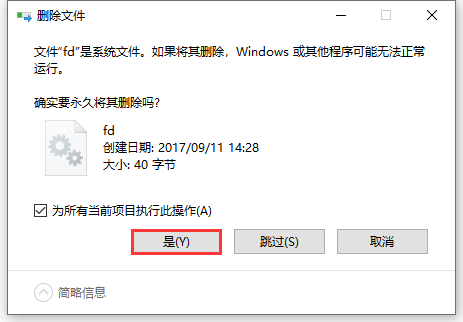
19. Shift + Delete Forces to delete the installation directory: C:\cygwin64. Do this for all current projects. Yes. Completely deleted successfully. as shown in Figure 19
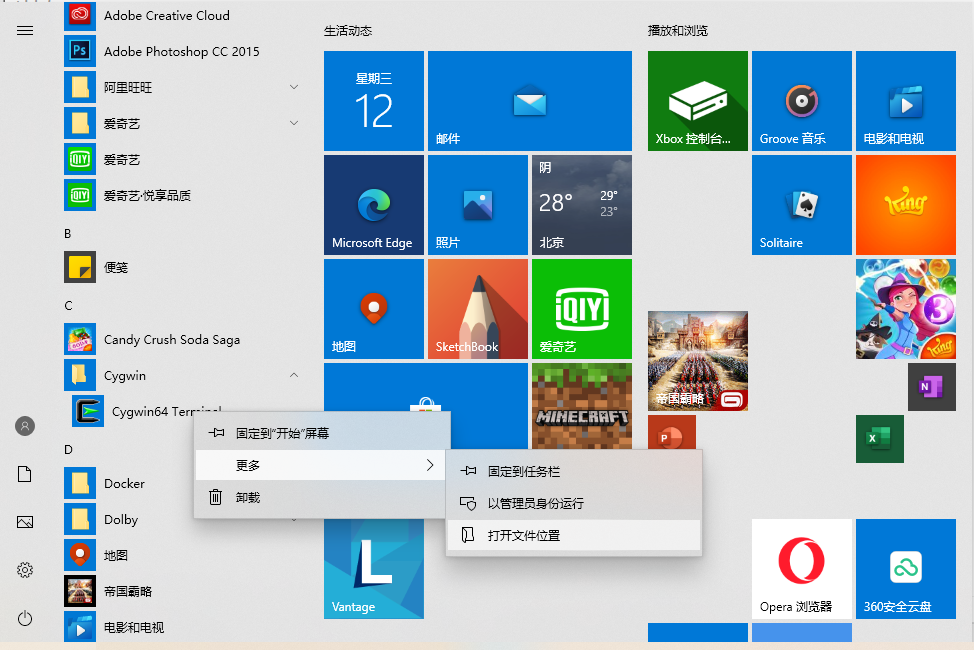
20. It still exists in the system menu: cygwin – cygwin64 terminal. As shown in Figure 20
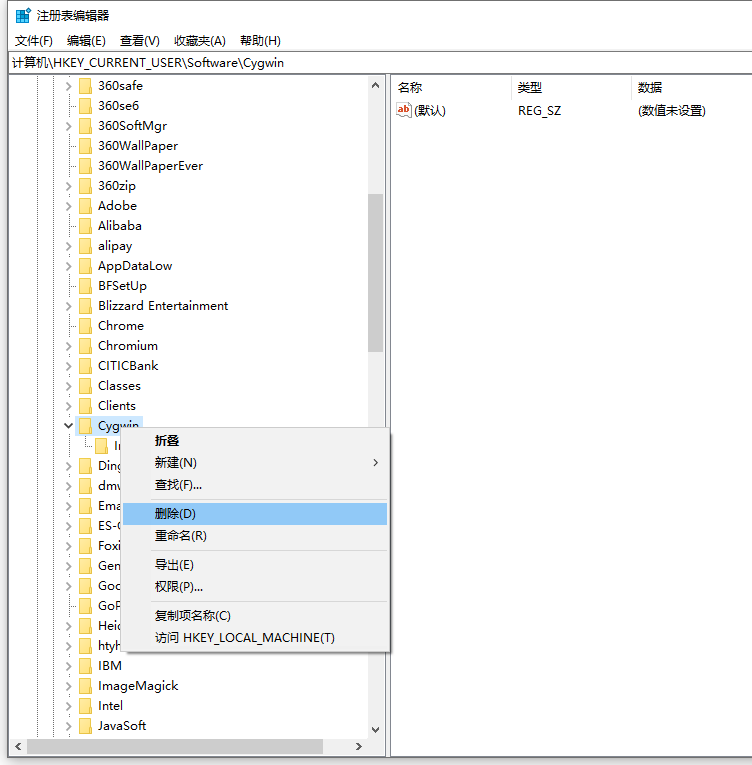
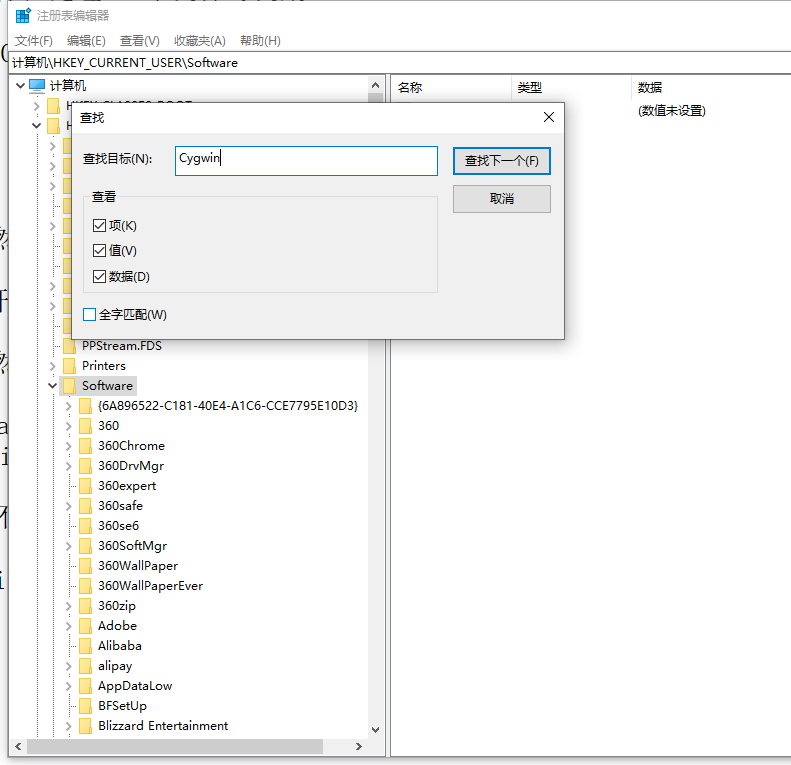
21. Press Win + R to open the run, enter regedit, and press Enter to open the registry. HKEY_CURRENT_USER\Software\Cygwin. need to be deleted. as shown in Figure 21
22. It still exists in the system menu: cygwin – cygwin64 terminal. Right click – more – open file location. Figure 22
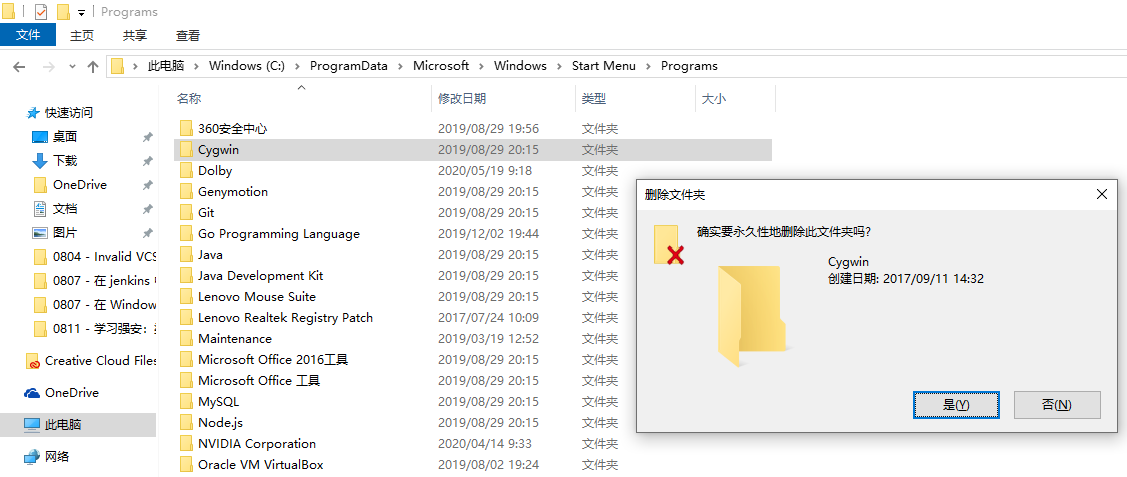
23. File: C:\ProgramData\Microsoft\Windows\Start Menu\Programs\Cygwin\Cygwin64 Terminal. Delete the directory: C:\ProgramData\Microsoft\Windows\Start Menu\Programs\Cygwin. Figure 23
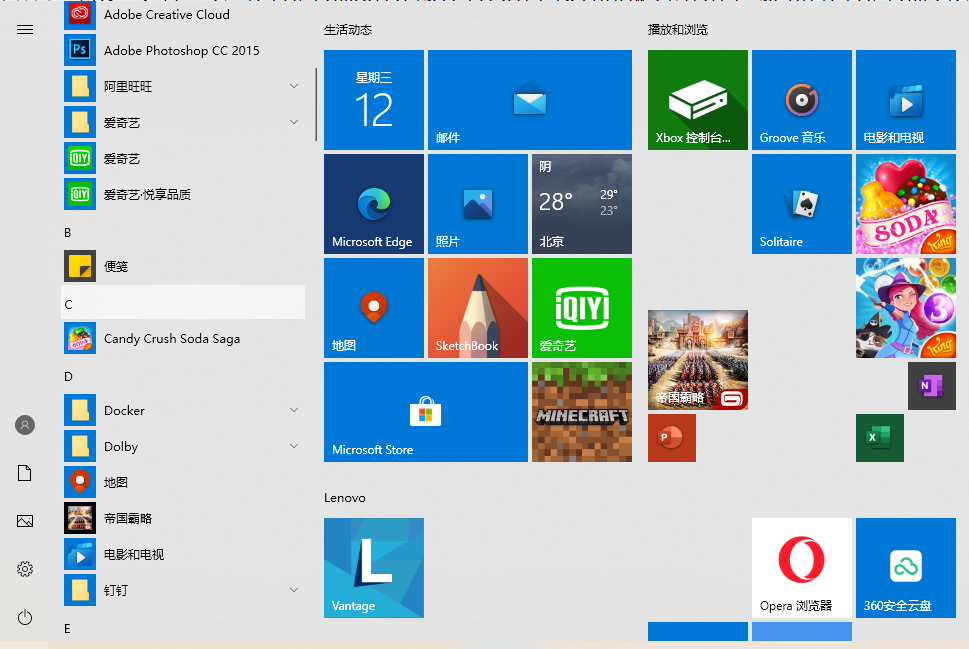
24. It no longer exists in the system menu: cygwin – cygwin64 terminal. Figure 24
25. Find in the registry: cygwin, no result. So far, Cygwin has been completely uninstalled in Windows 10 64-bit. as shown in Figure 25