The Authenticity of Host is prompted when Git is pushed to GitHubgithub.com (52.192.72.89)cant be established.ecdsa key fingerprint is sha256:., configure ssh key of github in Windows 10, generate a new personal access token
1. When executing the command: git push -u origin master, prompt: The authentication of hostgithub.com (52.192.72.89)cant be established.ecdsa key fingerprint is sha256: p2qamxnic1tjyweiottrvc98/r1bufwu3/liykgufqm.. as shown in Figure 1
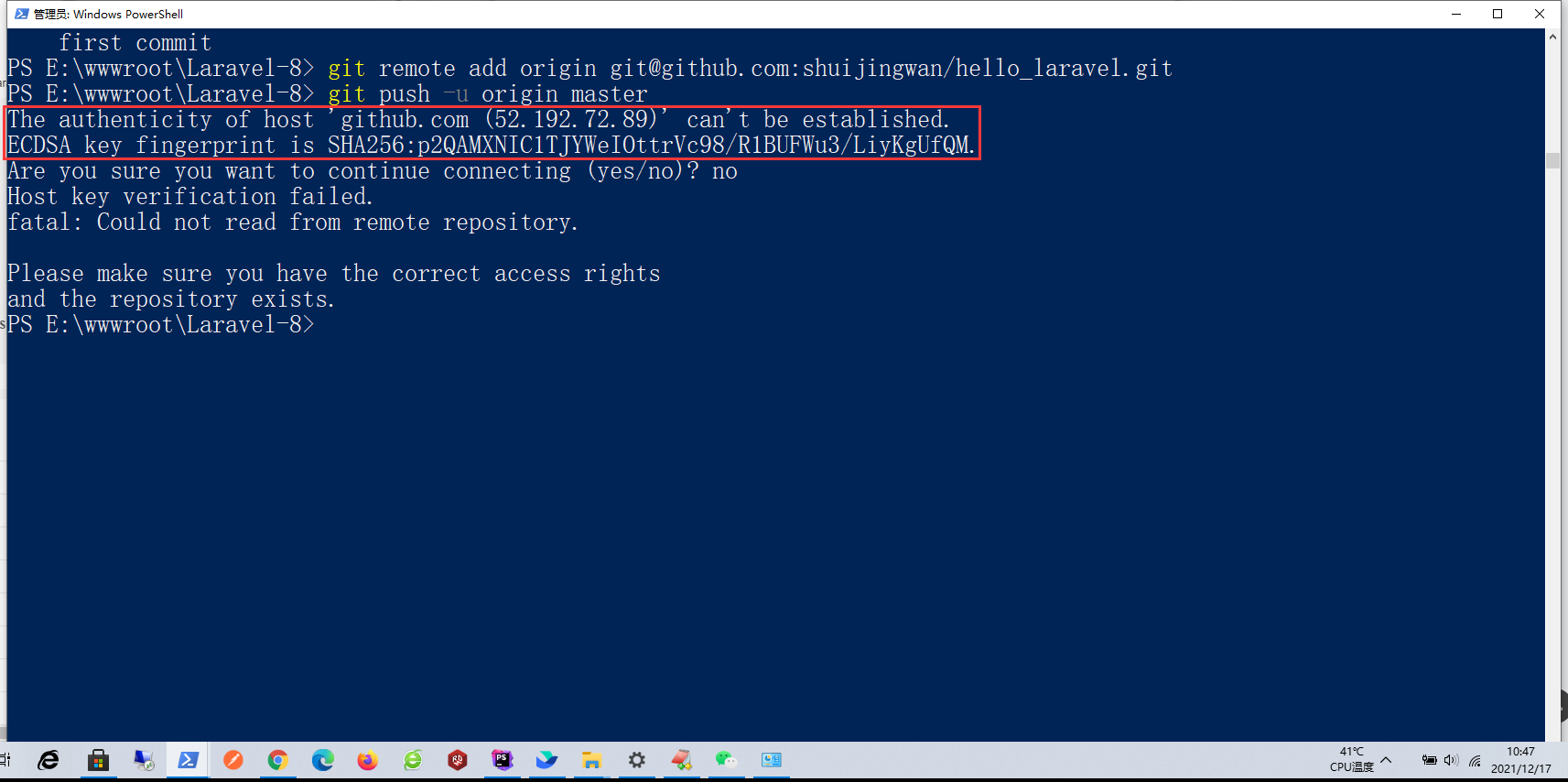
Figure 1
PS E:\wwwroot\Laravel-8> git remote add origin git@github.com:shuijingwan/hello_laravel.git
PS E:\wwwroot\Laravel-8> git push -u origin master
The authenticity of host 'github.com (52.192.72.89)' can't be established.
ECDSA key fingerprint is SHA256:p2QAMXNIC1TJYWeIOttrVc98/R1BUFWu3/LiyKgUfQM.
Are you sure you want to continue connecting (yes/no)? no
Host key verification failed.
fatal: Could not read from remote repository.

Please make sure you have the correct access rights
and the repository exists.
PS E:\wwwroot\Laravel-8> git push -u origin master
The authenticity of host 'github.com (52.69.186.44)' can't be established.
ECDSA key fingerprint is SHA256:p2QAMXNIC1TJYWeIOttrVc98/R1BUFWu3/LiyKgUfQM.
Are you sure you want to continue connecting (yes/no)? yes
Warning: Permanently added 'github.com,52.69.186.44' (ECDSA) to the list of known hosts.
git@github.com: Permission denied (publickey).
fatal: Could not read from remote repository.

Please make sure you have the correct access rights
and the repository exists.
PS E:\wwwroot\Laravel-8> git push -u origin master
git@github.com: Permission denied (publickey).
fatal: Could not read from remote repository.

Please make sure you have the correct access rights
and the repository exists.
2. Push through TortoiseGit, and still report an error: Logon Failed, use Ctrl+C to cancel Basic Credential Prompt. as shown in Figure 2

Figure 2
git.exe push --progress "origin" master:master
Logon failed, use ctrl+c to cancel basic credential prompt.
Logon failed, use ctrl+c to cancel basic credential prompt.
remote: Support for password authentication was removed on August 13, 2021. Please use a personal access token instead.
remote: Please see https://github.blog/2020-12-15-token-authentication-requirements-for-git-operations/ for more information.
fatal: Authentication failed for 'https://github.com/shuijingwan/yii2-app-advanced.git/'


git 未能顺利结束 (退出码 128) (71079 ms @ 2021/12/17 11:26:10)
3. Remote: On August 13, 2021, support for password authentication was removed. Please use a personal access token instead. Remote: seehttps://github.blog/2020-12-15-token-authentication-requirements-for-git-operations/Learn more. Starting August 13, 2021, we will no longer accept account passwords when authenticating Git operations and will require token-based authentication.
4. Configure two-step verification, refer to the URL:https://docs.github.com/cn/authentication/securing-your-account-with-two-factor-authentication-2fa/configuring-two-factor-authentication.
5. Reference URL:https://www.jianshu.com/p/9317a927e844. Generate a new SSH key. Open git bash, enter the following command, and then press Enter three times in a row: ssh-keygen -t rsa -c “shuijingwanwq@163.com”. The key holds the path: /c/users/administrator/.ssh. id_rsa is the key and id_rsa.pub is the public key. as shown in Figure 3
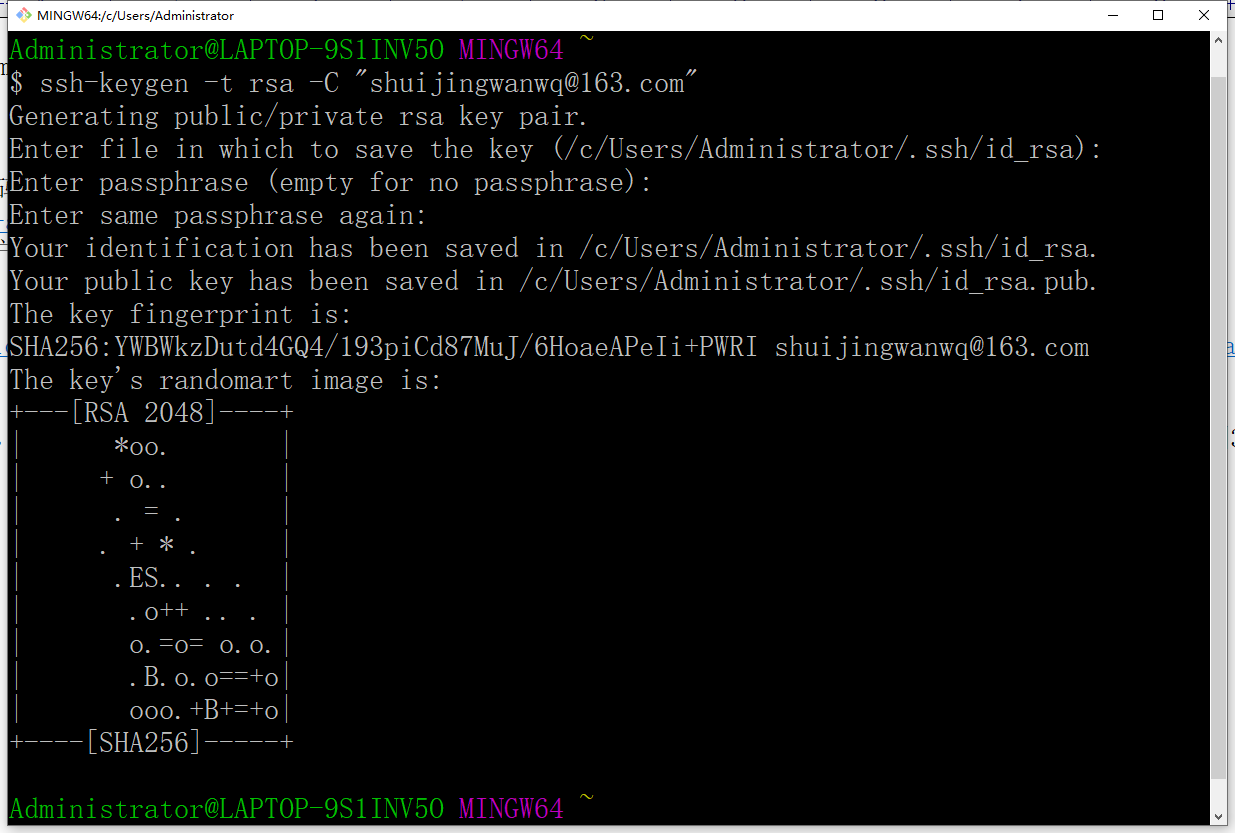
Figure 3
$ ssh-keygen -t rsa -C "shuijingwanwq@163.com"
Generating public/private rsa key pair.
Enter file in which to save the key (/c/Users/Administrator/.ssh/id_rsa):
Enter passphrase (empty for no passphrase):
Enter same passphrase again:
Your identification has been saved in /c/Users/Administrator/.ssh/id_rsa.
Your public key has been saved in /c/Users/Administrator/.ssh/id_rsa.pub.
The key fingerprint is:
SHA256:YWBWkzDutd4GQ4/193piCd87MuJ/6HoaeAPeIi+PWRI shuijingwanwq@163.com
The key's randomart image is:
+---[RSA 2048]----+
|      *oo.       |
|     + o..       |
|      . = .      |
|     . + * .     |
|      .ES.. . .  |
|       .o++ .. . |
|       o.=o= o.o.|
|       .B.o.o==+o|
|       ooo.+B+=+o|
+----[SHA256]-----+

Administrator@LAPTOP-9S1INV5O MINGW64 ~
$
6. Add the ssh private key to the ssh-agent, start the ssh-agent in the background, and add the ssh private key to the ssh-agent. as shown in Figure 4
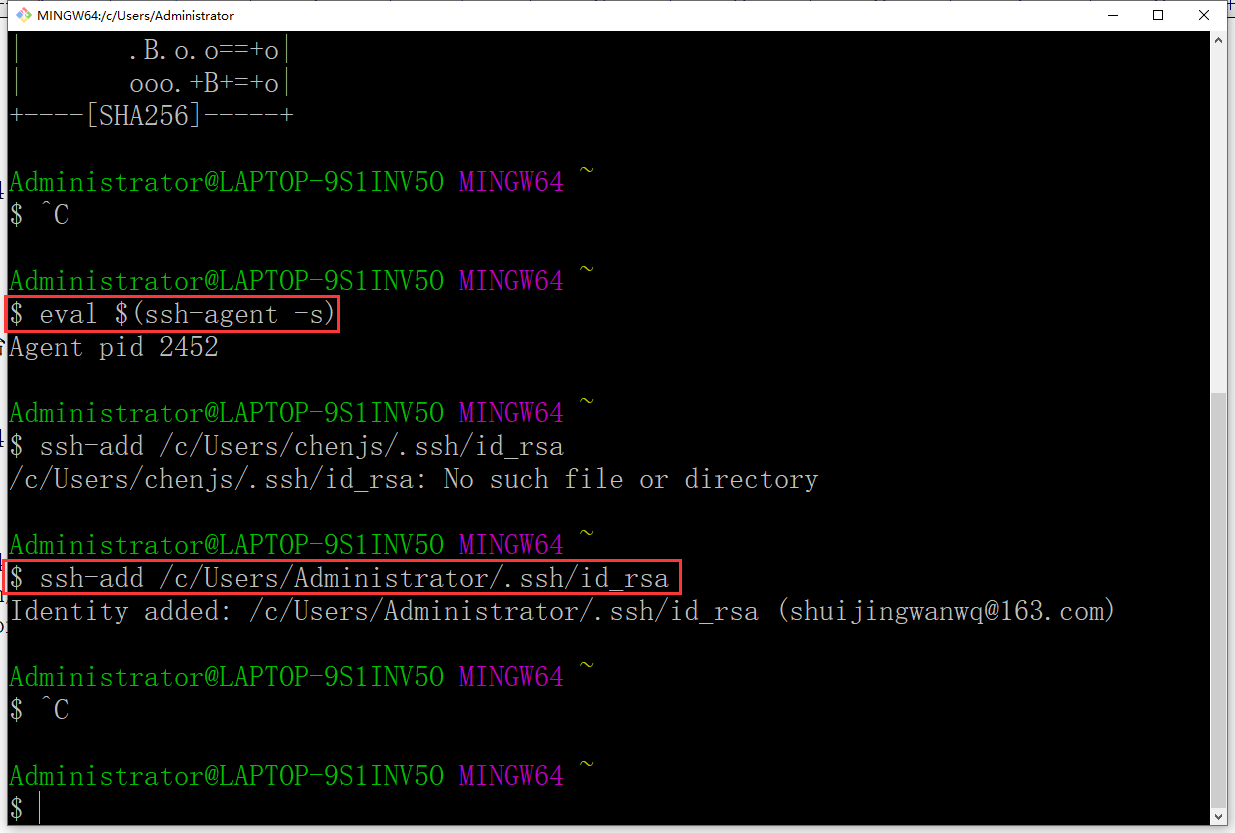
Figure 4
Administrator@LAPTOP-9S1INV5O MINGW64 ~
$ eval $(ssh-agent -s)
Agent pid 2452

Administrator@LAPTOP-9S1INV5O MINGW64 ~
$ ssh-add /c/Users/Administrator/.ssh/id_rsa
Identity added: /c/Users/Administrator/.ssh/id_rsa (shuijingwanwq@163.com)
7. Add the SSH public key to the GitHub account, first copy the complete content of the SSH public key (/c/users/administrator/.ssh/id_rsa.pub). as shown in Figure 5
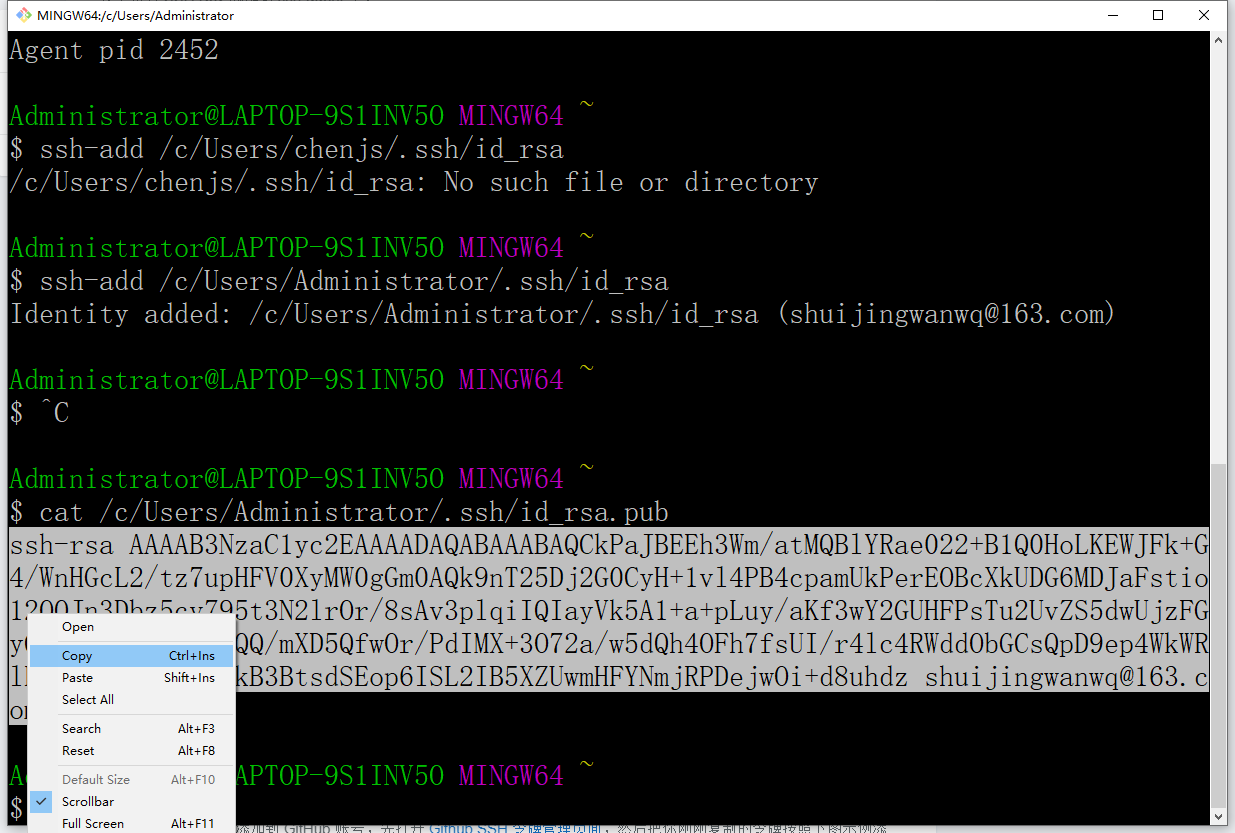
Figure 5
8. Add the public key to the GitHub account, first open the GitHub SSH token management page:https://github.com/settings/keys, and then add the token you just copied according to the example below. as shown in Figure 6
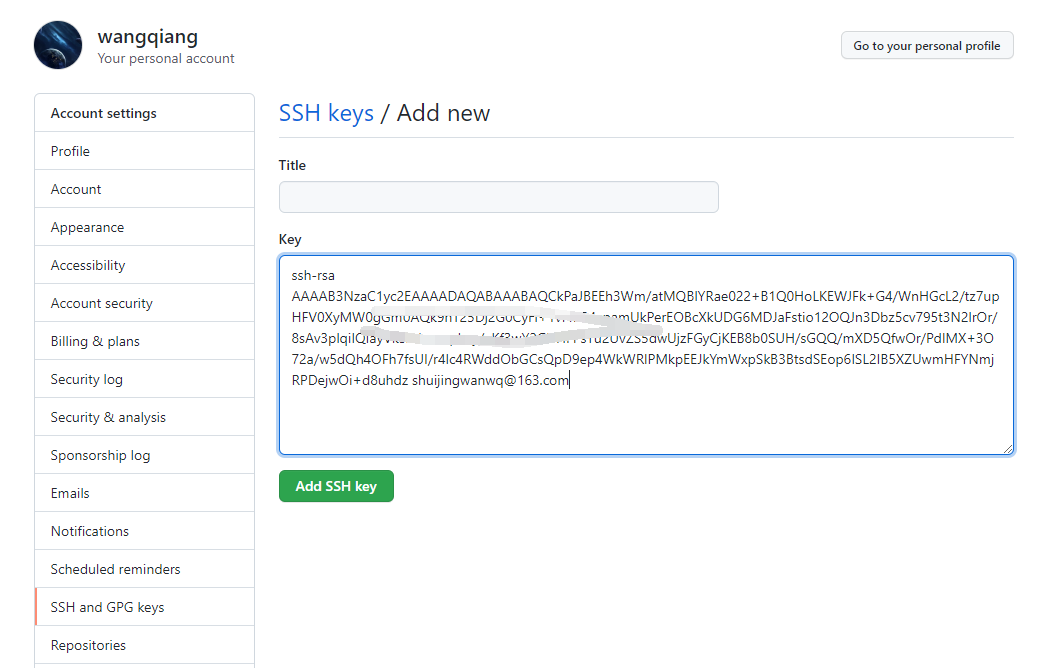
Figure 6
9. Test the connection, open git bash and enter: ssh -t git@github.com . Execution in PowerShell still reports an error, but the overall success is successful. as shown in Figure 7
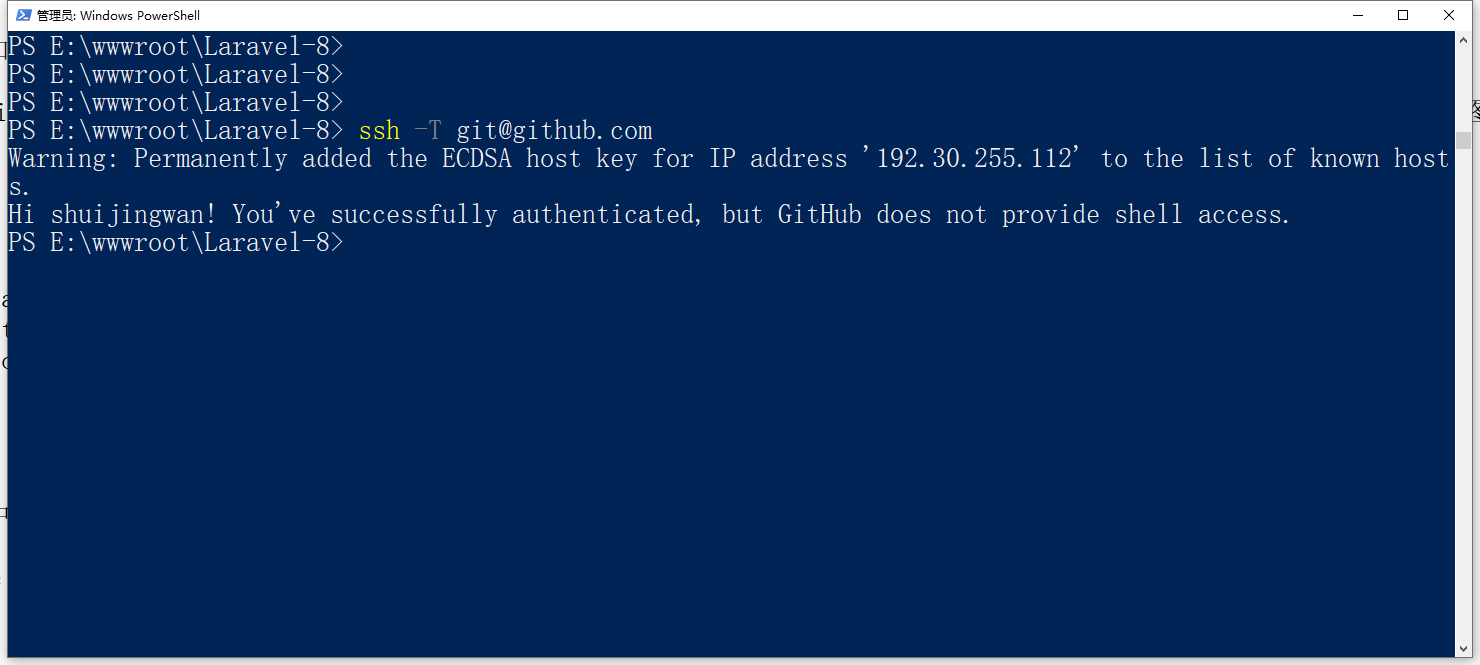
Figure 7
PS E:\wwwroot\Laravel-8> ssh -T git@github.com
Warning: Permanently added the ECDSA host key for IP address '192.30.255.112' to the list of known hosts.
Hi shuijingwan! You've successfully authenticated, but GitHub does not provide shell access.
10. Test the connection, open git bash and enter: ssh -t git@github.com . But the execution was successful in git bash.
Administrator@LAPTOP-9S1INV5O MINGW64 ~
$ ssh -T git@github.com
Hi shuijingwan! You've successfully authenticated, but GitHub does not provide shell access.
11. When executing the command again: git push -u origin master, error: support for password authentication was removed on August 13, 2021. Please use a personal access token instead..
Administrator@LAPTOP-9S1INV5O MINGW64 /e/wwwroot/Laravel-8 (main)
$ git push -u origin main
Logon failed, use ctrl+c to cancel basic credential prompt.
Logon failed, use ctrl+c to cancel basic credential prompt.
Username for 'https://github.com': shuijingwan
remote: Support for password authentication was removed on August 13, 2021. Please use a personal access token instead.
remote: Please see https://github.blog/2020-12-15-token-authentication-requirements-for-git-operations/ for more information.
fatal: Authentication failed for 'https://github.com/shuijingwan/hello_laravel.git/'
12. Delete the directory: .git, resubmit and push. Error: Remote: Support for password authentication was removed on August 13, 2021. Please use a personal access token INSTEAD..
PS E:\wwwroot\Laravel-8> git branch -M main
PS E:\wwwroot\Laravel-8> git remote add origin https://github.com/shuijingwan/hello_laravel.git
PS E:\wwwroot\Laravel-8> git push -u origin main
Logon failed, use ctrl+c to cancel basic credential prompt.
Logon failed, use ctrl+c to cancel basic credential prompt.
Username for 'https://github.com': shuijingwan
Password for 'https://shuijingwan@github.com':
remote: Support for password authentication was removed on August 13, 2021. Please use a personal access token instead.
remote: Please see https://github.blog/2020-12-15-token-authentication-requirements-for-git-operations/ for more information.
fatal: Authentication failed for 'https://github.com/shuijingwan/hello_laravel.git/'
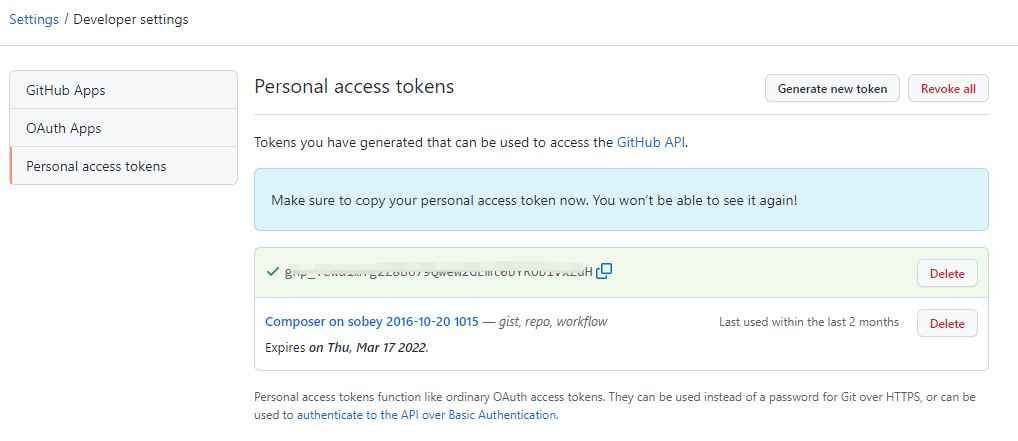
13. Open the URL:https://github.com/settings/tokens. Generate new token, check all permissions. as shown in Figure 8
8
14. Edit the remote URL:https://github.com/shuijingwan/hello_laravel.git, modified to:https://xxx@github.com/shuijingwan/hello_laravel.git. Delete the directory: .git, resubmit and push. The push was successful. as shown in Figure 9
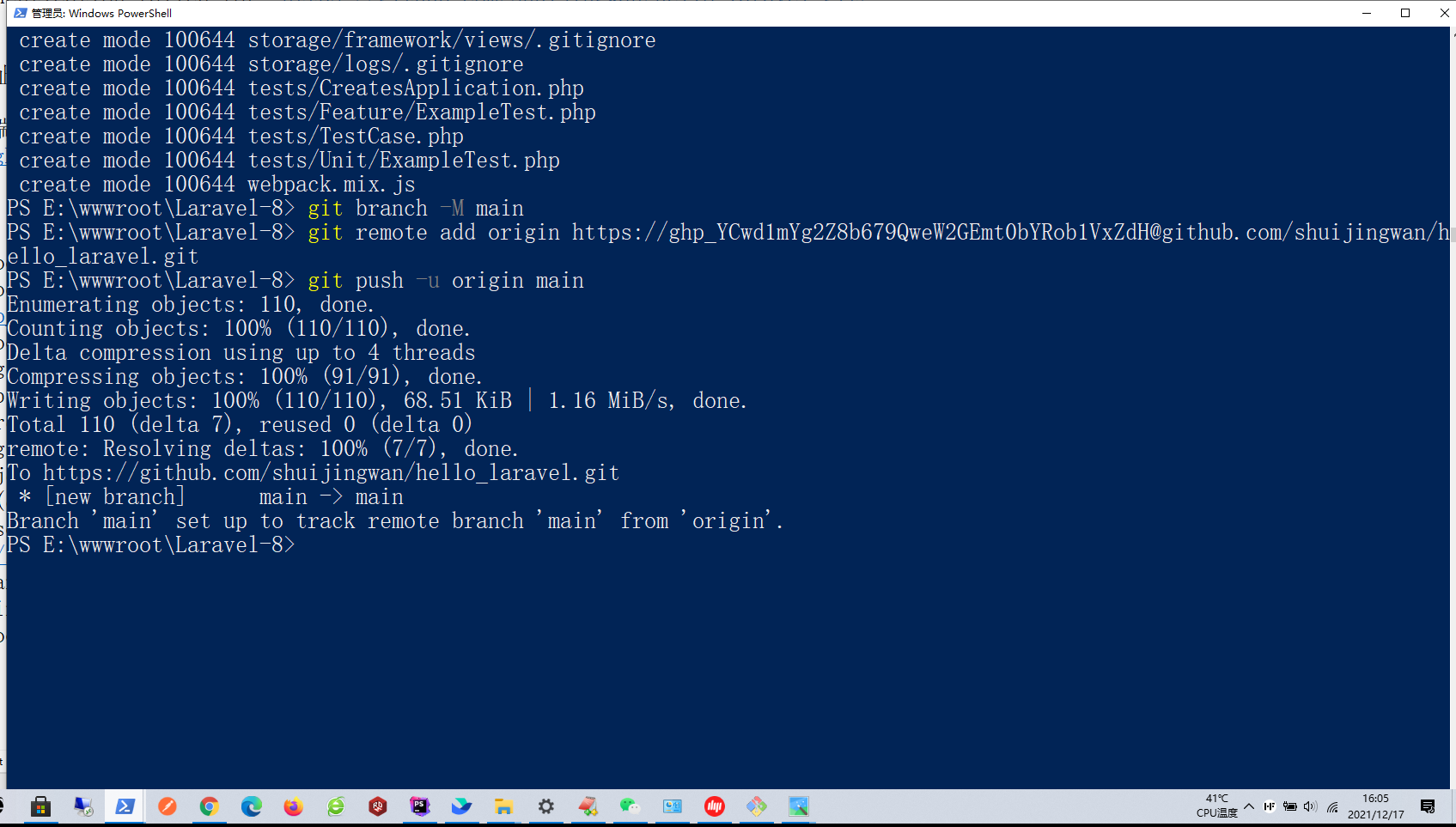
Figure 9
PS E:\wwwroot\Laravel-8> git branch -M main
PS E:\wwwroot\Laravel-8> git remote add origin https://xxx@github.com/shuijingwan/hello_laravel.git
PS E:\wwwroot\Laravel-8> git push -u origin main
Enumerating objects: 110, done.
Counting objects: 100% (110/110), done.
Delta compression using up to 4 threads
Compressing objects: 100% (91/91), done.
Writing objects: 100% (110/110), 68.51 KiB | 1.16 MiB/s, done.
Total 110 (delta 7), reused 0 (delta 0)
remote: Resolving deltas: 100% (7/7), done.
To https://github.com/shuijingwan/hello_laravel.git
 * [new branch]      main -> main
Branch 'main' set up to track remote branch 'main' from 'origin'.
PS E:\wwwroot\Laravel-8>Git Bash
15. Check the git repository on github to confirm that the file has been successfully pushed to github. As shown in Figure 10
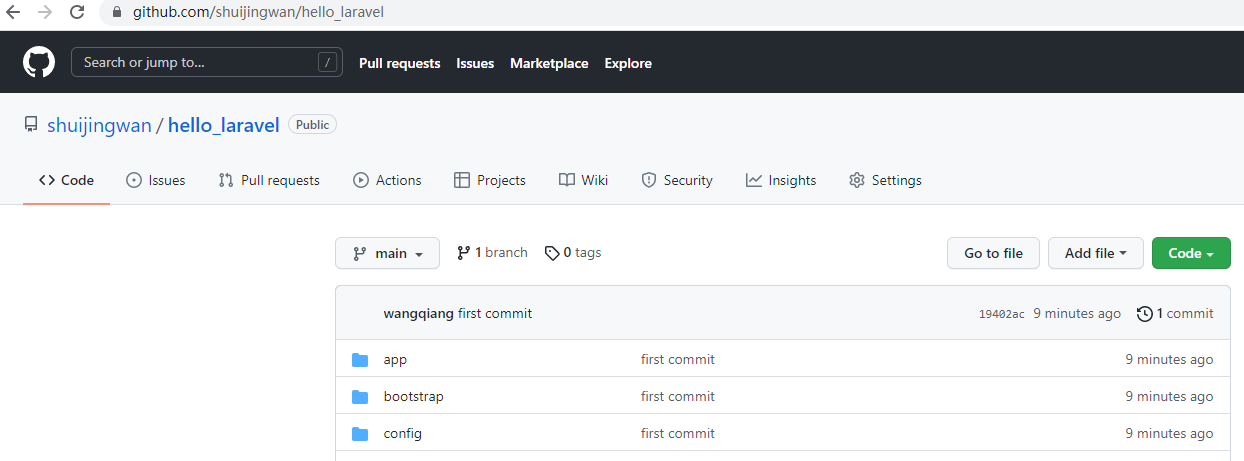
Figure 10