Build a Laravel Sail development environment in Windows 10 Professional
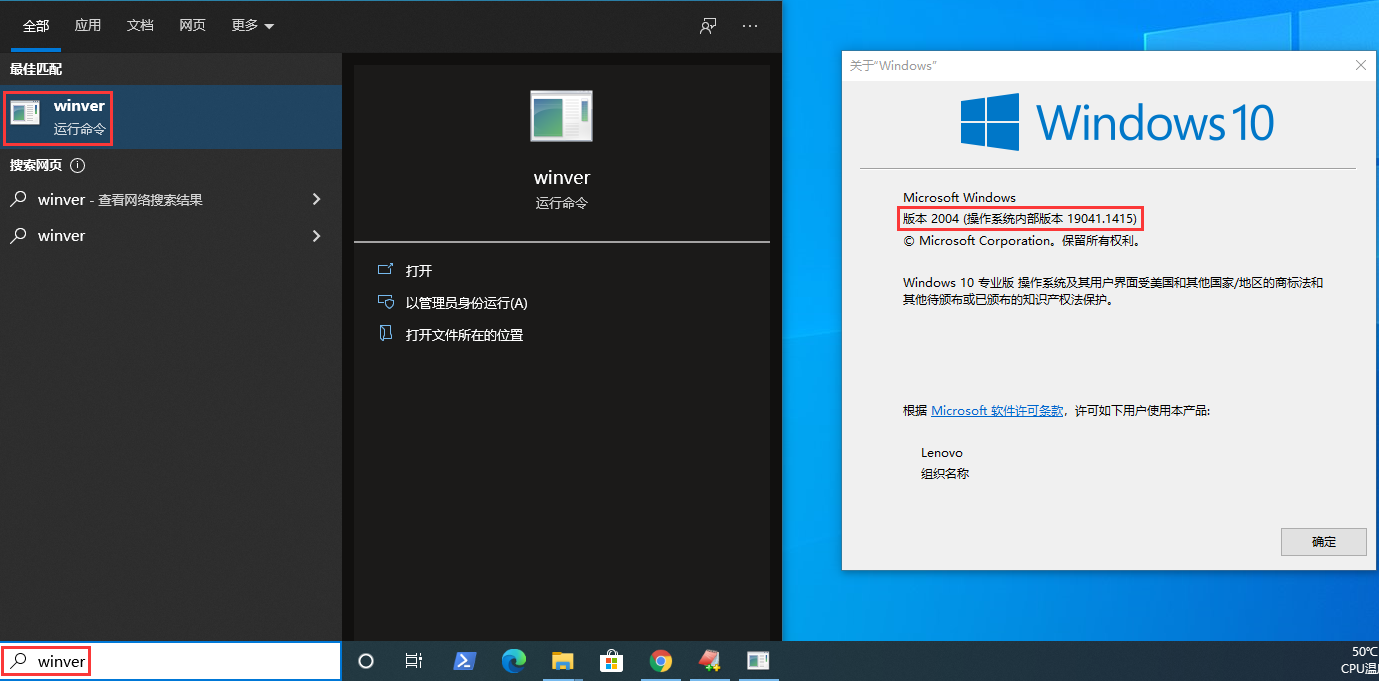
1. Laravel Sail requires Windows 10 systems that support WSL 2. The 2004 version released in May 2020 only supports the WSL 2 function, so our system needs to be updated to the 2004 version equal to or greater than the 2004 version. To view the system version, you can use the winver command, refer to Windows 10 Release Information, the release time of the version is greater than 1909. The system version meets the requirements. as shown in Figure 1
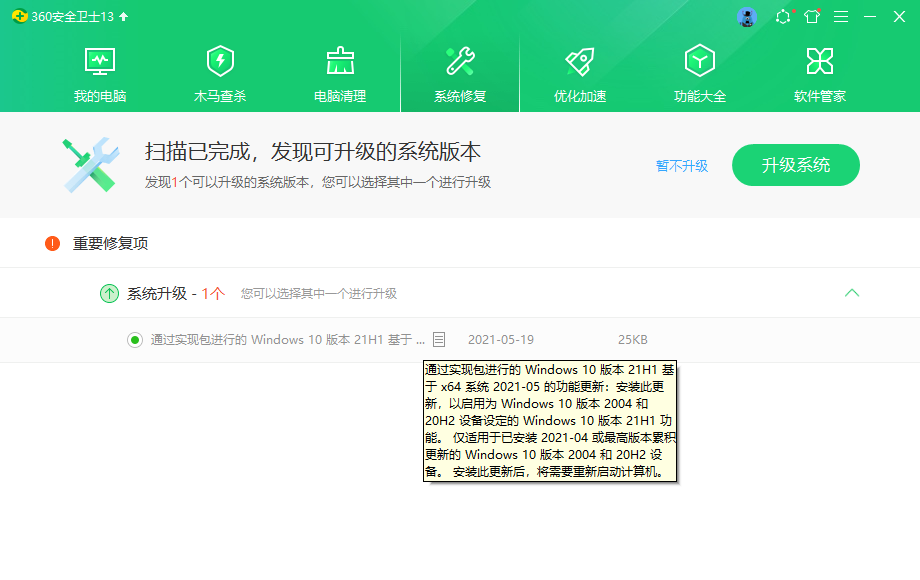
2. First upgrade to: the latest 21H1 version based on 360. as shown in Figure 2
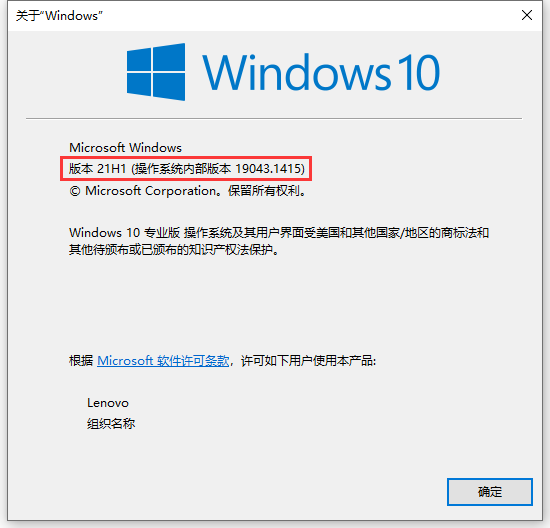
3. Check the system version, it has been upgraded to: 21h1 version. as shown in Figure 3
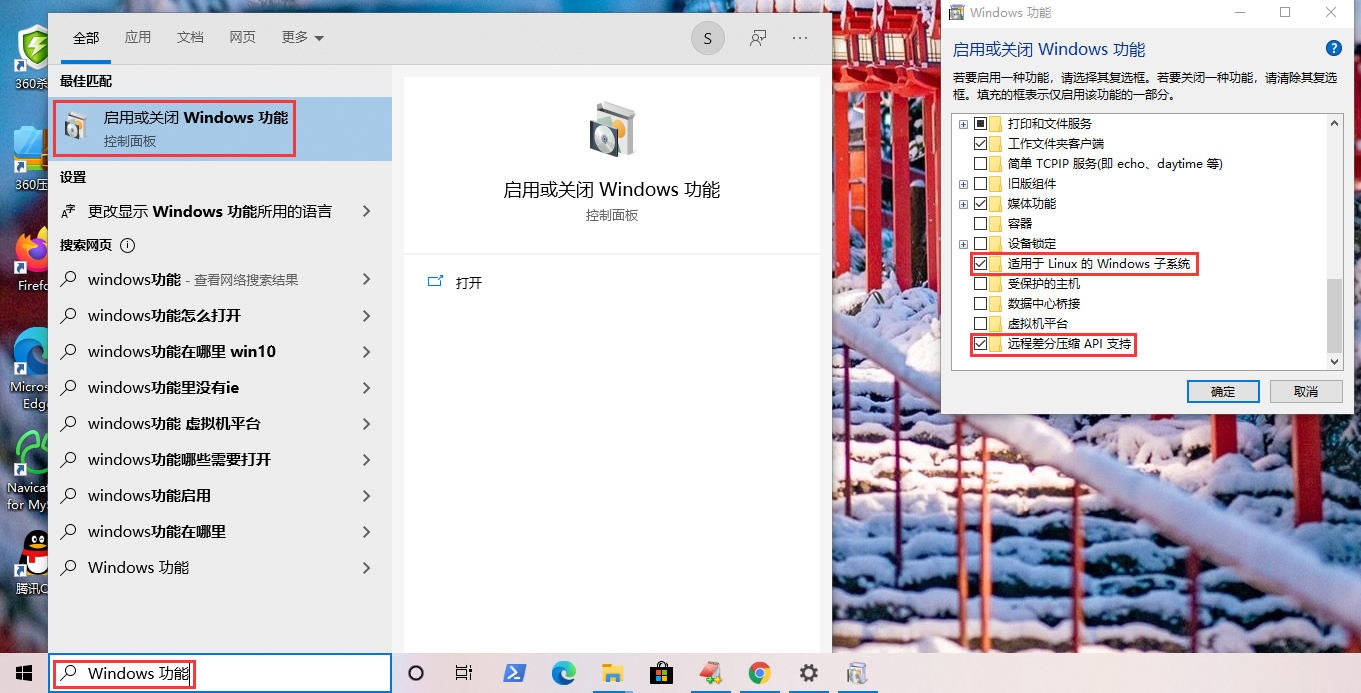
4. Search to open the windows function management window to ensure that the two places in the red box in the figure below are enabled: Windows subsystem for Linux, remote differential compression API support. as shown in Figure 4
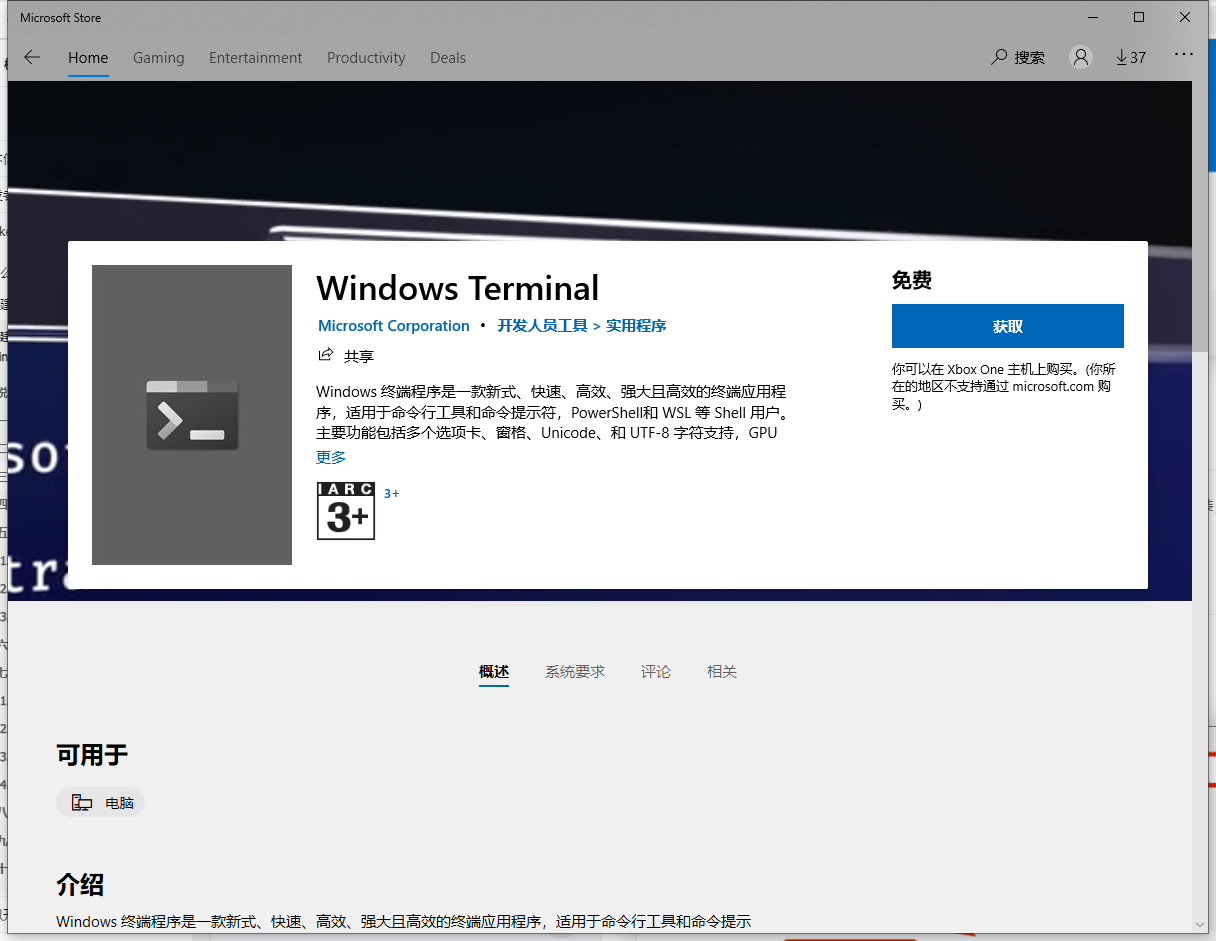
5. In order to better access the Windows subsystem, it is recommended to use Windows Terminal as a command line tool. Open the Microsoft store, search for the keyword Windows Terminal, and click Install in the search results. as shown in Figure 5
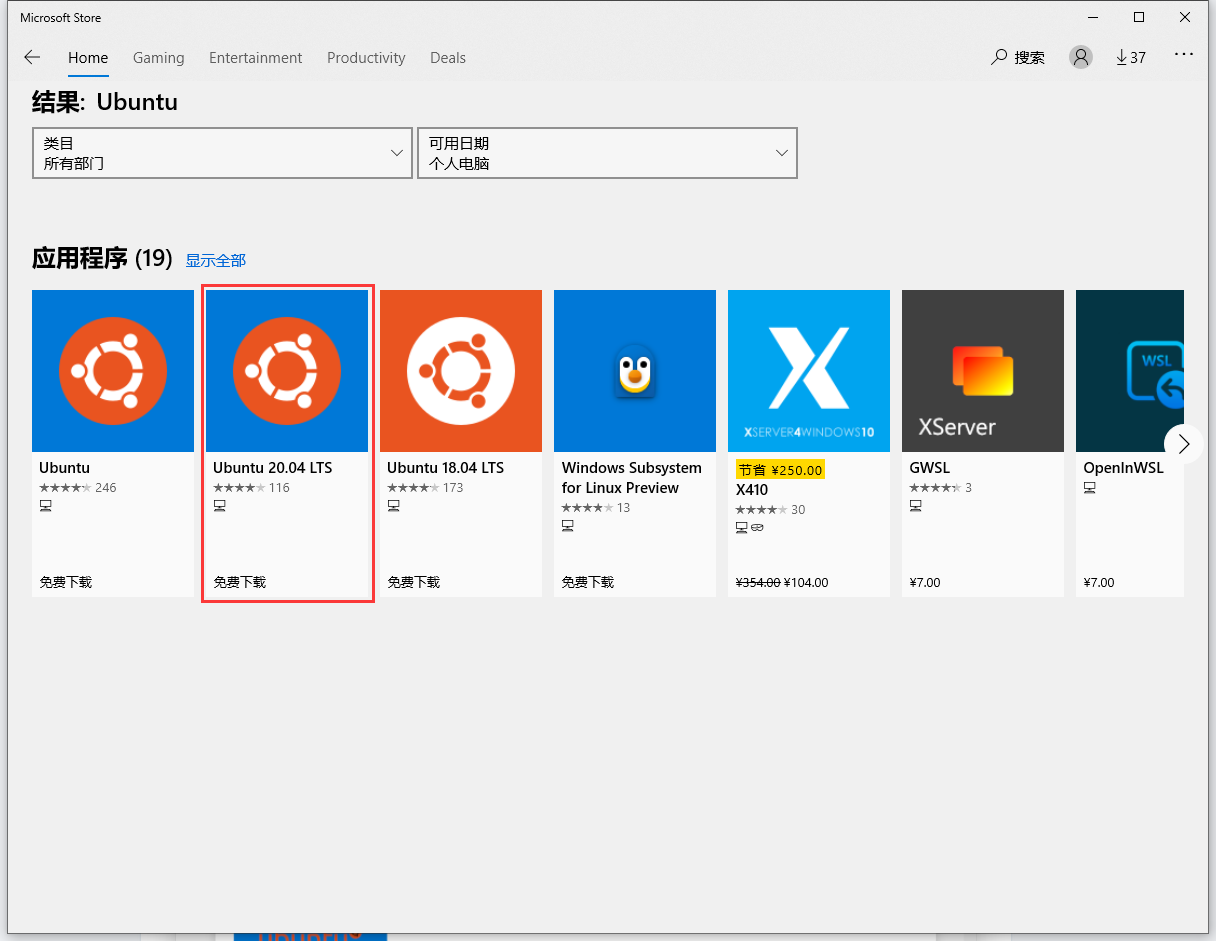
6. Download and install the subsystem: Ubuntu. Open the Microsoft store, search for ubuntu, the first and second can be, select the second one: ubuntu 20.04 LTS. as shown in Figure 6
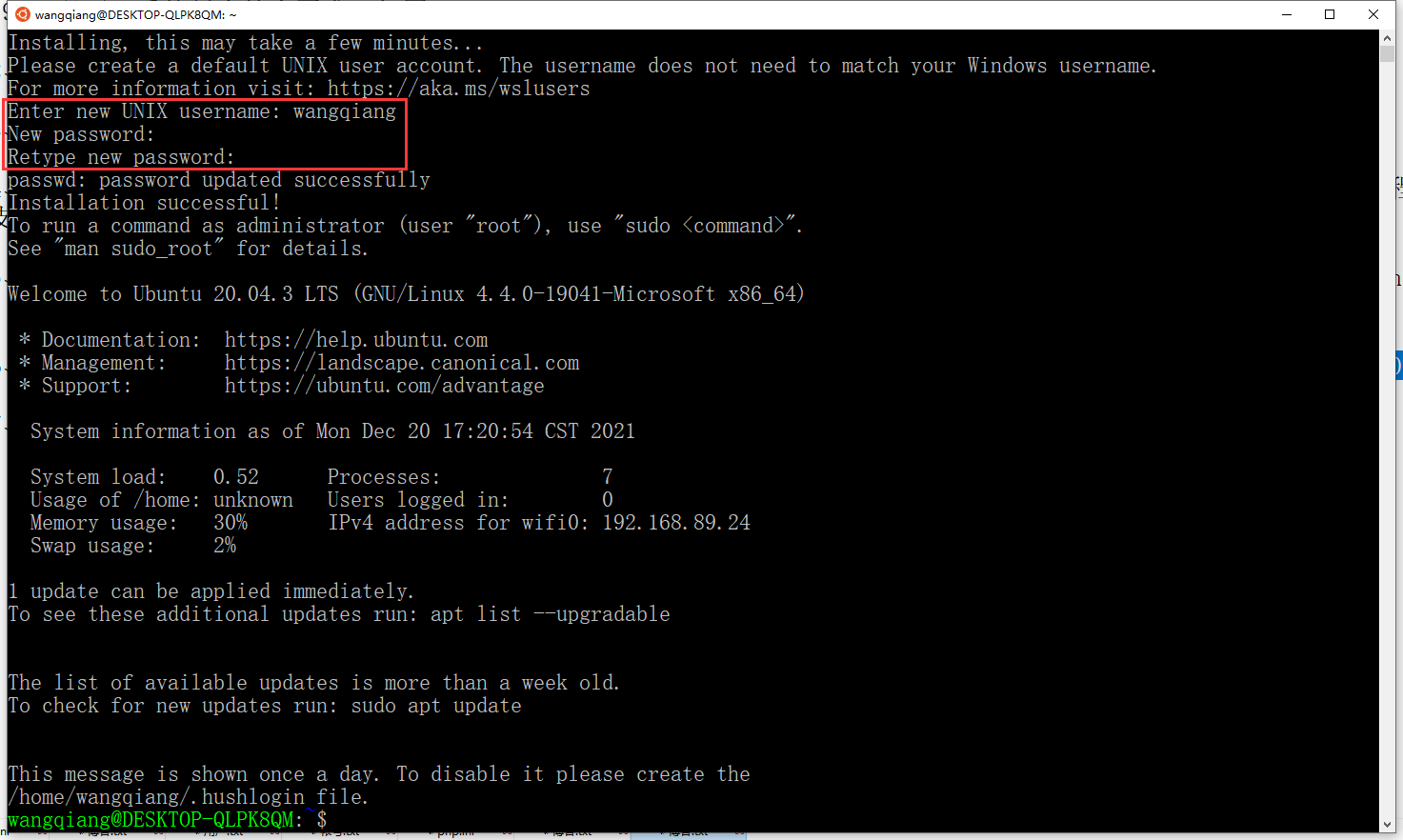
7. Prompt to create a user of the Ubuntu system, enter the user name, and then enter the password to complete the installation of the Ubuntu subsystem. This Ubuntu is a subsystem of the current Windows system, and our Docker will run based on this system. as shown in Figure 7
8. Go to Docker official website to download Docker Desktop: https://hub.docker.com/editions/community/docker-ce-desktop-windows After the download is complete, click the installation package to install, and you can go all the way.
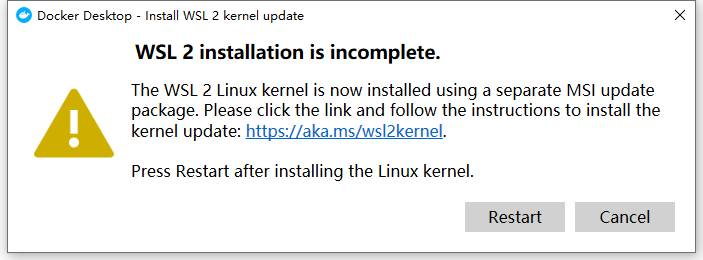
9. Tips: WSL 2 Installation is incomplete. WSL 2 installation is incomplete. as shown in Figure 8
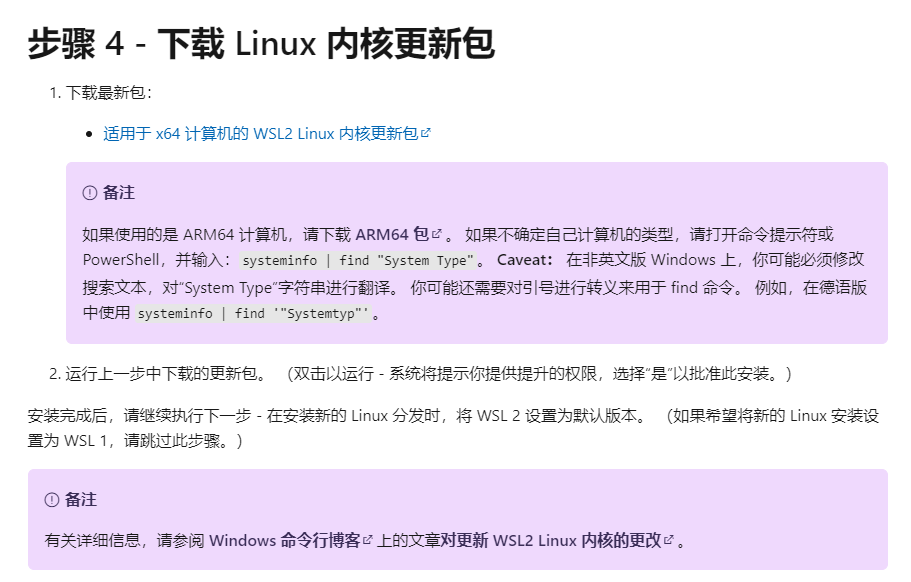
WSL 2 Installation is incomplete. The WSL 2 Linux kernel is now installed using a separate MSI update package. Please click the link and follow the instructions to install the kernel update:https://aka.ms/wsl2kernel Press restart after installing the linux kernel
10. Click the link and follow the instructions to install the kernel update: https://aka.ms/wsl2kernel . Download and install the Linux kernel update package. as shown in Figure 9
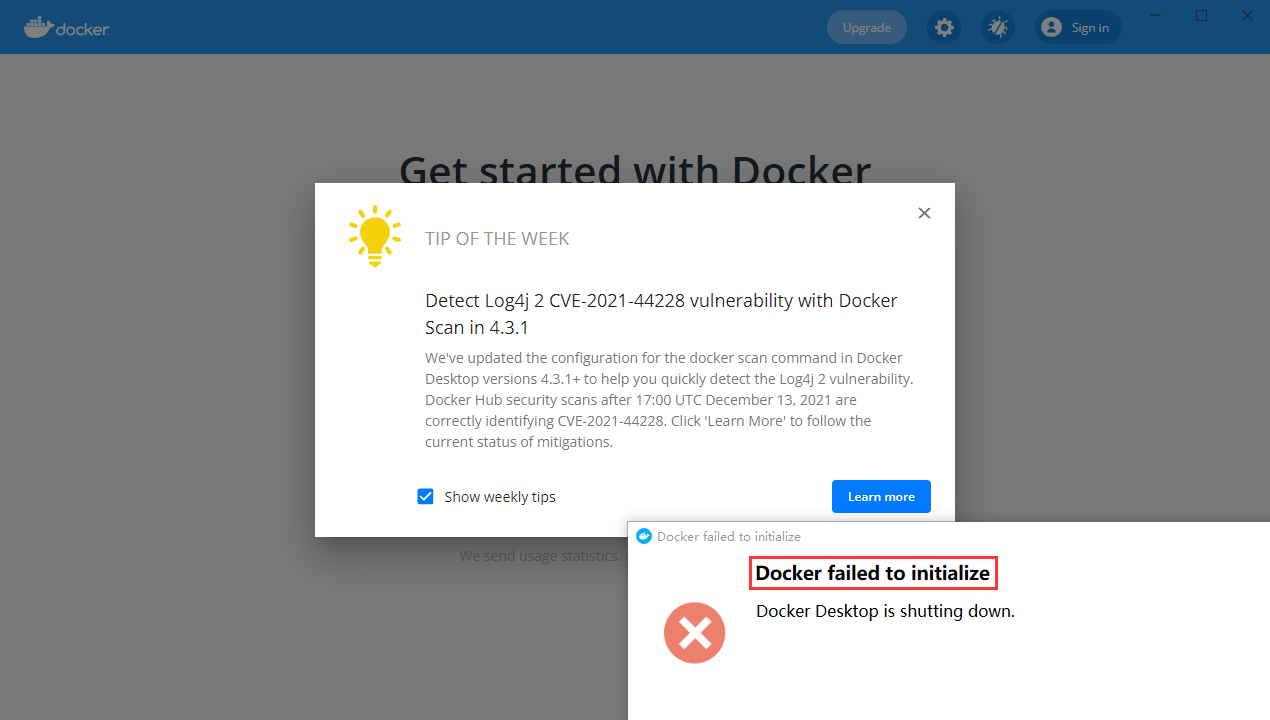
11. Restart the computer, open Docker Desktop again, and report an error: Docker failed to initialize. Ignore it for now. As shown in Figure 10
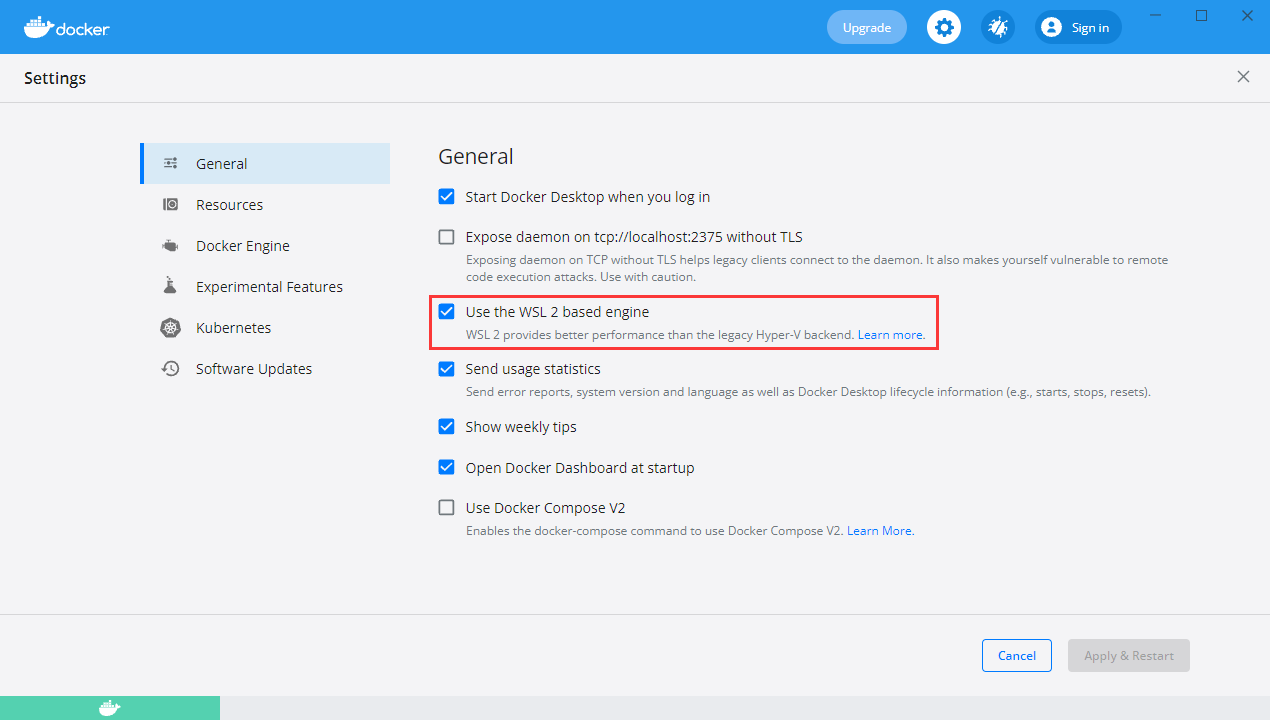
12. After restarting the computer again. Open Docker Desktop, no errors are reported again. Go to the configuration page – General, Use the WSL 2 based engine is checked by default, and enable WSL2 mode. as shown in Figure 11
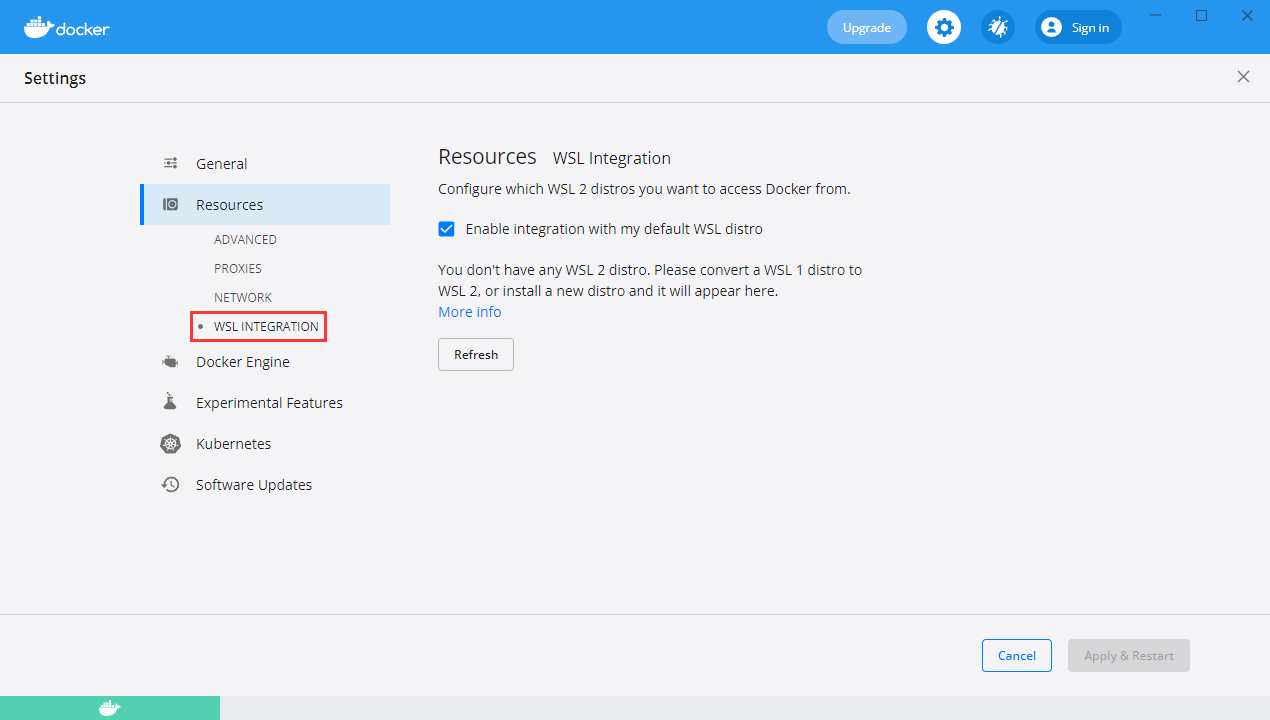
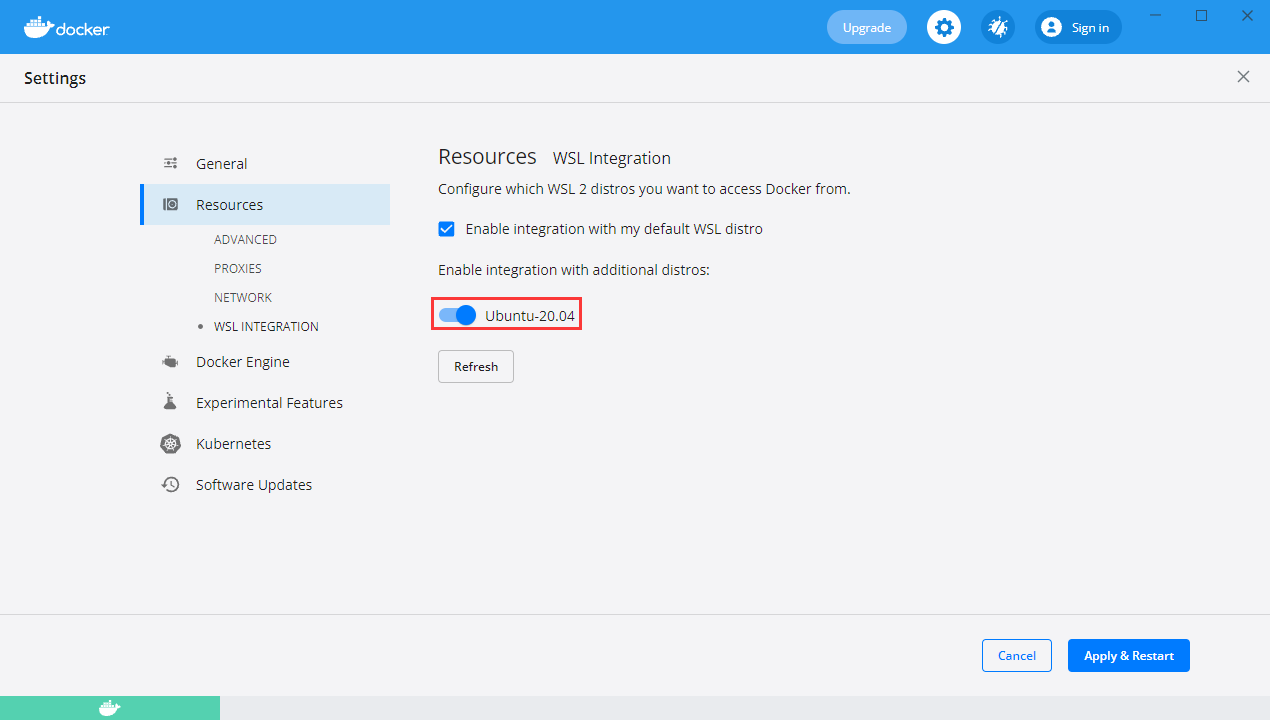
13. Configuration – Resources – WSL Integration, select the Ubuntu system we installed in the previous step, but the Ubuntu option does not exist. as shown in Figure 12
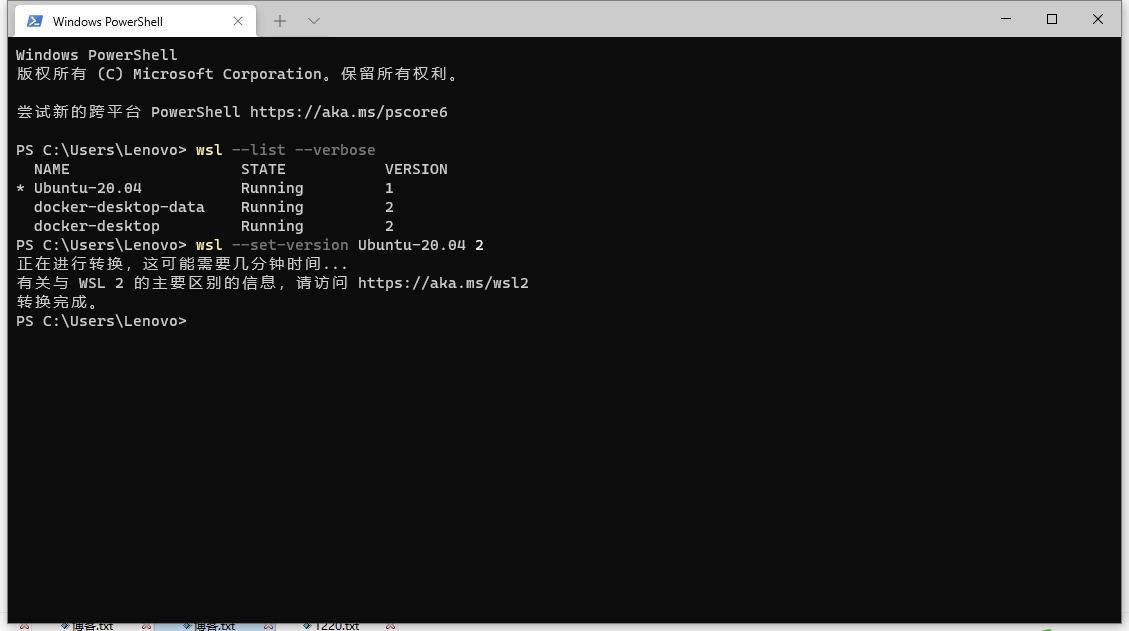
14. Reference URL: https://learnku.com/articles/54890. Open: Windows Terminal, convert to WSL 2. as shown in Figure 13
ps c:\users\lenovo> wsl --list --verbose name state version * Ubuntu-20.04 Running 1 docker-desktop-data running 2 docker-desktop running 2 PS C:\Users\Lenovo> wsl --set-version ubuntu-20.04 2 Conversion is in progress, which may take a few minutes... For information about the main difference with WSL 2, visit https://aka.ms/wsl2 The conversion is complete. PS C:\Users\Lenovo>
15. Click the button Refresh, the option ubuntu-20.04 has appeared, turn on. Figure 14
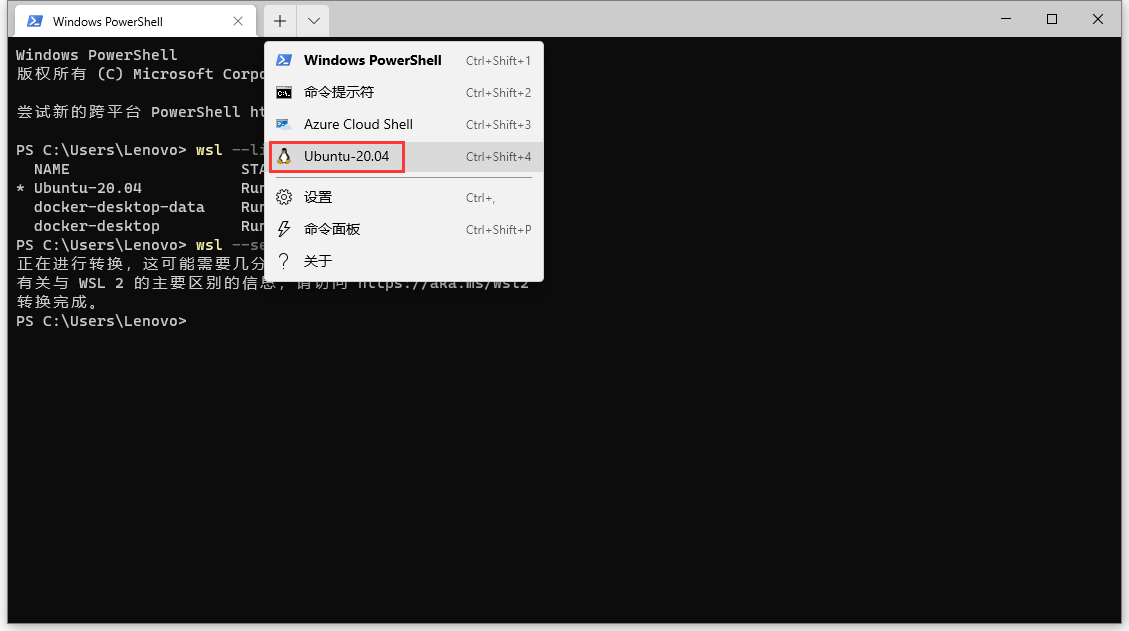
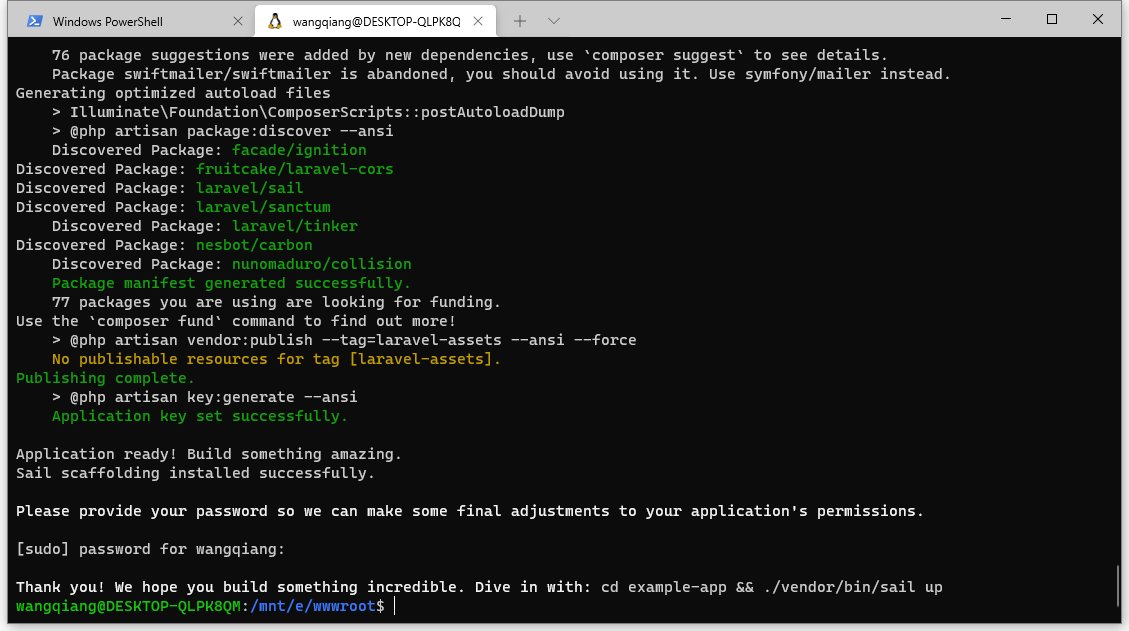
16. Create a test project, open the Windows Terminal command line, and follow the instructions below to enter the Ubuntu system. as shown in Figure 15
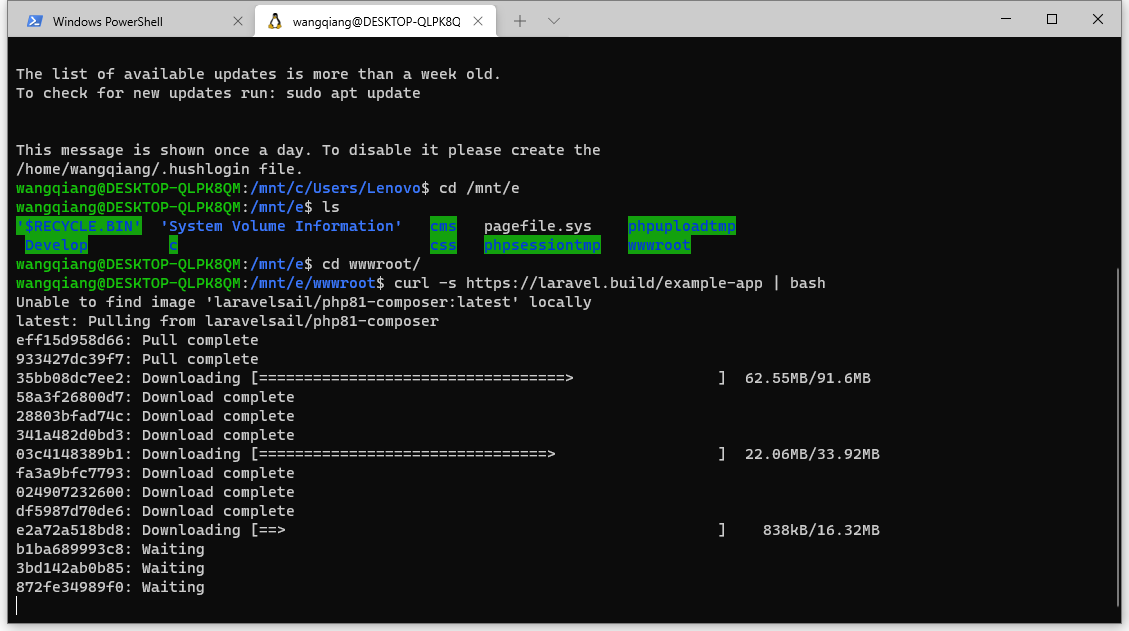
17. Ubuntu, as a Windows subsystem, can access the hard disk under the main system. In order to facilitate the management code, I have already created the wwwroot directory under the E drive. After entering this directory, I use the following command to create a test Laravel project. as shown in Figure 16
wangqiang@desktop-qlpk8qm:/mnt/c/users/lenovo$ cd /mnt/e wangqiang@desktop-qlpk8qm:/mnt/e$ ls $recycle.binSystem volume informationCMS pagefile.sys phpuploadtmp develop c css phpsessiontmp wwwroot wangqiang@desktop-qlpk8qm:/mnt/e$ cd wwwroot/ wangqiang@desktop-qlpk8qm:/mnt/e/wwwroot$ curl -s https://laravel.build/example-app | bash Unable to find imagelaravelsail/php81-composer:latestLocally Latest: pulling from laravelsail/php81-composer EFF15D958D66: pull complete 933427dc39f7: pull complete 35BB08DC7EE2: pull complete 58a3f26800d7: pull complete 28803bfad74c: pull complete 341a482d0bd3: pull complete 03C4148389B1: pull complete FA3A9BFC7793: pull complete 024907232600: pull complete df5987d70de6: pull complete E2A72A518BD8: pull complete b1ba689993c8: pull complete 3BD142AB0B85: pull complete 872fe34989f0: pull complete Digest: SHA256:B27920B769AD8DC036A9EDE3AE36F51A280D370EC7D125E77CA1924C9FA21DBB Status: downloaded newer image for laravelsail/php81-composer:latest _ | | | | | | | __ _ _ __ __ ___ _____ | | | / _` |__/ _` \ / / _ \ | | |___| (_| | | | (_| |\v / __/ | |_____\__,_|_| \__,_| \_/ \___|_| warning: tty mode requires /dev/tty to be read/writable. Creating a "Laravel/Laravel" project at "./example-app" Installing Laravel/Laravel (v8.6.9) - Download Laravel/Laravel (v8.6.9) - Installing Laravel/Laravel (v8.6.9): Extracting Archive created project in /opt/example-app > @php -r "file_exists(.env) || copy(.env.example,.env);" Loading composer repositories with package information Updating dependencies lock file operations: 110 installs, 0 updates, 0 removals - Locking ASM89/Stack-Cors (v2.0.3) - locking brick/math (0.9.3) - locking dflydev/dot-access-data (v3.0.1) - Locking Doctrine/Inflector (2.0.4) - Locking Doctrine/Instantiator (1.4.0) - Locking doctrine/lexer (1.2.1) - locking dragonmantank/cron-expression (v3.1.0) - Locking egulias/email-validator (2.1.25) - locking facade/flare-client-php (1.9.1) - Locking Facade/Ignition (2.17.2) - locking facade/ignition-contracts (1.0.2) - Locking FakerPHP/Faker (v1.17.0) - Locking filp/whoops (2.14.4) - Locking fruitcake/Laravel-cors (v2.0.4) - Locking Graham-Campbell/Result-Type (v1.0.4) - Locking guzzlehttp/guzzle (7.4.1) - Locking guzzlehttp/promises (1.5.1) - Locking GuzzleHTTP/PSR7 (2.1.0) - Locking Hamcrest/Hamcrest-php (v2.0.1) - Locking Laravel/Framework (v8.76.2) - Locking Laravel/Sail (v1.12.12) - Locking Laravel/Sanctum (v2.13.0) - locking laravel/serializable-closure (v1.0.5) - Locking Laravel/Tinker (v2.6.3) - Locking League/CommonMark (2.1.0) - Locking League/Config (v1.1.1) - Locking League/FlySystem (1.1.9) - Locking League/MIME-Type-detection (1.9.0) - Locking Mockery/Mockery (1.4.4) - locking monolog/monolog (2.3.5) - locking mylabs/deep-copy (1.10.2) - Locking Nesbot/Carbon (2.55.2) - Locking nette/schema (v1.2.2) - Locking nette/utils (v3.2.6) - Locking Nikic/PHP-Parser (v4.13.2) - Locking Nunomaduro/Collision (v5.10.0) - Locking OPIS/Closure (3.6.2) - Locking Phar-io/Manifest (2.0.3) - Locking Phar-io/Version (3.1.0) - locking phpDocumentor/reflection-common (2.2.0) - locking phpDocumentor/reflection-docblock (5.3.0) - Locking phpDocumentor/type-resolver (1.5.1) - locking phpooption/phpooption (1.8.1) - Locking phpsspec/prophecy (v1.15.0) - locking phpunit/php-code-coverage (9.2.10) - locking phpunit/php-file-iterator (3.0.6) - locking phpunit/php-invoker (3.1.1) - locking phpunit/php-text-template (2.0.4) - locking phpunit/php-timer (5.0.3) - locking phpunit/phpunit (9.5.10) - Locking PSR/Container (1.1.2) - Locking PSR/Event-Dispatcher (1.0.0) - Locking PSR/HTTP-Client (1.0.1) - Locking PSR/HTTP-Factory (1.0.1) - Locking PSR/HTTP-Message (1.0.1) - locking PSR/log (2.0.0) - Locking PSR/Simple-Cache (1.0.1) - Locking PSY/PSYSH (v0.10.12) - Locking Ralouchie/GetAllHeaders (3.0.3) - Locking Ramsey/Collection (1.2.2) - Locking Ramsey/UUID (4.2.3) - locking sebastian/cli-parser (1.0.1) - locking sebastian/code-unit (1.0.8) - locking sebastian/code-unit-reverse-lookup (2.0.3) - Locking Sebastian/Comparator (4.0.6) - Locking Sebastian/Complexity (2.0.2) - Locking Sebastian/Diff (4.0.4) - Locking Sebastian/Environment (5.1.3) - Locking Sebastian/Exporter (4.0.4) - Locking Sebastian/Global-State (5.0.3) - locking sebastian/lines-of-code (1.0.3) - locking sebastian/object-enumerator (4.0.4) - locking sebastian/object-reflector (2.0.4) - locking sebastian/recursion-context (4.0.4) - locking sebastian/resource-operations (3.0.3) - Locking Sebastian/Type (2.3.4) - Locking Sebastian/Version (3.0.2) - Locking Swiftmailer/SwiftMailer (v6.3.0) - locking symfony/console (v5.4.1) - Locking symfony/CSS-selector (v6.0.1) - locking symfony/deprecation-contracts (v3.0.0) - locking symfony/error-handler (v5.4.1) - locking symfony/event-dispatcher (v6.0.1) - locking symfony/event-dispatcher-contracts (v3.0.0) - locking symfony/finder (v5.4.0) - locking symfony/http-foundation (v5.4.1) - locking symfony/http-kernel (v5.4.1) - Locking Symfony/MIME (v5.4.0) - locking symfony/polyfill-ctype (v1.23.0) - locking symfony/polyfill-iconv (v1.23.0) - locking symfony/polyfill-intl-graphe (v1.23.1) - locking symfony/polyfill-intl-idn (v1.23.0) - locking symfony/polyfill-intl-normalizer (v1.23.0) - locking symfony/polyfill-mbstring (v1.23.1) - locking symfony/polyfill-php72 (v1.23.0) - Locking symfony/polyfill-php73 (v1.23.0) - locking symfony/polyfill-php80 (v1.23.1) - locking symfony/polyfill-php81 (v1.23.0) - locking symfony/process (v5.4.0) - locking symfony/routing (v5.4.0) - locking symfony/service-contracts (v2.4.1) - locking symfony/string (v6.0.1) - locking symfony/translation (v6.0.1) - locking symfony/translation-contracts (v3.0.0) - locking symfony/var-dumper (v5.4.1) - Locking theseer/tokenizer (1.2.1) - locking tijsverkoyen/css-to-inline-styles (2.2.4) - Locking vlucas/phpdotenv (v5.4.1) - Locking Voku/Portable-ASCII (1.5.6) - Locking WebMozart/Assert (1.10.0) Writing lock file Installing dependencies from lock file (inclusion require-dev) Package operations: 110 installs, 0 updates, 0 removals - Downloading Doctrine/Inflector (2.0.4) - downloading doctrine/lexer (1.2.1) - downloading dragonmantank/cron-expression (v3.1.0) - downloading symfony/var-dumper (v5.4.1) - downloading symfony/string (v6.0.1) - downloading PSR/Container (1.1.2) - downloading symfony/service-contracts (v2.4.1) - downloading symfony/console (v5.4.1) - downloading PSR/log (2.0.0) - downloading monolog/monolog (2.3.5) - downloading voku/portable-ascii (1.5.6) - downloading phpooption/phpoption (1.8.1) - downloading graham-campbell/result-type (v1.0.4) - downloading vlucas/phpdotenv (v5.4.1) - downloading symfony/CSS-selector (v6.0.1) - downloading tijsverkoyen/css-to-inline-styles (2.2.4) - downloading symfony/routing (v5.4.0) - downloading symfony/polyfill-php72 (v1.23.0) - downloading symfony/polyfill-intl-idn (v1.23.0) - downloading symfony/mime (v5.4.0) - downloading symfony/http-foundation (v5.4.1) - Download PSR/Event-Dispatcher (1.0.0) - downloading symfony/event-dispatcher-contracts (v3.0.0) - downloading symfony/event-dispatcher (v6.0.1) - downloading symfony/error-handler (v5.4.1) - downloading symfony/http-kernel (v5.4.1) - downloading symfony/finder (v5.4.0) - downloading symfony/polyfill-iconv (v1.23.0) - downloading egulias/email-validator (2.1.25) - Downloading SwiftMailer/SwiftMailer (v6.3.0) - downloading symfony/polyfill-php81 (v1.23.0) - Downloading Ramsey/Collection (1.2.2) - downloading brick/math (0.9.3) - downloading ramsey/uuid (4.2.3) - downloading PSR/simple-cache (1.0.1) - downloading opis/closure (3.6.2) - downloading symfony/translation-contracts (v3.0.0) - downloading symfony/translation (v6.0.1) - Download Nesbot/Carbon (2.55.2) - Downloading League/MIME-Type-detection (1.9.0) - Downloading League/FlySystem (1.1.9) - Downloading nette/utils (v3.2.6) - Downloading nette/schema (v1.2.2) - downloading dflydev/dot-access-data (v3.0.1) - Downloading League/Config (v1.1.1) - Downloading League/CommonMark (2.1.0) - Download Laravel/Serializable-Closure (v1.0.5) - Download Laravel/Framework (v8.76.2) - Download Facade/Ignition-Contracts (1.0.2) - downloading facade/flare-client-php (1.9.1) - Download Facade/Ignition (2.17.2) - downloading fakerphp/faker (v1.17.0) - Download ASM89/Stack-Cors (v2.0.3) - downloading fruitcake/Laravel-cors (v2.0.4) - downloading PSR/Http-message (1.0.1) - Download PSR/HTTP-Client (1.0.1) - Download raluphie/GetAllHeaders (3.0.3) - downloading PSR/HTTP-factory (1.0.1) - downloading guzzlehttp/psr7 (2.1.0) - downloading guzzlehttp/promises (1.5.1) - downloading guzzlehttp/guzzle (7.4.1) - Download Laravel/Sail (v1.12.12) - Download Laravel/Sanctum (v2.13.0) - downloading nikic/php-parser (v4.13.2) - Downloading PSY/PSYSH (v0.10.12) - Download Laravel/Tinker (v2.6.3) - downloading hamcrest/hamcrest-php (v2.0.1) - downloading mockery/mockery (1.4.4) - downloading filp/whoops (2.14.4) - downloading nunomaduro/collision (v5.10.0) - downloading phpunit/php-file-iterator (3.0.6) - downloading phpunit/php-code-coverage (9.2.10) - downloading phpspec/prophecy (v1.15.0) - Installing Doctrine/Inflector (2.0.4): Extracting Archive - Installing Doctrine/Lexer (1.2.1): Extracting Archive - Installing symfony/polyfill-ctype (v1.23.0): Extracting Archive - Installing WebMozart/Assert (1.10.0): Extracting Archive - Installing DragonMantank/cron-expression (v3.1.0): Extracting Archive - Installing symfony/polyfill-php80 (v1.23.1): Extracting Archive - Installing symfony/polyfill-mbstring (v1.23.1): Extracting Archive - Installing symfony/var-dumper (v5.4.1): Extracting Archive - Installing symfony/polyfill-intl-normalizer (v1.23.0): Extracting Archive - Installing symfony/polyfill-intl-graphe (v1.23.1): Extracting Archive - Installing symfony/string (v6.0.1): Extracting Archive - Installing PSR/Container (1.1.2): Extracting Archive - Installing symfony/service-contracts (v2.4.1): extracting archives - Installing symfony/polyfill-php73 (v1.23.0): Extracting Archive - Installing symfony/deprecation-contracts (v3.0.0): Extracting Archive - Installing symfony/console (v5.4.1): Extracting Archive - Installing PSR/Log (2.0.0): Extracting Archive - Installing monolog/monolog (2.3.5): Extracting Archive - Installing voku/portable-ascii (1.5.6): Extracting Archive - Installing phpooption/phpoption (1.8.1): Extracting Archive - Installing grad-campbell/result-type (v1.0.4): extracting archive - Installing vlucas/phpdotenv (v5.4.1): Extracting Archive - Installing symfony/CSS-selector (v6.0.1): Extracting Archive -Installing tijsverkoyen/css-to-inline-styles (2.2.4): Extracting Archive - Installing Symfony/Routing (v5.4.0): Extracting Archive - Installing Symfony/Process (v5.4.0): Extracting Archive - Installing symfony/polyfill-php72 (v1.23.0): extracting archive - Installing symfony/polyfill-intl-idn (v1.23.0): Extracting Archive - Installing symfony/MIME (v5.4.0): Extracting Archive - Installing symfony/http-foundation (v5.4.1): Extracting Archive - Installing PSR/Event-Dispatcher (1.0.0): Extracting Archive - Installing Symfony/Event-Dispatcher-Contracts (v3.0.0): Extracting Archive - Installing Symfony/Event-Dispatcher (v6.0.1): Extracting Archive - Installing symfony/error-handler (v5.4.1): Extracting Archive - Installing symfony/http-kernel (v5.4.1): Extracting Archive - Installing symfony/finder (v5.4.0): Extracting Archive - Installing symfony/polyfill-iconv (v1.23.0): Extracting Archive - Installing egulias/email-validator (2.1.25): Extracting Archive - Installing SwiftMailer/SwiftMailer (v6.3.0): Extracting Archive - Installing symfony/polyfill-php81 (v1.23.0): Extracting Archive - Installing Ramsey/Collection (1.2.2): Extracting Archive - Installing Brick/Math (0.9.3): Extracting Archive - Installing Ramsey/UUID (4.2.3): Extracting Archive - Installing PSR/simple-cache (1.0.1): Extracting Archive - Installing OPIS/Closure (3.6.2): Extracting Archive - Installing symfony/translation-contracts (v3.0.0): extracting archives - Installing symfony/translation (v6.0.1): Extracting Archive - Installing Nesbot/Carbon (2.55.2): Extracting Archive - Installing League/MIME-Type-detection (1.9.0): Extracting Archive - Installing League/FlySystem (1.1.9): Extracting Archive - Installing nette/utils (v3.2.6): Extracting Archive - Installing nette/schema (v1.2.2): Extracting Archive - Installing dflydev/dot-access-data (v3.0.1): extracting archive - Installing League/Config (v1.1.1): Extracting Archive - Installing League/CommonMark (2.1.0): Extracting Archive - Installing Laravel/Serializable-Closure (v1.0.5): Extracting Archive - Installing Laravel/Framework (v8.76.2): Extracting Archive - Installing Facade/Ignition-Contracts (1.0.2): Extracting Archive - Installing facade/flare-client-php (1.9.1): extracting archive - Installing Facade/Ignition (2.17.2): Extracting Archive - Installing FakerPHP/Faker (v1.17.0): Extracting Archive - Installing ASM89/Stack-Cors (v2.0.3): Extracting Archive - Installing fruitcake/Laravel-cors (v2.0.4): Extracting Archive - Installing PSR/Http-Message (1.0.1): Extracting Archive - Installing PSR/Http-Client (1.0.1): Extracting Archive - Installing Ralouchie/GetAllHeaders (3.0.3): Extracting Archive - Installing PSR/Http-factory (1.0.1): Extracting Archive - Installing GuzzleHttp/PSR7 (2.1.0): Extracting Archive - Installing GuzzleHttp/Promises (1.5.1): Extracting Archive - Installing GuzzleHttp/Guzzle (7.4.1): Extracting Archive - Installing Laravel/Sail (v1.12.12): Extracting Archive - Installing Laravel/Sanctum (v2.13.0): Extracting Archive - Installing Nikic/PHP-Parser (v4.13.2): Extracting Archive - Installing PSY/PSYSH (v0.10.12): Extracting Archive - Installing Laravel/Tinker (v2.6.3): Extracting Archive - Installing Hamcrest/Hamcrest-php (v2.0.1): Extracting Archive - Installing mockery/mockery (1.4.4): Extracting Archive - Installing FILP/WHOOPS (2.14.4): Extracting Archive - Installing Nunomaduro/Collision (v5.10.0): Extracting Archive - Installing phpDocumentor/reflecting-common (2.2.0): extracting archive - Installing phpDocumentor/type-resolver (1.5.1): extracting archive - Installing phpDocumentor/reflection-docblock (5.3.0): extracting archive - Installing Sebastian/Version (3.0.2): Extracting Archive - Installing Sebastian/Type (2.3.4): Extracting Archive - Installing Sebastian/Resource-Operations (3.0.3): Extracting Archive - Installing Sebastian/Recursion-Context (4.0.4): Extracting Archive - Installing Sebastian/Object-Reflector (2.0.4): Extracting Archive - Installing Sebastian/Object-Enumerator (4.0.4): Extracting Archive - Installing Sebastian/Global-State (5.0.3): Extracting Archive - Installing Sebastian/Exporter (4.0.4): Extracting Archive - Installing Sebastian/Environment (5.1.3): Extracting Archive - Installing Sebastian/Diff (4.0.4): Extracting Archive - Installing Sebastian/Comparator (4.0.6): Extracting Archive - Installing Sebastian/Code-Unit (1.0.8): Extracting Archive - Installing sebastian/cli-parser (1.0.1): Extracting Archive - Installing phpunit/php-timer (5.0.3): Extracting Archive -Installing phpunit/php-text-template (2.0.4): extracting archive - Installing phpunit/php-invoker (3.1.1): Extracting Archive - Installing phpunit/php-file-iterator (3.0.6): extracting archive - Installing theseer/Tokenizer (1.2.1): Extracting Archive - Installing Sebastian/Lines-of-Code (1.0.3): Extracting Archive - Installing Sebastian/Complexity (2.0.2): Extracting Archive - Installing sebastian/code-unit-reverse-lookup (2.0.3): Extracting Archive - Installing phpunit/php-code-coverage (9.2.10): extracting archive - Installing Doctrine/Instantiator (1.4.0): Extracting Archive - Installing PHPSPEC/prophecy (v1.15.0): Extracting Archive - Installing Phar-io/Version (3.1.0): Extracting Archive - Installing Phar-io/Manifest (2.0.3): Extracting Archive - Installing mylabs/deep-copy (1.10.2): Extracting Archive - Installing phpunit/phpunit (9.5.10): Extracting Archive 76 Package suggests were added by new dependencies, use `Composer suggest` to see details. Package SwiftMailer/SwiftMailer is bandoned, you should avoid using it. Use symfony/mailer instead. GENERATING OPTIMIZED AUTOLOAD FILES > Illuminate\Foundation\ComposerScripts::PostAutoLoadDump > @php artisan package:discover --ansi Discovered Package: Facade/Ignition Discovered Package: Fruitcake/Laravel-Cors Discovered Package: Laravel/Sail Discovered Package: Laravel/Sanctum Discovered Package: Laravel/Tinker Discovered Package: Nesbot/Carbon Discovered Package: NUNOMADURO/COLLISION Package manifested successfully. 77 packages you are using are looking for funding. Use the `Composer Fund` command to find out more! > @php artisan vendor:publish --tag=laravel-assets --ansi --force No Publishable Resources for Tag[laravel-assets]. publishing complete. > @php artisan key:generate --ansi Application key set successfully. Application Ready! Build Something Amazing. Sail Scaffolding Installed Successfully. Please provide your password so we can make some final adjustments to your applications permissions. [sudo]Password for wangqiang: Thank you! We hope you build something incredible. Dive in with: cd example-app && ./vendor/bin/sail up wangqiang@desktop-qlpk8qm:/mnt/e/wwwroot$
18. Finally create a successful interface. as shown in Figure 17
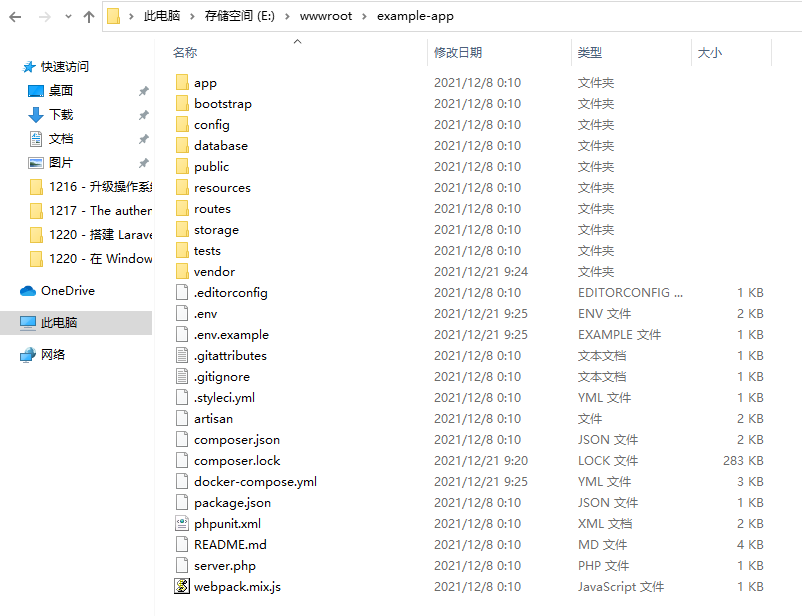
19. Open the E:\wwwroot\example-app directory. as shown in Figure 18
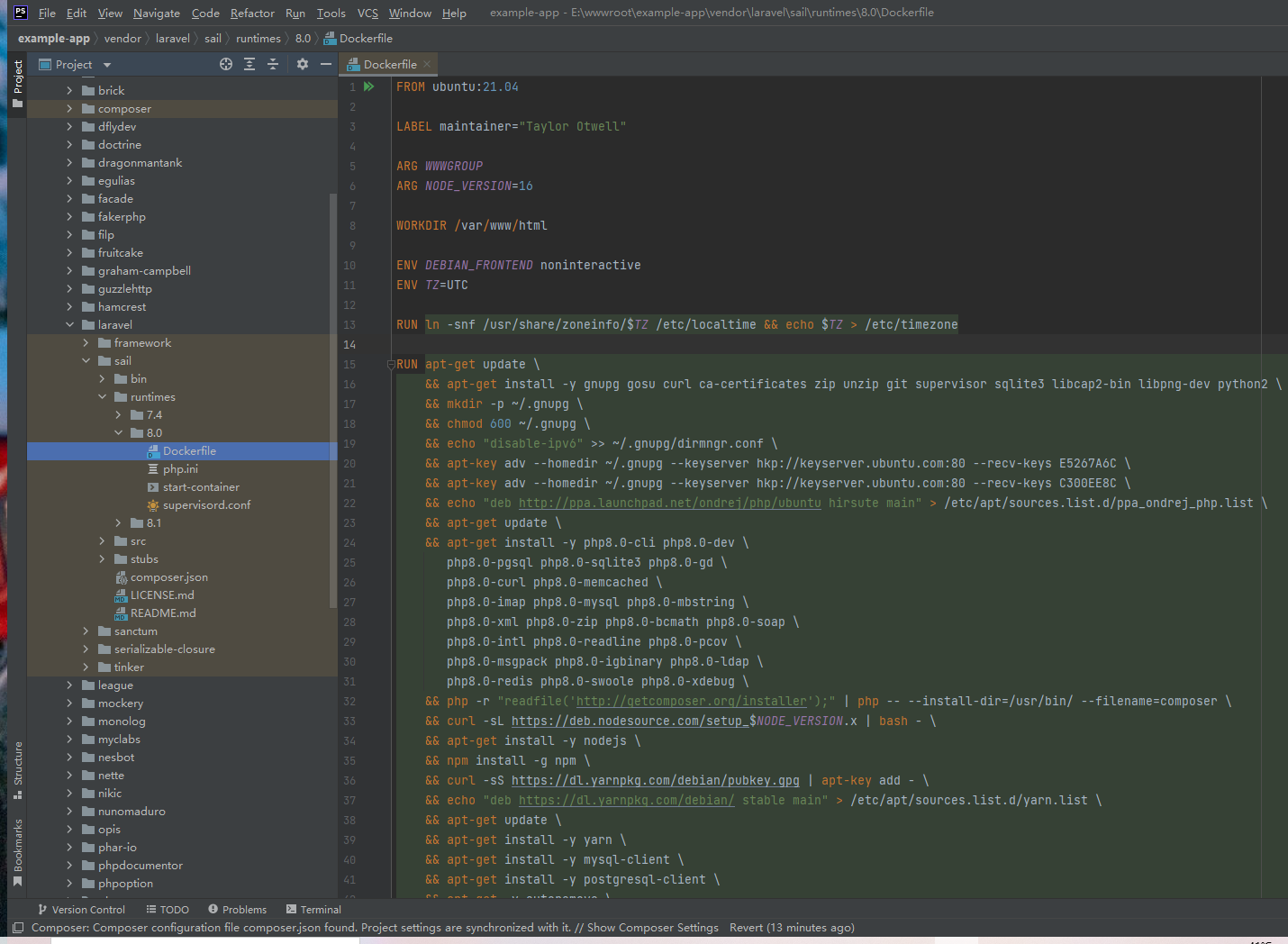
20. To view the Dockerfile file, Laravel 8 uses the Dockerfile under the vendor/Laravel/sail/runtimes/8.0 directory by default. as shown in Figure 19
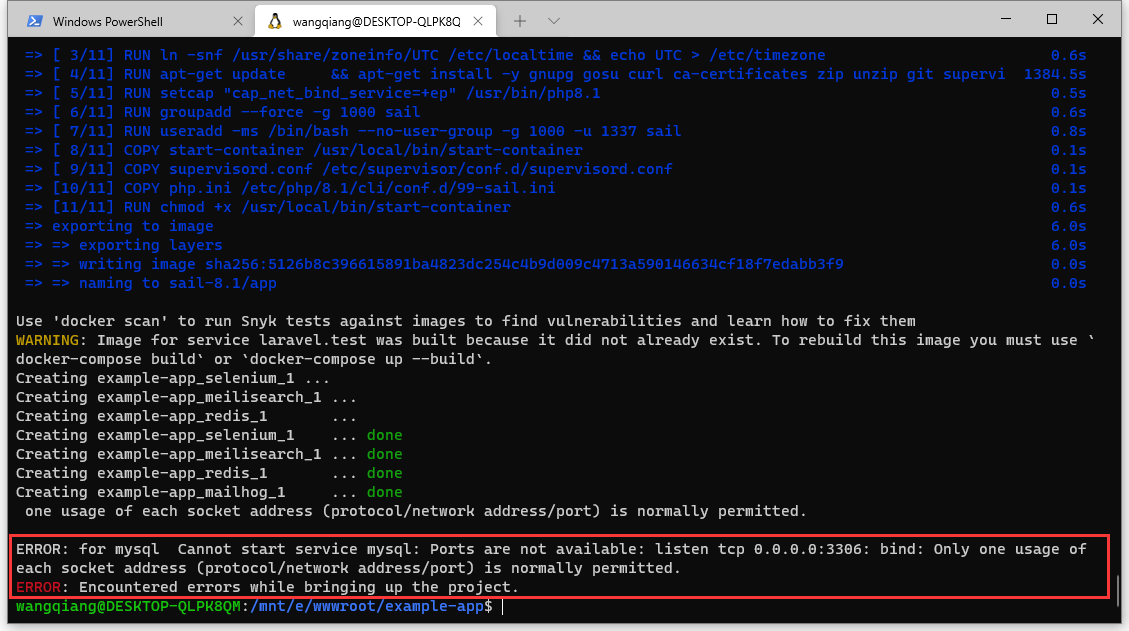
21. Run the container, and in the root directory of the project, execute the following command: ./vendor/bin/sail up. The first time it runs, the container is initialized. It is recommended to turn over the wall. I generally don’t tend to use domestic mirrors. report an error. As shown in Figure 20
Error: for mysql cannot start service mysql: ports are not available: listen tcp 0.0.0.0:3306: bind: only One usage of each socket address (protocol/network address/port) is normally permitted. Error: Encountered errors while bringing up the project.
22. The reason should be that the local MySQL database has used port 3306, and it is decided to first modify the port of the local MySQL database to 3307. Open the directory C:\ProgramData\MySQL\MySQL Server 5.7, and edit the my.ini file.
[client] # pipe # socket=0.0 port=3307 [mysqld] # the next three options are often excluded to server_port below. # skip-networking # enable-named-pipe # shared-memory # shared-memory-base-name=mysql # the pipe the mysql server will use # socket=mysql # The TCP/IP port the MySQL server will listen on port=3307
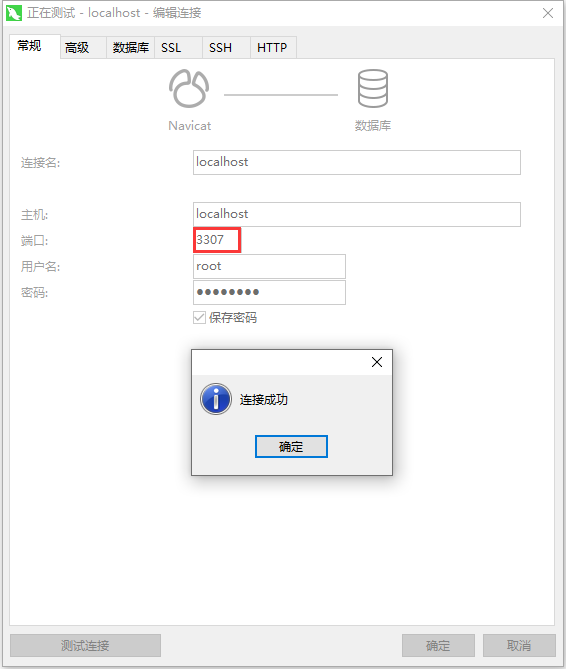
23. After restarting the computer, the connection to the local MySQL database is successful based on port 3307. as shown in Figure 21
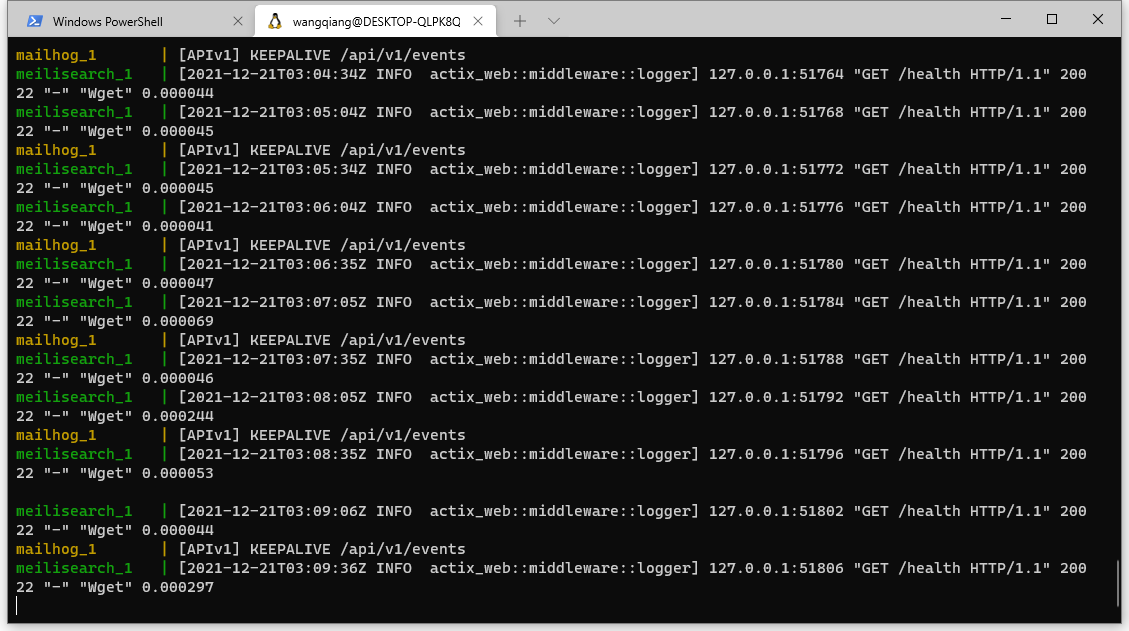
24. Run the command again: ./vendor/bin/sail up. It will start running from MySQL, and the total time it takes 20 minutes. After the Sail up command runs successfully, the real-time log interface of the software will always be displayed. Figure 22
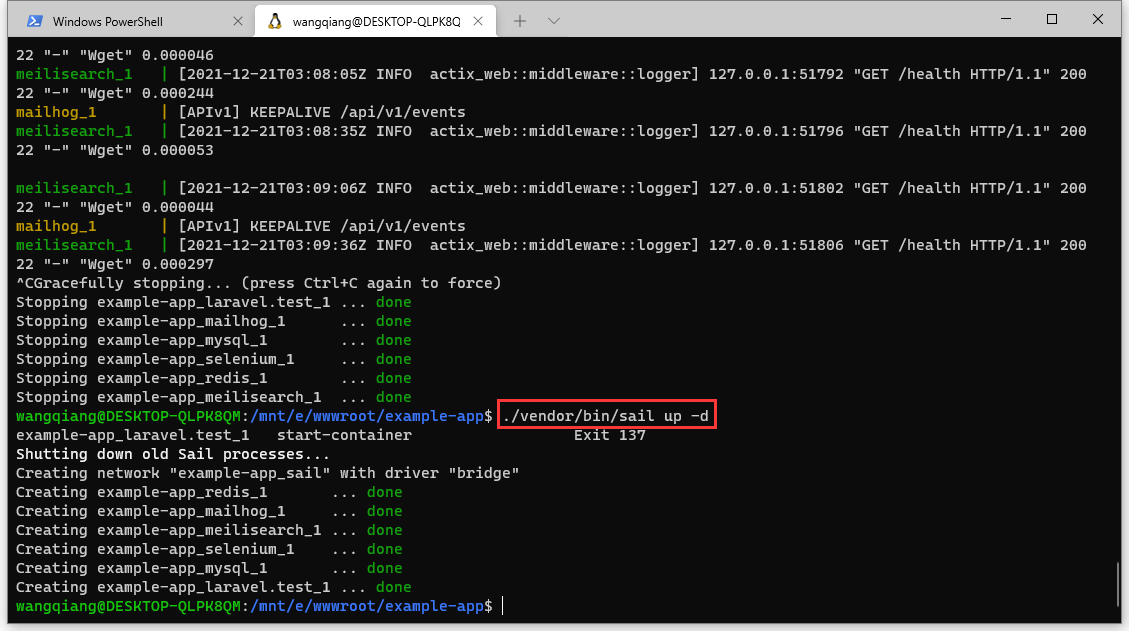
25. At this time, you can run Ctrl+C interrupts. When running again, you can use the -d parameter to make the Sail up command run in the background. Figure 23
meisearch_1 |[2021-12-21T03:09:36Z INFO actix_web::middleware::logger]127.0.0.1:51806 "Get /Health HTTP/1.1" 200 22 "-" "WGet" 0.000297 ^CGracefully Stopping... (Press Ctrl+C Again to Force) stopping example-app_laravel.test_1 ... done stopping example-app_mailhog_1 ... done stopping example-app_mysql_1 ... done stopping example-app_selenium_1 ... done Stopping example-app_redis_1 ... done Stopping example-app_meiliSearch_1 ... done wangqiang@desktop-qlpk8qm:/mnt/e/wwwroot/example-app$ ./vendor/bin/sail up -d example-app_laravel.test_1 start-container exit 137 Shutting Down Old Sail Processes... Creating network "example-app_sail" with driver "bridge" Creating example-app_redis_1 ... done Creating example-app_mailhog_1 ... done Creating example-app_meisearch_1 ... done Creating example-app_selenium_1 ... done Creating example-app_mysql_1 ... done Creating example-app_laravel.test_1 ... done wangqiang@desktop-qlpk8qm:/mnt/e/wwwroot/example-app$
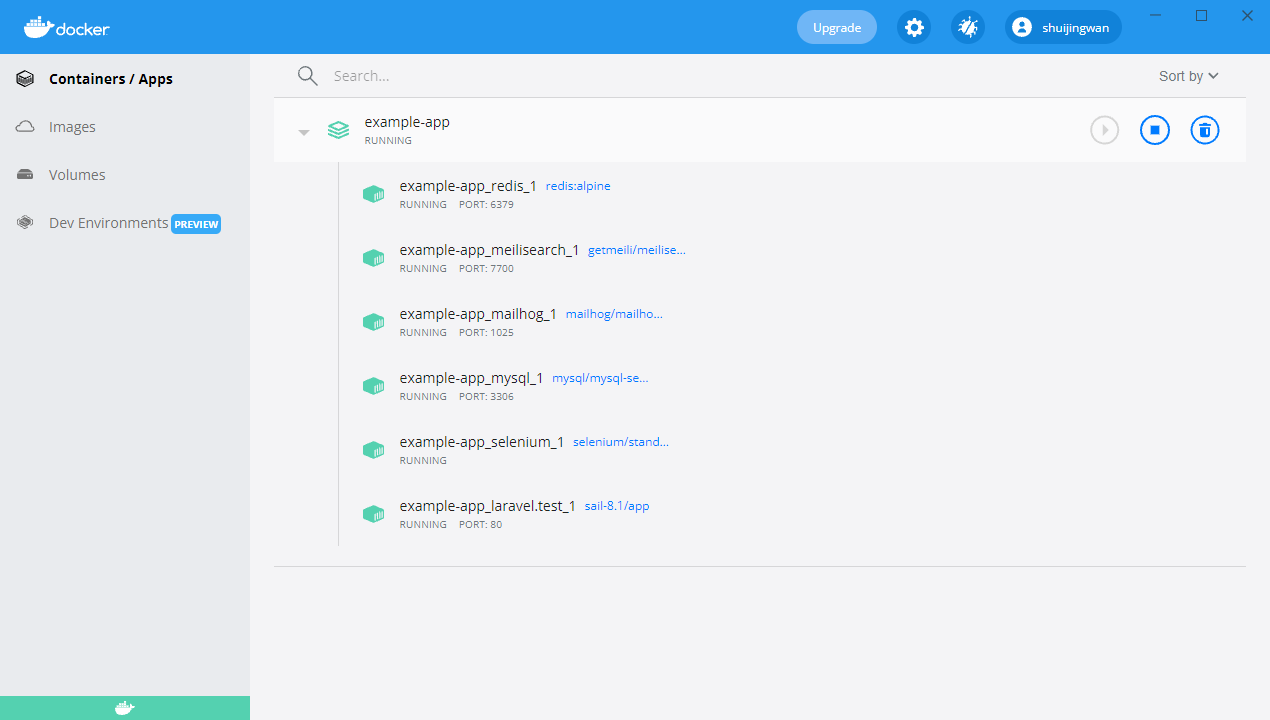
26. Open Docker Desktop, there is a container in the container list: example-app, and the status is running. Figure 24
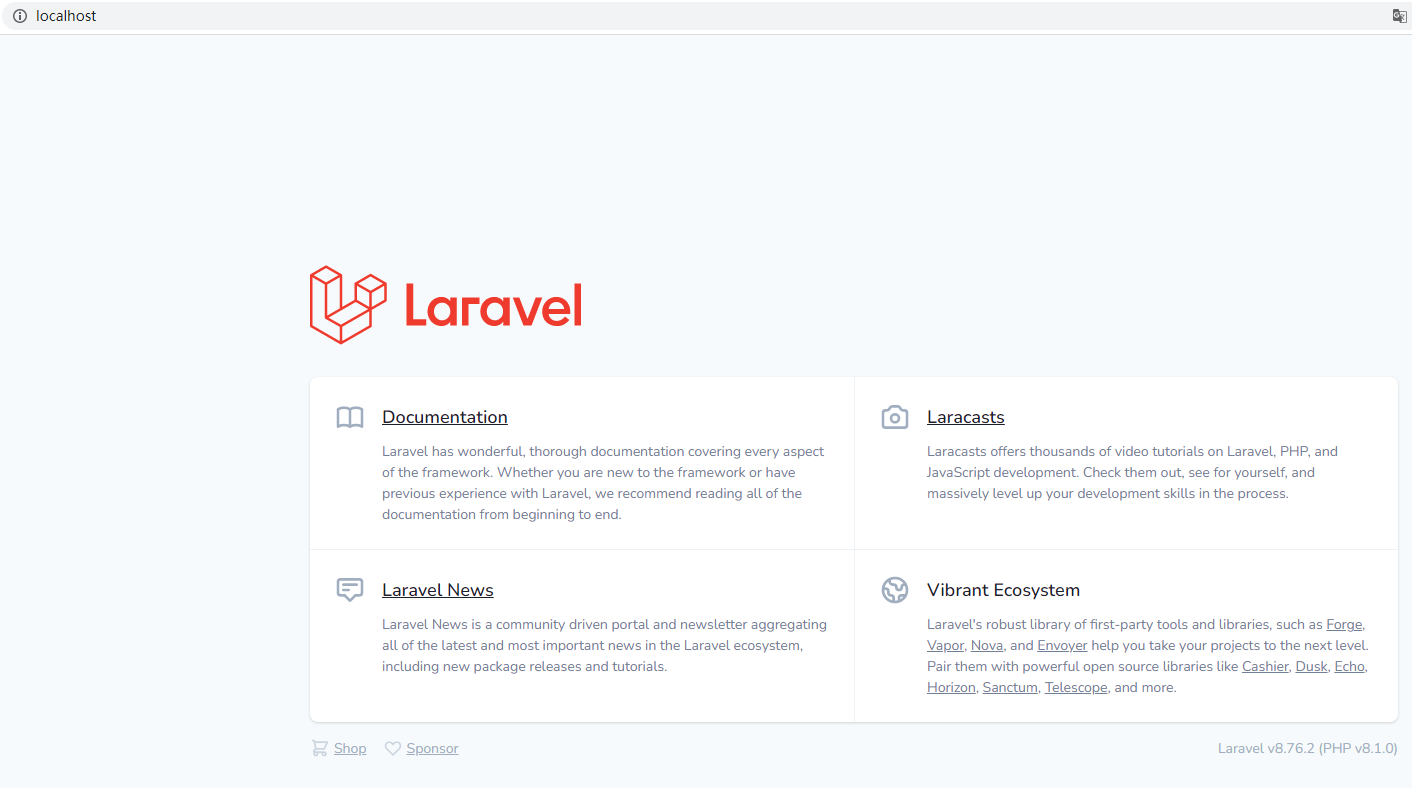
27. Open the URL in the browser: http://localhost/ , and the response is 200. Laravel v8.76.2 (PHP v8.1.0). The development environment is successfully deployed. as shown in Figure 25
28. In response to the problem of port 3306 being occupied, there is another solution, that is, the port of modifying the container is 43306. The local MySQL database still uses port 3306. The plan is subsequently implemented based on Nginx Proxy Manager.
29. Edit the C:/Windows/System32/drivers/etc/hosts file, and specify the mapping relationship between IP and domain name.
127.0.0.1 example-app.test
30. Open the URL in the browser: http://example-app.test/ . Response 200. Figure 26