In Laravel 6, after the model has applied soft deletion, the record is inserted again, and the resolution of the unique key conflict is solved
1. In Laravel 6, after the model applies soft deletion, the record is inserted again, and the unique key conflicts. as shown in Figure 1
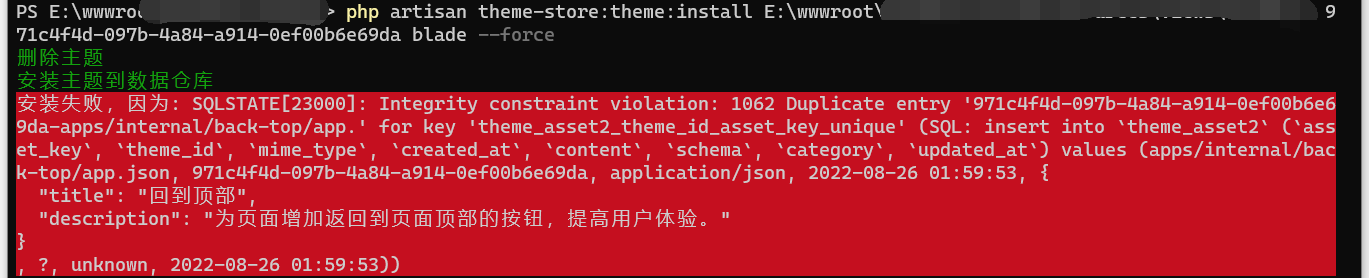
Figure 1
PS E:\wwwroot\object> php artisan theme-store:theme:install E:\wwwroot\object\resources\views\brooklyn 971c4f4d-097b-4a84-a914-0ef00b6e69da blade --force
删除主题
安装主题到数据仓库
安装失败,因为: SQLSTATE[23000]: Integrity constraint violation: 1062 Duplicate entry '971c4f4d-097b-4a84-a914-0ef00b6e69da-apps/internal/back-top/app.' for key 'theme_asset2_theme_id_asset_key_unique' (SQL: insert into `theme_asset2` (`asset_key`, `theme_id`, `mime_type`, `created_at`, `content`, `schema`, `category`, `updated_at`) values (apps/internal/back-top/app.json, 971c4f4d-097b-4a84-a914-0ef00b6e69da, application/json, 2022-08-26 01:59:53, {
  "title": "回到顶部",
  "description": "为页面增加返回到页面顶部的按钮,提高用户体验。"
}
, ?, unknown, 2022-08-26 01:59:53))
2. The reason is that after applying soft deletion, when you use the delete method on the model instance, the current date and time will be written to the deleted_at field. At the same time, the queried results will also automatically exclude records that have been soft deleted.
ThemeAsset::where('theme_id', $themeId)->delete();
3. Since the record is not hard deleted, a unique key conflict occurs when writing a new record.
4. The query results will automatically remove the results that have been soft deleted. Therefore, you need to use the withtrashed method to get the model including the soft delete model. Then use the ForceDelete method to permanently delete the soft deleted model from the database.
ThemeAsset::withTrashed()->where('theme_id', $themeId)->forceDelete();
5. The hard deletion of the record is successful, and the error will not be reported when inserting it again. as shown in Figure 2

Figure 2
![测试翻译结果,invalid image size hint: [flp8Ba0298w689] rid: 610a6969-72bb79c0-4b069755 已经被翻译为:invalid image size hint: [flp8Ba0298w689] rid: 610a6969-72bb79c0-4b069755。蓝框中是翻译前的英文信息,红框中是翻译后的中文信息。符合预期](https://www.shuijingwanwq.com/wp-content/uploads/2021/08/6-1-520x245.png)