
1. When running in the Shopify application: YARN DEV, an error is reported: Bundler version 2.3.7 is not supported. as shown in Figure 1
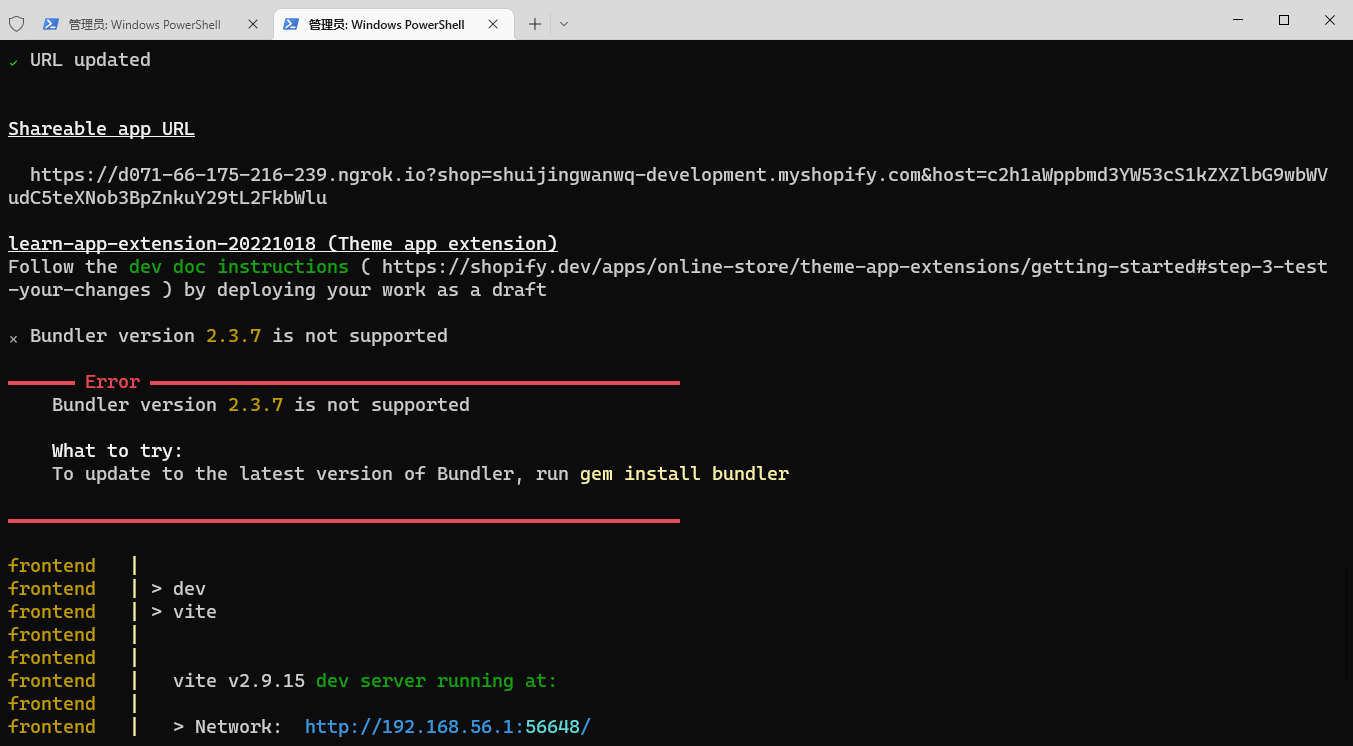
PS E:\wwwroot\shopify-app\learn-app> yarn dev YARN RUN v1.22.15 $ Shopify App Dev ✔ Dependencies installed To run this command, log in to Shopify Partners. 👉Press any key to open the login page on your browser Auto-open timed out.http://accounts.shopify.com/oauth/authorize?client_id=fbdb2649-e327-4907-8f67-908d24cfd7e3&scope=openid+https%3A%2F%2Fapi.shopify.com%2Fauth%2Fshop.admin.graphql+https%3A%2F%2Fapi.shopify.com%2Fauth%2Fshop.admin.themes+https%3A%2F%2Fapi.shopify.com%2Fauth%2Fpartners.collaborator-relationships.readonly+https%3A%2F%2Fapi.shopify.com%2Fauth%2Fshop.storefront-renderer.devtools+https%3A%2F%2Fapi.shopify.com%2Fauth%2Fpartners.app.cli.access&redirect_uri=http%3A%2F%2F127.0.0.1%3A3456&state=34c66755c0614e1bcedd680b643bcbf2e6fe237c653dac95dc43a7fb15e7&response_type=code&code_challenge_method=S256&code_challenge=lLJtne8D7cUPF437Ct2zttzSDSJV48mXJyuil-7GzrM) ✔ Logged in. Using your previous dev settings: - Org: Wang Qiang - app: learn-app - Dev Store: shuijingwanwq-development.myshopify.com - update urls: always To reset your default dev config, run yarn dev --reset ✅ Success! The tunnel is running and you can now view your app. ✔ URL updated Shareable app url https://d071-66-175-216-239.ngrok.io?shop=shuijingwanwq-development.myshopify.com&host=c2h1aWppbmd3YW53cS1kZXZlbG9wbWVudC5teXNob3BpZnkuY29tL2FkbWlu Learn-App-Extension-20221018 (Theme App Extension) follow the dev doc instructions (https://shopify.dev/apps/online-store/theme-app-extensions/getting-started#step-3-test-your-changes)By Deploying your work as a draft ✖ Bundler version 2.3.7 is not supported ━━━━━ Error ━━━━━━━━━━━━━━━━━━━━━━━━━━━━━━━━━━ Bundler version 2.3.7 is not supported What to try: To update to the latest version of bundler, run gem install bundler ━━━━━━━━━━━━━━━━━━━━━━━━━�� full━━━━━━━━━━━━━━━ frontend | frontend | > dev frontend | > vite frontend | frontend | Frontend | Vite v2.9.15 Dev Server running at: frontend | frontend | > network:http://192.168.56.1:56648/ frontend | > network:http://192.168.10.1:56648/ frontend | > network:http://192.168.89.86:56648/ frontend | > local:http://localhost:56648/ frontend | > network:http://172.17.176.1:56648/ frontend | Frontend | Ready in 1913ms. frontend | backend | > composer\config::disableProcessTimeout backend | > php artisan serve Error command failed with exit code 1. info visithttps://yarnpkg.com/en/docs/cli/runFor documentation about this command. PS e:\wwwroot\shopify-app\learn-app>
2. To update to the latest version of Bundler, run gem install bundler.
PS E:\wwwroot\shopify-app\learn-app> gem install bundler
fetching bundler-2.3.24.gem
Successfully installed bundler-2.3.24
Parsing documentation for bundler-2.3.24
Installing ri documentation for bundler-2.3.24
Done Installing Documentation for Bundler After 0 Seconds
1 gem installed
3. Run again: yarn dev, no more errors.
PS E:\wwwroot\shopify-app\learn-app> yarn dev YARN RUN v1.22.15 $ Shopify App Dev ✔ Dependencies installed Using your previous dev settings: - Org: Wang Qiang - app: learn-app - Dev Store: shuijingwanwq-development.myshopify.com - update urls: always To reset your default dev config, run yarn dev --reset ✅ Success! The tunnel is running and you can now view your app. ✔ URL updated Shareable app url https://2c8b-66-175-216-239.ngrok.io?shop=shuijingwanwq-development.myshopify.com&host=c2h1aWppbmd3YW53cS1kZXZlbG9wbWVudC5teXNob3BpZnkuY29tL2FkbWlu Learn-App-Extension-20221018 (Theme App Extension) follow the dev doc instructions (https://shopify.dev/apps/online-store/theme-app-extensions/getting-started#step-3-test-your-changes)By Deploying your work as a draft ⠧ Installing theme dependencies frontend | frontend | > dev frontend | > vite ⠦ Installing theme dependencies frontend | Frontend | Vite v2.9.15 Dev Server running at: frontend | frontend | > network:http://192.168.56.1:57181/ frontend | > network:http://192.168.10.1:57181/ frontend | > network:http://192.168.89.86:57181/ frontend | > local:http://localhost:57181/ frontend | > network:http://172.17.176.1:57181/ frontend | Frontend | Ready in 840ms. ⠧ Installing theme dependencies backend | > composer\config::disableProcessTimeout ⠸ Installing theme dependencies ⠦ Installing theme dependencies ✔ Installing theme Dependencies ┏━━Pushing Theme Files to App Ext. Host (287916-desktop-qlpk8qm) (#133112823993) on shuijingwanwq-development.myshopify.com ┃ 100% ┗━━━━━━━━━━━━━━━━━━━━━━━━━━━━━━━━━━━━━━━━━━━━━━━━━━━━━━━━━━━━━━━━━━━ (42.0s) ━━━ [Note]You cannot use gems with Shopify cli. [LoadError]Cannot load such file -- WDM They are disabled. please donT modify the cli locally. If you would like to contribute to the CLI project, please refer to https://github.com/Shopify/shopify-cli/blob/main/.github/CONTRIBUTING.md Please add the following to your gemfile to avoid polling for changes: gemWDM,>= 0.1.0if gem.win_platform? ┏━━ Viewing extension… ━━━━━━━━━━━━━━━━━━━━━━━━━━━━━━━━━━━━━━ ┃ Enable your theme app extension: ┃https://partners.shopify.com/2442779/apps/12958171137/extensions/theme_app_extension/17515347969 ┃ ┃ Setup your theme app extension in the host theme: ┃https://shuijingwanwq-development.myshopify.com/admin/themes/133112823993/editor ┃ ┃ Preview your theme app extension: ┃http://127.0.0.1:9292 ┃ ┃ (use ctrl-c to stop) ┗━━━━━━━━━━━━━━━━━━━━━━━ ━━━━━━━━━━━━━━━━━━━━━━━━ (0.0s) ━━━
Need long-term technical maintenance or remote troubleshooting?
I am a PHP / Go backend engineer with 15+ years of experience, focused on existing system maintenance, bug fixing, performance optimization, server troubleshooting, WordPress maintenance, and small feature iterations.
If your project is facing any of the following issues, we can start with a small troubleshooting task first:
- ✅ PHP / Laravel / Yii2 legacy systems without active maintenance
- ✅ Go / Gin backend APIs that need troubleshooting or optimization
- ✅ Slow, broken, or unstable WordPress websites
- ✅ Nginx / MySQL / Redis / Linux server issues
- ✅ CDN / Cloudflare / DNS / HTTPS configuration problems
- ✅ Long-term remote technical support or part-time maintenance
More details: About Me & Collaboration
WeChat: 13980074657
Email: shuijingwanwq@gmail.com
Telegram: @shuijingwan
GitHub: https://github.com/shuijingwan
Leave a Reply