
1. Reference:Install Shopify CLI 3.0 (based on Node.js) in Windows 10 Professional, check in advance whether the corresponding requirements are met .
2. Reference:The requirements in Linux are as follows
Node.js 16 or higher
Ruby 3.0
Ruby development environment (ruby-dev / ruby-devel)
Git
cURL
GCC
g++
Make
3. Node.js is not installed, refer to:Installation . Installation failed.
wangqiang@DESKTOP-QLPK8QM:/mnt/e/wwwroot/shopify-app$ node -v

Command 'node' not found, but can be installed with:

sudo apt install nodejs

wangqiang@DESKTOP-QLPK8QM:/mnt/e/wwwroot/shopify-app$ sudo apt-get install -y nodejs
Reading package lists... Done
Building dependency tree
Reading state information... Done
The following additional packages will be installed:
libc-ares2 libnode64 nodejs-doc
Suggested packages:
npm
The following NEW packages will be installed:
libc-ares2 libnode64 nodejs nodejs-doc
0 upgraded, 4 newly installed, 0 to remove and 93 not upgraded.
Need to get 38.2 kB/6807 kB of archives.
After this operation, 30.7 MB of additional disk space will be used.
Ign:1 http://archive.ubuntu.com/ubuntu focal-updates/main amd64 libc-ares2 amd64 1.15.0-1ubuntu0.1
Err:1 http://security.ubuntu.com/ubuntu focal-updates/main amd64 libc-ares2 amd64 1.15.0-1ubuntu0.1
404 Not Found [IP: 185.125.190.39 80]
E: Failed to fetch http://security.ubuntu.com/ubuntu/pool/main/c/c-ares/libc-ares2_1.15.0-1ubuntu0.1_amd64.deb 404 Not Found [IP: 185.125.190.39 80]
E: Unable to fetch some archives, maybe run apt-get update or try with --fix-missing?
4. Execute the command: sudo apt-get update
wangqiang@DESKTOP-QLPK8QM:/mnt/e/wwwroot/shopify-app$ apt-get update
Reading package lists... Done
E: Could not open lock file /var/lib/apt/lists/lock - open (13: Permission denied)
E: Unable to lock directory /var/lib/apt/lists/
W: Problem unlinking the file /var/cache/apt/pkgcache.bin - RemoveCaches (13: Permission denied)
W: Problem unlinking the file /var/cache/apt/srcpkgcache.bin - RemoveCaches (13: Permission denied)
wangqiang@DESKTOP-QLPK8QM:/mnt/e/wwwroot/shopify-app$ sudo apt-get update
Get:1 http://security.ubuntu.com/ubuntu focal-security InRelease [114 kB]
Hit:2 http://archive.ubuntu.com/ubuntu focal InRelease
Get:3 http://archive.ubuntu.com/ubuntu focal-updates InRelease [114 kB]
Get:4 http://archive.ubuntu.com/ubuntu focal-backports InRelease [108 kB]
Get:5 http://security.ubuntu.com/ubuntu focal-security/main amd64 Packages [2192 kB]
Get:6 http://archive.ubuntu.com/ubuntu focal-updates/main amd64 Packages [2573 kB]
Get:7 http://archive.ubuntu.com/ubuntu focal-updates/main Translation-en [435 kB]
Get:8 http://archive.ubuntu.com/ubuntu focal-updates/main amd64 c-n-f Metadata [16.6 kB]
Get:9 http://archive.ubuntu.com/ubuntu focal-updates/restricted amd64 Packages [1882 kB]
Get:10 http://security.ubuntu.com/ubuntu focal-security/main Translation-en [354 kB]
Get:11 http://archive.ubuntu.com/ubuntu focal-updates/restricted Translation-en [264 kB]
Get:12 http://archive.ubuntu.com/ubuntu focal-updates/restricted amd64 c-n-f Metadata [636 B]
Get:13 http://archive.ubuntu.com/ubuntu focal-updates/universe amd64 Packages [1064 kB]
Get:14 http://security.ubuntu.com/ubuntu focal-security/main amd64 c-n-f Metadata [13.0 kB]
Get:15 http://archive.ubuntu.com/ubuntu focal-updates/universe Translation-en [253 kB]
Get:16 http://security.ubuntu.com/ubuntu focal-security/restricted amd64 Packages [1770 kB]
Get:17 http://archive.ubuntu.com/ubuntu focal-updates/universe amd64 c-n-f Metadata [24.3 kB]
Get:18 http://archive.ubuntu.com/ubuntu focal-updates/multiverse amd64 Packages [25.2 kB]
Get:19 http://archive.ubuntu.com/ubuntu focal-updates/multiverse Translation-en [7408 B]
Get:20 http://archive.ubuntu.com/ubuntu focal-updates/multiverse amd64 c-n-f Metadata [612 B]
Get:21 http://security.ubuntu.com/ubuntu focal-security/restricted Translation-en [249 kB]
Get:22 http://archive.ubuntu.com/ubuntu focal-backports/main amd64 Packages [45.7 kB]
Get:23 http://security.ubuntu.com/ubuntu focal-security/restricted amd64 c-n-f Metadata [640 B]
Get:24 http://security.ubuntu.com/ubuntu focal-security/universe amd64 Packages [839 kB]
Get:25 http://archive.ubuntu.com/ubuntu focal-backports/main Translation-en [16.3 kB]
Get:26 http://security.ubuntu.com/ubuntu focal-security/universe Translation-en [173 kB]
Get:27 http://archive.ubuntu.com/ubuntu focal-backports/main amd64 c-n-f Metadata [1420 B]
Get:28 http://security.ubuntu.com/ubuntu focal-security/universe amd64 c-n-f Metadata [17.8 kB]
Get:29 http://archive.ubuntu.com/ubuntu focal-backports/universe amd64 Packages [25.0 kB]
Get:30 http://security.ubuntu.com/ubuntu focal-security/multiverse amd64 Packages [22.9 kB]
Get:31 http://archive.ubuntu.com/ubuntu focal-backports/universe Translation-en [16.3 kB]
Get:32 http://security.ubuntu.com/ubuntu focal-security/multiverse Translation-en [5488 B]
Get:33 http://archive.ubuntu.com/ubuntu focal-backports/universe amd64 c-n-f Metadata [880 B]
Get:34 http://security.ubuntu.com/ubuntu focal-security/multiverse amd64 c-n-f Metadata [540 B]
Fetched 12.6 MB in 21s (595 kB/s)
Reading package lists... Done
5. Execute the command again: sudo apt-get install -y nodejs, the installation is successful. The version of Node.js is: v10.19.0, below 16. Does not meet the requirements.
wangqiang@DESKTOP-QLPK8QM:/mnt/e/wwwroot/shopify-app$ sudo apt-get install -y nodejs
Reading package lists... Done
Building dependency tree
Reading state information... Done
The following additional packages will be installed:
libc-ares2 libnode64 nodejs-doc
Suggested packages:
npm
The following NEW packages will be installed:
libc-ares2 libnode64 nodejs nodejs-doc
0 upgraded, 4 newly installed, 0 to remove and 248 not upgraded.
Need to get 36.7 kB/6805 kB of archives.
After this operation, 30.7 MB of additional disk space will be used.
Get:1 http://archive.ubuntu.com/ubuntu focal-updates/main amd64 libc-ares2 amd64 1.15.0-1ubuntu0.2 [36.7 kB]
Fetched 36.7 kB in 2s (21.7 kB/s)
Selecting previously unselected package libc-ares2:amd64.
(Reading database ... 32378 files and directories currently installed.)
Preparing to unpack .../libc-ares2_1.15.0-1ubuntu0.2_amd64.deb ...
Unpacking libc-ares2:amd64 (1.15.0-1ubuntu0.2) ...
Selecting previously unselected package libnode64:amd64.
Preparing to unpack .../libnode64_10.19.0~dfsg-3ubuntu1_amd64.deb ...
Unpacking libnode64:amd64 (10.19.0~dfsg-3ubuntu1) ...
Selecting previously unselected package nodejs-doc.
Preparing to unpack .../nodejs-doc_10.19.0~dfsg-3ubuntu1_all.deb ...
Unpacking nodejs-doc (10.19.0~dfsg-3ubuntu1) ...
Selecting previously unselected package nodejs.
Preparing to unpack .../nodejs_10.19.0~dfsg-3ubuntu1_amd64.deb ...
Unpacking nodejs (10.19.0~dfsg-3ubuntu1) ...
Setting up libc-ares2:amd64 (1.15.0-1ubuntu0.2) ...
Setting up libnode64:amd64 (10.19.0~dfsg-3ubuntu1) ...
Setting up nodejs-doc (10.19.0~dfsg-3ubuntu1) ...
Setting up nodejs (10.19.0~dfsg-3ubuntu1) ...
update-alternatives: using /usr/bin/nodejs to provide /usr/bin/js (js) in auto mode
Processing triggers for libc-bin (2.31-0ubuntu9.2) ...
/sbin/ldconfig.real: /usr/lib/wsl/lib/libcuda.so.1 is not a symbolic link

Processing triggers for man-db (2.9.1-1) ...
wangqiang@DESKTOP-QLPK8QM:/mnt/e/wwwroot/shopify-app$ node -v
v10.19.0
wangqiang@DESKTOP-QLPK8QM:/mnt/e/wwwroot/shopify-app$
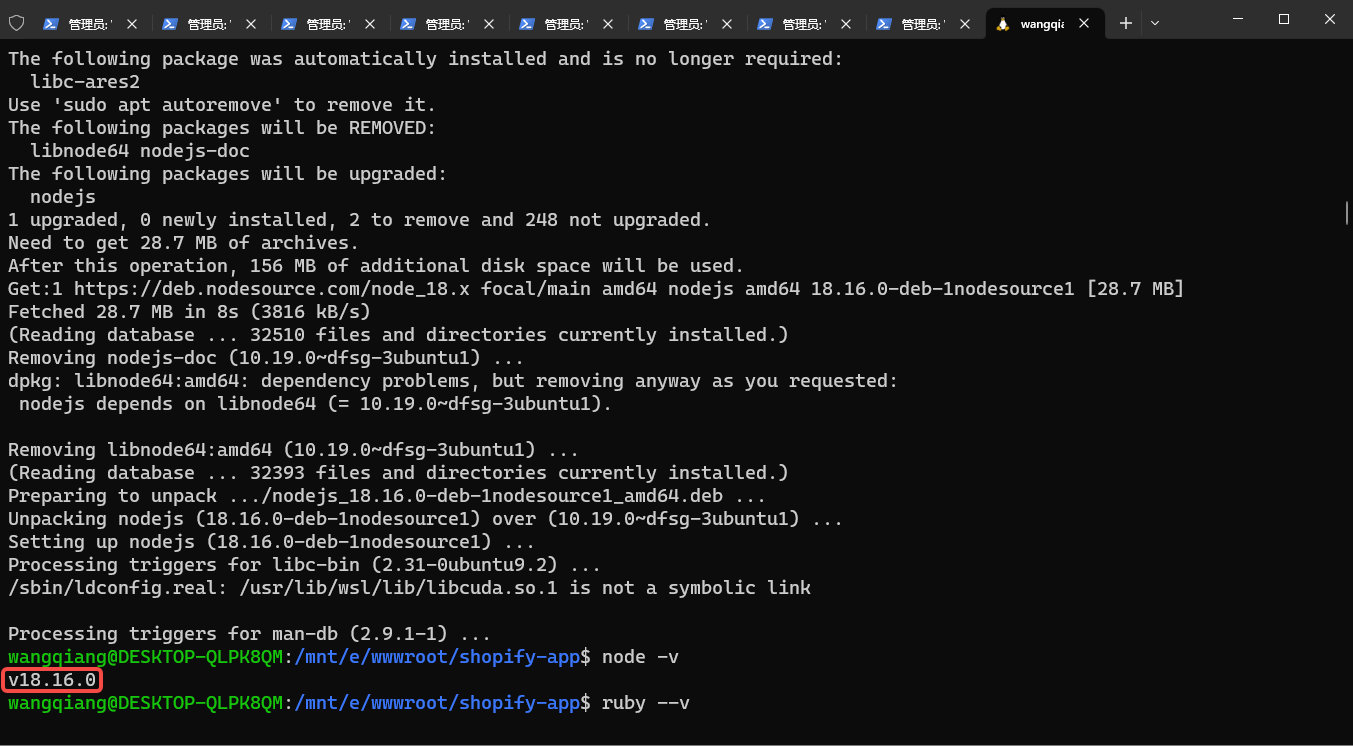
6. Reference:Update to Node.js v18.x. The version of Node.js is: v18.16.0, above 16. meet the requirements. as shown in Figure 1
wangqiang@DESKTOP-QLPK8QM:/mnt/e/wwwroot/shopify-app$ curl -fsSL https://deb.nodesource.com/setup_18.x | sudo -E bash - &&\
> sudo apt-get install -y nodejs

## Installing the NodeSource Node.js 18.x repo...

## Populating apt-get cache...

+ apt-get update
Hit:1 http://security.ubuntu.com/ubuntu focal-security InRelease
Hit:2 http://archive.ubuntu.com/ubuntu focal InRelease
Hit:3 http://archive.ubuntu.com/ubuntu focal-updates InRelease
Hit:4 http://archive.ubuntu.com/ubuntu focal-backports InRelease
Reading package lists... Done

## Confirming "focal" is supported...

+ curl -sLf -o /dev/null 'https://deb.nodesource.com/node_18.x/dists/focal/Release'

## Adding the NodeSource signing key to your keyring...

+ curl -s https://deb.nodesource.com/gpgkey/nodesource.gpg.key | gpg --dearmor | tee /usr/share/keyrings/nodesource.gpg >/dev/null

## Creating apt sources list file for the NodeSource Node.js 18.x repo...

+ echo 'deb [signed-by=/usr/share/keyrings/nodesource.gpg] https://deb.nodesource.com/node_18.x focal main' > /etc/apt/sources.list.d/nodesource.list
+ echo 'deb-src [signed-by=/usr/share/keyrings/nodesource.gpg] https://deb.nodesource.com/node_18.x focal main' >> /etc/apt/sources.list.d/nodesource.list

## Running `apt-get update` for you...

+ apt-get update
Hit:1 http://security.ubuntu.com/ubuntu focal-security InRelease
Hit:2 http://archive.ubuntu.com/ubuntu focal InRelease
Hit:3 http://archive.ubuntu.com/ubuntu focal-updates InRelease
Hit:4 http://archive.ubuntu.com/ubuntu focal-backports InRelease
Get:5 https://deb.nodesource.com/node_18.x focal InRelease [4583 B]
Get:6 https://deb.nodesource.com/node_18.x focal/main amd64 Packages [776 B]
Fetched 5359 B in 4s (1459 B/s)
Reading package lists... Done

## Run `sudo apt-get install -y nodejs` to install Node.js 18.x and npm
## You may also need development tools to build native addons:
sudo apt-get install gcc g++ make
## To install the Yarn package manager, run:
curl -sL https://dl.yarnpkg.com/debian/pubkey.gpg | gpg --dearmor | sudo tee /usr/share/keyrings/yarnkey.gpg >/dev/null
echo "deb [signed-by=/usr/share/keyrings/yarnkey.gpg] https://dl.yarnpkg.com/debian stable main" | sudo tee /etc/apt/sources.list.d/yarn.list
sudo apt-get update && sudo apt-get install yarn

Reading package lists... Done
Building dependency tree
Reading state information... Done
The following package was automatically installed and is no longer required:
libc-ares2
Use 'sudo apt autoremove' to remove it.
The following packages will be REMOVED:
libnode64 nodejs-doc
The following packages will be upgraded:
nodejs
1 upgraded, 0 newly installed, 2 to remove and 248 not upgraded.
Need to get 28.7 MB of archives.
After this operation, 156 MB of additional disk space will be used.
Get:1 https://deb.nodesource.com/node_18.x focal/main amd64 nodejs amd64 18.16.0-deb-1nodesource1 [28.7 MB]
Fetched 28.7 MB in 8s (3816 kB/s)
(Reading database ... 32510 files and directories currently installed.)
Removing nodejs-doc (10.19.0~dfsg-3ubuntu1) ...
dpkg: libnode64:amd64: dependency problems, but removing anyway as you requested:
nodejs depends on libnode64 (= 10.19.0~dfsg-3ubuntu1).

Removing libnode64:amd64 (10.19.0~dfsg-3ubuntu1) ...
(Reading database ... 32393 files and directories currently installed.)
Preparing to unpack .../nodejs_18.16.0-deb-1nodesource1_amd64.deb ...
Unpacking nodejs (18.16.0-deb-1nodesource1) over (10.19.0~dfsg-3ubuntu1) ...
Setting up nodejs (18.16.0-deb-1nodesource1) ...
Processing triggers for libc-bin (2.31-0ubuntu9.2) ...
/sbin/ldconfig.real: /usr/lib/wsl/lib/libcuda.so.1 is not a symbolic link

Processing triggers for man-db (2.9.1-1) ...
wangqiang@DESKTOP-QLPK8QM:/mnt/e/wwwroot/shopify-app$ node -v
v18.16.0
wangqiang@DESKTOP-QLPK8QM:/mnt/e/wwwroot/shopify-app$
7. Ruby is not installed, the installed version is: Ruby 2.7.0p0, which is lower than 3.0, which does not meet the requirements.
wangqiang@DESKTOP-QLPK8QM:/mnt/e/wwwroot/shopify-app$ sudo apt-get install ruby-full
Reading package lists... Done
Building dependency tree
Reading state information... Done
The following package was automatically installed and is no longer required:
libc-ares2
Use 'sudo apt autoremove' to remove it.
The following additional packages will be installed:
fonts-lato javascript-common libgmp-dev libgmp10 libgmpxx4ldbl libjs-jquery libruby2.7 rake ri ruby ruby-dev
ruby-minitest ruby-net-telnet ruby-power-assert ruby-test-unit ruby-xmlrpc ruby2.7 ruby2.7-dev ruby2.7-doc
rubygems-integration unzip zip
Suggested packages:
apache2 | lighttpd | httpd gmp-doc libgmp10-doc libmpfr-dev bundler
The following NEW packages will be installed:
fonts-lato javascript-common libgmp-dev libgmpxx4ldbl libjs-jquery libruby2.7 rake ri ruby ruby-dev ruby-full
ruby-minitest ruby-net-telnet ruby-power-assert ruby-test-unit ruby-xmlrpc ruby2.7 ruby2.7-dev ruby2.7-doc
rubygems-integration unzip zip
The following packages will be upgraded:
libgmp10
1 upgraded, 22 newly installed, 0 to remove and 247 not upgraded.
Need to get 10.2 MB of archives.
After this operation, 58.9 MB of additional disk space will be used.
Do you want to continue? [Y/n] Y
Get:1 http://archive.ubuntu.com/ubuntu focal/main amd64 fonts-lato all 2.0-2 [2698 kB]
Get:2 http://archive.ubuntu.com/ubuntu focal-updates/main amd64 libgmp10 amd64 2:6.2.0+dfsg-4ubuntu0.1 [241 kB]
Get:3 http://archive.ubuntu.com/ubuntu focal/main amd64 javascript-common all 11 [6066 B]
Get:4 http://archive.ubuntu.com/ubuntu focal-updates/main amd64 libgmpxx4ldbl amd64 2:6.2.0+dfsg-4ubuntu0.1 [9144 B]
Get:5 http://archive.ubuntu.com/ubuntu focal-updates/main amd64 libgmp-dev amd64 2:6.2.0+dfsg-4ubuntu0.1 [320 kB]
Get:6 http://archive.ubuntu.com/ubuntu focal/main amd64 libjs-jquery all 3.3.1~dfsg-3 [329 kB]
Get:7 http://archive.ubuntu.com/ubuntu focal/main amd64 rubygems-integration all 1.16 [5092 B]
Get:8 http://archive.ubuntu.com/ubuntu focal-updates/main amd64 ruby2.7 amd64 2.7.0-5ubuntu1.11 [95.6 kB]
Get:9 http://archive.ubuntu.com/ubuntu focal/main amd64 ruby amd64 1:2.7+1 [5412 B]
Get:10 http://archive.ubuntu.com/ubuntu focal/main amd64 rake all 13.0.1-4 [61.6 kB]
Get:11 http://archive.ubuntu.com/ubuntu focal/main amd64 ruby-minitest all 5.13.0-1 [40.9 kB]
Get:12 http://archive.ubuntu.com/ubuntu focal/main amd64 ruby-net-telnet all 0.1.1-2 [12.6 kB]
Get:13 http://archive.ubuntu.com/ubuntu focal/main amd64 ruby-power-assert all 1.1.7-1 [11.4 kB]
Get:14 http://archive.ubuntu.com/ubuntu focal/main amd64 ruby-test-unit all 3.3.5-1 [73.2 kB]
Get:15 http://archive.ubuntu.com/ubuntu focal/main amd64 ruby-xmlrpc all 0.3.0-2 [23.8 kB]
Get:16 http://archive.ubuntu.com/ubuntu focal-updates/main amd64 libruby2.7 amd64 2.7.0-5ubuntu1.11 [3533 kB]
Get:17 http://archive.ubuntu.com/ubuntu focal-updates/main amd64 ruby2.7-doc all 2.7.0-5ubuntu1.11 [2160 kB]
Get:18 http://archive.ubuntu.com/ubuntu focal/universe amd64 ri all 1:2.7+1 [4520 B]
Get:19 http://archive.ubuntu.com/ubuntu focal-updates/main amd64 ruby2.7-dev amd64 2.7.0-5ubuntu1.11 [182 kB]
Get:20 http://archive.ubuntu.com/ubuntu focal/main amd64 ruby-dev amd64 1:2.7+1 [4632 B]
Get:21 http://archive.ubuntu.com/ubuntu focal/universe amd64 ruby-full all 1:2.7+1 [2728 B]
Get:22 http://archive.ubuntu.com/ubuntu focal-updates/main amd64 unzip amd64 6.0-25ubuntu1.1 [168 kB]
Get:23 http://archive.ubuntu.com/ubuntu focal/main amd64 zip amd64 3.0-11build1 [167 kB]
Fetched 10.2 MB in 16s (643 kB/s)
Selecting previously unselected package fonts-lato.
(Reading database ... 37931 files and directories currently installed.)
Preparing to unpack .../fonts-lato_2.0-2_all.deb ...
Unpacking fonts-lato (2.0-2) ...
Preparing to unpack .../libgmp10_2%3a6.2.0+dfsg-4ubuntu0.1_amd64.deb ...
Unpacking libgmp10:amd64 (2:6.2.0+dfsg-4ubuntu0.1) over (2:6.2.0+dfsg-4) ...
Setting up libgmp10:amd64 (2:6.2.0+dfsg-4ubuntu0.1) ...
Selecting previously unselected package javascript-common.
(Reading database ... 37954 files and directories currently installed.)
Preparing to unpack .../00-javascript-common_11_all.deb ...
Unpacking javascript-common (11) ...
Selecting previously unselected package libgmpxx4ldbl:amd64.
Preparing to unpack .../01-libgmpxx4ldbl_2%3a6.2.0+dfsg-4ubuntu0.1_amd64.deb ...
Unpacking libgmpxx4ldbl:amd64 (2:6.2.0+dfsg-4ubuntu0.1) ...
Selecting previously unselected package libgmp-dev:amd64.
Preparing to unpack .../02-libgmp-dev_2%3a6.2.0+dfsg-4ubuntu0.1_amd64.deb ...
Unpacking libgmp-dev:amd64 (2:6.2.0+dfsg-4ubuntu0.1) ...
Selecting previously unselected package libjs-jquery.
Preparing to unpack .../03-libjs-jquery_3.3.1~dfsg-3_all.deb ...
Unpacking libjs-jquery (3.3.1~dfsg-3) ...
Selecting previously unselected package rubygems-integration.
Preparing to unpack .../04-rubygems-integration_1.16_all.deb ...
Unpacking rubygems-integration (1.16) ...
Selecting previously unselected package ruby2.7.
Preparing to unpack .../05-ruby2.7_2.7.0-5ubuntu1.11_amd64.deb ...
Unpacking ruby2.7 (2.7.0-5ubuntu1.11) ...
Selecting previously unselected package ruby.
Preparing to unpack .../06-ruby_1%3a2.7+1_amd64.deb ...
Unpacking ruby (1:2.7+1) ...
Selecting previously unselected package rake.
Preparing to unpack .../07-rake_13.0.1-4_all.deb ...
Unpacking rake (13.0.1-4) ...
Selecting previously unselected package ruby-minitest.
Preparing to unpack .../08-ruby-minitest_5.13.0-1_all.deb ...
Unpacking ruby-minitest (5.13.0-1) ...
Selecting previously unselected package ruby-net-telnet.
Preparing to unpack .../09-ruby-net-telnet_0.1.1-2_all.deb ...
Unpacking ruby-net-telnet (0.1.1-2) ...
Selecting previously unselected package ruby-power-assert.
Preparing to unpack .../10-ruby-power-assert_1.1.7-1_all.deb ...
Unpacking ruby-power-assert (1.1.7-1) ...
Selecting previously unselected package ruby-test-unit.
Preparing to unpack .../11-ruby-test-unit_3.3.5-1_all.deb ...
Unpacking ruby-test-unit (3.3.5-1) ...
Selecting previously unselected package ruby-xmlrpc.
Preparing to unpack .../12-ruby-xmlrpc_0.3.0-2_all.deb ...
Unpacking ruby-xmlrpc (0.3.0-2) ...
Selecting previously unselected package libruby2.7:amd64.
Preparing to unpack .../13-libruby2.7_2.7.0-5ubuntu1.11_amd64.deb ...
Unpacking libruby2.7:amd64 (2.7.0-5ubuntu1.11) ...
Selecting previously unselected package ruby2.7-doc.
Preparing to unpack .../14-ruby2.7-doc_2.7.0-5ubuntu1.11_all.deb ...
Unpacking ruby2.7-doc (2.7.0-5ubuntu1.11) ...
Selecting previously unselected package ri.
Preparing to unpack .../15-ri_1%3a2.7+1_all.deb ...
Unpacking ri (1:2.7+1) ...
Selecting previously unselected package ruby2.7-dev:amd64.
Preparing to unpack .../16-ruby2.7-dev_2.7.0-5ubuntu1.11_amd64.deb ...
Unpacking ruby2.7-dev:amd64 (2.7.0-5ubuntu1.11) ...
Selecting previously unselected package ruby-dev:amd64.
Preparing to unpack .../17-ruby-dev_1%3a2.7+1_amd64.deb ...
Unpacking ruby-dev:amd64 (1:2.7+1) ...
Selecting previously unselected package ruby-full.
Preparing to unpack .../18-ruby-full_1%3a2.7+1_all.deb ...
Unpacking ruby-full (1:2.7+1) ...
Selecting previously unselected package unzip.
Preparing to unpack .../19-unzip_6.0-25ubuntu1.1_amd64.deb ...
Unpacking unzip (6.0-25ubuntu1.1) ...
Selecting previously unselected package zip.
Preparing to unpack .../20-zip_3.0-11build1_amd64.deb ...
Unpacking zip (3.0-11build1) ...
Setting up javascript-common (11) ...
Setting up fonts-lato (2.0-2) ...
Setting up ruby-power-assert (1.1.7-1) ...
Setting up unzip (6.0-25ubuntu1.1) ...
Setting up rubygems-integration (1.16) ...
Setting up ruby-minitest (5.13.0-1) ...
Setting up zip (3.0-11build1) ...
Setting up libgmpxx4ldbl:amd64 (2:6.2.0+dfsg-4ubuntu0.1) ...
Setting up ruby-test-unit (3.3.5-1) ...
Setting up ruby-net-telnet (0.1.1-2) ...
Setting up ruby2.7-doc (2.7.0-5ubuntu1.11) ...
Setting up libjs-jquery (3.3.1~dfsg-3) ...
Setting up ruby-xmlrpc (0.3.0-2) ...
Setting up libgmp-dev:amd64 (2:6.2.0+dfsg-4ubuntu0.1) ...
Setting up ruby2.7 (2.7.0-5ubuntu1.11) ...
Setting up ri (1:2.7+1) ...
Setting up ruby (1:2.7+1) ...
Setting up rake (13.0.1-4) ...
Setting up libruby2.7:amd64 (2.7.0-5ubuntu1.11) ...
Setting up ruby2.7-dev:amd64 (2.7.0-5ubuntu1.11) ...
Setting up ruby-dev:amd64 (1:2.7+1) ...
Setting up ruby-full (1:2.7+1) ...
Processing triggers for mime-support (3.64ubuntu1) ...
Processing triggers for libc-bin (2.31-0ubuntu9.2) ...
/sbin/ldconfig.real: /usr/lib/wsl/lib/libcuda.so.1 is not a symbolic link

Processing triggers for man-db (2.9.1-1) ...
wangqiang@DESKTOP-QLPK8QM:/mnt/e/wwwroot/shopify-app$ ruby -v
ruby 2.7.0p0 (2019-12-25 revision 647ee6f091) [x86_64-linux-gnu]
wangqiang@DESKTOP-QLPK8QM:/mnt/e/wwwroot/shopify-app$
8. The Ruby version in the package manager is usually not the latest. Decided to install version 3.0 based on the installation tool ruby-build. Ruby-Build will try to download and compile the desired Ruby version, but sometimes the compilation fails due to not satisfying the system dependencies, or the compilation is successful but the new Ruby version has a strange error at runtime. Prepare for recommendations for a rationally built environment. Reference:Construct . Then install ruby-build again.
wangqiang@DESKTOP-QLPK8QM:/mnt/e/wwwroot/shopify-app$ sudo apt-get install autoconf patch build-essential rustc libssl-dev libyaml-dev libreadline6-dev zlib1g-dev libgmp-dev libncurses5-dev libffi-dev libgdbm6 libgdbm-dev libdb-dev uuid-dev
[sudo] password for wangqiang:
Reading package lists... Done
Building dependency tree
Reading state information... Done
Note, selecting 'libreadline-dev' instead of 'libreadline6-dev'
libgdbm6 is already the newest version (1.18.1-5).
libgdbm6 set to manually installed.
patch is already the newest version (2.7.6-6).
patch set to manually installed.
libgmp-dev is already the newest version (2:6.2.0+dfsg-4ubuntu0.1).
libgmp-dev set to manually installed.
The following package was automatically installed and is no longer required:
libc-ares2
Use 'sudo apt autoremove' to remove it.
The following additional packages will be installed:
automake autotools-dev binutils binutils-common binutils-x86-64-linux-gnu cpp cpp-9 dpkg-dev fakeroot g++ g++-9 gcc
gcc-9 gcc-9-base libalgorithm-diff-perl libalgorithm-diff-xs-perl libalgorithm-merge-perl libasan5 libatomic1
libbinutils libc-dev-bin libc6 libc6-dev libcc1-0 libcrypt-dev libctf-nobfd0 libctf0 libdb5.3-dev libdpkg-perl
libfakeroot libfile-fcntllock-perl libgcc-9-dev libgomp1 libisl22 libitm1 liblsan0 libmpc3 libncurses-dev
libncurses6 libncursesw6 libquadmath0 libssl1.1 libstd-rust-1.65 libstd-rust-dev libstdc++-9-dev libtinfo6 libtsan0
libubsan1 libuuid1 linux-libc-dev m4 manpages-dev zlib1g
Suggested packages:
autoconf-archive gnu-standards autoconf-doc libtool gettext binutils-doc cpp-doc gcc-9-locales debian-keyring
g++-multilib g++-9-multilib gcc-9-doc gcc-multilib flex bison gdb gcc-doc gcc-9-multilib glibc-doc db5.3-doc bzr
ncurses-doc readline-doc libssl-doc libstdc++-9-doc libyaml-doc m4-doc cargo llvm-14 lld-14 clang-14
The following NEW packages will be installed:
autoconf automake autotools-dev binutils binutils-common binutils-x86-64-linux-gnu build-essential cpp cpp-9
dpkg-dev fakeroot g++ g++-9 gcc gcc-9 gcc-9-base libalgorithm-diff-perl libalgorithm-diff-xs-perl
libalgorithm-merge-perl libasan5 libatomic1 libbinutils libc-dev-bin libc6-dev libcc1-0 libcrypt-dev libctf-nobfd0
libctf0 libdb-dev libdb5.3-dev libdpkg-perl libfakeroot libffi-dev libfile-fcntllock-perl libgcc-9-dev libgdbm-dev
libgomp1 libisl22 libitm1 liblsan0 libmpc3 libncurses-dev libncurses5-dev libquadmath0 libreadline-dev libssl-dev
libstd-rust-1.65 libstd-rust-dev libstdc++-9-dev libtsan0 libubsan1 libyaml-dev linux-libc-dev m4 manpages-dev rustc
uuid-dev zlib1g-dev
The following packages will be upgraded:
libc6 libncurses6 libncursesw6 libssl1.1 libtinfo6 libuuid1 zlib1g
7 upgraded, 58 newly installed, 0 to remove and 240 not upgraded.
Need to get 136 MB of archives.
After this operation, 593 MB of additional disk space will be used.
Do you want to continue? [Y/n] Y
Get:1 http://archive.ubuntu.com/ubuntu focal-updates/main amd64 libc6 amd64 2.31-0ubuntu9.9 [2722 kB]
Get:2 http://archive.ubuntu.com/ubuntu focal-updates/main amd64 libncursesw6 amd64 6.2-0ubuntu2.1 [132 kB]
Get:3 http://archive.ubuntu.com/ubuntu focal-updates/main amd64 libncurses6 amd64 6.2-0ubuntu2.1 [101 kB]
Get:4 http://archive.ubuntu.com/ubuntu focal-updates/main amd64 libtinfo6 amd64 6.2-0ubuntu2.1 [87.4 kB]
Get:5 http://archive.ubuntu.com/ubuntu focal-updates/main amd64 libuuid1 amd64 2.34-0.1ubuntu9.3 [19.9 kB]
Get:6 http://archive.ubuntu.com/ubuntu focal-updates/main amd64 zlib1g amd64 1:1.2.11.dfsg-2ubuntu1.5 [54.2 kB]
Get:7 http://archive.ubuntu.com/ubuntu focal-updates/main amd64 libssl1.1 amd64 1.1.1f-1ubuntu2.18 [1322 kB]
Get:8 http://archive.ubuntu.com/ubuntu focal/main amd64 m4 amd64 1.4.18-4 [199 kB]
Get:9 http://archive.ubuntu.com/ubuntu focal/main amd64 autoconf all 2.69-11.1 [321 kB]
Get:10 http://archive.ubuntu.com/ubuntu focal/main amd64 autotools-dev all 20180224.1 [39.6 kB]
Get:11 http://archive.ubuntu.com/ubuntu focal/main amd64 automake all 1:1.16.1-4ubuntu6 [522 kB]
Get:12 http://archive.ubuntu.com/ubuntu focal-updates/main amd64 binutils-common amd64 2.34-6ubuntu1.5 [207 kB]
Get:13 http://archive.ubuntu.com/ubuntu focal-updates/main amd64 libbinutils amd64 2.34-6ubuntu1.5 [475 kB]
Get:14 http://archive.ubuntu.com/ubuntu focal-updates/main amd64 libctf-nobfd0 amd64 2.34-6ubuntu1.5 [47.4 kB]
Get:15 http://archive.ubuntu.com/ubuntu focal-updates/main amd64 libctf0 amd64 2.34-6ubuntu1.5 [46.6 kB]
Get:16 http://archive.ubuntu.com/ubuntu focal-updates/main amd64 binutils-x86-64-linux-gnu amd64 2.34-6ubuntu1.5 [1613 kB]
Get:17 http://archive.ubuntu.com/ubuntu focal-updates/main amd64 binutils amd64 2.34-6ubuntu1.5 [3372 B]
Get:18 http://archive.ubuntu.com/ubuntu focal-updates/main amd64 libc-dev-bin amd64 2.31-0ubuntu9.9 [71.8 kB]
Get:19 http://archive.ubuntu.com/ubuntu focal-updates/main amd64 linux-libc-dev amd64 5.4.0-149.166 [1117 kB]
Get:20 http://archive.ubuntu.com/ubuntu focal/main amd64 libcrypt-dev amd64 1:4.4.10-10ubuntu4 [104 kB]
Get:21 http://archive.ubuntu.com/ubuntu focal-updates/main amd64 libc6-dev amd64 2.31-0ubuntu9.9 [2519 kB]
Get:22 http://archive.ubuntu.com/ubuntu focal-updates/main amd64 gcc-9-base amd64 9.4.0-1ubuntu1~20.04.1 [19.4 kB]
Get:23 http://archive.ubuntu.com/ubuntu focal/main amd64 libisl22 amd64 0.22.1-1 [592 kB]
Get:24 http://archive.ubuntu.com/ubuntu focal/main amd64 libmpc3 amd64 1.1.0-1 [40.8 kB]
Get:25 http://archive.ubuntu.com/ubuntu focal-updates/main amd64 cpp-9 amd64 9.4.0-1ubuntu1~20.04.1 [7500 kB]
Get:26 http://archive.ubuntu.com/ubuntu focal/main amd64 cpp amd64 4:9.3.0-1ubuntu2 [27.6 kB]
Get:27 http://archive.ubuntu.com/ubuntu focal-updates/main amd64 libcc1-0 amd64 10.3.0-1ubuntu1~20.04 [48.8 kB]
Get:28 http://archive.ubuntu.com/ubuntu focal-updates/main amd64 libgomp1 amd64 10.3.0-1ubuntu1~20.04 [102 kB]
Get:29 http://archive.ubuntu.com/ubuntu focal-updates/main amd64 libitm1 amd64 10.3.0-1ubuntu1~20.04 [26.2 kB]
Get:30 http://archive.ubuntu.com/ubuntu focal-updates/main amd64 libatomic1 amd64 10.3.0-1ubuntu1~20.04 [9284 B]
Get:31 http://archive.ubuntu.com/ubuntu focal-updates/main amd64 libasan5 amd64 9.4.0-1ubuntu1~20.04.1 [2751 kB]
Get:32 http://archive.ubuntu.com/ubuntu focal-updates/main amd64 liblsan0 amd64 10.3.0-1ubuntu1~20.04 [835 kB]
Get:33 http://archive.ubuntu.com/ubuntu focal-updates/main amd64 libtsan0 amd64 10.3.0-1ubuntu1~20.04 [2009 kB]
Get:34 http://archive.ubuntu.com/ubuntu focal-updates/main amd64 libubsan1 amd64 10.3.0-1ubuntu1~20.04 [784 kB]
Get:35 http://archive.ubuntu.com/ubuntu focal-updates/main amd64 libquadmath0 amd64 10.3.0-1ubuntu1~20.04 [146 kB]
Get:36 http://archive.ubuntu.com/ubuntu focal-updates/main amd64 libgcc-9-dev amd64 9.4.0-1ubuntu1~20.04.1 [2359 kB]
Get:37 http://archive.ubuntu.com/ubuntu focal-updates/main amd64 gcc-9 amd64 9.4.0-1ubuntu1~20.04.1 [8274 kB]
Get:38 http://archive.ubuntu.com/ubuntu focal/main amd64 gcc amd64 4:9.3.0-1ubuntu2 [5208 B]
Get:39 http://archive.ubuntu.com/ubuntu focal-updates/main amd64 libstdc++-9-dev amd64 9.4.0-1ubuntu1~20.04.1 [1722 kB]
Get:40 http://archive.ubuntu.com/ubuntu focal-updates/main amd64 g++-9 amd64 9.4.0-1ubuntu1~20.04.1 [8420 kB]
Get:41 http://archive.ubuntu.com/ubuntu focal/main amd64 g++ amd64 4:9.3.0-1ubuntu2 [1604 B]
Get:42 http://archive.ubuntu.com/ubuntu focal-updates/main amd64 libdpkg-perl all 1.19.7ubuntu3.2 [231 kB]
Get:43 http://archive.ubuntu.com/ubuntu focal-updates/main amd64 dpkg-dev all 1.19.7ubuntu3.2 [679 kB]
Get:44 http://archive.ubuntu.com/ubuntu focal-updates/main amd64 build-essential amd64 12.8ubuntu1.1 [4664 B]
Get:45 http://archive.ubuntu.com/ubuntu focal/main amd64 libfakeroot amd64 1.24-1 [25.7 kB]
Get:46 http://archive.ubuntu.com/ubuntu focal/main amd64 fakeroot amd64 1.24-1 [62.6 kB]
Get:47 http://archive.ubuntu.com/ubuntu focal/main amd64 libalgorithm-diff-perl all 1.19.03-2 [46.6 kB]
Get:48 http://archive.ubuntu.com/ubuntu focal/main amd64 libalgorithm-diff-xs-perl amd64 0.04-6 [11.3 kB]
Get:49 http://archive.ubuntu.com/ubuntu focal/main amd64 libalgorithm-merge-perl all 0.08-3 [12.0 kB]
Get:50 http://archive.ubuntu.com/ubuntu focal/main amd64 libfile-fcntllock-perl amd64 0.22-3build4 [33.1 kB]
Get:51 http://archive.ubuntu.com/ubuntu focal/main amd64 libgdbm-dev amd64 1.18.1-5 [83.4 kB]
Get:52 http://archive.ubuntu.com/ubuntu focal-updates/main amd64 libncurses-dev amd64 6.2-0ubuntu2.1 [340 kB]
Get:53 http://archive.ubuntu.com/ubuntu focal-updates/main amd64 libncurses5-dev amd64 6.2-0ubuntu2.1 [984 B]
Get:54 http://archive.ubuntu.com/ubuntu focal/main amd64 libreadline-dev amd64 8.0-4 [141 kB]
Get:55 http://archive.ubuntu.com/ubuntu focal-updates/main amd64 libssl-dev amd64 1.1.1f-1ubuntu2.18 [1586 kB]
Get:56 http://archive.ubuntu.com/ubuntu focal-updates/universe amd64 libstd-rust-1.65 amd64 1.65.0+dfsg0ubuntu1~llvm2-0ubuntu0.20.04 [41.8 MB]
Get:57 http://archive.ubuntu.com/ubuntu focal/main amd64 manpages-dev all 5.05-1 [2266 kB]
Get:58 http://archive.ubuntu.com/ubuntu focal-updates/main amd64 zlib1g-dev amd64 1:1.2.11.dfsg-2ubuntu1.5 [155 kB]
Get:59 http://archive.ubuntu.com/ubuntu focal/main amd64 libdb5.3-dev amd64 5.3.28+dfsg1-0.6ubuntu2 [766 kB]
Get:60 http://archive.ubuntu.com/ubuntu focal/main amd64 libdb-dev amd64 1:5.3.21~exp1ubuntu2 [2294 B]
Get:61 http://archive.ubuntu.com/ubuntu focal/main amd64 libffi-dev amd64 3.3-4 [57.0 kB]
Get:62 http://archive.ubuntu.com/ubuntu focal-updates/universe amd64 libstd-rust-dev amd64 1.65.0+dfsg0ubuntu1~llvm2-0ubuntu0.20.04 [36.8 MB]
Get:63 http://archive.ubuntu.com/ubuntu focal/main amd64 libyaml-dev amd64 0.2.2-1 [58.2 kB]
Get:64 http://archive.ubuntu.com/ubuntu focal-updates/universe amd64 rustc amd64 1.65.0+dfsg0ubuntu1~llvm2-0ubuntu0.20.04 [2967 kB]
Get:65 http://archive.ubuntu.com/ubuntu focal-updates/main amd64 uuid-dev amd64 2.34-0.1ubuntu9.3 [33.6 kB]
Fetched 136 MB in 2min 1s (1124 kB/s)
Extracting templates from packages: 100%
Preconfiguring packages ...
(Reading database ... 58487 files and directories currently installed.)
Preparing to unpack .../libc6_2.31-0ubuntu9.9_amd64.deb ...
Unpacking libc6:amd64 (2.31-0ubuntu9.9) over (2.31-0ubuntu9.2) ...
Setting up libc6:amd64 (2.31-0ubuntu9.9) ...
(Reading database ... 58487 files and directories currently installed.)
Preparing to unpack .../libncursesw6_6.2-0ubuntu2.1_amd64.deb ...
Unpacking libncursesw6:amd64 (6.2-0ubuntu2.1) over (6.2-0ubuntu2) ...
Preparing to unpack .../libncurses6_6.2-0ubuntu2.1_amd64.deb ...
Unpacking libncurses6:amd64 (6.2-0ubuntu2.1) over (6.2-0ubuntu2) ...
Preparing to unpack .../libtinfo6_6.2-0ubuntu2.1_amd64.deb ...
Unpacking libtinfo6:amd64 (6.2-0ubuntu2.1) over (6.2-0ubuntu2) ...
Setting up libtinfo6:amd64 (6.2-0ubuntu2.1) ...
(Reading database ... 58487 files and directories currently installed.)
Preparing to unpack .../libuuid1_2.34-0.1ubuntu9.3_amd64.deb ...
Unpacking libuuid1:amd64 (2.34-0.1ubuntu9.3) over (2.34-0.1ubuntu9.1) ...
Setting up libuuid1:amd64 (2.34-0.1ubuntu9.3) ...
(Reading database ... 58487 files and directories currently installed.)
Preparing to unpack .../zlib1g_1%3a1.2.11.dfsg-2ubuntu1.5_amd64.deb ...
Unpacking zlib1g:amd64 (1:1.2.11.dfsg-2ubuntu1.5) over (1:1.2.11.dfsg-2ubuntu1.2) ...
Setting up zlib1g:amd64 (1:1.2.11.dfsg-2ubuntu1.5) ...
(Reading database ... 58487 files and directories currently installed.)
Preparing to unpack .../00-libssl1.1_1.1.1f-1ubuntu2.18_amd64.deb ...
Unpacking libssl1.1:amd64 (1.1.1f-1ubuntu2.18) over (1.1.1f-1ubuntu2.5) ...
Selecting previously unselected package m4.
Preparing to unpack .../01-m4_1.4.18-4_amd64.deb ...
Unpacking m4 (1.4.18-4) ...
Selecting previously unselected package autoconf.
Preparing to unpack .../02-autoconf_2.69-11.1_all.deb ...
Unpacking autoconf (2.69-11.1) ...
Selecting previously unselected package autotools-dev.
Preparing to unpack .../03-autotools-dev_20180224.1_all.deb ...
Unpacking autotools-dev (20180224.1) ...
Selecting previously unselected package automake.
Preparing to unpack .../04-automake_1%3a1.16.1-4ubuntu6_all.deb ...
Unpacking automake (1:1.16.1-4ubuntu6) ...
Selecting previously unselected package binutils-common:amd64.
Preparing to unpack .../05-binutils-common_2.34-6ubuntu1.5_amd64.deb ...
Unpacking binutils-common:amd64 (2.34-6ubuntu1.5) ...
Selecting previously unselected package libbinutils:amd64.
Preparing to unpack .../06-libbinutils_2.34-6ubuntu1.5_amd64.deb ...
Unpacking libbinutils:amd64 (2.34-6ubuntu1.5) ...
Selecting previously unselected package libctf-nobfd0:amd64.
Preparing to unpack .../07-libctf-nobfd0_2.34-6ubuntu1.5_amd64.deb ...
Unpacking libctf-nobfd0:amd64 (2.34-6ubuntu1.5) ...
Selecting previously unselected package libctf0:amd64.
Preparing to unpack .../08-libctf0_2.34-6ubuntu1.5_amd64.deb ...
Unpacking libctf0:amd64 (2.34-6ubuntu1.5) ...
Selecting previously unselected package binutils-x86-64-linux-gnu.
Preparing to unpack .../09-binutils-x86-64-linux-gnu_2.34-6ubuntu1.5_amd64.deb ...
Unpacking binutils-x86-64-linux-gnu (2.34-6ubuntu1.5) ...
Selecting previously unselected package binutils.
Preparing to unpack .../10-binutils_2.34-6ubuntu1.5_amd64.deb ...
Unpacking binutils (2.34-6ubuntu1.5) ...
Selecting previously unselected package libc-dev-bin.
Preparing to unpack .../11-libc-dev-bin_2.31-0ubuntu9.9_amd64.deb ...
Unpacking libc-dev-bin (2.31-0ubuntu9.9) ...
Selecting previously unselected package linux-libc-dev:amd64.
Preparing to unpack .../12-linux-libc-dev_5.4.0-149.166_amd64.deb ...
Unpacking linux-libc-dev:amd64 (5.4.0-149.166) ...
Selecting previously unselected package libcrypt-dev:amd64.
Preparing to unpack .../13-libcrypt-dev_1%3a4.4.10-10ubuntu4_amd64.deb ...
Unpacking libcrypt-dev:amd64 (1:4.4.10-10ubuntu4) ...
Selecting previously unselected package libc6-dev:amd64.
Preparing to unpack .../14-libc6-dev_2.31-0ubuntu9.9_amd64.deb ...
Unpacking libc6-dev:amd64 (2.31-0ubuntu9.9) ...
Selecting previously unselected package gcc-9-base:amd64.
Preparing to unpack .../15-gcc-9-base_9.4.0-1ubuntu1~20.04.1_amd64.deb ...
Unpacking gcc-9-base:amd64 (9.4.0-1ubuntu1~20.04.1) ...
Selecting previously unselected package libisl22:amd64.
Preparing to unpack .../16-libisl22_0.22.1-1_amd64.deb ...
Unpacking libisl22:amd64 (0.22.1-1) ...
Selecting previously unselected package libmpc3:amd64.
Preparing to unpack .../17-libmpc3_1.1.0-1_amd64.deb ...
Unpacking libmpc3:amd64 (1.1.0-1) ...
Selecting previously unselected package cpp-9.
Preparing to unpack .../18-cpp-9_9.4.0-1ubuntu1~20.04.1_amd64.deb ...
Unpacking cpp-9 (9.4.0-1ubuntu1~20.04.1) ...
Selecting previously unselected package cpp.
Preparing to unpack .../19-cpp_4%3a9.3.0-1ubuntu2_amd64.deb ...
Unpacking cpp (4:9.3.0-1ubuntu2) ...
Selecting previously unselected package libcc1-0:amd64.
Preparing to unpack .../20-libcc1-0_10.3.0-1ubuntu1~20.04_amd64.deb ...
Unpacking libcc1-0:amd64 (10.3.0-1ubuntu1~20.04) ...
Selecting previously unselected package libgomp1:amd64.
Preparing to unpack .../21-libgomp1_10.3.0-1ubuntu1~20.04_amd64.deb ...
Unpacking libgomp1:amd64 (10.3.0-1ubuntu1~20.04) ...
Selecting previously unselected package libitm1:amd64.
Preparing to unpack .../22-libitm1_10.3.0-1ubuntu1~20.04_amd64.deb ...
Unpacking libitm1:amd64 (10.3.0-1ubuntu1~20.04) ...
Selecting previously unselected package libatomic1:amd64.
Preparing to unpack .../23-libatomic1_10.3.0-1ubuntu1~20.04_amd64.deb ...
Unpacking libatomic1:amd64 (10.3.0-1ubuntu1~20.04) ...
Selecting previously unselected package libasan5:amd64.
Preparing to unpack .../24-libasan5_9.4.0-1ubuntu1~20.04.1_amd64.deb ...
Unpacking libasan5:amd64 (9.4.0-1ubuntu1~20.04.1) ...
Selecting previously unselected package liblsan0:amd64.
Preparing to unpack .../25-liblsan0_10.3.0-1ubuntu1~20.04_amd64.deb ...
Unpacking liblsan0:amd64 (10.3.0-1ubuntu1~20.04) ...
Selecting previously unselected package libtsan0:amd64.
Preparing to unpack .../26-libtsan0_10.3.0-1ubuntu1~20.04_amd64.deb ...
Unpacking libtsan0:amd64 (10.3.0-1ubuntu1~20.04) ...
Selecting previously unselected package libubsan1:amd64.
Preparing to unpack .../27-libubsan1_10.3.0-1ubuntu1~20.04_amd64.deb ...
Unpacking libubsan1:amd64 (10.3.0-1ubuntu1~20.04) ...
Selecting previously unselected package libquadmath0:amd64.
Preparing to unpack .../28-libquadmath0_10.3.0-1ubuntu1~20.04_amd64.deb ...
Unpacking libquadmath0:amd64 (10.3.0-1ubuntu1~20.04) ...
Selecting previously unselected package libgcc-9-dev:amd64.
Preparing to unpack .../29-libgcc-9-dev_9.4.0-1ubuntu1~20.04.1_amd64.deb ...
Unpacking libgcc-9-dev:amd64 (9.4.0-1ubuntu1~20.04.1) ...
Selecting previously unselected package gcc-9.
Preparing to unpack .../30-gcc-9_9.4.0-1ubuntu1~20.04.1_amd64.deb ...
Unpacking gcc-9 (9.4.0-1ubuntu1~20.04.1) ...
Selecting previously unselected package gcc.
Preparing to unpack .../31-gcc_4%3a9.3.0-1ubuntu2_amd64.deb ...
Unpacking gcc (4:9.3.0-1ubuntu2) ...
Selecting previously unselected package libstdc++-9-dev:amd64.
Preparing to unpack .../32-libstdc++-9-dev_9.4.0-1ubuntu1~20.04.1_amd64.deb ...
Unpacking libstdc++-9-dev:amd64 (9.4.0-1ubuntu1~20.04.1) ...
Selecting previously unselected package g++-9.
Preparing to unpack .../33-g++-9_9.4.0-1ubuntu1~20.04.1_amd64.deb ...
Unpacking g++-9 (9.4.0-1ubuntu1~20.04.1) ...
Selecting previously unselected package g++.
Preparing to unpack .../34-g++_4%3a9.3.0-1ubuntu2_amd64.deb ...
Unpacking g++ (4:9.3.0-1ubuntu2) ...
Selecting previously unselected package libdpkg-perl.
Preparing to unpack .../35-libdpkg-perl_1.19.7ubuntu3.2_all.deb ...
Unpacking libdpkg-perl (1.19.7ubuntu3.2) ...
Selecting previously unselected package dpkg-dev.
Preparing to unpack .../36-dpkg-dev_1.19.7ubuntu3.2_all.deb ...
Unpacking dpkg-dev (1.19.7ubuntu3.2) ...
Selecting previously unselected package build-essential.
Preparing to unpack .../37-build-essential_12.8ubuntu1.1_amd64.deb ...
Unpacking build-essential (12.8ubuntu1.1) ...
Selecting previously unselected package libfakeroot:amd64.
Preparing to unpack .../38-libfakeroot_1.24-1_amd64.deb ...
Unpacking libfakeroot:amd64 (1.24-1) ...
Selecting previously unselected package fakeroot.
Preparing to unpack .../39-fakeroot_1.24-1_amd64.deb ...
Unpacking fakeroot (1.24-1) ...
Selecting previously unselected package libalgorithm-diff-perl.
Preparing to unpack .../40-libalgorithm-diff-perl_1.19.03-2_all.deb ...
Unpacking libalgorithm-diff-perl (1.19.03-2) ...
Selecting previously unselected package libalgorithm-diff-xs-perl.
Preparing to unpack .../41-libalgorithm-diff-xs-perl_0.04-6_amd64.deb ...
Unpacking libalgorithm-diff-xs-perl (0.04-6) ...
Selecting previously unselected package libalgorithm-merge-perl.
Preparing to unpack .../42-libalgorithm-merge-perl_0.08-3_all.deb ...
Unpacking libalgorithm-merge-perl (0.08-3) ...
Selecting previously unselected package libfile-fcntllock-perl.
Preparing to unpack .../43-libfile-fcntllock-perl_0.22-3build4_amd64.deb ...
Unpacking libfile-fcntllock-perl (0.22-3build4) ...
Selecting previously unselected package libgdbm-dev:amd64.
Preparing to unpack .../44-libgdbm-dev_1.18.1-5_amd64.deb ...
Unpacking libgdbm-dev:amd64 (1.18.1-5) ...
Selecting previously unselected package libncurses-dev:amd64.
Preparing to unpack .../45-libncurses-dev_6.2-0ubuntu2.1_amd64.deb ...
Unpacking libncurses-dev:amd64 (6.2-0ubuntu2.1) ...
Selecting previously unselected package libncurses5-dev:amd64.
Preparing to unpack .../46-libncurses5-dev_6.2-0ubuntu2.1_amd64.deb ...
Unpacking libncurses5-dev:amd64 (6.2-0ubuntu2.1) ...
Selecting previously unselected package libreadline-dev:amd64.
Preparing to unpack .../47-libreadline-dev_8.0-4_amd64.deb ...
Unpacking libreadline-dev:amd64 (8.0-4) ...
Selecting previously unselected package libssl-dev:amd64.
Preparing to unpack .../48-libssl-dev_1.1.1f-1ubuntu2.18_amd64.deb ...
Unpacking libssl-dev:amd64 (1.1.1f-1ubuntu2.18) ...
Selecting previously unselected package libstd-rust-1.65:amd64.
Preparing to unpack .../49-libstd-rust-1.65_1.65.0+dfsg0ubuntu1~llvm2-0ubuntu0.20.04_amd64.deb ...
Unpacking libstd-rust-1.65:amd64 (1.65.0+dfsg0ubuntu1~llvm2-0ubuntu0.20.04) ...
Selecting previously unselected package manpages-dev.
Preparing to unpack .../50-manpages-dev_5.05-1_all.deb ...
Unpacking manpages-dev (5.05-1) ...
Selecting previously unselected package zlib1g-dev:amd64.
Preparing to unpack .../51-zlib1g-dev_1%3a1.2.11.dfsg-2ubuntu1.5_amd64.deb ...
Unpacking zlib1g-dev:amd64 (1:1.2.11.dfsg-2ubuntu1.5) ...
Selecting previously unselected package libdb5.3-dev.
Preparing to unpack .../52-libdb5.3-dev_5.3.28+dfsg1-0.6ubuntu2_amd64.deb ...
Unpacking libdb5.3-dev (5.3.28+dfsg1-0.6ubuntu2) ...
Selecting previously unselected package libdb-dev:amd64.
Preparing to unpack .../53-libdb-dev_1%3a5.3.21~exp1ubuntu2_amd64.deb ...
Unpacking libdb-dev:amd64 (1:5.3.21~exp1ubuntu2) ...
Selecting previously unselected package libffi-dev:amd64.
Preparing to unpack .../54-libffi-dev_3.3-4_amd64.deb ...
Unpacking libffi-dev:amd64 (3.3-4) ...
Selecting previously unselected package libstd-rust-dev:amd64.
Preparing to unpack .../55-libstd-rust-dev_1.65.0+dfsg0ubuntu1~llvm2-0ubuntu0.20.04_amd64.deb ...
Unpacking libstd-rust-dev:amd64 (1.65.0+dfsg0ubuntu1~llvm2-0ubuntu0.20.04) ...
Selecting previously unselected package libyaml-dev:amd64.
Preparing to unpack .../56-libyaml-dev_0.2.2-1_amd64.deb ...
Unpacking libyaml-dev:amd64 (0.2.2-1) ...
Selecting previously unselected package rustc.
Preparing to unpack .../57-rustc_1.65.0+dfsg0ubuntu1~llvm2-0ubuntu0.20.04_amd64.deb ...
Unpacking rustc (1.65.0+dfsg0ubuntu1~llvm2-0ubuntu0.20.04) ...
Selecting previously unselected package uuid-dev:amd64.
Preparing to unpack .../58-uuid-dev_2.34-0.1ubuntu9.3_amd64.deb ...
Unpacking uuid-dev:amd64 (2.34-0.1ubuntu9.3) ...
Setting up manpages-dev (5.05-1) ...
Setting up libyaml-dev:amd64 (0.2.2-1) ...
Setting up libfile-fcntllock-perl (0.22-3build4) ...
Setting up libalgorithm-diff-perl (1.19.03-2) ...
Setting up libssl1.1:amd64 (1.1.1f-1ubuntu2.18) ...
Setting up binutils-common:amd64 (2.34-6ubuntu1.5) ...
Setting up linux-libc-dev:amd64 (5.4.0-149.166) ...
Setting up libctf-nobfd0:amd64 (2.34-6ubuntu1.5) ...
Setting up m4 (1.4.18-4) ...
Setting up libgomp1:amd64 (10.3.0-1ubuntu1~20.04) ...
Setting up libffi-dev:amd64 (3.3-4) ...
Setting up libfakeroot:amd64 (1.24-1) ...
Setting up fakeroot (1.24-1) ...
update-alternatives: using /usr/bin/fakeroot-sysv to provide /usr/bin/fakeroot (fakeroot) in auto mode
Setting up autotools-dev (20180224.1) ...
Setting up libncurses6:amd64 (6.2-0ubuntu2.1) ...
Setting up libquadmath0:amd64 (10.3.0-1ubuntu1~20.04) ...
Setting up libssl-dev:amd64 (1.1.1f-1ubuntu2.18) ...
Setting up libmpc3:amd64 (1.1.0-1) ...
Setting up libatomic1:amd64 (10.3.0-1ubuntu1~20.04) ...
Setting up libncursesw6:amd64 (6.2-0ubuntu2.1) ...
Setting up libdpkg-perl (1.19.7ubuntu3.2) ...
Setting up autoconf (2.69-11.1) ...
Setting up libubsan1:amd64 (10.3.0-1ubuntu1~20.04) ...
Setting up libstd-rust-1.65:amd64 (1.65.0+dfsg0ubuntu1~llvm2-0ubuntu0.20.04) ...
Setting up libdb5.3-dev (5.3.28+dfsg1-0.6ubuntu2) ...
Setting up libcrypt-dev:amd64 (1:4.4.10-10ubuntu4) ...
Setting up libisl22:amd64 (0.22.1-1) ...
Setting up libbinutils:amd64 (2.34-6ubuntu1.5) ...
Setting up libc-dev-bin (2.31-0ubuntu9.9) ...
Setting up libalgorithm-diff-xs-perl (0.04-6) ...
Setting up libcc1-0:amd64 (10.3.0-1ubuntu1~20.04) ...
Setting up liblsan0:amd64 (10.3.0-1ubuntu1~20.04) ...
Setting up libitm1:amd64 (10.3.0-1ubuntu1~20.04) ...
Setting up gcc-9-base:amd64 (9.4.0-1ubuntu1~20.04.1) ...
Setting up libalgorithm-merge-perl (0.08-3) ...
Setting up libtsan0:amd64 (10.3.0-1ubuntu1~20.04) ...
Setting up libctf0:amd64 (2.34-6ubuntu1.5) ...
Setting up automake (1:1.16.1-4ubuntu6) ...
update-alternatives: using /usr/bin/automake-1.16 to provide /usr/bin/automake (automake) in auto mode
Setting up libstd-rust-dev:amd64 (1.65.0+dfsg0ubuntu1~llvm2-0ubuntu0.20.04) ...
Setting up libasan5:amd64 (9.4.0-1ubuntu1~20.04.1) ...
Setting up libdb-dev:amd64 (1:5.3.21~exp1ubuntu2) ...
Setting up cpp-9 (9.4.0-1ubuntu1~20.04.1) ...
Setting up libc6-dev:amd64 (2.31-0ubuntu9.9) ...
Setting up libgdbm-dev:amd64 (1.18.1-5) ...
Setting up binutils-x86-64-linux-gnu (2.34-6ubuntu1.5) ...
Setting up libncurses-dev:amd64 (6.2-0ubuntu2.1) ...
Setting up binutils (2.34-6ubuntu1.5) ...
Setting up libreadline-dev:amd64 (8.0-4) ...
Setting up dpkg-dev (1.19.7ubuntu3.2) ...
Setting up libgcc-9-dev:amd64 (9.4.0-1ubuntu1~20.04.1) ...
Setting up uuid-dev:amd64 (2.34-0.1ubuntu9.3) ...
Setting up zlib1g-dev:amd64 (1:1.2.11.dfsg-2ubuntu1.5) ...
Setting up cpp (4:9.3.0-1ubuntu2) ...
Setting up libncurses5-dev:amd64 (6.2-0ubuntu2.1) ...
Setting up gcc-9 (9.4.0-1ubuntu1~20.04.1) ...
Setting up libstdc++-9-dev:amd64 (9.4.0-1ubuntu1~20.04.1) ...
Setting up gcc (4:9.3.0-1ubuntu2) ...
Setting up g++-9 (9.4.0-1ubuntu1~20.04.1) ...
Setting up g++ (4:9.3.0-1ubuntu2) ...
update-alternatives: using /usr/bin/g++ to provide /usr/bin/c++ (c++) in auto mode
Setting up rustc (1.65.0+dfsg0ubuntu1~llvm2-0ubuntu0.20.04) ...
Setting up build-essential (12.8ubuntu1.1) ...
Processing triggers for libc-bin (2.31-0ubuntu9.2) ...
/sbin/ldconfig.real: /usr/lib/wsl/lib/libcuda.so.1 is not a symbolic link

Processing triggers for man-db (2.9.1-1) ...
Processing triggers for install-info (6.7.0.dfsg.2-5) ...
wangqiang@DESKTOP-QLPK8QM:/mnt/e/wwwroot/shopify-app$ sudo apt-get install ruby-build
Reading package lists... Done
Building dependency tree
Reading state information... Done
The following package was automatically installed and is no longer required:
libc-ares2
Use 'sudo apt autoremove' to remove it.
The following additional packages will be installed:
icu-devtools libicu-dev libicu66 libsqlite3-0 libsqlite3-dev libxml2 libxml2-dev libxslt1-dev libxslt1.1 rbenv
Suggested packages:
icu-doc sqlite3-doc pkg-config bison libtool
The following NEW packages will be installed:
icu-devtools libicu-dev libsqlite3-dev libxml2-dev libxslt1-dev rbenv ruby-build
The following packages will be upgraded:
libicu66 libsqlite3-0 libxml2 libxslt1.1
4 upgraded, 7 newly installed, 0 to remove and 236 not upgraded.
Need to get 21.2 MB of archives.
After this operation, 53.8 MB of additional disk space will be used.
Do you want to continue? [Y/n] Y
Get:1 http://archive.ubuntu.com/ubuntu focal-updates/main amd64 libicu66 amd64 66.1-2ubuntu2.1 [8515 kB]
Get:2 http://archive.ubuntu.com/ubuntu focal-updates/main amd64 libsqlite3-0 amd64 3.31.1-4ubuntu0.5 [549 kB]
Get:3 http://archive.ubuntu.com/ubuntu focal-updates/main amd64 libxml2 amd64 2.9.10+dfsg-5ubuntu0.20.04.6 [640 kB]
Get:4 http://archive.ubuntu.com/ubuntu focal-updates/main amd64 icu-devtools amd64 66.1-2ubuntu2.1 [189 kB]
Get:5 http://archive.ubuntu.com/ubuntu focal-updates/main amd64 libicu-dev amd64 66.1-2ubuntu2.1 [9451 kB]
Get:6 http://archive.ubuntu.com/ubuntu focal-updates/main amd64 libsqlite3-dev amd64 3.31.1-4ubuntu0.5 [697 kB]
Get:7 http://archive.ubuntu.com/ubuntu focal-updates/main amd64 libxml2-dev amd64 2.9.10+dfsg-5ubuntu0.20.04.6 [735 kB]
Get:8 http://archive.ubuntu.com/ubuntu focal-updates/main amd64 libxslt1.1 amd64 1.1.34-4ubuntu0.20.04.1 [151 kB]
Get:9 http://archive.ubuntu.com/ubuntu focal-updates/main amd64 libxslt1-dev amd64 1.1.34-4ubuntu0.20.04.1 [219 kB]
Get:10 http://archive.ubuntu.com/ubuntu focal/universe amd64 rbenv all 1.1.1-1 [22.1 kB]
Get:11 http://archive.ubuntu.com/ubuntu focal/universe amd64 ruby-build all 20170726-1 [46.1 kB]
Fetched 21.2 MB in 13s (1669 kB/s)
(Reading database ... 64775 files and directories currently installed.)
Preparing to unpack .../00-libicu66_66.1-2ubuntu2.1_amd64.deb ...
Unpacking libicu66:amd64 (66.1-2ubuntu2.1) over (66.1-2ubuntu2) ...
Preparing to unpack .../01-libsqlite3-0_3.31.1-4ubuntu0.5_amd64.deb ...
Unpacking libsqlite3-0:amd64 (3.31.1-4ubuntu0.5) over (3.31.1-4ubuntu0.2) ...
Preparing to unpack .../02-libxml2_2.9.10+dfsg-5ubuntu0.20.04.6_amd64.deb ...
Unpacking libxml2:amd64 (2.9.10+dfsg-5ubuntu0.20.04.6) over (2.9.10+dfsg-5ubuntu0.20.04.1) ...
Selecting previously unselected package icu-devtools.
Preparing to unpack .../03-icu-devtools_66.1-2ubuntu2.1_amd64.deb ...
Unpacking icu-devtools (66.1-2ubuntu2.1) ...
Selecting previously unselected package libicu-dev:amd64.
Preparing to unpack .../04-libicu-dev_66.1-2ubuntu2.1_amd64.deb ...
Unpacking libicu-dev:amd64 (66.1-2ubuntu2.1) ...
Selecting previously unselected package libsqlite3-dev:amd64.
Preparing to unpack .../05-libsqlite3-dev_3.31.1-4ubuntu0.5_amd64.deb ...
Unpacking libsqlite3-dev:amd64 (3.31.1-4ubuntu0.5) ...
Selecting previously unselected package libxml2-dev:amd64.
Preparing to unpack .../06-libxml2-dev_2.9.10+dfsg-5ubuntu0.20.04.6_amd64.deb ...
Unpacking libxml2-dev:amd64 (2.9.10+dfsg-5ubuntu0.20.04.6) ...
Preparing to unpack .../07-libxslt1.1_1.1.34-4ubuntu0.20.04.1_amd64.deb ...
Unpacking libxslt1.1:amd64 (1.1.34-4ubuntu0.20.04.1) over (1.1.34-4) ...
Selecting previously unselected package libxslt1-dev:amd64.
Preparing to unpack .../08-libxslt1-dev_1.1.34-4ubuntu0.20.04.1_amd64.deb ...
Unpacking libxslt1-dev:amd64 (1.1.34-4ubuntu0.20.04.1) ...
Selecting previously unselected package rbenv.
Preparing to unpack .../09-rbenv_1.1.1-1_all.deb ...
Unpacking rbenv (1.1.1-1) ...
Selecting previously unselected package ruby-build.
Preparing to unpack .../10-ruby-build_20170726-1_all.deb ...
Unpacking ruby-build (20170726-1) ...
Setting up ruby-build (20170726-1) ...
Setting up libicu66:amd64 (66.1-2ubuntu2.1) ...
Setting up libsqlite3-0:amd64 (3.31.1-4ubuntu0.5) ...
Setting up libsqlite3-dev:amd64 (3.31.1-4ubuntu0.5) ...
Setting up icu-devtools (66.1-2ubuntu2.1) ...
Setting up rbenv (1.1.1-1) ...
Setting up libicu-dev:amd64 (66.1-2ubuntu2.1) ...
Setting up libxml2:amd64 (2.9.10+dfsg-5ubuntu0.20.04.6) ...
Setting up libxml2-dev:amd64 (2.9.10+dfsg-5ubuntu0.20.04.6) ...
Setting up libxslt1.1:amd64 (1.1.34-4ubuntu0.20.04.1) ...
Setting up libxslt1-dev:amd64 (1.1.34-4ubuntu0.20.04.1) ...
Processing triggers for man-db (2.9.1-1) ...
Processing triggers for libc-bin (2.31-0ubuntu9.2) ...
/sbin/ldconfig.real: /usr/lib/wsl/lib/libcuda.so.1 is not a symbolic link

wangqiang@DESKTOP-QLPK8QM:/mnt/e/wwwroot/shopify-app$
9. As the rbenv plugin, list all available ruby versions, execute the command: rbenv install –list , install Ruby rbx-3.82 to ~/.rbenv/versions, execute the command: rbenv install rbx-3.82. Installation failed.
wangqiang@DESKTOP-QLPK8QM:/mnt/e/wwwroot/shopify-app$ rbenv install --list
Available versions:
1.8.5-p52
1.8.5-p113
1.8.5-p114
1.8.5-p115
1.8.5-p231
1.8.6
1.8.6-p36
1.8.6-p110
1.8.6-p111
1.8.6-p114
1.8.6-p230
1.8.6-p286
1.8.6-p287
1.8.6-p368
1.8.6-p369
1.8.6-p383
1.8.6-p388
1.8.6-p398
1.8.6-p399
1.8.6-p420
1.8.7-preview1
1.8.7-preview2
1.8.7-preview3
1.8.7-preview4
1.8.7
1.8.7-p17
1.8.7-p22
1.8.7-p71
1.8.7-p72
1.8.7-p160
1.8.7-p173
1.8.7-p174
1.8.7-p248
1.8.7-p249
1.8.7-p299
1.8.7-p301
1.8.7-p302
1.8.7-p330
1.8.7-p334
1.8.7-p352
1.8.7-p357
1.8.7-p358
1.8.7-p370
1.8.7-p371
1.8.7-p373
1.8.7-p374
1.8.7-p375
1.9.0-0
1.9.0-1
1.9.0-2
1.9.0-3
1.9.0-4
1.9.0-5
1.9.1-preview1
1.9.1-preview2
1.9.1-rc1
1.9.1-rc2
1.9.1-p0
1.9.1-p129
1.9.1-p243
1.9.1-p376
1.9.1-p378
1.9.1-p429
1.9.1-p430
1.9.1-p431
1.9.2-preview1
1.9.2-preview3
1.9.2-rc1
1.9.2-rc2
1.9.2-p0
1.9.2-p136
1.9.2-p180
1.9.2-p290
1.9.2-p318
1.9.2-p320
1.9.2-p326
1.9.2-p330
1.9.3-dev
1.9.3-preview1
1.9.3-rc1
1.9.3-p0
1.9.3-p105
1.9.3-p125
1.9.3-p194
1.9.3-p286
1.9.3-p327
1.9.3-p362
1.9.3-p374
1.9.3-p385
1.9.3-p392
1.9.3-p426
1.9.3-p429
1.9.3-p448
1.9.3-p484
1.9.3-p545
1.9.3-p547
1.9.3-p550
1.9.3-p551
2.0.0-dev
2.0.0-preview1
2.0.0-preview2
2.0.0-rc1
2.0.0-rc2
2.0.0-p0
2.0.0-p195
2.0.0-p247
2.0.0-p353
2.0.0-p451
2.0.0-p481
2.0.0-p576
2.0.0-p594
2.0.0-p598
2.0.0-p643
2.0.0-p645
2.0.0-p647
2.0.0-p648
2.1.0-dev
2.1.0-preview1
2.1.0-preview2
2.1.0-rc1
2.1.0
2.1.1
2.1.2
2.1.3
2.1.4
2.1.5
2.1.6
2.1.7
2.1.8
2.1.9
2.1.10
2.2.0-dev
2.2.0-preview1
2.2.0-preview2
2.2.0-rc1
2.2.0
2.2.1
2.2.2
2.2.3
2.2.4
2.2.5
2.2.6
2.2.7
2.3.0-dev
2.3.0-preview1
2.3.0-preview2
2.3.0
2.3.1
2.3.2
2.3.3
2.3.4
2.4.0-dev
2.4.0-preview1
2.4.0-preview2
2.4.0-preview3
2.4.0-rc1
2.4.0
2.4.1
2.5.0-dev
jruby-1.5.6
jruby-1.6.3
jruby-1.6.4
jruby-1.6.5
jruby-1.6.5.1
jruby-1.6.6
jruby-1.6.7
jruby-1.6.7.2
jruby-1.6.8
jruby-1.7.0-preview1
jruby-1.7.0-preview2
jruby-1.7.0-rc1
jruby-1.7.0-rc2
jruby-1.7.0
jruby-1.7.1
jruby-1.7.2
jruby-1.7.3
jruby-1.7.4
jruby-1.7.5
jruby-1.7.6
jruby-1.7.7
jruby-1.7.8
jruby-1.7.9
jruby-1.7.10
jruby-1.7.11
jruby-1.7.12
jruby-1.7.13
jruby-1.7.14
jruby-1.7.15
jruby-1.7.16
jruby-1.7.16.1
jruby-1.7.16.2
jruby-1.7.17
jruby-1.7.18
jruby-1.7.19
jruby-1.7.20
jruby-1.7.20.1
jruby-1.7.21
jruby-1.7.22
jruby-1.7.23
jruby-1.7.24
jruby-1.7.25
jruby-1.7.26
jruby-1.7.27
jruby-9.0.0.0.pre1
jruby-9.0.0.0.pre2
jruby-9.0.0.0.rc1
jruby-9.0.0.0.rc2
jruby-9.0.0.0
jruby-9.0.1.0
jruby-9.0.3.0
jruby-9.0.4.0
jruby-9.0.5.0
jruby-9.1.0.0-dev
jruby-9.1.0.0
jruby-9.1.1.0
jruby-9.1.2.0
jruby-9.1.3.0
jruby-9.1.4.0
jruby-9.1.5.0
jruby-9.1.6.0
jruby-9.1.7.0
jruby-9.1.8.0
jruby-9.1.9.0-dev
jruby-9.1.9.0
jruby-9.1.10.0
jruby-9.1.11.0
jruby-9.1.12.0
maglev-1.0.0
maglev-1.1.0-dev
maglev-2.0.0-dev
mruby-dev
mruby-1.0.0
mruby-1.1.0
mruby-1.2.0
rbx-2.2.2
rbx-2.2.3
rbx-2.2.4
rbx-2.2.5
rbx-2.2.6
rbx-2.2.7
rbx-2.2.8
rbx-2.2.9
rbx-2.2.10
rbx-2.3.0
rbx-2.4.0
rbx-2.4.1
rbx-2.5.0
rbx-2.5.1
rbx-2.5.2
rbx-2.5.3
rbx-2.5.4
rbx-2.5.5
rbx-2.5.6
rbx-2.5.7
rbx-2.5.8
rbx-2.6
rbx-2.7
rbx-2.8
rbx-2.9
rbx-2.10
rbx-2.11
rbx-2.71828182
rbx-3.0
rbx-3.1
rbx-3.2
rbx-3.3
rbx-3.4
rbx-3.5
rbx-3.6
rbx-3.7
rbx-3.8
rbx-3.9
rbx-3.10
rbx-3.11
rbx-3.12
rbx-3.13
rbx-3.14
rbx-3.15
rbx-3.16
rbx-3.17
rbx-3.18
rbx-3.19
rbx-3.20
rbx-3.21
rbx-3.22
rbx-3.23
rbx-3.24
rbx-3.25
rbx-3.26
rbx-3.27
rbx-3.28
rbx-3.29
rbx-3.30
rbx-3.31
rbx-3.32
rbx-3.33
rbx-3.34
rbx-3.35
rbx-3.36
rbx-3.37
rbx-3.38
rbx-3.39
rbx-3.40
rbx-3.41
rbx-3.42
rbx-3.43
rbx-3.44
rbx-3.45
rbx-3.46
rbx-3.47
rbx-3.48
rbx-3.49
rbx-3.50
rbx-3.51
rbx-3.52
rbx-3.53
rbx-3.54
rbx-3.55
rbx-3.56
rbx-3.57
rbx-3.58
rbx-3.59
rbx-3.60
rbx-3.61
rbx-3.62
rbx-3.63
rbx-3.64
rbx-3.65
rbx-3.66
rbx-3.67
rbx-3.68
rbx-3.69
rbx-3.70
rbx-3.71
rbx-3.72
rbx-3.73
rbx-3.74
rbx-3.75
rbx-3.76
rbx-3.77
rbx-3.78
rbx-3.79
rbx-3.80
rbx-3.81
rbx-3.82
ree-1.8.7-2011.03
ree-1.8.7-2011.12
ree-1.8.7-2012.01
ree-1.8.7-2012.02
topaz-dev
wangqiang@DESKTOP-QLPK8QM:/mnt/e/wwwroot/shopify-app$ rbenv install rbx-3.82
Downloading rubinius-3.82.tar.bz2...
-> https://dqw8nmjcqpjn7.cloudfront.net/53abb85219980d7307a762660e1d509cd74beccbcf4d46979ddd0749e77a1401
Installing rubinius-3.82...

BUILD FAILED (Ubuntu 20.04 using ruby-build 20170726)

Inspect or clean up the working tree at /tmp/ruby-build.20230530173243.9015
Results logged to /tmp/ruby-build.20230530173243.9015.log

Last 10 log lines:
Gem::Ext::BuildError: ERROR: Failed to build gem native extension.

current directory: /tmp/ruby-build.20230530173243.9015/rubinius-3.82/vendor/bundle/ruby/2.7.0/gems/rubinius-melbourne-3.9/ext/rubinius/code/melbourne
/usr/bin/ruby2.7 -I /usr/lib/ruby/2.7.0 -r ./siteconf20230530-9078-1ds9pho.rb extconf.rb ''
extconf failedno implicit conversion of nil into String

Gem files will remain installed in /tmp/ruby-build.20230530173243.9015/rubinius-3.82/vendor/bundle/ruby/2.7.0/gems/rubinius-melbourne-3.9 for inspection.
Results logged to /tmp/ruby-build.20230530173243.9015/rubinius-3.82/vendor/bundle/ruby/2.7.0/extensions/x86_64-linux/2.7.0/rubinius-melbourne-3.9/gem_make.out
An error occurred while installing rubinius-melbourne (3.9), and Bundler cannot continue.
Make sure that `gem install rubinius-melbourne -v '3.9'` succeeds before bundling.
10. Decided to uninstall Ruby 2.7
wangqiang@DESKTOP-QLPK8QM:/mnt/e/wwwroot/shopify-app$ sudo apt-get remove ruby-full
Reading package lists... Done
Building dependency tree
Reading state information... Done
The following package was automatically installed and is no longer required:
libc-ares2
Use 'sudo apt autoremove' to remove it.
The following packages will be REMOVED:
ruby-full
0 upgraded, 0 newly installed, 1 to remove and 236 not upgraded.
After this operation, 19.5 kB disk space will be freed.
Do you want to continue? [Y/n] Y
(Reading database ... 65638 files and directories currently installed.)
Removing ruby-full (1:2.7+1) ...
wangqiang@DESKTOP-QLPK8QM:/mnt/e/wwwroot/shopify-app$ ruby -v
ruby 2.7.0p0 (2019-12-25 revision 647ee6f091) [x86_64-linux-gnu]
wangqiang@DESKTOP-QLPK8QM:/mnt/e/wwwroot/shopify-app$ sudo apt-get remove ruby
Reading package lists... Done
Building dependency tree
Reading state information... Done
The following packages were automatically installed and are no longer required:
fonts-lato javascript-common libc-ares2 libjs-jquery ruby-minitest ruby-net-telnet ruby-power-assert ruby-test-unit
ruby-xmlrpc ruby2.7-doc rubygems-integration unzip zip
Use 'sudo apt autoremove' to remove them.
The following packages will be REMOVED:
libruby2.7 rake rbenv ri ruby ruby-dev ruby2.7 ruby2.7-dev
0 upgraded, 0 newly installed, 8 to remove and 236 not upgraded.
After this operation, 19.3 MB disk space will be freed.
Do you want to continue? [Y/n] Y
(Reading database ... 65634 files and directories currently installed.)
Removing ruby-dev:amd64 (1:2.7+1) ...
Removing ruby2.7-dev:amd64 (2.7.0-5ubuntu1.11) ...
Removing rbenv (1.1.1-1) ...
Removing ri (1:2.7+1) ...
Removing ruby2.7 (2.7.0-5ubuntu1.11) ...
Removing libruby2.7:amd64 (2.7.0-5ubuntu1.11) ...
Removing rake (13.0.1-4) ...
Removing ruby (1:2.7+1) ...
Processing triggers for man-db (2.9.1-1) ...
Processing triggers for libc-bin (2.31-0ubuntu9.2) ...
/sbin/ldconfig.real: /usr/lib/wsl/lib/libcuda.so.1 is not a symbolic link

wangqiang@DESKTOP-QLPK8QM:/mnt/e/wwwroot/shopify-app$ ruby -v
-bash: /usr/bin/ruby: No such file or directory
wangqiang@DESKTOP-QLPK8QM:/mnt/e/wwwroot/shopify-app$
11. As the rbenv plugin, list all available ruby versions, execute the command: rbenv install –list , the prompt that the command does not exist, reinstall rbenv.
wangqiang@DESKTOP-QLPK8QM:/mnt/e/wwwroot$ rbenv install --list

Command 'rbenv' not found, but can be installed with:

sudo apt install rbenv
wangqiang@DESKTOP-QLPK8QM:/mnt/e/wwwroot$ sudo apt install rbenv
12. As the Rbenv plugin, install Ruby rbx-3.82 to ~/.rbenv/versions, and execute the command: rbenv install rbx-3.82. Installation failed, error: gem install rubinius-melbourne -v3.9
wangqiang@DESKTOP-QLPK8QM:/mnt/e/wwwroot$ rbenv install rbx-3.82
Downloading rubinius-3.82.tar.bz2...
-> https://dqw8nmjcqpjn7.cloudfront.net/53abb85219980d7307a762660e1d509cd74beccbcf4d46979ddd0749e77a1401
Installing rubinius-3.82...

BUILD FAILED (Ubuntu 20.04 using ruby-build 20170726)

Inspect or clean up the working tree at /tmp/ruby-build.20230531093842.693
Results logged to /tmp/ruby-build.20230531093842.693.log

Last 10 log lines:
Gem::Ext::BuildError: ERROR: Failed to build gem native extension.

current directory: /tmp/ruby-build.20230531093842.693/rubinius-3.82/vendor/bundle/ruby/2.7.0/gems/rubinius-melbourne-3.9/ext/rubinius/code/melbourne
/usr/bin/ruby2.7 -I /usr/lib/ruby/2.7.0 -r ./siteconf20230531-756-1f7i4tc.rb extconf.rb ''
extconf failedno implicit conversion of nil into String

Gem files will remain installed in /tmp/ruby-build.20230531093842.693/rubinius-3.82/vendor/bundle/ruby/2.7.0/gems/rubinius-melbourne-3.9 for inspection.
Results logged to /tmp/ruby-build.20230531093842.693/rubinius-3.82/vendor/bundle/ruby/2.7.0/extensions/x86_64-linux/2.7.0/rubinius-melbourne-3.9/gem_make.out
An error occurred while installing rubinius-melbourne (3.9), and Bundler cannot continue.
Make sure that `gem install rubinius-melbourne -v '3.9'` succeeds before bundling.
13. Execute the command: sudo gem install rubinius-melbourne -v3.9, error: make: ***[Makefile:45: encoding_compat.o]Error 1
wangqiang@DESKTOP-QLPK8QM:/mnt/e/wwwroot$ sudo gem install rubinius-melbourne -v '3.9'
[sudo] password for wangqiang:
Fetching rubinius-melbourne-3.9.gem
Building native extensions. This could take a while...
ERROR: Error installing rubinius-melbourne:
ERROR: Failed to build gem native extension.

current directory: /var/lib/gems/2.7.0/gems/rubinius-melbourne-3.9/ext/rubinius/code/melbourne
/usr/bin/ruby2.7 -I /usr/lib/ruby/2.7.0 -r ./siteconf20230531-774-1d47cv.rb extconf.rb

current directory: /var/lib/gems/2.7.0/gems/rubinius-melbourne-3.9/ext/rubinius/code/melbourne
make "DESTDIR=" clean

current directory: /var/lib/gems/2.7.0/gems/rubinius-melbourne-3.9/ext/rubinius/code/melbourne
make "DESTDIR="
compiling node_types.cpp
node_types.cpp: In function ‘const char* melbourne_1685498084::get_node_type_string(melbourne_1685498084::node_type)’:
node_types.cpp:264:66: warning: ‘%d’ directive output truncated writing between 3 and 10 bytes into a region of size 1 [-Wformat-truncation=]
264 | snprintf(msg, NODE_STRING_MESSAGE_LEN, "unknown node type: %d", node);
| ^~
node_types.cpp:264:46: note: directive argument in the range [121, 2147483647]
264 | snprintf(msg, NODE_STRING_MESSAGE_LEN, "unknown node type: %d", node);
| ^~~~~~~~~~~~~~~~~~~~~~~
In file included from /usr/include/stdio.h:867,
from node_types.cpp:6:
/usr/include/x86_64-linux-gnu/bits/stdio2.h:67:35: note: ‘__builtin___snprintf_chk’ output between 23 and 30 bytes into a destination of size 20
67 | return __builtin___snprintf_chk (__s, __n, __USE_FORTIFY_LEVEL - 1,
| ~~~~~~~~~~~~~~~~~~~~~~~~~^~~~~~~~~~~~~~~~~~~~~~~~~~~~~~~~~~~
68 | __bos (__s), __fmt, __va_arg_pack ());
| ~~~~~~~~~~~~~~~~~~~~~~~~~~~~~~~~~~~~~
compiling encoding_compat.cpp
In file included from encoding_compat.hpp:7,
from encoding_compat.cpp:1:
melbourne.hpp:28:10: fatal error: ruby.h: No such file or directory
28 | #include "ruby.h"
| ^~~~~~~~
compilation terminated.
make: *** [Makefile:45: encoding_compat.o] Error 1

make failed, exit code 2

Gem files will remain installed in /var/lib/gems/2.7.0/gems/rubinius-melbourne-3.9 for inspection.
Results logged to /var/lib/gems/2.7.0/extensions/x86_64-linux/2.7.0/rubinius-melbourne-3.9/gem_make.out
14. Decided to update the gem to the latest version.
wangqiang@DESKTOP-QLPK8QM:/mnt/e/wwwroot$ bundle-update
bundle-update: command not found
wangqiang@DESKTOP-QLPK8QM:/mnt/e/wwwroot$ sudo gem install bundler
[sudo] password for wangqiang:
Sorry, try again.
[sudo] password for wangqiang:
Fetching bundler-2.4.13.gem
Successfully installed bundler-2.4.13
Parsing documentation for bundler-2.4.13
Installing ri documentation for bundler-2.4.13
Done installing documentation for bundler after 0 seconds
1 gem installed
wangqiang@DESKTOP-QLPK8QM:/mnt/e/wwwroot$ bundle-update
bundle-update: command not found
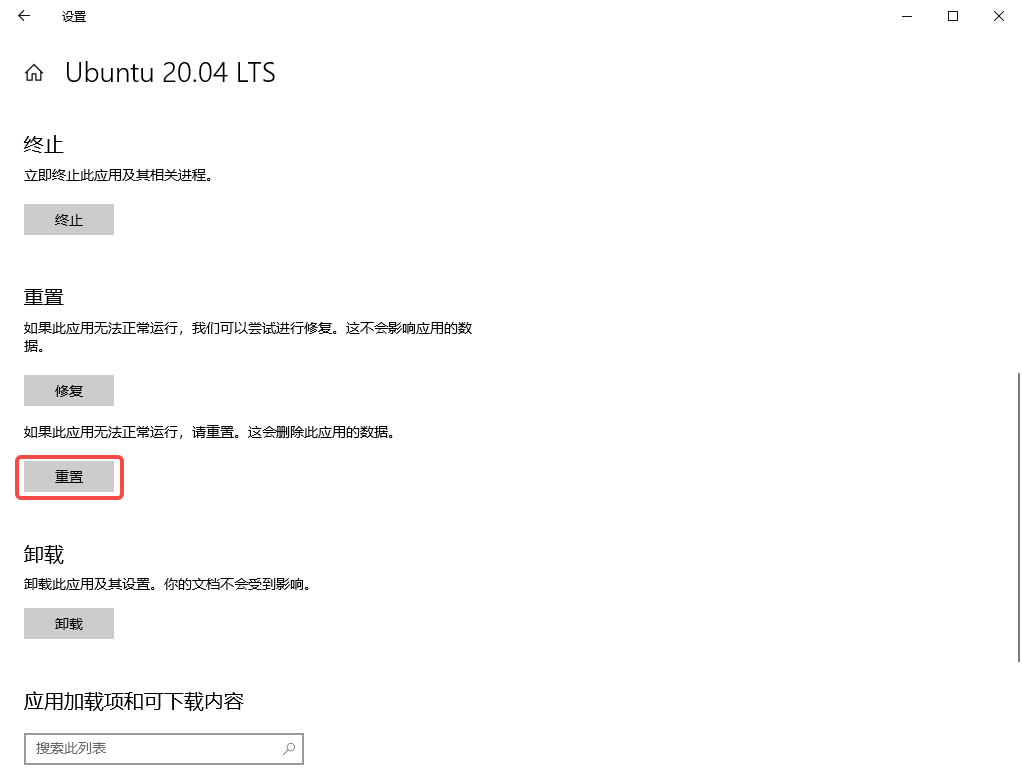
15. In the application settings, after resetting ubuntu-20.04, you no longer install ruby based on the package manager, but install or update rbenv on your system based on the rbenv-installer script. If Homebrew is detected, the installation will continue using brew install/upgrade. Otherwise, rbenv is installed under ~/.rbenv.
Also, if rbenv install is not yet available, also install ruby-build. as shown in Figure 2
wangqiang@DESKTOP-QLPK8QM:~$ sudo apt-get update
wangqiang@DESKTOP-QLPK8QM:~$ wget -q https://github.com/rbenv/rbenv-installer/raw/HEAD/bin/rbenv-installer -O- | bash
Installing rbenv with git...
Initialized empty Git repository in /home/wangqiang/.rbenv/.git/
Updating origin
remote: Enumerating objects: 3176, done.
remote: Counting objects: 100% (333/333), done.
remote: Compressing objects: 100% (192/192), done.
remote: Total 3176 (delta 179), reused 252 (delta 129), pack-reused 2843
Receiving objects: 100% (3176/3176), 638.26 KiB | 184.00 KiB/s, done.
Resolving deltas: 100% (1967/1967), done.
From https://github.com/rbenv/rbenv
* [new branch] master -> origin/master
* [new tag] v0.1.0 -> v0.1.0
* [new tag] v0.1.1 -> v0.1.1
* [new tag] v0.1.2 -> v0.1.2
* [new tag] v0.2.0 -> v0.2.0
* [new tag] v0.2.1 -> v0.2.1
* [new tag] v0.3.0 -> v0.3.0
* [new tag] v0.4.0 -> v0.4.0
* [new tag] v1.0.0 -> v1.0.0
* [new tag] v1.1.0 -> v1.1.0
* [new tag] v1.1.1 -> v1.1.1
* [new tag] v1.1.2 -> v1.1.2
* [new tag] v1.2.0 -> v1.2.0
Branch 'master' set up to track remote branch 'master' from 'origin'.
Already on 'master'

Installing ruby-build with git...
Cloning into '/home/wangqiang/.rbenv/plugins/ruby-build'...
remote: Enumerating objects: 13982, done.
remote: Counting objects: 100% (132/132), done.
remote: Compressing objects: 100% (45/45), done.
remote: Total 13982 (delta 83), reused 118 (delta 78), pack-reused 13850
Receiving objects: 100% (13982/13982), 2.80 MiB | 46.00 KiB/s, done.
Resolving deltas: 100% (9566/9566), done.

All done!
Note that this installer does NOT edit your shell configuration files:
1. Run `~/.rbenv/bin/rbenv init' to view instructions on how to configure rbenv for your shell.
2. Launch a new terminal window after editing shell configuration files.
3. (Optional) Run the doctor command to verify the installation:
wget -q "https://github.com/rbenv/rbenv-installer/raw/HEAD/bin/rbenv-doctor" -O- | bash
16. Run `~/.rbenv/bin/rbenv initSee instructions on how to configure Rbenv for your shell. Add eval “$(/home/wangqiang/.rbenv/bin/rbenv init – bash)” to ~/.bashrc, and then restart the terminal.
wangqiang@DESKTOP-QLPK8QM:~$ ~/.rbenv/bin/rbenv init
# Please add the following line to your `~/.bashrc' file,
# then restart your terminal.

eval "$(/home/wangqiang/.rbenv/bin/rbenv init - bash)"

wangqiang@DESKTOP-QLPK8QM:~$ echo 'eval "$(/home/wangqiang/.rbenv/bin/rbenv init - bash)"' >> ~/.bashrc
wangqiang@DESKTOP-QLPK8QM:~$
17. After editing the shell configuration file, start a new terminal window. as shown in Figure 3
18. You can use the following command to verify the status of the Rbenv installation and pass the verification.
wangqiang@DESKTOP-QLPK8QM:~$ wget -q https://github.com/rbenv/rbenv-installer/raw/HEAD/bin/rbenv-doctor -O- | bash
Checking for `rbenv' in PATH: /home/wangqiang/.rbenv/bin/rbenv
Checking for rbenv shims in PATH: OK
Checking `rbenv install' support: /home/wangqiang/.rbenv/plugins/ruby-build/bin/rbenv-install (ruby-build 20230512)
Counting installed Ruby versions: none
There aren't any Ruby versions installed under `/home/wangqiang/.rbenv/versions'.
You can install Ruby versions like so: rbenv install 3.2.2
Auditing installed plugins: OK
19. Execute the command: rbenv install 3.2.2, the installation failed, report an error: no c compiler found, please specific one with the environment variable CC, or configure with an explicit configuration target.
wangqiang@DESKTOP-QLPK8QM:~$ rbenv install --list
3.0.6
3.1.4
3.2.2
jruby-9.4.2.0
mruby-3.2.0
picoruby-3.0.0
truffleruby-22.3.1
truffleruby+graalvm-22.3.1

Only latest stable releases for each Ruby implementation are shown.
Use 'rbenv install --list-all / -L' to show all local versions.
wangqiang@DESKTOP-QLPK8QM:~$ rbenv install 3.2.2
To follow progress, use 'tail -f /tmp/ruby-build.20230602104329.795.log' or pass --verbose
No system openssl version was found, ensure openssl headers are installed (https://github.com/rbenv/ruby-build/wiki#suggested-build-environment)
Downloading openssl-3.1.0.tar.gz...
-> https://dqw8nmjcqpjn7.cloudfront.net/aaa925ad9828745c4cad9d9efeb273deca820f2cdcf2c3ac7d7c1212b7c497b4
Installing openssl-3.1.0...

BUILD FAILED (Ubuntu 20.04 using ruby-build 20230512)

Inspect or clean up the working tree at /tmp/ruby-build.20230602104329.795.clWddR
Results logged to /tmp/ruby-build.20230602104329.795.log

Last 10 log lines:

/tmp/ruby-build.20230602104329.795.clWddR/openssl-3.1.0 /tmp/ruby-build.20230602104329.795.clWddR ~

Failure! build file wasn't produced.
Please read INSTALL.md and associated NOTES-* files. You may also have to
look over your available compiler tool chain or change your configuration.

ERROR!
No C compiler found, please specify one with the environment variable CC,
or configure with an explicit configuration target.
20. Before downloading and trying to compile Ruby from source, ruby-build usually doesn’t verify that the system dependencies exist. Make sure all the required libraries (such as build tools and development headers) are already present in your system. Follow the instructions in the suggested build environment. Install dependencies.
wangqiang@DESKTOP-QLPK8QM:~$ sudo apt-get install autoconf patch build-essential rustc libssl-dev libyaml-dev libreadline6-dev zlib1g-dev libgmp-dev libncurses5-dev libffi-dev libgdbm6 libgdbm-dev libdb-dev uuid-dev
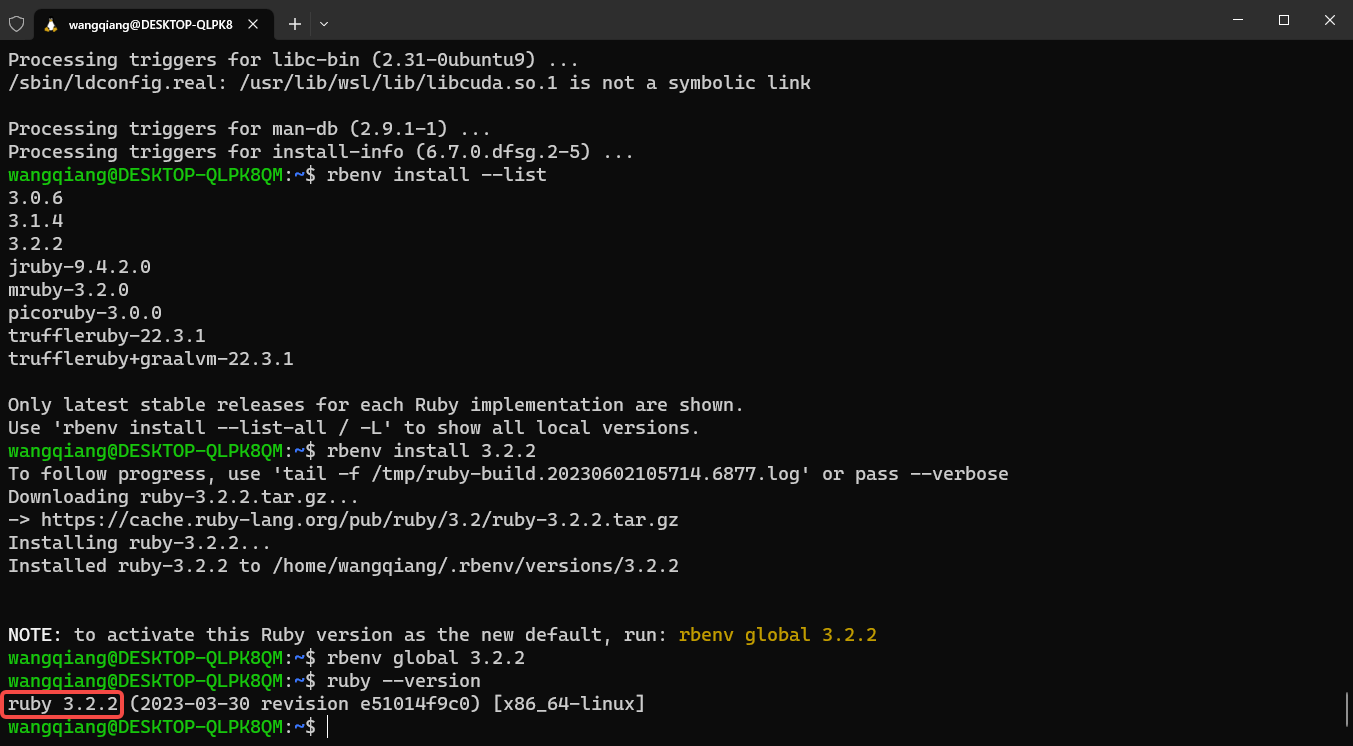
21. Reinstall Ruby 3.2.2, set the Ruby version to complete the installation and start using Ruby, and set the default Ruby version for this machine. as shown in Figure 4
wangqiang@DESKTOP-QLPK8QM:~$ rbenv install 3.2.2
To follow progress, use 'tail -f /tmp/ruby-build.20230602105714.6877.log' or pass --verbose
Downloading ruby-3.2.2.tar.gz...
-> https://cache.ruby-lang.org/pub/ruby/3.2/ruby-3.2.2.tar.gz
Installing ruby-3.2.2...
Installed ruby-3.2.2 to /home/wangqiang/.rbenv/versions/3.2.2

NOTE: to activate this Ruby version as the new default, run: rbenv global 3.2.2
wangqiang@DESKTOP-QLPK8QM:~$ rbenv global 3.2.2
wangqiang@DESKTOP-QLPK8QM:~$ ruby --version
ruby 3.2.2 (2023-03-30 revision e51014f9c0) [x86_64-linux]
wangqiang@DESKTOP-QLPK8QM:~$
22. Continue to install GEMS
wangqiang@DESKTOP-QLPK8QM:~$ gem install bundler
Fetching bundler-2.4.13.gem
Successfully installed bundler-2.4.13
Parsing documentation for bundler-2.4.13
Installing ri documentation for bundler-2.4.13
Done installing documentation for bundler after 0 seconds
1 gem installed

A new release of RubyGems is available: 3.4.10 → 3.4.13!
Run `gem update --system 3.4.13` to update your installation.
23. Reference: Install and run all the requirements of the Shopify CLI on Linux using the following command, including (Ruby Development Environment (ruby-dev/ ruby-devel), git, curl, gcc, g++, make). Except for Node.js and Ruby.
wangqiang@DESKTOP-QLPK8QM:~$ sudo apt update && sudo apt upgrade
wangqiang@DESKTOP-QLPK8QM:~$ sudo apt install curl gcc g++ make
Reading package lists... Done
Building dependency tree
Reading state information... Done
g++ is already the newest version (4:9.3.0-1ubuntu2).
g++ set to manually installed.
gcc is already the newest version (4:9.3.0-1ubuntu2).
gcc set to manually installed.
make is already the newest version (4.2.1-1.2).
make set to manually installed.
curl is already the newest version (7.68.0-1ubuntu2.18).
curl set to manually installed.
The following packages were automatically installed and are no longer required:
libfwupdplugin1 libxmlb1
Use 'sudo apt autoremove' to remove them.
0 upgraded, 0 newly installed, 0 to remove and 0 not upgraded.
wangqiang@DESKTOP-QLPK8QM:~$ sudo apt install ruby-dev
wangqiang@DESKTOP-QLPK8QM:~$ sudo apt install git
Reading package lists... Done
Building dependency tree
Reading state information... Done
git is already the newest version (1:2.25.1-1ubuntu3.11).
git set to manually installed.
The following packages were automatically installed and are no longer required:
libfwupdplugin1 libxmlb1
Use 'sudo apt autoremove' to remove them.
0 upgraded, 0 newly installed, 0 to remove and 0 not upgraded.
24. All requirements for installing and running Shopify CLI are all prepared and meet the requirements.
Linux Server Operations, Deployment & Production Troubleshooting
If your website or backend service runs on a Linux server and you are facing unstable access, Nginx configuration issues, MySQL / Redis errors, Docker service failures, full disk usage, or high CPU / memory usage, feel free to contact me for remote troubleshooting.
Ideal For:
✅ Website downtime or unstable access
✅ Nginx / PHP-FPM configuration issues
✅ MySQL / Redis performance or connection problems
✅ Docker service deployment and maintenance
✅ Server migration and environment setup
✅ CPU / memory / disk usage investigation
What I Offer:
✅ Linux environment inspection
✅ Website migration and deployment
✅ Nginx / PHP-FPM / MySQL / Redis troubleshooting
✅ Docker configuration and maintenance
✅ Server performance analysis
✅ Long-term remote operations support
Please contact me and mention: Linux Operations Consultation.
Contact Me:
Telegram: @shuijingwan
WeChat: 13980074657
Email: shuijingwanwq@gmail.com
Leave a Reply