wangqiang@DESKTOP-QLPK8QM:/mnt/e/wwwroot/shopify-app$ npm init @shopify/app@latest
Need to install the following packages:
  @shopify/create-app@3.46.2
Ok to proceed? (y)

Welcome. Let’s get started by naming your app project. You can change it later.

?  Your app project name?
✔  learn-php-app-ubuntu-2004-0602

?  Which template would you like to use?
✔  php


╭─ error ──────────────────────────────────────────────────────────────────────╮
│                                                                              │
│  EPERM: operation not permitted, copyfile                                    │
│  '/tmp/cb635eef29c31a10687f90a7693d4848/app/web/storage/logs/.gitignore' ->  │
│   '/mnt/e/wwwroot/shopify-app/learn-php-app-ubuntu-2004-0602/web/storage/lo  │
│  gs/.gitignore'                                                              │
│                                                                              │
╰──────────────────────────────────────────────────────────────────────────────╯

npm notice
npm notice New minor version of npm available! 9.5.1 -> 9.6.7
npm notice Changelog: https://github.com/npm/cli/releases/tag/v9.6.7
npm notice Run npm install -g npm@9.6.7 to update!
npm notice
npm ERR! code 1
npm ERR! path /mnt/e/wwwroot/shopify-app
npm ERR! command failed
npm ERR! command sh -c create-app

npm ERR! A complete log of this run can be found in:
npm ERR!     /home/wangqiang/.npm/_logs/2023-06-02T03_46_50_520Z-debug-0.log
wangqiang@DESKTOP-QLPK8QM:/mnt/e/wwwroot/shopify-app$
3. Add sudo before the command npm init @shopify/app@latest to increase permissions, no more errors
wangqiang@DESKTOP-QLPK8QM:/mnt/e/wwwroot/shopify-app$ sudo npm init @shopify/app@latest

Welcome. Let’s get started by naming your app project. You can change it later.

?  Your app project name?
✔  learn-php-app-ubuntu-2004-0602

?  Which template would you like to use?
✔  php
wangqiang@DESKTOP-QLPK8QM:~$ sudo apt install php
Reading package lists... Done
Building dependency tree
Reading state information... Done
The following packages were automatically installed and are no longer required:
  libfwupdplugin1 libxmlb1
Use 'sudo apt autoremove' to remove them.
The following additional packages will be installed:
  apache2 apache2-bin apache2-data apache2-utils libapache2-mod-php7.4 libapr1 libaprutil1 libaprutil1-dbd-sqlite3
  libaprutil1-ldap libjansson4 liblua5.2-0 php-common php7.4 php7.4-cli php7.4-common php7.4-json php7.4-opcache
  php7.4-readline ssl-cert
Suggested packages:
  apache2-doc apache2-suexec-pristine | apache2-suexec-custom php-pear openssl-blacklist
The following NEW packages will be installed:
  apache2 apache2-bin apache2-data apache2-utils libapache2-mod-php7.4 libapr1 libaprutil1 libaprutil1-dbd-sqlite3
Enabling module status.
Enabling module reqtimeout.
Enabling conf charset.
Enabling conf localized-error-pages.
Enabling conf other-vhosts-access-log.
Enabling conf security.
Enabling conf serve-cgi-bin.
Enabling site 000-default.
info: Switch to mpm prefork for package libapache2-mod-php7.4
Module mpm_event disabled.
Enabling module mpm_prefork.
info: Executing deferred 'a2enmod php7.4' for package libapache2-mod-php7.4
Enabling module php7.4.
Created symlink /etc/systemd/system/multi-user.target.wants/apache2.service → /lib/systemd/system/apache2.service.
Created symlink /etc/systemd/system/multi-user.target.wants/apache-htcacheclean.service → /lib/systemd/system/apache-htcacheclean.service.
invoke-rc.d: could not determine current runlevel
Setting up php7.4 (7.4.3-4ubuntu2.18) ...
Setting up php (2:7.4+75) ...
Processing triggers for ufw (0.36-6ubuntu1) ...
Processing triggers for systemd (245.4-4ubuntu3.21) ...
Processing triggers for man-db (2.9.1-1) ...
Processing triggers for libc-bin (2.31-0ubuntu9.9) ...
/sbin/ldconfig.real: /usr/lib/wsl/lib/libcuda.so.1 is not a symbolic link

Processing triggers for php7.4-cli (7.4.3-4ubuntu2.18) ...
Processing triggers for libapache2-mod-php7.4 (7.4.3-4ubuntu2.18) ...
wangqiang@DESKTOP-QLPK8QM:~$ sudo apt install composer
Reading package lists... Done
Building dependency tree
Reading state information... Done
The following packages were automatically installed and are no longer required:
  libfwupdplugin1 libxmlb1
Use 'sudo apt autoremove' to remove them.
The following additional packages will be installed:
  jsonlint libonig5 php-composer-ca-bundle php-composer-semver php-composer-spdx-licenses php-composer-xdebug-handler
  php-json-schema php-mbstring php-psr-container php-psr-log php-symfony-console php-symfony-filesystem
  php-symfony-finder php-symfony-process php-symfony-service-contracts php7.4-mbstring
Preparing to unpack .../16-composer_1.10.1-1_all.deb ...
Unpacking composer (1.10.1-1) ...
Setting up php-symfony-finder (4.3.8+dfsg-1ubuntu1) ...
Setting up jsonlint (1.7.2-1) ...
Setting up php-psr-container (1.0.0-2) ...
Setting up php-symfony-service-contracts (1.1.8-1) ...
Setting up php-composer-ca-bundle (1.2.6-1) ...
Setting up php-symfony-process (4.3.8+dfsg-1ubuntu1) ...
Setting up php-symfony-filesystem (4.3.8+dfsg-1ubuntu1) ...
Setting up php-psr-log (1.1.2-1) ...
Setting up php-composer-semver (1.5.1-1) ...
Setting up php-json-schema (5.2.9-1) ...
Setting up php-composer-spdx-licenses (1.5.3-1) ...
Setting up libonig5:amd64 (6.9.4-1) ...
Setting up php-composer-xdebug-handler (1.4.0-1) ...
Setting up php7.4-mbstring (7.4.3-4ubuntu2.18) ...

Creating config file /etc/php/7.4/mods-available/mbstring.ini with new version
Setting up php-mbstring (2:7.4+75) ...
Setting up php-symfony-console (4.3.8+dfsg-1ubuntu1) ...
Setting up composer (1.10.1-1) ...
Processing triggers for libc-bin (2.31-0ubuntu9.9) ...
/sbin/ldconfig.real: /usr/lib/wsl/lib/libcuda.so.1 is not a symbolic link

Processing triggers for man-db (2.9.1-1) ...
Processing triggers for libapache2-mod-php7.4 (7.4.3-4ubuntu2.18) ...
Processing triggers for php7.4-cli (7.4.3-4ubuntu2.18) ...
5. After creating the application, set the Laravel application. Install dependencies. Tip: It is recommended to upgrade to Composer 2. Uninstall Composer 1 first, and then install Composer 2. Reference: Subsequent use:php composer.phar .
wangqiang@DESKTOP-QLPK8QM:/mnt/e/wwwroot/shopify-app/learn-php-app-ubuntu-2004-0602/web$ composer install
Loading composer repositories with package information
Warning from https://repo.packagist.org: Support for Composer 1 is deprecated and some packages will not be available. You should upgrade to Composer 2. See https://blog.packagist.com/deprecating-composer-1-support/
wangqiang@DESKTOP-QLPK8QM:/mnt/e/wwwroot/shopify-app/learn-php-app-ubuntu-2004-0602/web$ composer -V
Composer 1.10.1 2020-03-13 20:34:27
wangqiang@DESKTOP-QLPK8QM:/mnt/e/wwwroot/shopify-app/learn-php-app-ubuntu-2004-0602/web$ sudo apt-get remove composer
[sudo] password for wangqiang:
Reading package lists... Done
Building dependency tree
Reading state information... Done
The following packages were automatically installed and are no longer required:
  jsonlint libfwupdplugin1 libonig5 libxmlb1 php-composer-ca-bundle php-composer-semver php-composer-spdx-licenses
  php-composer-xdebug-handler php-json-schema php-mbstring php-psr-container php-psr-log php-symfony-console
  php-symfony-filesystem php-symfony-finder php-symfony-process php-symfony-service-contracts php7.4-mbstring
Use 'sudo apt autoremove' to remove them.
The following packages will be REMOVED:
  composer
0 upgraded, 0 newly installed, 1 to remove and 0 not upgraded.
After this operation, 1996 kB disk space will be freed.
Do you want to continue? [Y/n] Y
(Reading database ... 66661 files and directories currently installed.)
Removing composer (1.10.1-1) ...
Processing triggers for man-db (2.9.1-1) ...
wangqiang@DESKTOP-QLPK8QM:/mnt/e/wwwroot/shopify-app/learn-php-app-ubuntu-2004-0602/web$ composer -V
-bash: /usr/bin/composer: No such file or directory
wangqiang@DESKTOP-QLPK8QM:/mnt/e/wwwroot/shopify-app/learn-php-app-ubuntu-2004-0602/web$ php -r "copy('https://getcomposer.org/installer', 'composer-setup.php');"
wangqiang@DESKTOP-QLPK8QM:/mnt/e/wwwroot/shopify-app/learn-php-app-ubuntu-2004-0602/web$ php -r "if (hash_file('sha384', 'composer-setup.php') === '55ce33d7678c5a611085589f1f3ddf8b3c52d662cd01d4ba75c0ee0459970c2200a51f492d557530c71c15d8dba01eae') { echo 'Installer verified'; } else { echo 'Installer corrupt'; unlink('composer-setup.php'); } echo PHP_EOL;"
Installer verified
wangqiang@DESKTOP-QLPK8QM:/mnt/e/wwwroot/shopify-app/learn-php-app-ubuntu-2004-0602/web$ php composer-setup.php
All settings correct for using Composer
Downloading...

Composer (version 2.5.7) successfully installed to: /mnt/e/wwwroot/shopify-app/learn-php-app-ubuntu-2004-0602/web/composer.phar
Use it: php composer.phar
wangqiang@DESKTOP-QLPK8QM:/mnt/e/wwwroot/shopify-app/learn-php-app-ubuntu-2004-0602/web$ php composer.phar -V
Composer version 2.5.7 2023-05-24 15:00:39
6. Tips: Composer is operating signally slower than normal because you do not have the php curl extension enabled.
wangqiang@DESKTOP-QLPK8QM:/mnt/e/wwwroot/shopify-app/learn-php-app-ubuntu-2004-0602/web$ php composer.phar install
Composer is operating significantly slower than normal because you do not have the PHP curl extension enabled.
wangqiang@DESKTOP-QLPK8QM:/mnt/e/wwwroot/shopify-app/learn-php-app-ubuntu-2004-0602/web$ apt-cache search php | grep cur
l
php-curl - CURL module for PHP [default]
php7.4-curl - CURL module for PHP
wangqiang@DESKTOP-QLPK8QM:/mnt/e/wwwroot/shopify-app/learn-php-app-ubuntu-2004-0602/web$ sudo apt-get install php-curl
[sudo] password for wangqiang:
Reading package lists... Done
Building dependency tree
Reading state information... Done
The following packages were automatically installed and are no longer required:
  jsonlint libfwupdplugin1 libonig5 libxmlb1 php-composer-ca-bundle php-composer-semver php-composer-spdx-licenses
  php-composer-xdebug-handler php-json-schema php-mbstring php-psr-container php-psr-log php-symfony-console
  php-symfony-filesystem php-symfony-finder php-symfony-process php-symfony-service-contracts php7.4-mbstring
Use 'sudo apt autoremove' to remove them.
The following additional packages will be installed:
  php7.4-curl
The following NEW packages will be installed:
  php-curl php7.4-curl
0 upgraded, 2 newly installed, 0 to remove and 0 not upgraded.
Need to get 32.9 kB of archives.
After this operation, 148 kB of additional disk space will be used.
Do you want to continue? [Y/n] Y
Get:1 http://archive.ubuntu.com/ubuntu focal-updates/main amd64 php7.4-curl amd64 7.4.3-4ubuntu2.18 [30.9 kB]
Get:2 http://archive.ubuntu.com/ubuntu focal/main amd64 php-curl all 2:7.4+75 [2000 B]
Fetched 32.9 kB in 2s (16.1 kB/s)
Selecting previously unselected package php7.4-curl.
(Reading database ... 66332 files and directories currently installed.)
Preparing to unpack .../php7.4-curl_7.4.3-4ubuntu2.18_amd64.deb ...
Unpacking php7.4-curl (7.4.3-4ubuntu2.18) ...
Selecting previously unselected package php-curl.
Preparing to unpack .../php-curl_2%3a7.4+75_all.deb ...
Unpacking php-curl (2:7.4+75) ...
Setting up php7.4-curl (7.4.3-4ubuntu2.18) ...

Creating config file /etc/php/7.4/mods-available/curl.ini with new version
Setting up php-curl (2:7.4+75) ...
Processing triggers for libapache2-mod-php7.4 (7.4.3-4ubuntu2.18) ...
Processing triggers for php7.4-cli (7.4.3-4ubuntu2.18) ...
7. Your requirements could not be resolved to an installable set of packages. The root composer.json requires php ~8.0.0 || ~8.1.0 || ~8.2.0 But your PHP version (7.4.3) does not meet this requirement. Some required extensions are also not enabled.
wangqiang@DESKTOP-QLPK8QM:/mnt/e/wwwroot/shopify-app/learn-php-app-ubuntu-2004-0602/web$ php composer.phar install
No composer.lock file present. Updating dependencies to latest instead of installing from lock file. See https://getcomposer.org/install for more information.
Loading composer repositories with package information
Info from https://repo.packagist.org: #StandWithUkraine
Updating dependencies
Your requirements could not be resolved to an installable set of packages.

  Problem 1
    - Root composer.json requires php ~8.0.0 || ~8.1.0 || ~8.2.0 but your php version (7.4.3) does not satisfy that requirement.
  Problem 2
    - Root composer.json requires PHP extension ext-xml * but it is missing from your system. Install or enable PHP's xml extension.
  Problem 3
    - Root composer.json requires PHP extension ext-zip * but it is missing from your system. Install or enable PHP's zip extension.
  Problem 4
    - Root composer.json requires shopify/shopify-api ^5.0 -> satisfiable by shopify/shopify-api[v5.0.0].
    - shopify/shopify-api v5.0.0 requires php ~8.0.0 || ~8.1.0 || ~8.2.0 -> your php version (7.4.3) does not satisfy that requirement.
  Problem 5
    - Root composer.json requires squizlabs/php_codesniffer ^3.6 -> satisfiable by squizlabs/php_codesniffer[3.6.0, ..., 3.x-dev].
    - squizlabs/php_codesniffer[3.6.0, ..., 3.x-dev] require ext-xmlwriter * -> it is missing from your system. Install or enable PHP's xmlwriter extension.
  Problem 6
    - phpunit/phpunit[9.3.3, ..., 9.6.x-dev] require ext-dom * -> it is missing from your system. Install or enable PHP's dom extension.
    - Root composer.json requires phpunit/phpunit ^9.3.3 -> satisfiable by phpunit/phpunit[9.3.3, ..., 9.6.x-dev].

To enable extensions, verify that they are enabled in your .ini files:
    - /etc/php/7.4/cli/php.ini
    - /etc/php/7.4/cli/conf.d/10-opcache.ini
    - /etc/php/7.4/cli/conf.d/10-pdo.ini
    - /etc/php/7.4/cli/conf.d/20-calendar.ini
    - /etc/php/7.4/cli/conf.d/20-ctype.ini
    - /etc/php/7.4/cli/conf.d/20-curl.ini
    - /etc/php/7.4/cli/conf.d/20-exif.ini
    - /etc/php/7.4/cli/conf.d/20-ffi.ini
    - /etc/php/7.4/cli/conf.d/20-fileinfo.ini
    - /etc/php/7.4/cli/conf.d/20-ftp.ini
    - /etc/php/7.4/cli/conf.d/20-gettext.ini
    - /etc/php/7.4/cli/conf.d/20-iconv.ini
    - /etc/php/7.4/cli/conf.d/20-json.ini
    - /etc/php/7.4/cli/conf.d/20-mbstring.ini
    - /etc/php/7.4/cli/conf.d/20-phar.ini
    - /etc/php/7.4/cli/conf.d/20-posix.ini
    - /etc/php/7.4/cli/conf.d/20-readline.ini
    - /etc/php/7.4/cli/conf.d/20-shmop.ini
    - /etc/php/7.4/cli/conf.d/20-sockets.ini
    - /etc/php/7.4/cli/conf.d/20-sysvmsg.ini
    - /etc/php/7.4/cli/conf.d/20-sysvsem.ini
    - /etc/php/7.4/cli/conf.d/20-sysvshm.ini
    - /etc/php/7.4/cli/conf.d/20-tokenizer.ini
You can also run `php --ini` in a terminal to see which files are used by PHP in CLI mode.
Alternatively, you can run Composer with `--ignore-platform-req=ext-xml --ignore-platform-req=ext-zip --ignore-platform-req=ext-xmlwriter --ignore-platform-req=ext-dom` to temporarily ignore these required extensions.
wangqiang@DESKTOP-QLPK8QM:/mnt/e/wwwroot/shopify-app/learn-php-app-ubuntu-2004-0602/web$ sudo apt install mysql-server
wangqiang@DESKTOP-QLPK8QM:/mnt/e/wwwroot/shopify-app/learn-php-app-ubuntu-2004-0602/web$ mysql --version
mysql  Ver 8.0.33-0ubuntu0.20.04.2 for Linux on x86_64 ((Ubuntu))
wangqiang@DESKTOP-QLPK8QM:/mnt/e/wwwroot/shopify-app/learn-php-app-ubuntu-2004-0602/web$ sudo mysql
ERROR 2002 (HY000): Can't connect to local MySQL server through socket '/var/run/mysqld/mysqld.sock' (2)
wangqiang@DESKTOP-QLPK8QM:/mnt/e/wwwroot/shopify-app/learn-php-app-ubuntu-2004-0602/web$ sudo /etc/init.d/mysql start
 * Starting MySQL database server mysqld                                                                su: warning: cannot change directory to /nonexistent: No such file or directory
                                                                                                 [ OK ]
wangqiang@DESKTOP-QLPK8QM:/mnt/e/wwwroot/shopify-app/learn-php-app-ubuntu-2004-0602/web$ sudo mysql
Welcome to the MySQL monitor.  Commands end with ; or g.
Your MySQL connection id is 10
Server version: 8.0.33-0ubuntu0.20.04.2 (Ubuntu)

Copyright (c) 2000, 2023, Oracle and/or its affiliates.

Oracle is a registered trademark of Oracle Corporation and/or its
affiliates. Other names may be trademarks of their respective
owners.

Type 'help;' or 'h' for help. Type 'c' to clear the current input statement.

mysql> SHOW DATABASES;
+--------------------+
| Database           |
+--------------------+
| information_schema |
| mysql              |
| performance_schema |
| sys                |
+--------------------+
4 rows in set (0.01 sec)

mysql> CREATE DATABASE learn_php_app_ubuntu_2004_0602;
Query OK, 1 row affected (0.01 sec)

mysql> SHOW DATABASES;
+--------------------------------+
| Database                       |
+--------------------------------+
| information_schema             |
| learn_php_app_ubuntu_2004_0602 |
| mysql                          |
| performance_schema             |
| sys                            |
+--------------------------------+
5 rows in set (0.00 sec)

mysql>
12. An error is reported when executing the database migration command: access denied for useratlocalhost(using password: no)
wangqiang@DESKTOP-QLPK8QM:/mnt/e/wwwroot/shopify-app/learn-php-app-ubuntu-2004-0602/web$ php artisan migrate

   IlluminateDatabaseQueryException

  SQLSTATE[HY000] [1045] Access denied for user ''@'localhost' (using password: NO) (SQL: select * from information_schema.tables where table_schema = learn_php_app_ubuntu_2004_0602 and table_name = migrations and table_type = 'BASE TABLE')

  at vendor/laravel/framework/src/Illuminate/Database/Connection.php:712
    708▕         // If an exception occurs when attempting to run a query, we'll format the error
    709▕         // message to include the bindings with SQL, which will make this exception a
    710▕         // lot more helpful to the developer instead of just the database's errors.
    711▕         catch (Exception $e) {
  ➜ 712▕             throw new QueryException(
    713▕                 $query, $this->prepareBindings($bindings), $e
    714▕             );
    715▕         }
    716▕     }

      +33 vendor frames
  34  artisan:37
      IlluminateFoundationConsoleKernel::handle()
13. Start the security script prompt: sudo mysql_secure_installation, prompt when setting the password: Failed! Error: set password has no signification for userrootatlocalhostAs the authentication method used doesn’tT store authentication data in the mysql server.
wangqiang@DESKTOP-QLPK8QM:/mnt/e/wwwroot/shopify-app/learn-php-app-ubuntu-2004-0602/web$ sudo mysql_secure_installation

Securing the MySQL server deployment.

Connecting to MySQL using a blank password.
The 'validate_password' component is installed on the server.
The subsequent steps will run with the existing configuration
of the component.
Please set the password for root here.

New password:

Re-enter new password:

Estimated strength of the password: 100
Do you wish to continue with the password provided?(Press y|Y for Yes, any other key for No) : Y
 ... Failed! Error: SET PASSWORD has no significance for user 'root'@'localhost' as the authentication method used doesn't store authentication data in the MySQL server. Please consider using ALTER USER instead if you want to change authentication parameters.
14. Execute: sudo cat /etc/mysql/debian.cnf, use the username and password in the file to reset the .env, and the execution of the database migration is successful
15. Start the local server, go back to the root directory, and execute: npm run dev, and report an error. It is suspected that the problem caused by the completeness of step 3 is not executed. Because there is no prompt in step 3: Success
wangqiang@DESKTOP-QLPK8QM:/mnt/e/wwwroot/shopify-app/learn-php-app-ubuntu-2004-0602$ npm run dev

> learn-php-app-ubuntu-2004-0602@1.0.0 dev
> shopify app dev

?  Command `app dev` not found. Did you mean `theme dev`?
✔  Yes, confirm

╭─ error ──────────────────────────────────────────────────────────────────────╮
│                                                                              │
│  A store is required                                                         │
│                                                                              │
│  Specify the store passing --store={your_store_url} or set the               │
│  SHOPIFY_FLAG_STORE environment variable.                                    │
│                                                                              │
╰──────────────────────────────────────────────────────────────────────────────╯

wangqiang@DESKTOP-QLPK8QM:/mnt/e/wwwroot/shopify-app/learn-php-app-ubuntu-2004-0602$
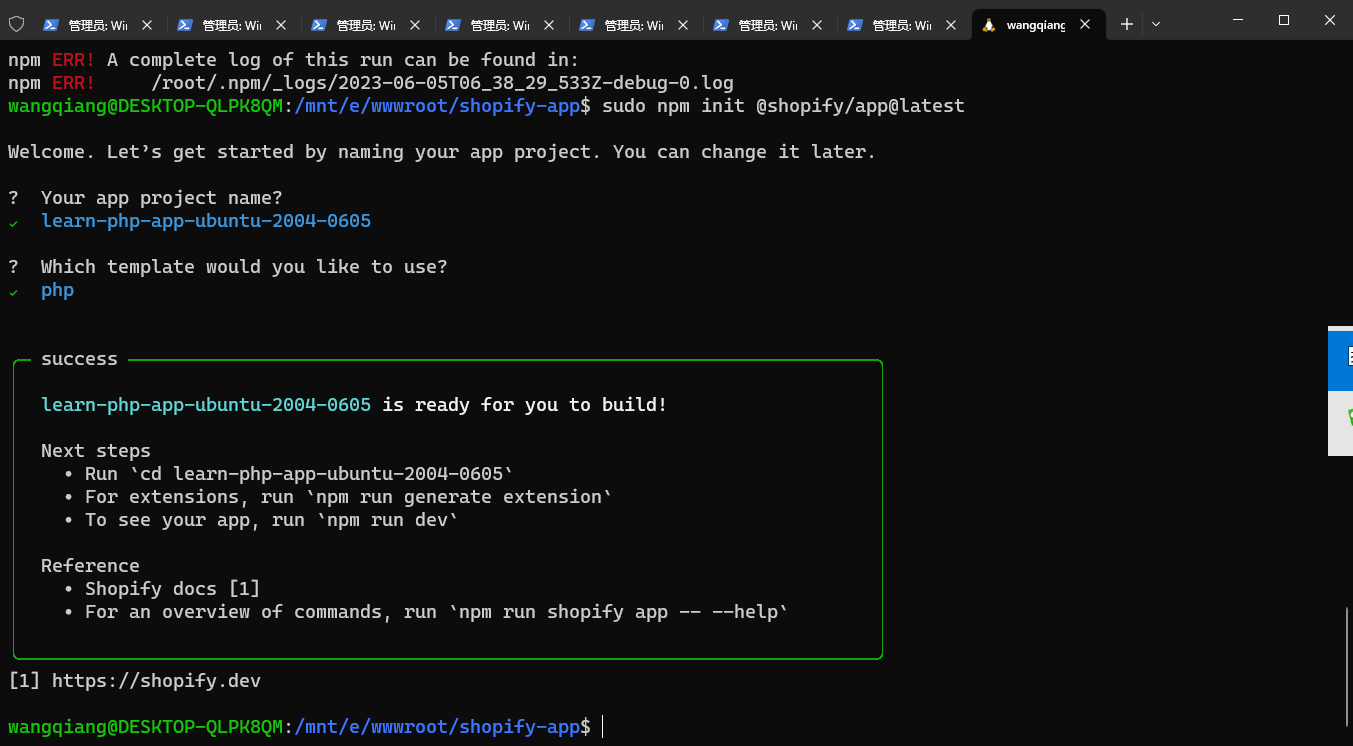
16. Create a new application from scratch: learn-php-app-ubuntu-2004-0605, you need to wait patiently for a period of time, and don’t stop it in the middle. as shown in Figure 1
Figure 1
wangqiang@DESKTOP-QLPK8QM:/mnt/e/wwwroot/shopify-app$ sudo npm init @shopify/app@latest

Welcome. Let’s get started by naming your app project. You can change it later.

?  Your app project name?
✔  learn-php-app-ubuntu-2004-0605

?  Which template would you like to use?
✔  php


╭─ success ────────────────────────────────────────────────────────────────────╮
│                                                                              │
│  learn-php-app-ubuntu-2004-0605 is ready for you to build!                   │
│                                                                              │
│  Next steps                                                                  │
│    • Run `cd learn-php-app-ubuntu-2004-0605`                                 │
│    • For extensions, run `npm run generate extension`                        │
│    • To see your app, run `npm run dev`                                      │
│                                                                              │
│  Reference                                                                   │
│    • Shopify docs [1]                                                        │
│    • For an overview of commands, run `npm run shopify app -- --help`        │
│                                                                              │
╰──────────────────────────────────────────────────────────────────────────────╯
[1] https://shopify.dev
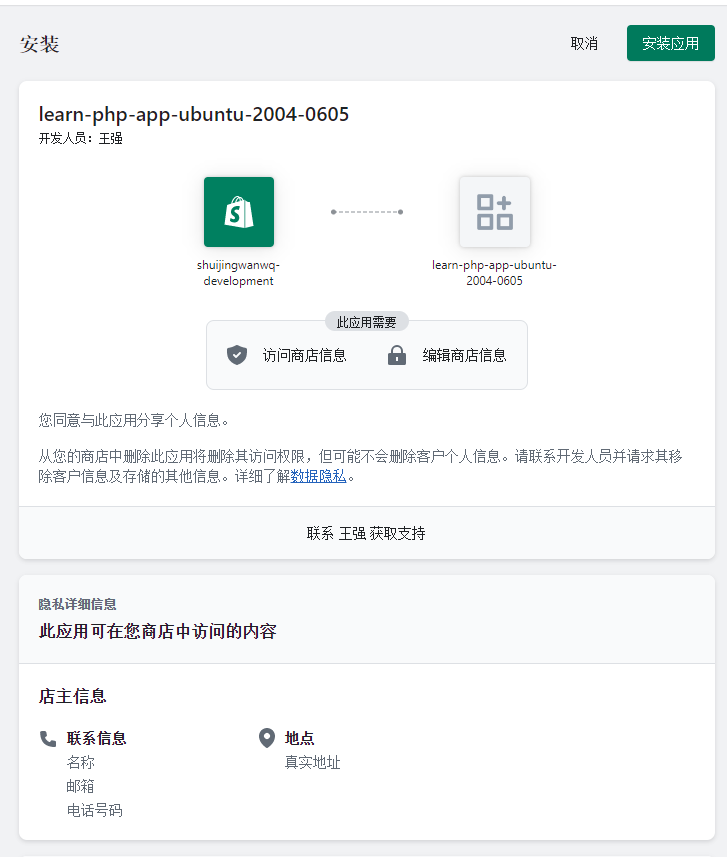
17. Start the operation again from step 4, some steps can be skipped. Execute step 15 and report an error: to investigate the issue, exit this stack trace. You can do it again. Enter the installation application. as shown in Figure 2
Figure 2
wangqiang@DESKTOP-QLPK8QM:/mnt/e/wwwroot/shopify-app/learn-php-app-ubuntu-2004-0605$ composer -V
Composer version 2.5.5 2023-03-21 11:50:05
wangqiang@DESKTOP-QLPK8QM:/mnt/e/wwwroot/shopify-app/learn-php-app-ubuntu-2004-0605/web$ composer install
wangqiang@DESKTOP-QLPK8QM:/mnt/e/wwwroot/shopify-app/learn-php-app-ubuntu-2004-0605/web$ cp .env.example .env
wangqiang@DESKTOP-QLPK8QM:/mnt/e/wwwroot/shopify-app/learn-php-app-ubuntu-2004-0605/web$ php artisan key:generate
wangqiang@DESKTOP-QLPK8QM:/mnt/e/wwwroot/shopify-app/learn-php-app-ubuntu-2004-0605/web$ php artisan migrate
wangqiang@DESKTOP-QLPK8QM:/mnt/e/wwwroot/shopify-app/learn-php-app-ubuntu-2004-0605$ npm run dev

> learn-php-app-ubuntu-2004-0605@1.0.0 dev
> shopify app dev


To run this command, log in to Shopify Partners.
👉 Press any key to open the login page on your browser

Auto-open timed out. Open the login page: Log in to Shopify Partners ( http://accounts.shopify.com/oauth/authorize?client_id=fbdb2649-e327-4907-8f67-908d24cfd7e3&scope=openid+https%3A%2F%2Fapi.shopify.com%2Fauth%2Fshop.admin.graphql+https%3A%2F%2Fapi.shopify.com%2Fauth%2Fshop.admin.themes+https%3A%2F%2Fapi.shopify.com%2Fauth%2Fpartners.collaborator-relationships.readonly+https%3A%2F%2Fapi.shopify.com%2Fauth%2Fshop.storefront-renderer.devtools+https%3A%2F%2Fapi.shopify.com%2Fauth%2Fpartners.app.cli.access&redirect_uri=http%3A%2F%2F127.0.0.1%3A3456&state=5cba6732fe773fac2a7e9a95ddf3ab686b3a9b7231168d58f339f17dcaa1&response_type=code&code_challenge_method=S256&code_challenge=gozZ6hqQIOzwYdzxuX2RaOUgpaRz9A8gUlUoC6Wy6Vw )

✔ Logged in.

Looks like this is the first time you're running dev for this project.
Configure your preferences by answering a few questions.


Before you preview your work, it needs to be associated with an app.

?  Create this project as a new app on Shopify?
✔  Yes, create it as a new app

?  App name:
✔  learn-php-app-ubuntu-2004-0605

✔ Using your default dev store (shuijingwanwq-development) to preview your project.
╭─ error ──────────────────────────────────────────────────────────────────────╮
│                                                                              │
│                                                                              │
│  To investigate the issue, examine this stack trace:                         │
│    at pollTunnelStatus (@shopify/app/src/cli/services/dev/urls.ts:106)       │
│      if (result.status === 'error') return reject(new                        │
│      BugError(result.message))                                               │
│    at (@shopify/app/src/cli/services/dev/urls.ts:120)                        │
│      pollTunnelStatus()                                                      │
│    at new Promise                                                            │
│    at pollTunnelURL (@shopify/app/src/cli/services/dev/urls.ts:101)          │
│      return new Promise<string>((resolve, reject) => {                       │
│    at generateFrontendURL (@shopify/app/src/cli/services/dev/urls.ts:89)     │
│      const url = await pollTunnelURL(options.tunnelClient)                   │
│    at dev (@shopify/app/src/cli/services/dev.ts:121)                         │
│      generateFrontendURL({                                                   │
│    at run (@shopify/app/src/cli/commands/app/dev.ts:106)                     │
│      await dev({                                                             │
│                                                                              │
╰──────────────────────────────────────────────────────────────────────────────╯
wangqiang@DESKTOP-QLPK8QM:/mnt/e/wwwroot/shopify-app/learn-php-app-ubuntu-2004-0605$ npm run dev

> learn-php-app-ubuntu-2004-0605@1.0.0 dev
> shopify app dev

╭─ info ───────────────────────────────────────────────────────────────────────╮
│                                                                              │
│  Using your previous dev settings:                                           │
│                                                                              │
│    • Org:          王强                                                      │
│    • App:          learn-php-app-ubuntu-2004-0605                            │
│    • Dev store:    shuijingwanwq-development.myshopify.com                   │
│    • Update URLs:  Not yet configured                                        │
│                                                                              │
│  To reset your default dev config, run `npm run dev -- --reset`              │
│                                                                              │
╰──────────────────────────────────────────────────────────────────────────────╯

?  Have Shopify automatically update your app's URL in order to create a preview experience?
✔  Always by default

2023-06-06 01:51:12 │ frontend │
2023-06-06 01:51:12 │ frontend │ > shopify-frontend-template-react@1.0.0 dev
2023-06-06 01:51:12 │ frontend │ > vite
2023-06-06 01:51:12 │ frontend │
2023-06-06 01:51:18 │ backend  │ > ComposerConfig::disableProcessTimeout
2023-06-06 01:51:18 │ backend  │ > php artisan serve
2023-06-06 01:51:20 │ frontend │
2023-06-06 01:51:20 │ frontend │   VITE v4.3.9  ready in 7780 ms
2023-06-06 01:51:20 │ frontend │
2023-06-06 01:51:20 │ frontend │   ➜  Local:   http://localhost:33597/
2023-06-06 01:51:26 │ backend  │ Starting Laravel development server: http://127.0.0.1:44681
2023-06-06 01:51:27 │ backend  │ [Tue Jun  6 09:51:26 2023] PHP 8.1.18 Development Server (http://127.0.0.1:44681) started
2023-06-06 01:51:47 │ backend  │ [Tue Jun  6 09:51:47 2023] 127.0.0.1:34304 Accepted
2023-06-06 01:51:54 │ backend  │ [Tue Jun  6 09:51:54 2023] 127.0.0.1:34304 Closing
2023-06-06 01:51:54 │ backend  │ [Tue Jun  6 09:51:54 2023] 127.0.0.1:34310 Accepted
2023-06-06 01:51:56 │ backend  │ [Tue Jun  6 09:51:56 2023] 127.0.0.1:34310 Closing
2023-06-06 01:53:17 │ backend  │ [Tue Jun  6 09:53:17 2023] 127.0.0.1:34320 Accepted
2023-06-06 01:53:22 │ backend  │ [Tue Jun  6 09:53:22 2023] 127.0.0.1:34320 Closing
2023-06-06 01:53:22 │ backend  │ [Tue Jun  6 09:53:22 2023] 127.0.0.1:34326 Accepted
2023-06-06 01:53:26 │ backend  │ [Tue Jun  6 09:53:25 2023] 127.0.0.1:34326 Closing

› Press p │ preview in your browser
› Press q │ quit

Preview URL: https://instructional-attend-excellent-gig.trycloudflare.com?shop=shuijingwanwq-development.myshopify.com&h
ost=c2h1aWppbmd3YW53cS1kZXZlbG9wbWVudC5teXNob3BpZnkuY29tL2FkbWlu
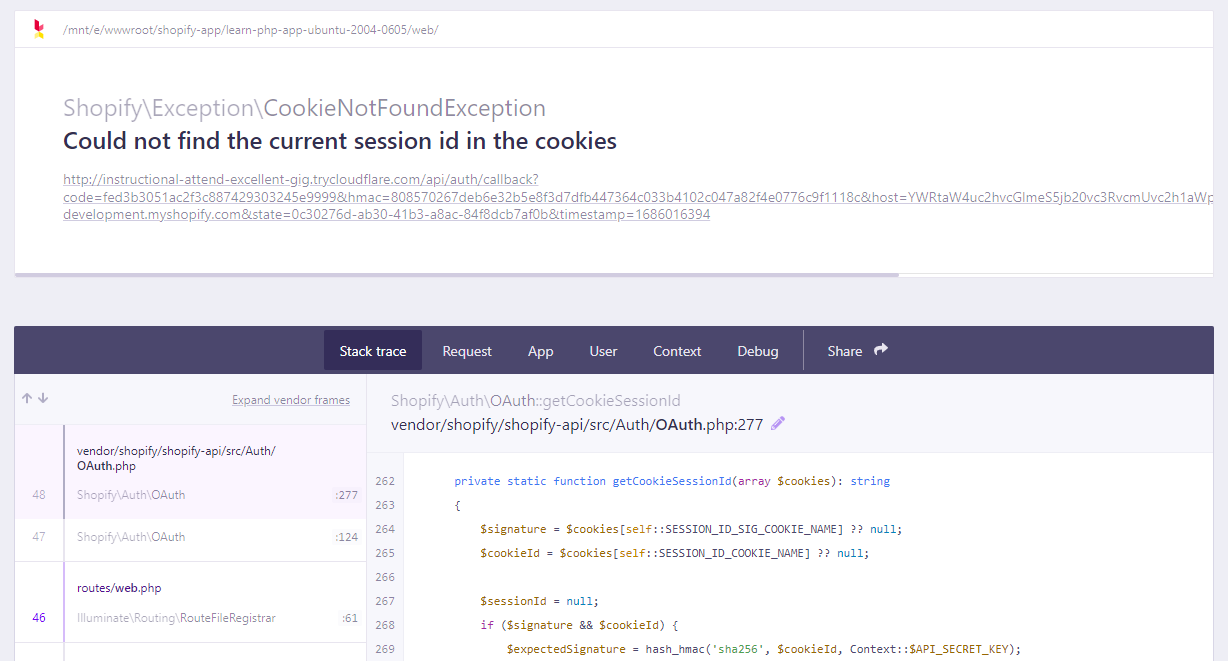
18. Error when installing the application: ShopifyExceptionCookieNotFoundException could not find the current session id in the cookies. as shown in Figure 3
Figure 3
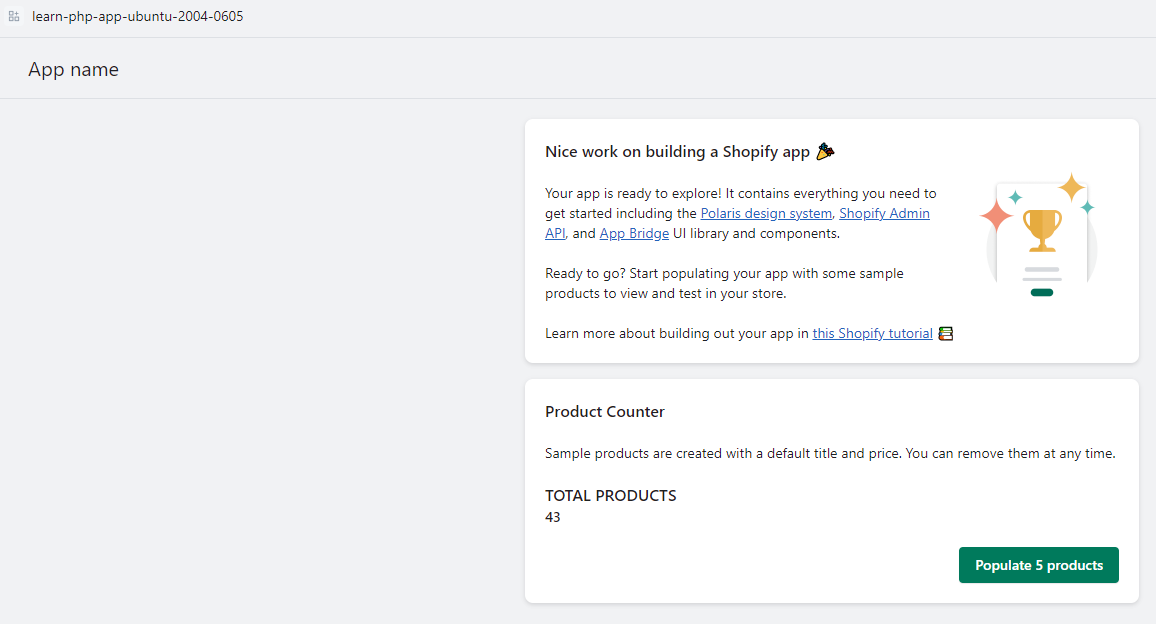
19. Run again: npm run dev, open the browser, no more errors. as shown in Figure 4
Figure 4
Leave a Reply