
1. The default number of tag clouds is 45. as shown in Figure 1
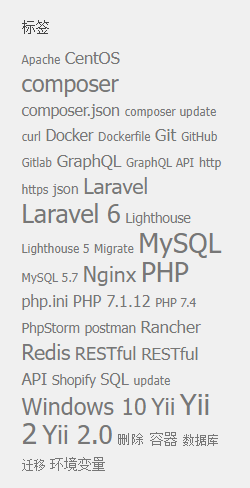
2. Prepare to increase the limit of the number of label clouds to 90. Reference:Is there a way to add more tags to the tag cloud?
3. Add this code to the functions.php file of the theme. Go to the background – Theme file editor – functions.php
function wpse_235908_tag_cloud_args( $args ) {
    $args['number'] = 90; // the number of tags you want to display.
    return $args;
}
add_filter( 'widget_tag_cloud_args', 'wpse_235908_tag_cloud_args' );
4. Refresh the page, the limit of the number of label clouds has been adjusted to 90, which is in line with expectations. After each subsequent upgrade of the theme, you need to re-edit it again.
Need long-term technical maintenance or remote troubleshooting?
I am a PHP / Go backend engineer with 15+ years of experience, focused on existing system maintenance, bug fixing, performance optimization, server troubleshooting, WordPress maintenance, and small feature iterations.
If your project is facing any of the following issues, we can start with a small troubleshooting task first:
- ✅ PHP / Laravel / Yii2 legacy systems without active maintenance
- ✅ Go / Gin backend APIs that need troubleshooting or optimization
- ✅ Slow, broken, or unstable WordPress websites
- ✅ Nginx / MySQL / Redis / Linux server issues
- ✅ CDN / Cloudflare / DNS / HTTPS configuration problems
- ✅ Long-term remote technical support or part-time maintenance
More details: About Me & Collaboration
WeChat: 13980074657
Email: shuijingwanwq@gmail.com
Telegram: @shuijingwan
GitHub: https://github.com/shuijingwan
Leave a Reply