

1. When executing: composer install, prompt: enqueue/rdkafka 0.10.19 requires ext-rdkafka -> It is missing from your system. install or enable phps rdkafka extension.. as shown in Figure 1
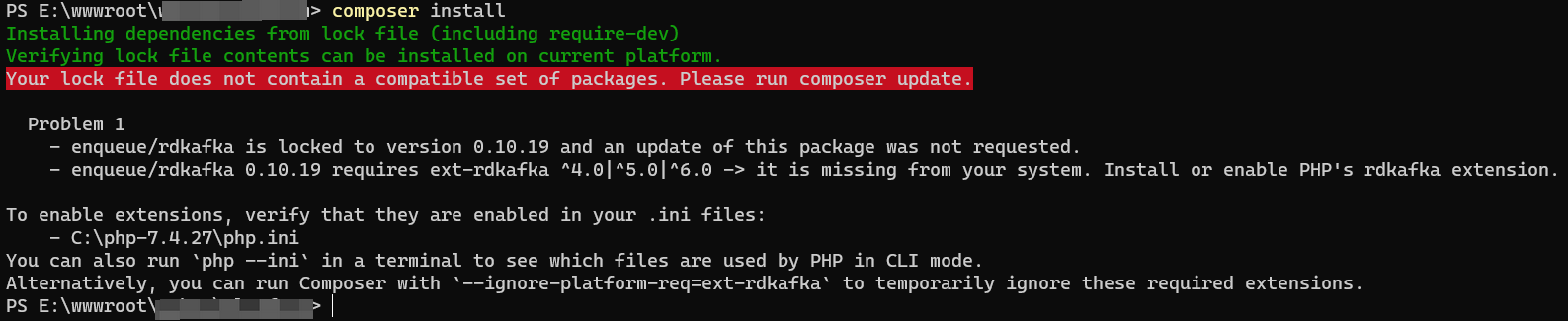
PS E:\wwwroot\object> composer install
Installing dependencies from lock file (including require-dev)
Verifying lock file contents can be installed on current platform.
Your lock file does not contain a compatible set of packages. Please run composer update.

  Problem 1
    - enqueue/rdkafka is locked to version 0.10.19 and an update of this package was not requested.
    - enqueue/rdkafka 0.10.19 requires ext-rdkafka ^4.0|^5.0|^6.0 -> it is missing from your system. Install or enable PHP's rdkafka extension.

To enable extensions, verify that they are enabled in your .ini files:
    - C:\php-7.4.27\php.ini
You can also run `php --ini` in a terminal to see which files are used by PHP in CLI mode.
Alternatively, you can run Composer with `--ignore-platform-req=ext-rdkafka` to temporarily ignore these required extensions.
2. Decide to enable PHP’s RDKAFKA extension. Open:https://pecl.php.net/package/rdkafka/6.0.1/windows, download 7.4 Thread Safe (ts) x64. After decompressing php_rdkafka-6.0.1-7.4-ts-vc15-x64, put php_rdkafka.dll Copy to: C:\php-7.4.27\ext\php_rdkafka.dll. Then edit php.ini, add extension=rdkafka
3. When restarting php, an error is reported: php warning: php startup: unable to load dynamic libraryrdkafka. as shown in Figure 2

PS C:\Users\Lenovo> php-cgi.exe -b 127.0.0.1:9000-c C:/php-7.4.27/php.ini
PHP Warning:  PHP Startup: Unable to load dynamic library 'rdkafka' (tried: C:/php-7.4.27/ext\rdkafka (鎵句笉鍒版寚瀹氱殑妯″潡銆?, C:/php-7.4.27/ext\php_rdkafka.dll (鎵句 笉鍒版寚瀹氱殑妯″潡銆?) in Unknown on line 0
<br />
<b>Warning</b>:  PHP Startup: Unable to load dynamic library 'rdkafka' (tried: C:/php-7.4.27/ext\rdkafka (鎵句笉鍒版寚瀹氱殑妯″潡銆?, C:/php-7.4.27/ext\php_rdkafka.dll (鎵句笉鍒版寚瀹氱殑妯″潡銆?) in <b>Unknown</b> on line <b>0</b><br />
4. Reference:https://arnaud.le-blanc.net/php-rdkafka-doc/phpdoc/rdkafka.installation.windows.htmlInstalling the rdkafka extension on Windows. Put librdkafka.dll into the php root directory (same level as php.exe), and put the php_rdkfaka.dll file into php Extended directory (default is “ext”). Copy librdkafka.dll to: c:\php-7.4.27\librdkafka.dll. When restarting PHP, no errors are reported.
5. Check phpinfo, search: rdkafka, php’s rdkafka extension has been successfully enabled. as shown in Figure 3

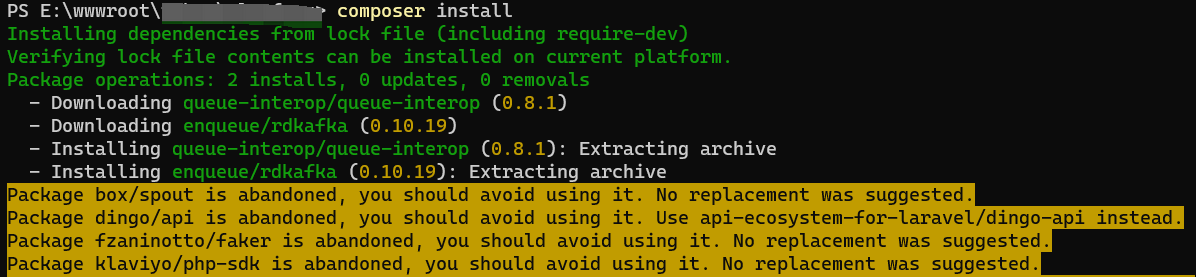
6. Execute: When composer install, no longer prompt, run normally. as shown in Figure 4
Need long-term technical maintenance or remote troubleshooting?
I am a PHP / Go backend engineer with 15+ years of experience, focused on existing system maintenance, bug fixing, performance optimization, server troubleshooting, WordPress maintenance, and small feature iterations.
If your project is facing any of the following issues, we can start with a small troubleshooting task first:
- ✅ PHP / Laravel / Yii2 legacy systems without active maintenance
- ✅ Go / Gin backend APIs that need troubleshooting or optimization
- ✅ Slow, broken, or unstable WordPress websites
- ✅ Nginx / MySQL / Redis / Linux server issues
- ✅ CDN / Cloudflare / DNS / HTTPS configuration problems
- ✅ Long-term remote technical support or part-time maintenance
More details: About Me & Collaboration
WeChat: 13980074657
Email: shuijingwanwq@gmail.com
Telegram: @shuijingwan
GitHub: https://github.com/shuijingwan
Leave a Reply