

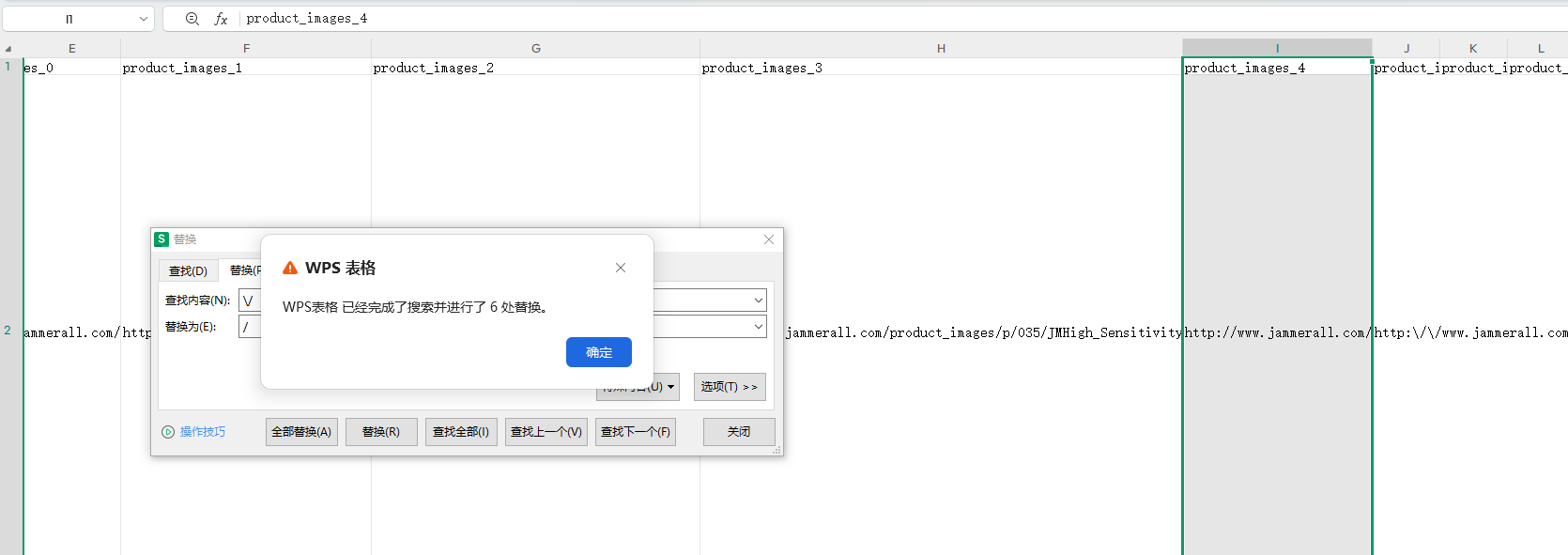
1. The URL URL of a column of a CSV file is now escaped after a string. Example:
http:\/\/www.jammerall.com\/product_images\/p\/035\/JMHigh_Sensitivity_and_Long_Range_From_0_to_6GHz_Drone_Alarmer_3__03159_zoom.jpg
2. Because it is planned to import the CSV file into WooCommerce’s products, the URL is mapped as a picture. If it is escaped, the picture is empty after importing. After deciding to deliberate, import again.
3. Select the column to be replaced, find the replacement method, press Ctrl+H to open the replacement window, and enter the search content input: \/ Replace with input:/ Click ‘Replace All’. as shown in Figure 1
Need long-term technical maintenance or remote troubleshooting?
I am a PHP / Go backend engineer with 15+ years of experience, focused on existing system maintenance, bug fixing, performance optimization, server troubleshooting, WordPress maintenance, and small feature iterations.
If your project is facing any of the following issues, we can start with a small troubleshooting task first:
- ✅ PHP / Laravel / Yii2 legacy systems without active maintenance
- ✅ Go / Gin backend APIs that need troubleshooting or optimization
- ✅ Slow, broken, or unstable WordPress websites
- ✅ Nginx / MySQL / Redis / Linux server issues
- ✅ CDN / Cloudflare / DNS / HTTPS configuration problems
- ✅ Long-term remote technical support or part-time maintenance
More details: About Me & Collaboration
WeChat: 13980074657
Email: shuijingwanwq@gmail.com
Telegram: @shuijingwan
GitHub: https://github.com/shuijingwan
Leave a Reply