The chain is still there, just changed the domain name. But it is the difference between this word, which has made the refund process card for a long time.
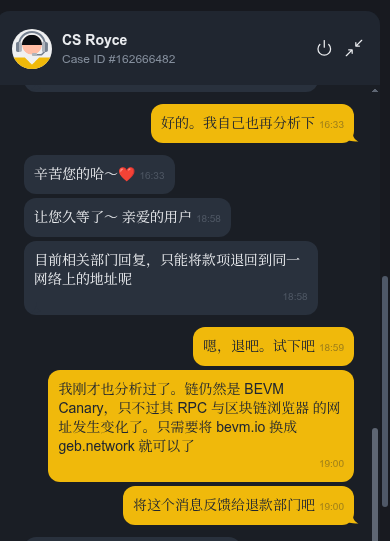
A brief review: I have a BTC recharge on the BVM Canary chain, and I hit the recharge address given by Binance due to an operation error. After submitting the asset recovery application, the customer service clearly replied:You can only return to the address on the same network in the same network, and do not support cross-chain replacement of public chain addresses.
Here comes the problem: the blockchain browser of this chain cannot be opened, and the RPC is also good and sometimes bad. If I fill in the original address directly, after the refund is credited to the account, will the asset be locked to a chain that ‘it seems to have been abolished’? I can’t bet. So, I chose to contact the Binance manual customer service again, and at the same time took the initiative to ask the project party for verification – this chain is still abnormal.
1. Why did I contact Binance manual customer service again
When adding information, I found the official browser of BeVM Canary scan-canary.bevm.io It is completely unopened, and RPC nodes often request timeouts. If Binance refunds the original path, and I can’t operate the assets on this chain normally, then the money is back, but I can’t get it.
So my strategy is:First find out the real situation of the chain, and then use the evidence to communicate with Binance. If the project party clearly states that ‘this chain has been abandoned’, then Binance may make an exception to return the cross-chain; if the project party says ‘the chain is still there’, then I will at least provide them with the correct network configuration to avoid the refund department refuses to deal with the ‘chain unavailable’.
2. Verify the true state of the chain from the project party
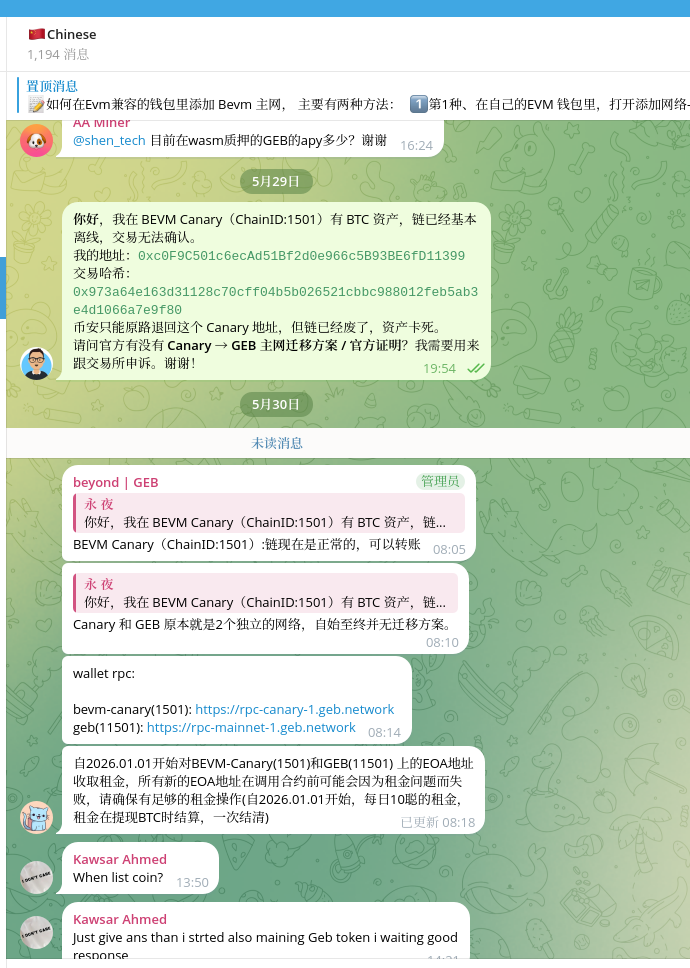
I joined GEB’s official Telegram community (BVM has been upgraded and renamed GEB) and asked the administrator directly:
Is BVM Canary (chain ID:1501) still running normally?
Are there any plans to be merged or abandoned?
The administrator’s reply is clear:
‘Chain is normal now and can be transferred.’ ‘Canary.Network and GEB mainnet are two different public chains, without any asset migration plan.’
My questions are as follows:
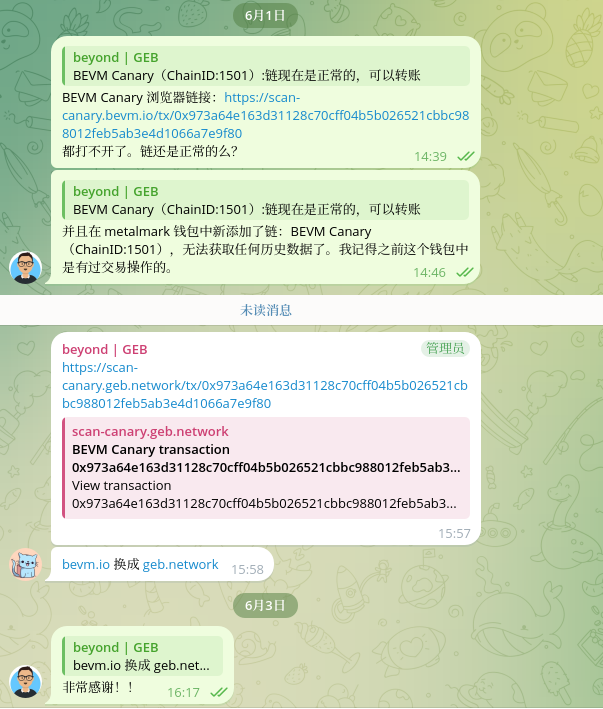
Bevm Canary Browser Link:https://scan-canary.bevm.io/tx/0x973a64e163d31128c70cff04b5b026521cbbc988012feb5ab3e4d1066a7e9f80 Can’t open. Is the chain still normal?
And added a new chain to the MetalMark wallet: bevm canary (chainid: 1501), can’t get any historical data. I remember that there was a transaction operation in this wallet before.
In this conversation, the members of the group gave a key prompt:Will bvm.io Replace with GEB.Network.
3. Key clues: replace bevm.io with geb.network
I immediately tried this prompt. The original browser address is: https://scan-canary.bevm.io/tx/0x973a...
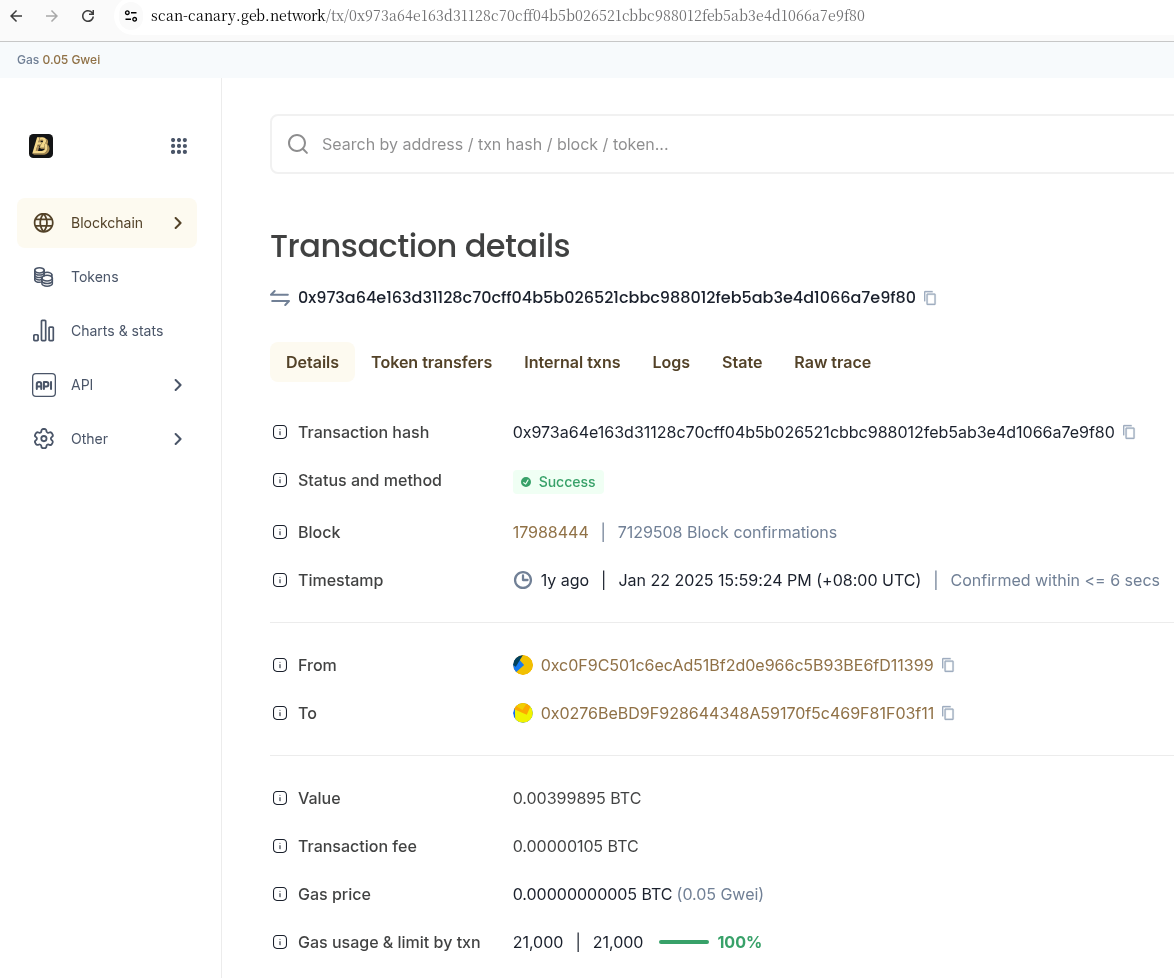
After replacing the domain name: https://scan-canary.geb.network/tx/0x973a...
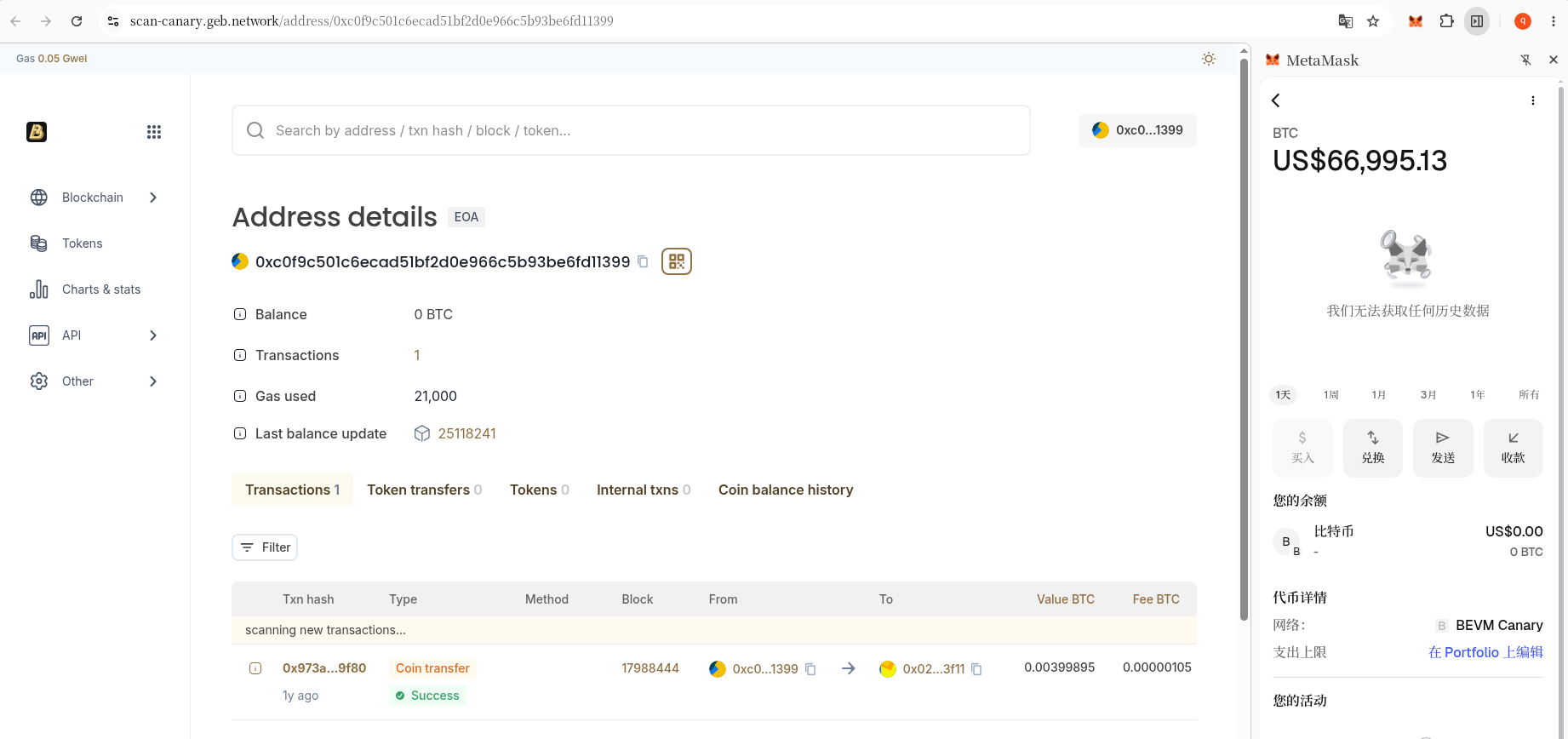
The page was successfully loaded! The transaction details are fully visible: from 0xc0f9...1399, to 0x0276...f11, value 0.00399895 BTC, Gas 0.05 GWEI. This transaction record of a year ago, clearly lying on the chain.
At this point I have confirmed two things:
Assets are safe and transaction records are not erased.
The chain has not changed, just the domain name of the service from bevm.io Changed to GEB.Network.
The configuration update of the wallet side
Knowing the change of the domain name, the next step is to update the network configuration in the wallet.
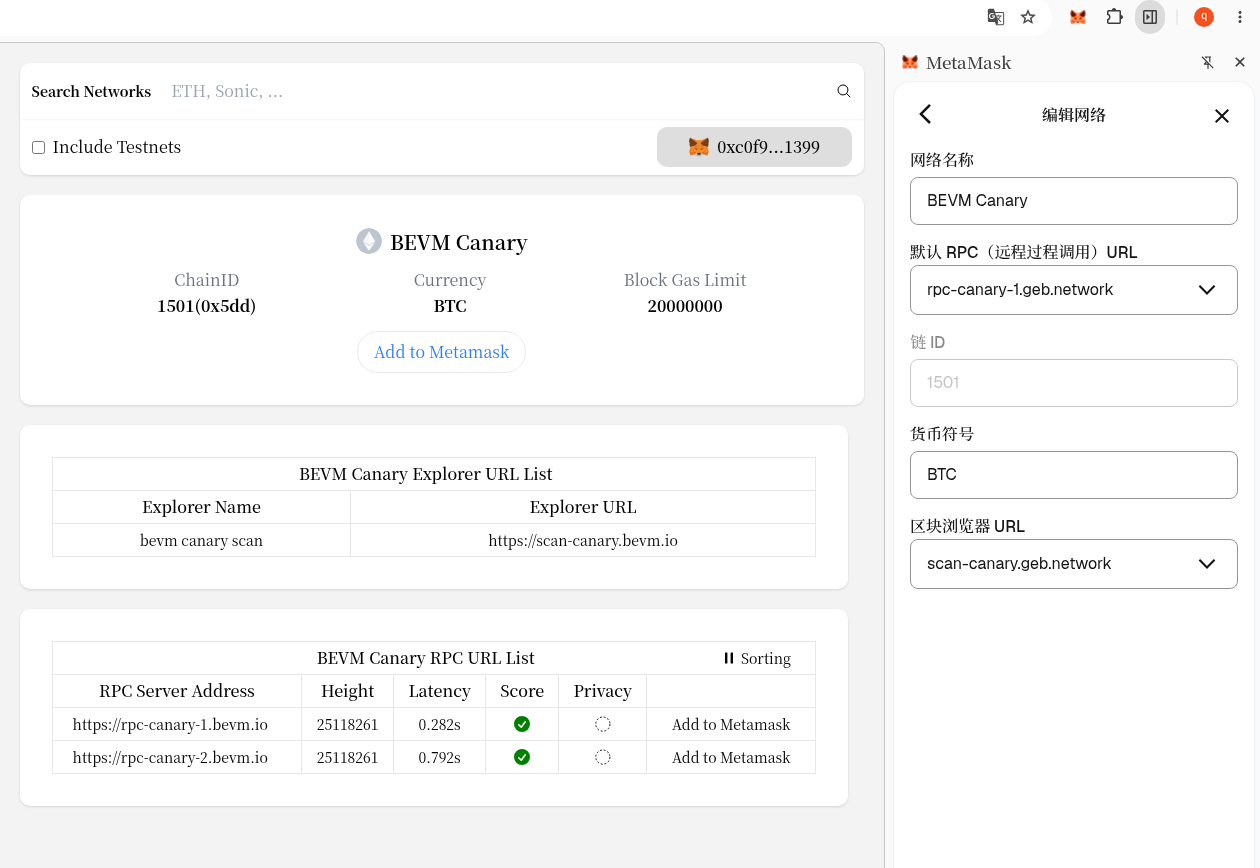
I deleted the old bevm canary network in MetaMask and opened it https://chainlist.org/chain/1501 re-add. In the original configuration displayed on ChainList, the RPC and browser addresses are still bevm.io old domain name.
I manually replace all these addresses with GEB.Network the corresponding version:
RPC URL:https://rpc-canary-1.geb.network
Block Browser URL:https://scan-canary.geb.network
chain id: keep 1501 Constant
currency symbol:btc
Save the configuration, switch back to the BVM Canary network, and wait for synchronization.
5. The difference between the display of the wallet and the facts on the chain
An interesting phenomenon happened:There is still no historical transaction records in MetaMask, but ‘View Assets in Explorer’ can be opened normally.
In the network list of my wallet, click ‘…’ in the upper right corner of ‘…’ → ‘View assets in explorer’, and jump directly to: https://scan-canary.geb.network/address/0xc0F9...1399
The full transaction history and BTC balance of the address are clearly displayed in the browser. This means:RPC can read on-chain data normally, but the local cache of MetaMask does not sync the history to the interface.
This is a common situation in wallet software and does not affect asset security. As long as it can be seen in the browser, the assets are there.
6. Final communication with Binance customer service
With all the above verification results, I will contact Binance Customer Service again and explain the complete situation clearly:
The chain is still BEVM Canary(Chain ID:1501)
The underlying nodes are normally blocked, and the chain is not discarded
It’s just that the URLs of RPC and blockchain browser have changed:Will bevm.io Replace with GEB.Network normal access and operation
After the assets are returned, I can receive and manage normally on the updated network
The customer service quickly gave feedback: the information has been forwarded to the refund department and entered the in-depth verification process.
At this point, the rest is waiting.
7. Waiting and a few things worth noting
There is no final result for this matter, and the review by the refund department will take time. But in the whole process, there are several experiences that I want to share with you:
① Chain ID is the only standard The domain name can be changed, the RPC can be changed, and the browser can also be changed. But as long as the chain ID remains unchanged, this chain is the same chain, and the assets are not lost.
② The browser is the final ledger, and the wallet is only a local cache If you can’t see a record in MetaMask, it’s not necessarily a configuration error, it may just be that the local cache is not synchronized. Checking with the block browser is the most reliable way to confirm.
③ Active verification is much more useful than passive waiting If I just fill in the original address for a refund step by step, the asset may really get stuck on a ‘look unavailable’ chain. It is precisely because of the initiative to ask the project party for verification that the key information of the domain name replacement is obtained, so that the follow-up communication is based.
④ The perspective of the project party and the exchange is different The project side is looking at ‘whether the bottom layer is out of a block’, and the exchange is looking at ‘whether the rules are allowed’. What the user needs to do is: put the facts on both sides together, and then push the solution. This process requires patience and a little technical verification ability.
at the end
At present, I have submitted the correct network configuration and full background of the migration to the Binance Refunds department. The program has entered the internal audit process.
If the subsequent refund is successfully completed, I will update this blog again and share the good news with you. If there are new twists and turns in the process, I will also record it truthfully.
Thanks to the project manager who patiently replied to my project party during this process, and also thanked the Binance customer service for being willing to transfer the problem to the technical department for in-depth verification.
I hope this record can bring some reference and confidence to friends who encounter similar situations.
📌 Continue to update: I will synchronize the refund progress in the comment area. You can also leave your questions or experiences and let’s communicate together.