在 Windows 10 中安装 HTTP Toolkit 后对 Shopify CLI 3.x 的抓包流程
1、参考:在 Windows 10 中安装 Fiddler Classic 后对 Shopify CLI 3.x 的抓包流程 。 最终未实现。
2、参考:如果您只是为 Node.js 寻找一个类似 fiddler 的 HTTP 调试工具,一个名为 HTTP Toolkit 的开源项目,一键从应用程序打开终端。从该终端启动任何节点 CLI/服务器/脚本。它发送的所有 HTTP 或 HTTPS 请求都会自动代理,因此您可以查看和重写所有内容。无需更改代码或 npm 包。在内部,它的工作方式是将额外的 JS 脚本注入到启动的 Node 进程中,该脚本挂钩 require() 来自动为您重新配置代理设置,对于每个不使用全局设置的模块。
3、HTTP Toolkit 允许您拦截来自几乎所有 HTTP 客户端的 HTTP 和 HTTPS 流量。参考: Intercepting HTTP from Node.js 。HTTP Toolkit 还允许您拦截服务器、脚本和命令行工具,例如 Node.js 应用程序。
4、点击 Fresh Terminal。打开一个新终端,拦截所有进程和 Docker 容器。如图1
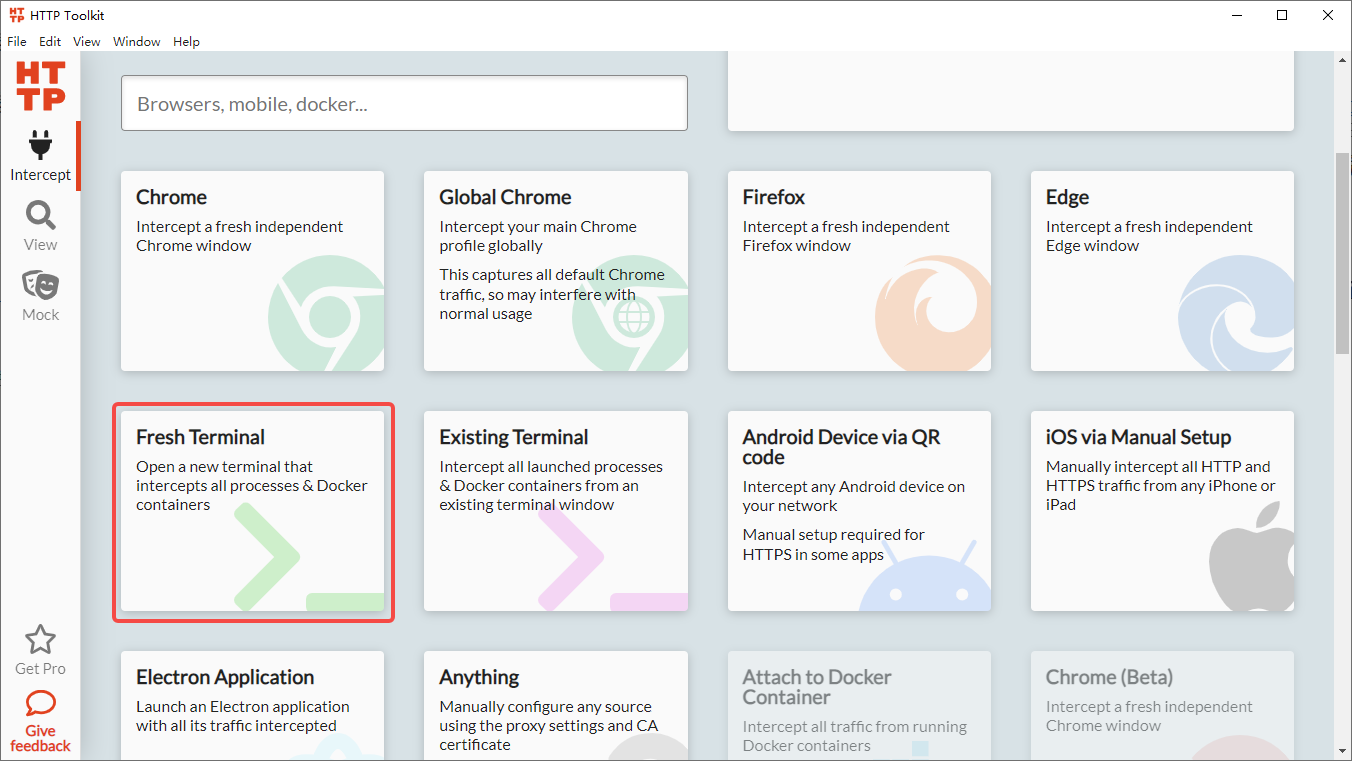
图1
5、在新的终端中执行 Shopify CLI 的命令。如图2
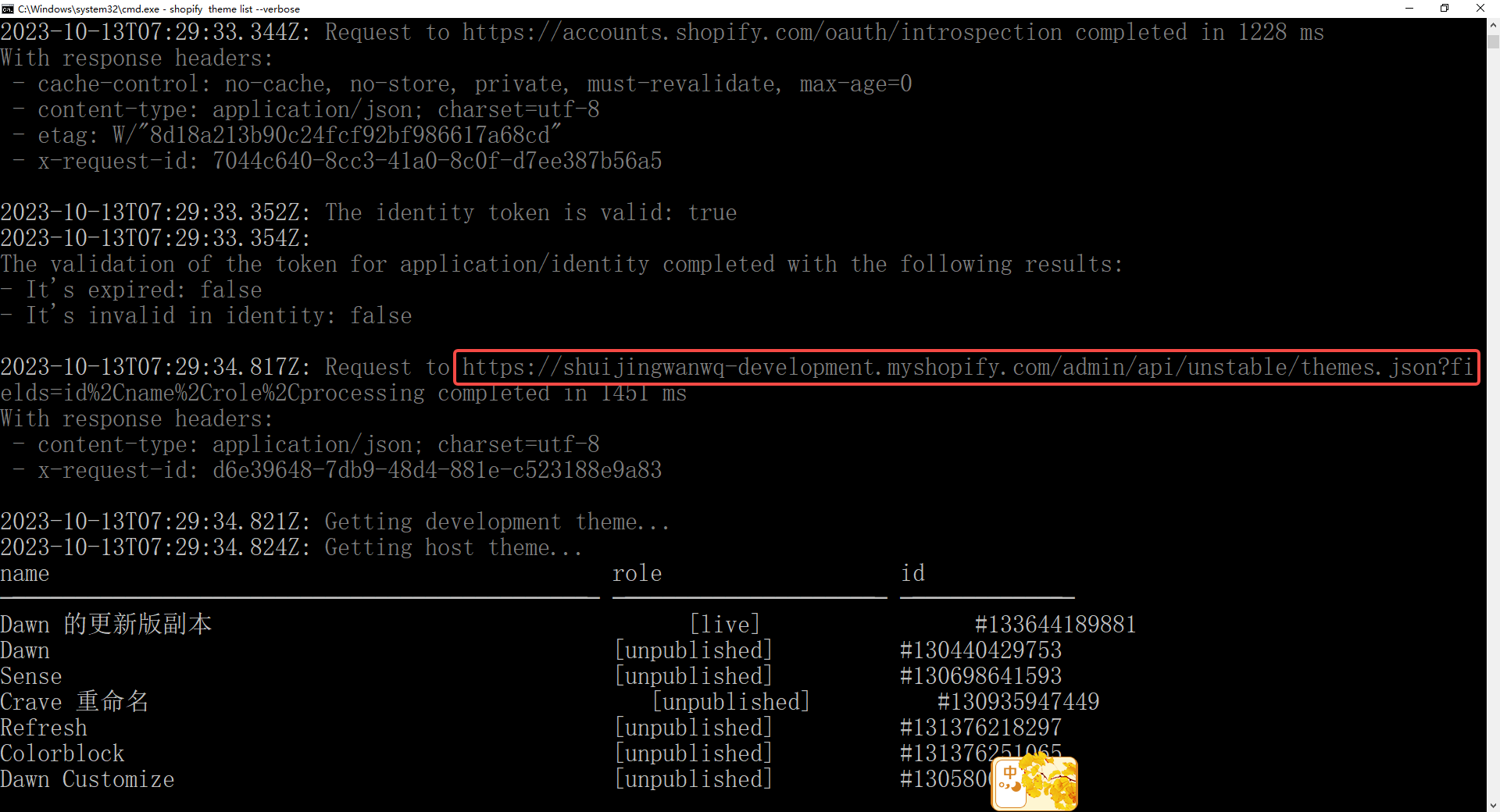
图2
E:\wwwroot\shopify-theme\theme-20230922>shopify theme list --verbose
2023-10-13T07:29:32.038Z: Running command theme list
2023-10-13T07:29:32.070Z: Ensuring that the user is authenticated with the Theme API with the following scopes:
[]

2023-10-13T07:29:32.071Z: Ensuring that the user is authenticated with the Admin API with the following scopes for the store shuijingwanwq-development.myshopify.com:
[]

2023-10-13T07:29:32.075Z: Getting session store...
2023-10-13T07:29:32.080Z: Validating existing session against the scopes:
[
  "openid",
  "https://api.shopify.com/auth/shop.admin.graphql",
  "https://api.shopify.com/auth/shop.admin.themes",
  "https://api.shopify.com/auth/partners.collaborator-relationships.readonly",
  "https://api.shopify.com/auth/shop.storefront-renderer.devtools",
  "https://api.shopify.com/auth/partners.app.cli.access",
  "https://api.shopify.com/auth/destinations.readonly"
]
For applications:
{
  "adminApi": {
    "scopes": [],
    "storeFqdn": "shuijingwanwq-development.myshopify.com"
  }
}

2023-10-13T07:29:32.084Z: Sending Identity Introspection request to URL: https://accounts.shopify.com/oauth/introspection
2023-10-13T07:29:32.097Z: Sending POST request to URL https://accounts.shopify.com/oauth/introspection
With request headers:
 - User-Agent: Shopify CLI; v=3.49.3
 - Keep-Alive: timeout=30
 - Sec-CH-UA-PLATFORM: win32
 - Content-Type: application/json

2023-10-13T07:29:33.344Z: Request to https://accounts.shopify.com/oauth/introspection completed in 1228 ms
With response headers:
 - cache-control: no-cache, no-store, private, must-revalidate, max-age=0
 - content-type: application/json; charset=utf-8
 - etag: W/"8d18a213b90c24fcf92bf986617a68cd"
 - x-request-id: 7044c640-8cc3-41a0-8c0f-d7ee387b56a5

2023-10-13T07:29:33.352Z: The identity token is valid: true
2023-10-13T07:29:33.354Z:
The validation of the token for application/identity completed with the following results:
- It's expired: false
- It's invalid in identity: false

2023-10-13T07:29:34.817Z: Request to https://shuijingwanwq-development.myshopify.com/admin/api/unstable/themes.json?fields=id%2Cname%2Crole%2Cprocessing completed in 1451 ms
With response headers:
 - content-type: application/json; charset=utf-8
 - x-request-id: d6e39648-7db9-48d4-881e-c523188e9a83

2023-10-13T07:29:34.821Z: Getting development theme...
2023-10-13T07:29:34.824Z: Getting host theme...
name                                             role                   id
───────────────────────────────────────────────  ─────────────────────  ─────────────
Dawn 的更新版副本                                      [live]                 #133644189881
Dawn                                             [unpublished]          #130440429753
Sense                                            [unpublished]          #130698641593
Crave 重命名                                        [unpublished]          #130935947449
Refresh                                          [unpublished]          #131376218297
Colorblock                                       [unpublished]          #131376251065
Dawn Customize                                   [unpublished]          #130580054201
Taste 的更新版副本 的更新版副本 的更新版副本 的更新版副本 的更新版副本            [unpublished]          #132350771385
的更新版副本
shopify-theme-dawn-20221011/main                 [unpublished]          #133060722873
Dawn                                             [unpublished]          #133474844857
Copy of Studio                                   [unpublished]          #133474975929
Dawn (Shopify CLI) 9                             [unpublished]          #133492932793
Dawn 的副本 的副本 1                                   [unpublished]          #133635932345
Colorblock                                       [unpublished]          #130698510521
Taste                                            [unpublished]          #130698543289
Craft                                            [unpublished]          #130698576057
Development (639b5c-DESKTOP-QLPK8QM)             [development] [yours]  #134109462713
2023-10-13T07:29:35.161Z:
Running system process:
  · Command: ruby -v
  · Working directory: E:/wwwroot/shopify-theme/theme-20230922

2023-10-13T07:29:36.486Z: Request to https://monorail-edge.shopifysvc.com/v1/produce completed in 1275 ms
With response headers:
 - x-request-id: 56128223-93f8-45c2-bb4e-f5c7abb44863

2023-10-13T07:29:36.488Z: Analytics event sent: {
  "command": "theme list",
  "time_start": 1697182172041,
  "time_end": 1697182175101,
  "total_time": 3060,
  "success": true,
  "cli_version": "3.49.3",
  "ruby_version": "3.1.1",
  "node_version": "18.18.0",
  "is_employee": false,
  "uname": "windows amd64",
  "env_ci": false,
  "env_plugin_installed_any_custom": false,
  "env_plugin_installed_shopify": "[\"@shopify/cli\",\"@shopify/plugin-did-you-mean\",\"@shopify/theme\"]",
  "env_shell": "cmd.exe",
  "env_device_id": "eb479d42673daf065d783e808d3de3b4870a4c02",
  "env_cloud": "localhost",
  "env_package_manager": "unknown",
  "cmd_all_launcher": "unknown",
  "cmd_all_topic": "theme",
  "cmd_all_plugin": "@shopify/theme",
  "cmd_all_verbose": true,
  "cmd_all_path_override": false,
  "args": "--verbose",
  "env_plugin_installed_all": "[\"@shopify/cli\",\"@shopify/plugin-did-you-mean\",\"@shopify/theme\"]",
  "metadata": "{\"extraPublic\":{},\"extraSensitive\":{}}"
}
2023-10-13T07:29:36.499Z: Completed command theme list

E:\wwwroot\shopify-theme\theme-20230922>
6、在 HTTP Toolkit 中查看已经被捕获的流量,符合期望。已经存在对应的请求:https://shuijingwanwq-development.myshopify.com/admin/api/unstable/themes.json?fields=id%2Cname%2Crole%2Cprocessing ,且响应为明文。如图3
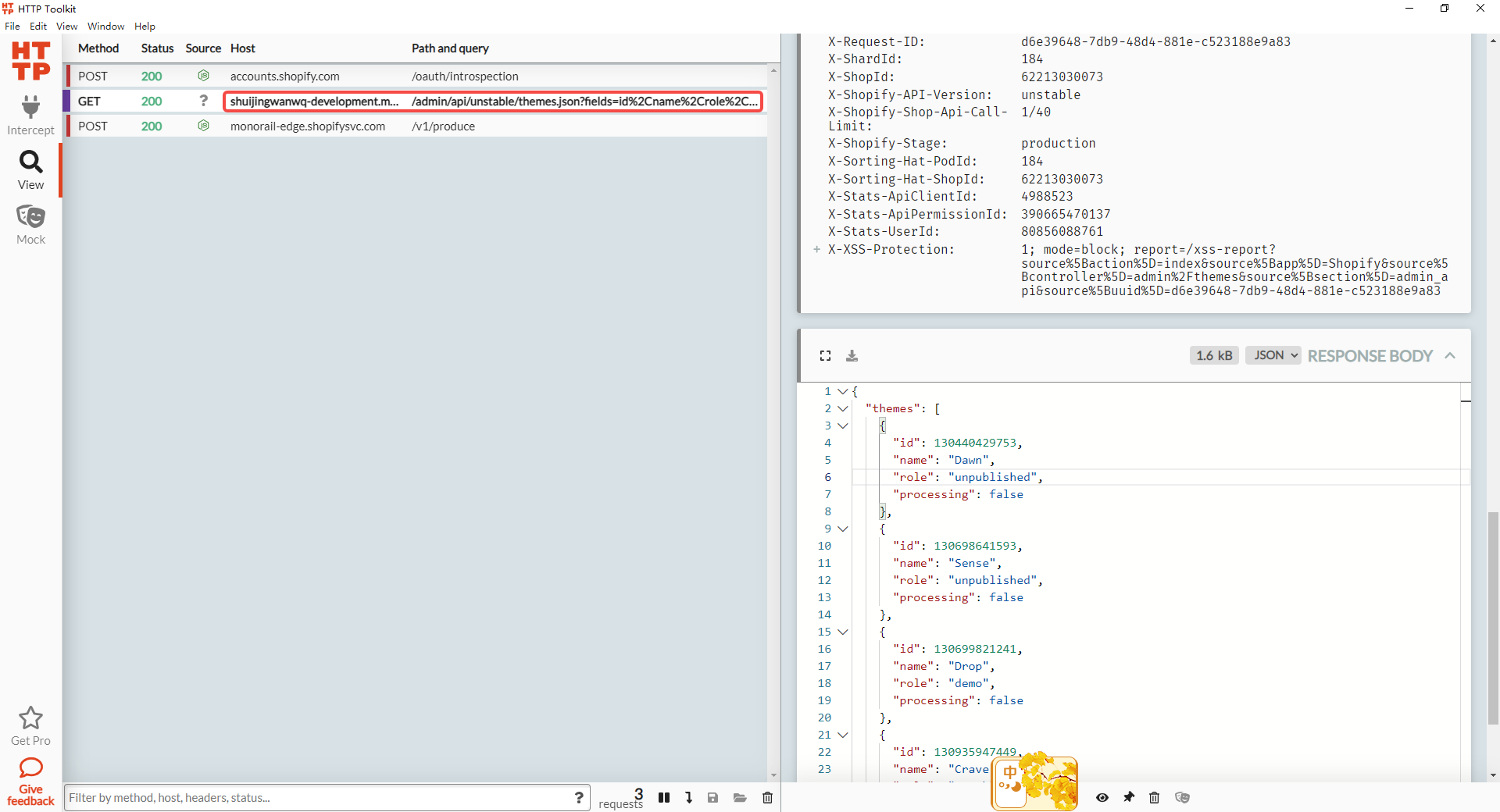
图3
7、现有终端,点击 Existing Terminal,在本机上的任何 Powershell 终端中运行以下命令,以立即启用对在那里启动的所有新进程的拦截。如图4

图4
8、在现有终端中执行 Shopify CLI 的命令。在 HTTP Toolkit 中查看已经被捕获的流量,符合期望。如图5

图5
PS C:\Users\Lenovo> Invoke-Expression (Invoke-WebRequest http://localhost:8001/ps-setup).Content                                                                           HTTP Toolkit interception enabled
PS C:\Users\Lenovo> E:
PS E:\> cd .\wwwroot\shopify-theme\theme-20230922\
PS E:\wwwroot\shopify-theme\theme-20230922> shopify theme list
name                                             role           id
───────────────────────────────────────────────  ─────────────  ─────────────
Dawn 的更新版副本                                      [live]         #133644189881
Dawn                                             [unpublished]  #130440429753
Sense                                            [unpublished]  #130698641593
Crave 重命名                                        [unpublished]  #130935947449
Refresh                                          [unpublished]  #131376218297
Colorblock                                       [unpublished]  #131376251065
Dawn Customize                                   [unpublished]  #130580054201
Taste 的更新版副本 的更新版副本 的更新版副本 的更新版副本 的更新版副本 的更新版副本  [unpublished]  #132350771385
shopify-theme-dawn-20221011/main                 [unpublished]  #133060722873
Dawn                                             [unpublished]  #133474844857
Copy of Studio                                   [unpublished]  #133474975929
Dawn (Shopify CLI) 9                             [unpublished]  #133492932793
Dawn 的副本 的副本 1                                   [unpublished]  #133635932345
Colorblock                                       [unpublished]  #130698510521
Taste                                            [unpublished]  #130698543289
Craft                                            [unpublished]  #130698576057
PS E:\wwwroot\shopify-theme\theme-20230922>
1 条回复
[…] 15、配置 Wireshark,编辑 – 首选项 – Protocls – TLS。决定暂时搁置此方案,因为已经找到了更为合适的方案。参考:在 Windows 10 中安装 HTTP Toolkit 后对 Shopify CLI 3.x 的抓包流程 […]