The installation of Redis under Windows 8.1, and the configuration supports PHP implementation process
1. Open the URL:http://redis.io/download,
windows
The Redis project does not officially support Windows. However, Microsoft Open Technology Group has developed and maintained a Redis version for Windows 64-bit. as shown in Figure 1

The Redis project does not officially support Windows. However, Microsoft Open Technology Group has developed and maintained a Redis version for Windows 64-bit.
2. The URL is linked to:https://github.com/MSOpenTech/redis
According to the prompt, you canhttp://github.com/MSOpenTech/redis/releasesDownload to the latest binary file, as shown in Figure 2

According to the prompt, you canhttp://github.com/MSOpenTech/redis/releasesDownload to the latest binary file
3. Download the latest version of the binary file: redis-x64-2.8.2104.msi
In step 6: Add the Redis installation folder to the PATH environment variable
In step 7: Add exception to Windows Firewall

Download the latest version of the binary: redis-x64-2.8.2104.msi
The installation steps are as follows:

Installation step 1

Install step 2, agree to the corresponding agreement

Install step 3, add Redis’s installation folder to the PATH environment variable

Install step 4, add the exception to the Windows Firewall

Installation step 5

Installation step 6

View Redis in Task Manager’s Services
4. Install the Redis extension of PHP
Download php_redis.dll from the php official website

Download php_redis.dll from the php official website

Download the thread-safe version of 5.4

Copy the php_redis.dll file to the ext directory of the php installation directory

Configure Redis extension to configure in php.ini file
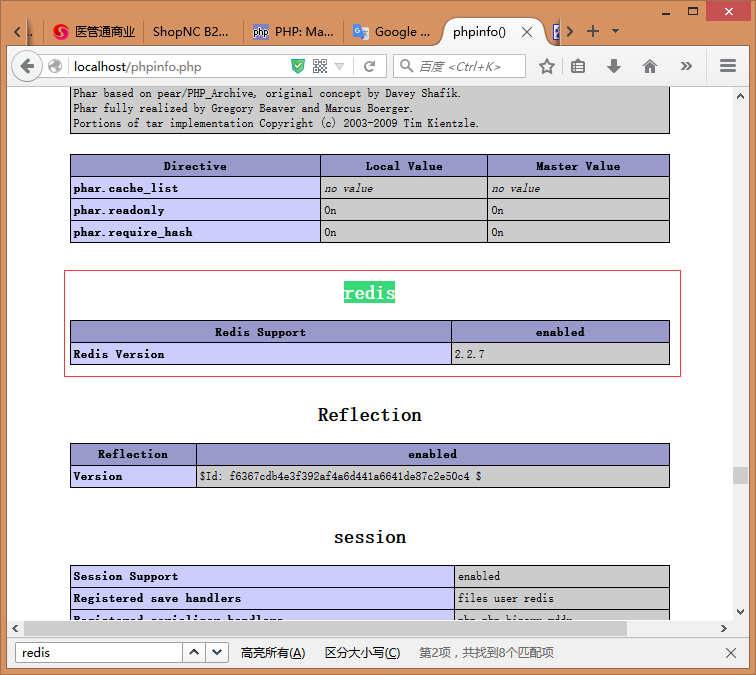
Check if Redis exists in phpinfo
5. Client phpredisadmin installation:https://github.com/ErikDubbelboer/phpRedisAdmin
Execute: php composer.phar create-project -s dev erik-dubbelboer/php-redis-admin phpredisadmin
Error, as shown in Figure 16:
Warning: this development build of composer is over 60 days old. It is recommended
ed to update it by running “Composer.Phar Self-Update” to get the latest version

Execute: php composer.phar create-project -s dev erik-dubbelboer/php-redis-admin phpredisadmin
6. Execute: composer.phar self-update, download the latest version of composer.phar, Figure 17

Execute: composer.phar self-update, download the latest version of composer.phar
7. Clear the files in phpredisadmin and re-execute: php composer.phar create-project -s dev erik-dubbelboer/php-redis-admin phpredisadmin, as shown in Figure 18, 19

Figure 17: Clear files within phpredisadmin

Re-execute: php composer.phar create-project -s dev erik-dubbelboer/php-redis-admin phpredisadmin, as shown in Figure 19
8. Open:http://localhost/phpredisadmin/,Found that it has been installed successfully

Open:http://localhost/phpredisadmin/,Found that it has been installed successfully
8. Client-side Redis Desktop Manager installation:http://redisdesktop.com/download
Download the Windows version, as shown in Figure 20

Client Redis Desktop Manager installation:http://redisdesktop.com/downloadDownload the Windows version, as shown in Figure 20

Redis Desktop Manager installation step 1

Redis Desktop Manager installation step 2

Redis Desktop Manager installation step 3

Redis Desktop Manager installation step 5

Redis Desktop Manager installation step 6

Redis Desktop Manager running interface