There is no problem not worth solving, and no technology not worth learning!
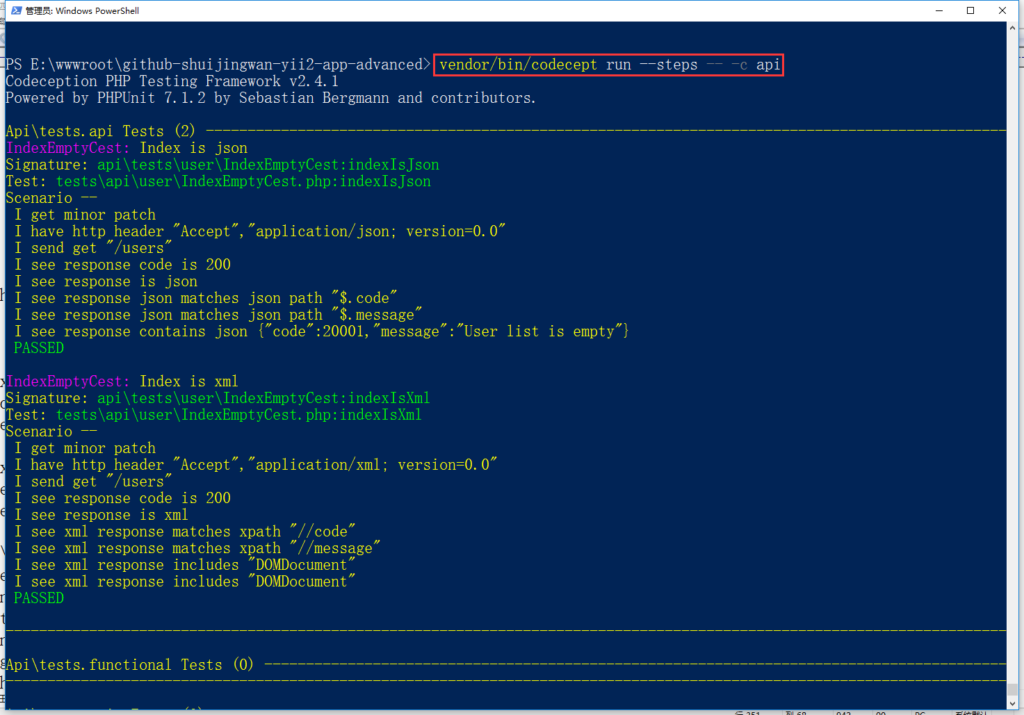
Based on yiisoft/yii2-app-advanced, create a new repository yii2-app-advanced on github, and create a new interface application (implement RESTful-style web service services. API), implement RESTful web service, support internationalization (drivingly set the target language, default to simplified Chinese)
1. RESTful web service, it is recommended to implement based on a separate interface application, at this time, it is implemented based on the API application
2. Create a new directory: \api\rests, this directory will be used as the operation method category directory of the RESTful web service
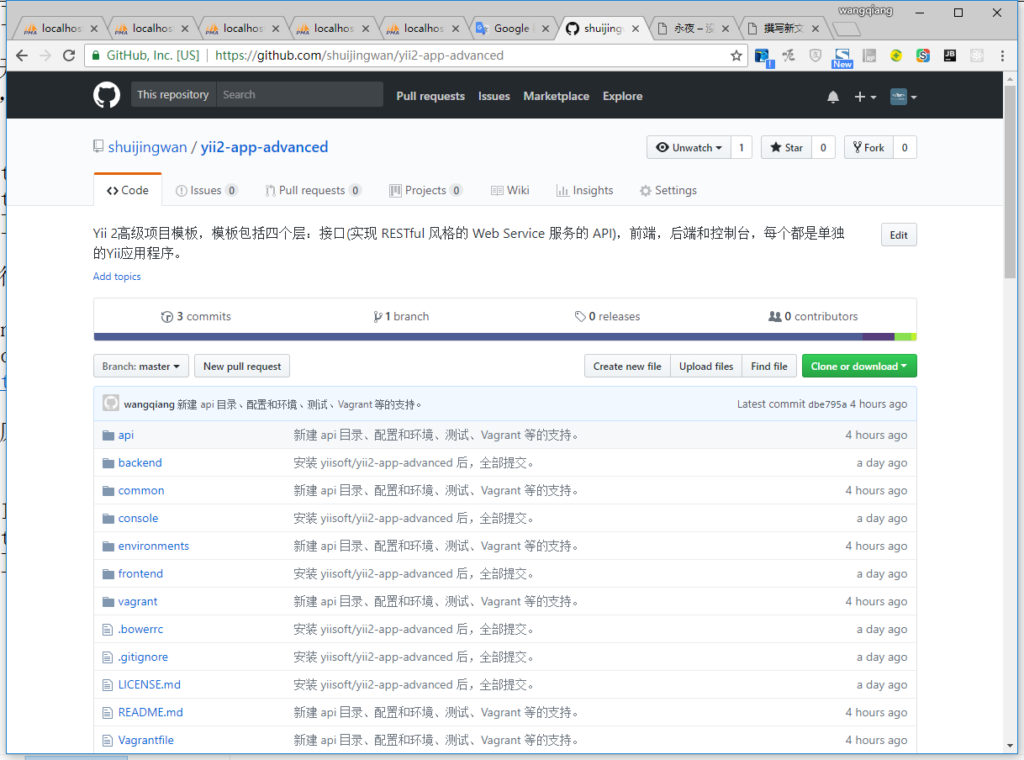
3. Create a new controller class \API\Controllers\UserController.php , and the controller class is extended from[[yii\rest\ActiveController]]. The realization of data serialization includes paging information in the response body to simplify the development of the client, as shown in Figure 1
Figure 1
Note: If only less behavior is supported, you can choose the following scheme, such as
    public function actions()
    {
        $actions = parent::actions();

        $actions['view']['class'] = 'api\rests\user\ViewAction';

        return $actions;
    }
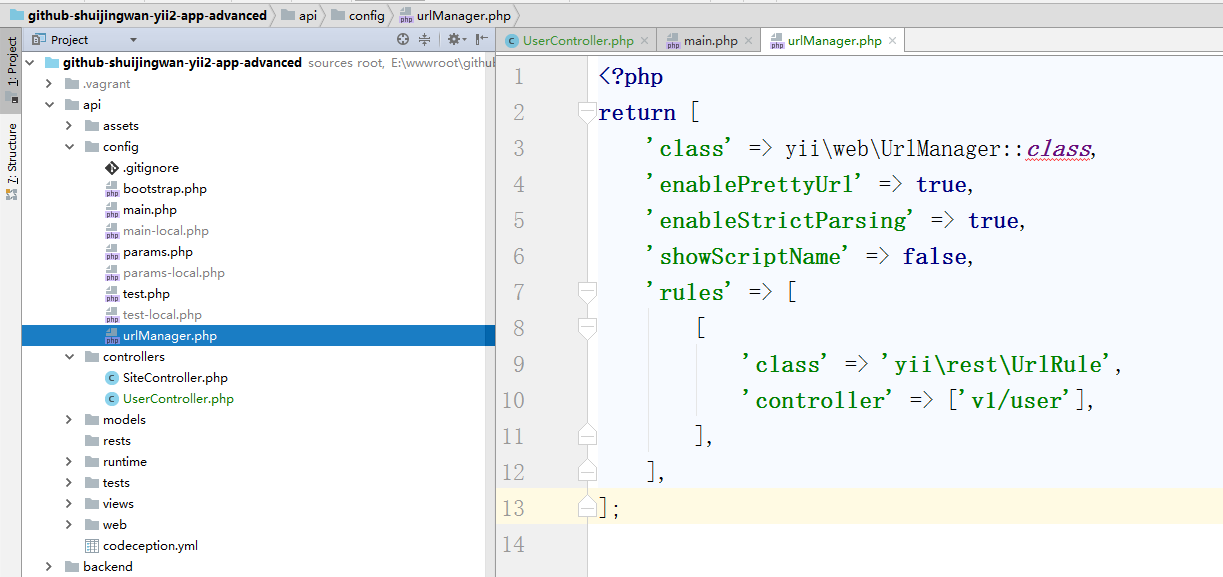
4. When the content of the configuration is very complex, the common practice is to store it in one or more PHP files, which are called configuration files. A configuration file returns an array of php. Versioning of the versioned implementation, configuring the URL rules, modifying the configuration of the urlmanager component configured in the application, supporting the v1 module, supporting all behaviors, create a new:\api\config\urlmanager.php, as shown in Figure 2
Figure 2
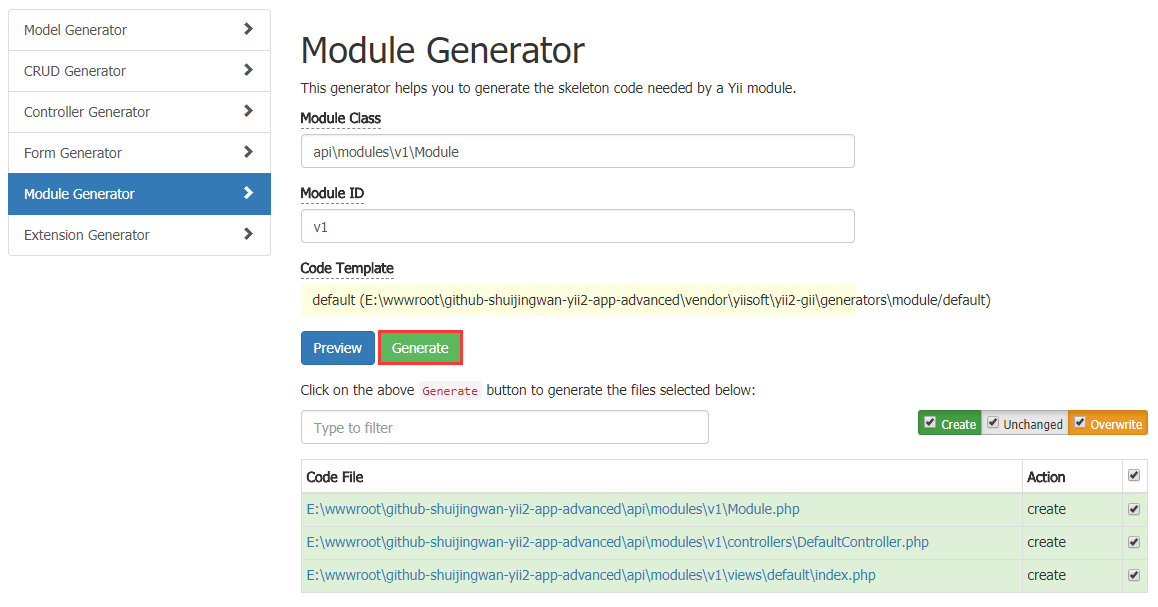
6. Implement the API of each major version in the main version number of a separate module ID, and generate the module based on the GII v1, open the URL: http://www.github-shuijingwan-yii2-app-advanced.localhost/gii/module , delete the directory: \api\modules\v1\views, as shown in Figure 3
Figure 3
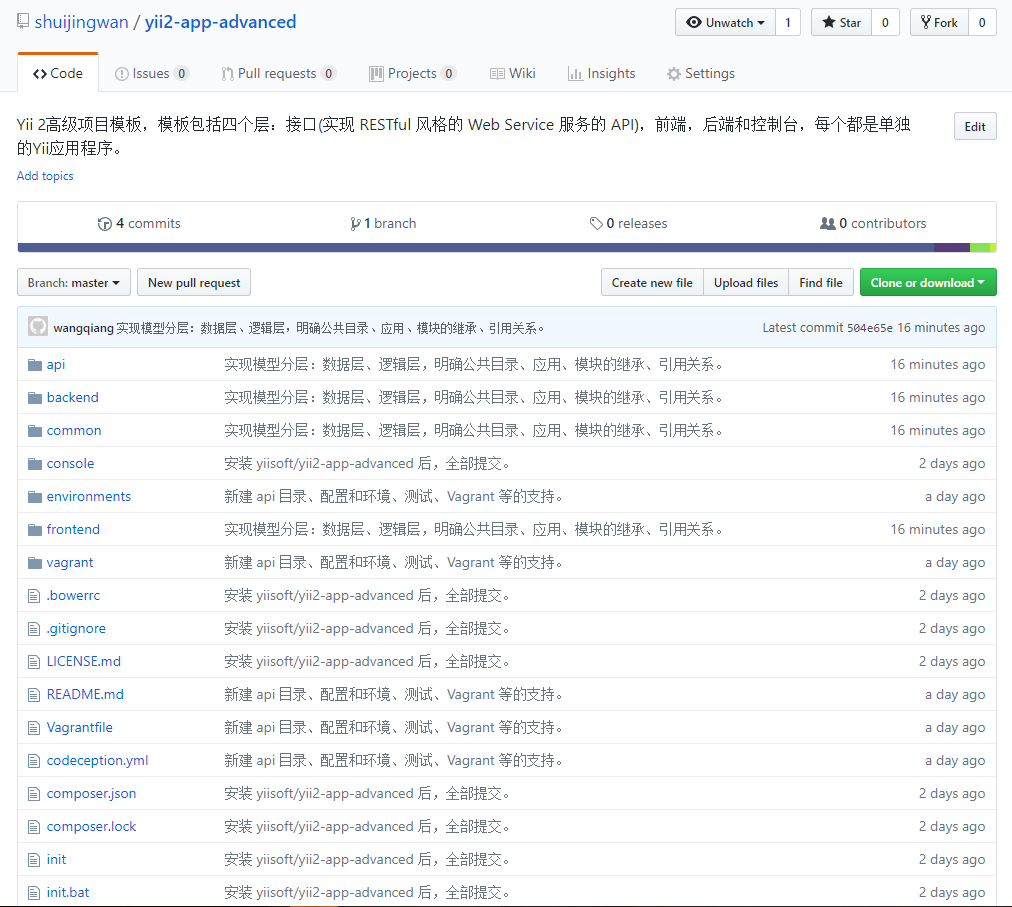
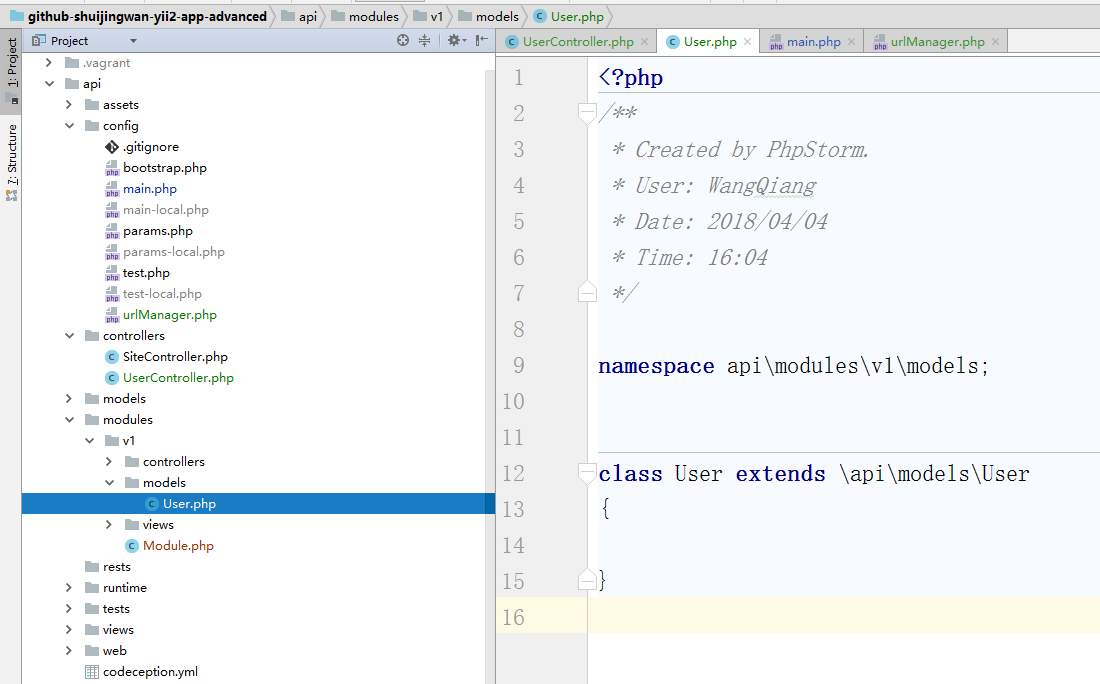
7. Create a new \API\modules\v1\models\user.php, inherit to \api\models\user.php, as shown in Figure 4
Note: \api\modules\v1\models\user (only for v1 modules) > \api\models\user (for API applications only) > \common\logics\user.php (available for multiple applications such as API, frontend, etc.) > \common\models\user.php (limited to GII generation only) > \yii\db\ActiveRecord
Figure 4
<?php
/**
 * Created by PhpStorm.
 * User: WangQiang
 * Date: 2018/04/04
 * Time: 16:04
 */

namespace api\modules\v1\models;


class User extends \api\models\User
{

}
8. \API\modules\v1\Controllers\DefaultController.php Renamed \API\modules\v1\Controllers\UserController.php, by specifying[[yii\rest\ActiveController::modelClass|modelClass]] As API\modules\v1\models\user, the controller can know which model to use to obtain and process data. Edit the code, as shown in Figure 5
Note: \api\modules\v1\Controllers\UserController.php (only for the v1 module) > \API\Controllers\UserController.php (only for API Application) > \yii\rest\ActiveController
Figure 5
<?php

namespace api\modules\v1\controllers;

/**
 * User controller for the `v1` module
 */
class UserController extends \api\controllers\UserController
{
    public $modelClass = 'api\modules\v1\models\User';
}
9. To use the module in the application, you only need to add the module to the configuration of the application body.[[yii\base\Application::modules|modules]] in the list of attributes, the application body configuration of the following code Using the v1 module, edit \api\config\main.php, as shown in Figure 6
Figure 6
13. RESTful APIs are usually stateless, so configure the User application component, edit \API\config\main.php
Note: Configure User Application Components:
install[[yii\web\User::enableSession|enableSession]] property is false.
install[[yii\web\User::loginUrl|loginUrl]] The attribute is null to display an HTTP 403 error instead of jumping to the login interface.
14. Copy the directory under \vendor\yiisoft\yii2\rest action.php, indexaction.php, optionsAction.php, viewaction.php, createaction.php, updateAction.php, deleteAction.php, serializer.php to directory \API\RESTS\User, if it is a directory with multiple words combined, it is recommended to use lowercase + underscore for the directory, refer to the URL: https://github. com/hfcorriez/fig-standards/blob/master/accepted/zh_cn/psr-0.md
15. Edit \API\RESTS\User\IndexAction.php, adjust namespace, inheritance relationship, query conditions, etc.
<?php
/**
 * @link http://www.yiiframework.com/
 * @copyright Copyright (c) 2008 Yii Software LLC
 * @license http://www.yiiframework.com/license/
 */

namespace api\rests\user;

use Yii;
use yii\data\ActiveDataProvider;

/**
 * IndexAction implements the API endpoint for listing multiple models.
 *
 * For more details and usage information on IndexAction, see the [guide article on rest controllers](guide:rest-controllers).
 *
 * @author Qiang Wang <shuijingwanwq@163.com>
 * @since 1.0
 */
class IndexAction extends \yii\rest\IndexAction
{
    const STATUS_DELETED = 0; //状态:已删除
    const STATUS_ACTIVE = 10; //状态:活跃

    /**
     * Prepares the data provider that should return the requested collection of the models.
     * @return ActiveDataProvider
     */
    protected function prepareDataProvider()
    {
        $requestParams = Yii::$app->getRequest()->getBodyParams();
        if (empty($requestParams)) {
            $requestParams = Yii::$app->getRequest()->getQueryParams();
        }

        $filter = null;
        if ($this->dataFilter !== null) {
            $this->dataFilter = Yii::createObject($this->dataFilter);
            if ($this->dataFilter->load($requestParams)) {
                $filter = $this->dataFilter->build();
                if ($filter === false) {
                    return $this->dataFilter;
                }
            }
        }

        if ($this->prepareDataProvider !== null) {
            return call_user_func($this->prepareDataProvider, $this, $filter);
        }

        /* @var $modelClass \yii\db\BaseActiveRecord */
        $modelClass = $this->modelClass;

        $query = $modelClass::find()->where(['status' => self::STATUS_ACTIVE]);
        if (!empty($filter)) {
            $query->andWhere($filter);
        }

        return Yii::createObject([
            'class' => ActiveDataProvider::className(),
            'query' => $query,
            'pagination' => [
                'params' => $requestParams,
            ],
            'sort' => [
                'params' => $requestParams,
            ],
        ]);
    }
}
16. Edit \API\RESTS\User\Serializer.php, adjust the namespace, inheritance relationship, and response structure (response success: “code”: 10000,”message”,”data”; response failed: “code”: other numbers not equal to 10000, “message”) etc.
<?php
/**
 * @link http://www.yiiframework.com/
 * @copyright Copyright (c) 2008 Yii Software LLC
 * @license http://www.yiiframework.com/license/
 */

namespace api\rests\user;

use Yii;
use yii\data\DataProviderInterface;

/**
 * Serializer converts resource objects and collections into array representation.
 *
 * Serializer is mainly used by REST controllers to convert different objects into array representation
 * so that they can be further turned into different formats, such as JSON, XML, by response formatters.
 *
 * The default implementation handles resources as [[Model]] objects and collections as objects
 * implementing [[DataProviderInterface]]. You may override [[serialize()]] to handle more types.
 *
 * @author Qiang Wang <shuijingwanwq@163.com>
 * @since 1.0
 */
class Serializer extends \yii\rest\Serializer
{
    /**
     * Serializes a data provider.
     * @param DataProviderInterface $dataProvider
     * @return array the array representation of the data provider.
     */
    protected function serializeDataProvider($dataProvider)
    {
        if ($this->preserveKeys) {
            $models = $dataProvider->getModels();
        } else {
            $models = array_values($dataProvider->getModels());
        }
        $models = $this->serializeModels($models);

        if (($pagination = $dataProvider->getPagination()) !== false) {
            $this->addPaginationHeaders($pagination);
        }

        if ($this->request->getIsHead()) {
            return null;
        } elseif ($this->collectionEnvelope === null) {
            return $models;
        }

        $result = [
            $this->collectionEnvelope => $models,
        ];

        if (empty($result['items'])) {
            return ['code' => 20001, 'message' => Yii::t('error', '20001')];
        }

        if ($pagination !== false) {
            return ['code' => 10000, 'message' => Yii::t('success', '10001'), 'data' => array_merge($result, $this->serializePagination($pagination))];
        }

        return ['code' => 10000, 'message' => Yii::t('success', '10001'), 'data' => $result];
    }
}
17. Edit \API\config\main.php to configure the I18n application component of the interface application
20. Create a new language pack file: \api\messages\en-us\success.php (English in the United States, the response is successful)
<?php
return [
    10000 => 'success',
    10001 => 'Get user list success',
    10002 => 'Get user details success',
    10003 => 'Create user success',
    10004 => 'Update user success',
    10005 => 'Delete user success',
];
21. Create a new language pack file: \api\messages\en-us\error.php (English American, response failed)
<?php
return [
    20000 => 'error',
    20001 => 'User list is empty',
    20002 => 'User ID: {id}, does not exist',
    20003 => 'User ID: {id}, the status is not active',
    20004 => 'Data validation failed: {firstErrors}',
];
22. ContentNegotiator supports response content format processing and language processing. Determine the response content format and language by checking the GET parameter and the Accept HTTP header. Configure ContentNegotiator to support English American and Simplified Chinese. Edit \common\config\main.php
Note: If no language is detected in the request, use[[languages]] The first configuration item.
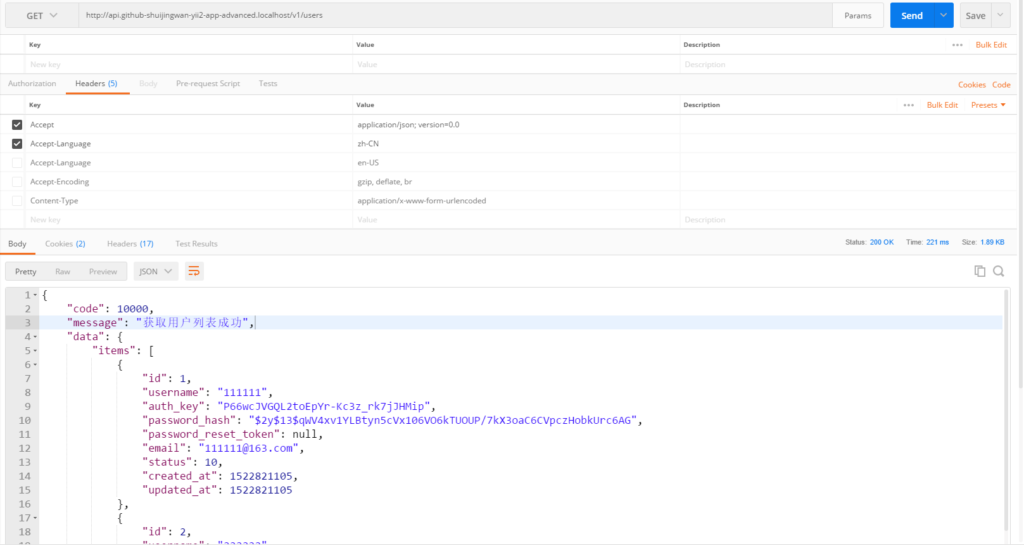
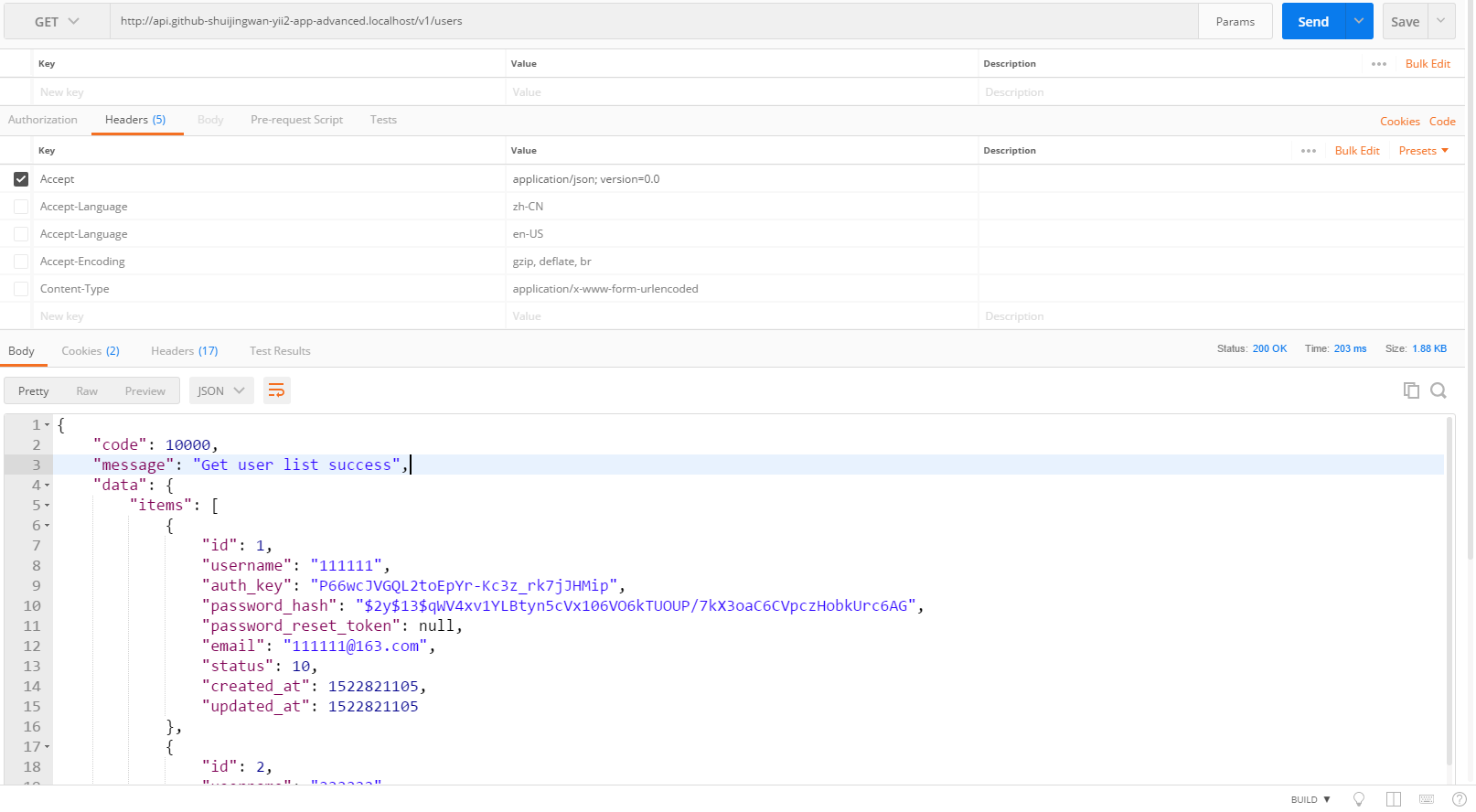
23. In Postman, get http://api.github-shuijingwan-yii2-app-advanced.localhost/v1/users , 200 response, the message defaults to simplified Chinese, as shown in Figure 9
Note:
accept application/json; version=0.0
Figure 9
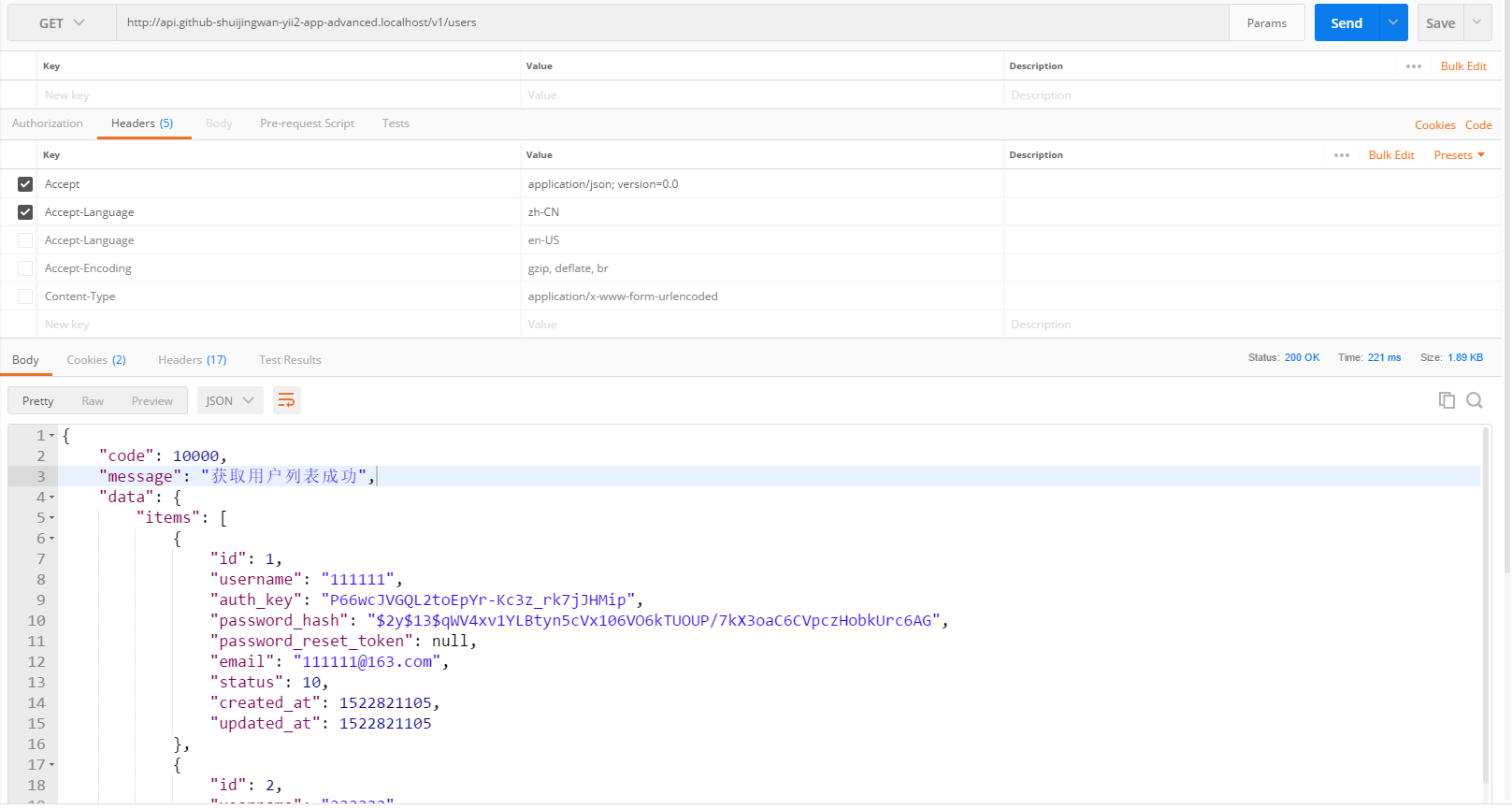
24. In Postman, get http://api.github-shuijingwan-yii2-app-advanced.localhost/v1/users , 200 response, the message is simplified Chinese, as shown in Figure 10
Note:
accept application/json; version=0.0
accept-language en
Figure 10
25, get /users/1: return the details of user 1, edit \api\rests\user\action.php, adjust the namespace, inheritance, response structure, etc.
<?php
/**
 * @link http://www.yiiframework.com/
 * @copyright Copyright (c) 2008 Yii Software LLC
 * @license http://www.yiiframework.com/license/
 */

namespace api\rests\user;

use Yii;
use yii\db\ActiveRecordInterface;
use yii\web\NotFoundHttpException;

/**
 * Action is the base class for action classes that implement RESTful API.
 *
 * For more details and usage information on Action, see the [guide article on rest controllers](guide:rest-controllers).
 *
 * @author Qiang Wang <shuijingwanwq@163.com>
 * @since 1.0
 */
class Action extends \yii\rest\Action
{
    /**
     * Returns the data model based on the primary key given.
     * If the data model is not found, a 404 HTTP exception will be raised.
     * @param string $id the ID of the model to be loaded. If the model has a composite primary key,
     * the ID must be a string of the primary key values separated by commas.
     * The order of the primary key values should follow that returned by the `primaryKey()` method
     * of the model.
     * @return ActiveRecordInterface the model found
     * @throws NotFoundHttpException if the model cannot be found
     */
    public function findModel($id)
    {
        if ($this->findModel !== null) {
            return call_user_func($this->findModel, $id, $this);
        }

        /* @var $modelClass ActiveRecordInterface */
        $modelClass = $this->modelClass;
        $keys = $modelClass::primaryKey();
        if (count($keys) > 1) {
            $values = explode(',', $id);
            if (count($keys) === count($values)) {
                $model = $modelClass::findOne(array_combine($keys, $values));
            }
        } elseif ($id !== null) {
            $model = $modelClass::findOne($id);
        }

        if (isset($model)) {
            return $model;
        }

        throw new NotFoundHttpException(Yii::t('error', Yii::t('error', Yii::t('error', '20002'), ['id' => $id])), 20002);
    }
}
26. Edit \api\rests\user\viewaction.php, adjust namespace, inheritance relationship, response structure, etc.
<?php
/**
 * @link http://www.yiiframework.com/
 * @copyright Copyright (c) 2008 Yii Software LLC
 * @license http://www.yiiframework.com/license/
 */

namespace api\rests\user;

use Yii;

/**
 * ViewAction implements the API endpoint for returning the detailed information about a model.
 *
 * For more details and usage information on ViewAction, see the [guide article on rest controllers](guide:rest-controllers).
 *
 * @author Qiang Wang <shuijingwanwq@163.com>
 * @since 1.0
 */
class ViewAction extends Action
{
    const STATUS_DELETED = 0; //状态:已删除
    const STATUS_ACTIVE = 10; //状态:活跃

    /**
     * Displays a model.
     * @param string $id the primary key of the model.
     * @return \yii\db\ActiveRecordInterface the model being displayed
     */
    public function run($id)
    {
        $model = $this->findModel($id);
        if ($this->checkAccess) {
            call_user_func($this->checkAccess, $this->id, $model);
        }

        /* 判断状态,如果为已删除,则返回失败 */
        if ($model->status === self::STATUS_DELETED) {
            return ['code' => 20003, 'message' => Yii::t('error', Yii::t('error', Yii::t('error', '20003'), ['id' => $id]))];
        }

        return ['code' => 10000, 'message' => Yii::t('success', '10002'), 'data' => $model];
    }
}
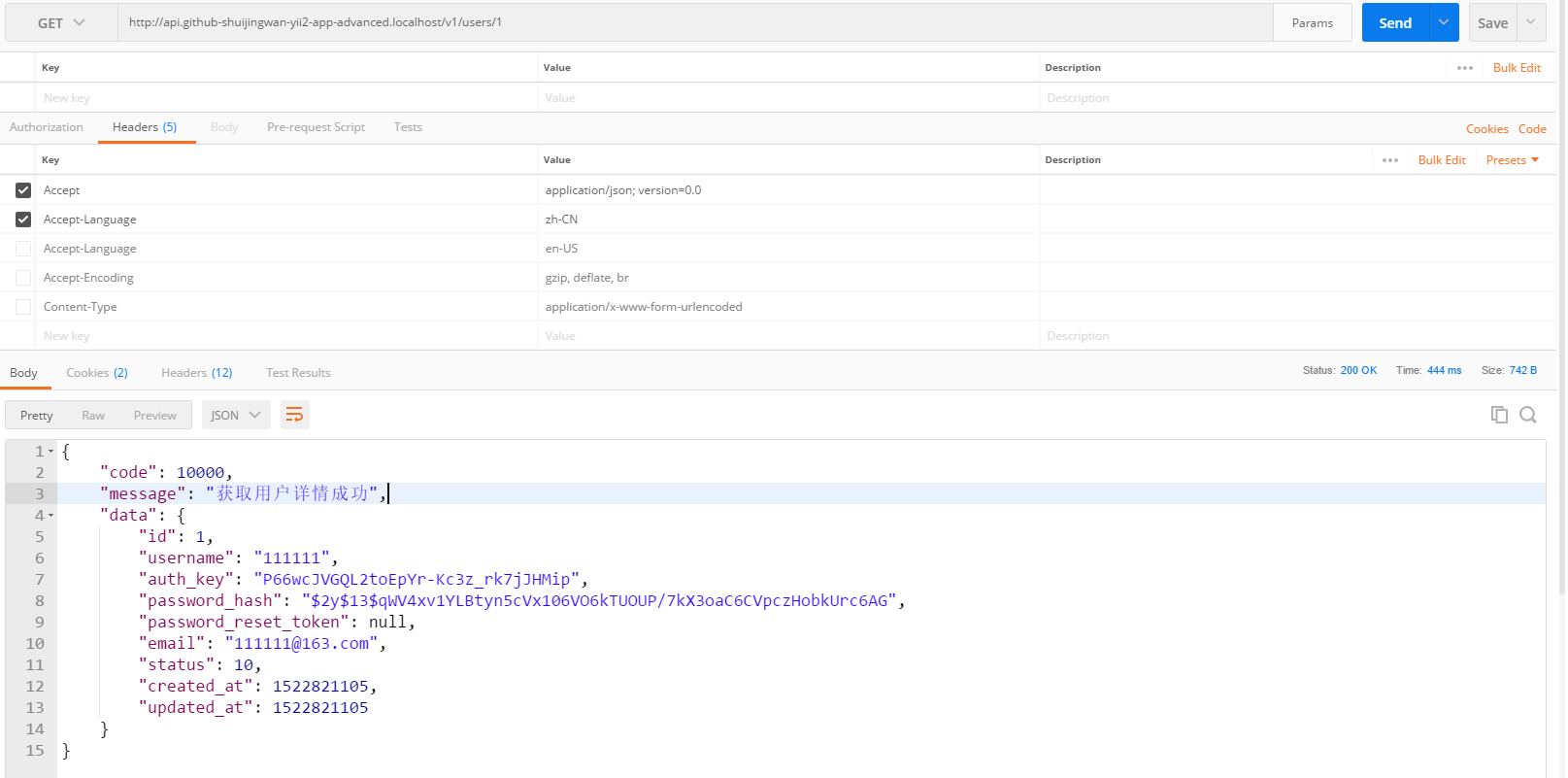
27. In Postman, get http://api.github-shuijingwan-yii2-app-advanced.localhost/v1/users/1 , 200 responses, its status is active, as shown in Figure 11
Note:
accept application/json; version=0.0
accept-language en
Figure 11
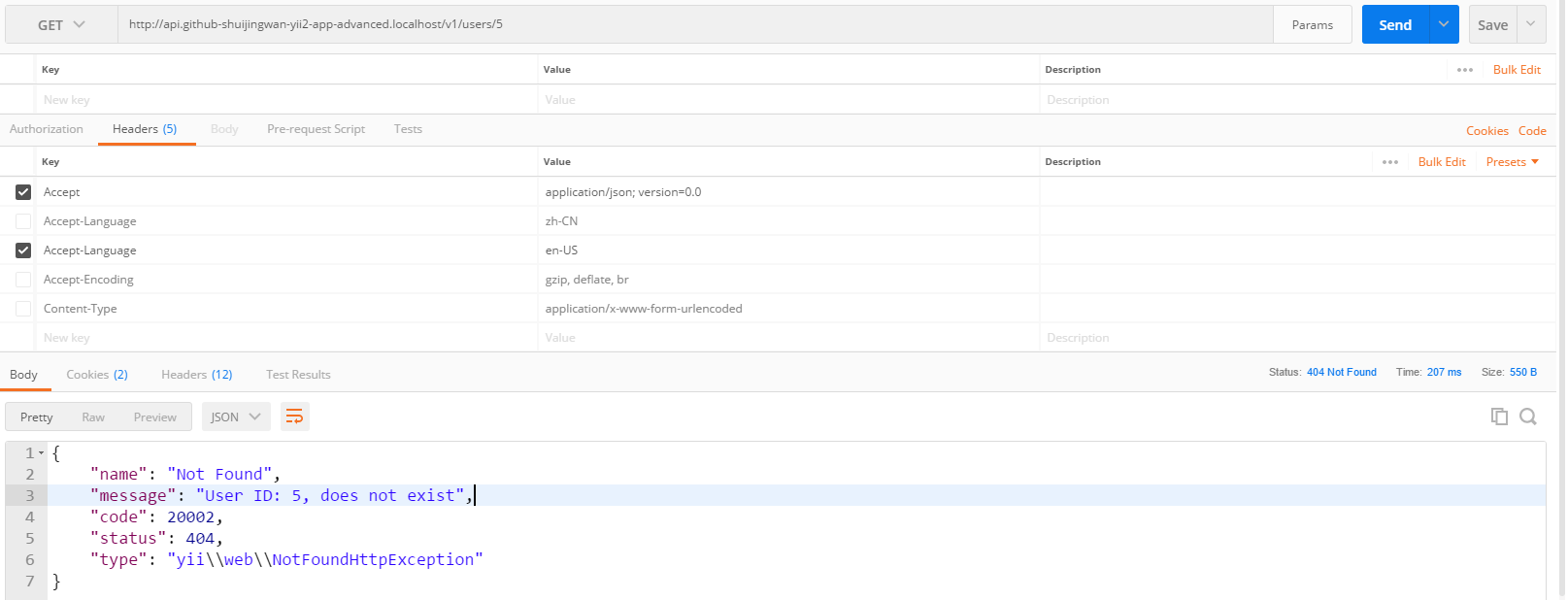
28. In Postman, get http://api.github-shuijingwan-yii2-app-advanced.localhost/v1/users/5 , 404 response, the user does not exist, as shown in Figure 12
Note:
accept application/json; version=0.0
accept-language en-us
Figure 12
{
    "name": "Not Found",
    "message": "User ID: 5, does not exist",
    "code": 20002,
    "status": 404,
    "type": "yii\\web\\NotFoundHttpException"
}
29, post /users: Create a new user, copy \api\models\signupform.php to \api\models\signup.php
<?php
namespace api\models;

use yii\base\Model;

/**
 * Signup
 */
class Signup extends Model
{
    public $username;
    public $email;
    public $password;


    /**
     * {@inheritdoc}
     */
    public function rules()
    {
        return [
            ['username', 'trim'],
            ['username', 'required'],
            ['username', 'unique', 'targetClass' => '\api\models\User'],
            ['username', 'string', 'min' => 2, 'max' => 255],
            ['email', 'trim'],
            ['email', 'required'],
            ['email', 'email'],
            ['email', 'string', 'max' => 255],
            ['email', 'unique', 'targetClass' => '\api\models\User'],
            ['password', 'required'],
            ['password', 'string', 'min' => 6],
        ];
    }
}
30. Create a new \API\modules\v1\models\signup.php, inherit to \api\models\signup.php
<?php
/**
 * Created by PhpStorm.
 * User: WangQiang
 * Date: 2018/04/08
 * Time: 10:48
 */

namespace api\modules\v1\models;


class Signup extends \api\models\Signup
{

}
31, post /users: create a new user, edit \api\rests\user\createaction.php
<?php
/**
 * @link http://www.yiiframework.com/
 * @copyright Copyright (c) 2008 Yii Software LLC
 * @license http://www.yiiframework.com/license/
 */

namespace api\rests\user;

use Yii;
use yii\base\Model;
use api\models\Signup;
use yii\helpers\Url;
use yii\web\ServerErrorHttpException;

/**
 * CreateAction implements the API endpoint for creating a new model from the given data.
 *
 * For more details and usage information on CreateAction, see the [guide article on rest controllers](guide:rest-controllers).
 *
 * @author Qiang Wang <shuijingwanwq@163.com>
 * @since 1.0
 */
class CreateAction extends Action
{
    /**
     * @var string the scenario to be assigned to the new model before it is validated and saved.
     */
    public $scenario = Model::SCENARIO_DEFAULT;
    /**
     * @var string the name of the view action. This property is need to create the URL when the model is successfully created.
     */
    public $viewAction = 'view';


    /**
     * Creates a new model.
     * @return \yii\db\ActiveRecordInterface the model newly created
     * @throws ServerErrorHttpException if there is any error when creating the model
     */
    public function run()
    {
        if ($this->checkAccess) {
            call_user_func($this->checkAccess, $this->id);
        }

        $signup = new Signup();
        $signup->load(Yii::$app->getRequest()->getBodyParams(), '');
        if (!$signup->validate()) {
            if ($signup->hasErrors()) {
                $response = Yii::$app->getResponse();
                $response->setStatusCode(422, 'Data Validation Failed.');
                foreach ($signup->getFirstErrors() as $message) {
                    $firstErrors = $message;
                    break;
                }
                return ['code' => 20004, 'message' => Yii::t('error', Yii::t('error', Yii::t('error', '20004'), ['firstErrors' => $firstErrors]))];
            } elseif (!$signup->hasErrors()) {
                throw new ServerErrorHttpException('Failed to create the object for unknown reason.');
            }
        }

        /* @var $model \yii\db\ActiveRecord */
        $model = new $this->modelClass([
            'scenario' => $this->scenario,
        ]);

        $model->username = $signup->username;
        $model->email = $signup->email;
        $model->setPassword($signup->password);
        $model->generateAuthKey();
        if ($model->save()) {
            $response = Yii::$app->getResponse();
            $response->setStatusCode(201);
            $id = implode(',', array_values($model->getPrimaryKey(true)));
            $response->getHeaders()->set('Location', Url::toRoute([$this->viewAction, 'id' => $id], true));
        } elseif ($model->hasErrors()) {
            $response = Yii::$app->getResponse();
            $response->setStatusCode(422, 'Data Validation Failed.');
            foreach ($model->getFirstErrors() as $message) {
                $firstErrors = $message;
                break;
            }
            return ['code' => 20004, 'message' => Yii::t('error', Yii::t('error', Yii::t('error', '20004'), ['firstErrors' => $firstErrors]))];
        } elseif (!$model->hasErrors()) {
            throw new ServerErrorHttpException('Failed to create the object for unknown reason.');
        }

        return ['code' => 10000, 'message' => Yii::t('success', '10003'), 'data' => $model];
    }
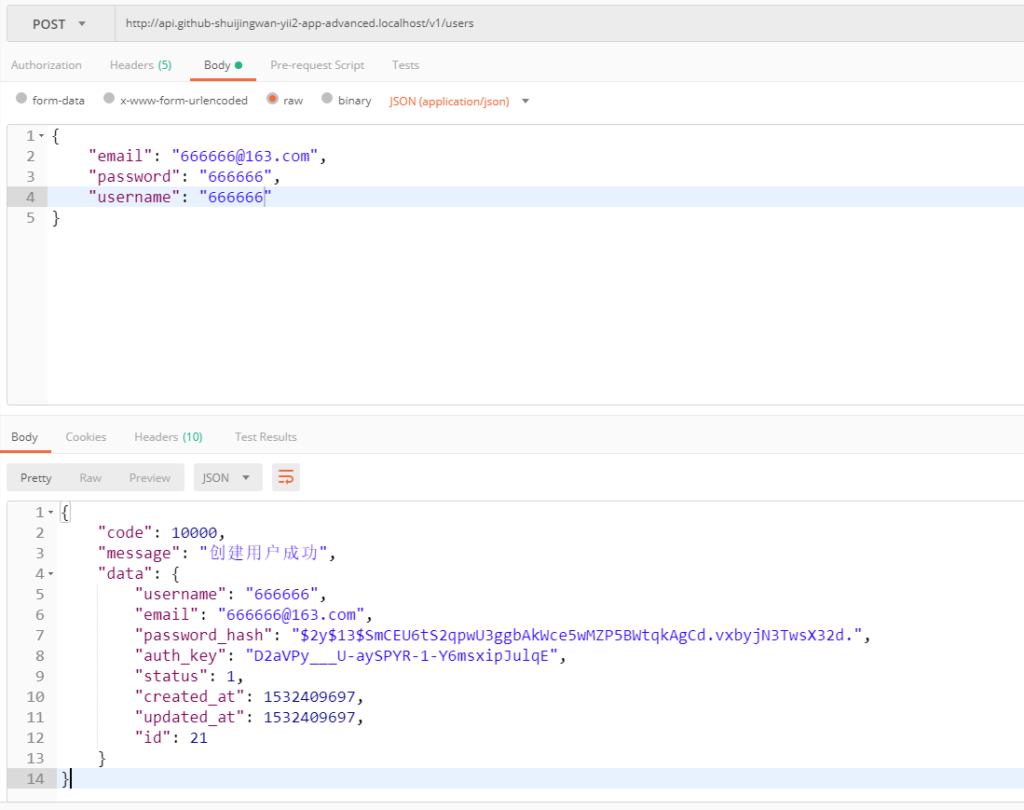
}
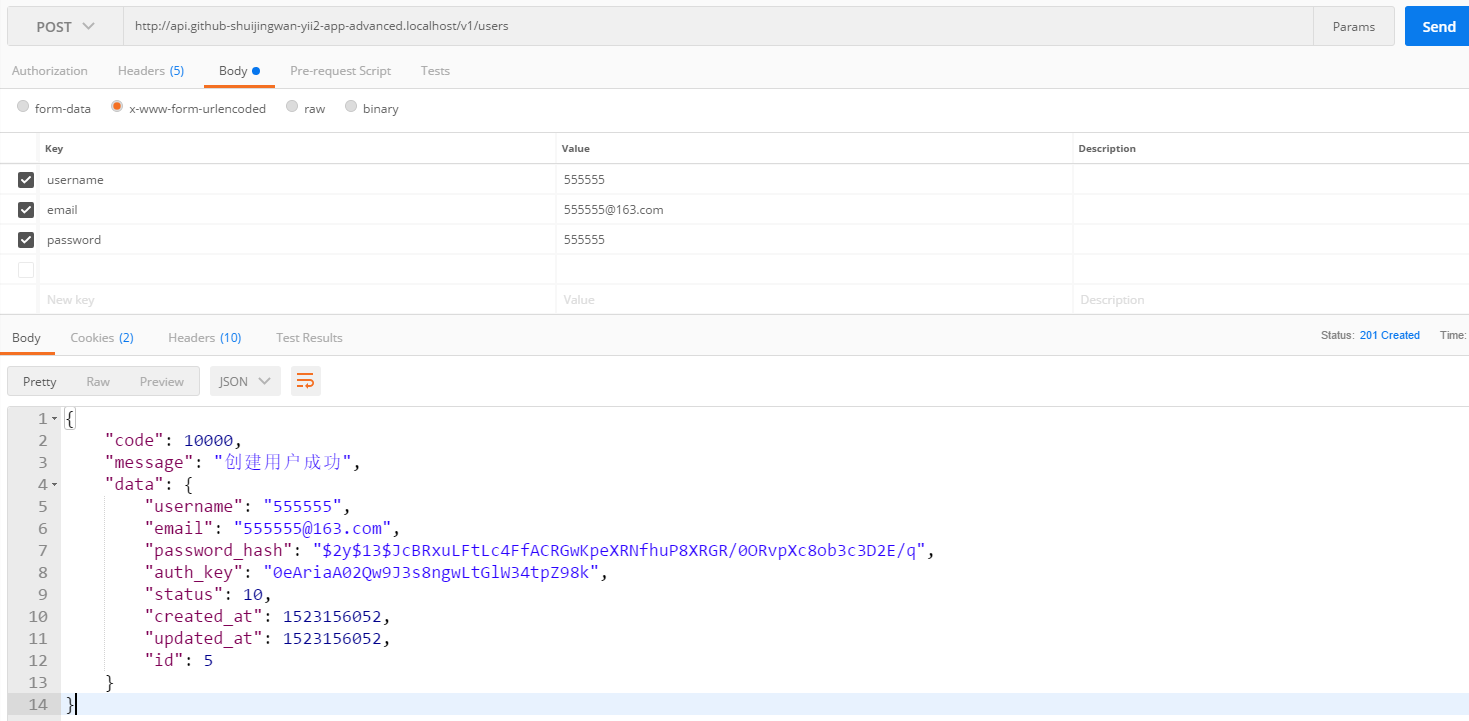
32. In Postman, post http://api.github-shuijingwan-yii2-app-advanced.localhost/v1/users , 201 response, as shown in Figure 13
Note:
accept application/json; version=0.0
accept-language en
Accept-encoding gzip, deflate, br
content-type application/x-www-form-urlencoded
Figure 13
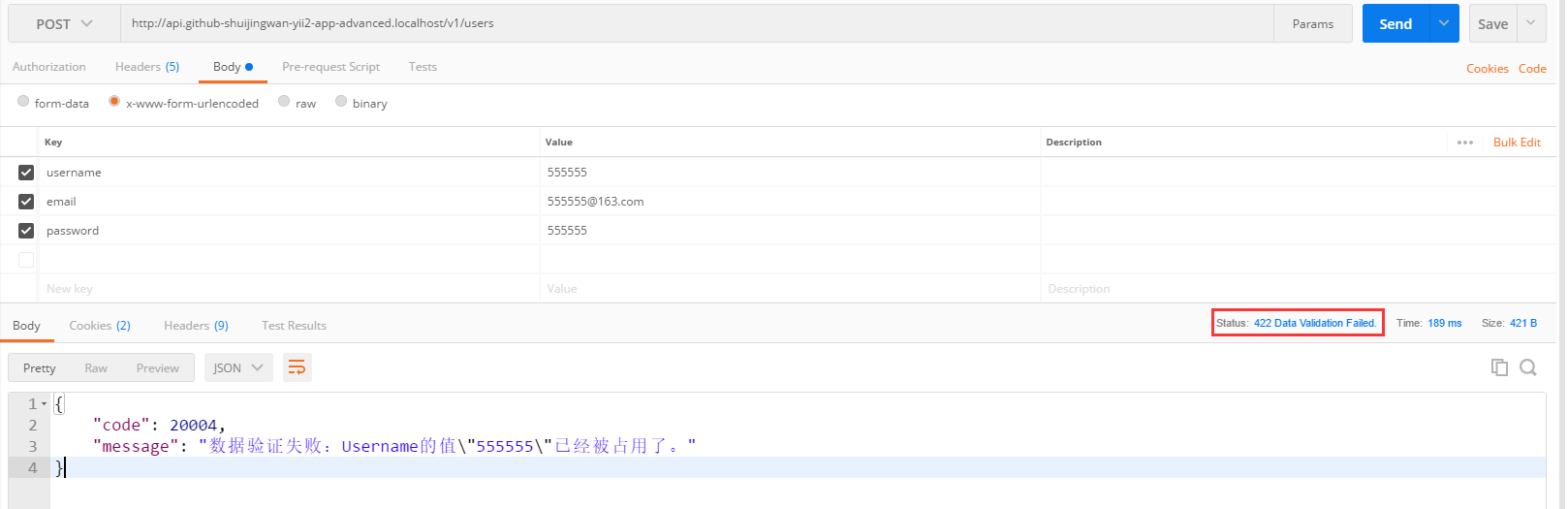
33. In Postman, post http://api.github-shuijingwan-yii2-app-advanced.localhost/v1/users , the parameters remain as they are, 422 responds, as shown in Figure 14
Note:
accept application/json; version=0.0
accept-language en
Accept-encoding gzip, deflate, br
content-type application/x-www-form-urlencoded
Figure 14
34, put /users/5: update a user, create a new \api\models\userupdate.php
<?php
namespace api\models;

use yii\base\Model;

/**
 * UserUpdate
 */
class UserUpdate extends Model
{
    public $id;
    public $email;
    public $password;
    public $status;

    const STATUS_DELETED = 0; //状态:已删除
    const STATUS_ACTIVE = 10; //状态:活跃

    /**
     * {@inheritdoc}
     */
    public function rules()
    {
        return [
            ['email', 'trim'],
            ['email', 'required'],
            ['email', 'email'],
            ['email', 'string', 'max' => 255],
            ['email', 'unique', 'targetClass' => '\api\models\User', 'filter' => ['!=', 'id', $this->id]],
            ['password', 'required'],
            ['password', 'string', 'min' => 6],
            [['status'], 'in', 'range' => [self::STATUS_DELETED, self::STATUS_ACTIVE]],
        ];
    }
}
35. Create a new \API\modules\v1\models\userupdate.php, inherit to \api\models\userupdate.php
<?php
/**
 * Created by PhpStorm.
 * User: WangQiang
 * Date: 2018/04/08
 * Time: 11:19
 */

namespace api\modules\v1\models;


class UserUpdate extends \api\models\UserUpdate
{

}
36, put /users/4: update a user, edit \api\rests\user\updateaction.php
<?php
/**
 * @link http://www.yiiframework.com/
 * @copyright Copyright (c) 2008 Yii Software LLC
 * @license http://www.yiiframework.com/license/
 */

namespace api\rests\user;

use Yii;
use yii\base\Model;
use yii\db\ActiveRecord;
use api\models\UserUpdate;
use yii\web\ServerErrorHttpException;

/**
 * UpdateAction implements the API endpoint for updating a model.
 *
 * For more details and usage information on UpdateAction, see the [guide article on rest controllers](guide:rest-controllers).
 *
 * @author Qiang Wang <shuijingwanwq@163.com>
 * @since 1.0
 */
class UpdateAction extends Action
{
    /**
     * @var string the scenario to be assigned to the model before it is validated and updated.
     */
    public $scenario = Model::SCENARIO_DEFAULT;


    /**
     * Updates an existing model.
     * @param string $id the primary key of the model.
     * @return \yii\db\ActiveRecordInterface the model being updated
     * @throws ServerErrorHttpException if there is any error when updating the model
     */
    public function run($id)
    {
        /* @var $model ActiveRecord */
        $model = $this->findModel($id);

        if ($this->checkAccess) {
            call_user_func($this->checkAccess, $this->id, $model);
        }

        $userUpdate = new UserUpdate();
        $userUpdate->id = $id;
        $userUpdate->load(Yii::$app->getRequest()->getBodyParams(), '');
        if (!$userUpdate->validate()) {
            if ($userUpdate->hasErrors()) {
                $response = Yii::$app->getResponse();
                $response->setStatusCode(422, 'Data Validation Failed.');
                foreach ($userUpdate->getFirstErrors() as $message) {
                    $firstErrors = $message;
                    break;
                }
                return ['code' => 20004, 'message' => Yii::t('error', Yii::t('error', Yii::t('error', '20004'), ['firstErrors' => $firstErrors]))];
            } elseif (!$userUpdate->hasErrors()) {
                throw new ServerErrorHttpException('Failed to create the object for unknown reason.');
            }
        }

        $model->scenario = $this->scenario;
        $model->email = $userUpdate->email;
        $model->status = $userUpdate->status;
        $model->setPassword($userUpdate->password);
        $model->generateAuthKey();
        if ($model->save() === false) {
            if ($model->hasErrors()) {
                $response = Yii::$app->getResponse();
                $response->setStatusCode(422, 'Data Validation Failed.');
                foreach ($model->getFirstErrors() as $message) {
                    $firstErrors = $message;
                    break;
                }
                return ['code' => 20004, 'message' => Yii::t('error', Yii::t('error', Yii::t('error', '20004'), ['firstErrors' => $firstErrors]))];
            } elseif (!$model->hasErrors()) {
                throw new ServerErrorHttpException('Failed to update the object for unknown reason.');
            }
        }

        return ['code' => 10000, 'message' => Yii::t('success', '10004'), 'data' => $model];
    }
}
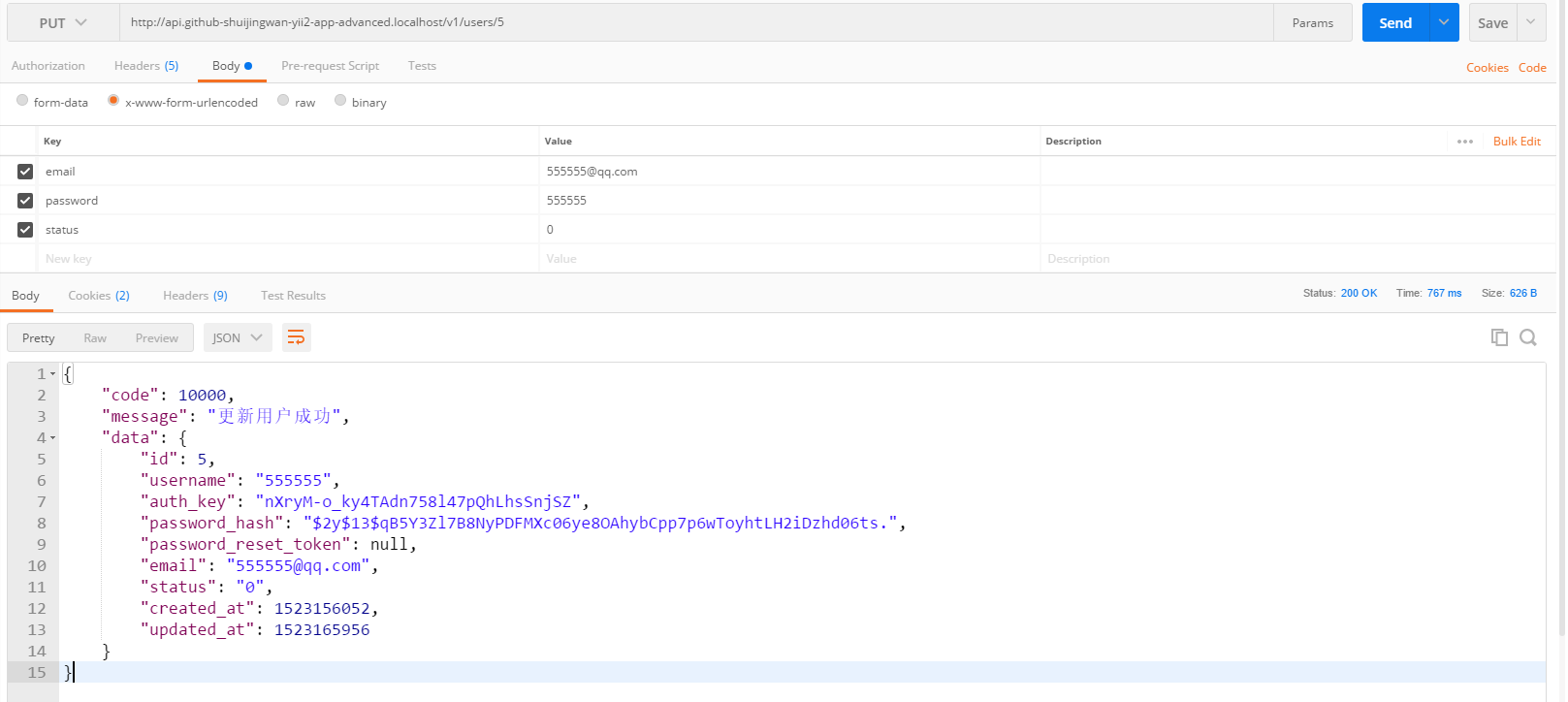
37. In Postman, put http://api.github-shuijingwan-yii2-app-advanced.localhost/v1/users/5 , 200 responses, as shown in Figure 15
Figure 15
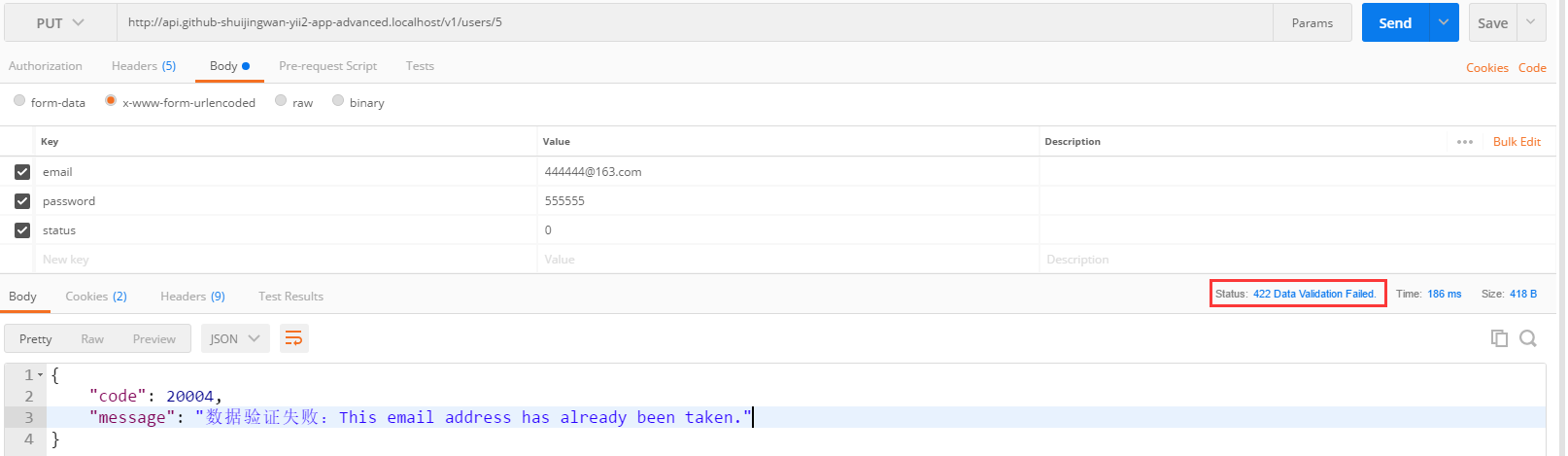
38. In Postman, put http://api.github-shuijingwan-yii2-app-advanced.localhost/v1/users/4 , 422 response, as shown in Figure 16
Note:
accept application/json; version=0.0
accept-language en-us
Accept-encoding gzip, deflate, br
content-type application/x-www-form-urlencoded
Body
The value of the email has been occupied by another user (if the value has not changed, it can be verified to pass)
Figure 16
{
    "code": 20004,
    "message": "Data validation failed: Email \"444444@163.com\" has already been taken."
}
39, delete /users/5: delete user 5, edit \api\rests\user\deleteaction.php
<?php
/**
 * @link http://www.yiiframework.com/
 * @copyright Copyright (c) 2008 Yii Software LLC
 * @license http://www.yiiframework.com/license/
 */

namespace api\rests\user;

use Yii;
use yii\web\ServerErrorHttpException;

/**
 * DeleteAction implements the API endpoint for deleting a model.
 *
 * For more details and usage information on DeleteAction, see the [guide article on rest controllers](guide:rest-controllers).
 *
 * @author Qiang Wang <shuijingwanwq@163.com>
 * @since 1.0
 */
class DeleteAction extends Action
{
    /**
     * Deletes a model.
     * @param mixed $id id of the model to be deleted.
     * @throws ServerErrorHttpException on failure.
     */
    public function run($id)
    {
        $model = $this->findModel($id);

        if ($this->checkAccess) {
            call_user_func($this->checkAccess, $this->id, $model);
        }

        if ($model->delete() === false) {
            throw new ServerErrorHttpException('Failed to delete the object for unknown reason.');
        }

        return ['code' => 10000, 'message' => Yii::t('success', '10005')];
    }
}
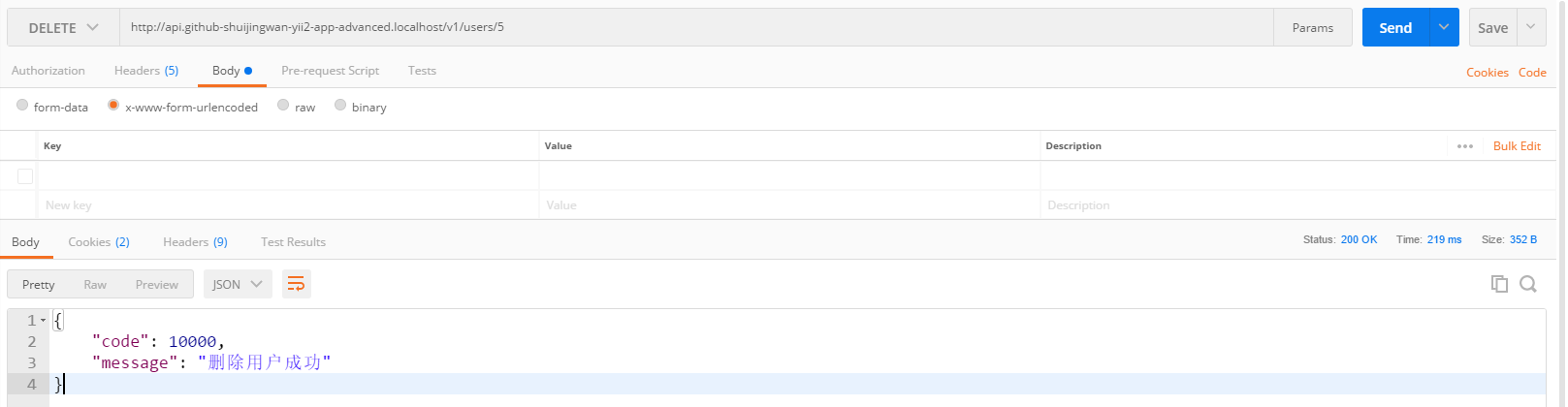
40. In Postman, delete http://api.github-shuijingwan-yii2-app-advanced.localhost/v1/users/5 , 200 responses, as shown in Figure 17
Note:
accept application/json; version=0.0
accept-language en
Accept-encoding gzip, deflate, br
Figure 17
{
    "code": 10000,
    "message": "删除用户成功"
}
41. Edit \API\RESTS\User\OptionsAction.php
<?php
/**
 * @link http://www.yiiframework.com/
 * @copyright Copyright (c) 2008 Yii Software LLC
 * @license http://www.yiiframework.com/license/
 */

namespace api\rests\user;

use Yii;

/**
 * OptionsAction responds to the OPTIONS request by sending back an `Allow` header.
 *
 * For more details and usage information on OptionsAction, see the [guide article on rest controllers](guide:rest-controllers).
 *
 * @author Qiang Xue <qiang.xue@gmail.com>
 * @since 2.0
 */
class OptionsAction extends \yii\rest\Action
{
    /**
     * @var array the HTTP verbs that are supported by the collection URL
     */
    public $collectionOptions = ['GET', 'POST', 'HEAD', 'OPTIONS'];
    /**
     * @var array the HTTP verbs that are supported by the resource URL
     */
    public $resourceOptions = ['GET', 'PUT', 'PATCH', 'DELETE', 'HEAD', 'OPTIONS'];


    /**
     * Responds to the OPTIONS request.
     * @param string $id
     */
    public function run($id = null)
    {
        if (Yii::$app->getRequest()->getMethod() !== 'OPTIONS') {
            Yii::$app->getResponse()->setStatusCode(405);
        }
        $options = $id === null ? $this->collectionOptions : $this->resourceOptions;
        $headers = Yii::$app->getResponse()->getHeaders();
        $headers->set('Allow', implode(', ', $options));
        $headers->set('Access-Control-Allow-Methods', implode(', ', $options));
    }
}
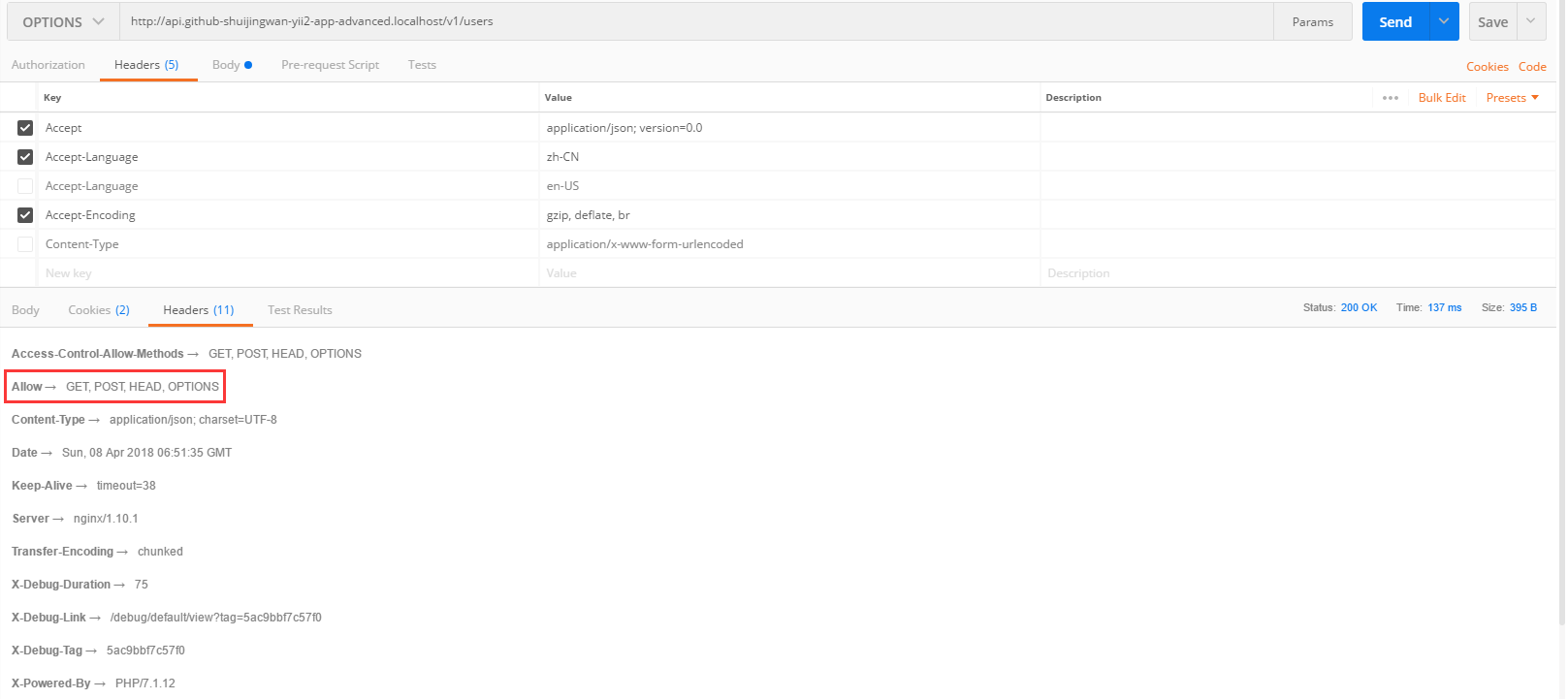
42. Options /Users: Displays verbs about the end/users supported, in Postman, options http://api.github-shuijingwan-yii2-app-advanced.localhost/v1/users , 200 responses, as shown in Figure 18
18
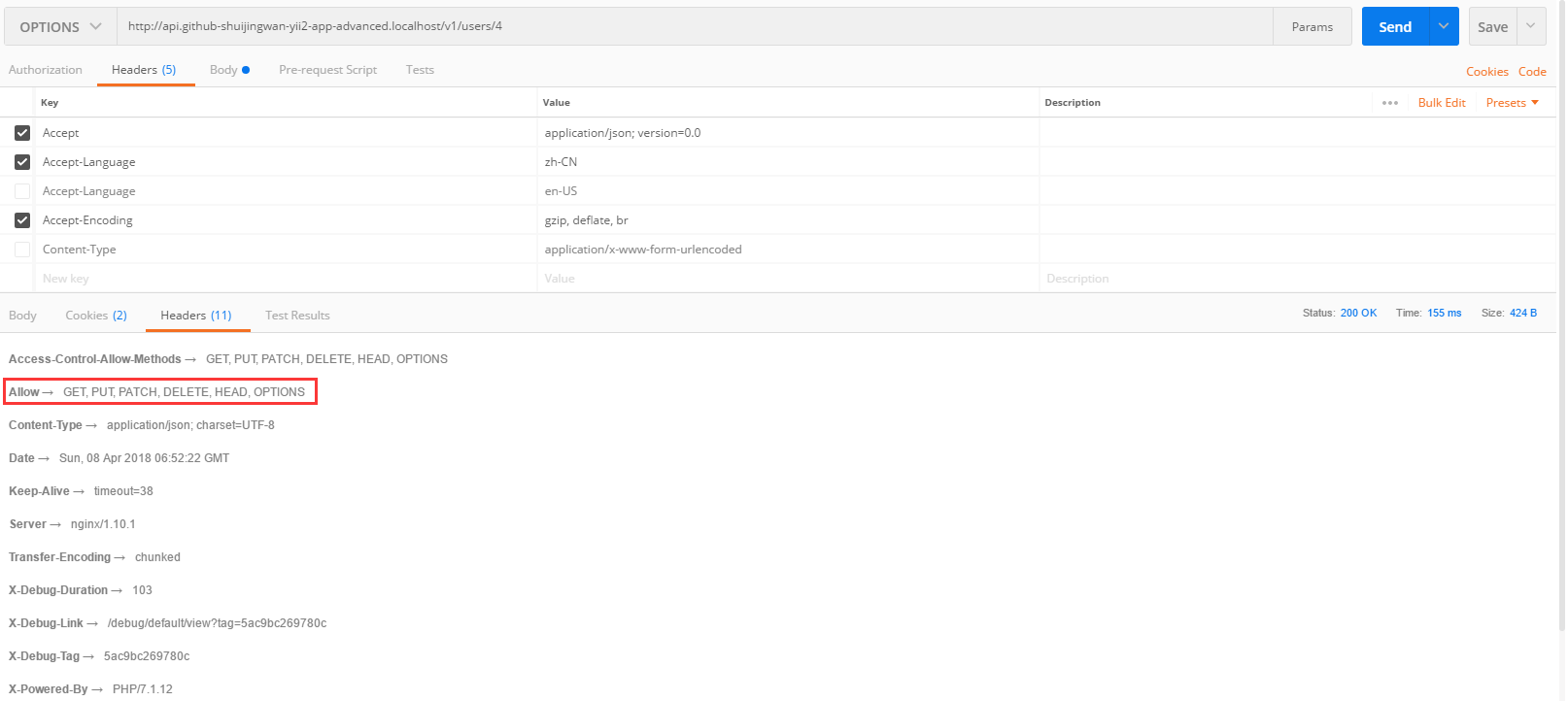
43. Options /Users/4: Display verbs about the end /users/4 support, in Postman, options http://api.github-shuijingwan-yii2-app-advanced.localhost/v1/users/1 , 200 responses, as shown in Figure 19
Figure 19
44. Due to[[yii\web\Response::format|response format]] The response format is not HTML, so it will not use error or exception views to display error messages, you can cancel the error action, edit \api\config\main.php
Delete
45. Summary: The current supported behaviors: index, view, create, update, delete, and options, all of which are inherited, and then overwrite to achieve specific requirements.
![在 Postman 中,GET http://api.github-shuijingwan-yii2-app-advanced.localhost/v1/logs?filter[level]=4&filter[category][like]=api\behaviors\RequestLogBehavior&filter[prefix][like]=app-api&filter[log_time][gte]=1528090828&filter[log_time][lte]=1529564924.6648 ,200响应,空数组已经被自动转换为空对象,以保证字段格式的统一,GET http://api.github-shuijingwan-yii2-app-advanced.localhost/v1/logs/3](https://www.shuijingwanwq.com/wp-content/uploads/2018/06/16-1024x680.png)
![新建控制器类 \api\controllers\UserController.php ,控制器类扩展自 [[yii\rest\ActiveController]]。数据序列化的实现,在响应主体内包含分页信息来简化客户端的开发工作](https://www.shuijingwanwq.com/wp-content/uploads/2018/04/1-2.png)
![\api\modules\v1\controllers\DefaultController.php 重命名为 \api\modules\v1\controllers\UserController.php,通过指定 [[yii\rest\ActiveController::modelClass|modelClass]] 作为 api\modules\v1\models\User, 控制器就能知道使用哪个模型去获取和处理数据](https://www.shuijingwanwq.com/wp-content/uploads/2018/04/5-2.png)
![要在应用中使用模块,只需要将模块加入到应用主体配置的[[yii\base\Application::modules|modules]]属性的列表中, 如下代码的应用主体配置 使用 v1 模块,编辑 \api\config\main.php](https://www.shuijingwanwq.com/wp-content/uploads/2018/04/6-2.png)
Leave a Reply