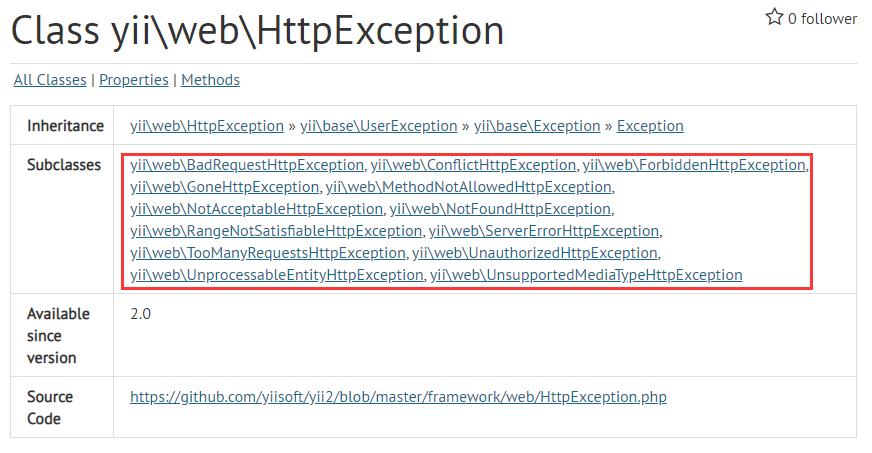
1. Yii\Web\BadRequestHttpException: status code 400.
BadRequestHttpExceptions a “bad request” Http exception with status code 400.
Use this exception to represent a generic client error. Describes the error. In that case, consider using the more precision exception.
See also https://tools.ietf.org/html/RFC7231#Section-6.5.1.
The 400 (bad request) status code indicates that the server cannot or will not process the request due to something that is perceived to be A client error (e.g., Malformed request syntax, invalid request message framework, or deceptive request routing).
Chinese translation:
BadRequestHttpException represents a “bad request” HTTP exception with a status code of 400.
Use this exception to represent generic client errors. In many cases, there may be an HTTP exception that describes the error message more accurately. In this case, consider providing the user with more accurate error messages.
See https://tools.ietf.org/html/rfc7231#Section-6.5.1.
The 400 (bad request) status code means that the server cannot or will not process the request due to obvious client errors (for example, malformed request syntax, invalid request messages, or smudged routing requests).
Note:
(1) HTTP 400 Bad Request The response status code indicates that the server cannot understand the request because the syntax is invalid. Clients should not repeat this request without modification.
(2) Incorrect request. It may be caused by various reasons of the user, such as invalid JSON data in the request body, invalid operating parameters, and so on.
2. Yii\Web\ConflicHttpException: status code 409.
ConflicHttpException represents a “Conflict” HTTP exception with status code 409.
See also https://tools.ietf.org/html/rfc7231#Section-6.5.8.
The 409 (Conflict) status code indicates that the request could not be completed due to a conflict with the current state of the target Resource. This code is used in situations where the user might be able to resolve Generate a payload that includes enough information for a user to recognize the source of the conflict.
Conflicts are most like used and the representation Being put included changes to a resource that can be made with those made by an earlier (third-party) request, the origin server Might use a 409 Response to indicate that it canT complete the request. on the revision history.
Chinese translation:
ConflicHttpException represents a “conflict” HTTP exception with a status code of 409.
See https://tools.ietf.org/html/rfc7231#Section-6.5.8.
The 409 (conflict) status code indicates that the request cannot be completed due to the conflict with the current state of the target resource. This code is used in cases where the user may be able to resolve conflicts and submit requests. The server should generate a payload that contains enough information for the user to identify the source of the conflict.
Conflicts are most likely to occur when responding to PUT requests. For example, if version control is being used and the representation of the PUT is changed to a resource that conflicts with an earlier (third party) request, the source server may use a 409 response to indicate that it cannot complete the request. In this case, the response representation may contain information that is useful for merging differences based on the revision history.
Note:
(1) Response status code 409 Conflict Indicates that the request conflicts with the current status of the target resource on the server side. Conflicts are most likely to occur in responses to PUT requests. For example, when the version of the uploaded file is older than already existing on the server, which leads to version conflicts, it is possible to receive a response with a status code of 409.
(2) Indicates that the request cannot be processed because of a conflict, such as an edit conflict between multiple synchronization updates.
3, Yii\Web\ForbidDenHttpException: status code 403.
ForbiddenHttpExceptions a “Forbidden” HTTP exception with status code 403.
Use this exception when a user is not allowed to perform the requested action. Allow performing the requested action. If you do not want to expose authorization information to the user, it is valid to respond with A 404 Yii\Web\NotFoundHttpException.
See also https://tools.ietf.org/html/rfc7231#Section-6.5.3.
The 403 (forbidden) status code indicates that the server understood the request but rejects to authorize it. A server that wishes To make public why the request has been forbidden can describe that reason in the response payload (if any).
The client should not Automatically repeat the request with the same credentials. The client may repeat the request with new or different credentials. However, a request might be forbidden for reasons unrelated to the credentials.
An origin server that wishes to “hide” the current existence of a forbidden target resource may instead with a status code of 404 (not found).
Chinese translation:
ForbidDenHttpException represents a “disabled” HTTP exception with status code 403.
Use this exception if the user is not allowed to perform the requested action. Using different credentials may or may not allow requested operations. If you don’t want to expose authorization information to users, you can respond with 404 yii\web\NotFoundHttpException .
See https://tools.ietf.org/html/rfc7231#Section-6.5.3.
403 (disabled) status code means that the server has understood the request, but refuses to execute. If the server wishes to make public requests disabled, the reason (if any) can be described in the response payload.
If authentication credentials are provided in the request, the servers consider them not enough to grant access. Clients should not automatically duplicate requests with the same credentials. Clients can duplicate requests with new or different credentials. However, requests may be prohibited for reasons not related to vouchers.
If you want to “hide” the currently prohibited target resource, the source server can respond with status code 404 (not found).
Note:
(1) Status code 403 Forbidden represents the client error, which means that the server is capable of processing the request, but refuses to authorize access. This state is similar to 401, but after entering this state, the verification cannot be continued. This access is permanently forbidden and is closely related to the application logic (such as incorrect passwords).
(2) The server has understood the request, but refuses to execute it. Unlike the 401 response, authentication does not provide any assistance and this request should not be submitted repeatedly. If this is not a HEAD request, and the server wants to be able to explain why the request cannot be executed, then the reason for the rejection should be described in the entity. Of course, the server can also return a 404 response, if it does not want the client to get any information.
(3) Authenticated users do not allow access to the specified API end.
4. Yii\Web\GoneHttpException: status code 410.
GoneHttpException Represents a “Gone” Http Exception with Status Code 410.
Throw a goneHttpException when a user requests a resource that no longer exists at the requested url. Record is deleted, future requests for that record should return a 410 GoneHttpException instead Yii\Web\NotFoundHttpException.
See also https://tools.ietf.org/html/rfc7231#Section-6.5.9.
The 410 (Gone) status code indicates that access to the target resource is no longer available at the origin server and that condition Is like to be permanent. The status code 404 (not found)
The 410 Response is primarly integrated to assist the task of web maintenance by notifying the relationship that the resource is traditionally Unavailable and that the server owns desire links to that resource be removed. Such an event is common for limited-time, promotional services and for resources belonging to individuals no longer associated with the origin serverS site. It is not necessary to mark all permanently unavailable resources time — that is left to the discretion of the server owner.
A 410 Response is cacheable by default; (See Section 4.2.2 of[RFC7234]..
Chinese translation:
GoneHttpException represents a “missed” HTTP exception with a status code 410.
GoneHttpException is thrown when the user request no longer exists at the requested URL. For example, a future request for that record should return 410 GoneHttpException instead of 404 Yii\Web\NotFoundHttpException.
See https://tools.ietf.org/html/rfc7231#Section-6.5.9.
The 410 (lost) status code indicates that the target resource is no longer accessible on the source server, and this condition may be permanent. If the source server is unaware or cannot determine whether the condition is permanent, you should use the status code 404 (not found).
The 410 response is mainly used for tasks that assist Web maintenance by notifying the recipient that the resource is intentionally unavailable and that the server owner wishes to remove the remote link to the resource. Such events are common for time-limited, promotional services and resources that are no longer associated with the source server site. It is not necessary to mark all permanently unavailable resources as “disappeared” or will keep the flags for any length of time – at the discretion of the server owner.
By default, 410 responses can be cached, ie unless otherwise specified by method definition or explicit cache control (see[RFC7234]section 4.2.2).
Note:
(1) HTTP 410 Loss Indicates that the content of the request does not exist on the server, and is permanently unavailable. If it is unclear whether it is permanent or temporary unavailable, 404 should be used, and the 410 response will be cached by default.
(2) Indicates that the requested resource is no longer available and will no longer be available. This should be used when the resource is intentionally deleted and the resource should be cleared. After receiving the 410 status code, the user should stop requesting the resource again.[39]But most servers do not use this status code, but directly use the 404 status code.
5. Yii\Web\MethodNotAllowedHttpException: status code 405.
MethodNotAllowedHttpExceptions a “method not allowed” HTTP exception with status code 405.
See also https://tools.ietf.org/html/rfc7231#Section-6.5.5.
The 405 (method not allowed) status code indicates that the method received in the request-line is known by the origin server but not Supported by the target resource. The origin server must generate an allow header field in a 405 response containering a list of the target Resources currently supported methods.
A 405 Response is cacheable by default; (See Section 4.2.2 of[RFC7234]..
Chinese translation:
MethodNotAllowEdHttpException Indicates that the “method not allowed” HTTP exception with status code 405.
See https://tools.ietf.org/html/rfc7231#section-6.5.5.
The 405 (method not allowed) status code indicates that the method received in the request line is known by the source server but the target resource is not supported. The source server must generate the Allow header field in the 405 response, which contains a list of methods currently supported by the target resource.
By default, 405 responses can be cached, i.e. unless otherwise specified by method definition or explicit cache control (see[RFC7234]section 4.2.2).
Note:
(1) Status code 405 method not allowed Indicates that the server has disabled requests using the current HTTP method. It should be noted that the two methods of GET and HEAD must not be prohibited, and of course, the status code 405 must not be returned.
(2) The request method specified in the request line cannot be used to request the corresponding resource. The response must return a Allow header information to represent a list of request methods that the current resource can accept. For example, a GET request on a form that renders the data via a POST, or a PUT request on a read-only resource.
In view of PUT, the Delete method will write operations on the resources on the server, so most web servers do not support or do not allow the above request methods under the default configuration, and all such requests will return a 405 error.
(3) The method not allowed. Please check the HTTP method allowed by Allow Header.
6, Yii\Web\NotAcceptableHttpException: status code 406.
NotAcceptableHttpExceptions a “Not Acceptable” Http Exception with status code 406.
Use this exception when the client requests a content-type that your application cannot return. 1.1 Specification, you are not required to respond with this status code in this site.
See also https://tools.ietf.org/html/rfc7231#Section-6.5.6.
The 406 (not acceptable) status code indicates that the target resource does not have a current representation that would be Acceptable to the user agent, according to the proactive negative header fields received in the request (Section 5.3), and the server is unwilling to supply a default representation.
The server should generate a payload containering a list of available representation characters from which the user or user agent can choose the one most appropriate choice. From that list. However, this specific does not define any standard for such automatic selection, as described in section 6.4.1.
Chinese translation:
NotAcceptableHttpException Indicates a “not accept” HTTP exception with status code 406.
Use this exception when the client requests a Content-Type that your application cannot return. Note that in this case you do not need to respond with this status code according to the HTTP 1.1 specification.
See https://tools.ietf.org/html/rfc7231#Section-6.5.6.
The 406 (Not Acceptable) status code indicates that the target resource has no current representation acceptable to the user agent, according to the active negotiation header field (Section 5.3) received in the request, and the server is reluctant to provide a default representation.
The server should generate a payload that contains a list of available representation features and corresponding resource identifiers from which the user or user agent can choose the most suitable one. User agents can automatically select the most suitable option from this list. However, this specification does not define any criteria for such automatic selection, as described in Section 6.4.1.
Note:
(1) The 406 Not Acceptable status code in the HTTP protocol indicates a client error, which means that the server cannot provide the same as accept-charset and accept-language The message header specifies the response that matches the value.
In practical applications, this error status code is rarely used: it is not to return an obscure (and difficult to correct) error status code to the user, but to ignore the relevant message header, and at the same time provide the user with a visible and tangible page. This practice is based on the assumption that even if the user is not very satisfied, it is stronger than returning an error status code.
If the server returns this error status code, the message body should contain a list of available resource representations, allowing the user to choose manually.
(2) See: Content negotiation, the content characteristics of the requested resource cannot meet the conditions in the request header, so the response entity cannot be generated, and the request is unacceptable.
Unless this is a HEAD request, the response should return an entity that contains the most suitable entity characteristics and address bar tables from which the user or the browser can choose from it. The format of the entity is determined by the media type defined in the Content-Type header. The browser can make the best choice according to the format and its own ability. However, there are no criteria for making such automatic selections defined in the specification.
7. Yii\Web\NotFoundHttpException: status code 404.
NotFoundHttpException represents a “Not found” Http exception with status code 404.
See also https://tools.ietf.org/html/rfc7231#Section-6.5.4.
The 404 (Not Found) status code indicates that the origin server did not find a current representative WILLING TO DISCLOSE that one exists. A 404 status code does not indicate or Permanent; the 410 (Gone) status code is preferred over 404 if the
Origin server knows, presumably through some configurable means, that the condition is like to be permanent.
A 404 Response is cacheable by default; (See Section 4.2.2 of[RFC7234]..
Chinese translation:
NotFoundHttpException indicates a “not found” HTTP exception with status code 404.
See https://tools.ietf.org/html/rfc7231#Section-6.5.4.
The 404 (not found) status code indicates that the source server has not found the current representation of the target resource, or is unwilling to disclose the existence of the target resource. 404 Status code does not indicate whether the missing indication is temporary or permanent, if so, the 410 (Gone) status code takes precedence over 404
The source server may know that the conditions may be permanent in some configurable ways.
By default, 404 responses can be cached, i.e. unless otherwise specified by method definition or explicit cache control (see[RFC7234]section 4.2.2).
Note:
(1) Status code 404 Not Found represents the client error, which means that the server cannot find the requested resource. Links that return the response are often referred to as broken links or dead links, and they lead to links to link error processing (Link Rot) pages.
404 Status code does not indicate whether the requested resource is temporarily or permanently lost. If the server knows that the resource is permanently lost, it should return 410 (gone) instead of 404 .
(2) The request fails, and the resource desired by the request is not found on the server, but the user’s subsequent request is allowed. There is no information to tell the user whether this situation is temporary or permanent. If the server knows the situation, you should use the 410 status code to inform the old resources that it is permanently unavailable due to some internal configuration mechanism problems, and there is no address that can be jumped. 404 This status code is widely used when the server does not want to reveal why the request is rejected or no other suitable response is available.
8. Yii\Web\ServerErrorHttpException: status code 500.
ServerErrorHttpException Represents an “Internal Server Error” HTTP Exception with status code 500.
See also https://tools.ietf.org/html/rfc7231#Section-6.6.1.
The 500 (Internal Server Error) Status code indicates that the server enabled Fulfilling the request.
Chinese translation:
ServerErrorHttpException represents an “internal server error” HTTP exception with a status code of 500.
See https://tools.ietf.org/html/rfc7231#Section-6.6.1.
The 500 (internal server error) status code indicates that the server has encountered an unexpected situation, causing the server to fail to complete the request.
Note:
(1) In the HTTP protocol, 500 Internal Server Error is a response status code that indicates a server-side error, which means that the requested server encounters unexpected situations and prevents its execution request.
This error code is a generic “all-round” response code. Often the server administrator will record the relevant request information in more detail for errors like 500 to prevent the same errors from appearing later.
(2) General error message, the server encounters an unexpected situation, which makes it unable to complete the processing of the request. No specific error message was given.
(3) Internal server error. This may be caused by an internal program error.
9. Yii\Web\TooManyRequestHttpException: status code 429.
TooManyRequestShttpExceptions a “Too many requests” HTTP exception with status code 429.
For example, you would Throw this exception whenthrottlingan API user.
See also https://tools.ietf.org/html/rfc6585#Section-4.
The 429 status code indicates that the user has sent too many requests in a given amount of time (“rate limiting”).
The response represents including how long to wait, and may include a retry-after header indicating how long to wait Before making a new request.
Note that this specific does not define how the origin server identifies the user, nor how it counts requests. Origin server that is limiting request rates can do so based upon counts of requests on a per-resource basis Server, or even among a set of servers. Likewise, it might identify the user by its authentication credentials, or a stateful cookies.
Responses with the 429 status code must not be stored by a cache.
Chinese translation:
TooManyRequestHttpException Indicates a “too many requests” HTTP exception with a status code of 429.
Using this exception means that the client has made too many requests for a given period of time. For example, inLimitThis exception is thrown when API users are thrown.
See https://tools.ietf.org/html/rfc6585#Section-4.
The 429 status code means that the user has sent too many requests (“rate limit”) for a given time.
The response representation should include the details of the interpreted condition, and may include a Retry-After header indicating how long to wait before making a new request.
Note that this specification does not define how the source server recognizes the user, nor how the request is calculated. For example, the source server that restricts the request rate may do this based on each resource, the entire server, or even a request count in a group of servers. Likewise, it can identify users by their authentication credentials or stateful cookies.
The response of the 429 status code must not be stored by the cache.
Note:
(1) In the HTTP protocol, the response status code 429 Too many requests indicates that the user has sent too many requests within a certain period of time, that is, the “frequency limit” is exceeded.
In the response, a Retry-After header can be provided to prompt the user how long it needs to wait before sending a new request.
(2) The user has sent too many requests within a given time. Designed for network speed limits.
10, Yii\Web\UnauthorizedHttpException: status code 401.
UnauthorizedHttpExceptions an “Unauthorized” HTTP exception with status code 401.
Use this exception to indicate that a client needs to authenticate via www-authenticate header to perform the requested action.
If the client is already authenticated and is simply not allowed to perform the action, consider using a 403 Yii\Web\ForbidDenHttpException or 404 yii\web\NotFoundHttpException instead.
Chinese translation:
UnauthorizedHttpException represents an “unauthenticated” HTTP exception with status code 401.
Using this exception indicates that the client needs to authenticate through the www-authenticate header to perform the requested operation.
If the client is authenticated and does not allow operations at all, consider using 403 yii\web\forbiddenHttpException or 404 yii\web\notFoundHttpException.
Note:
(1) Status code 401 Unauthorized represents the client error, which means that the request sent is not satisfied due to the lack of authentication credentials required by the target resource.
This status code will be sent with the WWW-Authenticate header, which contains information on how to verify it.
This state is similar to 403, but in this case, authentication is still possible.
(2) Similar to 403 Forbidden, 401 semantics is “unauthenticated”, that is, users do not have necessary credentials. This status code indicates that the current request requires user authentication. The response must contain a www-authenticate header that is suitable for the requested resource to ask for user information. The client can repeatedly submit a request with appropriate Authorization header information. If the current request already contains the Authorization certificate, then the 401 response means that the certificate has been denied by the server. If the 401 response contains the same authentication query as the previous response, and the browser has tried at least one verification, the browser should present the entity information contained in the response to the user, because this entity information may contain relevant diagnostic information.
Note: When the website (usually the website domain name) prohibits the IP address, some website status codes display 401, indicating that the specific address is denied access to the website.
11. Yii\Web\UnsupportedMediaTypeHttpException: status code 415.
UnsupportedMediaTypeHttpExceptions an “Unsupported Media Type” Http Exception with status code 415.
For example, you would Throw this exception if the client posts xml data to an action or controller that only accepts json.
See also https://tools.ietf.org/html/rfc7231#Section-6.5.13.
The 415 (Unsupported Media Type) Status code indicates that the origin server is refusing to service the request because the payload is in a Format not supported by this method on the target resource. The format problem might be due to the requestS indicated content-type or content-encoding, or as a result of inspecting the data directly.
Chinese translation:
UnsupportedMediaTypeHttpException represents an “unsupported media type” HTTP exception with status code 415.
Use this exception when sending data in a format that the client application cannot understand. For example, this exception is thrown if the client posts the XML data to an operation or controller that only accepts JSON.
See https://tools.ietf.org/html/rfc7231#section-6.5.13.
The 415 (unsupported media type) status code means that the source server refuses to serve the request, because the format of the payload is not the format supported by this method on the target resource. The formatting problem may be due to the request indicating content-type or content-encoding, or because of direct data checking.
Note:
(1) 415 Unsupported Media Type is an error status code of the HTTP protocol, indicating that the server refuses to accept the client’s request because it does not support the format of its payload.
Format problems may arise from the format specified by the client in the Content-Type or Content-Encoding header, or the result of direct detection of the load data.
(2) For the currently requested method and the requested resource, the Internet media type submitted in the request is not the format supported by the server, so the request is rejected. For example, the client will format the image as SVG, but the server requires the image to use the upload format as JPG.
12, yii\web\rangeNotsFileHttpException: status code 416.
RangeNotsAtisfiableHttpExceptions an exception caused by an improper request of the end-user.
This exception thrown when the requested range is not satisfiable: Server cannot supply that lies beyond the end of the file.
Throwing an RangenotsatisfiableHttpException like in the following example will result in the error page with error 416 to be displayed.
Chinese translation:
RangeNotsFableHttpException represents an exception caused by an incorrect request from the end user.
This exception is thrown when the scope of the request is unsatisfied: a part of the client request file (byte service), but the server cannot provide that part. For example, if the client requests a portion of the file that goes beyond the end of the file.
Throwing RangeNotsFileHttpException, as shown in the example below, will cause the error page to display 416 error.
Note:
(1) HTTP 416 Range not satisfiable The error status code means that the server cannot process the requested data interval. The most common case is that the requested data interval is not within the file scope, that is, the value of the Range header, although grammatically no problem, is semantically meaningless.
The 416 response message contains a Content-Range header, which prompts an unsatisfied data interval (represented by an asterisk *), followed by a “/”, followed by the length of the current resource. For example: content-range: */12777
When encountering this error status code, the browser generally has two policies: either terminate the operation (for example, an interrupt download operation is considered unrecoverable), or request the entire file again.
(2) Abbreviated as “Requested Range Not Satisfiable”. The client has requested a part of the file (byte serving), but the server cannot provide that part. For example, if the client requests a portion of the file to go beyond the end of the file.
13, Yii\Web\UnprocessableEntityHttpException: status code 422.
UnprocessableEntityHttpExceptions an “Unprocessable Entity” Http Exception with status code 422.
Use this exception to inform that the server understands the content type of the request entity and the syntax of that request Correct but the server was unable to process the containerized instructions.
Chinese translation:
UnprocessableEntityHttpException represents an “unhandleable entity” HTTP exception with a status code of 422.
Use this exception to notify the recipient server of the content type of the requesting entity, and the syntax of the request entity is correct, but the server cannot process the included instructions. For example, return form validation errors.
Note:
(1) HTTP 422 Return code Indicates that the server understands the content type of the requesting entity, and the syntax of the request entity is correct, but the server cannot process the included instructions.
(2) The request is formatted correctly, but cannot be responded to due to the semantic error.
(3) Data validation failed (for example, responding to a POST request). Please check the detailed error message in the response body.
Leave a Reply