
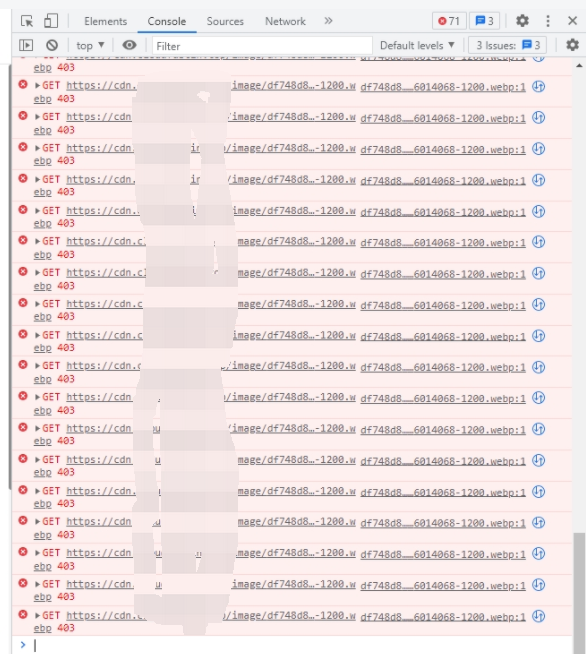
1. When I encounter a bug in the production environment, after a new container is newly deployed, when the first run, the value of the environment variables feels that it is not the environment variable of the container, but null. On the second run, the value of its environment variables is correct. On the first run, the CDN request response is 403. as shown in Figure 1
2. Since the environment variables of the container are allowed to be overwritten, the general implementation process is as follows:
(1) Get all the array of environment variables of a container from vault
(2) The environment variables to be modified are merged into the array of environment variables obtained in step (1)
(3) Update the new environment variable array to vault
(4) Update the container with the same version to make the environment variables take effect
3. The use of environment variables is actually used in the Laravel configuration file: env().
'debug' => env('APP_DEBUG', false),
4. At the first run, the value of its environment variable, cache $json is null, and the environment variable obtained from the interface response $json will overwrite the environment variable.
putenv("{$key}={$value}");
$_ENV[$key] = $value;
5. However, at this time, the configuration items generated based on the environment variable, that is, the configuration files in the config directory have been executed, so the config configuration items are still old.
// 主题素材CDN
'theme-asset-cdn' => [
	'driver' => 's3',
	'key' => env('THEME_ASSET_CDN_AWS_ACCESS_KEY_ID'),
	'secret' => env('THEME_ASSET_CDN_AWS_SECRET_ACCESS_KEY'),
	'region' =>  env('THEME_ASSET_CDN_AWS_DEFAULT_REGION', 'us-east-2'),
	'bucket' => env('THEME_ASSET_CDN_BUCKET', 'object-theme-assets'),
	'root' => env('THEME_ASSET_CDN_ASSET_PREFIX', 'static/xxx/'),
],
6. Therefore, the first run, it feels like $JSON is not immediately applied to the environment variable. The workaround for overwriting implementation of environment variables is actually implemented by overwriting config() again. At this time, the feeling to the user is that the new environment variable value has covered the old environment variable value.
$newConfig = [
	'theme.view_storage' => $json['VIEW_STORAGE'] ?? config('theme.view_storage'),
];
config($newConfig);
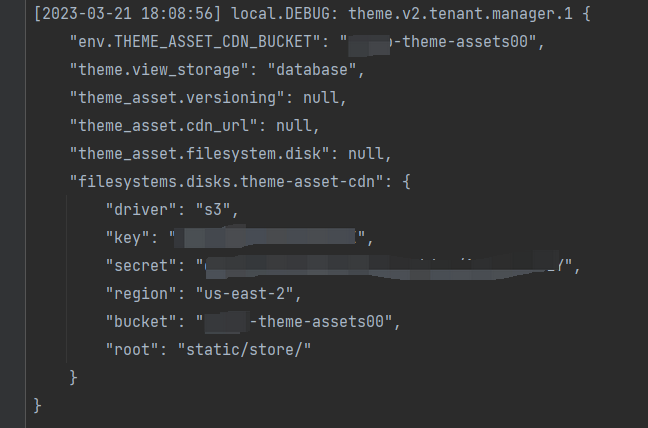
7. However, this scheme is very redundant. Once there are newly added configuration items, you need to add corresponding configuration items synchronously in $newconfig. Code is redundant. Try an alternative, reload configuration items based on new environment variables. However, this scenario results in missing configuration items in the module directory, and missing configuration items based on the config() function before reloading. Leave it for subsequent improvement. as shown in Figure 2
$key = 'THEME_ASSET_CDN_BUCKET';
$value = 'object-theme-assets00';
putenv("{$key}={$value}");
$_ENV[$key] = $value;
config(['theme.view_storage' => 'ss']);
$loadConfiguration = new LoadConfiguration();
$loadConfiguration->bootstrap(app());
Log::debug(
	'theme.v2.tenant.manager.1',
	[
		'env.THEME_ASSET_CDN_BUCKET' => env('THEME_ASSET_CDN_BUCKET'),
		'theme.view_storage' => config('theme.view_storage') ?? null,
		'theme_asset.versioning' => config('theme_asset.versioning') ?? null,
		'theme_asset.cdn_url' => config('theme_asset.cdn_url') ?? null,
		'theme_asset.filesystem.disk' => config('theme_asset.filesystem.disk') ?? null,
		'filesystems.disks.theme-asset-cdn' => config('filesystems.disks.theme-asset-cdn') ?? null,
	]
);
[2023-03-21 18:08:56] local.DEBUG: theme.v2.tenant.manager.1 {
    "env.THEME_ASSET_CDN_BUCKET": "object-theme-assets00",
    "theme.view_storage": "database",
    "theme_asset.versioning": null,
    "theme_asset.cdn_url": null,
    "theme_asset.filesystem.disk": null,
    "filesystems.disks.theme-asset-cdn": {
        "driver": "s3",
        "key": "111111111111",
        "secret": "22222222222",
        "region": "us-east-2",
        "bucket": "object-theme-assets00",
        "root": "static/xxx/"
    }
}
PHP / Laravel / Yii2 Legacy Project Maintenance & Long-Term Technical Support
If your PHP / Laravel / Yii2 project is already in production but needs bug fixing, API troubleshooting, performance optimization, developer handover support, or long-term maintenance, feel free to contact me for remote technical support.
Ideal For:
✅ PHP legacy systems without active maintenance
✅ Laravel / Yii2 project bug fixes
✅ Admin panel feature iterations
✅ RESTful API troubleshooting
✅ MySQL / Redis / Nginx performance issues
✅ Long-term remote part-time maintenance
We can start with a small task:
✅ Production error troubleshooting
✅ API issue analysis
✅ Slow query and performance bottleneck diagnosis
✅ Initial code structure review
✅ Deployment environment and log inspection
If you would like to discuss your project, please contact me and mention: PHP Maintenance Consultation.
Contact Me:
Telegram: @shuijingwan
WeChat: 13980074657
Email: shuijingwanwq@gmail.com
Leave a Reply