Deploy the LNMP environment in CentOS Stream 9 based one-click installation package
1. Check the /etc/os-release file, the operating system is CentOS Stream 9.
[root@iZ2zeaj7tnbv8d3gsoy1w5Z ~]# cat /etc/os-release
NAME="CentOS Stream"
VERSION="9"
ID="centos"
ID_LIKE="rhel fedora"
VERSION_ID="9"
PLATFORM_ID="platform:el9"
PRETTY_NAME="CentOS Stream 9"
ANSI_COLOR="0;31"
LOGO="fedora-logo-icon"
CPE_NAME="cpe:/o:centos:centos:9"
HOME_URL="https://centos.org/"
BUG_REPORT_URL="https://issues.redhat.com/"
REDHAT_SUPPORT_PRODUCT="Red Hat Enterprise Linux 9"
REDHAT_SUPPORT_PRODUCT_VERSION="CentOS Stream"
2. Reference:https://lnmp.org/install.htmlInstall the VPS or server with putty or similar ssh tools; after logging in, run: screen -s lnmp If the screen: command not found command does not exist can be executed: yum install screen Installation, prompt: not found. as shown in Figure 1

Figure 1
[root@iZ2zeaj7tnbv8d3gsoy1w5Z ~]# screen -S lnmp
-bash: screen: command not found
[root@iZ2zeaj7tnbv8d3gsoy1w5Z ~]# yum install screen
Last metadata expiration check: 0:47:49 ago on Sat 08 Mar 2025 03:00:17 PM CST.
No match for argument: screen
Error: Unable to find a match: screen
[root@iZ2zeaj7tnbv8d3gsoy1w5Z ~]# dnf install screen
Last metadata expiration check: 0:50:52 ago on Sat 08 Mar 2025 03:00:17 PM CST.
No match for argument: screen
Error: Unable to find a match: screen
3. Screen packages are usually located in the EPEL (Extra Packages for Enterprise Linux) repository. Install the EPEL repository. Install screen again, the installation is successful. as shown in Figure 2
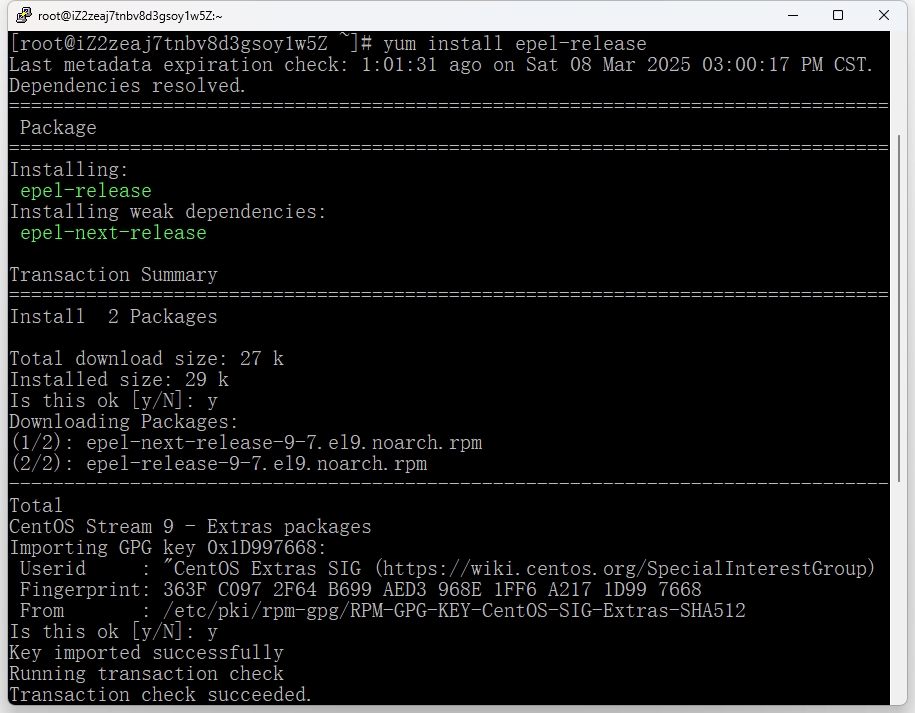
Figure 2
[root@iZ2zeaj7tnbv8d3gsoy1w5Z ~]# yum install epel-release
Last metadata expiration check: 1:01:31 ago on Sat 08 Mar 2025 03:00:17 PM CST.
Dependencies resolved.
=======================================================================================================================================================================================================================================================================================================================
Package Architecture Version Repository Size
=======================================================================================================================================================================================================================================================================================================================
Installing:
epel-release noarch 9-7.el9 extras-common 19 k
Installing weak dependencies:
epel-next-release noarch 9-7.el9 extras-common 8.1 k
Transaction Summary
=======================================================================================================================================================================================================================================================================================================================
Install 2 Packages
Total download size: 27 k
Installed size: 29 k
Is this ok [y/N]: y
Downloading Packages:
(1/2): epel-next-release-9-7.el9.noarch.rpm 71 kB/s | 8.1 kB 00:00
(2/2): epel-release-9-7.el9.noarch.rpm 131 kB/s | 19 kB 00:00
-----------------------------------------------------------------------------------------------------------------------------------------------------------------------------------------------------------------------------------------------------------------------------------------------------------------------
Total 183 kB/s | 27 kB 00:00
CentOS Stream 9 - Extras packages 2.0 MB/s | 2.1 kB 00:00
Importing GPG key 0x1D997668:
Userid : "CentOS Extras SIG (https://wiki.centos.org/SpecialInterestGroup) <security@centos.org>"
Fingerprint: 363F C097 2F64 B699 AED3 968E 1FF6 A217 1D99 7668
From : /etc/pki/rpm-gpg/RPM-GPG-KEY-CentOS-SIG-Extras-SHA512
Is this ok [y/N]: y
Key imported successfully
Running transaction check
Transaction check succeeded.
Running transaction test
Transaction test succeeded.
Running transaction
Preparing : 1/1
Installing : epel-release-9-7.el9.noarch 1/2
Running scriptlet: epel-release-9-7.el9.noarch 1/2
Many EPEL packages require the CodeReady Builder (CRB) repository.
It is recommended that you run /usr/bin/crb enable to enable the CRB repository.
Installing : epel-next-release-9-7.el9.noarch 2/2
Running scriptlet: epel-next-release-9-7.el9.noarch 2/2
Verifying : epel-next-release-9-7.el9.noarch 1/2
Verifying : epel-release-9-7.el9.noarch 2/2
Installed:
epel-next-release-9-7.el9.noarch epel-release-9-7.el9.noarch
Complete!
[root@iZ2zeaj7tnbv8d3gsoy1w5Z ~]# yum install screen
Extra Packages for Enterprise Linux 9 - x86_64 14 MB/s | 23 MB 00:01
Extra Packages for Enterprise Linux 9 openh264 (From Cisco) - x86_64 1.4 kB/s | 2.5 kB 00:01
Extra Packages for Enterprise Linux 9 - Next - x86_64 232 kB/s | 235 kB 00:01
Dependencies resolved.
=======================================================================================================================================================================================================================================================================================================================
Package Architecture Version Repository Size
=======================================================================================================================================================================================================================================================================================================================
Installing:
screen x86_64 4.8.0-6.el9 epel 649 k
Transaction Summary
=======================================================================================================================================================================================================================================================================================================================
Install 1 Package
Total download size: 649 k
Installed size: 957 k
Is this ok [y/N]: y
Downloading Packages:
screen-4.8.0-6.el9.x86_64.rpm 5.2 MB/s | 649 kB 00:00
-----------------------------------------------------------------------------------------------------------------------------------------------------------------------------------------------------------------------------------------------------------------------------------------------------------------------
Total 816 kB/s | 649 kB 00:00
Extra Packages for Enterprise Linux 9 - x86_64 1.6 MB/s | 1.6 kB 00:00
Importing GPG key 0x3228467C:
Userid : "Fedora (epel9) <epel@fedoraproject.org>"
Fingerprint: FF8A D134 4597 106E CE81 3B91 8A38 72BF 3228 467C
From : /etc/pki/rpm-gpg/RPM-GPG-KEY-EPEL-9
Is this ok [y/N]: y
Key imported successfully
Running transaction check
Transaction check succeeded.
Running transaction test
Transaction test succeeded.
Running transaction
Preparing : 1/1
Running scriptlet: screen-4.8.0-6.el9.x86_64 1/1
Installing : screen-4.8.0-6.el9.x86_64 1/1
Running scriptlet: screen-4.8.0-6.el9.x86_64 1/1
Verifying : screen-4.8.0-6.el9.x86_64 1/1
Installed:
screen-4.8.0-6.el9.x86_64
Complete!
[root@iZ2zeaj7tnbv8d3gsoy1w5Z ~]#
4. Install LNMP stable version
wget https://soft.lnmp.com/lnmp/lnmp2.1.tar.gz -O lnmp2.1.tar.gz && tar zxf lnmp2.1.tar.gz && cd lnmp2.1 && ./install.sh lnmp
5. LNMP add and delete virtual hosts Reference:https://lnmp.org/faq/lnmp-vhost-add-howto.html
[root@iZ2zeaj7tnbv8d3gsoy1w5Z ~]# lnmp vhost add
+-------------------------------------------+
|    Manager for LNMP, Written by Licess    |
+-------------------------------------------+
|              https://lnmp.org             |
+-------------------------------------------+
Please enter domain(example: www.lnmp.org): object.***.cn
 Your domain: object.***.cn
Enter more domain name(example: lnmp.org sub.lnmp.org):
 domain list: object.***.cn
Please enter the directory for the domain: object.***.cn
Default directory: /home/wwwroot/object.***.cn: /home/wwwroot/object
Virtual Host Directory: /home/wwwroot/object
Allow Rewrite rule? (y/n) y
Please enter the rewrite of programme,
wordpress,discuzx,typecho,thinkphp,laravel,codeigniter,yii2,zblog rewrite was exist.
(Default rewrite: other): yii2
You choose rewrite: yii2
Enable PHP Pathinfo? (y/n) y
Enable pathinfo.
Allow access log? (y/n) y
Enter access log filename(Default:object.***.cn.log): y
You access log filename: y.log
Enable IPv6? (y/n) n
Disabled IPv6 Support in current Virtualhost.
Add SSL Certificate (y/n) y
1: Use your own SSL Certificate and Key
2: Use Let's Encrypt to create SSL Certificate and Key
3: Use BuyPass to create SSL Certificate and Key
4: Use ZeroSSL to create SSL Certificate and Key
Enter 1, 2, 3 or 4: 2
Using 301 to Redirect HTTP to HTTPS? (y/n) y
Redirect http://object.***.cn to https://object.***.cn

Press any key to start create virtul host...

Create Virtul Host directory......
set permissions of Virtual Host directory......
chmod: changing permissions of '/home/wwwroot/object/.user.ini': Operation not permitted
chown: changing ownership of '/home/wwwroot/object/.user.ini': Operation not permitted
You select the exist rewrite rule:/usr/local/nginx/conf/rewrite/yii2.conf
Test Nginx configure file......
nginx: [warn] the "listen ... http2" directive is deprecated, use the "http2" directive instead in /usr/local/nginx/conf/vhost/objectapi.***.cn.conf:45
nginx: the configuration file /usr/local/nginx/conf/nginx.conf syntax is ok
nginx: configuration file /usr/local/nginx/conf/nginx.conf test is successful
Reload Nginx......
nginx: [warn] the "listen ... http2" directive is deprecated, use the "http2" directive instead in /usr/local/nginx/conf/vhost/objectapi.***.cn.conf:45
/usr/bin/lnmp: line 585: /home/wwwroot/object/.user.ini: Operation not permitted
chmod: changing permissions of '/home/wwwroot/object/.user.ini': Operation not permitted
Reload service php-fpm  done
/usr/local/acme.sh/acme.sh [found]
Generate ssl certificate using Let's Encrypt...
[Sat Mar  8 05:01:09 PM CST 2025] Using CA: https://acme-v02.api.letsencrypt.org/directory
[Sat Mar  8 05:01:09 PM CST 2025] Creating domain key
[Sat Mar  8 05:01:09 PM CST 2025] The domain key is here: /usr/local/nginx/conf/ssl/object.***.cn/object.***.cn.key
[Sat Mar  8 05:01:09 PM CST 2025] Single domain='object.***.cn'
[Sat Mar  8 05:01:09 PM CST 2025] Getting domain auth token for each domain
[Sat Mar  8 05:01:14 PM CST 2025] Getting webroot for domain='object.***.cn'
[Sat Mar  8 05:01:14 PM CST 2025] Verifying: object.***.cn
[Sat Mar  8 05:01:15 PM CST 2025] Pending, The CA is processing your order, please just wait. (1/30)
[Sat Mar  8 05:01:20 PM CST 2025] Pending, The CA is processing your order, please just wait. (2/30)
[Sat Mar  8 05:01:24 PM CST 2025] Success
[Sat Mar  8 05:01:24 PM CST 2025] Verify finished, start to sign.
[Sat Mar  8 05:01:24 PM CST 2025] Lets finalize the order.
[Sat Mar  8 05:01:24 PM CST 2025] Le_OrderFinalize='https://acme-v02.api.letsencrypt.org/acme/finalize/2269553226/361405220756'
[Sat Mar  8 05:01:25 PM CST 2025] Downloading cert.
[Sat Mar  8 05:01:25 PM CST 2025] Le_LinkCert='https://acme-v02.api.letsencrypt.org/acme/cert/038e2b0873b6d47b9eec4e6117670e32abd9'
[Sat Mar  8 05:01:26 PM CST 2025] Cert success.
[Sat Mar  8 05:01:26 PM CST 2025] Your cert is in: /usr/local/nginx/conf/ssl/object.***.cn/object.***.cn.cer
[Sat Mar  8 05:01:26 PM CST 2025] Your cert key is in: /usr/local/nginx/conf/ssl/object.***.cn/object.***.cn.key
[Sat Mar  8 05:01:26 PM CST 2025] The intermediate CA cert is in: /usr/local/nginx/conf/ssl/object.***.cn/ca.cer
[Sat Mar  8 05:01:26 PM CST 2025] And the full chain certs is there: /usr/local/nginx/conf/ssl/object.***.cn/fullchain.cer
[Sat Mar  8 05:01:26 PM CST 2025] Run reload cmd: /etc/init.d/nginx reload
Reload nginx... nginx: [warn] the "listen ... http2" directive is deprecated, use the "http2" directive instead in /usr/local/nginx/conf/vhost/objectapi.***.cn.conf:45
 done
[Sat Mar  8 05:01:26 PM CST 2025] Reload success
Test Nginx configure file......
nginx: [warn] the "listen ... http2" directive is deprecated, use the "http2" directive instead in /usr/local/nginx/conf/vhost/object.***.cn.conf:45
nginx: [warn] the "listen ... http2" directive is deprecated, use the "http2" directive instead in /usr/local/nginx/conf/vhost/objectapi.***.cn.conf:45
nginx: the configuration file /usr/local/nginx/conf/nginx.conf syntax is ok
nginx: configuration file /usr/local/nginx/conf/nginx.conf test is successful
Reload Nginx......
nginx: [warn] the "listen ... http2" directive is deprecated, use the "http2" directive instead in /usr/local/nginx/conf/vhost/object.***.cn.conf:45
nginx: [warn] the "listen ... http2" directive is deprecated, use the "http2" directive instead in /usr/local/nginx/conf/vhost/objectapi.***.cn.conf:45
 Generate SSL Certificate successfully.
================================================
Virtualhost infomation:
Your domain: object.***.cn
Home Directory: /home/wwwroot/object
Rewrite: yii2
Enable log: yes
Create database: no
Create ftp account: no
Enable SSL: yes
  =>Let's Encrypt
IPv6 Support: Disabled
================================================
6. Install git, based on gitee deployment. Configure the SSH key to generate the SSH key on the server:
[root@iZ2zeaj7tnbv8d3gsoy1w5Z object]# yum install git
[root@iZ2zeaj7tnbv8d3gsoy1w5Z object]# ssh-keygen -t rsa -b 4096 -C "root@server"
Generating public/private rsa key pair.
Enter file in which to save the key (/root/.ssh/id_rsa):
Enter passphrase (empty for no passphrase):
Enter same passphrase again:
Your identification has been saved in /root/.ssh/id_rsa
Your public key has been saved in /root/.ssh/id_rsa.pub
The key fingerprint is:
SHA256:7x7XrLbCPcTqfi3kw5aMg7NX2xXSRI4iOfr6VAZ4CO0 root@server
The key's randomart image is:
+---[RSA 4096]----+
|     ..       .. |
|      ..o .   o. |
|      .o * . .o. |
|       Eo + .. o |
|       .S  +  . .|
|        ..o =o  .|
|         =o@.=o. |
|        =.Bo#.o  |
|       .oO=*o=   |
+----[SHA256]-----+
7. Add the public key to gitee: copy the public key: log in to gitee, enter the personal settings > ssh public key, and add the public key. as shown in Figure 3
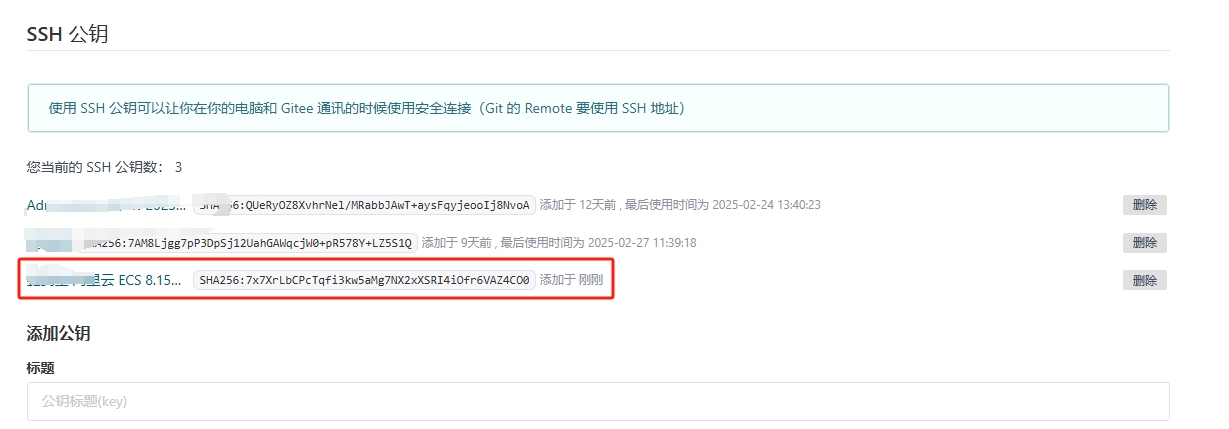
Figure 3
[root@iZ2zeaj7tnbv8d3gsoy1w5Z object]# cat ~/.ssh/id_rsa.pub
8. Failed to clone the Gitee repository in the project directory. Initialize the git repository, add a remote repository, and pull the code. as shown in Figure 4
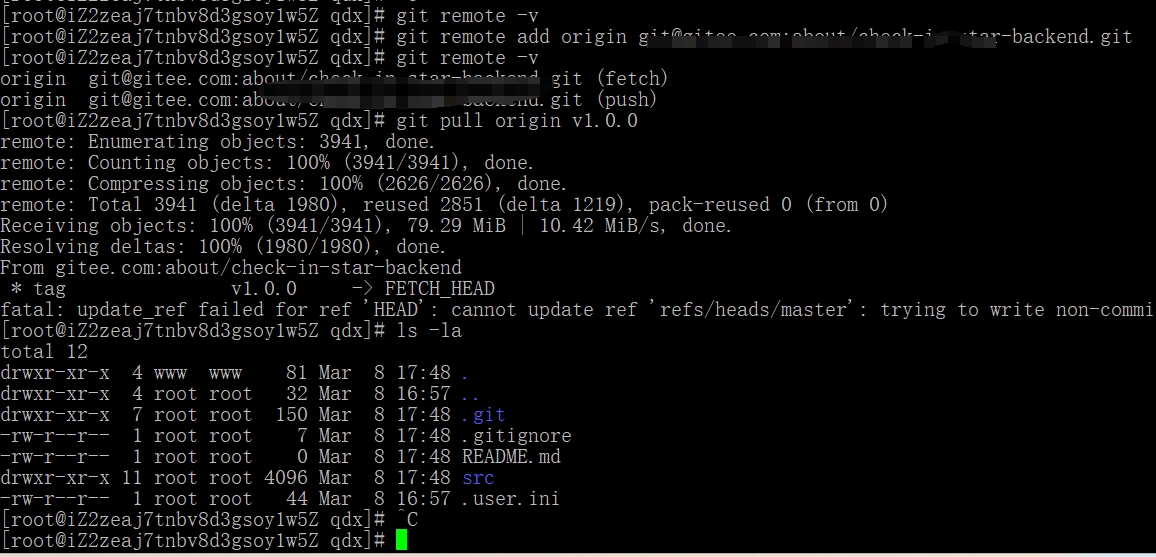
Figure 4
[root@iZ2zeaj7tnbv8d3gsoy1w5Z object]# git clone git@gitee.com:about/check-in-star-backend.git .
fatal: destination path '.' already exists and is not an empty directory.
[root@iZ2zeaj7tnbv8d3gsoy1w5Z object]# git init
hint: Using 'master' as the name for the initial branch. This default branch name
hint: is subject to change. To configure the initial branch name to use in all
hint: of your new repositories, which will suppress this warning, call:
hint:
hint:   git config --global init.defaultBranch <name>
hint:
hint: Names commonly chosen instead of 'master' are 'main', 'trunk' and
hint: 'development'. The just-created branch can be renamed via this command:
hint:
hint:   git branch -m <name>
Initialized empty Git repository in /home/wwwroot/object/.git/
[root@iZ2zeaj7tnbv8d3gsoy1w5Z object]# ls -l
total 0
[root@iZ2zeaj7tnbv8d3gsoy1w5Z object]# git remote add origin git@gitee.com:about/check-in-star-backend.git
fatal: detected dubious ownership in repository at '/home/wwwroot/object'
To add an exception for this directory, call:

        git config --global --add safe.directory /home/wwwroot/object
[root@iZ2zeaj7tnbv8d3gsoy1w5Z object]# ls -l
total 0
[root@iZ2zeaj7tnbv8d3gsoy1w5Z object]# git pull origin v1.0.0
fatal: detected dubious ownership in repository at '/home/wwwroot/object'
To add an exception for this directory, call:

        git config --global --add safe.directory /home/wwwroot/object
[root@iZ2zeaj7tnbv8d3gsoy1w5Z object]# ^C
[root@iZ2zeaj7tnbv8d3gsoy1w5Z object]# git config --global --add safe.directory /home/wwwroot/object
[root@iZ2zeaj7tnbv8d3gsoy1w5Z object]# git pull origin v1.0.0
fatal: 'origin' does not appear to be a git repository
fatal: Could not read from remote repository.

Please make sure you have the correct access rights
and the repository exists.
[root@iZ2zeaj7tnbv8d3gsoy1w5Z object]# ^C
[root@iZ2zeaj7tnbv8d3gsoy1w5Z object]# ls -la
total 4
drwxr-xr-x 3 www  www   35 Mar  8 17:42 .
drwxr-xr-x 4 root root  32 Mar  8 16:57 ..
drwxr-xr-x 7 root root 137 Mar  8 17:44 .git
-rw-r--r-- 1 root root  44 Mar  8 16:57 .user.ini
[root@iZ2zeaj7tnbv8d3gsoy1w5Z object]# ^C
[root@iZ2zeaj7tnbv8d3gsoy1w5Z object]# git remote -v
[root@iZ2zeaj7tnbv8d3gsoy1w5Z object]# git remote add origin git@gitee.com:about/check-in-star-backend.git
[root@iZ2zeaj7tnbv8d3gsoy1w5Z object]# git remote -v
origin  git@gitee.com:about/check-in-star-backend.git (fetch)
origin  git@gitee.com:about/check-in-star-backend.git (push)
[root@iZ2zeaj7tnbv8d3gsoy1w5Z object]# git pull origin v1.0.0
remote: Enumerating objects: 3941, done.
remote: Counting objects: 100% (3941/3941), done.
remote: Compressing objects: 100% (2626/2626), done.
remote: Total 3941 (delta 1980), reused 2851 (delta 1219), pack-reused 0 (from 0)
Receiving objects: 100% (3941/3941), 79.29 MiB | 10.42 MiB/s, done.
Resolving deltas: 100% (1980/1980), done.
From gitee.com:about/check-in-star-backend
 * tag               v1.0.0     -> FETCH_HEAD
fatal: update_ref failed for ref 'HEAD': cannot update ref 'refs/heads/master': trying to write non-commit object 7cefa5873aefc80530d576109a29df9b9a9cf161 to branch 'refs/heads/master'
[root@iZ2zeaj7tnbv8d3gsoy1w5Z object]# ls -la
total 12
drwxr-xr-x  4 www  www    81 Mar  8 17:48 .
drwxr-xr-x  4 root root   32 Mar  8 16:57 ..
drwxr-xr-x  7 root root  150 Mar  8 17:48 .git
-rw-r--r--  1 root root    7 Mar  8 17:48 .gitignore
-rw-r--r--  1 root root    0 Mar  8 17:48 README.md
drwxr-xr-x 11 root root 4096 Mar  8 17:48 src
-rw-r--r--  1 root root   44 Mar  8 16:57 .user.ini