
Recently, I have begun to seriously think about the commercialization of technical blogs.
For the past ten years, I have used blogs as technical notes and knowledge precipitation tools, mainly to record practical experience in PHP, GO, Linux, MySQL, WordPress and so on. With changes in search traffic, the impact of AI on search behavior, and adjustments to personal income structures, I have also started trying to find new sources of income for blogs.
At present, my main attempts include:
- Google AdSense ads
- Technical Consulting Services
- VPN related services
- Affiliate Marketing
And this time, I decided to start with Bewild and take the first step in affiliate marketing.
Initial idea: add an invitation link at the end of the article
In the beginning, I refer to many affiliate marketing websites.
At the end of the article on the purchase of chatgpt plus, I added something like this:
If this article helps you, you can sign up for Bewild through my invitation link.
Purchasing through the invitation link will not increase your cost, and I will get the invitation reward provided by the platform.
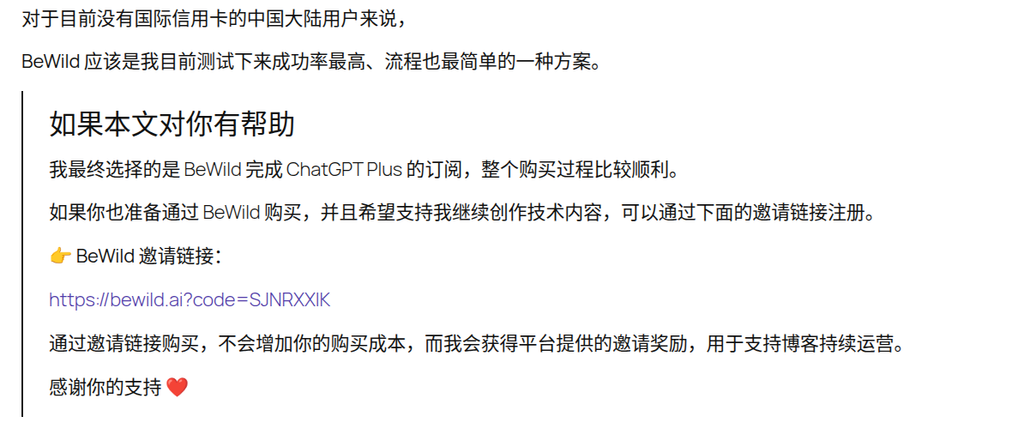
In terms of form, this is not a problem.
But after writing it, I always feel a little inconsistent.
Because my blog has never been a coupon station, nor a shopping guide station.
Readers come here more for:
- See the real stepping process
- View technical practice records
- Learn about the final solution
rather than specifically looking for discount links.
If there is a large section of promotional content at the end of each article, it will destroy the overall reading experience.
An important question: Users do not receive additional discounts
I then re-examined Bewild’s invitation mechanism.
I found a real problem:
Users buy via my invitation link:
- No additional discounts
- No additional gifts will be given
- No exclusive discounts
In other words:
Users do not directly benefit.
For many technical readers, they are more concerned with:
Which solution is best to use?
instead of:
Whose invitation code should I use?
This is different from exchange invitation links, cloud service promotion activities and other scenarios.
So I started rethinking how the recommendation link was presented.
Final decision: only add referral links on key decision nodes
After many adjustments, I finally adopted a solution that is more in line with the technical blog style.
Promotional areas are no longer placed separately.
No more large-scale invitations will be added.
Instead, add a recommendation link where the article really involves decision-making.
For example:
Final choice: Bewild
and:
I ended up completing the ChatGPT Plus subscription on Bewild, and the whole purchase process was relatively smooth.
These two positions are the information that the reader is most concerned about.
Because users search this article, they are essentially looking for:
What did you end up using?
In this case, it is more reasonable to naturally integrate the recommendation link into the decision-making conclusion.
Design independent styles for recommendation links
In order to distinguish the recommendation link from the ordinary link, I specially designed a new set of link styles.
The goal is clear:
- More eye-catching than normal links
- Do not use buttons
- Do not use banner ads
- Maintain the tech blog style
The final effect is as follows:
- Unified emphasis on color using the blog
- Text with dashed underline
- Automatically display external link arrows
- The size of the arrow is reduced, and it does not preempt the visual focus
- Color change on mouse over
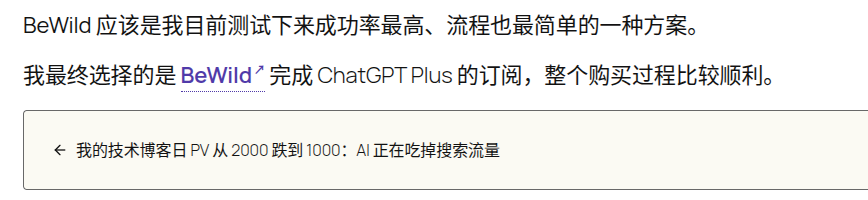
Final CSS:
/* ==========================================================================
   ★ 联盟营销 / 推荐链接
   ========================================================================== */

.recommend-link {
    color: #503aa8 !important;
    font-weight: 600;
    text-decoration: none !important;

    border-bottom: 1px dotted currentColor;
    padding-bottom: 1px;
}

.recommend-link::after {
    content: " ↗";
    font-size: 0.5em;
    vertical-align: super;
}

.recommend-link:hover {
    color: #3e2d84 !important;
}
How to use it in WordPress Gutenberg:
<a href="https://example.com"
   target="_blank"
   rel="noopener"
   class="recommend-link">
    ProductName
</a>
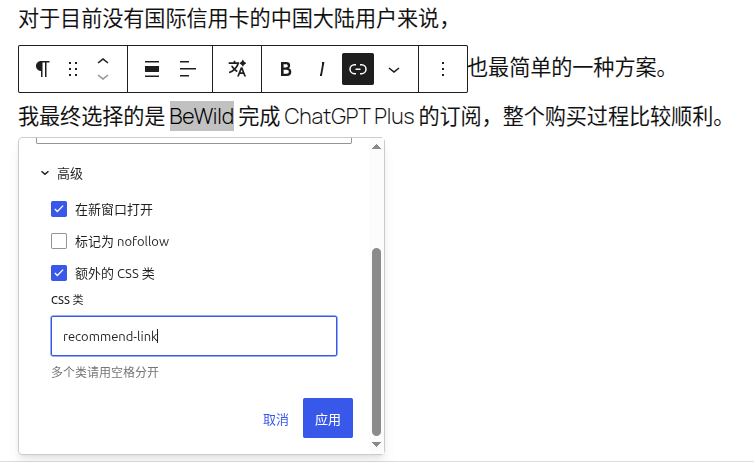
In this way, there is no need to switch to the source code mode to add additional SPAN tags, and the maintenance cost is also lower.
Recommended link usage specification (v1.0)
After this practice, I made the first version of the rules for my blog.
Recommended links apply to
- Products I have actually used
- Services I would like to recommend to readers
- Tools that are highly relevant to the topic of the article
For example:
- bewild
- zoogvpn
- vultr
- digitalOcean
The location of the recommendation link first
First priority:
Final choice
Second priority:
Actual purchase or use results
For example:
I ended up choosing Bewild.
I ended up completing the ChatGPT Plus subscription on Bewild.
A place not recommended to add
- Product screenshot description
- Repeated product name
- Features section
- Parameters section
Single article control quantity
In principle:
There are no more than 2 recommendation links.
Avoid the entire article into advertising pages.
follow-up plan
In order to systematically manage affiliate marketing projects, I have started to use NocoDB to build an affiliate marketing database.
Currently entered:
- bewild
- zoogvpn
- vultr
- digitalOcean
Follow-up plans include:
- Create a resource recommendation page
- Statistical alliance link click situation
- Record Alliance Revenue Data
- Continuously optimize the recommendation method
at the end
For tech blogs, affiliate marketing doesn’t necessarily mean ads and promotion links everywhere.
I prefer a simple way:
When I have actually used a product and are willing to recommend it to others, leave a link at the most critical decision nodes.
As for whether the user clicks or whether to buy, it is left to the content itself to decide.
This is also my first step in the marketing road of Tech Blog affiliate marketing.
I am a PHP / Go backend engineer with 15+ years of experience. If you need any of the following services, feel free to contact me (more details: About Me & Collaboration):
- ✅ PHP / Go project development and maintenance
- ✅ System architecture design and technical consulting
- ✅ Performance optimization and troubleshooting
- ✅ Linux server deployment and operations
- ✅ Network environment optimization and remote support
- ✅ Long-term technical consulting
WeChat: 13980074657
Email: shuijingwanwq@gmail.com
Telegram: @shuijingwan
GitHub: https://github.com/shuijingwan
Leave a Reply