在 Laravel 6 的数据库迁移中,更新字段属性时,Doctrine\DBAL\Exception : Unknown column type “tinyinteger” requested.
1、在 Laravel 6 中,更新字段属性
Schema::table('theme_installation_task', function (Blueprint $table) {
	$table->unsignedTinyInteger('step')->default(0)->comment('步骤,1:排队中;2:下载 ZIP;3:解压缩 ZIP;4:执行安装命令;5:复制主题文件;6:同步主题的素材至CDN')->change();
});
2、执行迁移时报错,Doctrine\DBAL\Exception : Unknown column type “tinyinteger” requested.。如图1
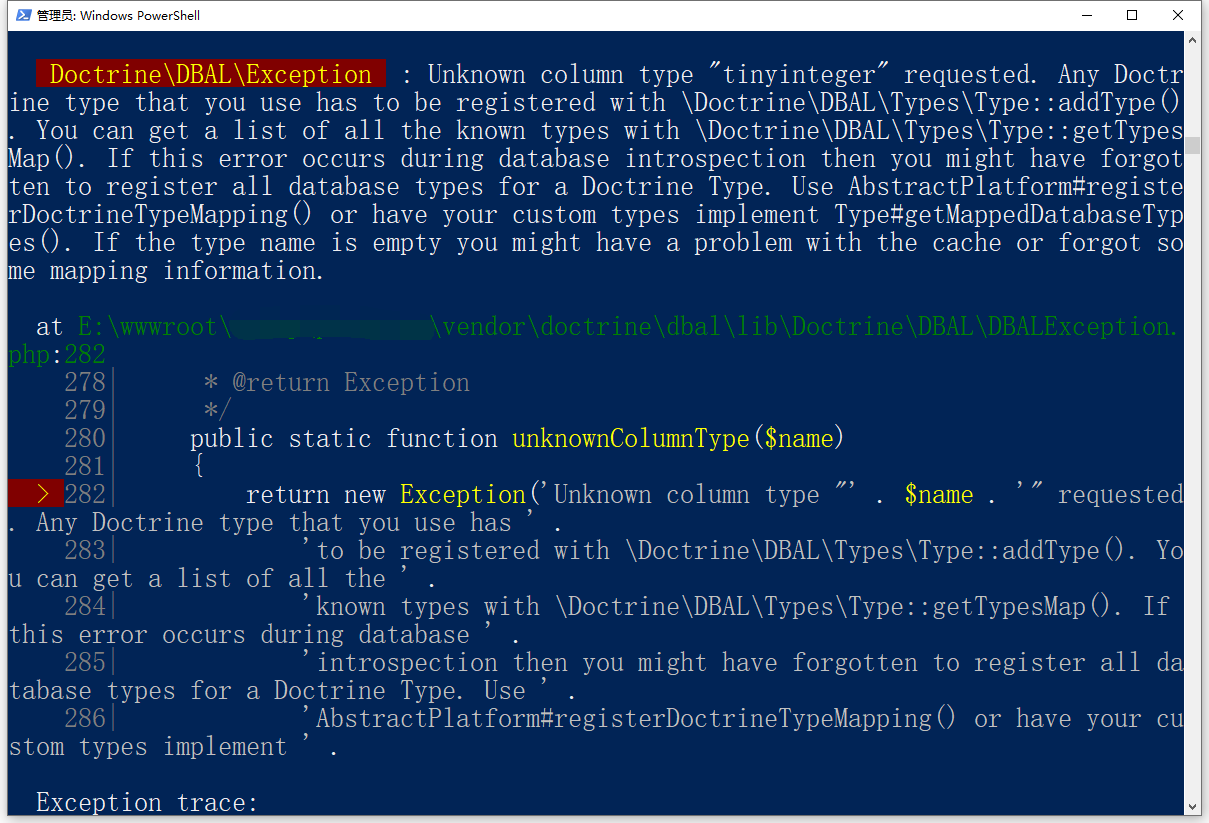
图1
   Doctrine\DBAL\Exception  : Unknown column type "tinyinteger" requested. Any Doctrine type that you use has to be registered with \Doctrine\DBAL\Types\Type::addType(). You can get a list of all the known types with \Doctrine\DBAL\Types\Type::getTypesMap(). If this error occurs during database introspection then you might have forgotten to register all database types for a Doctrine Type. Use AbstractPlatform#registerDoctrineTypeMapping() or have your custom types implement Type#getMappedDatabaseTypes(). If the type name is empty you might have a problem with the cache or forgot some mapping information.

  at E:\wwwroot\object\vendor\doctrine\dbal\lib\Doctrine\DBAL\DBALException.php:282
    278|      * @return Exception
    279|      */
    280|     public static function unknownColumnType($name)
    281|     {
  > 282|         return new Exception('Unknown column type "' . $name . '" requested. Any Doctrine type that you use has ' .
    283|             'to be registered with \Doctrine\DBAL\Types\Type::addType(). You can get a list of all the ' .
    284|             'known types with \Doctrine\DBAL\Types\Type::getTypesMap(). If this error occurs during database ' .
    285|             'introspection then you might have forgotten to register all database types for a Doctrine Type. Use ' .
    286|             'AbstractPlatform#registerDoctrineTypeMapping() or have your custom types implement ' .

  Exception trace:

  1   Doctrine\DBAL\DBALException::unknownColumnType("tinyinteger")
      E:\wwwroot\object\vendor\doctrine\dbal\lib\Doctrine\DBAL\Types\TypeRegistry.php:37

  2   Doctrine\DBAL\Types\TypeRegistry::get("tinyinteger")
      E:\wwwroot\object\vendor\doctrine\dbal\lib\Doctrine\DBAL\Types\Type.php:237

  Please use the argument -v to see more details.
3、由于此字段的数据允许删除,所以决定删除此字段后,再添加。
Schema::table('theme_installation_task', function (Blueprint $table) {
	$table->dropColumn('step');
	$table->unsignedTinyInteger('step')->default(0)->after('processing_failed')->comment('步骤,1:排队中;2:下载 ZIP;3:解压缩 ZIP;4:执行安装命令;5:复制主题文件;6:同步主题的素材至CDN');
});
4、报错:Illuminate\Database\QueryException : SQLSTATE[42S21]: Column already exists: 1060 Duplicate column name ‘step’ 。如图2
![报错:Illuminate\Database\QueryException : SQLSTATE[42S21]: Column already exists: 1060 Duplicate column name 'step' 。](https://www.shuijingwanwq.com/wp-content/uploads/2022/07/2-8.png)
图2
   Illuminate\Database\QueryException  : SQLSTATE[42S21]: Column already exists: 1060 Duplicate column name 'step' (SQL: alter table `theme_installation_task` add `step` tinyint unsigned not null default '0' comment '步骤,1:排队中;2:下载 ZIP;3:解压缩 ZIP;4:执行安装命令;5:复制主题文件;6:同步主题的素材至CDN' after `processing_failed`)

  at E:\wwwroot\object\vendor\laravel\framework\src\Illuminate\Database\Connection.php:669
    665|         // If an exception occurs when attempting to run a query, we'll format the error
    666|         // message to include the bindings with SQL, which will make this exception a
    667|         // lot more helpful to the developer instead of just the database's errors.
    668|         catch (Exception $e) {
  > 669|             throw new QueryException(
    670|                 $query, $this->prepareBindings($bindings), $e
    671|             );
    672|         }
    673|

  Exception trace:

  1   Doctrine\DBAL\Driver\PDO\Exception::("SQLSTATE[42S21]: Column already exists: 1060 Duplicate column name 'step'")
      E:\wwwroot\object\vendor\doctrine\dbal\lib\Doctrine\DBAL\Driver\PDO\Exception.php:18

  2   Doctrine\DBAL\Driver\PDO\Exception::new(Object(PDOException))
      E:\wwwroot\object\vendor\doctrine\dbal\lib\Doctrine\DBAL\Driver\PDOStatement.php:119

  Please use the argument -v to see more details.
5、最后不得不拆分为 2 个迁移文件,先删除字段,然后再添加字段。执行迁移成功。
Schema::table('theme_installation_task', function (Blueprint $table) {
	$table->dropColumn('step');
});
Schema::table('theme_installation_task', function (Blueprint $table) {
	$table->unsignedTinyInteger('step')->default(0)->after('processing_failed')->comment('步骤,1:排队中;2:下载 ZIP;3:解压缩 ZIP;4:执行安装命令;5:复制主题文件;6:同步主题的素材至CDN');
});
6、如果字段数据需要保留,则可以参考:https://www.shuijingwanwq.com/2022/06/02/6483/ ,使用 DB::statement。
![执行时报错:SQLSTATE[42S02]: Base table or view not found: 1146 Table 'object_store.themes' doesn't exist (SQL: delete from `themes` where `id` = 156) 。](https://www.shuijingwanwq.com/wp-content/uploads/2022/07/1-1-520x133.png)
近期评论