在 WSL2 中的 Ubuntu-20.04 中创建应用:Shopify App Template – PHP
1、参考:在 WSL2 中的 Ubuntu-20.04 中安装 Shopify CLI 3.0(基于 Node.js),提前检查相应的要求是否满足
2、创建应用,选择 PHP 模板,报错:operation not permitted, copyfile
wangqiang@DESKTOP-QLPK8QM:/mnt/e/wwwroot/shopify-app$ npm init @shopify/app@latest
Need to install the following packages:
  @shopify/create-app@3.46.2
Ok to proceed? (y)

Welcome. Let’s get started by naming your app project. You can change it later.

?  Your app project name?
✔  learn-php-app-ubuntu-2004-0602

?  Which template would you like to use?
✔  php


╭─ error ──────────────────────────────────────────────────────────────────────╮
│                                                                              │
│  EPERM: operation not permitted, copyfile                                    │
│  '/tmp/cb635eef29c31a10687f90a7693d4848/app/web/storage/logs/.gitignore' ->  │
│   '/mnt/e/wwwroot/shopify-app/learn-php-app-ubuntu-2004-0602/web/storage/lo  │
│  gs/.gitignore'                                                              │
│                                                                              │
╰──────────────────────────────────────────────────────────────────────────────╯

npm notice
npm notice New minor version of npm available! 9.5.1 -> 9.6.7
npm notice Changelog: https://github.com/npm/cli/releases/tag/v9.6.7
npm notice Run npm install -g npm@9.6.7 to update!
npm notice
npm ERR! code 1
npm ERR! path /mnt/e/wwwroot/shopify-app
npm ERR! command failed
npm ERR! command sh -c create-app

npm ERR! A complete log of this run can be found in:
npm ERR!     /home/wangqiang/.npm/_logs/2023-06-02T03_46_50_520Z-debug-0.log
wangqiang@DESKTOP-QLPK8QM:/mnt/e/wwwroot/shopify-app$
3、在命令 npm init @shopify/app@latest 前添加 sudo,以提升权限,不再报错
wangqiang@DESKTOP-QLPK8QM:/mnt/e/wwwroot/shopify-app$ sudo npm init @shopify/app@latest

Welcome. Let’s get started by naming your app project. You can change it later.

?  Your app project name?
✔  learn-php-app-ubuntu-2004-0602

?  Which template would you like to use?
✔  php
4、参考:安装 PHP 、Composer
wangqiang@DESKTOP-QLPK8QM:~$ sudo apt install php
Reading package lists... Done
Building dependency tree
Reading state information... Done
The following packages were automatically installed and are no longer required:
  libfwupdplugin1 libxmlb1
Use 'sudo apt autoremove' to remove them.
The following additional packages will be installed:
  apache2 apache2-bin apache2-data apache2-utils libapache2-mod-php7.4 libapr1 libaprutil1 libaprutil1-dbd-sqlite3
  libaprutil1-ldap libjansson4 liblua5.2-0 php-common php7.4 php7.4-cli php7.4-common php7.4-json php7.4-opcache
  php7.4-readline ssl-cert
Suggested packages:
  apache2-doc apache2-suexec-pristine | apache2-suexec-custom php-pear openssl-blacklist
The following NEW packages will be installed:
  apache2 apache2-bin apache2-data apache2-utils libapache2-mod-php7.4 libapr1 libaprutil1 libaprutil1-dbd-sqlite3
Enabling module status.
Enabling module reqtimeout.
Enabling conf charset.
Enabling conf localized-error-pages.
Enabling conf other-vhosts-access-log.
Enabling conf security.
Enabling conf serve-cgi-bin.
Enabling site 000-default.
info: Switch to mpm prefork for package libapache2-mod-php7.4
Module mpm_event disabled.
Enabling module mpm_prefork.
info: Executing deferred 'a2enmod php7.4' for package libapache2-mod-php7.4
Enabling module php7.4.
Created symlink /etc/systemd/system/multi-user.target.wants/apache2.service → /lib/systemd/system/apache2.service.
Created symlink /etc/systemd/system/multi-user.target.wants/apache-htcacheclean.service → /lib/systemd/system/apache-htcacheclean.service.
invoke-rc.d: could not determine current runlevel
Setting up php7.4 (7.4.3-4ubuntu2.18) ...
Setting up php (2:7.4+75) ...
Processing triggers for ufw (0.36-6ubuntu1) ...
Processing triggers for systemd (245.4-4ubuntu3.21) ...
Processing triggers for man-db (2.9.1-1) ...
Processing triggers for libc-bin (2.31-0ubuntu9.9) ...
/sbin/ldconfig.real: /usr/lib/wsl/lib/libcuda.so.1 is not a symbolic link

Processing triggers for php7.4-cli (7.4.3-4ubuntu2.18) ...
Processing triggers for libapache2-mod-php7.4 (7.4.3-4ubuntu2.18) ...
wangqiang@DESKTOP-QLPK8QM:~$ sudo apt install composer
Reading package lists... Done
Building dependency tree
Reading state information... Done
The following packages were automatically installed and are no longer required:
  libfwupdplugin1 libxmlb1
Use 'sudo apt autoremove' to remove them.
The following additional packages will be installed:
  jsonlint libonig5 php-composer-ca-bundle php-composer-semver php-composer-spdx-licenses php-composer-xdebug-handler
  php-json-schema php-mbstring php-psr-container php-psr-log php-symfony-console php-symfony-filesystem
  php-symfony-finder php-symfony-process php-symfony-service-contracts php7.4-mbstring
Preparing to unpack .../16-composer_1.10.1-1_all.deb ...
Unpacking composer (1.10.1-1) ...
Setting up php-symfony-finder (4.3.8+dfsg-1ubuntu1) ...
Setting up jsonlint (1.7.2-1) ...
Setting up php-psr-container (1.0.0-2) ...
Setting up php-symfony-service-contracts (1.1.8-1) ...
Setting up php-composer-ca-bundle (1.2.6-1) ...
Setting up php-symfony-process (4.3.8+dfsg-1ubuntu1) ...
Setting up php-symfony-filesystem (4.3.8+dfsg-1ubuntu1) ...
Setting up php-psr-log (1.1.2-1) ...
Setting up php-composer-semver (1.5.1-1) ...
Setting up php-json-schema (5.2.9-1) ...
Setting up php-composer-spdx-licenses (1.5.3-1) ...
Setting up libonig5:amd64 (6.9.4-1) ...
Setting up php-composer-xdebug-handler (1.4.0-1) ...
Setting up php7.4-mbstring (7.4.3-4ubuntu2.18) ...

Creating config file /etc/php/7.4/mods-available/mbstring.ini with new version
Setting up php-mbstring (2:7.4+75) ...
Setting up php-symfony-console (4.3.8+dfsg-1ubuntu1) ...
Setting up composer (1.10.1-1) ...
Processing triggers for libc-bin (2.31-0ubuntu9.9) ...
/sbin/ldconfig.real: /usr/lib/wsl/lib/libcuda.so.1 is not a symbolic link

Processing triggers for man-db (2.9.1-1) ...
Processing triggers for libapache2-mod-php7.4 (7.4.3-4ubuntu2.18) ...
Processing triggers for php7.4-cli (7.4.3-4ubuntu2.18) ...
5、创建应用程序后,设置 Laravel 应用程序。安装依赖包。提示:建议升级至 Composer 2。先卸载掉 Composer 1,再安装 Composer 2 。参考:后续使用:php composer.phar 。
wangqiang@DESKTOP-QLPK8QM:/mnt/e/wwwroot/shopify-app/learn-php-app-ubuntu-2004-0602/web$ composer install
Loading composer repositories with package information
Warning from https://repo.packagist.org: Support for Composer 1 is deprecated and some packages will not be available. You should upgrade to Composer 2. See https://blog.packagist.com/deprecating-composer-1-support/
wangqiang@DESKTOP-QLPK8QM:/mnt/e/wwwroot/shopify-app/learn-php-app-ubuntu-2004-0602/web$ composer -V
Composer 1.10.1 2020-03-13 20:34:27
wangqiang@DESKTOP-QLPK8QM:/mnt/e/wwwroot/shopify-app/learn-php-app-ubuntu-2004-0602/web$ sudo apt-get remove composer
[sudo] password for wangqiang:
Reading package lists... Done
Building dependency tree
Reading state information... Done
The following packages were automatically installed and are no longer required:
  jsonlint libfwupdplugin1 libonig5 libxmlb1 php-composer-ca-bundle php-composer-semver php-composer-spdx-licenses
  php-composer-xdebug-handler php-json-schema php-mbstring php-psr-container php-psr-log php-symfony-console
  php-symfony-filesystem php-symfony-finder php-symfony-process php-symfony-service-contracts php7.4-mbstring
Use 'sudo apt autoremove' to remove them.
The following packages will be REMOVED:
  composer
0 upgraded, 0 newly installed, 1 to remove and 0 not upgraded.
After this operation, 1996 kB disk space will be freed.
Do you want to continue? [Y/n] Y
(Reading database ... 66661 files and directories currently installed.)
Removing composer (1.10.1-1) ...
Processing triggers for man-db (2.9.1-1) ...
wangqiang@DESKTOP-QLPK8QM:/mnt/e/wwwroot/shopify-app/learn-php-app-ubuntu-2004-0602/web$ composer -V
-bash: /usr/bin/composer: No such file or directory
wangqiang@DESKTOP-QLPK8QM:/mnt/e/wwwroot/shopify-app/learn-php-app-ubuntu-2004-0602/web$ php -r "copy('https://getcomposer.org/installer', 'composer-setup.php');"
wangqiang@DESKTOP-QLPK8QM:/mnt/e/wwwroot/shopify-app/learn-php-app-ubuntu-2004-0602/web$ php -r "if (hash_file('sha384', 'composer-setup.php') === '55ce33d7678c5a611085589f1f3ddf8b3c52d662cd01d4ba75c0ee0459970c2200a51f492d557530c71c15d8dba01eae') { echo 'Installer verified'; } else { echo 'Installer corrupt'; unlink('composer-setup.php'); } echo PHP_EOL;"
Installer verified
wangqiang@DESKTOP-QLPK8QM:/mnt/e/wwwroot/shopify-app/learn-php-app-ubuntu-2004-0602/web$ php composer-setup.php
All settings correct for using Composer
Downloading...

Composer (version 2.5.7) successfully installed to: /mnt/e/wwwroot/shopify-app/learn-php-app-ubuntu-2004-0602/web/composer.phar
Use it: php composer.phar
wangqiang@DESKTOP-QLPK8QM:/mnt/e/wwwroot/shopify-app/learn-php-app-ubuntu-2004-0602/web$ php composer.phar -V
Composer version 2.5.7 2023-05-24 15:00:39
6、提示:Composer is operating significantly slower than normal because you do not have the PHP curl extension enabled.
wangqiang@DESKTOP-QLPK8QM:/mnt/e/wwwroot/shopify-app/learn-php-app-ubuntu-2004-0602/web$ php composer.phar install
Composer is operating significantly slower than normal because you do not have the PHP curl extension enabled.
wangqiang@DESKTOP-QLPK8QM:/mnt/e/wwwroot/shopify-app/learn-php-app-ubuntu-2004-0602/web$ apt-cache search php | grep cur
l
php-curl - CURL module for PHP [default]
php7.4-curl - CURL module for PHP
wangqiang@DESKTOP-QLPK8QM:/mnt/e/wwwroot/shopify-app/learn-php-app-ubuntu-2004-0602/web$ sudo apt-get install php-curl
[sudo] password for wangqiang:
Reading package lists... Done
Building dependency tree
Reading state information... Done
The following packages were automatically installed and are no longer required:
  jsonlint libfwupdplugin1 libonig5 libxmlb1 php-composer-ca-bundle php-composer-semver php-composer-spdx-licenses
  php-composer-xdebug-handler php-json-schema php-mbstring php-psr-container php-psr-log php-symfony-console
  php-symfony-filesystem php-symfony-finder php-symfony-process php-symfony-service-contracts php7.4-mbstring
Use 'sudo apt autoremove' to remove them.
The following additional packages will be installed:
  php7.4-curl
The following NEW packages will be installed:
  php-curl php7.4-curl
0 upgraded, 2 newly installed, 0 to remove and 0 not upgraded.
Need to get 32.9 kB of archives.
After this operation, 148 kB of additional disk space will be used.
Do you want to continue? [Y/n] Y
Get:1 http://archive.ubuntu.com/ubuntu focal-updates/main amd64 php7.4-curl amd64 7.4.3-4ubuntu2.18 [30.9 kB]
Get:2 http://archive.ubuntu.com/ubuntu focal/main amd64 php-curl all 2:7.4+75 [2000 B]
Fetched 32.9 kB in 2s (16.1 kB/s)
Selecting previously unselected package php7.4-curl.
(Reading database ... 66332 files and directories currently installed.)
Preparing to unpack .../php7.4-curl_7.4.3-4ubuntu2.18_amd64.deb ...
Unpacking php7.4-curl (7.4.3-4ubuntu2.18) ...
Selecting previously unselected package php-curl.
Preparing to unpack .../php-curl_2%3a7.4+75_all.deb ...
Unpacking php-curl (2:7.4+75) ...
Setting up php7.4-curl (7.4.3-4ubuntu2.18) ...

Creating config file /etc/php/7.4/mods-available/curl.ini with new version
Setting up php-curl (2:7.4+75) ...
Processing triggers for libapache2-mod-php7.4 (7.4.3-4ubuntu2.18) ...
Processing triggers for php7.4-cli (7.4.3-4ubuntu2.18) ...
7、Your requirements could not be resolved to an installable set of packages. 根 composer.json 需要 php ~8.0.0 || ~8.1.0 || ~8.2.0 但您的 php 版本 (7.4.3) 不满足该要求。一些必需的扩展也没有启用。
wangqiang@DESKTOP-QLPK8QM:/mnt/e/wwwroot/shopify-app/learn-php-app-ubuntu-2004-0602/web$ php composer.phar install
No composer.lock file present. Updating dependencies to latest instead of installing from lock file. See https://getcomposer.org/install for more information.
Loading composer repositories with package information
Info from https://repo.packagist.org: #StandWithUkraine
Updating dependencies
Your requirements could not be resolved to an installable set of packages.

  Problem 1
    - Root composer.json requires php ~8.0.0 || ~8.1.0 || ~8.2.0 but your php version (7.4.3) does not satisfy that requirement.
  Problem 2
    - Root composer.json requires PHP extension ext-xml * but it is missing from your system. Install or enable PHP's xml extension.
  Problem 3
    - Root composer.json requires PHP extension ext-zip * but it is missing from your system. Install or enable PHP's zip extension.
  Problem 4
    - Root composer.json requires shopify/shopify-api ^5.0 -> satisfiable by shopify/shopify-api[v5.0.0].
    - shopify/shopify-api v5.0.0 requires php ~8.0.0 || ~8.1.0 || ~8.2.0 -> your php version (7.4.3) does not satisfy that requirement.
  Problem 5
    - Root composer.json requires squizlabs/php_codesniffer ^3.6 -> satisfiable by squizlabs/php_codesniffer[3.6.0, ..., 3.x-dev].
    - squizlabs/php_codesniffer[3.6.0, ..., 3.x-dev] require ext-xmlwriter * -> it is missing from your system. Install or enable PHP's xmlwriter extension.
  Problem 6
    - phpunit/phpunit[9.3.3, ..., 9.6.x-dev] require ext-dom * -> it is missing from your system. Install or enable PHP's dom extension.
    - Root composer.json requires phpunit/phpunit ^9.3.3 -> satisfiable by phpunit/phpunit[9.3.3, ..., 9.6.x-dev].

To enable extensions, verify that they are enabled in your .ini files:
    - /etc/php/7.4/cli/php.ini
    - /etc/php/7.4/cli/conf.d/10-opcache.ini
    - /etc/php/7.4/cli/conf.d/10-pdo.ini
    - /etc/php/7.4/cli/conf.d/20-calendar.ini
    - /etc/php/7.4/cli/conf.d/20-ctype.ini
    - /etc/php/7.4/cli/conf.d/20-curl.ini
    - /etc/php/7.4/cli/conf.d/20-exif.ini
    - /etc/php/7.4/cli/conf.d/20-ffi.ini
    - /etc/php/7.4/cli/conf.d/20-fileinfo.ini
    - /etc/php/7.4/cli/conf.d/20-ftp.ini
    - /etc/php/7.4/cli/conf.d/20-gettext.ini
    - /etc/php/7.4/cli/conf.d/20-iconv.ini
    - /etc/php/7.4/cli/conf.d/20-json.ini
    - /etc/php/7.4/cli/conf.d/20-mbstring.ini
    - /etc/php/7.4/cli/conf.d/20-phar.ini
    - /etc/php/7.4/cli/conf.d/20-posix.ini
    - /etc/php/7.4/cli/conf.d/20-readline.ini
    - /etc/php/7.4/cli/conf.d/20-shmop.ini
    - /etc/php/7.4/cli/conf.d/20-sockets.ini
    - /etc/php/7.4/cli/conf.d/20-sysvmsg.ini
    - /etc/php/7.4/cli/conf.d/20-sysvsem.ini
    - /etc/php/7.4/cli/conf.d/20-sysvshm.ini
    - /etc/php/7.4/cli/conf.d/20-tokenizer.ini
You can also run `php --ini` in a terminal to see which files are used by PHP in CLI mode.
Alternatively, you can run Composer with `--ignore-platform-req=ext-xml --ignore-platform-req=ext-zip --ignore-platform-req=ext-xmlwriter --ignore-platform-req=ext-dom` to temporarily ignore these required extensions.
8、参考:在 WSL2 中的 Ubuntu-20.04 中卸载 PHP 7.4,然后安装 PHP 8
9、继续安装 Composer 依赖
wangqiang@DESKTOP-QLPK8QM:/mnt/e/wwwroot/shopify-app/learn-php-app-ubuntu-2004-0602/web$ sudo apt-get install php8.1-curl
[sudo] password for wangqiang:
Reading package lists... Done
Building dependency tree
Reading state information... Done
The following NEW packages will be installed:
  php8.1-curl
0 upgraded, 1 newly installed, 0 to remove and 5 not upgraded.
Need to get 33.6 kB of archives.
After this operation, 152 kB of additional disk space will be used.
Get:1 http://ppa.launchpad.net/ondrej/php/ubuntu focal/main amd64 php8.1-curl amd64 8.1.18-1+ubuntu20.04.1+deb.sury.org+1 [33.6 kB]
Fetched 33.6 kB in 2s (21.8 kB/s)
Selecting previously unselected package php8.1-curl.
(Reading database ... 65958 files and directories currently installed.)
Preparing to unpack .../php8.1-curl_8.1.18-1+ubuntu20.04.1+deb.sury.org+1_amd64.deb ...
Unpacking php8.1-curl (8.1.18-1+ubuntu20.04.1+deb.sury.org+1) ...
Setting up php8.1-curl (8.1.18-1+ubuntu20.04.1+deb.sury.org+1) ...

Creating config file /etc/php/8.1/mods-available/curl.ini with new version
Processing triggers for libapache2-mod-php8.1 (8.1.18-1+ubuntu20.04.1+deb.sury.org+1) ...
Processing triggers for php8.1-cli (8.1.18-1+ubuntu20.04.1+deb.sury.org+1) ...
wangqiang@DESKTOP-QLPK8QM:/mnt/e/wwwroot/shopify-app/learn-php-app-ubuntu-2004-0602/web$ php composer.phar install
No composer.lock file present. Updating dependencies to latest instead of installing from lock file. See https://getcomposer.org/install for more information.
Loading composer repositories with package information
Info from https://repo.packagist.org: #StandWithUkraine
Updating dependencies
Your requirements could not be resolved to an installable set of packages.

  Problem 1
    - Root composer.json requires PHP extension ext-xml * but it is missing from your system. Install or enable PHP's xml extension.
  Problem 2
    - Root composer.json requires PHP extension ext-zip * but it is missing from your system. Install or enable PHP's zip extension.
  Problem 3
    - Root composer.json requires squizlabs/php_codesniffer ^3.6 -> satisfiable by squizlabs/php_codesniffer[3.6.0, ..., 3.x-dev].
    - squizlabs/php_codesniffer[3.6.0, ..., 3.x-dev] require ext-xmlwriter * -> it is missing from your system. Install or enable PHP's xmlwriter extension.
  Problem 4
    - phpunit/phpunit[9.3.3, ..., 9.6.x-dev] require ext-dom * -> it is missing from your system. Install or enable PHP's dom extension.
    - Root composer.json requires phpunit/phpunit ^9.3.3 -> satisfiable by phpunit/phpunit[9.3.3, ..., 9.6.x-dev].

To enable extensions, verify that they are enabled in your .ini files:
    - /etc/php/8.1/cli/php.ini
    - /etc/php/8.1/cli/conf.d/10-opcache.ini
    - /etc/php/8.1/cli/conf.d/10-pdo.ini
    - /etc/php/8.1/cli/conf.d/20-calendar.ini
    - /etc/php/8.1/cli/conf.d/20-ctype.ini
    - /etc/php/8.1/cli/conf.d/20-curl.ini
    - /etc/php/8.1/cli/conf.d/20-exif.ini
    - /etc/php/8.1/cli/conf.d/20-ffi.ini
    - /etc/php/8.1/cli/conf.d/20-fileinfo.ini
    - /etc/php/8.1/cli/conf.d/20-ftp.ini
    - /etc/php/8.1/cli/conf.d/20-gettext.ini
    - /etc/php/8.1/cli/conf.d/20-iconv.ini
    - /etc/php/8.1/cli/conf.d/20-phar.ini
    - /etc/php/8.1/cli/conf.d/20-posix.ini
    - /etc/php/8.1/cli/conf.d/20-readline.ini
    - /etc/php/8.1/cli/conf.d/20-shmop.ini
    - /etc/php/8.1/cli/conf.d/20-sockets.ini
    - /etc/php/8.1/cli/conf.d/20-sysvmsg.ini
    - /etc/php/8.1/cli/conf.d/20-sysvsem.ini
    - /etc/php/8.1/cli/conf.d/20-sysvshm.ini
    - /etc/php/8.1/cli/conf.d/20-tokenizer.ini
You can also run `php --ini` in a terminal to see which files are used by PHP in CLI mode.
Alternatively, you can run Composer with `--ignore-platform-req=ext-xml --ignore-platform-req=ext-zip --ignore-platform-req=ext-xmlwriter --ignore-platform-req=ext-dom` to temporarily ignore these required extensions.
wangqiang@DESKTOP-QLPK8QM:/mnt/e/wwwroot/shopify-app/learn-php-app-ubuntu-2004-0602/web$ sudo apt-get install php8.1-xml
wangqiang@DESKTOP-QLPK8QM:/mnt/e/wwwroot/shopify-app/learn-php-app-ubuntu-2004-0602/web$ sudo apt-get install php8.1-zip
wangqiang@DESKTOP-QLPK8QM:/mnt/e/wwwroot/shopify-app/learn-php-app-ubuntu-2004-0602/web$ sudo php compos
er.phar install
[sudo] password for wangqiang:
Do not run Composer as root/super user! See https://getcomposer.org/root for details
Continue as root/super user [yes]? yes
Installing dependencies from lock file (including require-dev)
Verifying lock file contents can be installed on current platform.
Package operations: 114 installs, 0 updates, 0 removals
  - Downloading brick/math (0.11.0)
  - Downloading psr/log (2.0.0)
  - Downloading psr/cache (3.0.0)
  - Downloading doctrine/event-manager (2.0.0)
  - Downloading doctrine/deprecations (v1.1.0)
  - Downloading doctrine/cache (2.2.0)
  - Downloading doctrine/dbal (3.6.2)
  - Downloading doctrine/lexer (1.2.3)
  - Downloading symfony/polyfill-ctype (v1.27.0)
  - Downloading webmozart/assert (1.11.0)
  - Downloading dragonmantank/cron-expression (v3.3.2)
  - Downloading symfony/polyfill-php80 (v1.27.0)
  - Downloading symfony/polyfill-mbstring (v1.27.0)
  - Downloading symfony/var-dumper (v5.4.24)
  - Downloading symfony/polyfill-intl-normalizer (v1.27.0)
  - Downloading symfony/polyfill-intl-grapheme (v1.27.0)
  - Downloading symfony/string (v6.3.0)
  - Downloading symfony/deprecation-contracts (v3.3.0)
  - Downloading psr/container (1.1.2)
  - Downloading symfony/service-contracts (v2.5.2)
  - Downloading symfony/polyfill-php73 (v1.27.0)
  - Downloading symfony/console (v5.4.24)
  - Downloading monolog/monolog (2.9.1)
  - Downloading voku/portable-ascii (1.6.1)
  - Downloading phpoption/phpoption (1.9.1)
  - Downloading graham-campbell/result-type (v1.1.1)
  - Downloading vlucas/phpdotenv (v5.5.0)
  - Downloading symfony/css-selector (v6.3.0)
  - Downloading tijsverkoyen/css-to-inline-styles (2.2.6)
  - Downloading symfony/routing (v5.4.22)
  - Downloading symfony/process (v5.4.24)
  - Downloading symfony/polyfill-php72 (v1.27.0)
  - Downloading symfony/polyfill-intl-idn (v1.27.0)
  - Downloading symfony/mime (v5.4.23)
  - Downloading symfony/http-foundation (v5.4.24)
  - Downloading psr/event-dispatcher (1.0.0)
  - Downloading symfony/event-dispatcher-contracts (v3.3.0)
  - Downloading symfony/event-dispatcher (v6.3.0)
  - Downloading symfony/error-handler (v5.4.24)
  - Downloading symfony/http-kernel (v5.4.24)
  - Downloading symfony/finder (v5.4.21)
  - Downloading symfony/polyfill-iconv (v1.27.0)
  - Downloading egulias/email-validator (2.1.25)
  - Downloading swiftmailer/swiftmailer (v6.3.0)
  - Downloading ramsey/collection (2.0.0)
  - Downloading ramsey/uuid (4.7.4)
  - Downloading psr/simple-cache (1.0.1)
  - Downloading opis/closure (3.6.3)
  - Downloading symfony/translation-contracts (v3.3.0)
  - Downloading symfony/translation (v6.3.0)
  - Downloading nesbot/carbon (2.67.0)
  - Downloading league/mime-type-detection (1.11.0)
  - Downloading league/flysystem (1.1.10)
  - Downloading nette/utils (v4.0.0)
  - Downloading nette/schema (v1.2.3)
  - Downloading dflydev/dot-access-data (v3.0.2)
  - Downloading league/config (v1.2.0)
  - Downloading league/commonmark (2.4.0)
  - Downloading laravel/serializable-closure (v1.3.0)
  - Downloading doctrine/inflector (2.0.6)
  - Downloading laravel/framework (v8.83.27)
  - Downloading facade/ignition-contracts (1.0.2)
  - Downloading facade/flare-client-php (1.10.0)
  - Downloading facade/ignition (2.17.7)
  - Downloading fakerphp/faker (v1.22.0)
  - Downloading fideloper/proxy (4.4.2)
  - Downloading fruitcake/php-cors (v1.2.0)
  - Downloading fruitcake/laravel-cors (v3.0.0)
  - Downloading guzzlehttp/promises (2.0.0)
  - Downloading symfony/yaml (v6.3.0)
  - Downloading laravel/sail (v1.22.0)
  - Downloading nikic/php-parser (v4.15.5)
  - Downloading psy/psysh (v0.11.18)
  - Downloading laravel/tinker (v2.8.1)
  - Downloading hamcrest/hamcrest-php (v2.0.1)
  - Downloading mockery/mockery (1.5.1)
  - Downloading filp/whoops (2.15.2)
  - Downloading nunomaduro/collision (v5.11.0)
  - Downloading sebastian/version (3.0.2)
  - Downloading sebastian/type (3.2.1)
  - Downloading sebastian/resource-operations (3.0.3)
  - Downloading sebastian/recursion-context (4.0.5)
  - Downloading sebastian/object-reflector (2.0.4)
  - Downloading sebastian/object-enumerator (4.0.4)
  - Downloading sebastian/global-state (5.0.5)
  - Downloading sebastian/exporter (4.0.5)
  - Downloading sebastian/environment (5.1.5)
  - Downloading sebastian/diff (4.0.5)
  - Downloading sebastian/comparator (4.0.8)
  - Downloading sebastian/code-unit (1.0.8)
  - Downloading sebastian/cli-parser (1.0.1)
  - Downloading phpunit/php-timer (5.0.3)
  - Downloading phpunit/php-text-template (2.0.4)
  - Downloading phpunit/php-invoker (3.1.1)
  - Downloading phpunit/php-file-iterator (3.0.6)
  - Downloading theseer/tokenizer (1.2.1)
  - Downloading sebastian/lines-of-code (1.0.3)
  - Downloading sebastian/complexity (2.0.2)
  - Downloading sebastian/code-unit-reverse-lookup (2.0.3)
  - Downloading phpunit/php-code-coverage (9.2.26)
  - Downloading phar-io/version (3.2.1)
  - Downloading phar-io/manifest (2.0.3)
  - Downloading myclabs/deep-copy (1.11.1)
  - Downloading doctrine/instantiator (2.0.0)
  - Downloading phpunit/phpunit (9.6.8)
  - Downloading psr/http-message (1.1)
  - Downloading psr/http-factory (1.0.2)
  - Downloading ralouphie/getallheaders (3.0.3)
  - Downloading psr/http-client (1.0.2)
  - Downloading guzzlehttp/psr7 (2.5.0)
  - Downloading guzzlehttp/guzzle (7.7.0)
  - Downloading firebase/php-jwt (v6.5.0)
  - Downloading shopify/shopify-api (v5.0.0)
  - Downloading squizlabs/php_codesniffer (3.7.2)
  - Installing brick/math (0.11.0): Extracting archive
  - Installing psr/log (2.0.0): Extracting archive
  - Installing psr/cache (3.0.0): Extracting archive
  - Installing doctrine/event-manager (2.0.0): Extracting archive
  - Installing doctrine/deprecations (v1.1.0): Extracting archive
  - Installing doctrine/cache (2.2.0): Extracting archive
  - Installing doctrine/dbal (3.6.2): Extracting archive
  - Installing doctrine/lexer (1.2.3): Extracting archive
  - Installing symfony/polyfill-ctype (v1.27.0): Extracting archive
  - Installing webmozart/assert (1.11.0): Extracting archive
  - Installing dragonmantank/cron-expression (v3.3.2): Extracting archive
  - Installing symfony/polyfill-php80 (v1.27.0): Extracting archive
  - Installing symfony/polyfill-mbstring (v1.27.0): Extracting archive
  - Installing symfony/var-dumper (v5.4.24): Extracting archive
  - Installing symfony/polyfill-intl-normalizer (v1.27.0): Extracting archive
  - Installing symfony/polyfill-intl-grapheme (v1.27.0): Extracting archive
  - Installing symfony/string (v6.3.0): Extracting archive
  - Installing symfony/deprecation-contracts (v3.3.0): Extracting archive
  - Installing psr/container (1.1.2): Extracting archive
  - Installing symfony/service-contracts (v2.5.2): Extracting archive
  - Installing symfony/polyfill-php73 (v1.27.0): Extracting archive
  - Installing symfony/console (v5.4.24): Extracting archive
  - Installing monolog/monolog (2.9.1): Extracting archive
  - Installing voku/portable-ascii (1.6.1): Extracting archive
  - Installing phpoption/phpoption (1.9.1): Extracting archive
  - Installing graham-campbell/result-type (v1.1.1): Extracting archive
  - Installing vlucas/phpdotenv (v5.5.0): Extracting archive
  - Installing symfony/css-selector (v6.3.0): Extracting archive
  - Installing tijsverkoyen/css-to-inline-styles (2.2.6): Extracting archive
  - Installing symfony/routing (v5.4.22): Extracting archive
  - Installing symfony/process (v5.4.24): Extracting archive
  - Installing symfony/polyfill-php72 (v1.27.0): Extracting archive
  - Installing symfony/polyfill-intl-idn (v1.27.0): Extracting archive
  - Installing symfony/mime (v5.4.23): Extracting archive
  - Installing symfony/http-foundation (v5.4.24): Extracting archive
  - Installing psr/event-dispatcher (1.0.0): Extracting archive
  - Installing symfony/event-dispatcher-contracts (v3.3.0): Extracting archive
  - Installing symfony/event-dispatcher (v6.3.0): Extracting archive
  - Installing symfony/error-handler (v5.4.24): Extracting archive
  - Installing symfony/http-kernel (v5.4.24): Extracting archive
  - Installing symfony/finder (v5.4.21): Extracting archive
  - Installing symfony/polyfill-iconv (v1.27.0): Extracting archive
  - Installing egulias/email-validator (2.1.25): Extracting archive
  - Installing swiftmailer/swiftmailer (v6.3.0): Extracting archive
  - Installing ramsey/collection (2.0.0): Extracting archive
  - Installing ramsey/uuid (4.7.4): Extracting archive
  - Installing psr/simple-cache (1.0.1): Extracting archive
  - Installing opis/closure (3.6.3): Extracting archive
  - Installing symfony/translation-contracts (v3.3.0): Extracting archive
  - Installing symfony/translation (v6.3.0): Extracting archive
  - Installing nesbot/carbon (2.67.0): Extracting archive
  - Installing league/mime-type-detection (1.11.0): Extracting archive
  - Installing league/flysystem (1.1.10): Extracting archive
  - Installing nette/utils (v4.0.0): Extracting archive
  - Installing nette/schema (v1.2.3): Extracting archive
  - Installing dflydev/dot-access-data (v3.0.2): Extracting archive
  - Installing league/config (v1.2.0): Extracting archive
  - Installing league/commonmark (2.4.0): Extracting archive
  - Installing laravel/serializable-closure (v1.3.0): Extracting archive
  - Installing doctrine/inflector (2.0.6): Extracting archive
  - Installing laravel/framework (v8.83.27): Extracting archive
  - Installing facade/ignition-contracts (1.0.2): Extracting archive
  - Installing facade/flare-client-php (1.10.0): Extracting archive
  - Installing facade/ignition (2.17.7): Extracting archive
  - Installing fakerphp/faker (v1.22.0): Extracting archive
  - Installing fideloper/proxy (4.4.2): Extracting archive
  - Installing fruitcake/php-cors (v1.2.0): Extracting archive
  - Installing fruitcake/laravel-cors (v3.0.0): Extracting archive
  - Installing guzzlehttp/promises (2.0.0): Extracting archive
  - Installing symfony/yaml (v6.3.0): Extracting archive
  - Installing laravel/sail (v1.22.0): Extracting archive
  - Installing nikic/php-parser (v4.15.5): Extracting archive
  - Installing psy/psysh (v0.11.18): Extracting archive
  - Installing laravel/tinker (v2.8.1): Extracting archive
  - Installing hamcrest/hamcrest-php (v2.0.1): Extracting archive
  - Installing mockery/mockery (1.5.1): Extracting archive
  - Installing filp/whoops (2.15.2): Extracting archive
  - Installing nunomaduro/collision (v5.11.0): Extracting archive
  - Installing sebastian/version (3.0.2): Extracting archive
  - Installing sebastian/type (3.2.1): Extracting archive
  - Installing sebastian/resource-operations (3.0.3): Extracting archive
  - Installing sebastian/recursion-context (4.0.5): Extracting archive
  - Installing sebastian/object-reflector (2.0.4): Extracting archive
  - Installing sebastian/object-enumerator (4.0.4): Extracting archive
  - Installing sebastian/global-state (5.0.5): Extracting archive
  - Installing sebastian/exporter (4.0.5): Extracting archive
  - Installing sebastian/environment (5.1.5): Extracting archive
  - Installing sebastian/diff (4.0.5): Extracting archive
  - Installing sebastian/comparator (4.0.8): Extracting archive
  - Installing sebastian/code-unit (1.0.8): Extracting archive
  - Installing sebastian/cli-parser (1.0.1): Extracting archive
  - Installing phpunit/php-timer (5.0.3): Extracting archive
  - Installing phpunit/php-text-template (2.0.4): Extracting archive
  - Installing phpunit/php-invoker (3.1.1): Extracting archive
  - Installing phpunit/php-file-iterator (3.0.6): Extracting archive
  - Installing theseer/tokenizer (1.2.1): Extracting archive
  - Installing sebastian/lines-of-code (1.0.3): Extracting archive
  - Installing sebastian/complexity (2.0.2): Extracting archive
  - Installing sebastian/code-unit-reverse-lookup (2.0.3): Extracting archive
  - Installing phpunit/php-code-coverage (9.2.26): Extracting archive
  - Installing phar-io/version (3.2.1): Extracting archive
  - Installing phar-io/manifest (2.0.3): Extracting archive
  - Installing myclabs/deep-copy (1.11.1): Extracting archive
  - Installing doctrine/instantiator (2.0.0): Extracting archive
  - Installing phpunit/phpunit (9.6.8): Extracting archive
  - Installing psr/http-message (1.1): Extracting archive
  - Installing psr/http-factory (1.0.2): Extracting archive
  - Installing ralouphie/getallheaders (3.0.3): Extracting archive
  - Installing psr/http-client (1.0.2): Extracting archive
  - Installing guzzlehttp/psr7 (2.5.0): Extracting archive
  - Installing guzzlehttp/guzzle (7.7.0): Extracting archive
  - Installing firebase/php-jwt (v6.5.0): Extracting archive
  - Installing shopify/shopify-api (v5.0.0): Extracting archive
  - Installing squizlabs/php_codesniffer (3.7.2): Extracting archive
Package fruitcake/laravel-cors is abandoned, you should avoid using it. No replacement was suggested.
Package swiftmailer/swiftmailer is abandoned, you should avoid using it. Use symfony/mailer instead.
Generating optimized autoload files
> Illuminate\Foundation\ComposerScripts::postAutoloadDump
> @php artisan package:discover --ansi
Discovered Package: facade/ignition
Discovered Package: fideloper/proxy
Discovered Package: fruitcake/laravel-cors
Discovered Package: laravel/sail
Discovered Package: laravel/tinker
Discovered Package: nesbot/carbon
Discovered Package: nunomaduro/collision
Package manifest generated successfully.
81 packages you are using are looking for funding.
Use the `composer fund` command to find out more!
10、安装 MySQL,参考:进入数据库
wangqiang@DESKTOP-QLPK8QM:/mnt/e/wwwroot/shopify-app/learn-php-app-ubuntu-2004-0602/web$ sudo apt install mysql-server
wangqiang@DESKTOP-QLPK8QM:/mnt/e/wwwroot/shopify-app/learn-php-app-ubuntu-2004-0602/web$ mysql --version
mysql  Ver 8.0.33-0ubuntu0.20.04.2 for Linux on x86_64 ((Ubuntu))
wangqiang@DESKTOP-QLPK8QM:/mnt/e/wwwroot/shopify-app/learn-php-app-ubuntu-2004-0602/web$ sudo mysql
ERROR 2002 (HY000): Can't connect to local MySQL server through socket '/var/run/mysqld/mysqld.sock' (2)
wangqiang@DESKTOP-QLPK8QM:/mnt/e/wwwroot/shopify-app/learn-php-app-ubuntu-2004-0602/web$ sudo /etc/init.d/mysql start
 * Starting MySQL database server mysqld                                                                su: warning: cannot change directory to /nonexistent: No such file or directory
                                                                                                 [ OK ]
wangqiang@DESKTOP-QLPK8QM:/mnt/e/wwwroot/shopify-app/learn-php-app-ubuntu-2004-0602/web$ sudo mysql
Welcome to the MySQL monitor.  Commands end with ; or \g.
Your MySQL connection id is 10
Server version: 8.0.33-0ubuntu0.20.04.2 (Ubuntu)

Copyright (c) 2000, 2023, Oracle and/or its affiliates.

Oracle is a registered trademark of Oracle Corporation and/or its
affiliates. Other names may be trademarks of their respective
owners.

Type 'help;' or '\h' for help. Type '\c' to clear the current input statement.

mysql> SHOW DATABASES;
+--------------------+
| Database           |
+--------------------+
| information_schema |
| mysql              |
| performance_schema |
| sys                |
+--------------------+
4 rows in set (0.01 sec)

mysql> CREATE DATABASE learn_php_app_ubuntu_2004_0602;
Query OK, 1 row affected (0.01 sec)

mysql> SHOW DATABASES;
+--------------------------------+
| Database                       |
+--------------------------------+
| information_schema             |
| learn_php_app_ubuntu_2004_0602 |
| mysql                          |
| performance_schema             |
| sys                            |
+--------------------------------+
5 rows in set (0.00 sec)

mysql>
11、编辑 .env
APP_NAME="Shopify PHP App Ubuntu-20.04"
APP_ENV=local
APP_KEY=
APP_DEBUG=true

LOG_CHANNEL=stack
LOG_LEVEL=debug

DB_CONNECTION=mysql
DB_HOST=127.0.0.1
DB_PORT=3306
DB_DATABASE=learn_php_app_ubuntu_2004_0602
DB_USERNAME=
DB_PASSWORD=
12、执行数据库迁移命令时报错:Access denied for user ”@’localhost’ (using password: NO)
wangqiang@DESKTOP-QLPK8QM:/mnt/e/wwwroot/shopify-app/learn-php-app-ubuntu-2004-0602/web$ php artisan migrate

   Illuminate\Database\QueryException

  SQLSTATE[HY000] [1045] Access denied for user ''@'localhost' (using password: NO) (SQL: select * from information_schema.tables where table_schema = learn_php_app_ubuntu_2004_0602 and table_name = migrations and table_type = 'BASE TABLE')

  at vendor/laravel/framework/src/Illuminate/Database/Connection.php:712
    708▕         // If an exception occurs when attempting to run a query, we'll format the error
    709▕         // message to include the bindings with SQL, which will make this exception a
    710▕         // lot more helpful to the developer instead of just the database's errors.
    711▕         catch (Exception $e) {
  ➜ 712▕             throw new QueryException(
    713▕                 $query, $this->prepareBindings($bindings), $e
    714▕             );
    715▕         }
    716▕     }

      +33 vendor frames
  34  artisan:37
      Illuminate\Foundation\Console\Kernel::handle()
13、启动安全脚本提示符:sudo mysql_secure_installation 时,设置密码时提示:Failed! Error: SET PASSWORD has no significance for user ‘root’@’localhost’ as the authentication method used doesn’t store authentication data in the MySQL server.
wangqiang@DESKTOP-QLPK8QM:/mnt/e/wwwroot/shopify-app/learn-php-app-ubuntu-2004-0602/web$ sudo mysql_secure_installation

Securing the MySQL server deployment.

Connecting to MySQL using a blank password.
The 'validate_password' component is installed on the server.
The subsequent steps will run with the existing configuration
of the component.
Please set the password for root here.

New password:

Re-enter new password:

Estimated strength of the password: 100
Do you wish to continue with the password provided?(Press y|Y for Yes, any other key for No) : Y
 ... Failed! Error: SET PASSWORD has no significance for user 'root'@'localhost' as the authentication method used doesn't store authentication data in the MySQL server. Please consider using ALTER USER instead if you want to change authentication parameters.
14、执行:sudo cat /etc/mysql/debian.cnf,使用文件中的用户名与密码重新设置 .env ,执行数据库迁移成功
APP_NAME="Shopify PHP App Ubuntu-20.04"
APP_ENV=local
APP_KEY=base64:YFa6CcsSTZ4d0u62FbrCmehnoEx9q9bM5OnqjnAxdeU=
APP_DEBUG=true

LOG_CHANNEL=stack
LOG_LEVEL=debug

DB_CONNECTION=mysql
DB_HOST=127.0.0.1
DB_PORT=3306
DB_DATABASE=learn_php_app_ubuntu_2004_0602
DB_USERNAME=debian-sys-maint
DB_PASSWORD=nGWMLgJjXnsnhm7t
wangqiang@DESKTOP-QLPK8QM:/mnt/e/wwwroot/shopify-app/learn-php-app-ubuntu-2004-0602/web$ php artisan migrate
Migration table created successfully.
Migrating: 2019_08_19_000000_create_failed_jobs_table
Migrated:  2019_08_19_000000_create_failed_jobs_table (106.88ms)
Migrating: 2021_05_03_050717_create_sessions_table
Migrated:  2021_05_03_050717_create_sessions_table (45.18ms)
Migrating: 2021_05_05_071311_add_scope_expires_access_token_to_sessions
Migrated:  2021_05_05_071311_add_scope_expires_access_token_to_sessions (27.42ms)
Migrating: 2021_05_11_151158_add_online_access_info_to_sessions
Migrated:  2021_05_11_151158_add_online_access_info_to_sessions (23.57ms)
Migrating: 2021_05_17_152611_change_sessions_user_id_type
Migrated:  2021_05_17_152611_change_sessions_user_id_type (630.37ms)
15、启动本地服务器,回到根目录,执行:npm run dev,报错,怀疑是第 3 步骤未执行彻底导致的问题。因为在第 3 步骤未提示:success
wangqiang@DESKTOP-QLPK8QM:/mnt/e/wwwroot/shopify-app/learn-php-app-ubuntu-2004-0602$ npm run dev

> learn-php-app-ubuntu-2004-0602@1.0.0 dev
> shopify app dev

?  Command `app dev` not found. Did you mean `theme dev`?
✔  Yes, confirm

╭─ error ──────────────────────────────────────────────────────────────────────╮
│                                                                              │
│  A store is required                                                         │
│                                                                              │
│  Specify the store passing --store={your_store_url} or set the               │
│  SHOPIFY_FLAG_STORE environment variable.                                    │
│                                                                              │
╰──────────────────────────────────────────────────────────────────────────────╯

wangqiang@DESKTOP-QLPK8QM:/mnt/e/wwwroot/shopify-app/learn-php-app-ubuntu-2004-0602$
16、从头开始新建应用:learn-php-app-ubuntu-2004-0605,需要耐心等待一段时间,不要中途给中止了。如图1
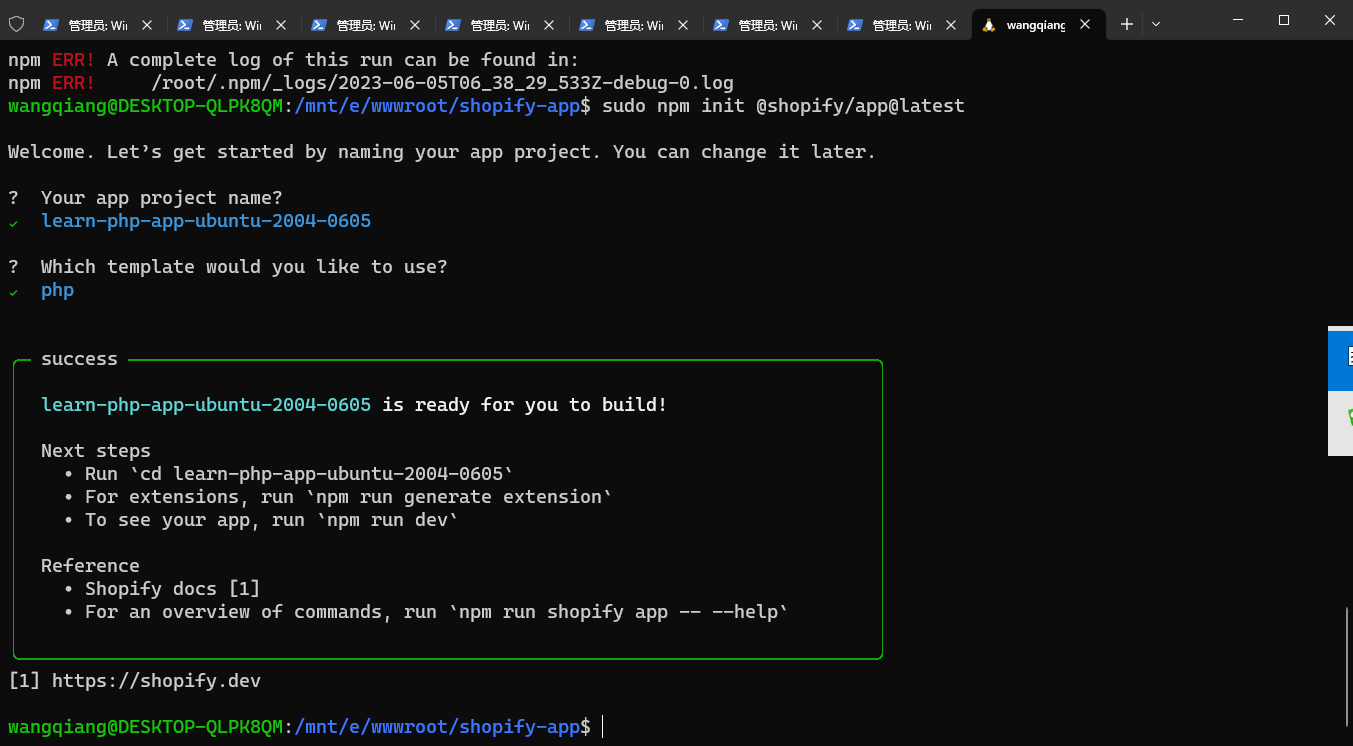
图1
wangqiang@DESKTOP-QLPK8QM:/mnt/e/wwwroot/shopify-app$ sudo npm init @shopify/app@latest

Welcome. Let’s get started by naming your app project. You can change it later.

?  Your app project name?
✔  learn-php-app-ubuntu-2004-0605

?  Which template would you like to use?
✔  php


╭─ success ────────────────────────────────────────────────────────────────────╮
│                                                                              │
│  learn-php-app-ubuntu-2004-0605 is ready for you to build!                   │
│                                                                              │
│  Next steps                                                                  │
│    • Run `cd learn-php-app-ubuntu-2004-0605`                                 │
│    • For extensions, run `npm run generate extension`                        │
│    • To see your app, run `npm run dev`                                      │
│                                                                              │
│  Reference                                                                   │
│    • Shopify docs [1]                                                        │
│    • For an overview of commands, run `npm run shopify app -- --help`        │
│                                                                              │
╰──────────────────────────────────────────────────────────────────────────────╯
[1] https://shopify.dev
17、再次从第 4 步骤开始操作,一些步骤可以跳过。执行第 15 步骤,报错:To investigate the issue, examine this stack trace。重新执行即可。进入安装应用。如图2
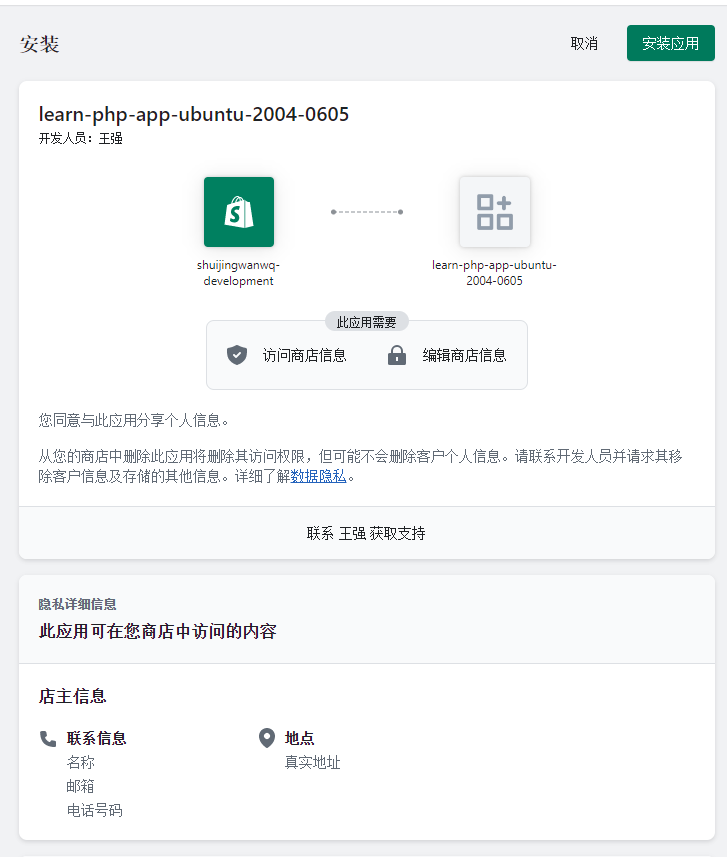
图2
wangqiang@DESKTOP-QLPK8QM:/mnt/e/wwwroot/shopify-app/learn-php-app-ubuntu-2004-0605$ composer -V
Composer version 2.5.5 2023-03-21 11:50:05
wangqiang@DESKTOP-QLPK8QM:/mnt/e/wwwroot/shopify-app/learn-php-app-ubuntu-2004-0605/web$ composer install
wangqiang@DESKTOP-QLPK8QM:/mnt/e/wwwroot/shopify-app/learn-php-app-ubuntu-2004-0605/web$ cp .env.example .env
wangqiang@DESKTOP-QLPK8QM:/mnt/e/wwwroot/shopify-app/learn-php-app-ubuntu-2004-0605/web$ php artisan key:generate
wangqiang@DESKTOP-QLPK8QM:/mnt/e/wwwroot/shopify-app/learn-php-app-ubuntu-2004-0605/web$ php artisan migrate
wangqiang@DESKTOP-QLPK8QM:/mnt/e/wwwroot/shopify-app/learn-php-app-ubuntu-2004-0605$ npm run dev

> learn-php-app-ubuntu-2004-0605@1.0.0 dev
> shopify app dev


To run this command, log in to Shopify Partners.
👉 Press any key to open the login page on your browser

Auto-open timed out. Open the login page: Log in to Shopify Partners ( http://accounts.shopify.com/oauth/authorize?client_id=fbdb2649-e327-4907-8f67-908d24cfd7e3&scope=openid+https%3A%2F%2Fapi.shopify.com%2Fauth%2Fshop.admin.graphql+https%3A%2F%2Fapi.shopify.com%2Fauth%2Fshop.admin.themes+https%3A%2F%2Fapi.shopify.com%2Fauth%2Fpartners.collaborator-relationships.readonly+https%3A%2F%2Fapi.shopify.com%2Fauth%2Fshop.storefront-renderer.devtools+https%3A%2F%2Fapi.shopify.com%2Fauth%2Fpartners.app.cli.access&redirect_uri=http%3A%2F%2F127.0.0.1%3A3456&state=5cba6732fe773fac2a7e9a95ddf3ab686b3a9b7231168d58f339f17dcaa1&response_type=code&code_challenge_method=S256&code_challenge=gozZ6hqQIOzwYdzxuX2RaOUgpaRz9A8gUlUoC6Wy6Vw )

✔ Logged in.

Looks like this is the first time you're running dev for this project.
Configure your preferences by answering a few questions.


Before you preview your work, it needs to be associated with an app.

?  Create this project as a new app on Shopify?
✔  Yes, create it as a new app

?  App name:
✔  learn-php-app-ubuntu-2004-0605

✔ Using your default dev store (shuijingwanwq-development) to preview your project.
╭─ error ──────────────────────────────────────────────────────────────────────╮
│                                                                              │
│                                                                              │
│  To investigate the issue, examine this stack trace:                         │
│    at pollTunnelStatus (@shopify/app/src/cli/services/dev/urls.ts:106)       │
│      if (result.status === 'error') return reject(new                        │
│      BugError(result.message))                                               │
│    at (@shopify/app/src/cli/services/dev/urls.ts:120)                        │
│      pollTunnelStatus()                                                      │
│    at new Promise                                                            │
│    at pollTunnelURL (@shopify/app/src/cli/services/dev/urls.ts:101)          │
│      return new Promise<string>((resolve, reject) => {                       │
│    at generateFrontendURL (@shopify/app/src/cli/services/dev/urls.ts:89)     │
│      const url = await pollTunnelURL(options.tunnelClient)                   │
│    at dev (@shopify/app/src/cli/services/dev.ts:121)                         │
│      generateFrontendURL({                                                   │
│    at run (@shopify/app/src/cli/commands/app/dev.ts:106)                     │
│      await dev({                                                             │
│                                                                              │
╰──────────────────────────────────────────────────────────────────────────────╯
wangqiang@DESKTOP-QLPK8QM:/mnt/e/wwwroot/shopify-app/learn-php-app-ubuntu-2004-0605$ npm run dev

> learn-php-app-ubuntu-2004-0605@1.0.0 dev
> shopify app dev

╭─ info ───────────────────────────────────────────────────────────────────────╮
│                                                                              │
│  Using your previous dev settings:                                           │
│                                                                              │
│    • Org:          王强                                                      │
│    • App:          learn-php-app-ubuntu-2004-0605                            │
│    • Dev store:    shuijingwanwq-development.myshopify.com                   │
│    • Update URLs:  Not yet configured                                        │
│                                                                              │
│  To reset your default dev config, run `npm run dev -- --reset`              │
│                                                                              │
╰──────────────────────────────────────────────────────────────────────────────╯

?  Have Shopify automatically update your app's URL in order to create a preview experience?
✔  Always by default

2023-06-06 01:51:12 │ frontend │
2023-06-06 01:51:12 │ frontend │ > shopify-frontend-template-react@1.0.0 dev
2023-06-06 01:51:12 │ frontend │ > vite
2023-06-06 01:51:12 │ frontend │
2023-06-06 01:51:18 │ backend  │ > Composer\Config::disableProcessTimeout
2023-06-06 01:51:18 │ backend  │ > php artisan serve
2023-06-06 01:51:20 │ frontend │
2023-06-06 01:51:20 │ frontend │   VITE v4.3.9  ready in 7780 ms
2023-06-06 01:51:20 │ frontend │
2023-06-06 01:51:20 │ frontend │   ➜  Local:   http://localhost:33597/
2023-06-06 01:51:26 │ backend  │ Starting Laravel development server: http://127.0.0.1:44681
2023-06-06 01:51:27 │ backend  │ [Tue Jun  6 09:51:26 2023] PHP 8.1.18 Development Server (http://127.0.0.1:44681) started
2023-06-06 01:51:47 │ backend  │ [Tue Jun  6 09:51:47 2023] 127.0.0.1:34304 Accepted
2023-06-06 01:51:54 │ backend  │ [Tue Jun  6 09:51:54 2023] 127.0.0.1:34304 Closing
2023-06-06 01:51:54 │ backend  │ [Tue Jun  6 09:51:54 2023] 127.0.0.1:34310 Accepted
2023-06-06 01:51:56 │ backend  │ [Tue Jun  6 09:51:56 2023] 127.0.0.1:34310 Closing
2023-06-06 01:53:17 │ backend  │ [Tue Jun  6 09:53:17 2023] 127.0.0.1:34320 Accepted
2023-06-06 01:53:22 │ backend  │ [Tue Jun  6 09:53:22 2023] 127.0.0.1:34320 Closing
2023-06-06 01:53:22 │ backend  │ [Tue Jun  6 09:53:22 2023] 127.0.0.1:34326 Accepted
2023-06-06 01:53:26 │ backend  │ [Tue Jun  6 09:53:25 2023] 127.0.0.1:34326 Closing

› Press p │ preview in your browser
› Press q │ quit

Preview URL: https://instructional-attend-excellent-gig.trycloudflare.com?shop=shuijingwanwq-development.myshopify.com&h
ost=c2h1aWppbmd3YW53cS1kZXZlbG9wbWVudC5teXNob3BpZnkuY29tL2FkbWlu
18、安装应用时报错:Shopify\Exception\CookieNotFoundException Could not find the current session id in the cookies。如图3
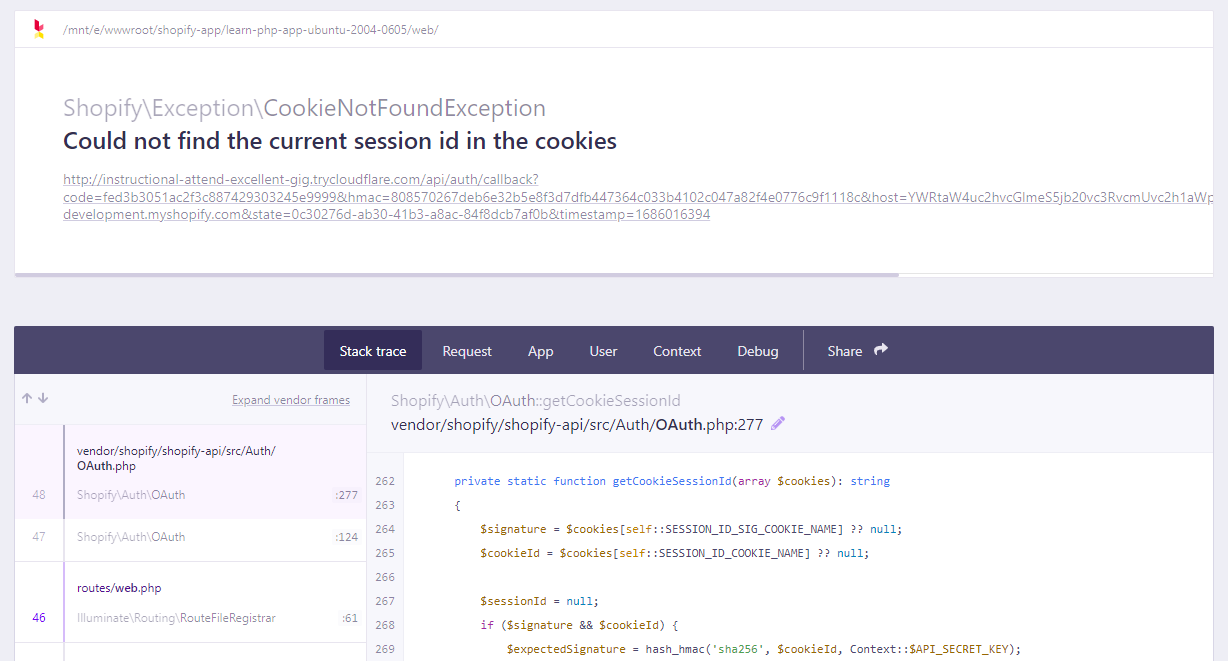
图3
19、再次运行:npm run dev,打开浏览器,不再报错。如图4
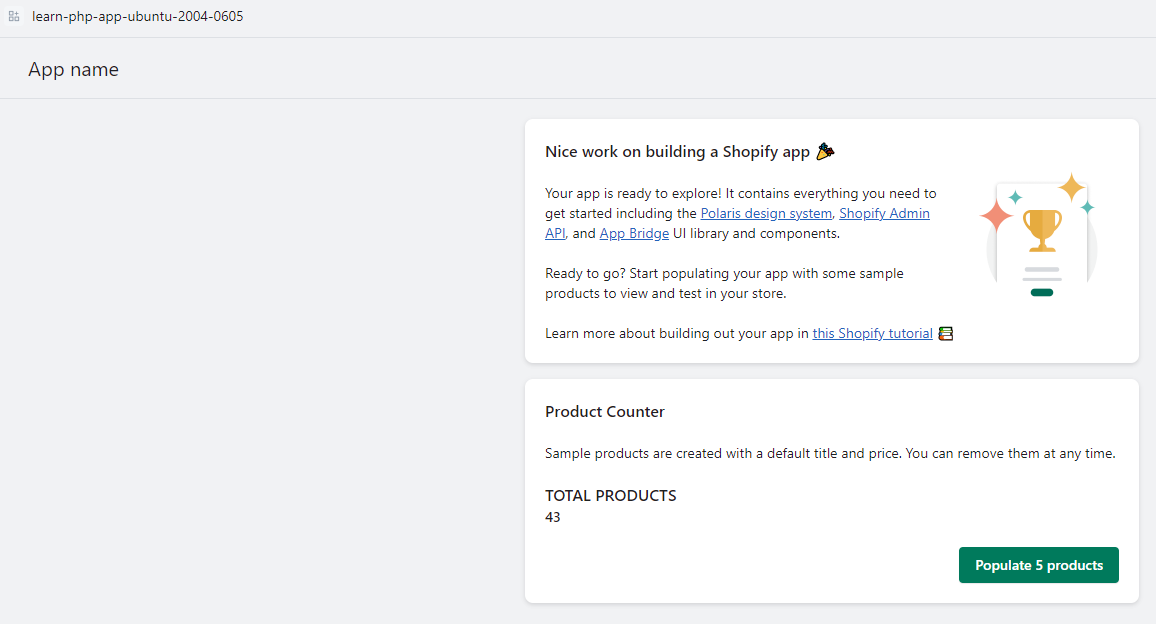
图4
1 条回复
[…] 上一篇 在 WSL2 中的 Ubuntu-20.04 中创建应用:Shopify App Template – PHP […]