在 Shopify 应用中运行:yarn dev 时,报错:Bundler version 2.3.7 is not supported
1、在 Shopify 应用中运行:yarn dev 时,报错:Bundler version 2.3.7 is not supported。如图1
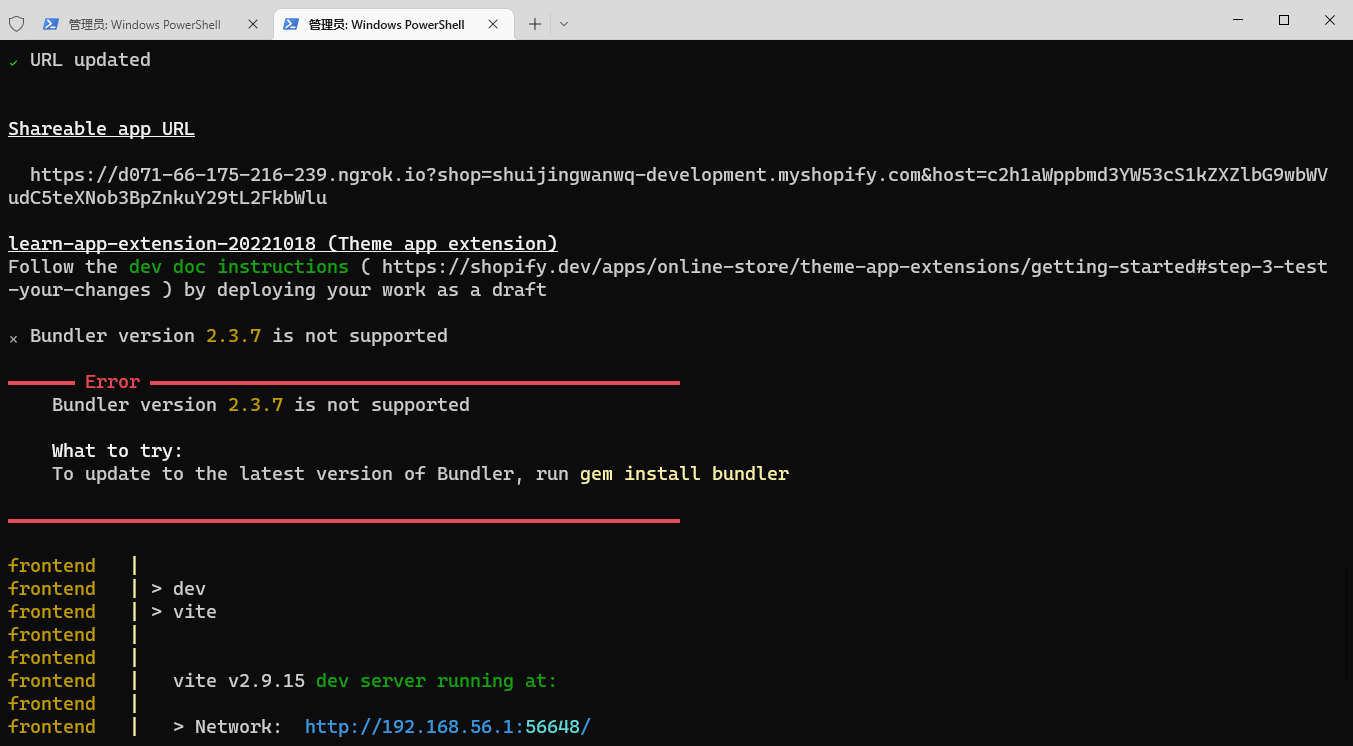
图1
PS E:\wwwroot\shopify-app\learn-app> yarn dev
yarn run v1.22.15
$ shopify app dev
✔ Dependencies installed
To run this command, log in to Shopify Partners.
👉 Press any key to open the login page on your browser
Auto-open timed out. Open the login page: Log in to Shopify Partners (http://accounts.shopify.com/oauth/authorize?client_id=fbdb2649-e327-4907-8f67-908d24cfd7e3&scope=openid+https%3A%2F%2Fapi.shopify.com%2Fauth%2Fshop.admin.graphql+https%3A%2F%2Fapi.shopify.com%2Fauth%2Fshop.admin.themes+https%3A%2F%2Fapi.shopify.com%2Fauth%2Fpartners.collaborator-relationships.readonly+https%3A%2F%2Fapi.shopify.com%2Fauth%2Fshop.storefront-renderer.devtools+https%3A%2F%2Fapi.shopify.com%2Fauth%2Fpartners.app.cli.access&redirect_uri=http%3A%2F%2F127.0.0.1%3A3456&state=34c66755c0614e1bcedd680b643bcbf2e6fe237c653dac95dc43a7fb15e7&response_type=code&code_challenge_method=S256&code_challenge=lLJtne8D7cUPF437Ct2zttzSDSJV48mXJyuil-7GzrM)
✔ Logged in.
Using your previous dev settings:
- Org: 王强
- App: learn-app
- Dev store: shuijingwanwq-development.myshopify.com
- Update URLs: Always
To reset your default dev config, run yarn dev --reset
✅ Success! The tunnel is running and you can now view your app.
✔ URL updated
Shareable app URL
https://d071-66-175-216-239.ngrok.io?shop=shuijingwanwq-development.myshopify.com&host=c2h1aWppbmd3YW53cS1kZXZlbG9wbWVudC5teXNob3BpZnkuY29tL2FkbWlu
learn-app-extension-20221018 (Theme app extension)
Follow the dev doc instructions (https://shopify.dev/apps/online-store/theme-app-extensions/getting-started#step-3-test-your-changes) by deploying your work as a draft
✖ Bundler version 2.3.7 is not supported
━━━━━━ Error ━━━━━━━━━━━━━━━━━━━━━━━━━━━━━━━━━━━━━━━━━━━━━━━━
Bundler version 2.3.7 is not supported
What to try:
To update to the latest version of Bundler, run gem install bundler
━━━━━━━━━━━━━━━━━━━━━━━━━━━━━━━━━━━━━━━━━━━━━━━━━━━━━━━━━━━━━
frontend |
frontend | > dev
frontend | > vite
frontend |
frontend |
frontend | vite v2.9.15 dev server running at:
frontend |
frontend | > Network: http://192.168.56.1:56648/
frontend | > Network: http://192.168.10.1:56648/
frontend | > Network: http://192.168.89.86:56648/
frontend | > Local: http://localhost:56648/
frontend | > Network: http://172.17.176.1:56648/
frontend |
frontend | ready in 1913ms.
frontend |
backend | > Composer\Config::disableProcessTimeout
backend | > php artisan serve
error Command failed with exit code 1.
info Visit https://yarnpkg.com/en/docs/cli/run for documentation about this command.
PS E:\wwwroot\shopify-app\learn-app>
2、要更新到最新版本的 Bundler,请运行 gem install bundler。
PS E:\wwwroot\shopify-app\learn-app> gem install bundler
Fetching bundler-2.3.24.gem
Successfully installed bundler-2.3.24
Parsing documentation for bundler-2.3.24
Installing ri documentation for bundler-2.3.24
Done installing documentation for bundler after 0 seconds
1 gem installed
3、再次运行:yarn dev,不再报错。
PS E:\wwwroot\shopify-app\learn-app> yarn dev
yarn run v1.22.15
$ shopify app dev
✔ Dependencies installed
Using your previous dev settings:
- Org: 王强
- App: learn-app
- Dev store: shuijingwanwq-development.myshopify.com
- Update URLs: Always
To reset your default dev config, run yarn dev --reset
✅ Success! The tunnel is running and you can now view your app.
✔ URL updated
Shareable app URL
https://2c8b-66-175-216-239.ngrok.io?shop=shuijingwanwq-development.myshopify.com&host=c2h1aWppbmd3YW53cS1kZXZlbG9wbWVudC5teXNob3BpZnkuY29tL2FkbWlu
learn-app-extension-20221018 (Theme app extension)
Follow the dev doc instructions (https://shopify.dev/apps/online-store/theme-app-extensions/getting-started#step-3-test-your-changes) by deploying your work as a draft
⠧ Installing theme dependencies
frontend |
frontend | > dev
frontend | > vite
⠦ Installing theme dependencies
frontend |
frontend | vite v2.9.15 dev server running at:
frontend |
frontend | > Network: http://192.168.56.1:57181/
frontend | > Network: http://192.168.10.1:57181/
frontend | > Network: http://192.168.89.86:57181/
frontend | > Local: http://localhost:57181/
frontend | > Network: http://172.17.176.1:57181/
frontend |
frontend | ready in 840ms.
⠧ Installing theme dependencies
backend | > Composer\Config::disableProcessTimeout
⠸ Installing theme dependencies
⠦ Installing theme dependencies
✔ Installing theme dependencies
┏━━ Pushing theme files to App Ext. Host (287916-DESKTOP-QLPK8QM) (#133112823993) on shuijingwanwq-development.myshopify.com
┃ 100%
┗━━━━━━━━━━━━━━━━━━━━━━━━━━━━━━━━━━━━━━━━━━━━━━━━━━━━━━━━━━━━━━━━━━━ (42.0s) ━━━
[Note] You cannot use gems with Shopify CLI.
[LoadError] cannot load such file -- wdm
They are disabled.
Please don't modify the CLI locally.
If you would like to contribute to the CLI project, please refer to
https://github.com/Shopify/shopify-cli/blob/main/.github/CONTRIBUTING.md
Please add the following to your Gemfile to avoid polling for changes:
gem 'wdm', '>= 0.1.0' if Gem.win_platform?
┏━━ Viewing extension… ━━━━━━━━━━━━━━━━━━━━━━━━━━━━━━━━━━━━━━━━━━━━━━━━━━━━━━━━━
┃ Enable your theme app extension:
┃ https://partners.shopify.com/2442779/apps/12958171137/extensions/theme_app_extension/17515347969
┃
┃ Setup your theme app extension in the host theme:
┃ https://shuijingwanwq-development.myshopify.com/admin/themes/133112823993/editor
┃
┃ Preview your theme app extension:
┃ http://127.0.0.1:9292
┃
┃ (Use Ctrl-C to stop)
┗━━━━━━━━━━━━━━━━━━━━━━━━━━━━━━━━━━━━━━━━━━━━━━━━━━━━━━━━━━━━━━━━━━━━ (0.0s) ━━━