There is no problem not worth solving, and no technology not worth learning!
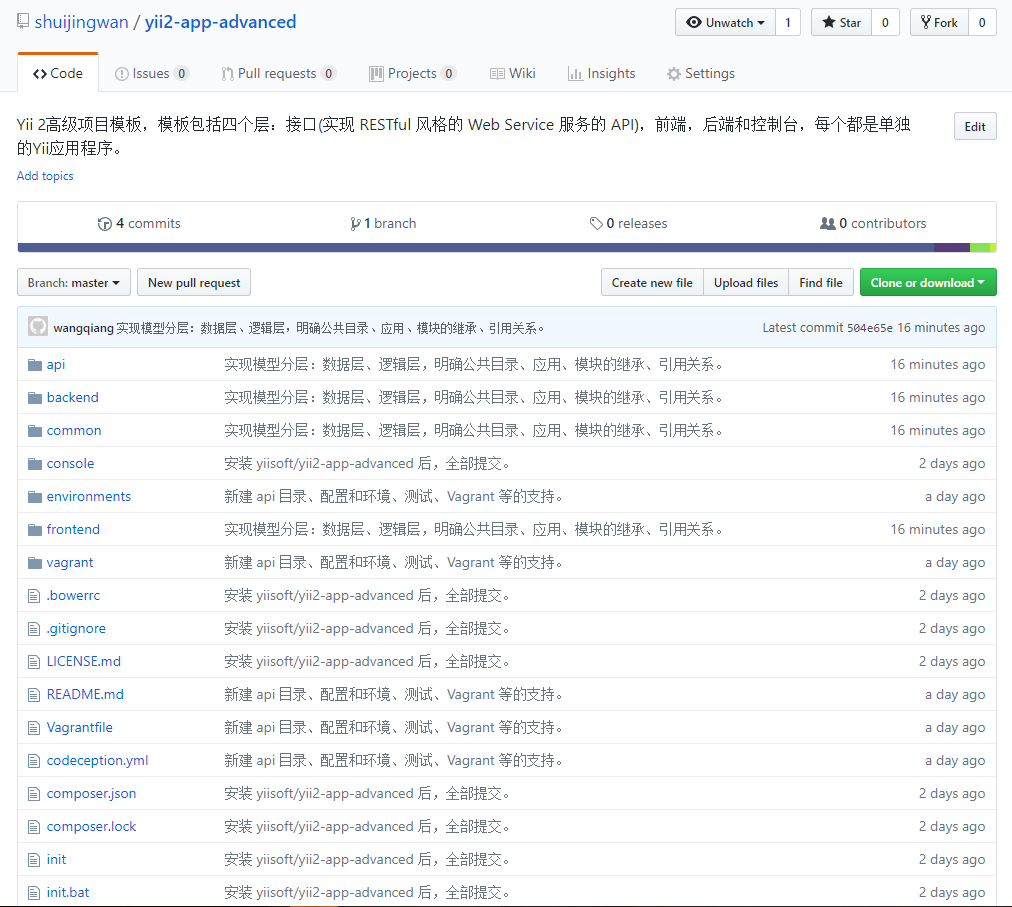
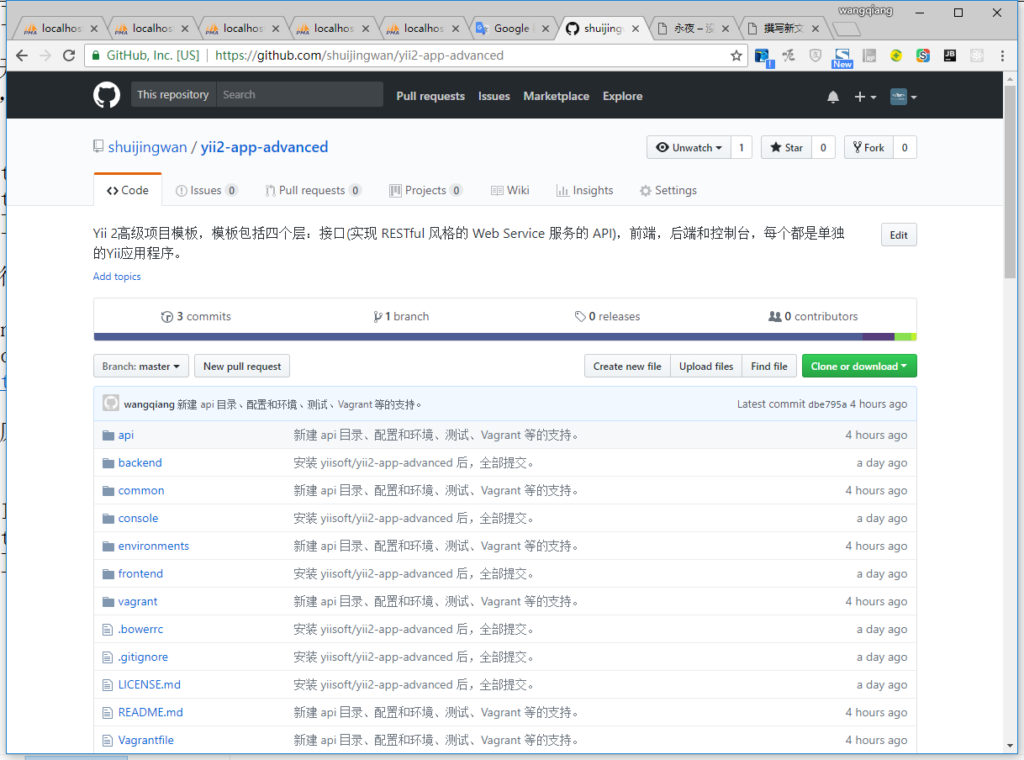
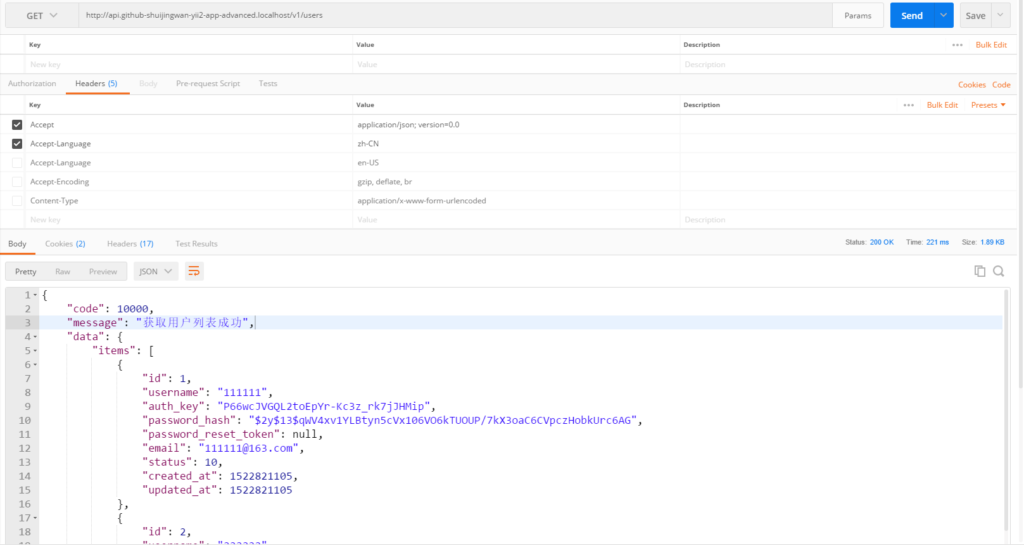
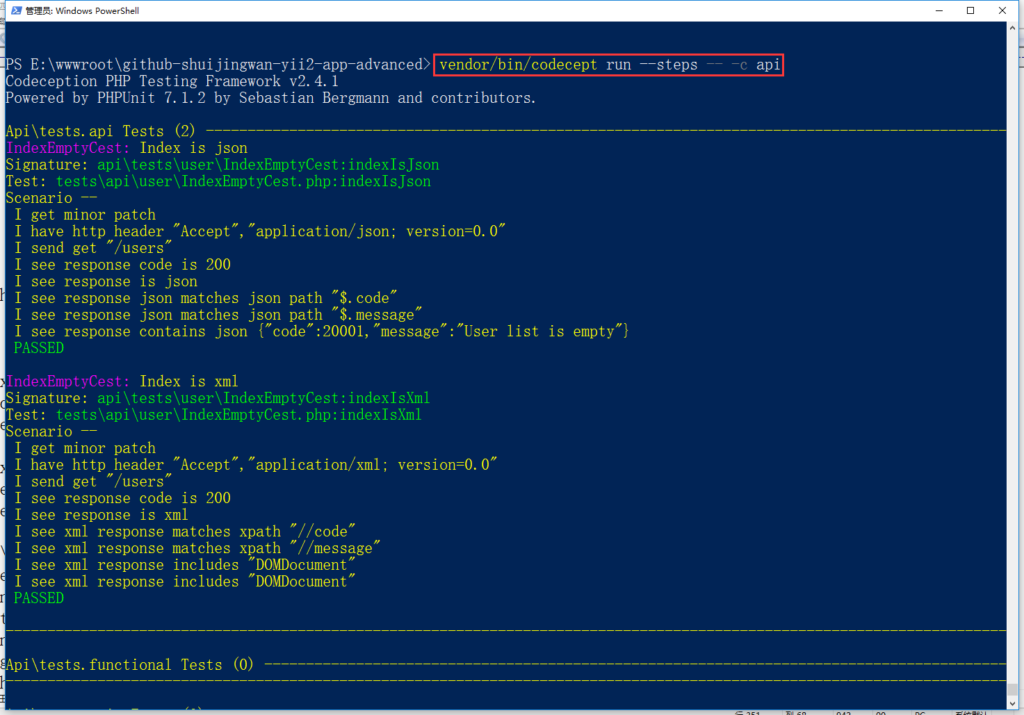
Based on yiisoft/yii2-app-advanced, create a new repository yii2-app-advanced on github, and create a new interface application (implement RESTful-style web service services. API), implement model hierarchy: data layer, logic layer, clarify common directory, application, module inheritance, reference relationship
1. Definition and specification:
Define:
(1) Data layer: Models is used to define automatic verification and automatic completion and data access interfaces related to data;
(2) Logical layer: Logics is used to define the business logic related to data;
Specification:
(1) The model class file in the /common/models directory is only allowed to be generated by the GII tool, which is a common model data layer;
(2) The model class file in the /common/logics directory is business logic-related, which is inherited to the /common/models data layer, which is the common model logic layer;
(3) The model class file needs to be referenced in the /common directory, only the model class file in /common/logics, for example:
public $modelClass = 'common\logics\User';
(4)/api/models, /backend/models, /frontend/models directory, the model class files are business logic related (only related to each application), inherit to /common/logics public logic layer;
(5) The model file needs to be referenced in the interface, front-end and back-end application directories, and only the corresponding model files in the respective directory are referenced, for example:
use api\models\User;
(6) The model class file in the /API/modules/v1/models directory is business logic related (only related to the module), and inherits to the /api/models application logic layer;
(7) The model class file needs to be referenced in the module directory, and only the corresponding model class file under the respective modules, for example:
public $modelClass = 'api\modules\v1\models\User';
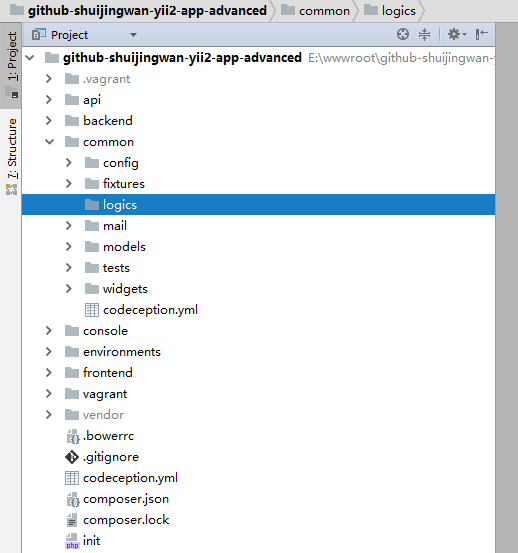
2. Create a new logics directory in the common directory, which is used for the logical layer of the mysql model, as shown in Figure 1
Figure 1
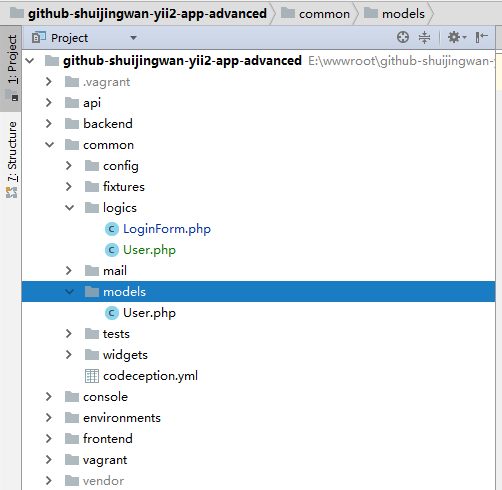
3. Copy \common\models\loginform.php, \common\models\user.php to \common\logics, as shown in Figure 2
Figure 2
4. The mysql model file in the common/models directory is only generated by the gII tool, delete \common\models\loginform.php, as shown in Figure 3
Figure 3
5. Configure the route, use a beautiful URL, edit \frontend\config\main.php
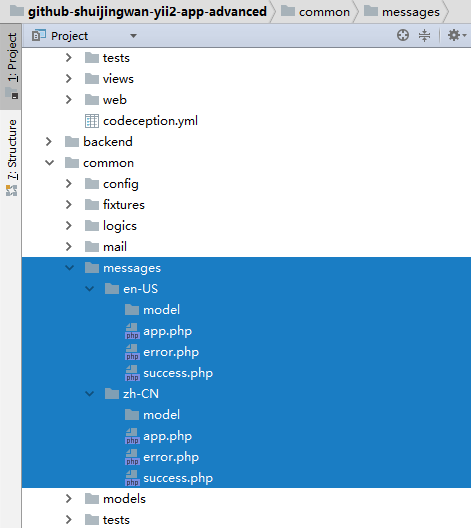
6. International support, create a new directory \common\messages\en-us\model, \common\messages\zh-cn\model, which are respectively used in American English and Chinese for the data layer of the model; \common\messages\{language}\app.php, \common\messages\{language}\error.p hp, \common\messages\{language}\success.php, which are used to apply global messages, application error messages, and application success messages, as shown in Figure 4
Figure 4
app.php
<?php
return [
];
error.php
<?php
return [
    20000 => 'error',
];
success.php
<?php
return [
    10000 => 'success',
];
7. Configure the application language, the source language is American English, and the target language is Simplified Chinese. When the source language and the target language are the same, whether the message translation is forced, the default is false, set to true, edit \common\config\main.php
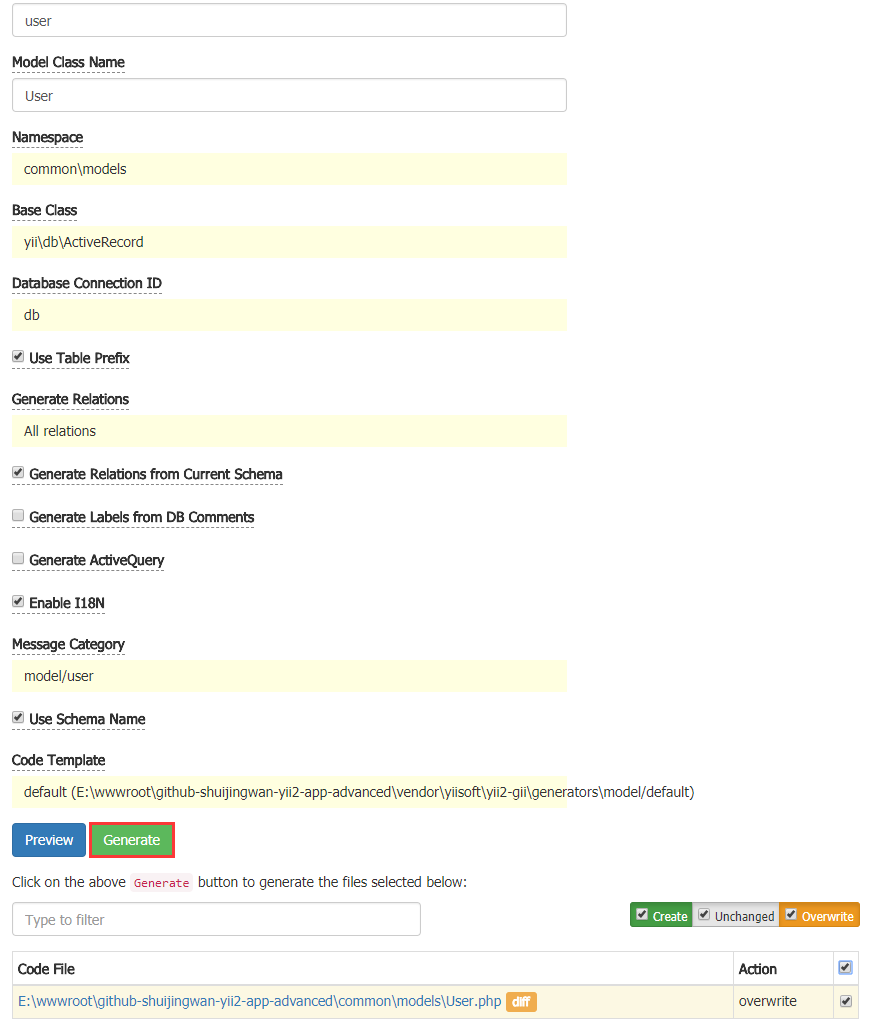
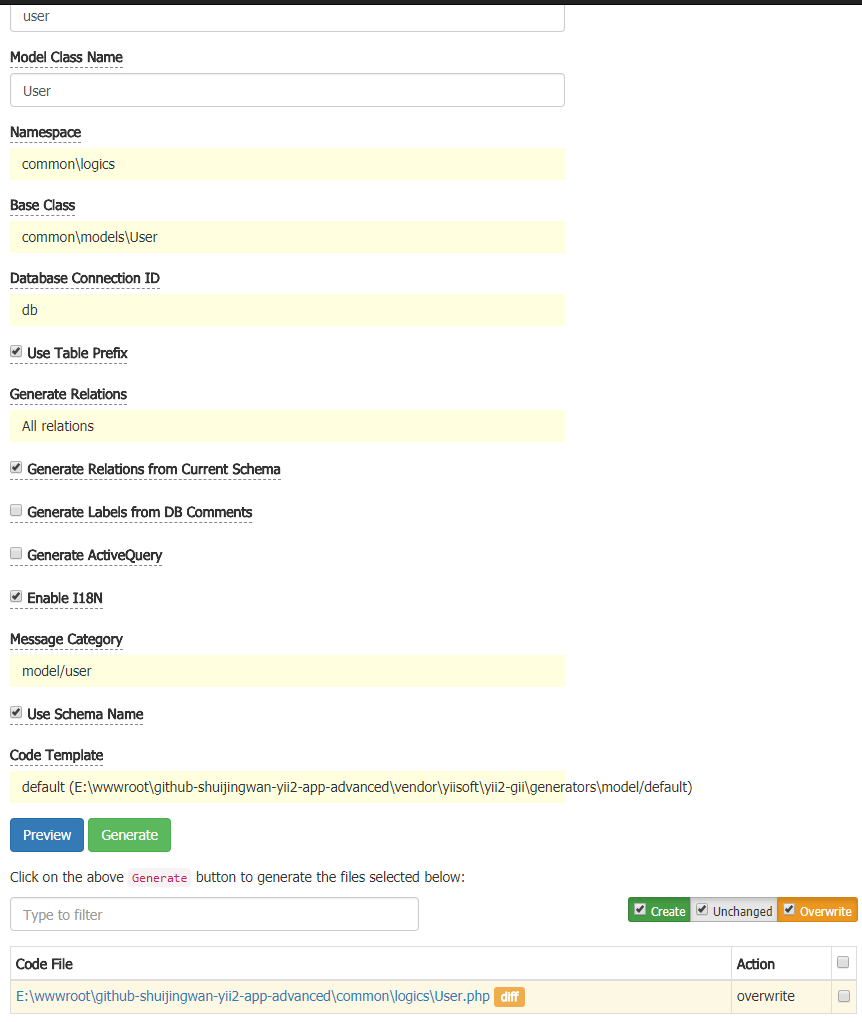
8. Open the URL: http://www.github-shuijingwan-yii2-app-advanced.localhost/gii/model , option, the namespace is common\models, at this time, it is necessary to support internationalization, overwrite \common\models\user.php, as shown in Figure 5
Figure 5
<?php

namespace common\models;

use Yii;

/**
 * This is the model class for table "{{%user}}".
 *
 * @property int $id
 * @property string $username
 * @property string $auth_key
 * @property string $password_hash
 * @property string $password_reset_token
 * @property string $email
 * @property int $status
 * @property int $created_at
 * @property int $updated_at
 */
class User extends \yii\db\ActiveRecord
{
    /**
     * @inheritdoc
     */
    public static function tableName()
    {
        return '{{%user}}';
    }

    /**
     * @inheritdoc
     */
    public function rules()
    {
        return [
            [['username', 'auth_key', 'password_hash', 'email', 'created_at', 'updated_at'], 'required'],
            [['status', 'created_at', 'updated_at'], 'integer'],
            [['username', 'password_hash', 'password_reset_token', 'email'], 'string', 'max' => 255],
            [['auth_key'], 'string', 'max' => 32],
            [['username'], 'unique'],
            [['email'], 'unique'],
            [['password_reset_token'], 'unique'],
        ];
    }

    /**
     * @inheritdoc
     */
    public function attributeLabels()
    {
        return [
            'id' => Yii::t('model/user', 'ID'),
            'username' => Yii::t('model/user', 'Username'),
            'auth_key' => Yii::t('model/user', 'Auth Key'),
            'password_hash' => Yii::t('model/user', 'Password Hash'),
            'password_reset_token' => Yii::t('model/user', 'Password Reset Token'),
            'email' => Yii::t('model/user', 'Email'),
            'status' => Yii::t('model/user', 'Status'),
            'created_at' => Yii::t('model/user', 'Created At'),
            'updated_at' => Yii::t('model/user', 'Updated At'),
        ];
    }
}
9. The mysql model file in the common/logics directory is business logic related, inherited to \common\models Data layer, open the URL: http://www.github-shuijingwan-yii2-app-advanced.localhost/gii/model , options, as shown in Figure 6
Figure 6
10. Based on diff, edit \common\logics\user.php, as shown in Figure 7
11. The mysql model file in the common/logics directory is business logic related, inherited to the data layer of \common\models\user
<?php

namespace common\logics;

use Yii;
use yii\base\NotSupportedException;
use yii\behaviors\TimestampBehavior;
use yii\web\IdentityInterface;

/**
 * This is the model class for table "{{%user}}".
 *
 * @property int $id
 * @property string $username
 * @property string $auth_key
 * @property string $password_hash
 * @property string $password_reset_token
 * @property string $email
 * @property int $status
 * @property int $created_at
 * @property int $updated_at
 * @property string $password write-only password
 */
class User extends \common\models\User implements IdentityInterface
{
    const STATUS_DELETED = 0;
    const STATUS_ACTIVE = 10;

    /**
     * @inheritdoc
     */
    public function behaviors()
    {
        return [
            TimestampBehavior::className(),
        ];
    }

    /**
     * @inheritdoc
     */
    public function rules()
    {
        return [
            [['username', 'auth_key', 'password_hash', 'email'], 'required'],
            [['status', 'created_at', 'updated_at'], 'integer'],
            [['username', 'password_hash', 'password_reset_token', 'email'], 'string', 'max' => 255],
            [['auth_key'], 'string', 'max' => 32],
            [['username'], 'unique'],
            [['email'], 'unique'],
            [['password_reset_token'], 'unique'],
            ['status', 'default', 'value' => self::STATUS_ACTIVE],
            ['status', 'in', 'range' => [self::STATUS_ACTIVE, self::STATUS_DELETED]],
        ];
    }

    /**
     * @inheritdoc
     */
    public static function findIdentity($id)
    {
        return static::findOne(['id' => $id, 'status' => self::STATUS_ACTIVE]);
    }

    /**
     * @inheritdoc
     */
    public static function findIdentityByAccessToken($token, $type = null)
    {
        throw new NotSupportedException('"findIdentityByAccessToken" is not implemented.');
    }

    /**
     * Finds user by username
     *
     * @param string $username
     * @return static|null
     */
    public static function findByUsername($username)
    {
        return static::findOne(['username' => $username, 'status' => self::STATUS_ACTIVE]);
    }

    /**
     * Finds user by password reset token
     *
     * @param string $token password reset token
     * @return static|null
     */
    public static function findByPasswordResetToken($token)
    {
        if (!static::isPasswordResetTokenValid($token)) {
            return null;
        }

        return static::findOne([
            'password_reset_token' => $token,
            'status' => self::STATUS_ACTIVE,
        ]);
    }

    /**
     * Finds out if password reset token is valid
     *
     * @param string $token password reset token
     * @return bool
     */
    public static function isPasswordResetTokenValid($token)
    {
        if (empty($token)) {
            return false;
        }

        $timestamp = (int) substr($token, strrpos($token, '_') + 1);
        $expire = Yii::$app->params['user.passwordResetTokenExpire'];
        return $timestamp + $expire >= time();
    }

    /**
     * @inheritdoc
     */
    public function getId()
    {
        return $this->getPrimaryKey();
    }

    /**
     * @inheritdoc
     */
    public function getAuthKey()
    {
        return $this->auth_key;
    }

    /**
     * @inheritdoc
     */
    public function validateAuthKey($authKey)
    {
        return $this->getAuthKey() === $authKey;
    }

    /**
     * Validates password
     *
     * @param string $password password to validate
     * @return bool if password provided is valid for current user
     */
    public function validatePassword($password)
    {
        return Yii::$app->security->validatePassword($password, $this->password_hash);
    }

    /**
     * Generates password hash from password and sets it to the model
     *
     * @param string $password
     */
    public function setPassword($password)
    {
        $this->password_hash = Yii::$app->security->generatePasswordHash($password);
    }

    /**
     * Generates "remember me" authentication key
     */
    public function generateAuthKey()
    {
        $this->auth_key = Yii::$app->security->generateRandomString();
    }

    /**
     * Generates new password reset token
     */
    public function generatePasswordResetToken()
    {
        $this->password_reset_token = Yii::$app->security->generateRandomString() . '_' . time();
    }

    /**
     * Removes password reset token
     */
    public function removePasswordResetToken()
    {
        $this->password_reset_token = null;
    }
}
12. Create a new \common\messages\en-us\model\user.php, support the message translation when the target language is English and the United States
14. Create a new \api\models\user.php, the mysql model file in the api/models directory is business logic related (only related to the API), inherit to \common\logics\user logic layer
<?php
/**
 * Created by PhpStorm.
 * User: WangQiang
 * Date: 2018/04/04
 * Time: 10:44
 */

namespace api\models;

class User extends \common\logics\User
{

}
15. Copy \API\models\user.php to \frontend\models\user.php, \backend\models\user.php, and adjust to their respective namespaces
\frontend\models\User.php
<?php
/**
 * Created by PhpStorm.
 * User: WangQiang
 * Date: 2018/04/04
 * Time: 10:44
 */

namespace frontend\models;

class User extends \common\logics\User
{

}
\backend\models\User.php
<?php
/**
 * Created by PhpStorm.
 * User: WangQiang
 * Date: 2018/04/04
 * Time: 10:44
 */

namespace backend\models;

class User extends \common\logics\User
{

}
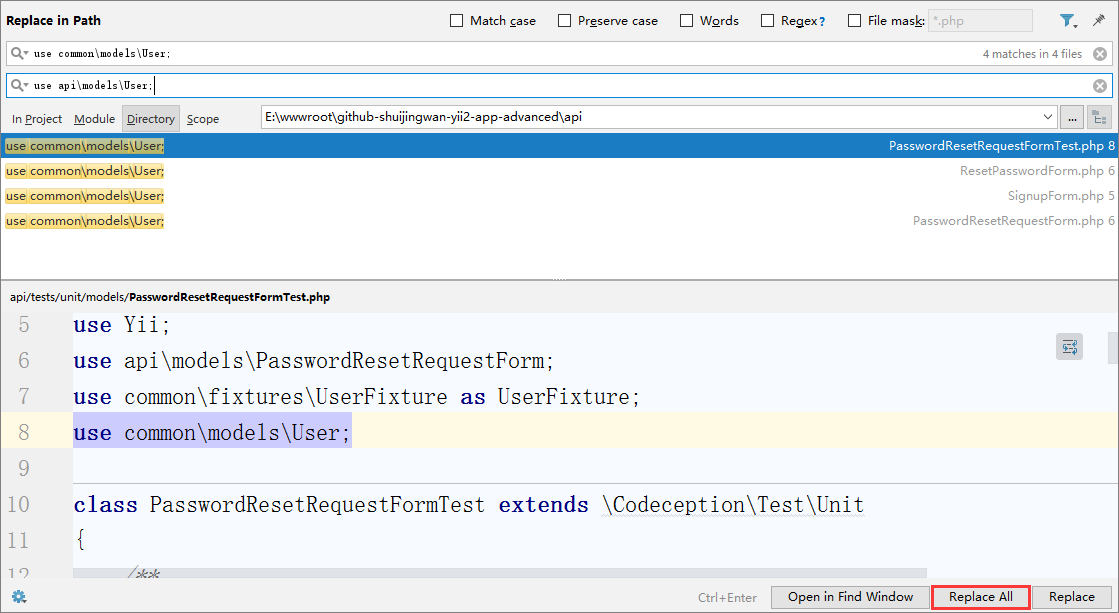
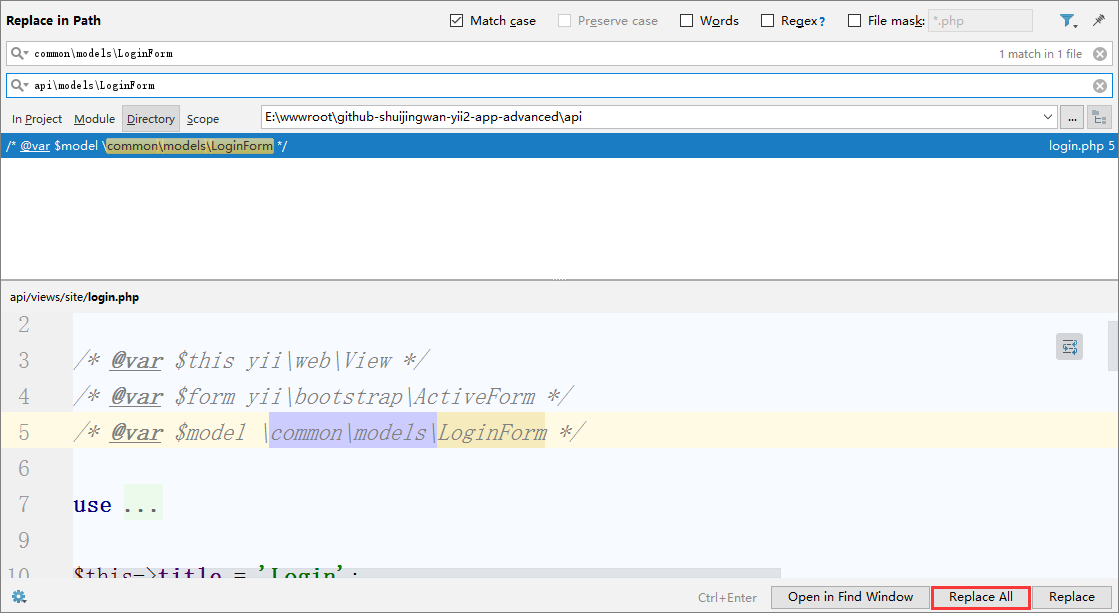
16. Search for use common\models\user in the API application, and replace it with: use api\models\user;, the same processing in the foreground and background applications, as shown in Figure 8
8
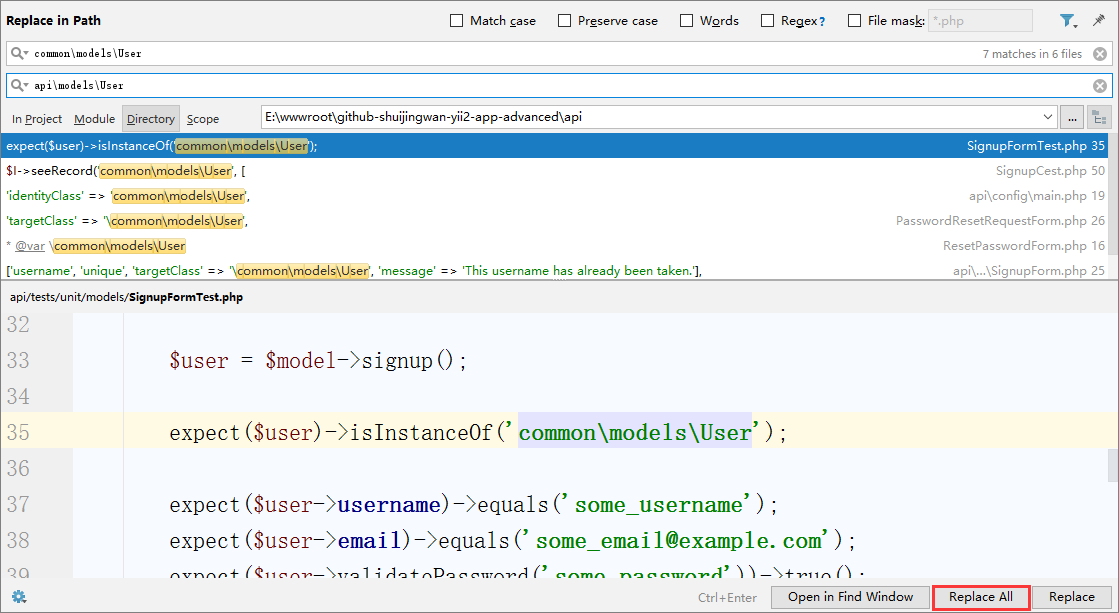
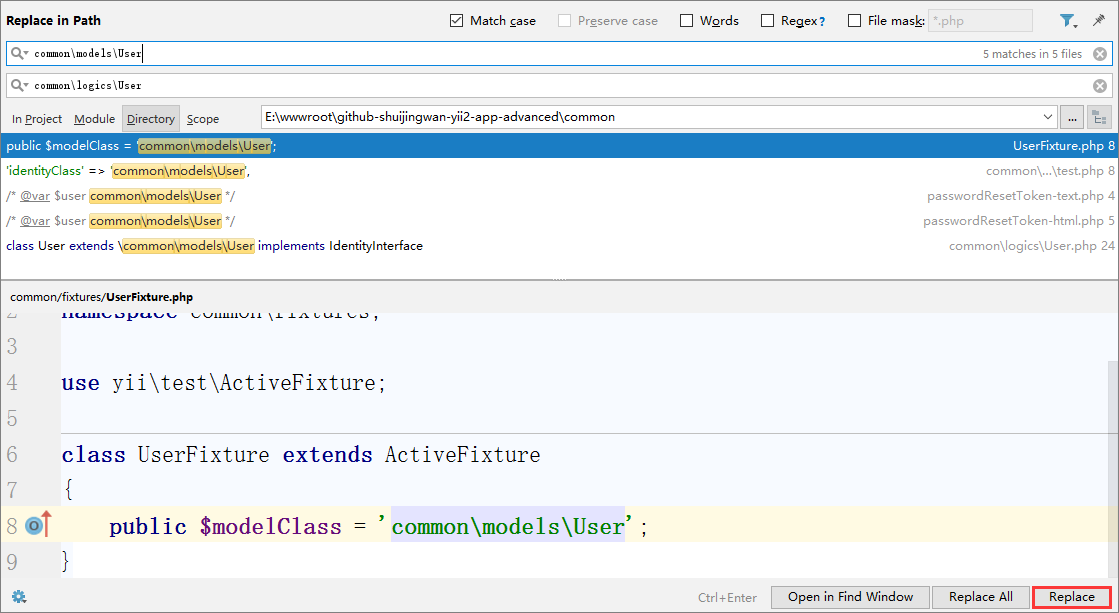
17. Search for common\models\user in the API application, replace it with: api\models\user, the same processing in the foreground and background applications, as shown in Figure 9
Figure 9
18. Edit \common\logics\loginform.php to adjust the namespace
<?php
namespace common\logics;

use Yii;
use yii\base\Model;

/**
 * Login form
 */
class LoginForm extends Model
{
    public $username;
    public $password;
    public $rememberMe = true;

    private $_user;


    /**
     * {@inheritdoc}
     */
    public function rules()
    {
        return [
            // username and password are both required
            [['username', 'password'], 'required'],
            // rememberMe must be a boolean value
            ['rememberMe', 'boolean'],
            // password is validated by validatePassword()
            ['password', 'validatePassword'],
        ];
    }

    /**
     * Validates the password.
     * This method serves as the inline validation for password.
     *
     * @param string $attribute the attribute currently being validated
     * @param array $params the additional name-value pairs given in the rule
     */
    public function validatePassword($attribute, $params)
    {
        if (!$this->hasErrors()) {
            $user = $this->getUser();
            if (!$user || !$user->validatePassword($this->password)) {
                $this->addError($attribute, 'Incorrect username or password.');
            }
        }
    }

    /**
     * Logs in a user using the provided username and password.
     *
     * @return bool whether the user is logged in successfully
     */
    public function login()
    {
        if ($this->validate()) {
            return Yii::$app->user->login($this->getUser(), $this->rememberMe ? 3600 * 24 * 30 : 0);
        }

        return false;
    }

    /**
     * Finds user by [[username]]
     *
     * @return User|null
     */
    protected function getUser()
    {
        if ($this->_user === null) {
            $this->_user = User::findByUsername($this->username);
        }

        return $this->_user;
    }
}
19. Create a new \api\models\loginform.php, the mysql model file in the api/models directory is business logic related (only related to the API), inherited to \common\logics\loginform logic layer
<?php
/**
 * Created by PhpStorm.
 * User: WangQiang
 * Date: 2018/04/04
 * Time: 11:10
 */

namespace api\models;


class LoginForm extends \common\logics\LoginForm
{

}
20. Copy \api\models\loginform.php to \frontend\models\loginform.php, \backend\models\loginform.php, adjust to their respective namespaces
\frontend\models\LoginForm.php
<?php
/**
 * Created by PhpStorm.
 * User: WangQiang
 * Date: 2018/04/04
 * Time: 11:10
 */

namespace frontend\models;


class LoginForm extends \common\logics\LoginForm
{

}
\backend\models\LoginForm.php
<?php
/**
 * Created by PhpStorm.
 * User: WangQiang
 * Date: 2018/04/04
 * Time: 11:10
 */

namespace backend\models;


class LoginForm extends \common\logics\LoginForm
{

}
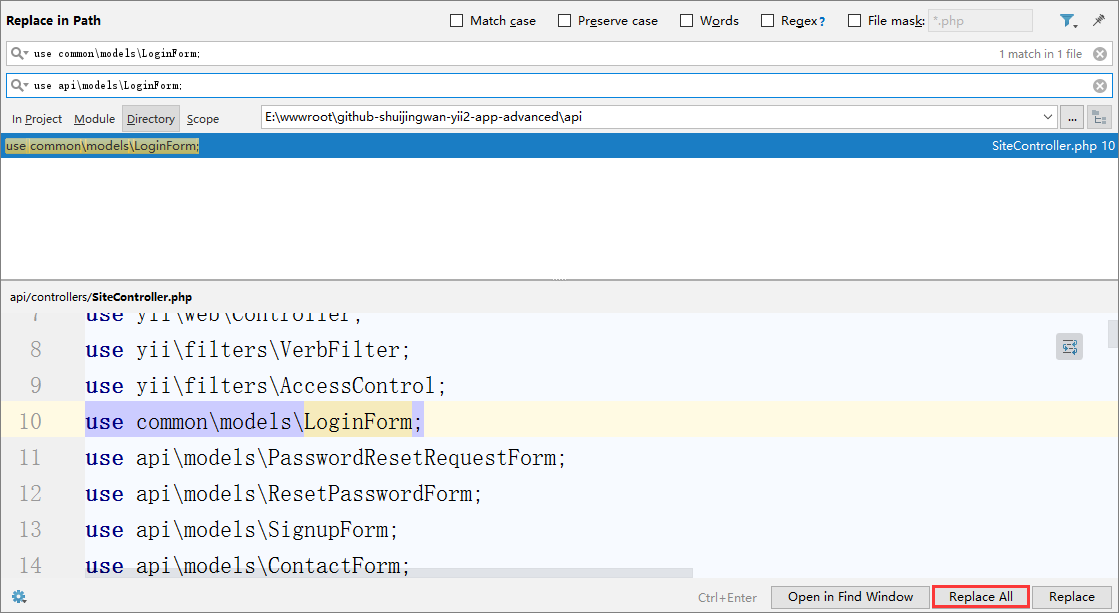
21. Search for use common\models\loginform in the API application;, replace with: use api\models\loginform;, the same processing in the foreground and background applications, as shown in Figure 10
Figure 10
22. Search common\models\loginform in the API application, replace it with: api\models\loginform, the same processing in the foreground and background applications, as shown in Figure 11
Figure 11
23. Search for common\models\user in the common directory, replace with: common\logics\user, with the exception of \common\logics\user.php, as shown in Figure 12
Figure 12
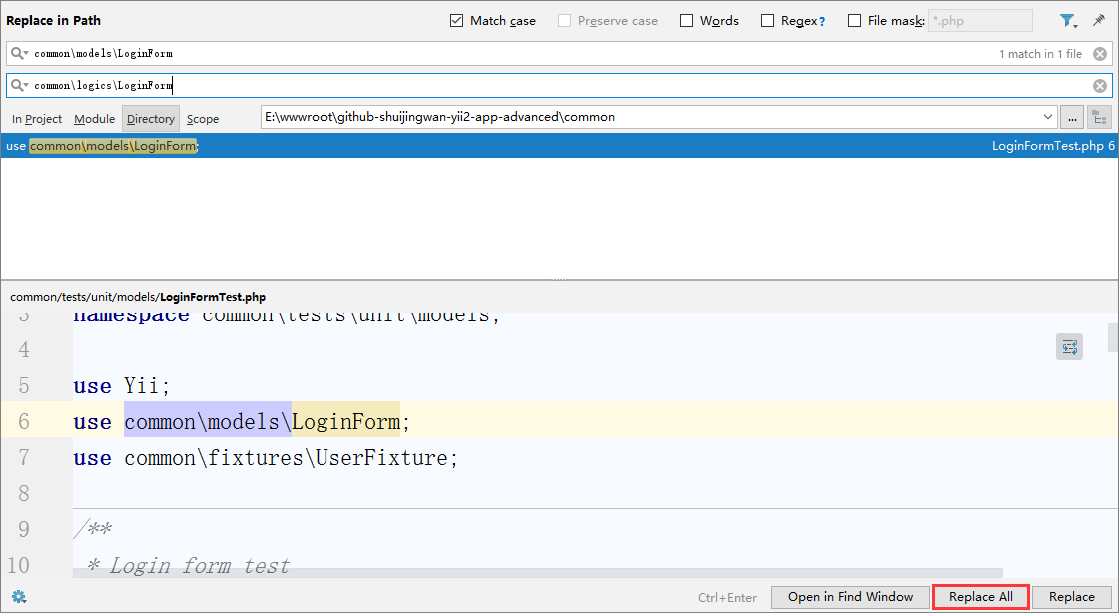
24. Search common\models\loginform in the common directory, replace it with: common\logics\loginform, as shown in Figure 13
Figure 13
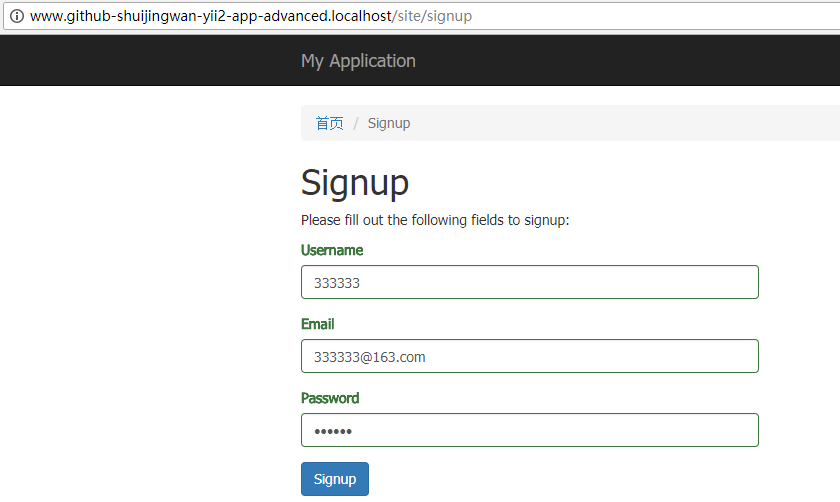
25. Test the registration function, open the website: http://www.github-shuijingwan-yii2-app-advanced.localhost/site/signup, in line with expectations, as shown in Figure 14
Figure 14
26. Check the database, as shown in Figure 15
Figure 15
![在 Postman 中,GET http://api.github-shuijingwan-yii2-app-advanced.localhost/v1/logs?filter[level]=4&filter[category][like]=api\behaviors\RequestLogBehavior&filter[prefix][like]=app-api&filter[log_time][gte]=1528090828&filter[log_time][lte]=1529564924.6648 ,200响应,空数组已经被自动转换为空对象,以保证字段格式的统一,GET http://api.github-shuijingwan-yii2-app-advanced.localhost/v1/logs/3](https://www.shuijingwanwq.com/wp-content/uploads/2018/06/16-1024x680.png)


Leave a Reply