Based on yiisoft/yii2-app-advanced, create a new repository yii2-app-advanced on github, and create a new remote procedure call application (implement hprose 2.0 for PHP’s RPC server), support for creating new RPC directories, configuration and environment, testing, Vagrant, etc.
1. Implement the corresponding RESTful-style web service API of the page in the API directory, and then adjust it to the RPC client
2. After all the corresponding APIs of the page are implemented, the POST request is executed in Postman, and the response is normal, as shown in Figure 1
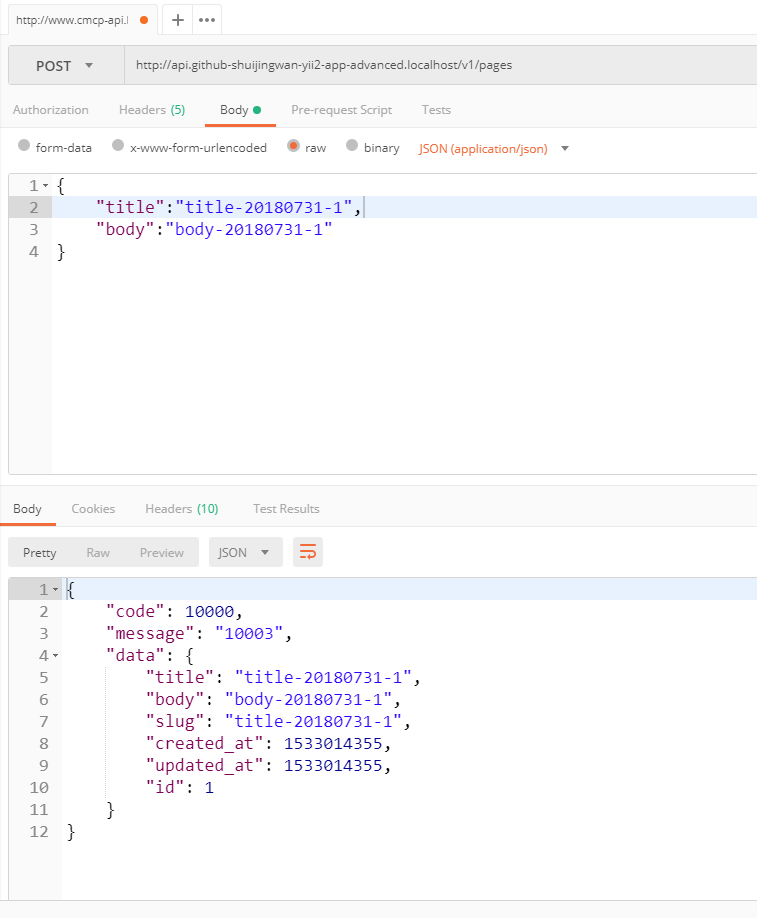
Figure 1
{
	"title":"title-20180731-1",
	"body":"body-20180731-1"
}
{
    "code": 10000,
    "message": "创建页面成功",
    "data": {
        "title": "title-20180731-1",
        "body": "body-20180731-1",
        "slug": "title-20180731-1",
        "created_at": 1533015414,
        "updated_at": 1533015414,
        "id": 1
    }
}
3. Execute the PUT /pages/1 request in Postman, responding to normal
{
	"slug":"slug-20180731-1",
	"title":"title-20180731-1",
	"body":"body-20180731-1",
	"status":2
}
{
    "code": 10000,
    "message": "更新页面成功",
    "data": {
        "id": 1,
        "slug": "slug-20180731-1",
        "title": "title-20180731-1",
        "body": "body-20180731-1",
        "view": 0,
        "status": 2,
        "created_at": 1533015414,
        "updated_at": 1533015770
    }
}
4. Execute the get /pages request in postman, the response is normal
{
    "code": 10000,
    "message": "获取页面列表成功",
    "data": {
        "items": [
            {
                "id": 1,
                "slug": "slug-20180731-1",
                "title": "title-20180731-1",
                "body": "body-20180731-1",
                "view": 0,
                "status": 2,
                "created_at": 1533015414,
                "updated_at": 1533015770
            }
        ],
        "_links": {
            "self": {
                "href": "http://api.github-shuijingwan-yii2-app-advanced.localhost/v1/pages?page=1"
            }
        },
        "_meta": {
            "totalCount": 1,
            "pageCount": 1,
            "currentPage": 1,
            "perPage": 20
        }
    }
}
5. Execute the get /pages/1 request in postman, the response is normal
{
    "code": 10000,
    "message": "获取用户详情成功",
    "data": {
        "id": 1,
        "slug": "slug-20180731-1",
        "title": "title-20180731-1",
        "body": "body-20180731-1",
        "view": 0,
        "status": 2,
        "created_at": 1533015414,
        "updated_at": 1533015770
    }
}
6. Execute delete /pages/1 request in postman, responding to normal
{
    "code": 10000,
    "message": "删除页面成功"
}
7. Execute the get /pages request in postman, the response is normal
filter[title][like]:title
filter[slug][like]:2018
filter[status]:2
{
    "code": 10000,
    "message": "获取页面列表成功",
    "data": {
        "items": [
            {
                "id": 1,
                "slug": "slug-20180731-1",
                "title": "title-20180731-1",
                "body": "body-20180731-1",
                "view": 0,
                "status": 2,
                "created_at": 1533015414,
                "updated_at": 1533019394
            }
        ],
        "_links": {
            "self": {
                "href": "http://api.github-shuijingwan-yii2-app-advanced.localhost/v1/pages?filter%5Btitle%5D%5Blike%5D=title&filter%5Bslug%5D%5Blike%5D=2018&filter%5Bstatus%5D=2&page=1"
            }
        },
        "_meta": {
            "totalCount": 1,
            "pageCount": 1,
            "currentPage": 1,
            "perPage": 20
        }
    }
}
8. Use the composer command line to install hprose
composer require "hprose/hprose-yii:^2.0"
./composer.json has been updated
Loading composer repositories with package information
Updating dependencies (including require-dev)
Package operations: 2 installs, 0 updates, 0 removals
  - Installing hprose/hprose (v2.0.35): Downloading (100%)
  - Installing hprose/hprose-yii (v2.0.0): Downloading (100%)
hprose/hprose suggests installing ext-hprose (Faster serialize and unserialize hprose extension.)
hprose/hprose-yii suggests installing ext-hprose (Faster serialize and unserialize hprose extension.)
Writing lock file
Generating autoload files
9. Add the RPC application (RPC), copy frontend to RPC, environments/dev/frontend to environments/dev/rpc and environments/prod/frontend to environments/prod/rpc
10. Delete all files under the directory \rpc\runtime\debug, delete all files except .gitignore, and delete all files under the directory \rpc\tests\_output \rpc\runtime\logs\app.log, adjust the namespace and path in the directory /rpc to start with rpc (replace frontend to rpc), as shown in Figure 2
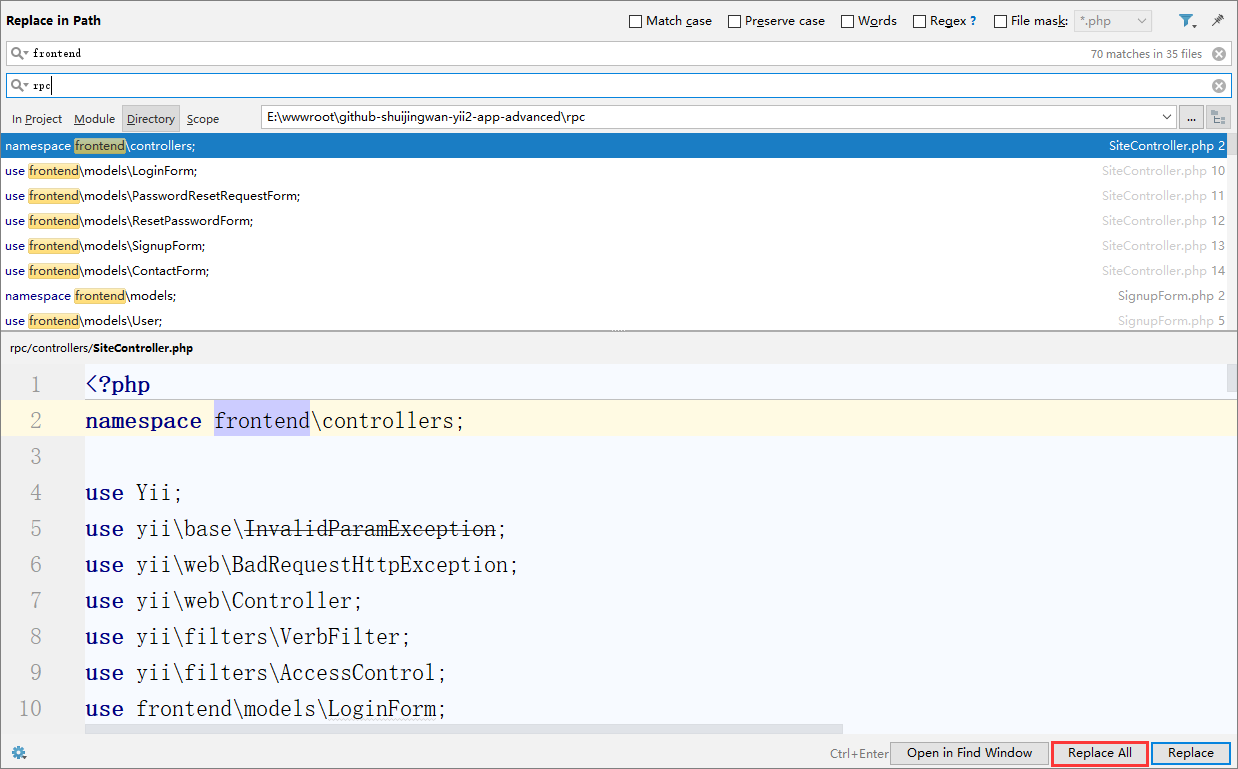
Figure 2
11. Add yii::setAlias in Common\Config\Bootstrap.php(RPC, dirname(dirname(__dir__)) ./rpc)
12. Edit environments/index.php, search for this file with 6 frontends, then copy 6 copies accordingly, and replace them with rpc
13, \vagrant\nginx\app.conf, add virtual host RPC
14. Edit \vagrant\nginx\log\.gitignore, and the log file of configuring RPC is ignored
15. Edit \vagrantfile, add RPC related configuration
16. Configure the web server based on Nginx, configure virtual hosts: WWW, Backend, API, RPC, edit C:\nginx-1.10.1\conf\vhosts\github-shuijingwan-yii2-app-advanced.conf
## FRONTEND ##
server {
    charset utf-8;
    client_max_body_size 128M;

    listen 80; ## listen for ipv4
    #listen [::]:80 default_server ipv6only=on; ## listen for ipv6

    server_name www.github-shuijingwan-yii2-app-advanced.localhost;
    root        E:/wwwroot/github-shuijingwan-yii2-app-advanced/frontend/web;
    index       index.php;

    access_log  logs/www.github-shuijingwan-yii2-app-advanced.localhost.access.log;
    error_log   logs/www.github-shuijingwan-yii2-app-advanced.localhost.error.log;

	location / {
		# Redirect everything that isn't a real file to index.php
		try_files $uri $uri/ /index.php$is_args$args;
	}

	# uncomment to avoid processing of calls to non-existing static files by Yii
	#location ~ \.(js|css|png|jpg|gif|swf|ico|pdf|mov|fla|zip|rar)$ {
	#    try_files $uri =404;
	#}
	#error_page 404 /404.html;

	# deny accessing php files for the /assets directory
	location ~ ^/assets/.*\.php$ {
		deny all;
	}

	location ~ \.php$ {
		include fastcgi_params;
		fastcgi_param SCRIPT_FILENAME $document_root$fastcgi_script_name;
		fastcgi_pass 127.0.0.1:9000;
		#fastcgi_pass unix:/var/run/php5-fpm.sock;
		try_files $uri =404;
	}

	location ~* /\. {
		deny all;
	}
}

## BACKEND ##
server {
    charset utf-8;
    client_max_body_size 128M;

    listen 80; ## listen for ipv4
    #listen [::]:80 default_server ipv6only=on; ## listen for ipv6

    server_name backend.github-shuijingwan-yii2-app-advanced.localhost;
    root        E:/wwwroot/github-shuijingwan-yii2-app-advanced/backend/web;
    index       index.php;

    access_log  logs/backend.github-shuijingwan-yii2-app-advanced.localhost.access.log;
    error_log   logs/backend.github-shuijingwan-yii2-app-advanced.localhost.error.log;

	location / {
		# Redirect everything that isn't a real file to index.php
		try_files $uri $uri/ /index.php$is_args$args;
	}

	# uncomment to avoid processing of calls to non-existing static files by Yii
	#location ~ \.(js|css|png|jpg|gif|swf|ico|pdf|mov|fla|zip|rar)$ {
	#    try_files $uri =404;
	#}
	#error_page 404 /404.html;

	# deny accessing php files for the /assets directory
	location ~ ^/assets/.*\.php$ {
		deny all;
	}

	location ~ \.php$ {
		include fastcgi_params;
		fastcgi_param SCRIPT_FILENAME $document_root$fastcgi_script_name;
		fastcgi_pass 127.0.0.1:9000;
		#fastcgi_pass unix:/var/run/php5-fpm.sock;
		try_files $uri =404;
	}

	location ~* /\. {
		deny all;
	}
}

## API ##
server {
    charset utf-8;
    client_max_body_size 128M;

    listen 80; ## listen for ipv4
    #listen [::]:80 default_server ipv6only=on; ## listen for ipv6

    server_name api.github-shuijingwan-yii2-app-advanced.localhost;
    root        E:/wwwroot/github-shuijingwan-yii2-app-advanced/api/web;
    index       index.php;

    access_log  logs/api.github-shuijingwan-yii2-app-advanced.localhost.access.log;
    error_log   logs/api.github-shuijingwan-yii2-app-advanced.localhost.error.log;

	location / {
		# Redirect everything that isn't a real file to index.php
		try_files $uri $uri/ /index.php$is_args$args;
	}

	# uncomment to avoid processing of calls to non-existing static files by Yii
	#location ~ \.(js|css|png|jpg|gif|swf|ico|pdf|mov|fla|zip|rar)$ {
	#    try_files $uri =404;
	#}
	#error_page 404 /404.html;

	# deny accessing php files for the /assets directory
	location ~ ^/assets/.*\.php$ {
		deny all;
	}

	location ~ \.php$ {
		include fastcgi_params;
		fastcgi_param SCRIPT_FILENAME $document_root$fastcgi_script_name;
		fastcgi_pass 127.0.0.1:9000;
		#fastcgi_pass unix:/var/run/php5-fpm.sock;
		try_files $uri =404;
	}

	location ~* /\. {
		deny all;
	}
}

## RPC ##
server {
    charset utf-8;
    client_max_body_size 128M;

    listen 80; ## listen for ipv4
    #listen [::]:80 default_server ipv6only=on; ## listen for ipv6

    server_name rpc.github-shuijingwan-yii2-app-advanced.localhost;
    root        E:/wwwroot/github-shuijingwan-yii2-app-advanced/rpc/web;
    index       index.php;

    access_log  logs/rpc.github-shuijingwan-yii2-app-advanced.localhost.access.log;
    error_log   logs/rpc.github-shuijingwan-yii2-app-advanced.localhost.error.log;

	location / {
		# Redirect everything that isn't a real file to index.php
		try_files $uri $uri/ /index.php$is_args$args;
	}

	# uncomment to avoid processing of calls to non-existing static files by Yii
	#location ~ \.(js|css|png|jpg|gif|swf|ico|pdf|mov|fla|zip|rar)$ {
	#    try_files $uri =404;
	#}
	#error_page 404 /404.html;

	# deny accessing php files for the /assets directory
	location ~ ^/assets/.*\.php$ {
		deny all;
	}

	location ~ \.php$ {
		include fastcgi_params;
		fastcgi_param SCRIPT_FILENAME $document_root$fastcgi_script_name;
		fastcgi_pass 127.0.0.1:9000;
		#fastcgi_pass unix:/var/run/php5-fpm.sock;
		try_files $uri =404;
	}

	location ~* /\. {
		deny all;
	}
}

## MISC ##

### WWW Redirect ###
server {
    listen       80;
    server_name  github-shuijingwan-yii2-app-advanced.localhost;
    return       301 http://www.github-shuijingwan-yii2-app-advanced.localhost$request_uri;
}
17. Open Windows PowerShell, execute the init command and select dev as the environment, the environment configuration file required by the API application is automatically generated, as shown in Figure 3
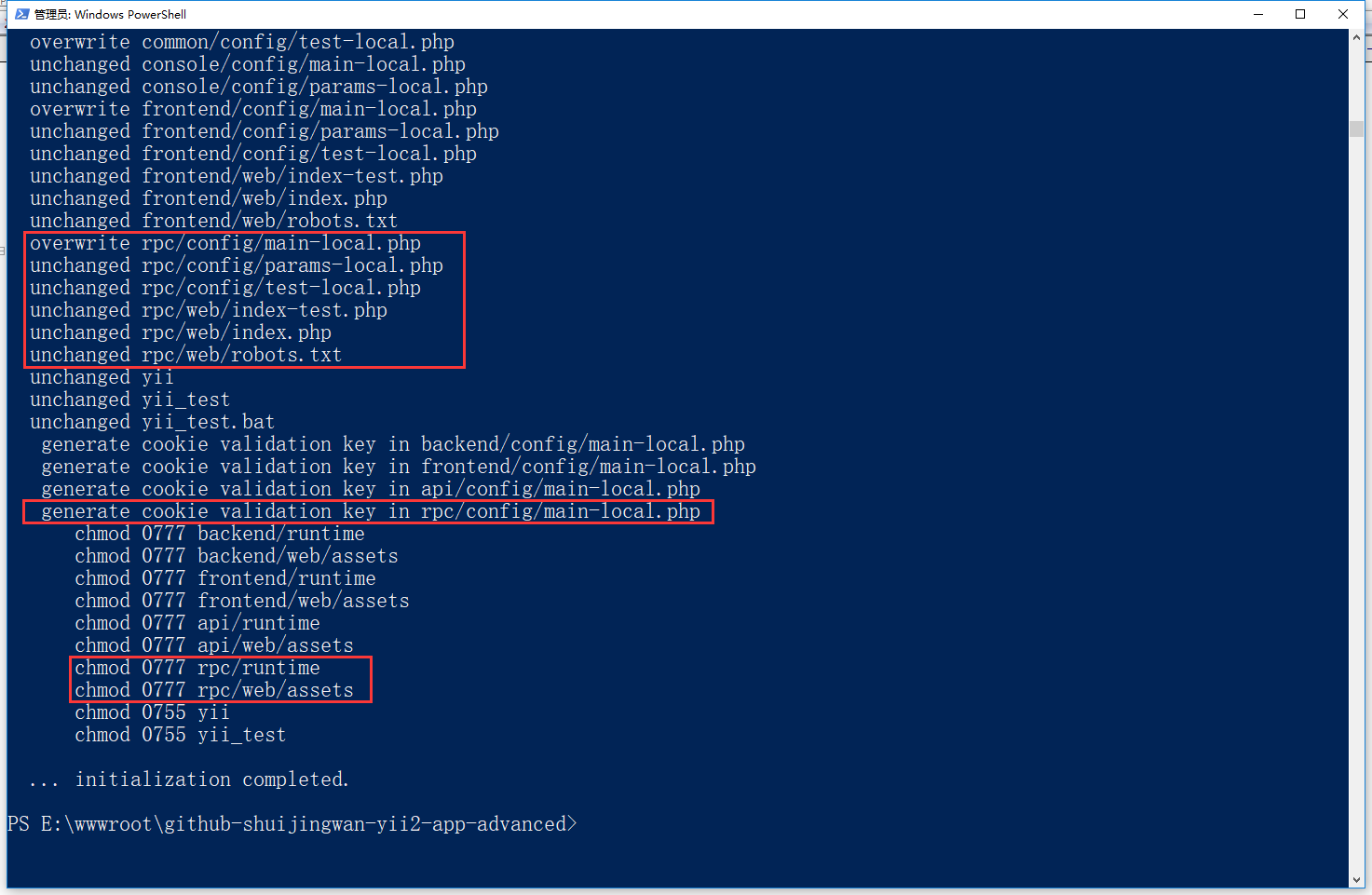
Figure 3
.\init
0
yes
All
18. Open:http://rpc.github-shuijingwan-yii2-app-advanced.localhost/, in line with expectations
19. Edit the codeception.yml configuration that contains tests for all applications
20. Edit \common\config\test.php because the console application uses different request components, and annotate the request component (uncomment in the web application)
    'components' => [
        'user' => [
            'class' => 'yii\web\User',
            'identityClass' => 'common\models\User',
        ],
        /*
        'request' => [
            'cookieValidationKey' => 'test',
        ],
        */
    ],
21. Execute the migration command of the test, as shown in Figure 4

Figure 4
./yii_test migrate --migrationPath=@yii/log/migrations/
./yii_test migrate
22. Build a test suite and run all sample tests
Note: After executing the migration command (./yii_test migrate), you need to uncomment the request component, otherwise an error will be reported:
 Test  ..\common\tests\unit\models\LoginFormTest.php:testLoginCorrect

  [yii\base\InvalidConfigException] yii\web\Request::cookieValidationKey must be configured with a secret key.
vendor/bin/codecept build
vendor/bin/codecept run
23. Edit readme.md and add RPC in the directory structure
<p align="center">
<a href="https://github.com/yiisoft" target="_blank">
<img src="https://avatars0.githubusercontent.com/u/993323" height="100px">
</a>
<h1 align="center">Yii 2 Advanced Project Template</h1>
<br>
</p>
Yii 2 Advanced Project Template is a skeleton [Yii 2](http://www.yiiframework.com/) application best for
developing complex Web applications with multiple tiers.
The template includes four tiers: api, front end, back end, and console, each of which
is a separate Yii application.
The template is designed to work in a team development environment. It supports
deploying the application in different environments.
Documentation is at [docs/guide-zh-CN/README.md](docs/guide-zh-CN/README.md).
[](https://packagist.org/packages/yiisoft/yii2-app-advanced)
[](https://packagist.org/packages/yiisoft/yii2-app-advanced)
[](https://travis-ci.org/yiisoft/yii2-app-advanced)
## TABLE OF CONTENTS
- [Basic info](docs/guide-zh-CN/README.md)
- [Installation](docs/guide-zh-CN/start-installation.md)
- [Manual installation](docs/guide-zh-CN/start-installation.md)
- [Vagrant installation](docs/guide-zh-CN/start-installation.md#使用vagrant安装)
- [Testing](docs/guide-zh-CN/start-testing.md)
DIRECTORY STRUCTURE
-------------------
```
common
config/ contains shared configurations
fixtures/ contains fixtures for common classes
logics/ contains logic classes used in both backend and frontend and api and console
mail/ contains view files for e-mails
messages/ contains message files for I18N
models/ contains model classes used in both backend and frontend and api and console
tests/ contains various tests for common classes
widgets/ contains common widgets
console
config/ contains console configurations
controllers/ contains console controllers (commands)
migrations/ contains database migrations
models/ contains console-specific model classes
runtime/ contains files generated during runtime
backend
assets/ contains application assets such as JavaScript and CSS
config/ contains backend configurations
controllers/ contains Web controller classes
models/ contains backend-specific model classes
runtime/ contains files generated during runtime
tests/ contains various tests for backend application
views/ contains view files for the Web application
web/ contains the entry script and Web resources
frontend
assets/ contains application assets such as JavaScript and CSS
config/ contains frontend configurations
controllers/ contains Web controller classes
models/ contains frontend-specific model classes
runtime/ contains files generated during runtime
tests/ contains various tests for frontend application
views/ contains view files for the Web application
web/ contains the entry script and Web resources
widgets/ contains frontend widgets
api
behaviors/ contains behaviors for api application
config/ contains api configurations
controllers/ contains Web controller classes
fixtures/ contains fixtures for api application
models/ contains api-specific model classes
modules/ contains modules for api application
rests/ contains rests for api application
runtime/ contains files generated during runtime
tests/ contains various tests for api application
views/ contains view files for the Web application
web/ contains the entry script and Web resources
rpc
assets/ contains application assets such as JavaScript and CSS
config/ contains rpc configurations
controllers/ contains Web controller classes
models/ contains rpc-specific model classes
runtime/ contains files generated during runtime
tests/ contains various tests for rpc application
views/ contains view files for the Web application
web/ contains the entry script and Web resources
widgets/ contains rpc widgets
vendor/ contains dependent 3rd-party packages
environments/ contains environment-based overrides
.gitignore contains a list of directories ignored by git version system. If you need something never get to your source code repository, add it there.
composer.json Composer config described in Configuring Composer.
init initialization script described in Configuration and environments.
init.bat same for Windows.
LICENSE.md license info. Put your project license there. Especially when opensourcing.
README.md basic info about installing template. Consider replacing it with information about your project and its installation.
requirements.php Yii requirements checker.
yii console application bootstrap.
yii.bat same for Windows.
```
24. Test whether to use vagrant to install, whether to support RPC, refer to the URL:https://github.com/yiisoft/yii2-app-advanced/blob/master/docs/guide-zh-CN/start-installation.md, using Vagrant to install (Windows User Manual)
25. Edit the following code to the hosts file
# github-shuijingwan-yii2-app-advanced Vagrant
192.168.83.137 y2aa-frontend.test y2aa-backend.test y2aa-api.test y2aa-rpc.test
26. Open Windows PowerShell, switch the path to the project root directory, and execute the following commands (need to overturn the wall, it may need to be executed multiple times), there is an error during the period, refer to step 20 processing, report the error: The name of your virtual machine couldnT Be Set Because VirtualBox
Is reporting another VM with that name already exists. ubuntu-16.04-amd64_1533104831432_66987, delete the directory f:\virtualbox VMS\Ubuntu-16.04-AMD64_1533105278434_57210
vagrant plugin install vagrant-hostmanager
vagrant up
27. After waiting for completion, just access the following URL in the browser, which is in line with expectations
frontend:http://y2aa-frontend.test
backend:http://y2aa-backend.test
API:http://y2aa-api.test
RPC:http://y2aa-rpc.test