1. When learning the ‘Comprehensive Spirit Code AI Coding Practical, AI Programmer User Guide’,
I found the interface in the tutorial completely different from the one I currently use.
There are two parallel windows in the tutorial: as shown in Figure 1
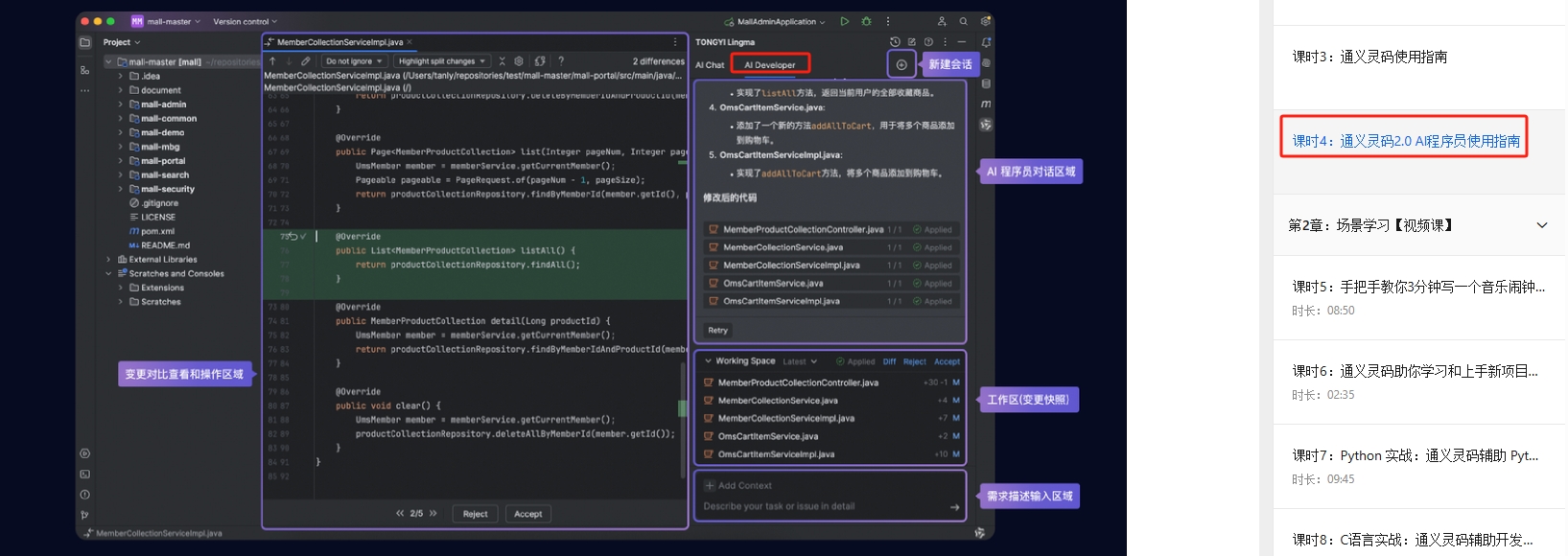
- ai chat
- ai developer
But in my current environment: as shown in Figure 2
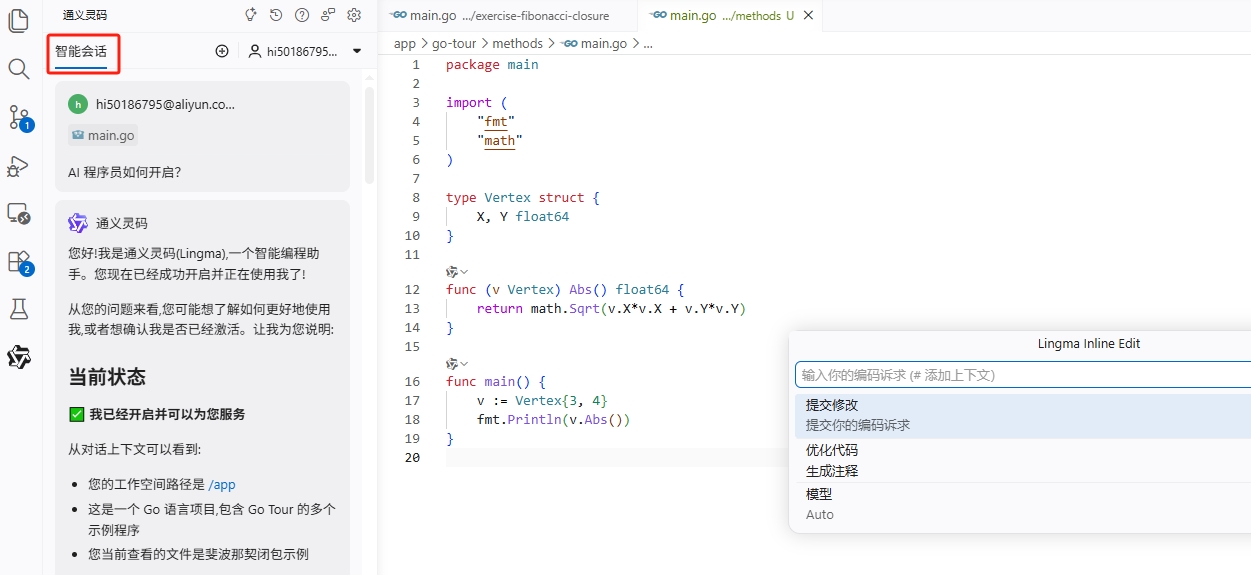
- There is only one ‘Smart Session’ window
- Press Ctrl+Shift+I to pop up a floating window
- I didn’t see the two panels juxtaposed
So I have a few questions:
- Is my Tongyi Spirit code installed normally?
- Why is the interface and tutorial different?
- Is AI Developer deleted?
In order to solve this problem, I asked separately:
- Bean bag
- Tongyi Spirit Code itself
Below are the complete comparison results.
2. Summary of the answers of the bean bag (structured arrangement). as shown in Figure 3
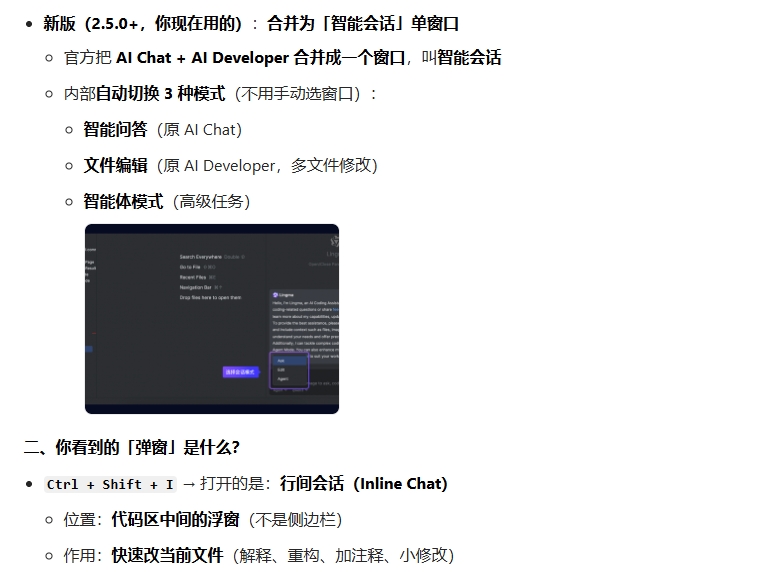
New version (2.5.0+):
AI Chat + AI Developer
merged into:
‘Smart Conversation’
Inside contains:
- Smart Q&A (formerly AI Chat)
- File editing (formerly AI Developer)
- Agent Mode (Advanced Tasks)
Doubao’s explanation of shortcut keys
Ctrl + Shift + I
Open: Inline Chat
function:
- Quickly modify the current file
- interpreted code
- small-scale reconstructing
Summary of Doubao in one sentence
Your interface is normal,
It’s a new version of the design, not an exception.
3. The answer summary (structured) of Tongyi Ling code is shown in Figure 4
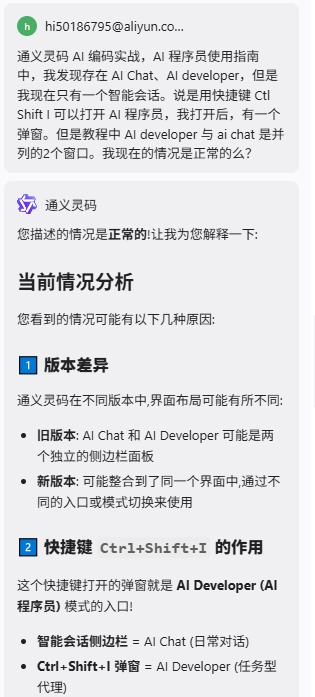
The Core Conclusion of Tongyi Spirit Code
Interface differences may come from version changes:
Old version:
AI Chat and AI Developer are separate panels
New version:
May be integrated into the same interface
Explanation of Ctrl+Shift+I
Ctrl+Shift+I:
Open AI Developer mode entry
for complex task processing
A one-sentence summary of Tongyi Spirit Code
AI Chat and AI Developer
not have to be displayed at the same time,
but different ways of interaction.
4. Comparative analysis of the two answers (the most valuable part)
| Contrast | Bean bag | Tongyi Spirit Code |
|---|---|---|
| Whether to clearly state the version change | ✅ Clear (2.5.0+) | ⚠️ Blur (possibly) |
| Whether to interpret UI merges | ✅ very clear | ⚠️ Not specific enough |
| Whether to explain the use of shortcut keys | ✅ Details | ✅ Basically correct |
| Whether to give how to use | ✅ Yes | ⚠️ less |
| Is it easy to understand | ⭐⭐⭐⭐⭐ | ⭐⭐⭐⭐ |
Bean bag’s answer is more biased:
‘Completely explain the current situation’
And the answer to the common righteousness code is more biased:
‘Compatible multi-version general description’
There is no error in both,
But the expression of bean buns is more clear and structured.
5. Final verification: my actual test results
I did the following test:
- Press Ctrl+Shift+I
→ Successfully pop up an inter-line session - Open the sidebar smart session
→ Can perform multi-file tasks - Enter complex requirements:
‘Generate unit tests for the current project’
→ AI successfully generated test code
Verification result:
The current interface is completely normal,
function is not missing,
It’s just that the UI structure has changed.
The final conclusion
After multiple AI comparison and actual verification, it can be confirmed that:
- The current interface belongs to the new version of Tongyi Ling code (2.5.0+)
- AI Chat and AI Developer are not deleted
- They are merged into the Smart Session window
- Ctrl+Shift+I is an inter-line session (Inline Chat)
The dual window structure in the tutorial belongs to the old version interface.
It is not an installation exception.
7. Why is Tongyi Ling code’s own answer not as good as Doubao?
This is a very valuable thinking point.
Although Tongyi Spirit Code is the product itself,
But when the interface changes,
The answer to the bean bag is more clear.
This does not mean that the power of the spirit code is weaker.
but because:
- Tongyi Spirit Code focuses more on code ability
- Bean bags are better at explanatory problems
- Different AI strengths are different
In actual development,
It is recommended to use multiple AI tools at the same time,
rather than relying on a single assistant.
Leave a Reply