
1. Reference:Deploy Shopify PHP application to production environment (CentOS 7.7 64-bit in Alibaba Cloud, ECS, MySQL 5.7)
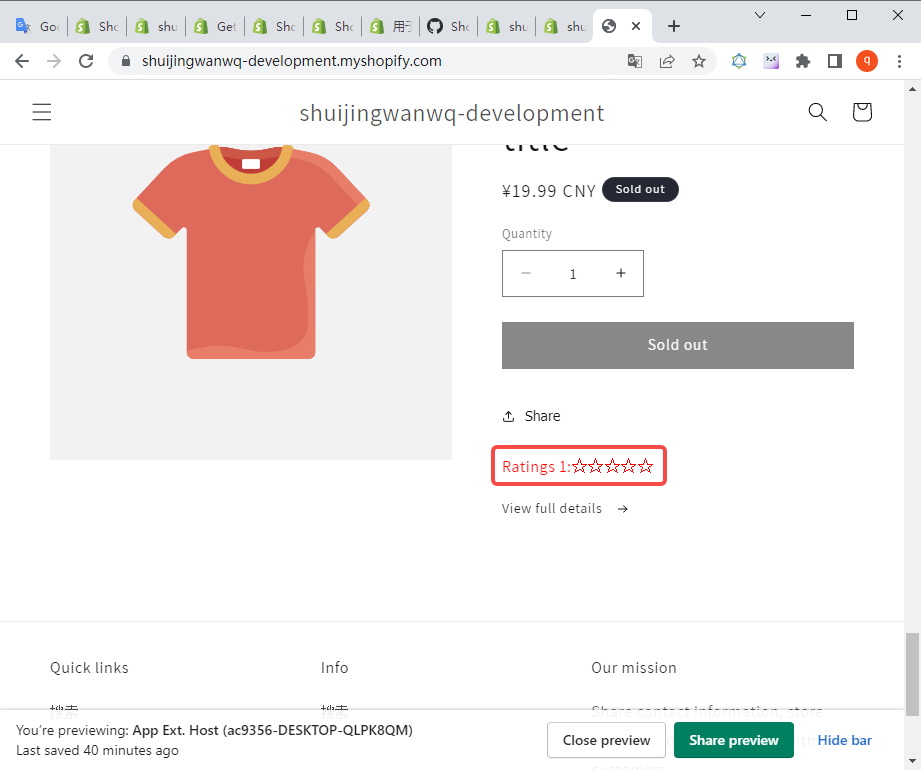
2. When the application: learn-php-app-ubuntu-2004-0605 is newly created and deployed the theme application extension. The test passed, in line with expectations. as shown in Figure 1
3. Upload the application in the local environment: learn-php-app-ubuntu-2004-0605 Web The code below is to the production environment, directory: vendor, frontend/node_modules, frontend/dist can not be uploaded.
4. After uploading the code to the production environment, rebuild the front-end and back-end.
[root@iZ23wv7v5ggZ frontend]# npm install
[root@iZ23wv7v5ggZ frontend]# Shopify_API_KEY=C7F826670575F7AE069F7E56350465EF npm run build
[root@iZ23wv7v5ggZ frontend]# cd ..
[root@iZ23wv7v5ggZ learn-php-app-0605-prod.shuijingwanwq.com]# composer build
> composer build-frontend-links
> ln -sf ../frontend/dist/assets public/assets && ln -sf ../frontend/dist/index.html public/index.html
5. Test the application of the production environment in the development store, which can work normally.
6. Since the theme application extension needs to be created based on the Shopify CLI, the Shopify CLI is not installed in the production environment. Creating and deploying theme application extensions can only be performed in the local environment. Only the application that needs to be bound is the application in the production environment (that is, the application of the partner center: learn-php-app-0605-prod). Copy learn-php-app-ubuntu-2004-0605 The code to the directory: learn-php-app-0605-prod, directory: node_modules, web/vendor, web/frontend/node_modules, web/frontend/dist Do not copy. The best practice should be that these 2 application directories share the same git repository to keep the code synchronized. Reference:Work on an existing app . Dependency for installation projects.
wangqiang@desktop-qlpk8qm:/mnt/e/wwwroot/shopify-app/learn-php-app-0605-prod$ sudo npm install
7. After installing the app’s dependencies, check the version to make sure the Shopify CLI is available.
wangqiang@desktop-qlpk8qm:/mnt/e/wwwroot/shopify-app/learn-php-app-0605-prod$ npm run Shopify version

> learn-php-app-ubuntu-2004-0605@1.0.0 Shopify
> shopify version

Current Shopify CLI Version: 3.46.2
💡 Version 3.46.5 Available! Run npm run Shopify Upgrade
8. Run the dev command, connect it to the existing application of the partner center when you run this command for the first time: learn-php-app-0605-prod, select the corresponding store to preview the application, and do not update the application’s URL to avoid application use that affects the production environment. as shown in Figure 2
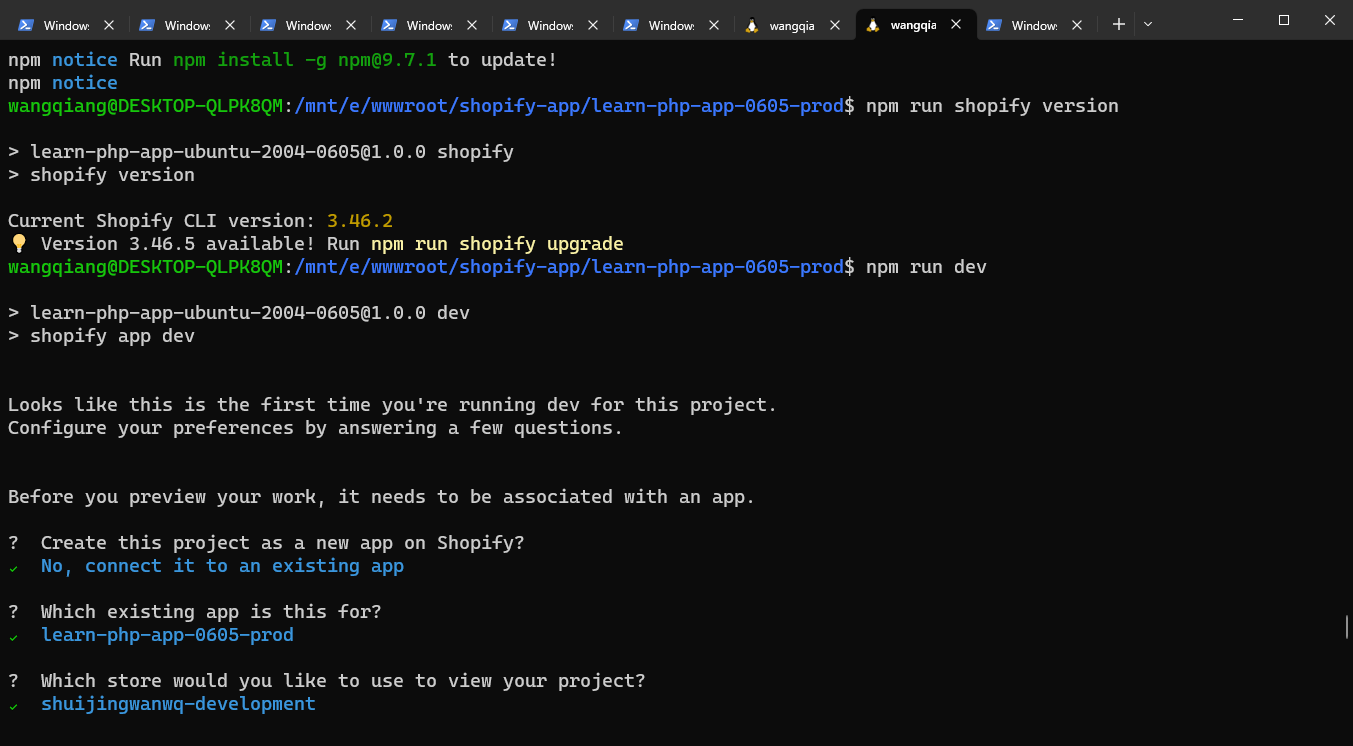
wangqiang@desktop-qlpk8qm:/mnt/e/wwwroot/shopify-app/learn-php-app-0605-prod$ npm run dev

> learn-php-app-ubuntu-2004-0605@1.0.0 dev
> Shopify App Dev

Looks like this is the first time youRe running dev for this project.
Configure your preferences by answering a few questions.

Before you preview your work, it needs to be associated with an app.

? Create this project as a new app on shopify?

> (y) yes, create it as a new app
(n) No, connect it to an existing app

✔ No, connect it to an existing app

? Which existing app is this for?

>learn-php-app-0605-prod
learn-php-app-ubuntu-2004-0605
App-Partners-20230530
theme-app-ext-example1
theme-app-extension-example
learn-node-app-20230524
learn-php-app-20230510
learn-node-app-20230509
learn-app-20221019
learn-app

✔ learn-php-app-0605-prod

? Which store would you like to use your project?

> shuijingwanwq-development
shuijingwanwq-development3
shuijingwanwq-development2

✔ shuijingwanwq-development

? have shopify automatically update your appS url in order to create a preview experience?

Current App URL: •https://learn-php-app-0605-prod.shuijingwanwq.com/

Current redirect urls: •https://learn-php-app-0605-prod.shuijingwanwq.com/api/auth/callback

(1) Always by default
(2) Yes, this time
(3) No, not now
> (4) never, donT Ask Again

✔ Never, DonT Ask Again

╭─ info ──────────────────────── ────────────────────────
│ │
│ To make URL updates manually, you can add the following URLs as redirects │
│ in your partner dashboard[1]: │
│ │
│ │
│ •https://tiger-foto-incident-sparc.trycloudflare.com/auth/callback│
│ •https://tiger-foto-incident-sparc.trycloudflare.com/auth/shopify/callb│
│ ACK │
│ •https://tiger-foto-incident-sparc.trycloudflare.com/api/auth/callback│
│ │
╰────────────────────────── ───────────────────────────
[1]https://partners.shopify.com/2442779/apps/44885082113/edit

Theme-App-Extension-0612 (Theme App Extension)
follow the dev doc instructions (https://shopify.dev/apps/online-store/theme-app-extensions/getting-started#step-3-test-your-changes) by deploying your work as a draft

2023-06-15 03:17:46 │ frontend │
2023-06-15 03:17:46 │ Frontend │ > Shopify-Frontend-template-react@1.0.0 dev
2023-06-15 03:17:46 │ Frontend │ > vite
2023-06-15 03:17:46 │ frontend │
2023-06-15 03:17:47 │ backend │ > composer\config::disableProcessTimeout
2023-06-15 03:17:47 │ backend │ > php artisan serve
2023-06-15 03:17:47 │ backend │ php warning: require(/mnt/e/wwwroot/shopify-app/learn-php-app-0605-prod/web/vendor/autoload.php): Failed to open
Stream: No such file or directory in /mnt/e/wwwroot/shopify-app/learn-php-app-0605-prod/web/artisan on line 18
2023-06-15 03:17:47 │ backend │ php fatal error: uncaught error: failed opening required
/mnt/e/wwwroot/shopify-app/learn-php-app-0605-prod/web/vendor/autoload.php(include_path=.:/usr/share/php) in
/mnt/e/wwwroot/shopify-app/learn-php-app-0605-prod/web/artisan:18
2023-06-15 03:17:47 │ backend │ stack trace:
2023-06-15 03:17:47 │ backend │ #0 {main}
2023-06-15 03:17:47 │ backend │ thrown in /mnt/e/wwwroot/shopify-app/learn-php-app-0605-prod/web/artisan on line 18
2023-06-15 03:17:47 │ backend │ script php artisan serve handling the serve event returned with error code 255

Preview URL:https://tiger-foto-incident-sparc.trycloudflare.com?shop=shuijingwanwq-development.myshopify.com&host=c2h1a
wppbmd3yw53cs1kzxzlbg9wbwvudc5texnob3bpznkuy29tl2fkbwlu

─ ─ external error ──────────────────────────────────────────

Error coming from `Composer serve`

Command failed with exit code 255: composer serve
> composer\config::disableProcessTimeout
> php artisan serve
PHP warning: require(/mnt/e/wwwroot/shopify-app/learn-php-app-0605-prod/web/vendor/autoload.php): Failed to open
Stream: No such file or directory in /mnt/e/wwwroot/shopify-app/learn-php-app-0605-prod/web/artisan on line 18
PHP fatal error: uncaught error: failed opening required
/mnt/e/wwwroot/shopify-app/learn-php-app-0605-prod/web/vendor/autoload.php(include_path=.:/usr/share/php) in
/mnt/e/wwwroot/shopify-app/learn-php-app-0605-prod/web/artisan:18
stack trace:
#0 {main}
Thrown in /mnt/e/wwwroot/shopify-app/learn-php-app-0605-prod/web/artisan on line 18
Script php artisan serve handling the serve event returned with error code 255

- -
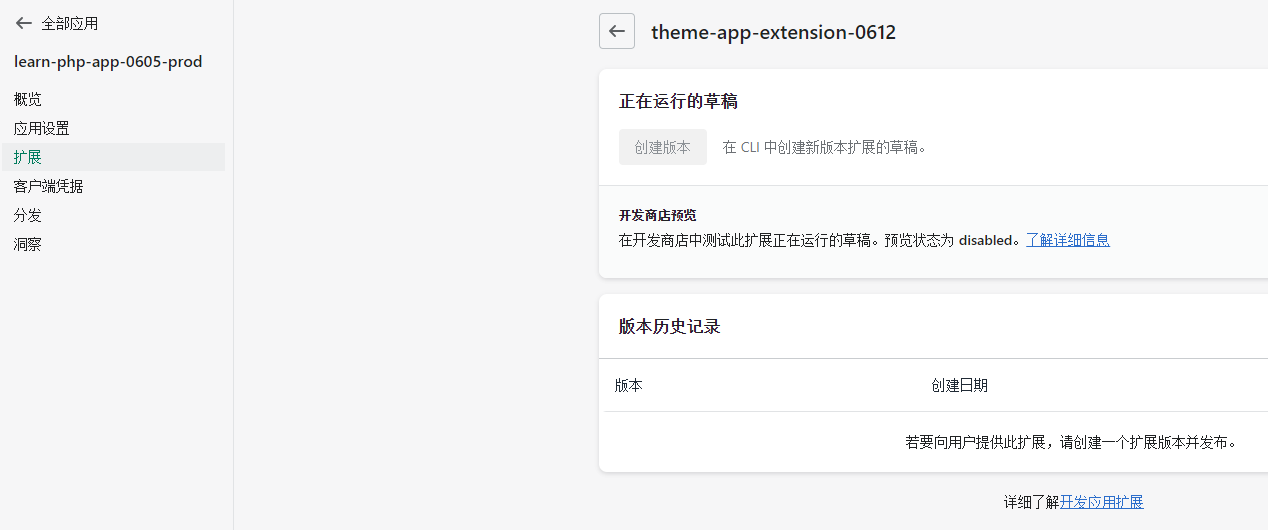
9. Execute the command: Composer serves an error, because the php dependencies have not been installed. However, the theme app extension: Theme-App-Extension-0612 has been pushed to the Partner Center. as shown in Figure 3
wangqiang@desktop-qlpk8qm:/mnt/e/wwwroot/shopify-app/learn-php-app-0605-prod/web$ composer install
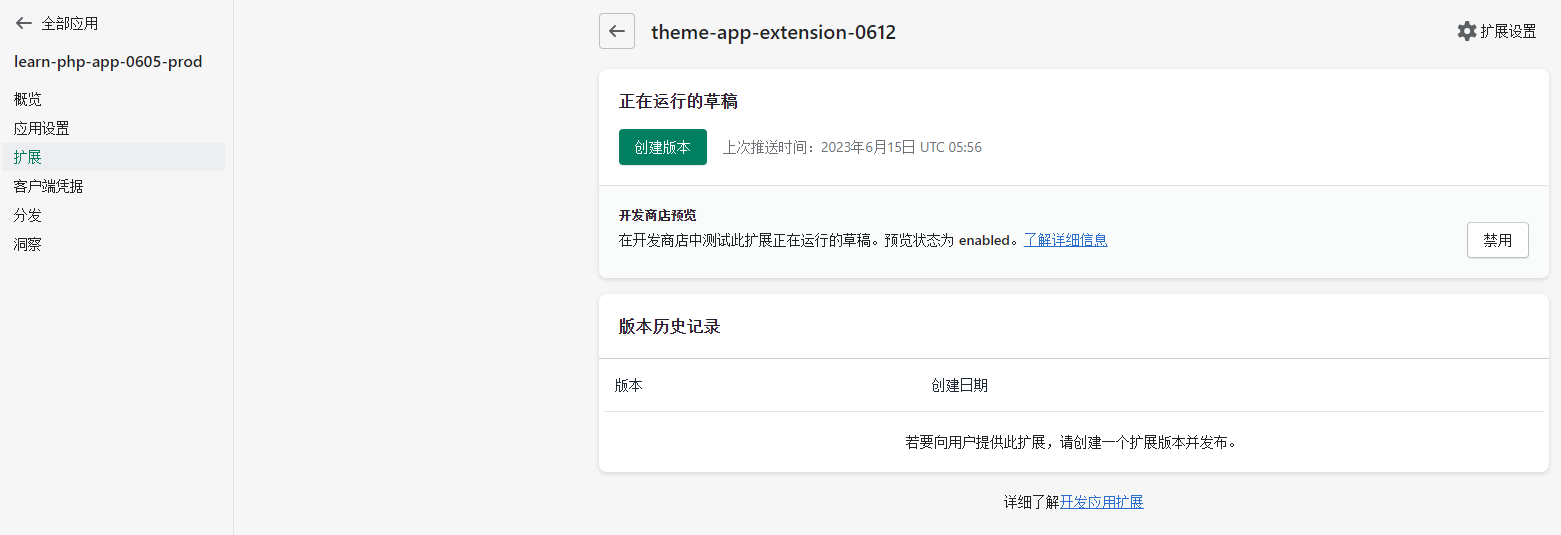
10. After enabling the development store preview, after executing the Deploy command, you can create an extended version, and then a store that has installed this application can use this theme application extension. Extended version cannot be created, which is not as expected. as shown in Figure 4

wangqiang@desktop-qlpk8qm:/mnt/e/wwwroot/shopify-app/learn-php-app-0605-prod$ npm run deploy

> learn-php-app-ubuntu-2004-0605@1.0.0 Deploy
> Shopify App Deploy

? Make the following changes to your extensions in Shopify Partners?
✔ Yes, Deploy to push changes

Deploying your work to Shopify Partners. It will be part of learn-php-app-ubuntu-2004-0605

Theme_extensions │ running theme check on your theme app extension...
Theme_extensions │ checking /mnt/e/wwwroot/shopify-app/learn-php-app-0605-prod/extensions/theme-app-extension-0612 ...
Theme_extensions │ 4 files inspected, 0 offers detected, 0 offers auto-correctable

╭─ Success ──────────────────────────────────────────────
│ │
│ deployed to shopify! │
│ │
│ Summary │
│ • Theme-App-Extension-0612 is deployed to Shopify but not yet live │
│ │
│ Next steps │
│ • Publish Theme-App-Extension-0612[1]│
│ │
╰────────────────────────── ───────────────────────────
[1]https://partners.shopify.com/2442779/apps/44874072065/extensions/theme_app_extension/25583255553
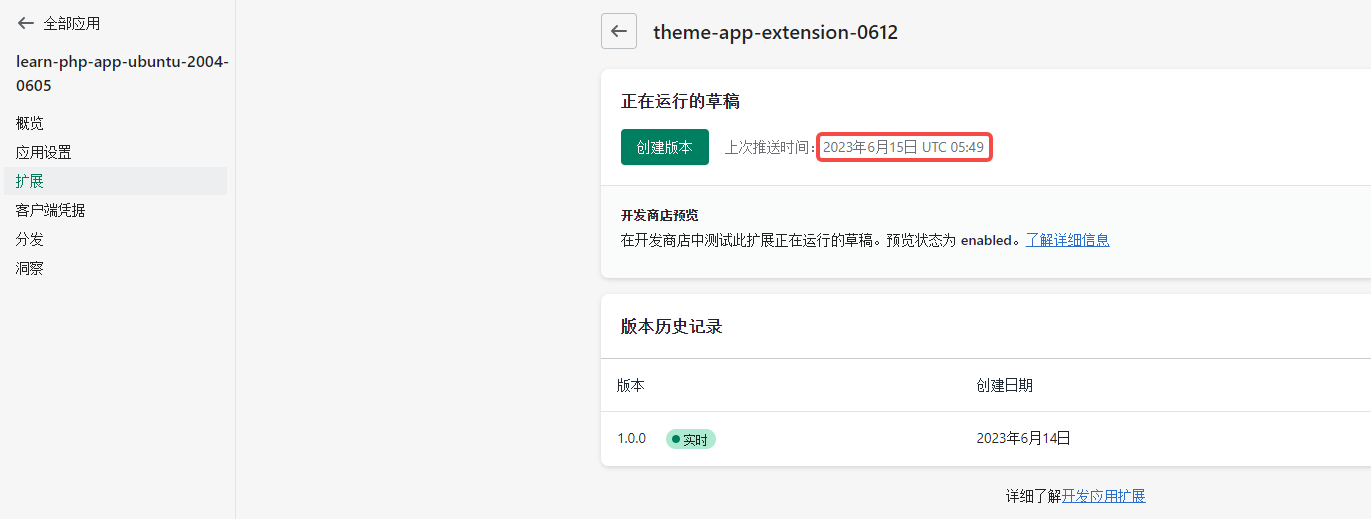
11. The discovery is still the application that was pushed and deployed to the copy before replication learn-php-app-ubuntu-2004-0605 . as shown in Figure 5
12. Rerun the development (reconfigure) command. During execution, there is: Pushed »theme-app-extension-0612To a draft. It is already possible to create an application extension version. as shown in Figure 6
wangqiang@desktop-qlpk8qm:/mnt/e/wwwroot/shopify-app/learn-php-app-0605-prod$ npm run dev -- --reset

> learn-php-app-ubuntu-2004-0605@1.0.0 dev
> shopify app dev --reset

Before you preview your work, it needs to be associated with an app.

? Create this project as a new app on shopify?
✔ No, connect it to an existing app

? Which existing app is this for?
✔ learn-php-app-0605-prod

? Which store would you like to use your project?
✔ shuijingwanwq-development

? have shopify automatically update your appS url in order to create a preview experience?
✔ Never, DonT Ask Again

╭─ info ──────────────────────── ────────────────────────
│ │
│ To make URL updates manually, you can add the following URLs as redirects │
│ in your partner dashboard[1]: │
│ │
│ │
│ •https://shape-vaccine-crop-xl.trycloudflare.com/auth/callback│
│ •https://shape-vaccine-crop-xl.trycloudflare.com/auth/shopify/callback│
│ •https://shape-vaccine-crop-xl.trycloudflare.com/api/auth/callback│
│ │
╰────────────────────────── ───────────────────────────
[1]https://partners.shopify.com/2442779/apps/44885082113/edit

Theme-App-Extension-0612 (Theme App Extension)
follow the dev doc instructions (https://shopify.dev/apps/online-store/theme-app-extensions/getting-started#step-3-test-your-changes) by deploying your work as a draft

2023-06-15 05:54:27 │ frontend │
2023-06-15 05:54:27 │ frontend │ > Shopify-Frontend-Template-react@1.0.0 dev
2023-06-15 05:54:27 │ frontend │ > vite
2023-06-15 05:54:27 │ frontend │
2023-06-15 05:54:29 │ webhooks │ sending app_uninstalled webhook to app server
2023-06-15 05:54:29 │ Webhooks │ App IsnT Retrying in 5 seconds
2023-06-15 05:54:34 │ webhooks │ app isnT Retrying in 5 seconds
2023-06-15 05:54:35 │ frontend │
2023-06-15 05:54:35 │ Frontend │ Vite v4.3.9 Ready in 7797 MS
2023-06-15 05:54:35 │ frontend │
2023-06-15 05:54:35 │ Frontend │ ➜ Local:http://localhost:33151/
2023-06-15 05:54:36 │ backend │ > composer\config::disableProcessTimeout
2023-06-15 05:54:36 │ backend │ > php artisan serve
2023-06-15 05:54:39 │ Webhooks │ App IsnT Retrying in 5 seconds
2023-06-15 05:54:44 │ webhooks │ app hasnT started in time, giving up
2023-06-15 05:54:44 │ webhooks │ app_uninstalled webhook delivery failed
2023-06-15 05:54:54 │ Backend │ Starting Laravel Development Server:http://127.0.0.1:41775
2023-06-15 05:54:54 │ backend │[Thu Jun 15 13:54:54 2023]PHP 8.1.18 Development Server (http://127.0.0.1:41775)startedled
2023-06-15 05:55:21 │ extensions │
2023-06-15 05:55:21 │ extensions │ --------- Pushing the theme files to app ext. Host (96E4F9-desktop-qlpk8qm) (#133838078137) ON
shuijingwanwq-development.myshopify.com
2023-06-15 05:55:21 │ extensions │ pushing theme... 0%
2023-06-15 05:55:33 │ backend │[Thu Jun 15 13:55:33 2023]127.0.0.1:42178 Accepted
2023-06-15 05:55:42 │ backend │[Thu Jun 15 13:55:42 2023]127.0.0.1:42178 Closing
2023-06-15 05:55:42 │ backend │[Thu Jun 15 13:55:42 2023]127.0.0.1:42184 Accepted
2023-06-15 05:55:45 │ backend │[Thu Jun 15 13:55:44 2023]127.0.0.1:42184 Closing
2023-06-15 05:56:25 │ extensions │ pushing theme... 36%
2023-06-15 05:56:27 │ extensions │ pushing theme... 52%
2023-06-15 05:56:27 │ extensions │ pushing theme... 68%
2023-06-15 05:56:27 │ extensions │ pushing theme... 84%
2023-06-15 05:56:27 │ extensions │ pushing theme... 100%
2023-06-15 05:56:29 │ extensions │ ----------------
2023-06-15 05:56:31 │ extensions │
2023-06-15 05:56:31 │ extensions │ -------- Viewing extension…
2023-06-15 05:56:31 │ extensions │ enable your theme app extension:
2023-06-15 05:56:31 │ extensions │https://partners.shopify.com/2442779/apps/44885082113/extensions/theme_app_extension/25719668737
2023-06-15 05:56:31 │ extensions │
2023-06-15 05:56:31 │ extensions │ setup your theme app extension in the host theme:
2023-06-15 05:56:31 │ extensions │https://shuijingwanwq-development.myshopify.com/admin/themes/133838078137/editor
2023-06-15 05:56:31 │ extensions │
2023-06-15 05:56:31 │ extensions │ preview your theme app extension:
2023-06-15 05:56:31 │ extensions │http://127.0.0.1:9292
2023-06-15 05:56:31 │ extensions │ ----------------
2023-06-15 05:56:34 │ Extensions │ Pushed »theme-app-extension-0612To a draft
2023-06-15 05:56:34 │ extensions │ - blocks/star_rating.liquid
2023-06-15 05:56:34 │ extensions │ - snippets/stars.liquid
2023-06-15 05:56:34 │ extensions │ - locales/en.default.json
2023-06-15 05:56:34 │ extensions │ - assets/thumbs-up.png
2023-06-15 06:39:08 │ extensions │ stopping…

› Press P │ Preview in your browser
› Press Q │ Quit

Preview URL:https://shape-vaccine-crop-xl.trycloudflare.com?shop=shuijingwanwq-development.myshopify.com&host=c2h1aWppb
MD3YW53CS1KZXZLBG9WBWVUDC5TEXNOB3BPZNKUY29TL2FKBWLU
13. Application: learn-php-app-0605-prod has been distributed to the store: shuijingwanwq-development3. as shown in Figure 7

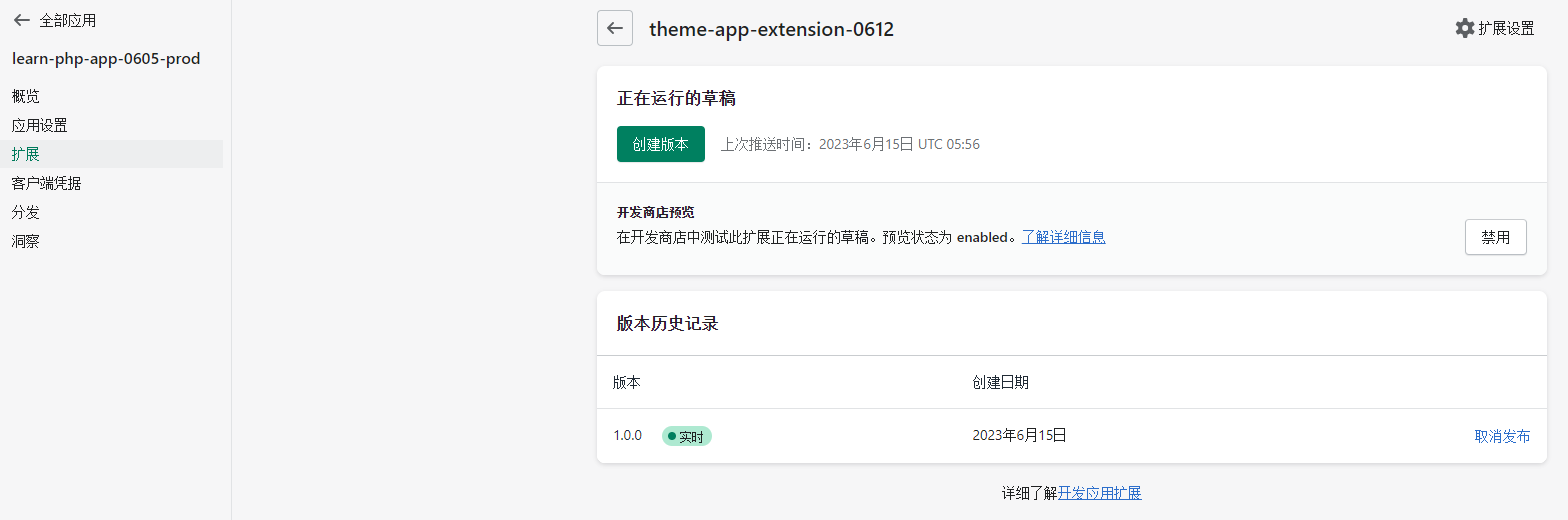
14. Create the theme application extension and release: 1.0.0. as shown in Figure 8
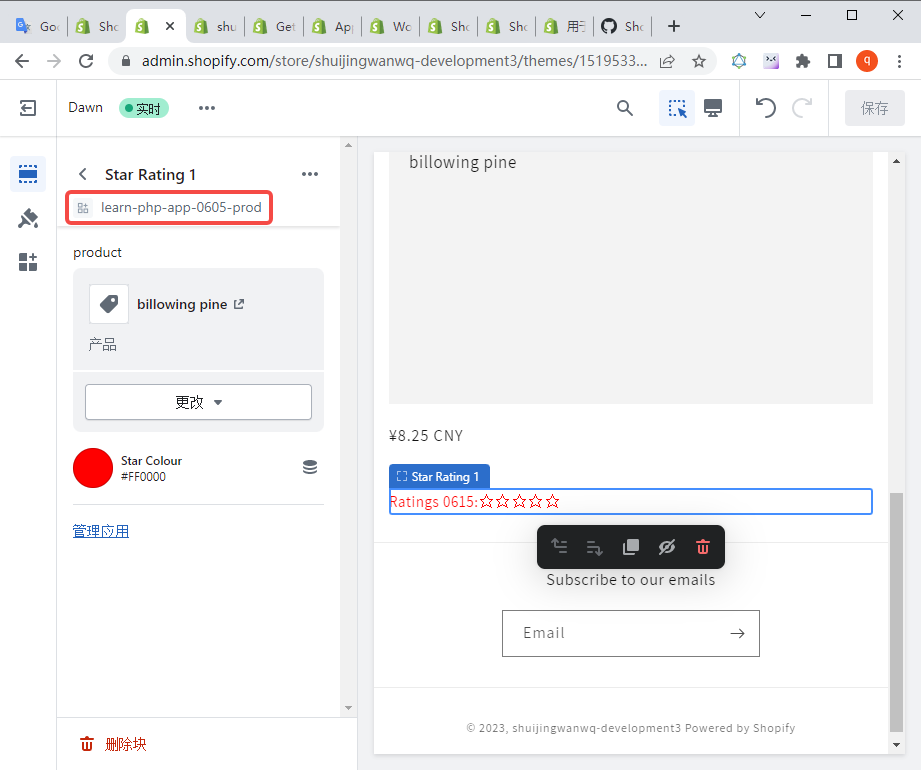
15. Open the store: The editor of any one of the themes of shuijingwanwq-development3, you can use the theme application extension by adding application blocks. as shown in Figure 9
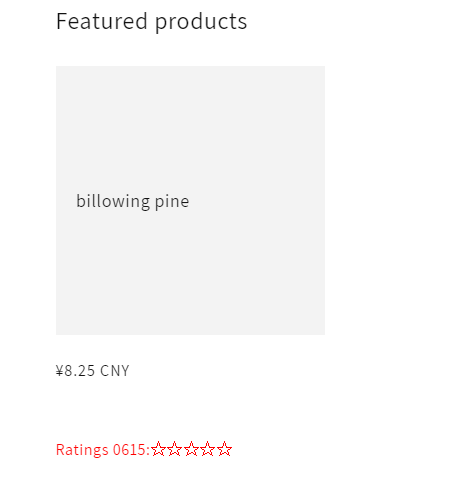
16. Check the homepage, the theme application extension has been displayed. As shown in Figure 10
17. After updating the code of the theme extension application, execute the deployment command. Discovery is still a deployed app before replication: learn-php-app-ubuntu-2004-0605
wangqiang@desktop-qlpk8qm:/mnt/e/wwwroot/shopify-app/learn-php-app-0605-prod$ npm run deploy

> learn-php-app-ubuntu-2004-0605@1.0.0 Deploy
> Shopify App Deploy

? Make the following changes to your extensions in Shopify Partners?
✔ Yes, Deploy to push changes

Deploying your work to Shopify Partners. It will be part of learn-php-app-ubuntu-2004-0605

Theme_extensions │ running theme check on your theme app extension...
Theme_extensions │ checking /mnt/e/wwwroot/shopify-app/learn-php-app-0605-prod/extensions/theme-app-extension-0612 ...
Theme_extensions │ 4 files inspected, 0 offers detected, 0 offers auto-correctable

╭─ Success ──────────────────────────────────────────────
│ │
│ deployed to shopify! │
│ │
│ Summary │
│ • Theme-App-Extension-0612 is deployed to Shopify but not yet live │
│ │
│ Next steps │
│ • Publish Theme-App-Extension-0612[1]│
│ │
╰────────────────────────── ───────────────────────────
[1]https://partners.shopify.com/2442779/apps/44874072065/extensions/theme_app_extension/25583255553
18. Re-execute the env pull command to specify the application as: learn-php-app-0605-prod. To update the existing application and application extension environment variables. as shown in Figure 11
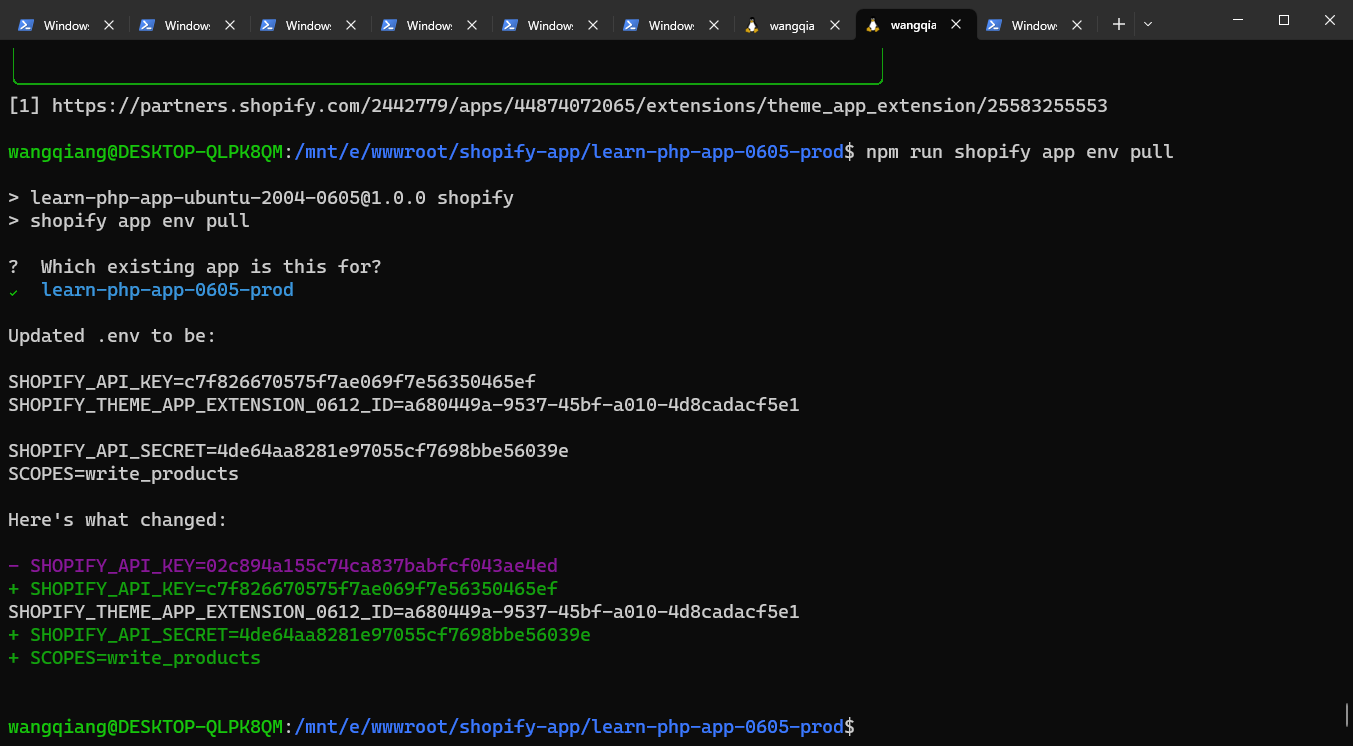
wangqiang@desktop-qlpk8qm:/mnt/e/wwwroot/shopify-app/learn-php-app-0605-prod$ npm run Shopify app env pull

> learn-php-app-ubuntu-2004-0605@1.0.0 Shopify
> shopify app env pull

? Which existing app is this for?
✔ learn-php-app-0605-prod

updated .env to be:

Shopify_API_KEY=C7F826670575F7AE069F7E56350465EF
Shopify_theme_app_extension_0612_id=a680449a-9537-45bf-a010-4d8cadacf5e1

Shopify_API_Secret=4DE64AA8281E97055CF7698BBE56039E
Scopes=write_products

heres what changed:

- Shopify_API_KEY=02C894A155C74CA837BABFCF043AE4ED
+ Shopify_API_KEY=C7F826670575F7AE069F7E56350465EF
Shopify_theme_app_extension_0612_id=a680449a-9537-45bf-a010-4d8cadacf5e1
+ Shopify_API_Secret=4DE64AA8281E97055CF7698BBE56039E
+ scopes=write_products
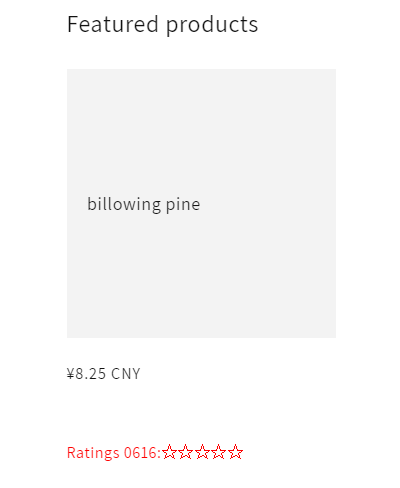
19. Execute the deployment command again, then create a new extension: 1.2.0 and publish. After waiting for about 3 minutes, the homepage has changed, and the new changes have been applied to 0616 from 0615. as shown in Figure 12
wangqiang@desktop-qlpk8qm:/mnt/e/wwwroot/shopify-app/learn-php-app-0605-prod$ npm run deploy

> learn-php-app-ubuntu-2004-0605@1.0.0 Deploy
> Shopify App Deploy

? Make the following changes to your extensions in Shopify Partners?
✔ Yes, Deploy to push changes

Deploying your work to Shopify Partners. It will be part of learn-php-app-0605-prod

Theme_extensions │ running theme check on your theme app extension...
Theme_extensions │ checking /mnt/e/wwwroot/shopify-app/learn-php-app-0605-prod/extensions/theme-app-extension-0612 ...
Theme_extensions │ 4 files inspected, 0 offers detected, 0 offers auto-correctable

╭─ Success ──────────────────────────────────────────────
│ │
│ deployed to shopify! │
│ │
│ Summary │
│ • Theme-App-Extension-0612 is deployed to Shopify but not yet live │
│ │
│ Next steps │
│ • Publish Theme-App-Extension-0612[1]│
│ │
╰────────────────────────── ───────────────────────────
[1]https://partners.shopify.com/2442779/apps/44885082113/extensions/theme_app_extension/25719668737
PHP / Laravel / Yii2 Legacy Project Maintenance & Long-Term Technical Support
If your PHP / Laravel / Yii2 project is already in production but needs bug fixing, API troubleshooting, performance optimization, developer handover support, or long-term maintenance, feel free to contact me for remote technical support.
Ideal For:
✅ PHP legacy systems without active maintenance
✅ Laravel / Yii2 project bug fixes
✅ Admin panel feature iterations
✅ RESTful API troubleshooting
✅ MySQL / Redis / Nginx performance issues
✅ Long-term remote part-time maintenance
We can start with a small task:
✅ Production error troubleshooting
✅ API issue analysis
✅ Slow query and performance bottleneck diagnosis
✅ Initial code structure review
✅ Deployment environment and log inspection
If you would like to discuss your project, please contact me and mention: PHP Maintenance Consultation.
Contact Me:
Telegram: @shuijingwan
WeChat: 13980074657
Email: shuijingwanwq@gmail.com
Leave a Reply