

Preface
In the previous series of articles, I have completed multi-language adaptation of classification, and today I want to solve the most cumbersome part of the entire multilingualization: batch translation of 8060 Chinese labels.
Manually add more than 8000 tags to translate one by one? This is obviously unrealistic. After clicking these 8,000 buttons, I am afraid that I will retire directly. The Polylang official does not provide this batch function of ‘copying a Chinese label as it is as an English label’, so I can only do it myself and write a script to do this.
In this whole process, I stepped on countless pits, from the initial change of the database that the database was not in effect, to the step-by-step check of the storage details of Polylang, and finally got this general batch script, and today I will share the whole process with you completely.
1. The principle of polylang’s tag storage: first understand how it is stored
Before I start, I have to first understand: how does polylang save language and translation for tags?
Unlike many plugins that create their own tables, Polylang cleverly uses the WordPress native classification system, using three hidden classifications to manage language and translation:
1. Language: The language classification of the article, used to mark the language of the article
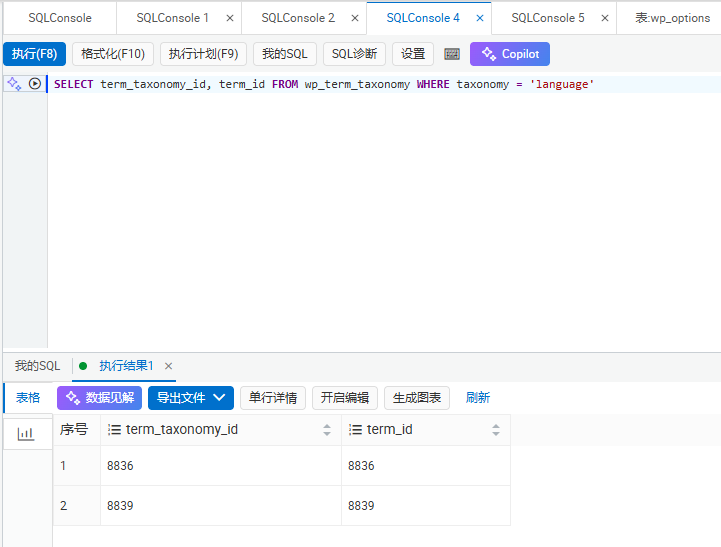
SELECT term_taxonomy_id, term_id FROM wp_term_taxonomy WHERE taxonomy = 'language'
The query result is shown in Figure 9
2. Term_Language : The language classification of the tag, used to give the label marker language
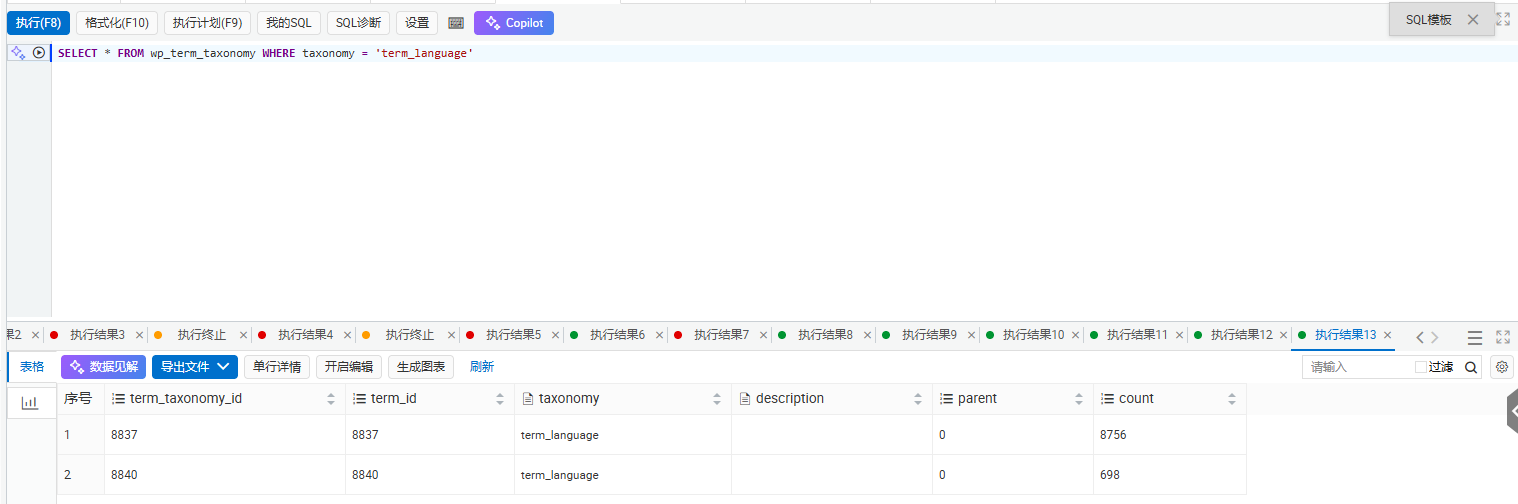
SELECT term_taxonomy_id, term_id FROM wp_term_taxonomy WHERE taxonomy = 'term_language'
The query result is shown in Figure 8
3. term_translations : translation group classification, used to bind the same label in different languages into a group
And these three categories are all native WP_TERM_RELATIONSHIPs through WordPress Tables are associated with labels – in simple terms, the tags themselves, like an article, need to add categories to themselves to mark their own language and which translation group they belong to.
This is the source of my step on the pit at the beginning: I thought it would be fine to just create a tag, and I completely forgot the label and added these hidden categories to myself!
2. The initial stepping on the pit: After changing the database, the translation will not take effect?
At first, what I thought was very simple: isn’t it just to create an English tag and bind the translation? Wouldn’t it be better to change the database directly?
So I wrote the simplest script, inserted data into wp_terms and wp_term_taxoomy (Figure 1), and then went to the background to see, and found:
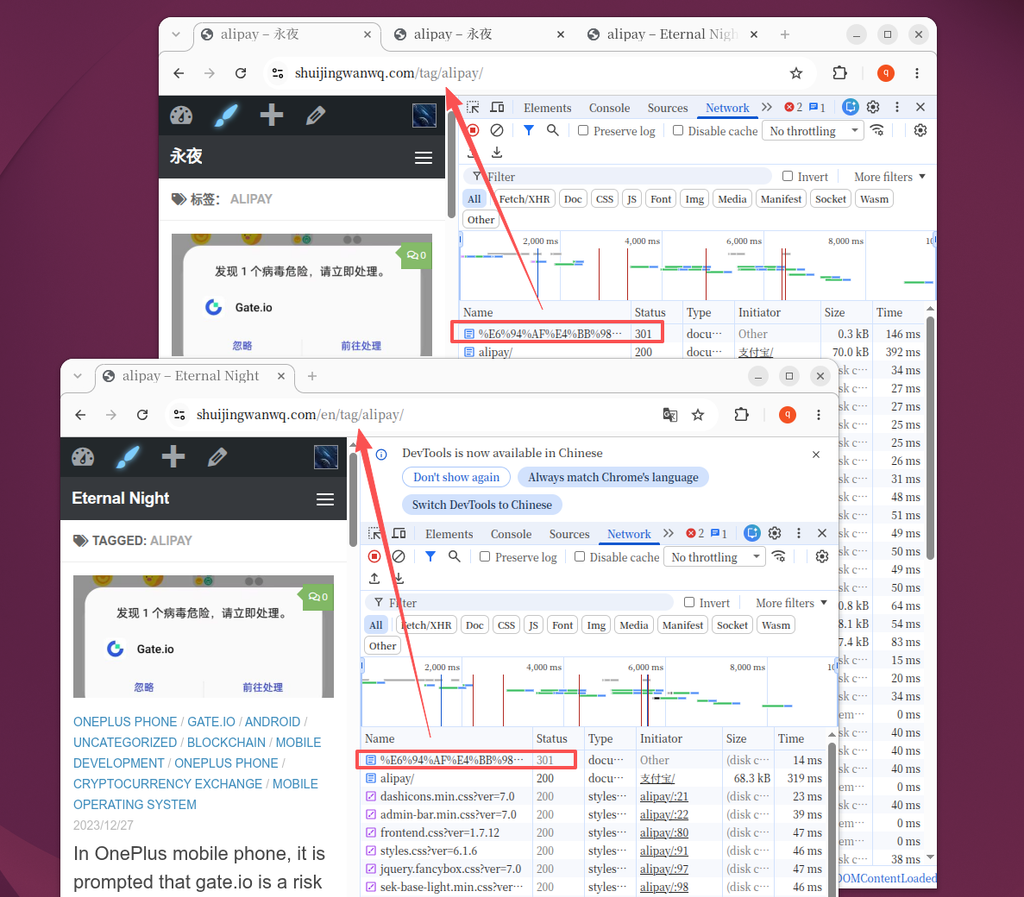
> When editing the tag in the Chinese background, the translation bar of english is empty, and the tag list I just added cannot be seen in the list of tags in the English background! as shown in Figure 6
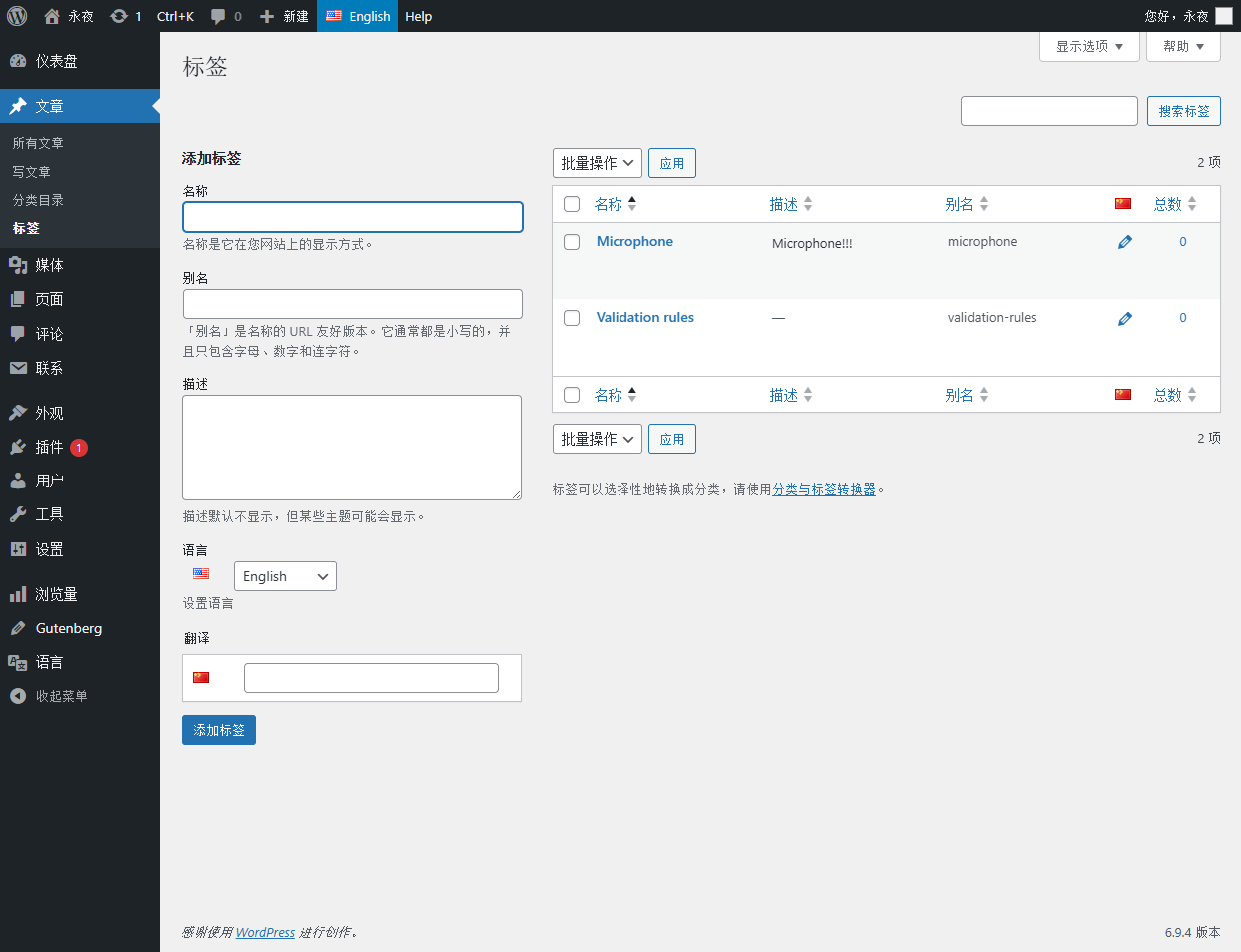
As shown in Figure 5, it is the Chinese editing page at that time. Obviously, I have added an English label, but the translation column is empty.
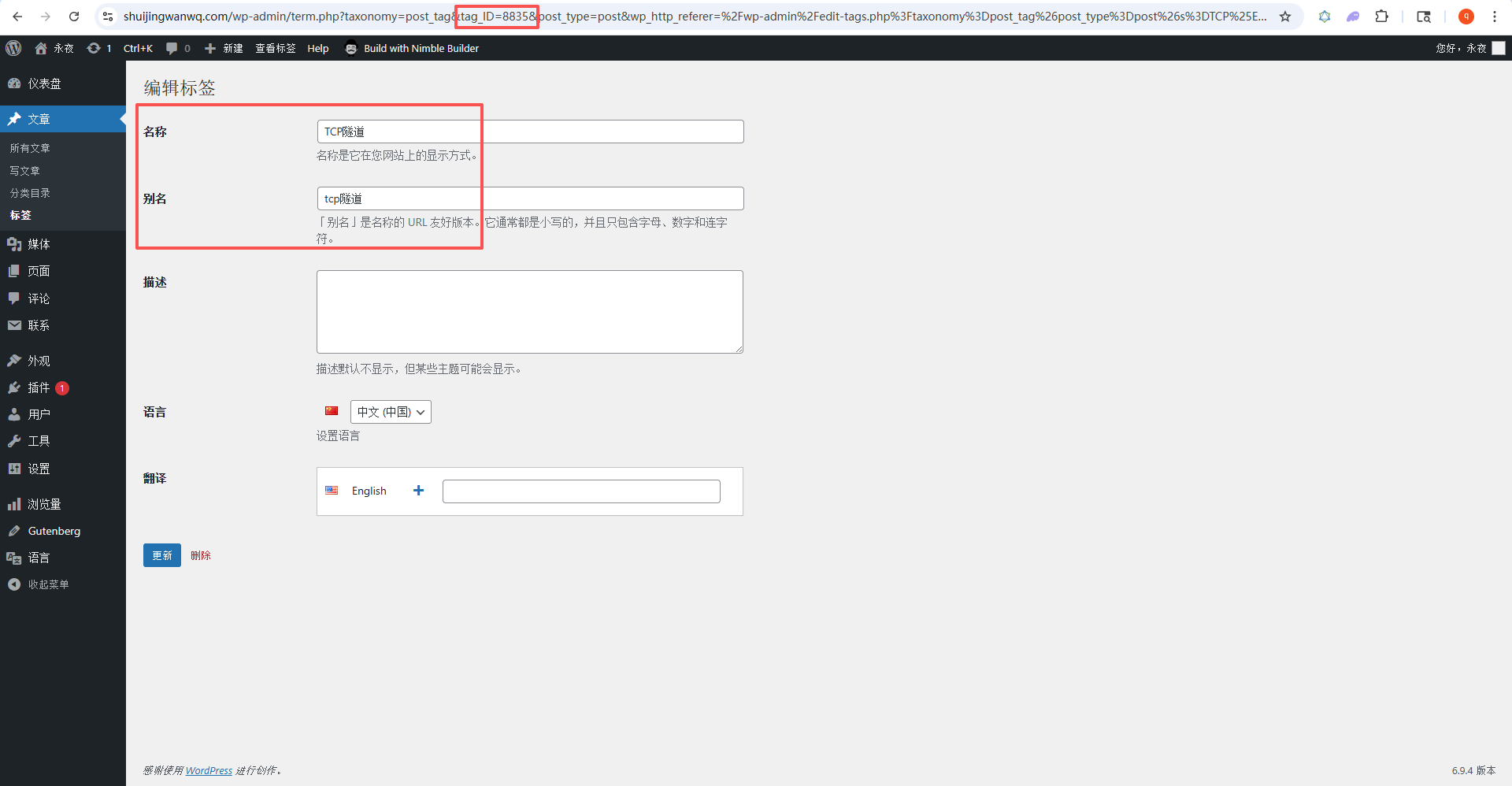
I was stunned at the time, all the fields are correct, why doesn’t it take effect?
3. Check: Compare the labels added manually to find the difference
Since the labels added manually are good, then I will export all the database data of the manually added tags, and compare them with the ones I added. Can you always find the difference?
I chose the two tags that I manually added to the verification rules and validation rules, and executed this sql, and found their associated data:
SELECT
  *
FROM
   wp_terms
ORDER BY
   term_id  DESC
LIMIT
  20;
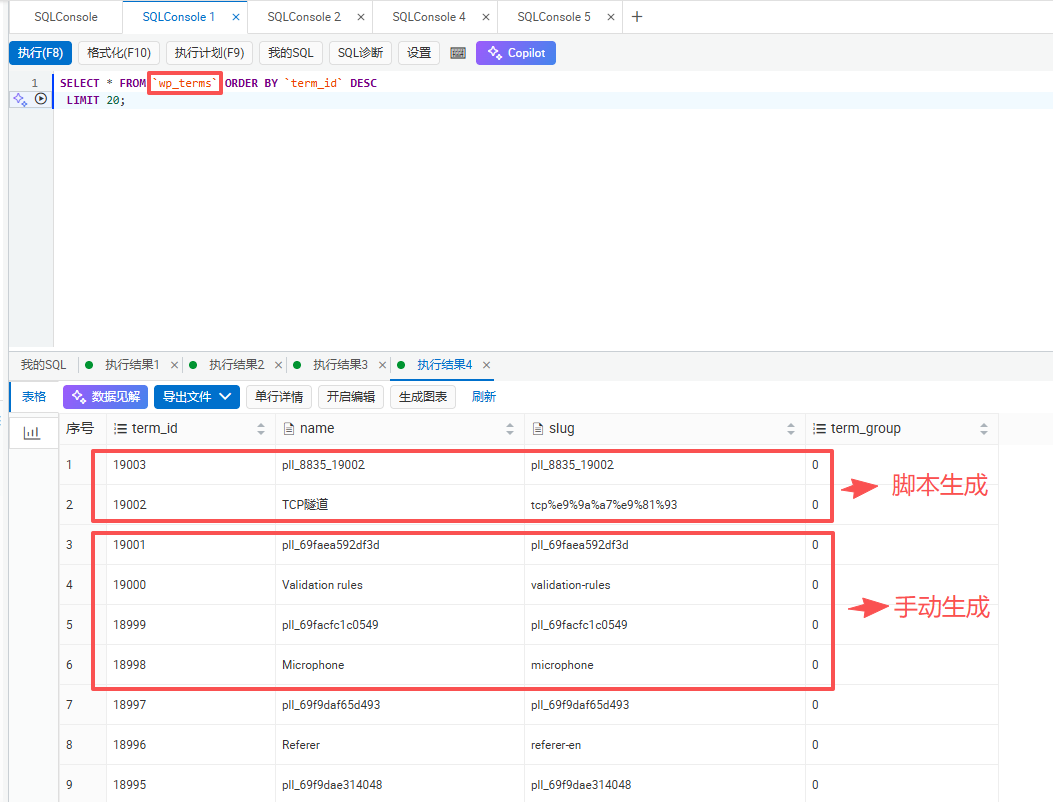
The query result is shown in Figure 2
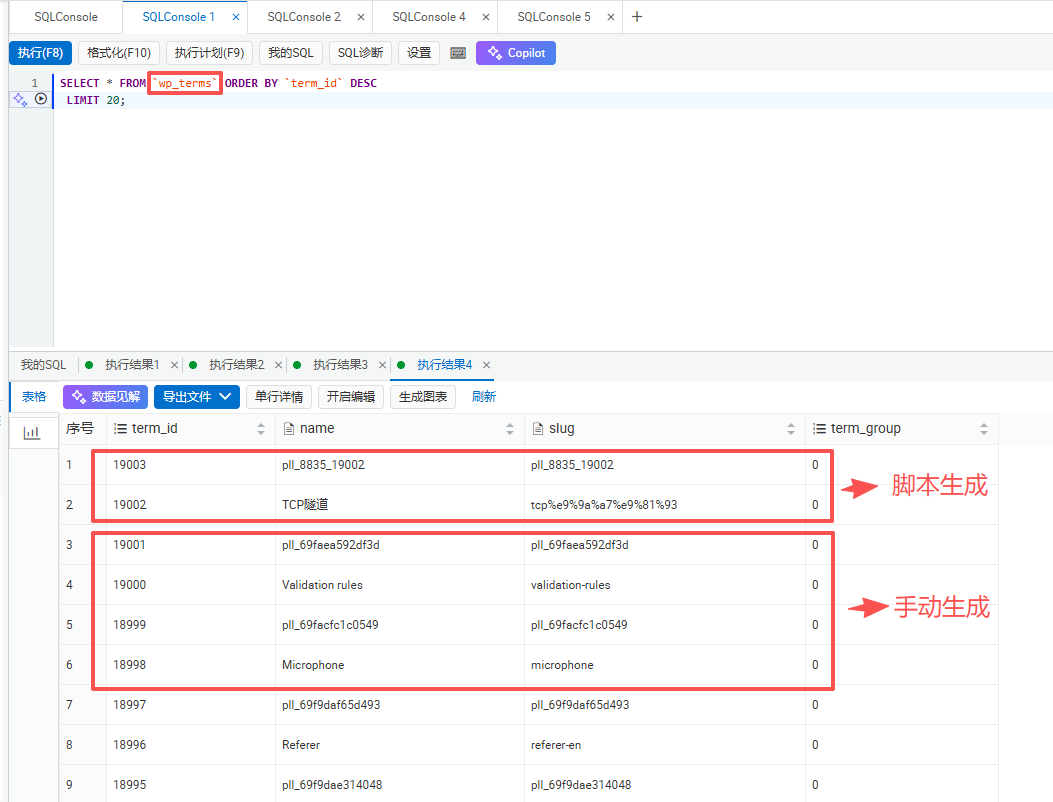
SELECT
  *
FROM
   wp_term_taxonomy
ORDER BY
   term_taxonomy_id  DESC
LIMIT
  20;
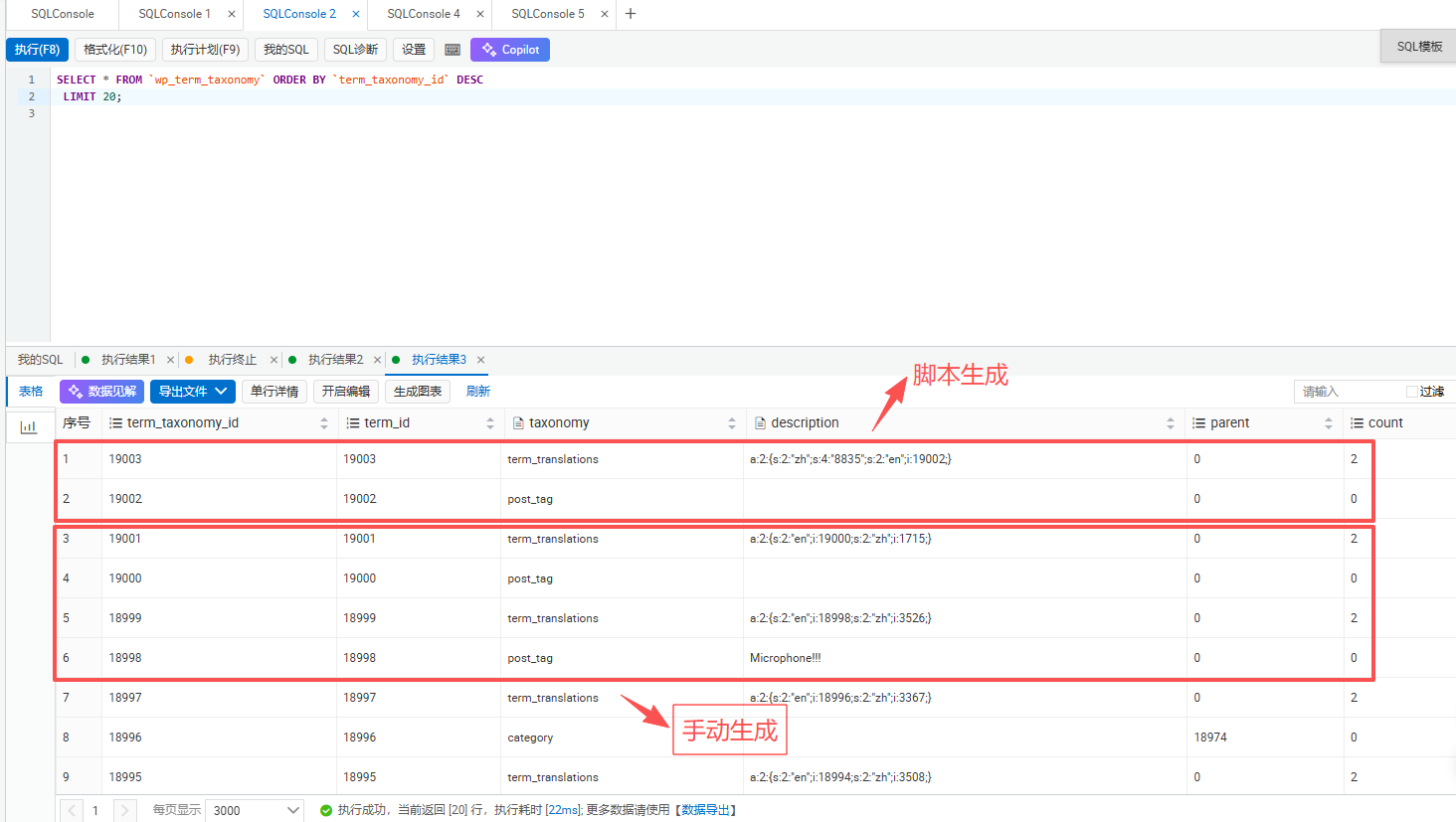
The query result is shown in Figure 3
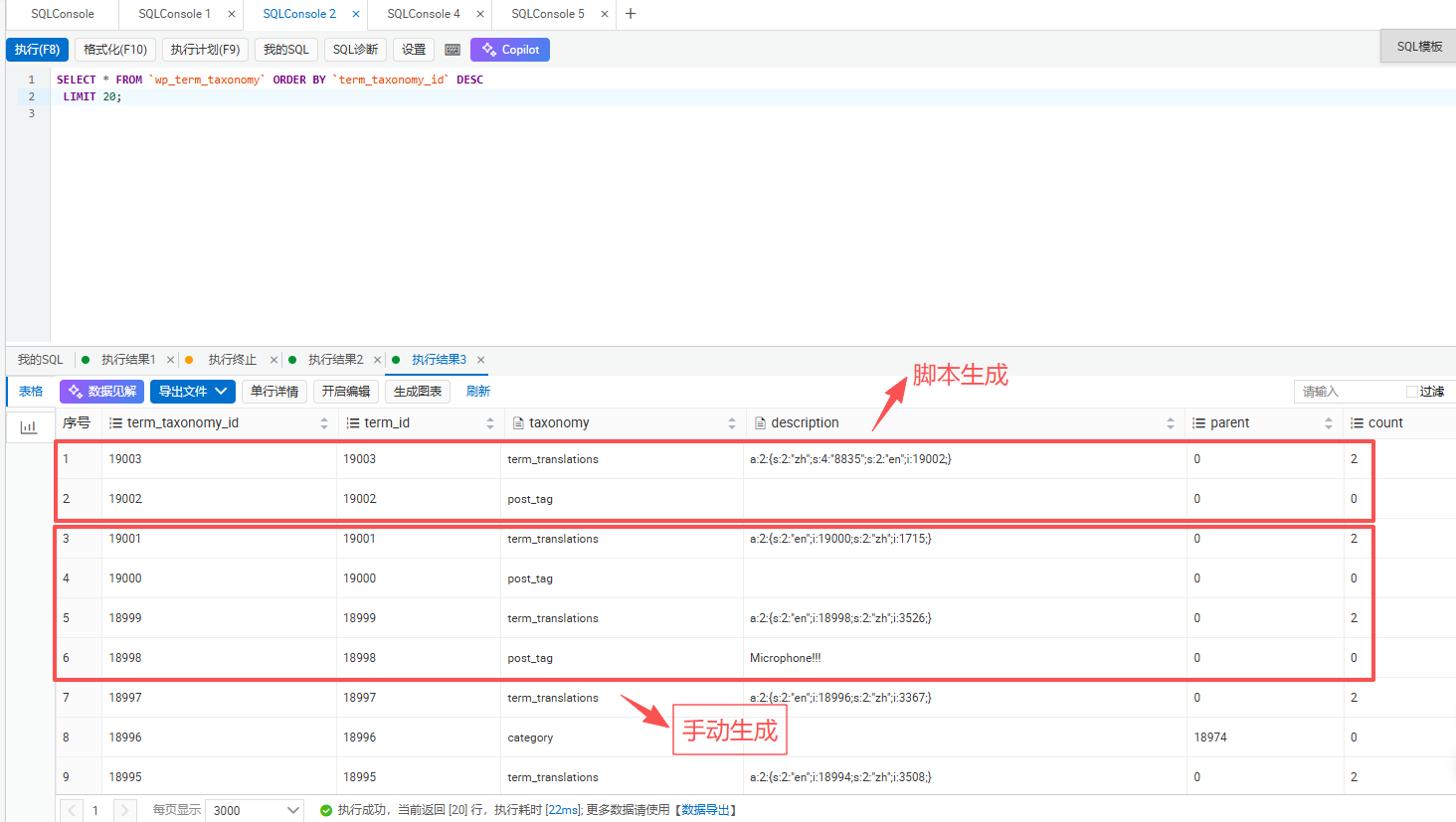
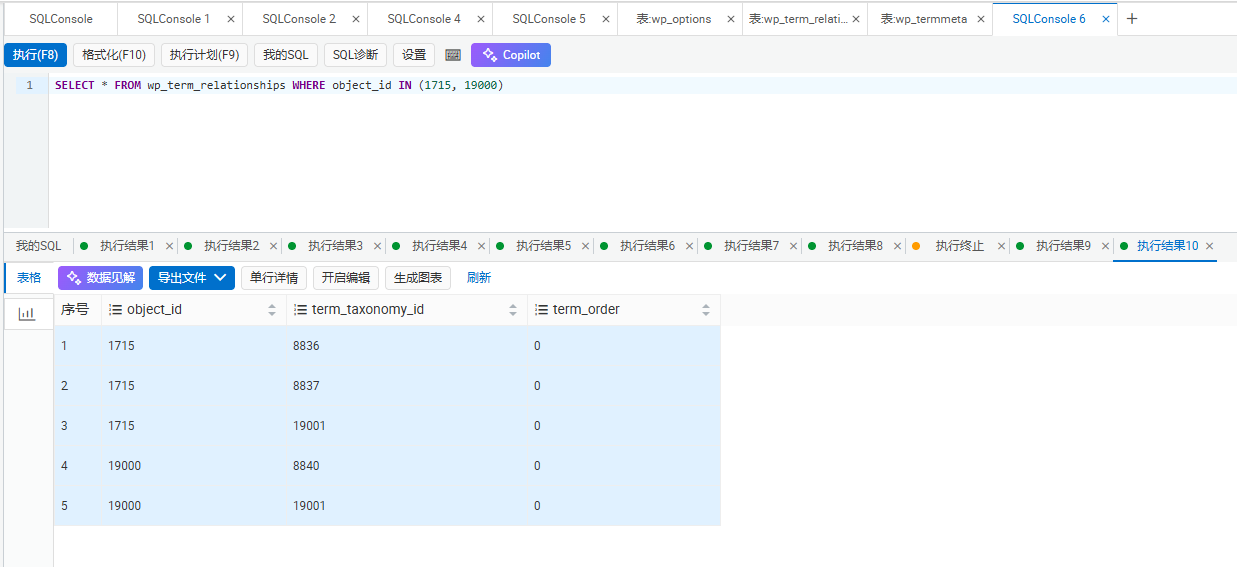
SELECT * FROM wp_term_relationships WHERE object_id IN (1715, 19000)
After the results came out, I instantly understood! Figure 10 is the result of this query:
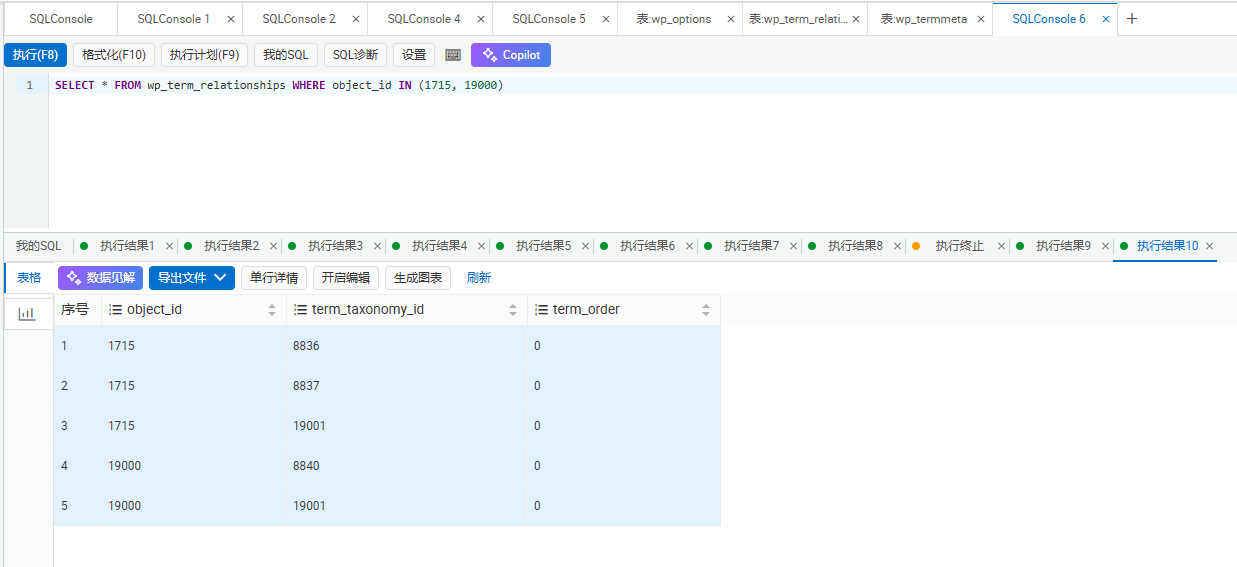
object_id	term_taxonomy_id	term_order
1715	8836	0
1715	8837	0
1715	19001	0
19000	8840	0
19000	19001	0
Oh! It turns out that the manual Chinese label has three connections!
1. 8836: Chinese ID of the language classification, add the classification of the article language to the label
2. 8837: The Chinese ID of the term_language classification, the classification of label language labeling
3. 19001: The translation group ID of the term_translations category, bind the two tags into a group
And my initial script only added the label itself, and none of the three associations were added! Polylang doesn’t know what the language of this new tag is, nor does it know that it is a translation relationship with the Chinese label!
4. Complement the correlation step by step: still wrong?
After finding the problem, I will start to re-correlation one by one:
1. Add the association of term_language to the English tag as shown in Figure 12
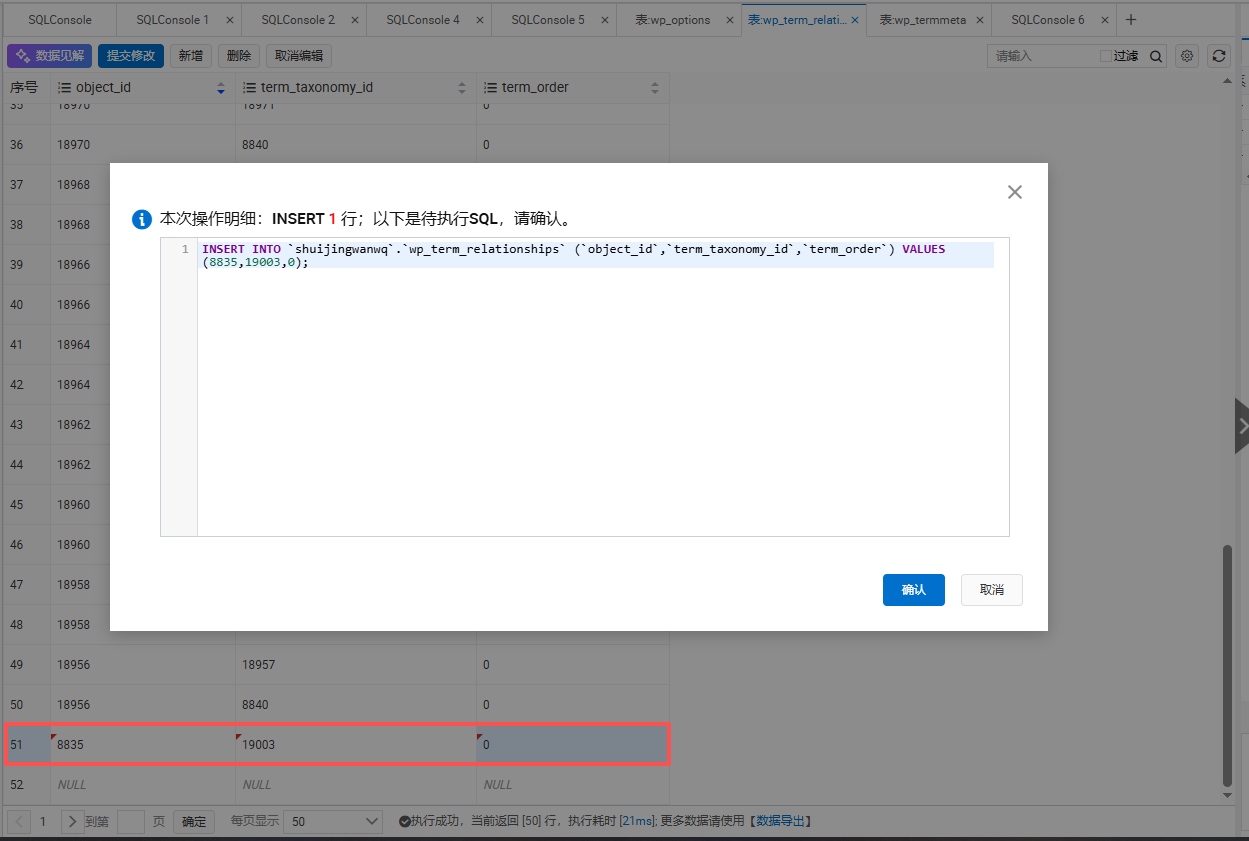
INSERT INTO wp_term_relationships VALUES(19002,8840,0);
The meaning is: give the English label 19002, affix a ‘I am an English label’ label, and the ID of the label is 8840 (that is, the English classification ID in the term_language category I found before). Polylang sees this tag and knows: Oh, this tag is in English.
2. Add the association of TERM_TRANSITIONs to both tags as shown in Figure 11 as shown in Figure 12
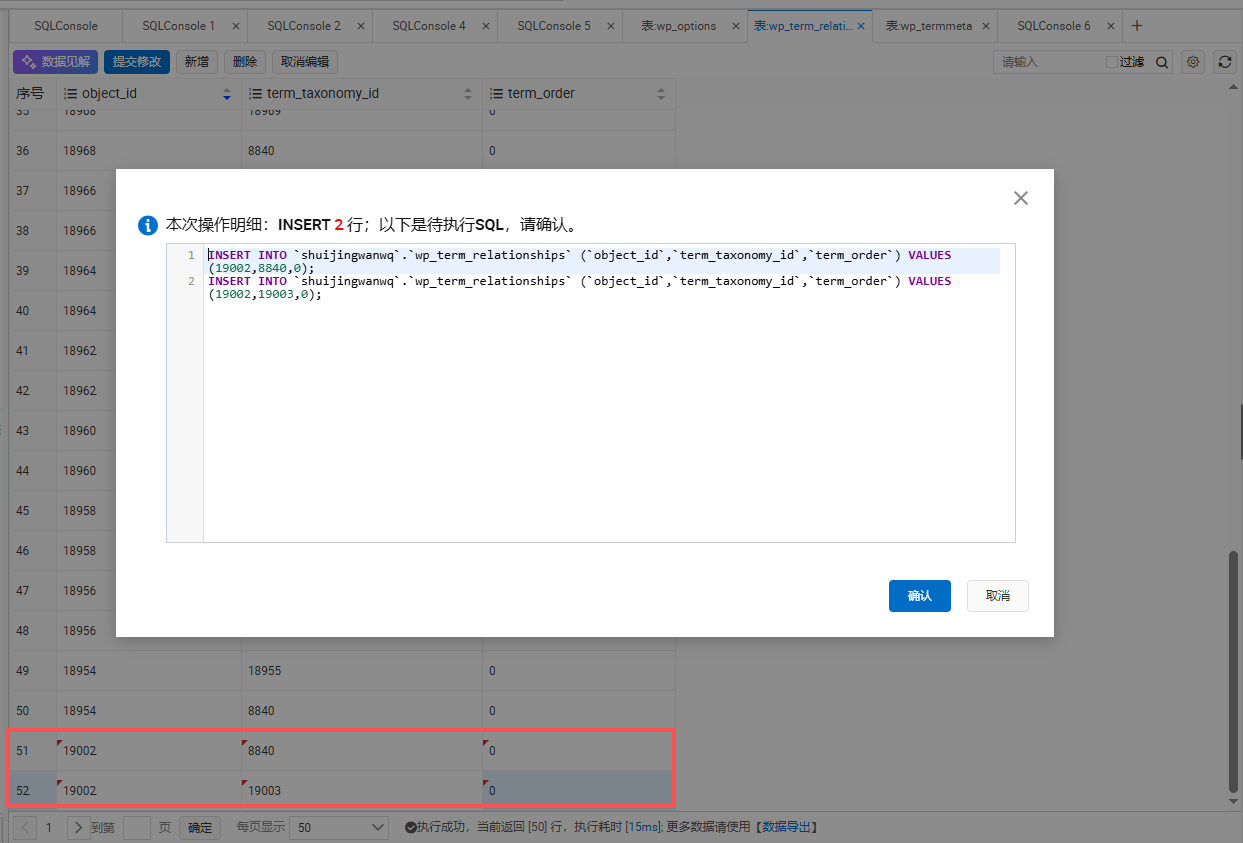
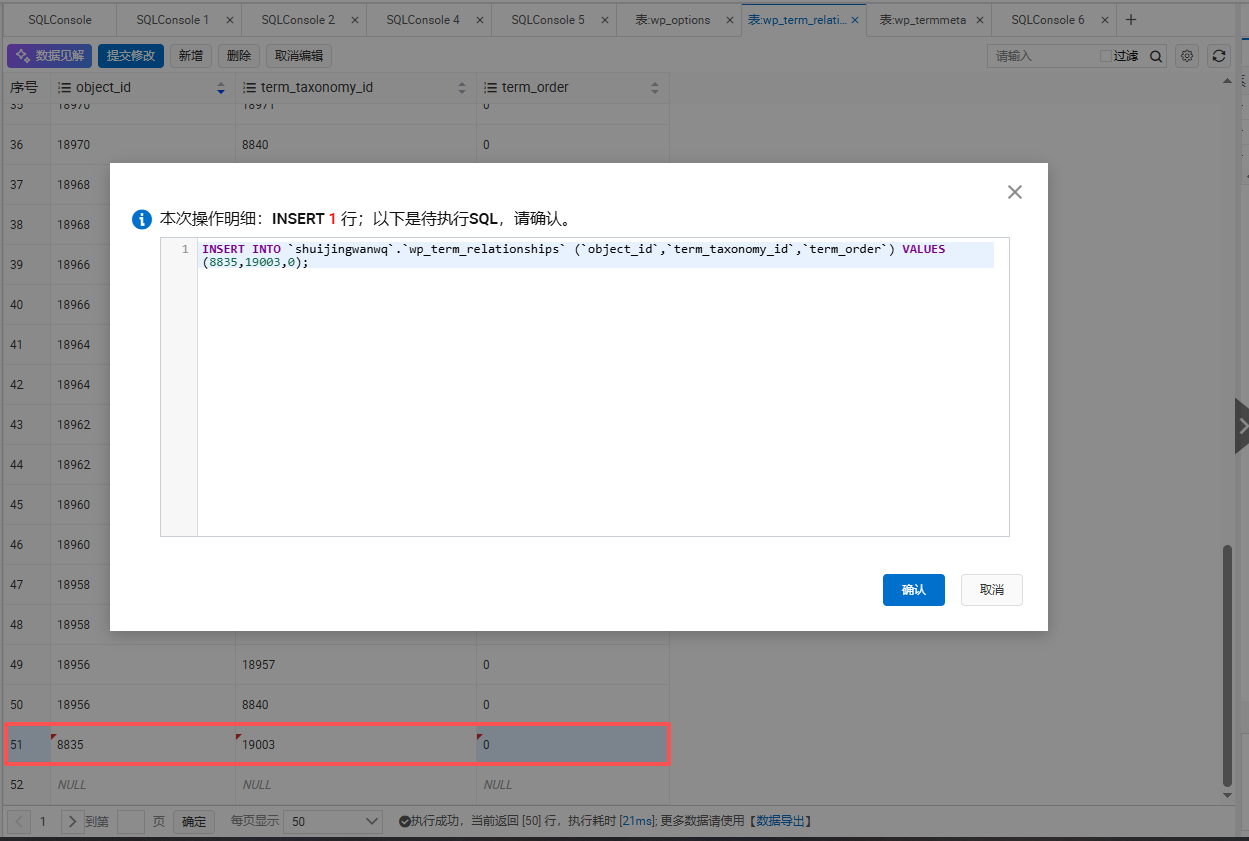
INSERT INTO wp_term_relationships VALUES (8835,19003,0);
INSERT INTO wp_term_relationships VALUES(19002,19003,0);
The meaning is: the Chinese label 8835 and the English label 19002 are all labeled ‘We are in the translation group, the same thing is in different languages’, and the ID of the tag is 19003 (that is, the ID of the translation group I created). Polylang saw that both tags were labeled with the same translation group, and they knew: Oh, these two are translation relationships!
3. Add the link to the Chinese label as shown in Figure 13
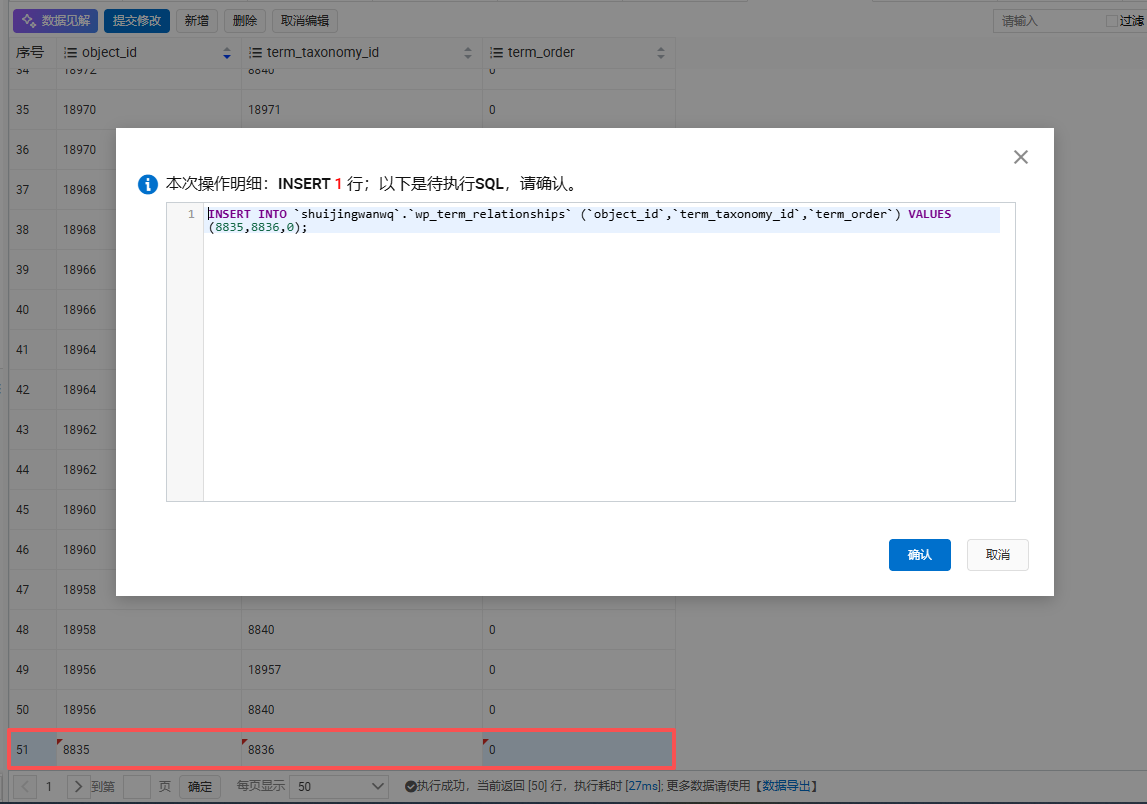
INSERT INTO wp_term_relationships VALUES (8835,8836,0);
The meaning is: give the Chinese label 8835, affix a label of ‘I am Chinese article language’, and the ID of the tag is 8836 (that is, the Chinese classification ID in the language category I found before). Polylang sees this tag, and you know: Oh, this tag is in Chinese, and it should be displayed in the Chinese background.
After the completion, I thought it was good, but I went to the backstage to see it, it was still wrong! When I was editing in Chinese, I still can’t see the English translation!
Obviously all the relationships have been added, but it still does not take effect.
I was stunned at the time, all the fields are exactly the same as the manual, why is it still wrong?
5. Abandon the manual change of the library: use the official function of polylang!
I suddenly reacted: Why should I change the database one by one? When adding manually, polylang has its own functions to do this! Wouldn’t it be better if I just call the function of it directly? No matter what the hidden details, its own function can definitely handle it!
In the core model of Polylang, there are two functions that deal with labels:
1. $polylang->model->term->set_language : Set the language for the tag
2. $polylang->model->term->save_translations : Bind the translation to the label, that is, when you click ‘Add Translation’ in the background, the same function is called!
Oh! Yes! Can I just use these two functions directly? No matter what hidden database details, its own function will definitely handle everything, just like I manually clicked the button in the background!
So I wrote a test script and used these two functions to bind the translation.
test-mouse-tag.php
<?php
if (php_sapi_name() !== 'cli') {
die("❌ 请在命令行运行\n");
}
require __DIR__ . '/wp-config.php';
global $wpdb, $polylang;
// 要处理的新标签:鼠标,ID=2450
$zh_id = 2450;
$name = '鼠标';
$slug = '%e9%bc%a0%e6%a0%87';
echo "🔰 开始处理新标签:{$name},ID: {$zh_id}\n\n";
// 1. 先清理这个标签可能存在的旧英文数据
$old_en_id = pll_get_term($zh_id, 'en');
if ($old_en_id) {
wp_delete_term($old_en_id, 'post_tag');
echo "🗑️ 已清理旧的英文标签,ID: {$old_en_id}\n";
}
echo "🗑️ 已清理所有旧数据\n\n";
// 2. 直接插数据库创建英文标签,绕过WordPress的slug重复检查
$wpdb->insert($wpdb->terms, [
'name' => $name,
'slug' => $slug,
'term_group' => 0
]);
$en_id = $wpdb->insert_id;
echo "ℹ️ 已创建英文标签,ID: {$en_id}\n";
// 3. 英文标签的 post_tag
$wpdb->insert($wpdb->term_taxonomy, [
'term_id' => $en_id,
'taxonomy' => 'post_tag',
'description' => '',
'parent' => 0,
'count' => 0
]);
// 4. 给英文标签设置语言,用Polylang的内部方法
$polylang->model->term->set_language($en_id, 'en');
echo "ℹ️ 已给英文标签设置语言为英文\n";
// 5. 绑定翻译!用Polylang的官方函数!和你手动点击一模一样!
$polylang->model->term->save_translations($zh_id, [
'en' => $en_id
]);
echo "ℹ️ 已用Polylang官方函数绑定翻译\n";
echo "\n✅ 全部完成!\n";
echo " 中文ID: {$zh_id}\n";
echo " 英文ID: {$en_id}\n";
echo " 已经用Polylang官方函数绑定了翻译,和手动添加完全一样!\n\n";
echo "🎉 现在刷新后台,所有的关联都已经正常了!\n";
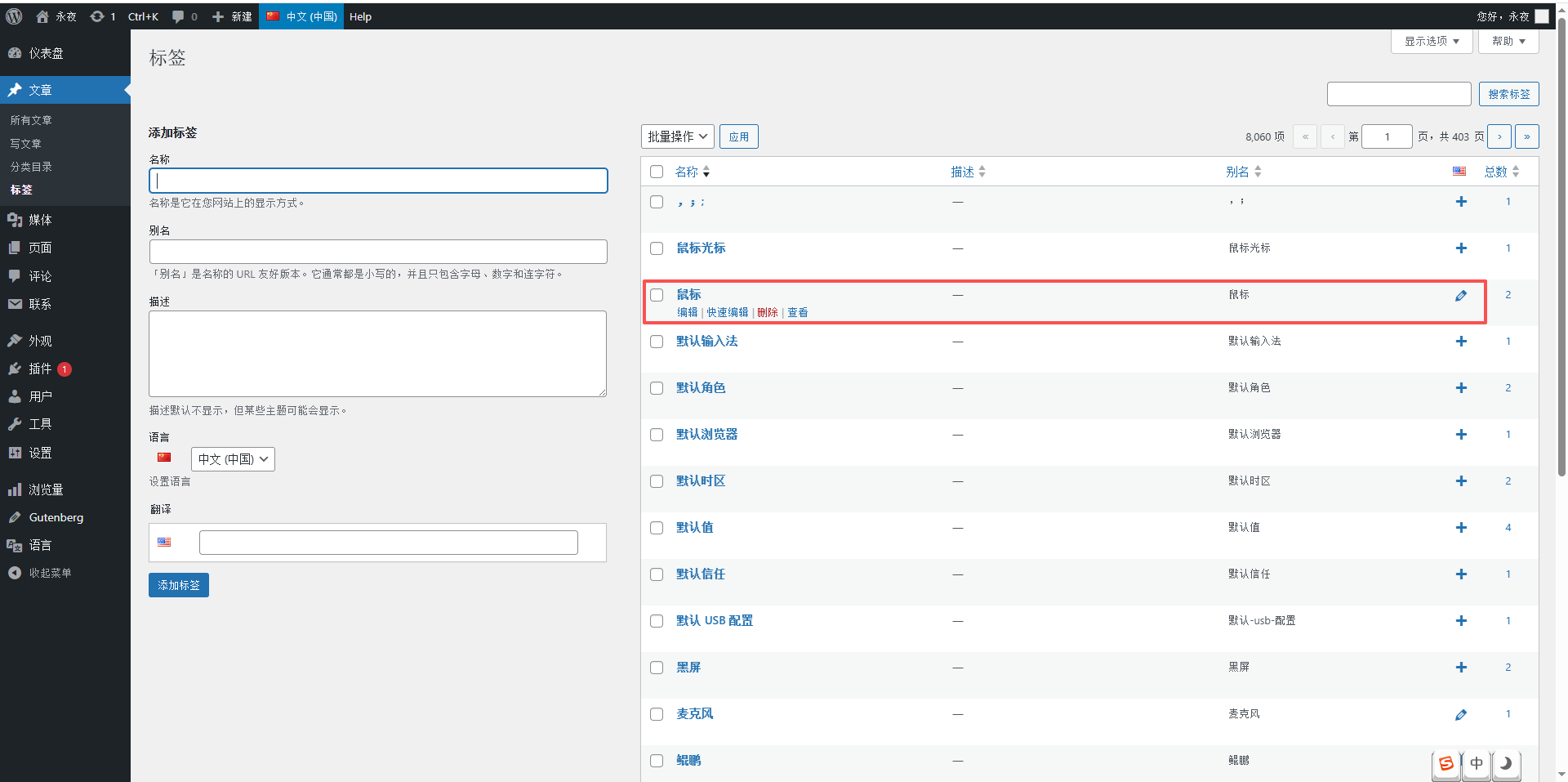
Then I used the mouse tag to test, and after running, I went to the background to see:
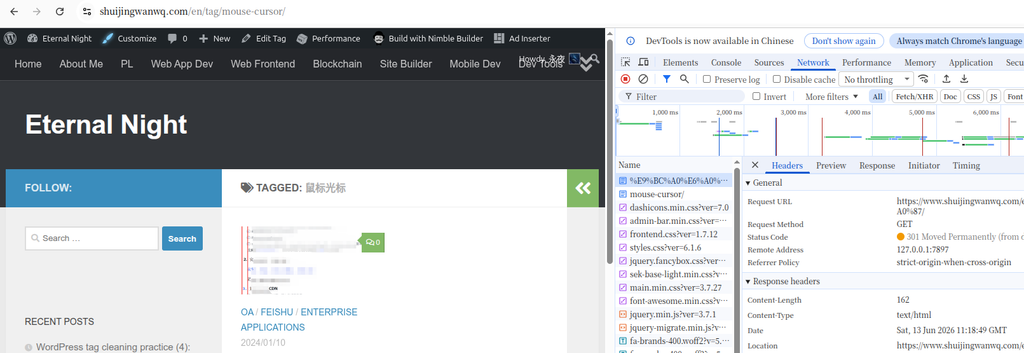
> When editing the mouse in the Chinese background, the translation bar of english automatically appears (as shown in Figure 15)!
You can also see the mouse tag in the list of tags in the English background! (as shown in Figure 16)
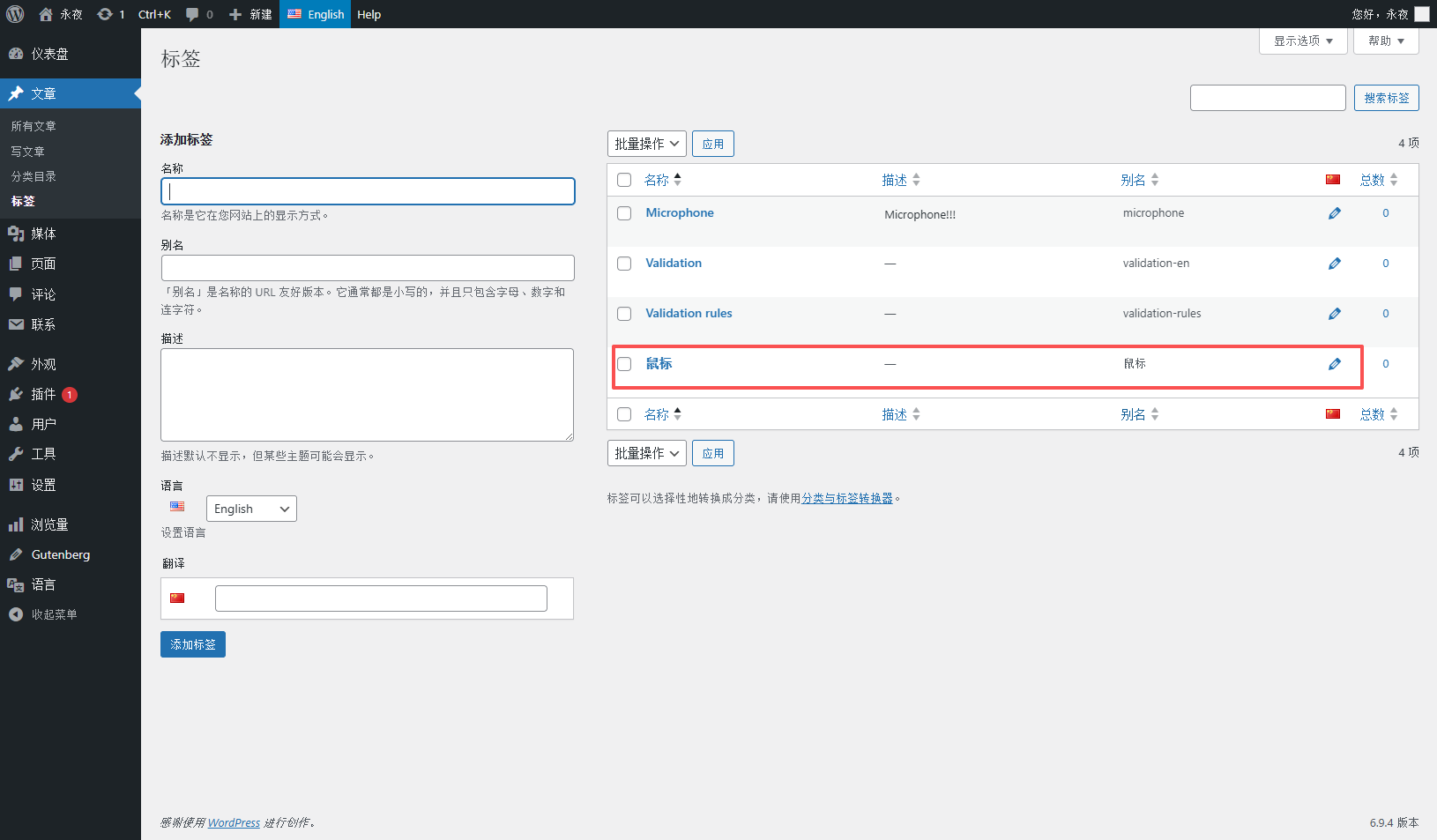
Finally! It’s done!
6. Pits in batch processing: not enough memory?
It is no problem to test a single tag, so I want to process all the tags in batches, so I wrote a script, took out all the Chinese labels at a time, and then processed them in a loop.
polylang-batch-zh-to-en-tags.php
<?php
if (php_sapi_name() !== 'cli') {
die("❌ 请在命令行运行\n");
}
require __DIR__ . '/wp-config.php';
global $wpdb, $polylang;
echo "🚀 开始批量处理所有中文标签...\n\n";
// 1. 直接拿到所有的中文post_tag标签,Polylang自动帮我过滤!
$zh_terms = get_terms([
'taxonomy' => 'post_tag',
'lang' => 'zh',
'hide_empty' => false,
'number' => 0, // 拿所有的
]);
if (is_wp_error($zh_terms) || empty($zh_terms)) {
die("❌ 没有找到中文标签\n");
}
$total = count($zh_terms);
$processed = 0;
$skipped = 0;
echo "📊 共找到 {$total} 个中文标签,开始处理...\n\n";
// 2. 循环处理每个标签
foreach ($zh_terms as $term) {
$zh_id = $term->term_id;
$name = $term->name;
$slug = $term->slug;
// 检查是不是已经有英文翻译了,有的话直接跳过
$en_id = pll_get_term($zh_id, 'en');
if ($en_id) {
$skipped++;
continue;
}
echo "🔰 正在处理: {$name} (ID: {$zh_id})\n";
// 3. 创建英文标签,绕过slug重复检查
$wpdb->insert($wpdb->terms, [
'name' => $name,
'slug' => $slug,
'term_group' => 0
]);
$new_en_id = $wpdb->insert_id;
// 4. 英文标签的post_taxonomy
$wpdb->insert($wpdb->term_taxonomy, [
'term_id' => $new_en_id,
'taxonomy' => 'post_tag',
'description' => '',
'parent' => 0,
'count' => 0
]);
// 5. 设置英文标签的语言
$polylang->model->term->set_language($new_en_id, 'en');
// 6. 绑定翻译
$polylang->model->term->save_translations($zh_id, [
'en' => $new_en_id
]);
$processed++;
}
echo "\n🎉 全部处理完成!\n";
echo "📊 统计:\n";
echo " 总中文标签: {$total}\n";
echo " 已处理新标签: {$processed}\n";
echo " 已跳过已有翻译: {$skipped}\n";
echo "\n✅ 所有标签都已经处理完毕,和手动添加的完全一样!现在刷新后台,所有的翻译都已经正常了!\n";
As soon as I ran halfway, I got an error:
PHP Fatal Error: Allowed Memory Size of 134217728 Bytes Exhausted
This is a memory error, 8000 tags are loaded at a time, and the memory is directly exploded.
Oh yes, my server only has 128M PHP memory, loading 8000 tags at a time, I really can’t hold it. So what to do?
Seven, paging processing: solving memory problems
It’s very simple, I changed it to page processing, only took 1000 tags at a time, and released the memory after processing, so that the memory will not explode!
Paging logic, take 1000 pieces each time, process it, and then release the 1000 memory, and then take the next page, so no matter how many tags there are, the memory is enough.
polylang-batch-zh-to-en-tags.php
<?php
if (php_sapi_name() !== 'cli') {
die("❌ 请在命令行运行\n");
}
require __DIR__ . '/wp-config.php';
global $wpdb, $polylang;
// 配置:一次处理多少个,你可以根据自己的服务器调整
$per_page = 1000;
// 配置:源语言和目标语言,以后其他语言直接改这里就好
$source_lang = 'zh';
$target_lang = 'en';
echo "🚀 开始批量处理所有{$source_lang}标签,自动添加{$target_lang}翻译(分页模式)...\n\n";
$processed = 0;
$skipped = 0;
$offset = 0;
while (true) {
// 分页拿源语言标签
$terms = get_terms([
'taxonomy' => 'post_tag',
'lang' => $source_lang,
'hide_empty' => false,
'number' => $per_page,
'offset' => $offset,
]);
if (is_wp_error($terms) || empty($terms)) {
break;
}
$current_count = count($terms);
echo "📊 正在处理第 " . ($offset + 1) . " - " . ($offset + $current_count) . " 个标签...\n";
foreach ($terms as $term) {
$source_id = $term->term_id;
$name = $term->name;
$slug = $term->slug;
// 检查是不是已经有目标语言的翻译了
$target_id = pll_get_term($source_id, $target_lang);
if ($target_id) {
$skipped++;
continue;
}
echo "🔰 正在处理: {$name} (ID: {$source_id})\n";
// 创建目标语言标签,绕过slug重复检查
$wpdb->insert($wpdb->terms, [
'name' => $name,
'slug' => $slug,
'term_group' => 0
]);
$new_target_id = $wpdb->insert_id;
// 目标语言标签的taxonomy
$wpdb->insert($wpdb->term_taxonomy, [
'term_id' => $new_target_id,
'taxonomy' => 'post_tag',
'description' => '',
'parent' => 0,
'count' => 0
]);
// 设置目标语言
$polylang->model->term->set_language($new_target_id, $target_lang);
// 绑定翻译
$polylang->model->term->save_translations($source_id, [
$target_lang => $new_target_id
]);
$processed++;
}
$offset += $per_page;
unset($terms);
gc_collect_cycles();
}
echo "\n🎉 全部处理完成!\n";
echo "📊 统计:\n";
echo " 已处理新标签: {$processed}\n";
echo " 已跳过已有翻译: {$skipped}\n";
echo "\n✅ 所有标签都已经处理完毕,和手动添加的完全一样!\n";
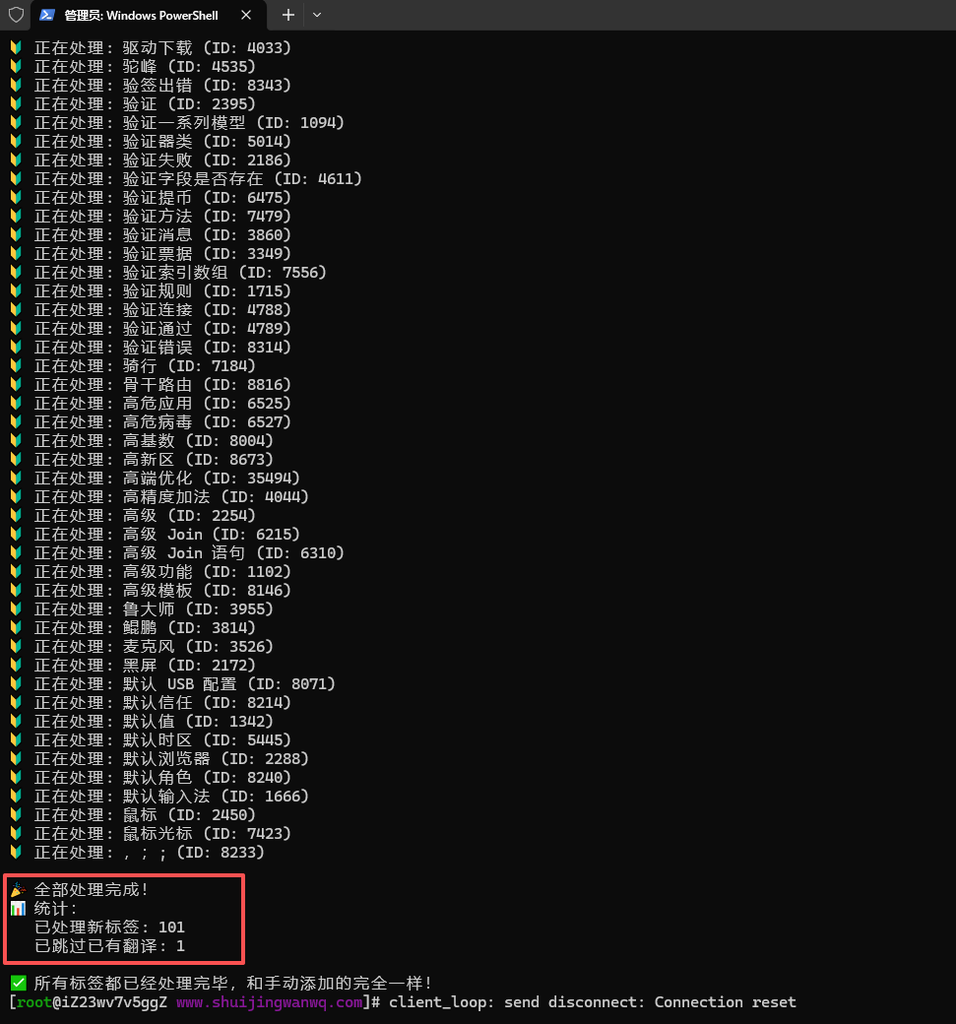
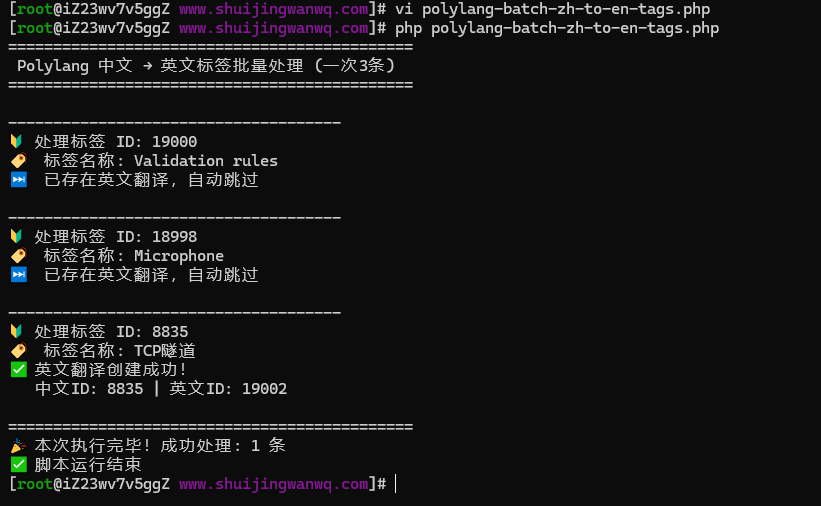
🔰 正在处理: 黑屏 (ID: 2172)
🔰 正在处理: 默认 USB 配置 (ID: 8071)
🔰 正在处理: 默认信任 (ID: 8214)
🔰 正在处理: 默认值 (ID: 1342)
🔰 正在处理: 默认时区 (ID: 5445)
🔰 正在处理: 默认浏览器 (ID: 2288)
🔰 正在处理: 默认角色 (ID: 8240)
🔰 正在处理: 默认输入法 (ID: 1666)
🔰 正在处理: 鼠标光标 (ID: 7423)
🔰 正在处理: ,;; (ID: 8233)

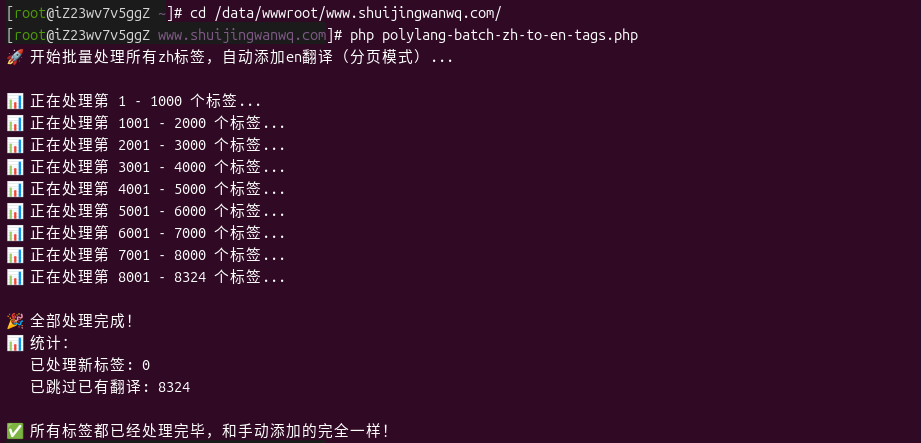
🎉 全部处理完成!
📊 统计:
   已处理新标签: 2941
   已跳过已有翻译: 5119

✅ 所有标签都已经处理完毕,和手动添加的完全一样!
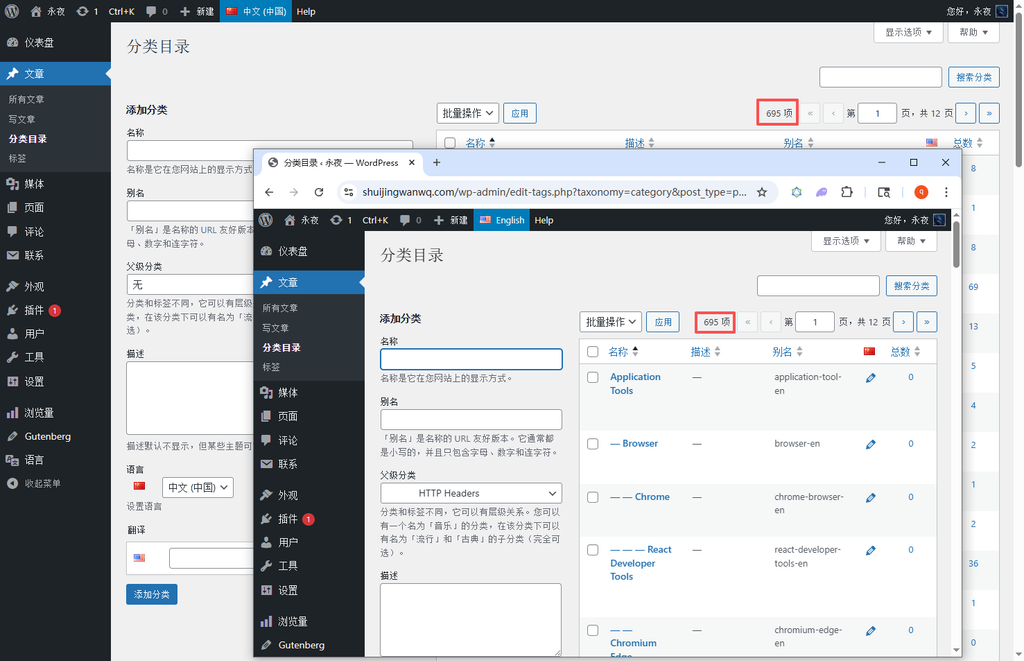
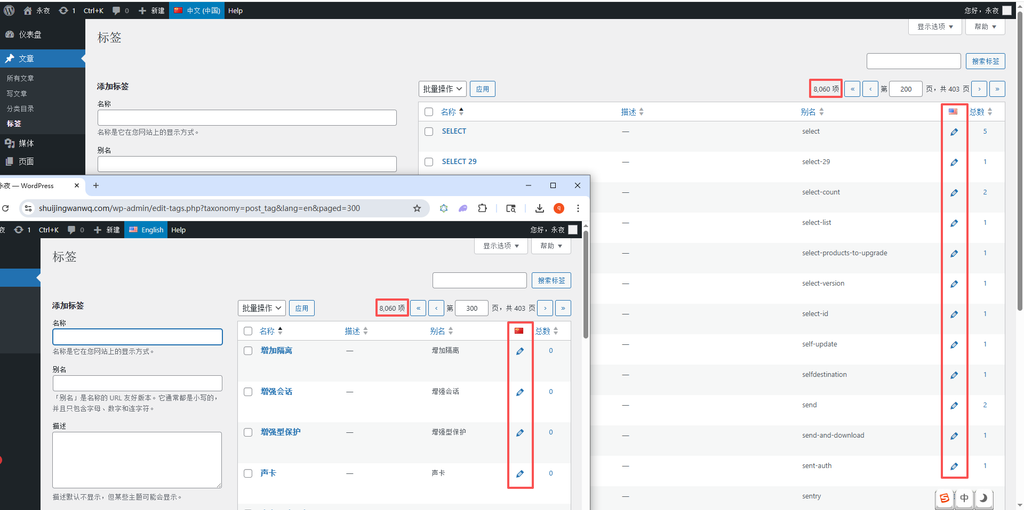
Finally, check the statistics of the tags under the Chinese and English backgrounds respectively, which is in line with expectations. as shown in Figure 17
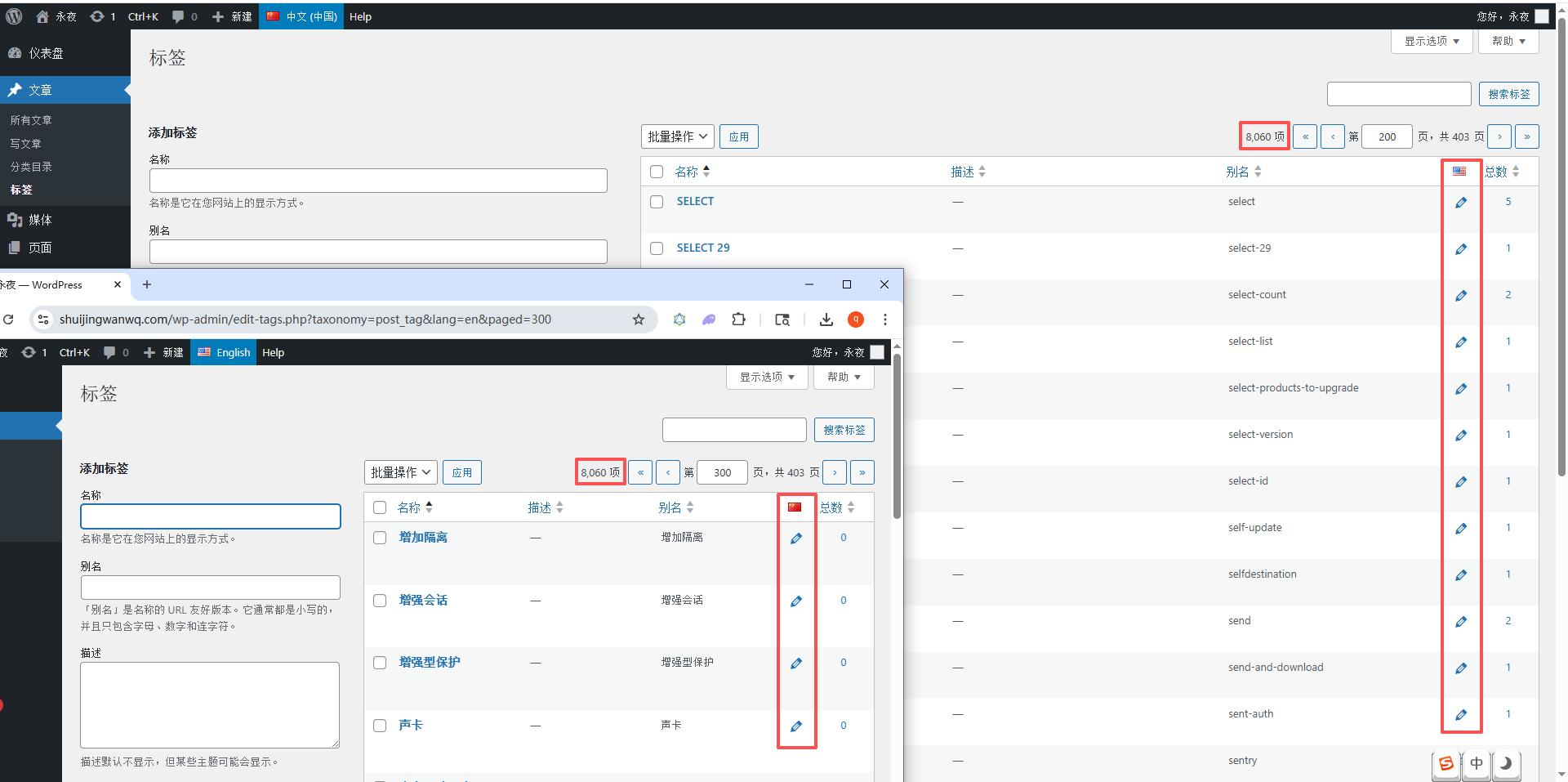
8. Generalization: other languages can also be used in the future
After finishing the Chinese to English, I thought, if I want to add other languages in the future, such as French and German, do I have to rewrite the script?
Of course not! I changed the script to a general one, as long as I change the top two parameters, I can handle the translation of any language:
// 配置:一次处理多少个,你可以根据自己的服务器调整
$per_page = 1000;
// 配置:源语言和目标语言,以后其他语言直接改这里就好
$source_lang = 'zh';
$target_lang = 'en';
This general configuration, no matter what language you want to translate into any language in the future, just change these two parameters and run it directly, you don’t need to change anything else at all!
9. Analysis of the table structure of the whole process: understand the role of each table
At this point, I have figured out all the tables of the entire process. Today, I will share all the functions of the tables with you. When you change it yourself, you will not be wrong:
1. WP_TERMS: Basic information of the label
This table stores the most basic information of the label, whether it is Chinese or English labels, it exists here:
term_id | name | slug | term_group
– name : the name of the tag, I use it directly in Chinese here
– slug : the alias of the tag, I also directly encoded the result of the Chinese url
As shown in Figure 2, it is the example data of this table.
2. WP_TERM_TAXONOMY: Tag classification information
This table stores the classification information of the label, which is used to mark whether the tag is post_tag , or term_language , or term_translations :
TERM_TAXONOMY_ID | TERM_ID | TAXONOMY | Description | Parent | Count
– Taxonomy : Category type, my tag is post_tag , the translation group is term_translations
– description : If the translation group, there is a serialized translation relationship, such as a:2:{s:2:’en’;I:19002;s:2:’zh’;i:8835;}
As shown in Figure 3, it is the example data of this table.
3. wp_term_relationships: Association information
This table is at its core, and all associations exist here:
Object_ID | TERM_TAXONOMY_ID | TERM_ORDER
– Chinese tags, to be associated with three: language , term_language , term_translations
– English tags, two to be associated: term_language , term_translations
As shown in Figure 10, it is the example data of this table, which is exactly the same as the manual.
10. SQL analysis of the investigation process: how did I find the problem
During the whole investigation process, I used a lot of sql to analyze the data, and today I will also share these sql with you. In the future, you can also use it when you check it yourself:
1. Check the ID of term_language
SELECT term_taxonomy_id, term_id FROM wp_term_taxonomy WHERE taxonomy = 'term_language'
This sql is used to check the ID of the term_language corresponding to your language. My Chinese is 8837 and English is 8840.
2. Check all the links of the label
SELECT * FROM wp_term_relationships WHERE object_id = 你的标签ID
This sql is used to check all the connections of your tags to see if there is any missing one
3. Check the label for translation
SELECT pll_get_term(你的中文标签ID, 'en')
This sql is used to check if your Chinese tag has an English translation, and if you have any, skip it
4. Compare the association between manual and script
-- 手动的
SELECT * FROM wp_term_relationships WHERE object_id IN (1715, 19000)
-- 脚本的
SELECT * FROM wp_term_relationships WHERE object_id IN (8835, 19002)
This is what I used when I first checked, compare the differences between the two
11. Summary of stepping on the pit: those pits I have stepped on
During the whole process, I stepped on countless pits, and I will share them with you today to avoid you stepping on it again:
1. Missing the association of wp_term_relationships
At first, I only created the tags, and forgot to add hidden classification associations to the tags, so that polylang could not recognize the language of the tags.
2. The memory is not enough, load all tags at once
Load 8000 tags at a time, directly explode the memory, and then change it to a page.
3. WordPress Slug Duplicate Check
WordPress defaults to the slug in the same category by default, so I have to bypass this check and directly insert the database to create two identical slug tags.
12. Final effect: 8060 tags, done in a few minutes
In the end, I ran the entire script, 8060 Chinese tags, all automatically generated the corresponding English tags, all the translation associations are normal, the Chinese and English background can be displayed normally, and the translation is normal when editing.
The final statistical result:
🔰 Processing: Mouse cursor (ID: 7423)
🔰 Processing: ,;; (ID: 8233)
🎉 All processing is complete!
📊 Statistics:
New tags processed: 2941
Skipped already translated: 5119
✅ All tags have been processed, exactly the same as manually added!
More than 8,000 tags, it only took less than 5 minutes to run, and I don’t know how many times faster than manual!
13. For the Chinese label under the English language: Why did I choose to copy it as it is?
Many friends may be curious: why don’t you translate Chinese labels into real English? For example, translate the `mouse` into `mouse`, and translate the `pipe` into `channel`? In fact, at the beginning, I also considered the automatic translation of the tag name, but after careful weighing, I finally decided to copy a copy of the Chinese label as it was, as a label in English language, and do not do translation. There are two reasons:
1. Avoid duplicate labels and mess up my label system
I have manually made real English translations of some commonly used technical tags, such as the tag `pipe`, I have manually translated it into `channel`, if I use automatic translation to translate all Chinese labels into English, I will In the English background, a brand new `Channel` tag is generated, which causes two identical `Channel` tags to appear in the English background. One is manually translated by me, and the other is automatically generated, which directly messed up my entire label system.
And if I copy the Chinese label as it is, I will not have this problem. The slug and name of the automatically generated English tags are all in Chinese, and there is no conflict with the English labels I manually translated.
2. Match the screenshot label of the blog to avoid user confusion
There are a lot of technical screenshots in my blog. These screenshots are all operation interfaces in my Chinese environment. The buttons, labels, and menus in it are all in Chinese. When I write articles, the labels added to these articles are also corresponding Chinese tags.
If I translate the label into English, then when the English user reads the article, the label of the article is in English, but the label in the screenshot is in Chinese, and the user will be completely confused: ‘Why is the article label is channel, and the screenshot is the pipeline? Are these two the same thing?’
If the Chinese label is kept as it is, there will be no such problem at all. The label is completely corresponding to the content in the screenshot, and the user can match it at a glance.
So in the end, I chose this solution that is most suitable for my blog: copy a Chinese label as it is, as a label in English language, it will not mess up my label system, and it can also be perfectly matched with screenshots.
Finally: a little regret
In fact, in the end, I still can’t fully understand: polylang’s save_translations In the end, in addition to the fact that I have completed all the connections manually, I also secretly added some hidden details – obviously I have manually added all the tables , all the relationships, all the fields are exactly the same as manual, but they just don’t take effect, and the function that calls it, everything is normal.
This is a little regret in the whole process. Due to time constraints, I couldn’t put polylang. 100% of all hidden details are picked up, but it doesn’t matter ), which also taught me a lesson: never try to simulate the database operation of the plugin, it is the most stable to use its own function directly.
No matter what the hidden details of the plugin, its own function will definitely be able to handle everything, just like you manually click the button in the background, you don’t have to step on the pit one by one.
But no matter what, in the end, I finally got the batch translation of these 8060 tags. Although the whole process has stepped on a lot of pits, I finally got this general tool. No matter what language label is added in the future, just change two parameters to get it, this is enough~
WordPress Maintenance, Performance Optimization & Blog Growth Consulting
I have been running my personal technology blog for more than 10 years and have published over 1,000 original articles. My long-term practice covers WordPress website maintenance, CDN / Cloudflare configuration, caching optimization, Google SEO, ad monetization, and multilingual website operations.
If your WordPress website is slow, unstable, affected by plugin conflicts, showing caching issues, having AdSense display problems, or facing CDN / Cloudflare / DNS configuration uncertainty, feel free to contact me for remote troubleshooting.
Ideal For:
✅ Personal blog owners
✅ WordPress website operators
✅ Independent developers and content creators
✅ SaaS website owners
✅ Website owners who want better speed and stability
What I Offer:
✅ WordPress performance optimization
✅ Cloudflare / CDN / caching configuration checks
✅ Plugin conflict and layout issue troubleshooting
✅ AdSense display issue troubleshooting
✅ Basic SEO structure review
✅ Blog growth and monetization consulting
If you would like to discuss your website, please contact me and mention: WordPress Maintenance Consultation.
Contact Me:
Telegram: @shuijingwan
WeChat: 13980074657
Email: shuijingwanwq@gmail.com
Leave a Reply