WordPress tab save failed? Nginx’s current restriction rules – a complete 429 troubleshooting and solving
Background
A WordPress site I maintain, in order to enhance security protection, I have recently configured a global restriction rule in Nginx. Shortly after the configuration was completed, when editing the article, it was found that the tag could not be added and saved normally, and the browser console and nginx logs appeared frequently 429 Too Many Requests And 400 bad request. After gradual investigation, the final target of the culprit is the overly strict flow restriction rules. This article will completely record the problem phenomenon, troubleshooting ideas, solutions and verification process, hoping to provide reference for friends who encounter similar problems. Reference:From 126 504 times in a single day to completely stable: WordPress 1-core 2G server extreme optimization full record (with all practical commands)
1. Problems
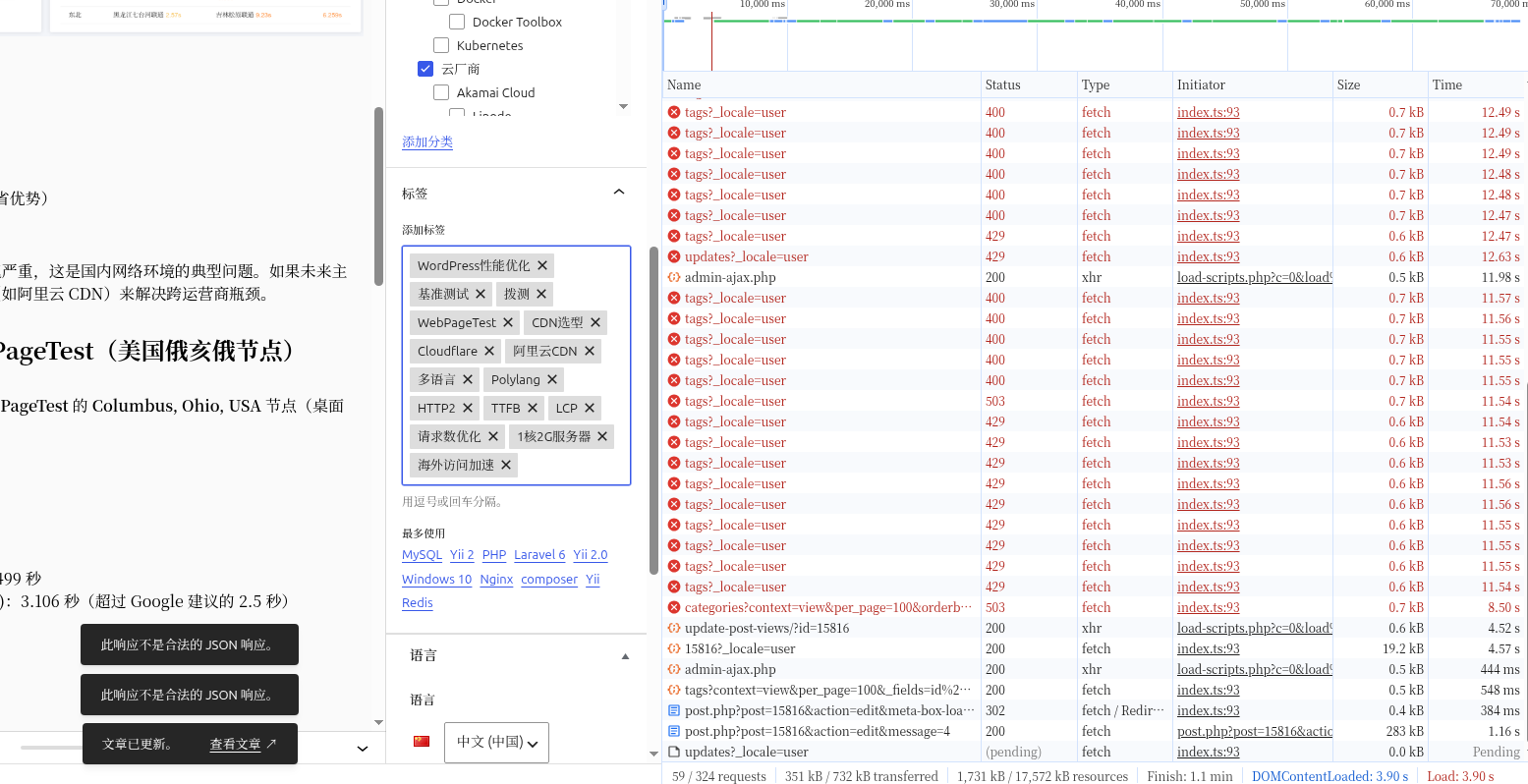
When editing an article in the WordPress background, when trying to add a new label or save an existing tag:
- The label input box is slow to respond, and sometimes there is no response after entering characters.
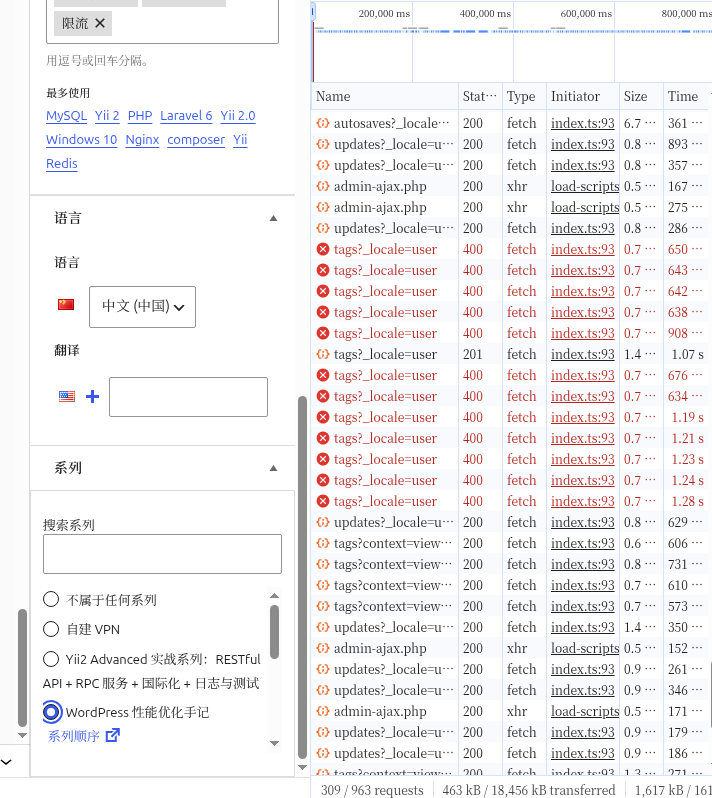
- The bottom of the page prompts ‘This response is not a legitimate JSON response’.
- Refresh the page to find that some tags are not saved.
- A large number of pairs of
/wp-json/wp/v2/tagsrequest return status code429Or400.
2. Nginx current limiting configuration (problem configuration)
main profile nginx.conf Of http in the block:
# 全局限流:单 IP 每秒 6 次请求,内存缓存 10 万 IP
limit_req_zone $binary_remote_addr zone=site_limit:10m rate=6r/s;
# 单 IP 最大并发连接数 20
limit_conn_zone $binary_remote_addr zone=conn_limit:10m;
Site virtual host configuration vhost/www.example.com.conf Of server Block header line:
# 启用请求限流,突发 12 次缓冲,无延迟
limit_req zone=site_limit burst=12 nodelay;
# 并发连接限制 20
limit_conn conn_limit 20;
# 超限返回 429
limit_req_status 429;
The investigation process
1. Confirm whether the current limit hits
First check the Nginx access log and count the number of 429 status codes:
grep -c " 429 " /data/wwwlogs/www.example.com_nginx.log
# 输出:738
Explain that the current limiting rule is in effect in large numbers. But is the question directly related to the tag API? Further filter the 429 label interfaces:
grep "/wp-json/wp/v2/tags" /data/wwwlogs/www.example.com_nginx.log | grep -c " 429 "
# 输出:28
Hard evidence: Label REST API requests have been intercepted by restriction.
2. Real-time monitoring request status
Use tail-f Observe the real-time log and operate the label at the same time:
tail -f /data/wwwlogs/www.example.com_nginx.log | grep "/wp-json/wp/v2/tags"
Output example:
211.137.80.234 - - [05/Jun/2026:20:48:20 +0800] "POST /wp-json/wp/v2/tags?_locale=user HTTP/2.0" 429 177 "..."
Numerous 429 Appears, multiple requests are rejected per second.
3. Analyze why tag operations trigger a large number of requests
The WordPress block editor (gutenberg) will frequently call the REST API when processing tags:
- Search Tags: Every time the user enters a character in the label input box, it will send
get /wp-json/wp/v2/tags?search=xxx. - Create a new tag: When a non-existent label name is entered and out of focus, it will send
POST /wp-json/wp/v2/tagsto create. - Save articles: Batch link tag ID at submission.
Edit in an article with 20 tags, and the above requests may be made 20 to 30 times in a few seconds. And our current limiting rule is 6 requests/sec, the instant burst allows up to 12 requests to be queued. Once exceeded, return directly 429.
Front-end received 429 After that, some scripts will enter the retry loop (especially when the response body does not meet the expectations), causing the same IP to continuously retry the same POST request in the log, further deteriorating the situation.
4. Why do I still see 400 errors?
In the log we find that some requests are returned 400. This is because:
- When the user quickly creates a new tag, the frontend may send multiple identical
postRequests (such as incomplete image stabilization, or network retry). - The WordPress REST API returns when it receives duplicate label names
400(Prompts ‘This label already exists’ or ‘parameter error’). - This situation does not affect the creation of the final tags – the first request successfully creates the tag, and then the repeated request returns
400, but when the article is saved, the association can already be done with the created tag ID.
Therefore,400 is a redundant response caused by duplicate requests from the front-end, not the root cause of saving failures. What is really deadly is 429, because the request is directly intercepted by Nginx, it cannot reach the WordPress application layer at all.
The solution
The essence of the problem is that the current limiting threshold is too low to meet the request frequency required for normal editing operations. There are two solutions:Adjust the current limit parameter Or Release current limiting for REST API paths. Considering the simple configuration and certain security protection, we choose to enlarge the parameters.
Modify steps
- Edit the main profile, increase the rate:
vi /usr/local/nginx/conf/nginx.conf
will:
limit_req_zone $binary_remote_addr zone=site_limit:10m rate=6r/s;
Change to:
limit_req_zone $binary_remote_addr zone=site_limit:10m rate=30r/s;
- Edit site profile, improve burst buffering:
vi /usr/local/nginx/conf/vhost/www.example.com.conf
will:
limit_req zone=site_limit burst=12 nodelay;
Change to:
limit_req zone=site_limit burst=50 nodelay;
At the same time, appropriately increase the concurrent connection limit (optional):
limit_conn conn_limit 50;
- Restart Nginx:
service nginx restart
Tuning Instructions
rate=30r/s: Allows 30 requests per second on average, which is enough to overwrite the normal peak value of the label operation (about 15 to 20 times per second) while still preventing violent attacks.Burst=50: Allows queuing up to 50 requests in an instant, avoiding the triggering limit for concurrent resource requests when the page is loaded.- If the server performance is good, it can be further improved to
50r/s,Burst=80.
5. Validation and results
After the modification is completed, re-edit the article, add tags, and save in the WordPress background. Observation log:
tail -f /data/wwwlogs/www.example.com_nginx.log | grep "/wp-json/wp/v2/tags"
no longer appear 429, only a few 200 Successful responses and individual 400(Causes caused by duplicate requests from the front-end, which does not affect the final save). The article label is saved successfully, and the problem is solved.
6. Experience summary and suggestions
- Limit is a double-edged sword: Reasonable configuration can defend against CC attacks and brute force cracking, but too low thresholds can accidentally damage normal user operations, especially modern editors that rely on frequent API calls.
- Monitoring and testing: Before applying the current limiting rule, it is recommended to run in a loose mode and observe the access log, and adjust according to the actual business request frequency
rateAndburst. - Refinement limiting: If you want to keep strict flow limits, you can use different strategies for different paths. For example:
- To
/wp-login.php,/xmlrpc.phpMaintainrate=6r/s. - To
/wp-json/*Set a higher threshold or fully let go. Sample configuration fragment:
   location /wp-json/ {
       limit_req zone=api_limit burst=100 nodelay;
       # 其他配置
   }
- Distinguish 429 and 400:
429Returned by the current limiting middleware, the request has not reached the application layer;400It is the application layer returned, usually related to the content of the request (such as repeated submission, parameter verification failed). Check whether there is any429because it will lead to more severe functional blocking. - Record changes: After each modification of the Nginx configuration, it is recommended to record the content and date of the change, which is convenient for future traceability.
7. Conclusion
A seemingly complex label save failure problem, the root cause is that the nginx limiting parameters are too conservative. Access logs, targeting through analysis 429 Response, adjust the current limiting threshold, and finally solve the problem at a minimum cost. Hope this article’s troubleshooting ideas and solutions can help your WordPress operation and maintenance. If you also encounter similar 429 If it is troublesome, you might as well check the nginx current limit configuration first, it may be more effective.
Attachment: Quick check of common investigation commands
- Statistics 429 Quantities:
grep -c '429' /path/to/access.log- Real-time monitoring tag API:
tail -f access.log | grep '/wp-json/wp/v2/tags'- Test configuration syntax:
nginx -t