





![[截图 2:浏览器 Network 中直接请求 translate.yandex.net]](https://media.shuijingwanwq.com/2026/07/2-16-1024x568.png)


Foreword: After the practical operation of the first 4 articles, we have completed the Chinese and English translation of blog article classification and labels, and the core content multilingual framework has been basically completed. This article will focus on the key link of ‘menu translation’ – the menu is the navigation core of the blog, which directly affects the browsing experience of visitors, especially multi-language sites.
This practical operation is based on the WordPress blog, using the Polylang plugin to realize multi-language switching, with the auxiliary translation of AutoPoly – AI Translation for Polylang, the theme is Hueman . During the actual operation process, I have encountered many pits (such as the menu is not displayed, the English classification cannot be found, etc.), all of which have been solved one by one.
1. Practical preparatory preparation (must see)
Before starting menu translation, it is necessary to confirm that the following three prerequisites have been completed to avoid rollovers in subsequent operations:
- The Polylang plugin, AutoPoly – AI Translation for Polylang plugin has been installed and activated, and the basic language settings are completed (Chinese is the default language, and English is a secondary language);
- All article classification and labeling have been completed, and the Chinese and English translation and matching of labels (Chinese classification is one-to-one correspondence with English classification, and all have been bound to the corresponding language);
- The menu location of the Hueman theme is clear (Hueman theme only supports adding language switches on the menu, and the location display will be optimized later).
2. Core practical steps: Chinese and English menu construction and translation
The core logic of this practical operation: build two sets of independent menus (Chinese main menu, English main menu), bind the menu position of the corresponding language respectively, and then Add the classification to the main English menu, finally optimize the menu layout, add a language switcher, avoid the plug-in pits throughout the process, and ensure that the Chinese and English menus are displayed normally.
Step 1: Create two sets of independent menus, bind the corresponding language location
Hueman theme supports multi-language menu positions, and it is necessary to create separate menus for Chinese and English respectively to avoid language confusion and the menu is not displayed.
- Enter the WordPress background → Appearance → Menu (Appearance → Menus);
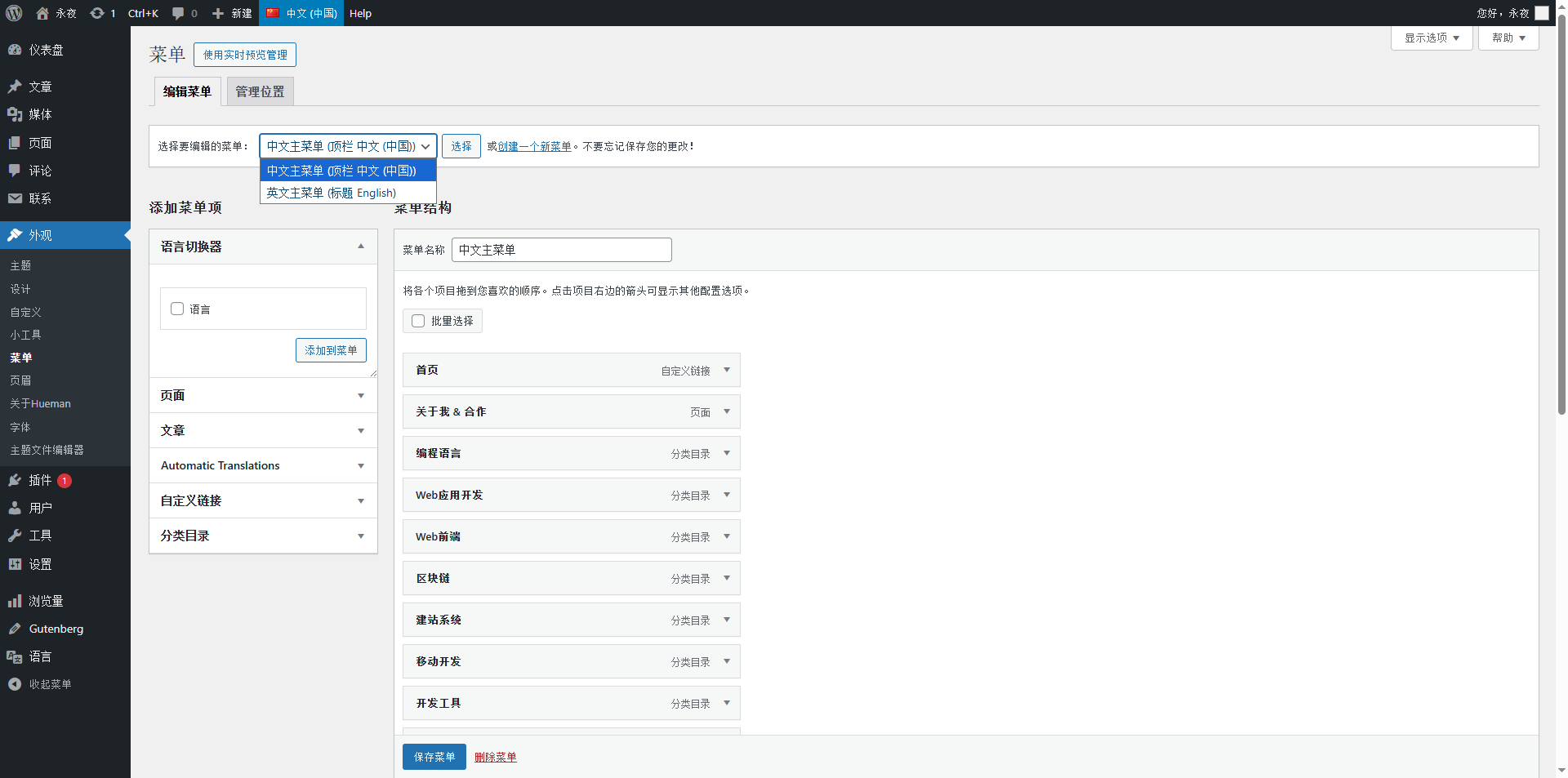
- Click ‘Create New Menu’, create the first set of menus, name ‘Chinese Main Menu’, and bind ‘Chinese (China)’ to the language by default;
- In the Menu Settings, bind the ‘Chinese main menu’ to the ‘Top bar Chinese (China)’ position (the Chinese menu location of the Hueman theme);
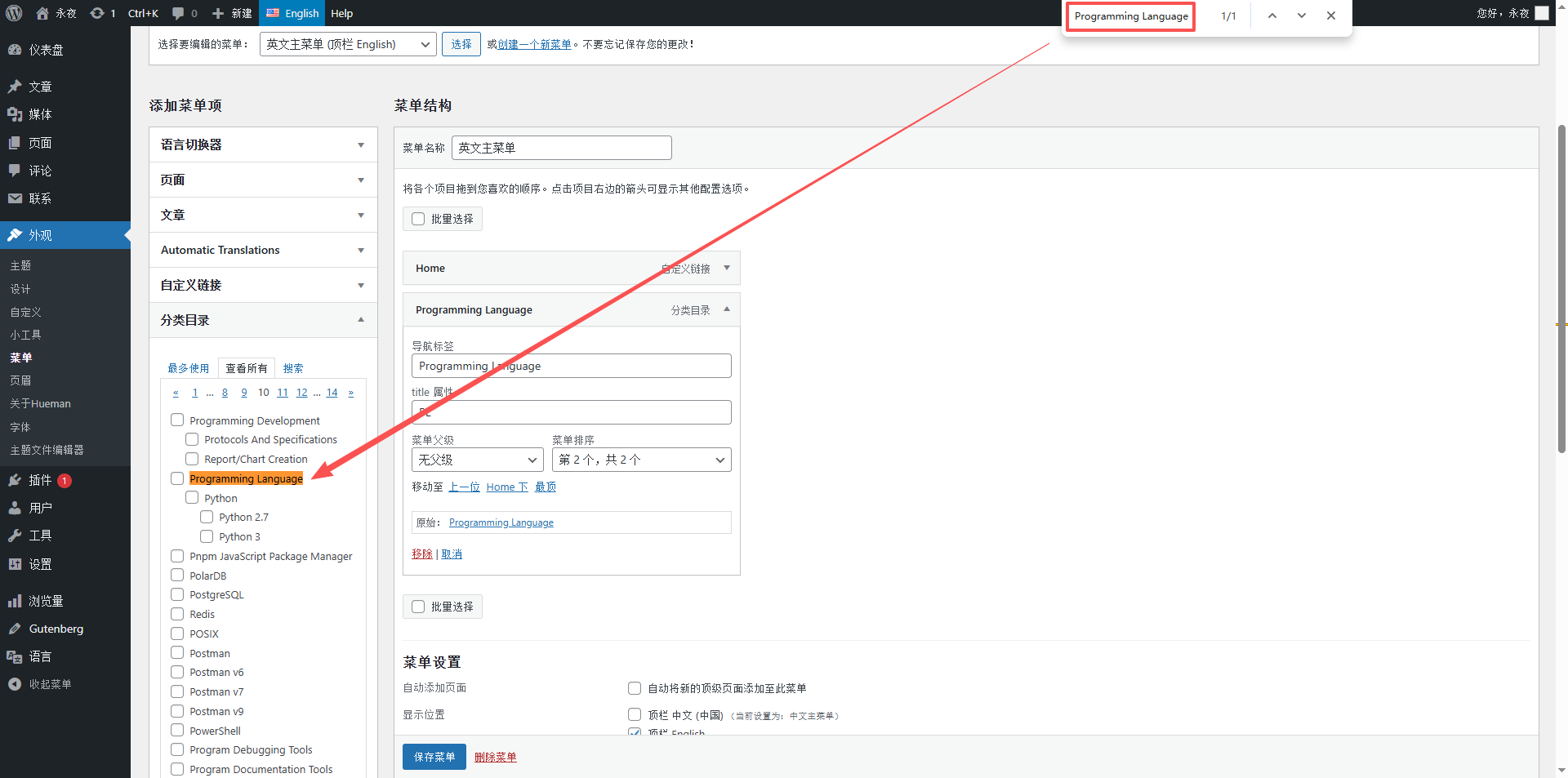
- Repeat the above operation to create the second set of menus, named ‘English Main Menu’, the language is switched to ‘English’, and bind to the ‘Top bar English’ position;
- Save the two sets of menus, at this time the background has completed the binding of the menu and the language position, laying the foundation for subsequent additions of classification and translation.
As shown in Figure 1: Create a screenshot of the Chinese main menu (show menu naming, language binding, location binding)
Figure 4: Create a screenshot of the main menu in English (show menu naming, English language binding, top bar English position binding)
Step 2: Chinese main menu configuration (reuse existing categories, no need to recreate)
The Chinese main menu can directly reuse the Chinese classification that has been created before, without additional operations, just confirm that the classification is complete and the sorting is reasonable.
- In ‘Appearance → Menu’, select ‘Chinese Main Menu’;
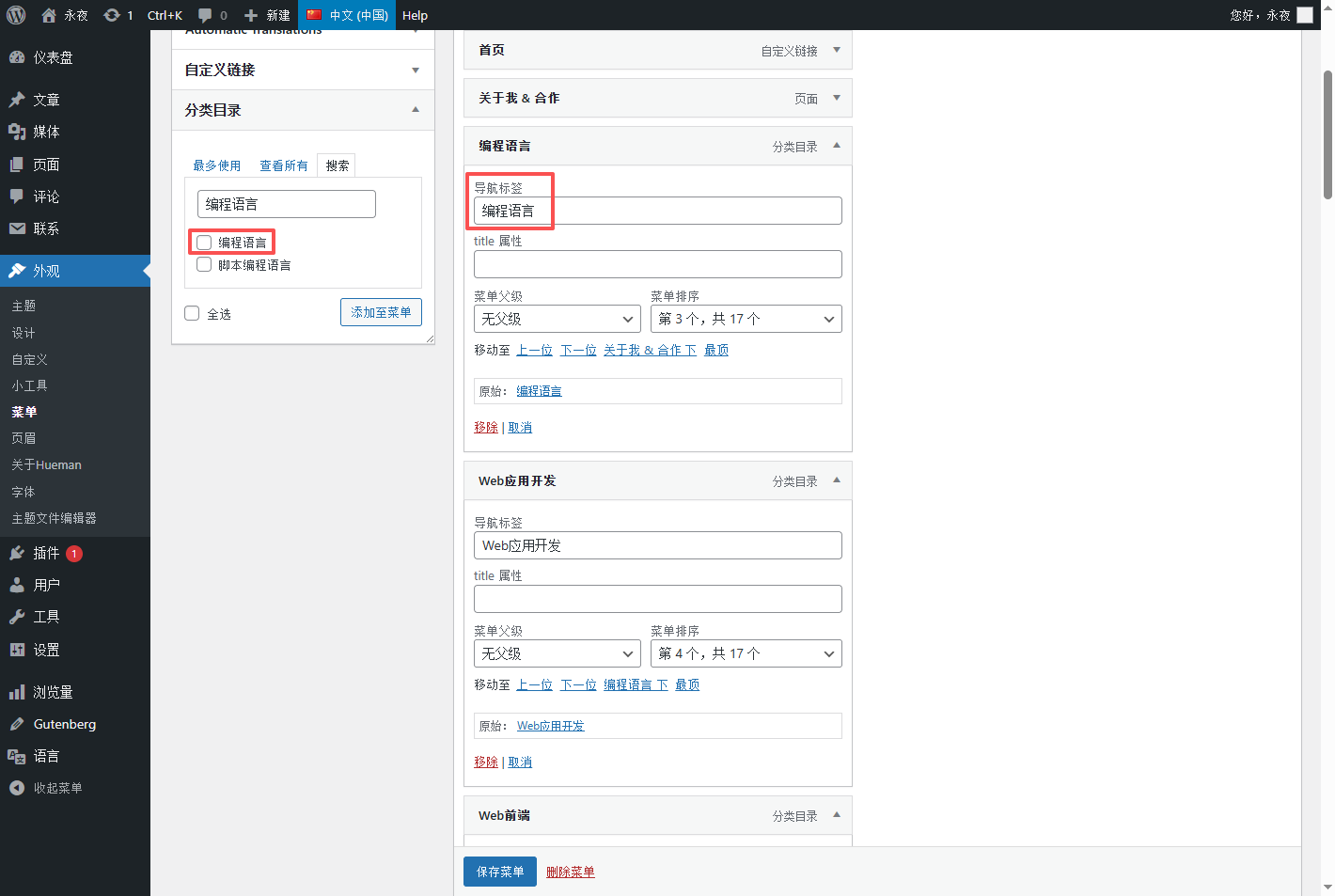
- Find the ‘Category Directory’ on the left, search and check all Chinese categories (programming language, web application development, web front-end, etc.), and click ‘Add to Menu’;
- Drag the menu item and sort it in the order of ‘Home → About me & Cooperation → Various technical classifications’ to ensure that the navigation logic is clear;
- Save the menu, the Chinese main menu is configured, and the Chinese site at the front desk can display the navigation normally.
As shown in Figure 2: Chinese main menu to add category screenshots
Step 3: English main menu configuration (copy the Chinese menu, translate and replace the classification)
The core of the English main menu is ‘consistent with the Chinese main menu structure and one-to-one correspondence’.
- In ‘Appearance → Menu’, select ‘Chinese Main Menu’ to copy all menu items as it is (you can check all menu items, copy the name and paste it into the English menu);
- Switch to ‘English main menu’, paste and add the copied menu item, at this time, the menu structure is exactly the same as the Chinese main menu;
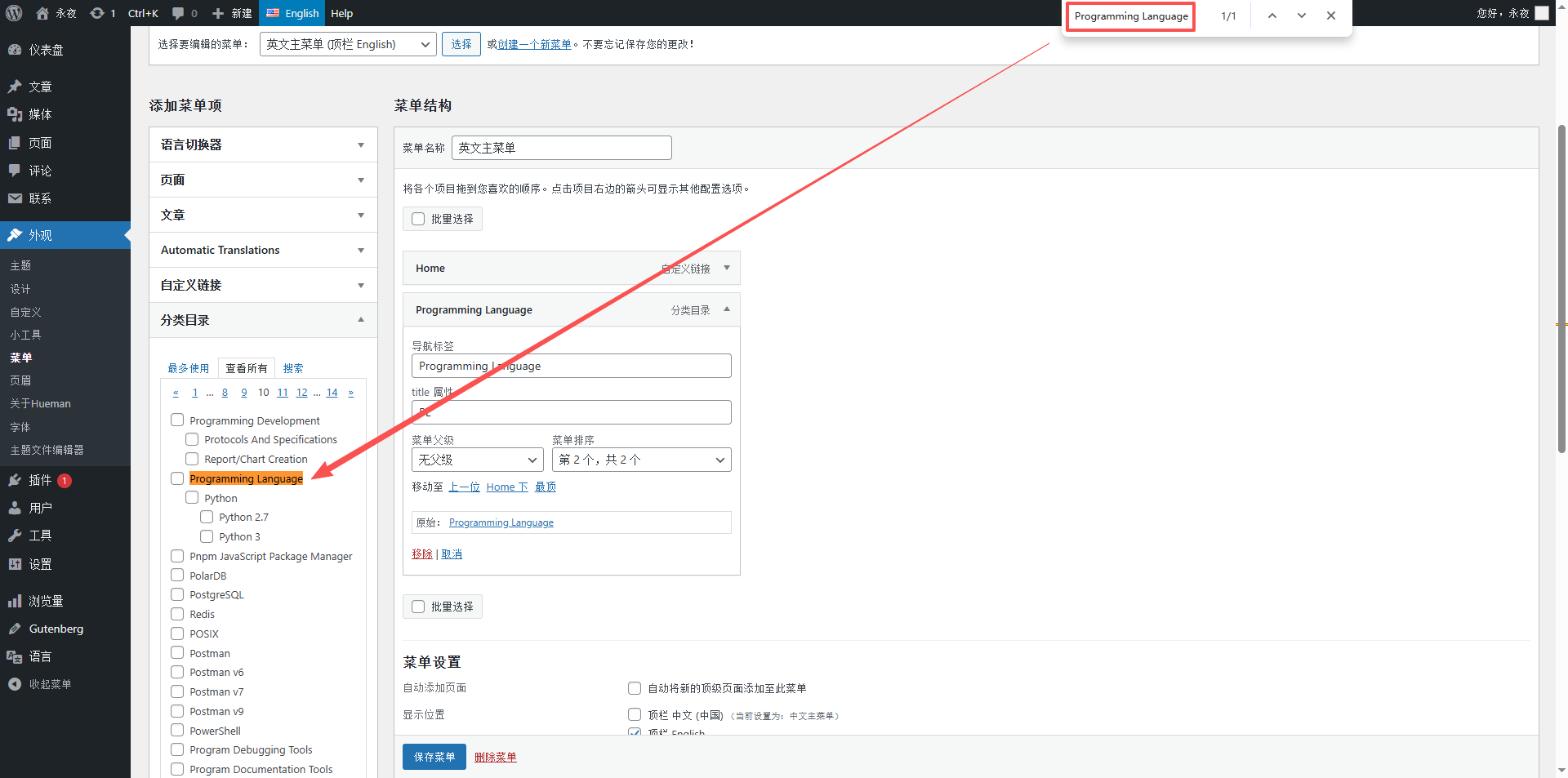
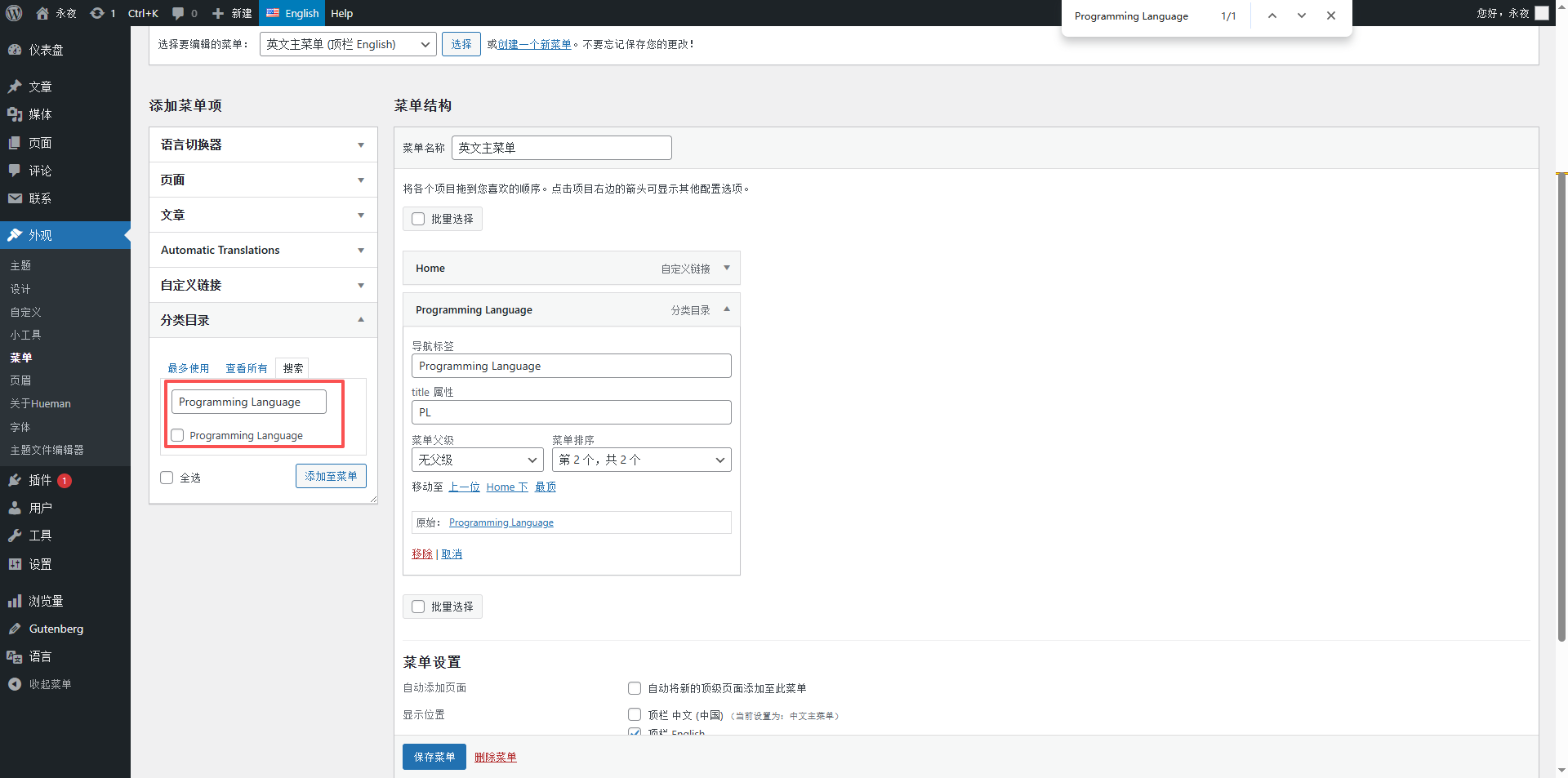
- Delete all Chinese categories in the English main menu, and replace them with the corresponding English categories – the first pit here is encountered: in the English environment, search for English categories in the ‘Classification Directory’ (such as programming language), the result is empty; however, search for English categories (such as programming language) in the category list under English language, and the results can be searched. as shown in Figure 3
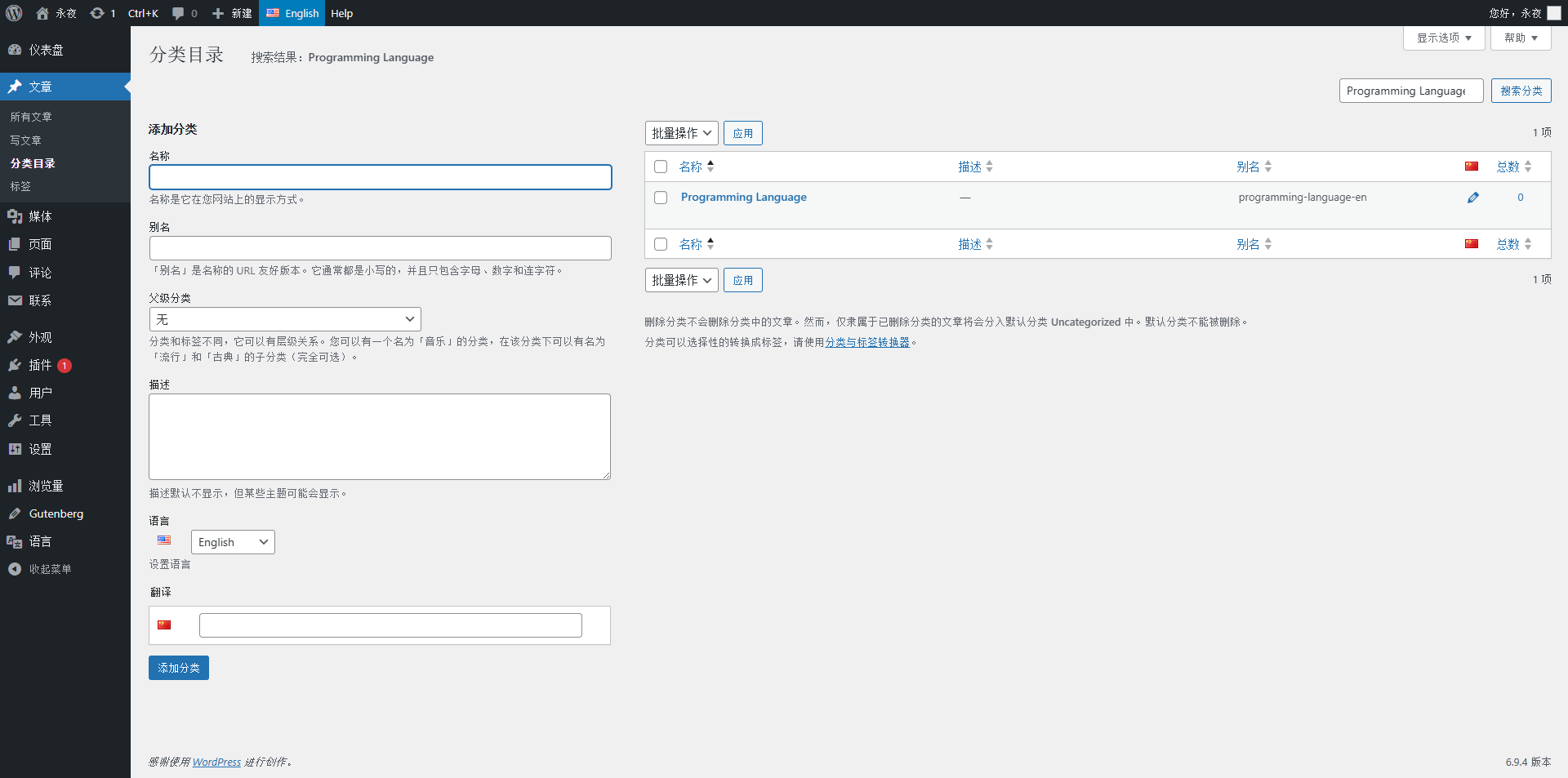
- Problem solving: WordPress background classification directory is asynchronous lazy loading, only loading the content of the first page, you need to manually turn over all 14-page classifications, load all categories into the background cache, and then search for English categories to find them normally (specific operations: enter the article → Category, switch to ENGLISH, turn 14 pages page by page, and then go back to the menu page to search);
- Search and tick all corresponding English categories, add them to the main English main menu, and keep the order of the main Chinese menu consistent;
- Translate and streamline the menu item label of the English main menu (navigation display text) – avoid the menu line break caused by the label is too long, the simplification principle: longer than the abbreviation, the full name, and the recognition and beauty (see below for the specific concise name);
- Save the main English menu, and the English main menu configuration is complete.
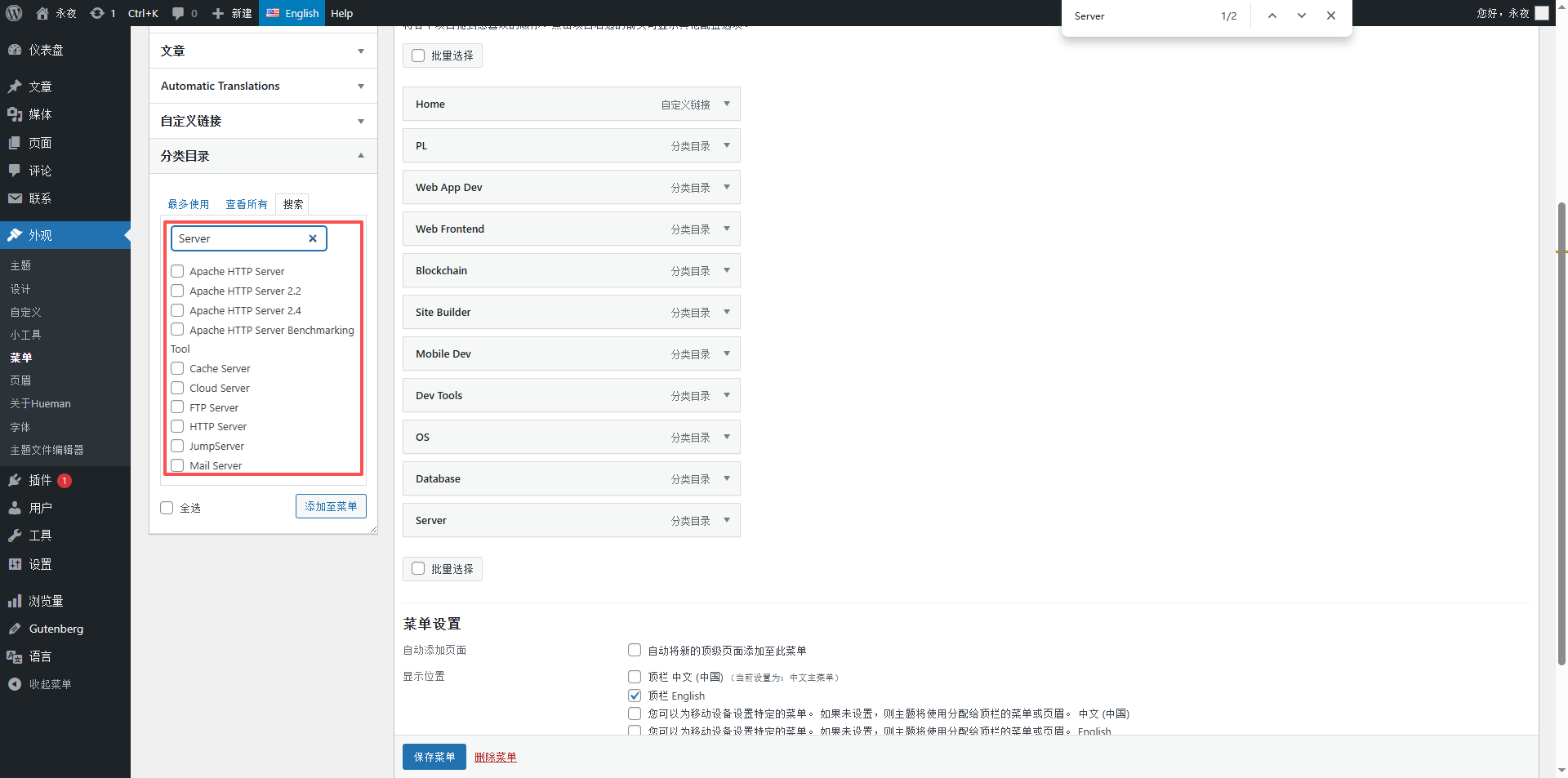
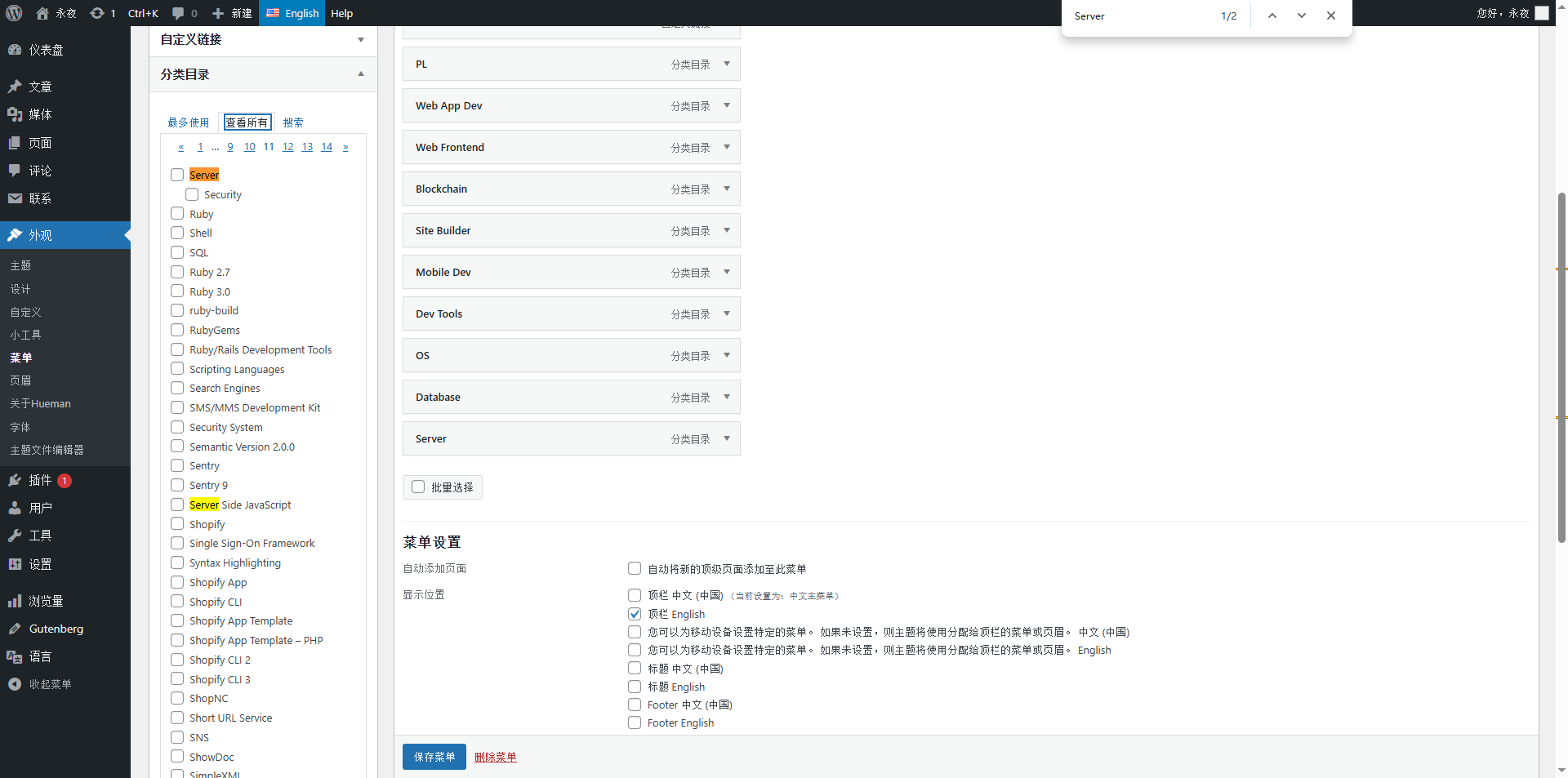
- Among them, the server cannot be searched, and finally decided to turn the page, and then use the search function that comes with the browser. as shown in Figure 8
As shown in Figure 4: Category pages, turn pages, load cache screenshots
As shown in Figure 5: Add English classification screenshots in the main English main menu (show the search English classification, add to the menu)
As shown in Figure 7: Simplified screenshot of English main menu label
Step 4: Menu Optimization: Delete Redundant Menu Items, Add a Language Switcher
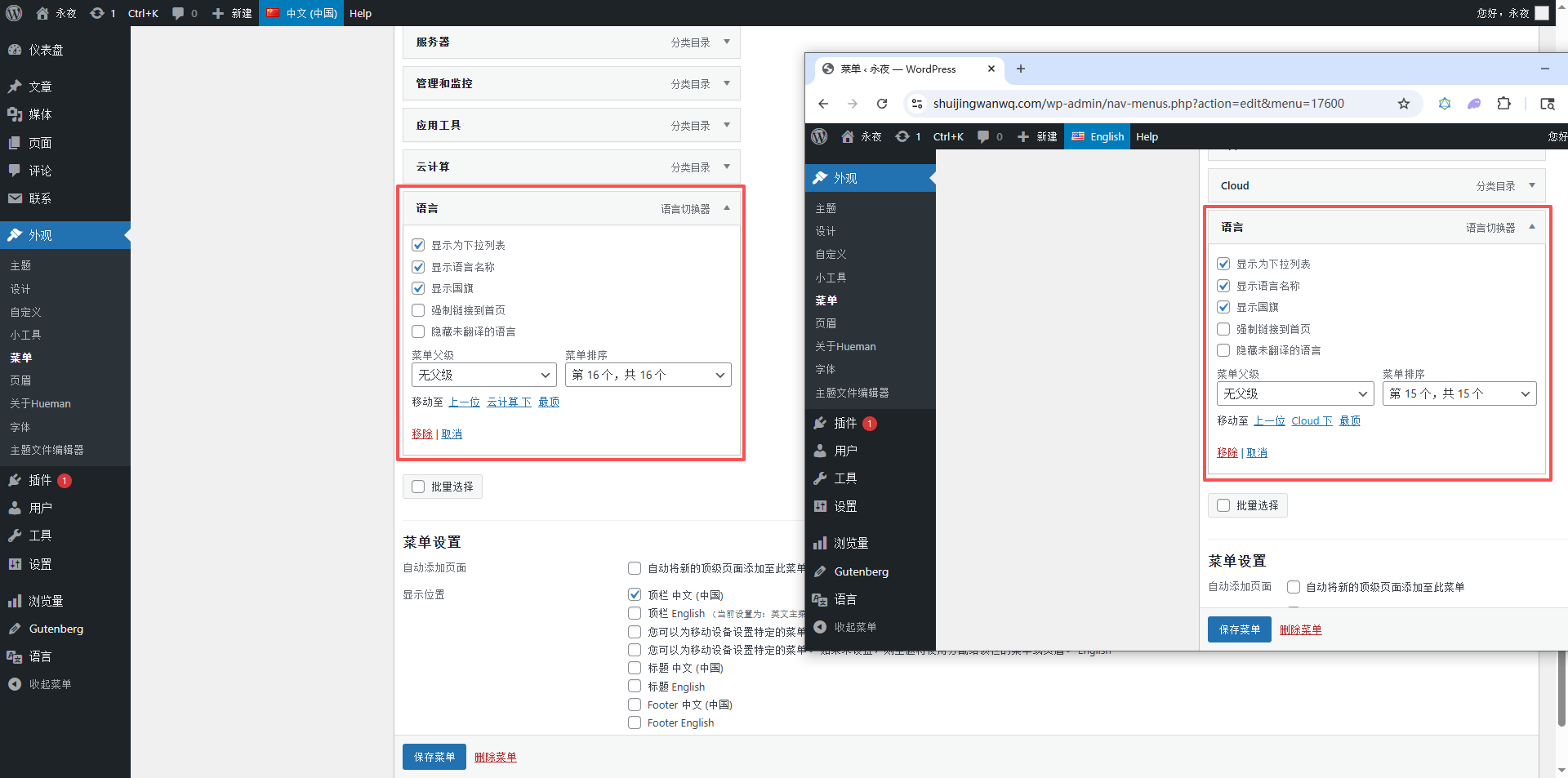
The Hueman theme only supports adding a language switcher on the menu, and the current menu contains 17 menu items (home page, about me, 15 categories), the layout is crowded, and the redundant menu items need to be deleted, and the language switcher needs to be freed up.
- Redundant menu item selection: give priority to deletion of the ‘Other’ category – this category is a bottom-line miscellaneous item, which does not belong to the core technology category, and the user access rate is low , it will not affect the navigation logic after deletion; if you don’t want to delete ‘Other’, you can alternatively delete ‘Program Development’ (the semantically overlaps with the ‘Programming Language’);
- After deleting the redundant menu item, open ‘Screen Options’ in the upper right corner of the menu page, and check ‘Language Switcher’;
- Find ‘Language Switcher’ on the left, check ‘English’ (Chinese main menu) and ‘Chinese (China)’ (English main menu), and add them to the rightmost side of the corresponding menus;
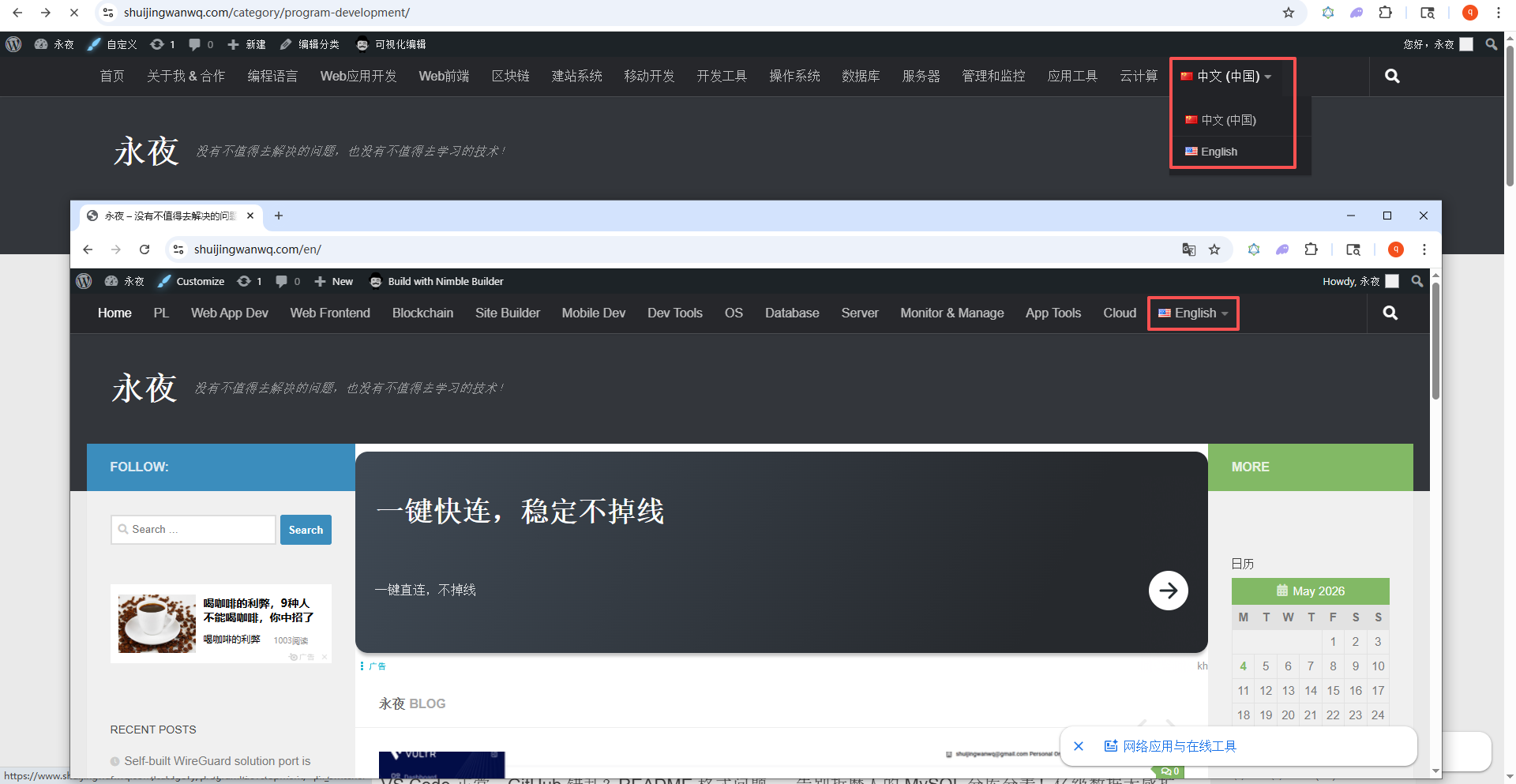
- Save the menu, at this time, both Chinese and English menus have added a language switcher, and visitors can use the switch to the Chinese site (https://www.shuijingwanwq.com/)与英文站点(https://www.shuijingwanwq.com/en/)之间自由跳转。
Figure 10: Screenshot of the final effect after menu optimization
3. Chinese and English menu concise names
Combined with the professionalism of the technical blog, taking into account the beauty of the menu (no line break), organize the corresponding simplified name of the Chinese and English menu, and directly replace the English main menu label:
- Programming Language — Programming Language — PL
- Web Application Development — Web Application Development — Web App Dev
- Web Frontend — Web Front End — Web Frontend
- Blockchain — Blockchain — Blockchain
- Website Build System — Website Building System — Site System
- Mobile Development — Mobile Development — Mobile Dev
- Development Tools — Development Tools — Dev Tools
- Operating System — Operating System — OS System
- database — database — database
- Server — Server — Server
- Program Development — Programming Development — Program Dev (deleted, can be spared)
- Management and Monitoring — Management and Monitoring — Manage & Monitoring
- Application Tools — Application Tools — App Utilities
- Cloud Computing — Cloud Computing — Cloud Compute
- Others — uncategorized — other categories (deleted, standby)
As shown in Figure 11: Final effect, in the foreground, the display of the language switcher
4. Practical common pits and solutions (focus!)
In this practical operation, I encountered 3 core pits, all of which are common problems of the Polylang plug-in and Hueman theme.
- Pit point 1: Chinese and English menus are not displayed → Solution: Confirm that the two sets of menus are bound to the menu position of the corresponding language (Chinese main menu is bound to the top bar Chinese, and the English main menu is bound to the top bar english), do not bind the wrong location (such as the English menu binding ‘title English’);
- Pit 2: The English menu cannot be searched for English classification → Solution: After manually flipping through all the categories and pages (14 pages in this article), force all the categories to be loaded into the background cache, and then you can search normally;
- Pit 3: There is no language switching option on the menu page → Solution: Switch to the corresponding language (Chinese/English) in the management bar at the top of the background, and then enter the menu page; if there is still no option, enter polylang Set, check ‘Show language switcher in the management bar’.
5. Practical summary
Menu translation is the core part of the multilingualization of blogs, and the core point is ‘two sets of independent menus, precise language binding, and one-to-one correspondence of classification’. This practical operation is based on the limitations of Hueman theme, and the language switcher is placed on the right side of the menu, and the layout is optimized by deleting the redundant menu items, which not only ensures the integrity of the navigation, but also takes into account the aesthetics.
Key reminder: Add the classification of English menus, be sure to load all category caches first (the page is complete), so as not to search for English categories; menu labels Concise and professional and simplicity, avoid too long or too short; the addition of language switches ensures that Chinese and English menus correspond to each other, so that visitors can jump freely.
WordPress Maintenance, Performance Optimization & Blog Growth Consulting
I have been running my personal technology blog for more than 10 years and have published over 1,000 original articles. My long-term practice covers WordPress website maintenance, CDN / Cloudflare configuration, caching optimization, Google SEO, ad monetization, and multilingual website operations.
If your WordPress website is slow, unstable, affected by plugin conflicts, showing caching issues, having AdSense display problems, or facing CDN / Cloudflare / DNS configuration uncertainty, feel free to contact me for remote troubleshooting.
Ideal For:
✅ Personal blog owners
✅ WordPress website operators
✅ Independent developers and content creators
✅ SaaS website owners
✅ Website owners who want better speed and stability
What I Offer:
✅ WordPress performance optimization
✅ Cloudflare / CDN / caching configuration checks
✅ Plugin conflict and layout issue troubleshooting
✅ AdSense display issue troubleshooting
✅ Basic SEO structure review
✅ Blog growth and monetization consulting
If you would like to discuss your website, please contact me and mention: WordPress Maintenance Consultation.
Contact Me:
Telegram: @shuijingwan
WeChat: 13980074657
Email: shuijingwanwq@gmail.com
Leave a Reply