Post Views: 123
1、复制 api 应用为 qq、wx,调整相应配置后,最后应用目录结构如下
common                   公共(所有应用程序共有的文件)
    config/              包含公共配置
    fixtures/            包含公共类的测试夹具
    logics/              包含在接口、前端、后端和控制台中使用的模型逻辑类
    mail/                包含电子邮件的视图文件
    messages/            包含国际化的消息文件
    models/              包含在接口、前端、后端和控制台中使用的模型数据类
    services/            包含在接口、前端、后端和控制台中使用的服务类(多个模型的逻辑类)
    tests/               包含公共类的各种测试
    widgets/             包含公共的小部件
console                  控制台
    config/              包含控制台配置
    controllers/         包含控制台的控制器类(命令)
    migrations/          包含数据库迁移
    models/              包含控制台的模型类
    runtime/             包含运行时生成的文件,例如日志和缓存文件
    services/            包含控制台的服务类
backend                  后端
    assets/              包含应用程序的资源文件(javascript 和 css)
    config/              包含后端配置
    controllers/         包含后端的Web控制器类
    models/              包含后端的模型类
    runtime/             包含运行时生成的文件,例如日志和缓存文件
    services/            包含后端的服务类
    tests/               包含后端应用程序的各种测试
    views/               包含Web应用程序的视图文件
    web/                 Web 应用根目录,包含 Web 入口文件
frontend                 前端
    assets/              包含应用程序的资源文件(javascript 和 css)
    config/              包含前端配置
    controllers/         包含前端的Web控制器类
    models/              包含前端的模型类
    runtime/             包含运行时生成的文件,例如日志和缓存文件
    services/            包含前端的服务类
    tests/               包含前端应用程序的各种测试
    views/               包含Web应用程序的视图文件
    web/                 Web 应用根目录,包含 Web 入口文件
    widgets/             包含前端的小部件
api                      接口(跨渠道)
    behaviors/           包含接口的行为类
    config/              包含接口配置
    controllers/         包含接口的Web控制器类
    fixtures/            包含接口的测试夹具
    messages/            包含国际化的消息文件
    models/              包含接口的模型类
    modules/             包含接口的模块
    rests/               包含接口的 REST API 类
    runtime/             包含运行时生成的文件,例如日志和缓存文件
    services/            包含接口的服务类
    tests/               包含接口应用程序的各种测试
    views/               包含Web应用程序的视图文件
    web/                 Web 应用根目录,包含 Web 入口文件
qq                       接口(企鹅号)
    behaviors/           包含接口的行为类
    config/              包含接口配置
    controllers/         包含接口的Web控制器类
    fixtures/            包含接口的测试夹具
    messages/            包含国际化的消息文件
    models/              包含接口的模型类
    modules/             包含接口的模块
    rests/               包含接口的 REST API 类
    runtime/             包含运行时生成的文件,例如日志和缓存文件
    services/            包含接口的服务类
    tests/               包含接口应用程序的各种测试
    views/               包含Web应用程序的视图文件
    web/                 Web 应用根目录,包含 Web 入口文件
wx                       接口(微信公众帐号)
    behaviors/           包含接口的行为类
    config/              包含接口配置
    controllers/         包含接口的Web控制器类
    fixtures/            包含接口的测试夹具
    messages/            包含国际化的消息文件
    models/              包含接口的模型类
    modules/             包含接口的模块
    rests/               包含接口的 REST API 类
    runtime/             包含运行时生成的文件,例如日志和缓存文件
    services/            包含接口的服务类
    tests/               包含接口应用程序的各种测试
    views/               包含Web应用程序的视图文件
    web/                 Web 应用根目录,包含 Web 入口文件
rpc                      远程过程调用
    assets/              包含应用程序的资源文件(javascript 和 css)
    config/              包含远程过程调用配置
    controllers/         包含远程过程调用的Web控制器类
    messages/            包含国际化的消息文件
    models/              包含远程过程调用的模型类
    modules/             包含远程过程调用的模块
    runtime/             包含运行时生成的文件,例如日志和缓存文件
    services/            包含远程过程调用的服务类
    tests/               包含远程过程调用应用程序的各种测试
    views/               包含Web应用程序的视图文件
    web/                 Web 应用根目录,包含 Web 入口文件
vendor/                  包含相关的第三方软件包
environments/            包含基于环境的覆盖
.gitignore               包含由 git 版本系统忽略的目录列表。如果你需要的东西从来没有到你的源代码存储库,添加它。
composer.json            Composer 配置文件
init                     初始化脚本描述文件
init.bat                 Windows 下的初始化脚本描述文件
LICENSE.md               许可信息。 把你的项目许可证放到这里。特别是开源醒目。
README.md                安装模板的基本信息。请考虑将其替换为有关您的项目及其安装的信息。
requirements.php         安装使用 Yii 需求检查器。
yii                      控制台应用程序引导。
yii.bat                  Windows下的控制台应用程序引导。
2、在 Yii 2 高级项目模板 上的基于 Nginx 的单域名配置,参考网址:https://www.shuijingwanwq.com/2018/08/16/2836/ ,api 应用为跨渠道、qq 应用为企鹅号、wx 应用为微信公众帐号,例:POST http://api.channel-pub-api.localhost/qq/v1/articles/video?group_id=spider ,实则最终的请求路由至:\qq\rests\article\VideoCreateAction.php
3、以发布文章类型:视频(视频)的文章至企鹅号为例说明整体的架构设计,在 Yii2 高级模板中基于 Yii2 队列扩展实现异步执行任务,参考网址:https://www.shuijingwanwq.com/2018/10/19/2952/ ,编辑 \common\config\main-local.php
        'copyAssetQueue' => [ // 复制资源文件队列
            'class' => 'yii\queue\redis\Queue',
            'redis' => 'redis', // Redis 连接组件或它的配置
            'channel' => 'cpa:queue:copy:asset', // 队列键前缀
            'ttr' => 10 * 60, // 作业处理的最长时间,单位(秒)
            'on afterExec' => ['common\components\queue\CopyAssetEventHandler', 'afterExec'], // 每次成功执行作业后
            'on afterError' => ['common\components\queue\CopyAssetEventHandler', 'afterError'], // 在作业执行期间发生未捕获的异常时
            'as log' => 'yii\queue\LogBehavior',
        ],
        'uploadAssetQueue' => [ // 上传资源文件队列
            'class' => 'yii\queue\redis\Queue',
            'redis' => 'redis', // Redis 连接组件或它的配置
            'channel' => 'cpa:queue:upload:asset', // 队列键前缀
            'ttr' => 2 * 60 * 60, // 作业处理的最长时间,单位(秒)
            'on afterExec' => ['common\components\queue\UploadAssetEventHandler', 'afterExec'], // 每次成功执行作业后
            'on afterError' => ['common\components\queue\UploadAssetEventHandler', 'afterError'], // 在作业执行期间发生未捕获的异常时
            'as log' => 'yii\queue\LogBehavior',
        ],
        'pubArticleQueue' => [ // 发布文章队列
            'class' => 'yii\queue\redis\Queue',
            'redis' => 'redis', // Redis 连接组件或它的配置
            'channel' => 'cpa:queue:pub:article', // 队列键前缀
            'ttr' => 5 * 60, // 作业处理的最长时间,单位(秒)
            'on afterExec' => ['common\components\queue\PubArticleEventHandler', 'afterExec'], // 每次成功执行作业后
            'on afterError' => ['common\components\queue\PubArticleEventHandler', 'afterError'], // 在作业执行期间发生未捕获的异常时
            'as log' => 'yii\queue\LogBehavior',
        ],
        'sourceCallbackQueue' => [ // 来源回调队列
            'class' => 'yii\queue\redis\Queue',
            'redis' => 'redis', // Redis 连接组件或它的配置
            'channel' => 'cpa:queue:source:callback', // 队列键前缀
            'ttr' => 5 * 60, // 作业处理的最长时间,单位(秒)
            'on afterExec' => ['common\components\queue\SourceCallbackEventHandler', 'afterExec'], // 每次成功执行作业后
            'on afterError' => ['common\components\queue\SourceCallbackEventHandler', 'afterError'], // 在作业执行期间发生未捕获的异常时
            'as log' => 'yii\queue\LogBehavior',
        ],
4、实现渠道发布接口(企鹅号):发布文章类型:视频(视频)的文章至渠道发布,编辑 \qq\rests\article\Action.php
<pre class="wp-block-syntaxhighlighter-code">

<?php
/**
 * @link http://www.yiiframework.com/
 * @copyright Copyright (c) 2008 Yii Software LLC
 * @license http://www.yiiframework.com/license/
 */

namespace qq\rests\article;

use Yii;
use yii\db\ActiveRecordInterface;
use yii\web\NotFoundHttpException;
use yii\web\ServerErrorHttpException;

/**
 * Action is the base class for action classes that implement RESTful API.
 *
 * For more details and usage information on Action, see the [guide article on rest controllers](guide:rest-controllers).
 *
 * @author Qiang Wang <shuijingwanwq@163.com>
 * @since 1.0
 */
class Action extends \yii\rest\Action
{
    /**
     * Returns the data model based on the primary key given.
     * If the data model is not found, a 404 HTTP exception will be raised.
     * @param string $id the ID of the model to be loaded. If the model has a composite primary key,
     * the ID must be a string of the primary key values separated by commas.
     * The order of the primary key values should follow that returned by the `primaryKey()` method
     * of the model.
     * @return ActiveRecordInterface the model found
     * @throws NotFoundHttpException if the model cannot be found
     */
    public function findModel($id)
    {
        if ($this->findModel !== null) {
            return call_user_func($this->findModel, $id, $this);
        }

        /* @var $modelClass ActiveRecordInterface */
        $modelClass = $this->modelClass;
        $keys = $modelClass::primaryKey();
        if (count($keys) > 1) {
            $values = explode(',', $id);
            if (count($keys) === count($values)) {
                $model = $modelClass::findOne(array_combine($keys, $values));
            }
        } elseif ($id !== null) {
            $model = $modelClass::findOne($id);
        }

        if (isset($model)) {
            return $model;
        }

        throw new NotFoundHttpException(Yii::t('error', Yii::t('error', Yii::t('error', '20002'), ['id' => $id])), 20002);
    }

    /**
     * 处理模型填充与验证
     * @param object $model 模型
     * @param array $requestParams 请求参数
     * @return array
     * 格式如下:
     *
     * [
     *     'status' => true, // 成功
     * ]
     *
     * [
     *     'status' => false, // 失败
     *     'code' => 20004, // 返回码
     *     'message' => '数据验证失败:企鹅号ID(UUID)是无效的。', // 说明
     * ]
     *
     * @throws ServerErrorHttpException
     */
    public static function handleLoadAndValidate($model, $requestParams)
    {
        // 把请求数据填充到模型中
        if (!$model->load($requestParams)) {
            return ['status' => false, 'code' => 40009, 'message' => Yii::t('error', '40009')];
        }
        // 验证模型
        if (!$model->validate()) {
            return self::handleValidateError($model);
        }

        return ['status' => true];
    }

    /**
     * 处理模型错误
     * @param object $model 模型
     * @return array
     * 格式如下:
     *
     * [
     *     'status' => false, // 失败
     *     'code' => 20004, // 返回码
     *     'message' => '数据验证失败:代码是无效的。', // 说明
     * ]
     *
     * @throws ServerErrorHttpException
     */
    public static function handleValidateError($model)
    {
        if ($model->hasErrors()) {
            $response = Yii::$app->getResponse();
            $response->setStatusCode(422, 'Data Validation Failed.');
            foreach ($model->getFirstErrors() as $message) {
                $firstErrors = $message;
                break;
            }
            return ['status' => false, 'code' => 20004, 'message' => Yii::t('error', Yii::t('error', Yii::t('error', '20004'), ['firstErrors' => $firstErrors]))];
        } elseif (!$model->hasErrors()) {
            throw new ServerErrorHttpException('Failed to create the object for unknown reason.');
        }
    }

    /**
     * 处理模型错误
     * @param array $models 模型列表
     * @return array
     * 格式如下:
     *
     * [
     *     'status' => false, // 失败
     *     'code' => 20004, // 返回码
     *     'message' => '数据验证失败:代码是无效的。', // 说明
     * ]
     *
     * @throws ServerErrorHttpException
     */
    public static function handleValidateMultipleError($models)
    {
        foreach ($models as $model) {
            if ($model->hasErrors()) {
                $response = Yii::$app->getResponse();
                $response->setStatusCode(422, 'Data Validation Failed.');
                foreach ($model->getFirstErrors() as $message) {
                    $firstErrors = $message;
                    break;
                }
                return ['status' => false, 'code' => 20004, 'message' => Yii::t('error', Yii::t('error', Yii::t('error', '20004'), ['firstErrors' => $firstErrors]))];
            }
        }

        throw new ServerErrorHttpException('Failed to create the object for unknown reason.');
    }
}


</pre>
5、实现渠道发布接口(企鹅号):发布文章类型:视频(视频)的文章至渠道发布,编辑 \qq\rests\article\VideoCreateAction.php
<pre class="wp-block-syntaxhighlighter-code">

<?php
/**
 * @link http://www.yiiframework.com/
 * @copyright Copyright (c) 2008 Yii Software LLC
 * @license http://www.yiiframework.com/license/
 */

namespace qq\rests\article;

use Yii;
use qq\models\Channel;
use qq\models\QqArticleVideoCreateParam;
use qq\models\ChannelType;
use qq\models\QqTpAppPenguin;
use qq\models\Task;
use qq\models\ArticleType;
use qq\models\QqArticleType;
use qq\models\ArticleCategory;
use qq\models\QqArticle;
use qq\models\QqArticleMultivideos;
use qq\models\redis\qq_auth\QqTpAppPenguinAccessToken as RedisQqAuthQqTpAppPenguinAccessToken;
use qq\services\ChannelService;
use qq\services\ChannelAppSourceService;
use qq\services\ChannelTypeService;
use qq\services\QqCwAppService;
use qq\services\ArticleTypeService;
use qq\services\QqArticleTypeService;
use qq\services\QqArticleCategoryMultivideosService;
use qq\services\QqArticleService;
use yii\base\Model;
use yii\helpers\ArrayHelper;
use yii\web\ServerErrorHttpException;
use yii\web\HttpException;

/**
 * 发布文章类型:视频(视频)的文章至渠道发布  /articles/video(article/video-create)
 *
 * 1、请求参数列表
 * (1)channel_app_source_uuids:必填,渠道的应用的来源ID(UUID)
 * (2)source:必填,来源,xContent:内容库;vms:视频管理系统;cms:内容管理系统;spider:自媒体;channel-pub-api:渠道发布接口
 * (3)source_uuid:必填,来源ID(UUID)
 * (4)source_pub_user_id:必填,来源发布用户ID
 * (5)source_callback_url:必填,来源回调地址
 * (6)article_category_id:必填,文章分类ID
 * (7)title:必填,标题
 * (8)author:可选,作者,默认:空字符串
 * (9)source_article_id:必填,来源文章ID
 * (10)media_absolute_url:必填,视频文件的绝对URL
 * (11)tag:必填,视频文章标签,以英文半角逗号分隔,最多5个,每个标签最多8个字
 * (12)apply:可选,是否申请原创文章,0:否;1:是(需要用户具有发表视频原创文章资格否则无效)
 * (13)desc:必填,视频描述
 *
 * 2、输入数据验证规则
 * (1)查询渠道代码,qq:企鹅号是否存在,如果不存在,则返回失败
 * (2)判断渠道代码,qq:企鹅号的状态是否启用,如果未启用,则返回失败
 * (3)必填:channel_app_source_uuids、source、source_uuid、source_pub_user_id、source_callback_url、article_category_id、title、source_article_id、media_absolute_url、tag、desc
 * (4)默认值(''):author
 * (5)默认值(0):apply
 * (6)数组:channel_app_source_uuids
 * (7)存在性:channel_app_source_uuids 必须存在于渠道的应用的来源模型中,且其状态为 1:启用,且渠道的类型代码必须一致
 * (8)如果渠道的类型代码,qq_cw:企鹅号的内容网站应用,查询渠道的类型代码,qq_cw:企鹅号的内容网站应用是否存在,如果不存在,则返回失败
 * (9)如果渠道的类型代码,qq_cw:企鹅号的内容网站应用,判断渠道的类型代码,qq_cw:企鹅号的内容网站应用的状态是否启用,如果未启用,则返回失败
 * (10)存在性:如果渠道的类型代码,qq_cw:企鹅号的内容网站应用,channel_app_source_uuids 必须存在于企鹅号的内容网站应用模型中,且其状态为 1:启用
 * (11)如果渠道的类型代码,qq_tp:企鹅号的第三方服务平台应用,查询渠道的类型代码,qq_tp:企鹅号的第三方服务平台应用是否存在,如果不存在,则返回失败
 * (12)如果渠道的类型代码,qq_tp:企鹅号的第三方服务平台应用,判断渠道的类型代码,qq_tp:企鹅号的第三方服务平台应用的状态是否启用,如果未启用,则返回失败
 * (13)存在性:如果渠道的类型代码,qq_tp:企鹅号的第三方服务平台应用,channel_app_source_uuids 必须存在于企鹅号的第三方服务平台应用的企鹅媒体用户模型中,且其状态为 1:启用
 * (14)范围(['xContent', 'vms', 'cms', 'spider', 'channel-pub-api']):source
 * (15)字符串(最大长度:32):group_id、source
 * (16)字符串(最大长度:64):source_uuid
 * (17)字符串(最大长度:255):source_callback_url
 * (18)查询文章类型代码,video:视频 是否存在,如果不存在,则返回失败
 * (19)判断文章类型代码,video:视频 的状态是否启用,如果未启用,则返回失败
 * (20)查询企鹅号的文章类型代码,multivideos:视频 是否存在,如果不存在,则返回失败
 * (21)判断企鹅号的文章类型代码,multivideos:视频 的状态是否启用,如果未启用,则返回失败
 * (22)存在性:article_category_id 必须存在于文章分类模型中,且其状态为 1:启用
 * (23)查询企鹅号的文章类型(视频)的文章分类的文章分类ID,article_category_id 是否存在,如果不存在,则返回失败
 * (24)判断企鹅号的文章类型(视频)的文章分类的文章分类ID,article_category_id 的状态是否启用,如果未启用,则返回失败
 * (25)整数:source_pub_user_id
 * (26)字符串(最大长度:255):title
 * (27)字符串(最大长度:64):author
 * (28)整数:source_article_id
 * (29)字符串(最大长度:255):tag、desc
 * (30)整数:apply
 * (31)范围([0, 1]):apply
 * (32)存在性:如果渠道的类型代码,qq_tp:企鹅号的第三方服务平台应用,channel_app_source_uuids 必须存在于企鹅号的第三方服务平台应用的访问令牌(Redis)模型中,且其状态为 1:启用
 * (33)用户刷新令牌有效截止时间必须 大于等于 服务器时间
 *
 * 3、操作数据(事务)
 * (1)创建 MySQL 模型(任务)
 * (2)循环创建 MySQL 模型(渠道的应用的任务、企鹅号的内容网站应用的任务/企鹅号的第三方服务平台应用的企鹅媒体用户的任务)
 * (3)创建 MySQL 模型(企鹅号的文章)
 * (4)创建 MySQL 模型(企鹅号的文章类型(视频)的文章)
 * (5)复制来源的资源文件至渠道发布的资源目录,队列任务执行成功后,调用相应服务,否则,插入发布日志(异步)
 *
 * For more details and usage information on VideoCreateAction, see the [guide article on rest controllers](guide:rest-controllers).
 *
 * @author Qiang Wang <shuijingwanwq@163.com>
 * @since 1.0
 */
class VideoCreateAction extends Action
{
    /**
     * @var string the scenario to be assigned to the new model before it is validated and saved.
     */
    public $scenario = Model::SCENARIO_DEFAULT;
    /**
     * @var string the name of the view action. This property is need to create the URL when the model is successfully created.
     */
    public $viewAction = 'view';

    /**
     * Creates a new model.
     * @return array
     * @throws ServerErrorHttpException if there is any error when creating the model
     * @throws \Throwable
     */
    public function run()
    {
        if ($this->checkAccess) {
            call_user_func($this->checkAccess, $this->id);
        }

        // 基于代码查找状态为启用的单个数据模型(渠道)
        $channelEnabledItem = ChannelService::findModelEnabledByCode(Channel::CODE_QQ);

        $requestParams = Yii::$app->getRequest()->getBodyParams();
        /* 判断请求体参数中租户ID是否存在 */
        if (!isset($requestParams['group_id'])) {
            $requestParams = ArrayHelper::merge($requestParams, ['group_id' => Yii::$app->params['groupId']]);
        }

        /* 视频(视频)的文章发布参数 */
        $qqArticleVideoCreateParam = new QqArticleVideoCreateParam();
        // 把请求数据填充到模型中
        if (!$qqArticleVideoCreateParam->load($requestParams, '')) {
            return ['code' => 40009, 'message' => Yii::t('error', '40009')];
        }
        // 验证模型
        if (!$qqArticleVideoCreateParam->validate()) {
            $qqArticleVideoCreateParamResult = self::handleValidateError($qqArticleVideoCreateParam);
            if ($qqArticleVideoCreateParamResult['status'] === false) {
                return ['code' => $qqArticleVideoCreateParamResult['code'], 'message' => $qqArticleVideoCreateParamResult['message']];
            }
        }

        /* 基于文章类型代码定义场景 */
        $this->scenario = QqArticle::SCENARIO_VIDEO_CREATE;

        /* 实例化多个模型 */

        // 渠道的应用的来源
        if (!is_array($requestParams['channel_app_source_uuids'])) {
            return ['code' => 40009, 'message' => Yii::t('error', '40009')];
        }
        // 基于多个UUID返回状态为启用,且渠道的类型代码必须一致的数据模型(渠道的应用的来源)列表
        $channelAppSourceEnabledItems = ChannelAppSourceService::findModelsEnabledByUuids($requestParams['channel_app_source_uuids']);

        // 获取、判断渠道的类型代码,获取应用的数据模型列表
        $channelTypeCode = $channelAppSourceEnabledItems[$requestParams['channel_app_source_uuids'][0]]->channel_type_code;
        if ($channelTypeCode == ChannelType::CODE_QQ_CW) {
            // 基于代码查找状态为启用的单个数据模型(渠道的类型)
            $channelTypeEnabledItem = ChannelTypeService::findModelEnabledByCode(ChannelType::CODE_QQ_CW);
            // 基于多个UUID返回状态为启用的数据模型(企鹅号的内容网站应用)列表
            $qqAppEnabledItems = QqCwAppService::findModelsEnabledByChannelAppSourceUuids($requestParams['channel_app_source_uuids']);
        } else {
            // 基于代码查找状态为启用的单个数据模型(渠道的类型)
            $channelTypeEnabledItem = ChannelTypeService::findModelEnabledByCode(ChannelType::CODE_QQ_TP);
            // 企鹅号的第三方服务平台应用的企鹅媒体用户
            if (!is_array($requestParams['uuid'])) {
                return ['code' => 40009, 'message' => Yii::t('error', '40009')];
            }
            $count = count($requestParams['uuid']);
            // 创建一个初始的 $qqTpAppPenguins 数组包含一个默认的模型
            $qqTpAppPenguins = [new QqTpAppPenguin([
                'scenario' => $this->scenario,
            ])];
            for($i = 1; $i < $count; $i++) {
                $qqTpAppPenguins[] = new QqTpAppPenguin([
                    'scenario' => $this->scenario,
                ]);
            }

            foreach ($requestParams['uuid'] as $key => $uuid) {
                // 转换视频(视频)的文章发布参数,多模型的填充、验证的实现
                $requestParams[$qqTpAppPenguins[0]->formName()][$key]['uuid'] = $uuid;
            }
            // 批量填充模型属性
            if (!Model::loadMultiple($qqTpAppPenguins, $requestParams, $qqTpAppPenguins[0]->formName())) {
                return ['code' => 40009, 'message' => Yii::t('error', '40009')];
            }
            // 批量验证模型
            if (!Model::validateMultiple($qqTpAppPenguins)) {
                $qqTpAppPenguinsResult = self::handleValidateMultipleError($qqTpAppPenguins);
                if ($qqTpAppPenguinsResult['status'] === false) {
                    return ['code' => $qqTpAppPenguinsResult['code'], 'message' => $qqTpAppPenguinsResult['message']];
                }
            }


        }

        // 任务
        $task = new Task([
            'scenario' => Task::SCENARIO_CREATE,
        ]);
        // 转换视频(视频)的文章发布参数,多模型的填充、验证的实现
        $requestParams[$task->formName()] = [
            'group_id' => $requestParams['group_id'],
            'source' => $qqArticleVideoCreateParam->source,
            'source_uuid' => $qqArticleVideoCreateParam->source_uuid,
            'source_pub_user_id' => $qqArticleVideoCreateParam->source_pub_user_id,
            'source_callback_url' => $qqArticleVideoCreateParam->source_callback_url,
        ];
        $taskResult = self::handleLoadAndValidate($task, $requestParams);
        if ($taskResult['status'] === false) {
            return ['code' => $taskResult['code'], 'message' => $taskResult['message']];
        }

        // 基于代码查找状态为启用的单个数据模型(文章类型)
        $articleTypeEnabledItem = ArticleTypeService::findModelEnabledByCode(ArticleType::CODE_VIDEO);

        // 基于代码查找状态为启用的单个数据模型(企鹅号的文章类型)
        $qqArticleTypeEnabledItem = QqArticleTypeService::findModelEnabledByCode(QqArticleType::CODE_MULTIVIDEOS);

        // 文章分类
        $articleCategory = new ArticleCategory([
            'scenario' => $this->scenario,
        ]);
        // 转换视频(视频)的文章发布参数,多模型的填充、验证的实现
        $requestParams[$articleCategory->formName()]['id'] = $qqArticleVideoCreateParam->article_category_id;
        $articleCategoryResult = self::handleLoadAndValidate($articleCategory, $requestParams);
        if ($articleCategoryResult['status'] === false) {
            return ['code' => $articleCategoryResult['code'], 'message' => $articleCategoryResult['message']];
        }

        // 基于文章分类ID查找状态为启用的单个数据模型(企鹅号的文章类型(视频)的文章分类)
        $qqArticleCategoryMultivideosEnabledItem = QqArticleCategoryMultivideosService::findModelEnabledByArticleCategoryId($qqArticleVideoCreateParam->article_category_id);

        // 企鹅号的文章
        $model = new $this->modelClass([
            'scenario' => $this->modelClass::SCENARIO_CREATE,
        ]);
        // 转换视频(视频)的文章发布参数,多模型的填充、验证的实现
        $requestParams[$model->formName()] = [
            'group_id' => $requestParams['group_id'],
            'article_category_id' => $qqArticleVideoCreateParam->article_category_id,
            'title' => $qqArticleVideoCreateParam->title,
            'author' => $qqArticleVideoCreateParam->author,
            'source_article_id' => $qqArticleVideoCreateParam->source_article_id,
        ];
        $modelResult = self::handleLoadAndValidate($model, $requestParams);
        if ($modelResult['status'] === false) {
            return ['code' => $modelResult['code'], 'message' => $modelResult['message']];
        }

        // 企鹅号的文章类型(视频)的文章
        $qqArticleMultivideos = new QqArticleMultivideos([
            'scenario' => QqArticleMultivideos::SCENARIO_CREATE,
        ]);
        // 转换视频(视频)的文章发布参数,多模型的填充、验证的实现
        $requestParams[$qqArticleMultivideos->formName()] = [
            'media' => $qqArticleVideoCreateParam->media_absolute_url,
            'tag' => $qqArticleVideoCreateParam->tag,
            'desc' => $qqArticleVideoCreateParam->desc,
            'apply' => $qqArticleVideoCreateParam->apply,
        ];
        $qqArticleMultivideosResult = self::handleLoadAndValidate($qqArticleMultivideos, $requestParams);
        if ($qqArticleMultivideosResult['status'] === false) {
            return ['code' => $qqArticleMultivideosResult['code'], 'message' => $qqArticleMultivideosResult['message']];
        }

        if ($channelTypeCode == ChannelType::CODE_QQ_TP) {
            // 企鹅号的第三方服务平台应用的访问令牌(Redis)
            // 创建一个初始的 $redisQqAuthQqTpAppAccessTokens 数组包含一个默认的模型
            $redisQqAuthQqTpAppAccessTokens = [new RedisQqAuthQqTpAppPenguinAccessToken([
                'scenario' => $this->scenario,
            ])];
            for($i = 1; $i < $count; $i++) {
                $redisQqAuthQqTpAppAccessTokens[] = new RedisQqAuthQqTpAppPenguinAccessToken([
                    'scenario' => $this->scenario,
                ]);
            }

            foreach ($requestParams['uuid'] as $key => $uuid) {
                // 转换视频(视频)的文章发布参数,多模型的填充、验证的实现
                $requestParams[$redisQqAuthQqTpAppAccessTokens[0]->formName()][$key]['qq_tp_app_penguin_uuid'] = $uuid;
            }
            // 批量填充模型属性
            if (!Model::loadMultiple($redisQqAuthQqTpAppAccessTokens, $requestParams, $redisQqAuthQqTpAppAccessTokens[0]->formName())) {
                return ['code' => 40009, 'message' => Yii::t('error', '40009')];
            }
            // 批量验证模型
            if (!Model::validateMultiple($redisQqAuthQqTpAppAccessTokens)) {
                $redisQqAuthQqTpAppAccessTokensResult = self::handleValidateMultipleError($redisQqAuthQqTpAppAccessTokens);
                if ($redisQqAuthQqTpAppAccessTokensResult['status'] === false) {
                    $qqTpAppPenguinUuids = [];
                    foreach ($redisQqAuthQqTpAppAccessTokens as $redisQqAuthQqTpAppAccessToken) {
                        if ($redisQqAuthQqTpAppAccessToken->hasErrors()) {
                            $qqTpAppPenguinUuids[] = $redisQqAuthQqTpAppAccessToken->qq_tp_app_penguin_uuid;
                        }
                    }
                    if (!empty($qqTpAppPenguinUuids)) {
                        $qqTpAppPenguinUuids = implode(";", $qqTpAppPenguinUuids);
                    }
                    throw new HttpException(302, Yii::t('error', Yii::t('error', Yii::t('error', '40020'), ['qq_tp_app_penguin_uuids' => $qqTpAppPenguinUuids])), 40008);
                }
            }
        }


        /* 操作数据(事务) */

        $qqArticleService = new QqArticleService();

        $result = $qqArticleService->videoCreate($channelEnabledItem, $channelTypeEnabledItem, $channelAppSourceEnabledItems, $qqAppEnabledItems, $articleTypeEnabledItem, $qqArticleTypeEnabledItem, $qqArticleCategoryMultivideosEnabledItem, $task, $model, $qqArticleMultivideos);
        if ($result['status'] === false) {
            throw new ServerErrorHttpException($result['message'], $result['code']);
        }

        return ['code' => 10000, 'message' => Yii::t('success', '30016'), 'data' => $result['data']];
    }
}


</pre>
6、实现渠道发布接口(企鹅号):发布文章类型:视频(视频)的文章至渠道发布,编辑 \common\services\QqArticleService.php
    /**
     * 发布视频(视频)的文章至渠道发布
     *
     * @param object $channel 渠道
     * @param object $channelType 渠道的类型
     * @param array $channelAppSources 渠道的应用的来源列表
     * @param array $qqApps 企鹅号的应用列表
     * @param object $articleType 文章类型
     * @param object $qqArticleType 企鹅号的文章类型
     * @param object $qqArticleCategoryMultivideos 企鹅号的文章类型(视频)的文章
     * @param object $task 任务
     * 格式如下:
     * [
     *     'group_id' => 'spider', // 租户ID
     *     'source' => 'spider', // 来源,xContent:内容库;vms:视频管理系统;cms:内容管理系统;spider:自媒体;channel-pub-api:渠道发布接口
     *     'source_uuid' => '825e6d5e36468cc4bf536799ce3565cf', // 来源ID(UUID)
     *     'source_pub_user_id' => 1, // 来源发布用户ID
     *     'source_callback_url' => 'http://www.source_callback_url.com', // 来源回调地址
     * ]
     *
     * @param object $qqArticle 企鹅号的文章
     * 格式如下:
     * [
     *     'group_id' => 'spider', // 租户ID
     *     'article_category_id' => 226, // 文章分类ID
     *     'title' => '综艺节目 - 20181121 - 1', // 标题
     *     'author' => '综艺节目 - 20181121 - 1', // 作者
     *     'source_article_id' => 1, //  来源文章ID
     * ]
     *
     * @param object $qqArticleMultivideos 企鹅号的文章类型(视频)的文章
     * 格式如下:
     * [
     *     'media' => 'http://127.0.0.1/channel-pub-api/storage/spider/videos/3d35e17a32fb48cfb76f39a1b1bf33ce_h264_1200k_mp4', // 视频文件
     *     'tag' => '综艺', // 视频文章标签,以英文半角逗号分隔,最多5个,每个标签最多8个字
     *     'desc' => '综艺节目 - 20181121 - 1', // 视频描述
     *     'apply' => 0, // 是否申请原创文章,0:否;1:是(需要用户具有发表视频原创文章资格否则无效)
     * ]
     *
     * @param bool $isCopyAssetsAsync 是否复制来源的资源文件至渠道发布的资源目录,队列任务执行成功后,调用相应服务,否则,插入发布日志(异步),默认为 true
     *
     * @return array
     * 格式如下:
     *
     * [
     *     'status' => true, // 成功
     *     'data' => [ // array
     *         [ // object
     *             'channel_id' => 1, // 渠道ID
     *             'channel_code' => 'qq', // 渠道代码,qq:企鹅号;wx:微信公众帐号
     *             'channel_type_id' => 1, // 渠道的类型ID
     *             'channel_type_code' => 'qq_cw', // 渠道的类型代码,qq_cw:企鹅号的内容网站应用;qq_tp:企鹅号的第三方服务平台应用;wx:微信公众帐号应用
     *             'channel_app_source_id' => 1, // 渠道的应用的来源ID
     *             'channel_app_source_uuid' => 'a3f87610e17011e88f0154ee75d2ebc1', // 渠道的应用的来源ID(UUID)
     *             'task_id' => 8, // 任务ID
     *             'status' => 1, // 状态,0:禁用;1:启用
     *             'created_at' => 1541730602, // 创建时间
     *             'updated_at' => 1541730602, // 更新时间
     *             'uuid' => '5ce1f7f2e3c711e8bc2354ee75d2ebc1', // 渠道的应用的任务ID(UUID)
     *             'id' => 13, // ID
     *         ],
     *         [ // object
     *             'channel_id' => 1, // 渠道ID
     *             'channel_code' => 'qq', // 渠道代码,qq:企鹅号;wx:微信公众帐号
     *             'channel_type_id' => 1, // 渠道的类型ID
     *             'channel_type_code' => 'qq_cw', // 渠道的类型代码,qq_cw:企鹅号的内容网站应用;qq_tp:企鹅号的第三方服务平台应用;wx:微信公众帐号应用
     *             'channel_app_source_id' => 2, // 渠道的应用的来源ID
     *             'channel_app_source_uuid' => '2369c1d8e25211e8bbf154ee75d2ebc1', // 渠道的应用的来源ID(UUID)
     *             'task_id' => 8, // 任务ID
     *             'status' => 1, // 状态,0:禁用;1:启用
     *             'created_at' => 1541730603, // 创建时间
     *             'updated_at' => 1541730603, // 更新时间
     *             'uuid' => '5ce3a8d6e3c711e8b2bd54ee75d2ebc1', // 渠道的应用的任务ID(UUID)
     *             'id' => 14, // ID
     *         ],
     *     ]
     * ]
     *
     * [
     *     'status' => false, // 失败
     *     'code' => 20004, // 返回码
     *     'message' => '文章类型代码:video,的状态为未启用', // 说明
     * ]
     *
     * @throws \Throwable
     */
    public function videoCreate($channel, $channelType, $channelAppSources, $qqApps, $articleType, $qqArticleType, $qqArticleCategoryMultivideos, $task, $qqArticle, $qqArticleMultivideos, $isCopyAssetsAsync = true)
    {

        if ($isCopyAssetsAsync) {
            $absoluteUrl = $qqArticleMultivideos->media;
        }

        /* 操作数据(事务) */
        $transaction = Yii::$app->db->beginTransaction();
        try {
            /* 创建 MySQL 模型(任务) */
            $taskService = new TaskService();
            $task->channel_id = $channel->id;
            $task->channel_code = $channel->code;
            $task->channel_type_id = $channelType->id;
            $task->channel_type_code = $channelType->code;
            $task->status = Task::STATUS_ENABLED;
            $taskServiceCreateResult = $taskService->create($task, false);
            if ($taskServiceCreateResult['status'] === false) {
                throw new ServerErrorHttpException($taskServiceCreateResult['message'], $taskServiceCreateResult['code']);
            }

            /* 循环创建 MySQL 模型(渠道的应用的任务、企鹅号的内容网站应用的任务/企鹅号的第三方服务平台应用的企鹅媒体用户的任务) */
            $channelAppTasks = [];
            $channelAppTaskService = new ChannelAppTaskService();
            $qqCwAppTaskService = new QqCwAppTaskService();
            foreach ($channelAppSources as $channelAppSource) {
                $channelAppTask = new ChannelAppTask();
                $channelAppTask->channel_id = $channel->id;
                $channelAppTask->channel_code = $channel->code;
                $channelAppTask->channel_type_id = $channelType->id;
                $channelAppTask->channel_type_code = $channelType->code;
                $channelAppTask->channel_app_source_id = $channelAppSource->id;
                $channelAppTask->channel_app_source_uuid = $channelAppSource->uuid;
                $channelAppTask->task_id = $task->id;
                $channelAppTask->status = ChannelAppTask::STATUS_ENABLED;
                $channelAppTaskServiceCreateResult = $channelAppTaskService->create($channelAppTask, false);
                if ($channelAppTaskServiceCreateResult['status'] === false) {
                    throw new ServerErrorHttpException($channelAppTaskServiceCreateResult['message'], $channelAppTaskServiceCreateResult['code']);
                }

                if ($channelType->code == ChannelType::CODE_QQ_CW) {
                    $qqCwAppTask = new QqCwAppTask();
                    $qqCwAppTask->channel_app_task_id = $channelAppTask->id;
                    $qqCwAppTask->channel_app_task_uuid = $channelAppTask->uuid;
                    $qqCwAppTask->qq_cw_app_id = $qqApps[$channelAppSource->uuid]->id;
                    $qqCwAppTask->task_id = $task->id;
                    $qqCwAppTask->status = QqCwAppTask::STATUS_WAIT_PUBLISH;
                    $qqCwAppTaskServiceCreateResult = $qqCwAppTaskService->create($qqCwAppTask, false);
                    if ($qqCwAppTaskServiceCreateResult['status'] === false) {
                        throw new ServerErrorHttpException($qqCwAppTaskServiceCreateResult['message'], $qqCwAppTaskServiceCreateResult['code']);
                    }
                } else {

                }

                $channelAppTask->status = $qqCwAppTask->status;
                $channelAppTasks[] = $channelAppTask;
            }

            /* 创建 MySQL 模型(企鹅号的文章) */
            $qqArticle->qq_app_type = $channelType->code == ChannelType::CODE_QQ_CW ? QqArticle::QQ_APP_TYPE_CW : QqArticle::QQ_APP_TYPE_TP;
            $qqArticle->article_type_id = $articleType->id;
            $qqArticle->qq_article_type_id = $qqArticleType->id;
            $qqArticle->qq_article_category_id = $qqArticleCategoryMultivideos->id;
            $qqArticle->task_id = $task->id;
            $qqArticle->status = QqArticle::STATUS_ENABLED;
            $thisCreateResult = $this->create($qqArticle, false);
            if ($thisCreateResult['status'] === false) {
                throw new ServerErrorHttpException($thisCreateResult['message'], $thisCreateResult['code']);
            }

            /* 创建 MySQL 模型(企鹅号的文章类型(视频)的文章) */
            $qqArticleMultivideosService = new QqArticleMultivideosService();
            $qqArticleMultivideos->qq_article_id = $qqArticle->id;
            $qqArticleMultivideos->category = $qqArticleCategoryMultivideos->id;
            $qqArticleMultivideos->md5 = '';
            $qqArticleMultivideos->media = '';
            $qqArticleMultivideos->vid = '';
            $qqArticleMultivideos->task_id = $task->id;
            $qqArticleMultivideos->status = QqArticleMultivideos::STATUS_ENABLED;
            $qqArticleMultivideosServiceCreateResult = $qqArticleMultivideosService->create($qqArticleMultivideos, false);
            if ($qqArticleMultivideosServiceCreateResult['status'] === false) {
                throw new ServerErrorHttpException($qqArticleMultivideosServiceCreateResult['message'], $qqArticleMultivideosServiceCreateResult['code']);
            }

            $transaction->commit();
        } catch(\Throwable $e) {
            $transaction->rollBack();
            throw $e;
        }

        if ($isCopyAssetsAsync) {
            /* 复制来源的资源文件至渠道发布的资源目录,队列任务执行成功后,调用相应服务,否则,插入发布日志(异步) */
            $assetServiceCopyAssetsAsyncData = [
                'channel_id' => $channel->id,
                'channel_code' => $channel->code,
                'channel_type_id' => $channelType->id,
                'channel_type_code' => $channelType->code,
                'source' => $task->source,
                'task_id' => $task->id,
            ];
            $assets = [
                [
                    'type' => Asset::TYPE_VIDEO,
                    'channel_article_id' => $qqArticle->id,
                    'absolute_url' => $absoluteUrl,
                ],
            ];
            $assetServiceCopyAssetsAsyncResult = AssetService::copyAssetsAsync($assetServiceCopyAssetsAsyncData, $assets);
        }

        return ['status' => true, 'data' => $channelAppTasks];
    }
7、实现渠道发布接口(企鹅号):发布文章类型:视频(视频)的文章至渠道发布,复制来源的资源文件至渠道发布的资源目录,队列任务执行成功后,调用相应服务,否则,插入发布日志(异步),编辑 \common\services\AssetService.php
    /**
     * 复制来源的资源文件至渠道发布的资源目录,队列任务执行成功后,调用相应服务,否则,插入发布日志(异步)
     * @param array $data 数据
     * 格式如下:
     * [
     *     'channel_id' => 1, // 渠道ID
     *     'channel_code' => 'qq', // 渠道代码,qq:企鹅号;wx:微信公众帐号
     *     'channel_type_id' => 1, // 渠道的类型ID
     *     'channel_type_code' => 'qq_cw', // 渠道的类型代码,qq_cw:企鹅号的内容网站应用;qq_tp:企鹅号的第三方服务平台应用;wx:微信公众帐号应用
     *     'source' => 'spider', // 来源,xContent:内容库;vms:视频管理系统;cms:内容管理系统;spider:自媒体;channel-pub-api:渠道发布接口
     *     'task_id' => 1, // 任务ID
     * ]
     *
     * @param array $assets 来源的资源文件的绝对URL
     * 格式如下:
     * [
     *     [
     *         'type' => 'image', // 资源文件的类型,image:图片;video:视频
     *         'channel_article_id' => 1, // 渠道的文章ID
     *         'absolute_url' => 'http://localhost/spider/storage/spider/images/1.png', // 来源的资源文件的绝对URL
     *     ],
     *     [
     *         'type' => 'video', // 资源文件的类型,image:图片;video:视频
     *         'channel_article_id' => 1, // 渠道的文章ID
     *         'absolute_url' => 'http://127.0.0.1/channel-pub-api/storage/spider/videos/7月份北上广深等十大城市租金环比上涨 看东方 20180820 高清_高清.mp4', // 来源的资源文件的绝对URL
     *     ],
     * ]
     *
     * @throws Exception execution failed
     */
    public static function copyAssetsAsync($data, $assets)
    {
        // file_put_contents('E:/wwwroot/channel-pub-api/qq/runtime/copy-assets-async-data-' . $data['task_id'] . time() . '.txt', print_r($data, true));
        // file_put_contents('E:/wwwroot/channel-pub-api/qq/runtime/copy-assets-async-assets-' . $data['task_id'] . time() . '.txt', print_r($assets, true));
        // 批量创建资源
        static::createMultiple($data, $assets);

        // 将任务发送到队列(复制资源文件队列),通过标准工作人员进行处理
        Yii::$app->copyAssetQueue->push(new CopyAssetJob([
            'taskId' => $data['task_id'],
        ]));
    }
8、POST http://api.channel-pub-api.localhost/qq/v1/articles/video?group_id=spider ,执行成功,特意让 media_absolute_url 的值是错误的,以测试复制资源文件队列的作业执行失败后的后续处理;特意让 source_callback_url 的值是错误的,以测试来源回调队列的作业执行失败后的后续处理
请求 Body
{
	"channel_app_source_uuids": ["bba4e024eba111e89fa754ee75d2ebc1"],
	"source": "spider",
	"source_uuid": "825e6d5e36468cc4bf536799ce3565cf",
	"source_pub_user_id": 1,
	"source_callback_url": "http://www.source_callback_url.com",
	"article_category_id": 226,
	"title": "综艺节目 - 20181123 - 1",
	"author": "综艺节目 - 20181123 - 1",
	"source_article_id": 1,
	"media_absolute_url": "http://127.0.0.1/channel-pub-api/storage/spider/videos/3d35e17a32fb48cfb76f39a1b1bf33ce_h264_1200k_mp4",
	"tag": "综艺",
	"apply": 0,
	"desc": "综艺节目 - 20181123 - 1"
}
响应 Body
{
    "code": 10000,
    "message": "发布文章类型:视频(视频)的文章成功",
    "data": [
        {
            "channel_id": 1,
            "channel_code": "qq",
            "channel_type_id": 1,
            "channel_type_code": "qq_cw",
            "channel_app_source_id": 6,
            "channel_app_source_uuid": "bba4e024eba111e89fa754ee75d2ebc1",
            "task_id": 19,
            "status": 1,
            "created_at": 1542960204,
            "updated_at": 1542960204,
            "uuid": "40e5a938eef611e88d6254ee75d2ebc1",
            "id": 19
        }
    ]
}
9、执行 SQL 语句如下:
SELECT * FROM `cpa_channel` WHERE (`code`='qq') AND (`is_deleted`=0)
SELECT * FROM `cpa_channel_app_source` WHERE (`uuid`='bba4e024eba111e89fa754ee75d2ebc1') AND (`is_deleted`=0)
SELECT * FROM `cpa_channel_type` WHERE (`code`='qq_cw') AND (`is_deleted`=0)
SELECT * FROM `cpa_qq_cw_app` WHERE (`channel_app_source_uuid`='bba4e024eba111e89fa754ee75d2ebc1') AND (`is_deleted`=0)
SELECT * FROM `cpa_article_type` WHERE (`code`='video') AND (`is_deleted`=0)
SELECT * FROM `cpa_qq_article_type` WHERE (`code`='multivideos') AND (`is_deleted`=0)
SELECT EXISTS(SELECT * FROM `cpa_article_category` WHERE (`cpa_article_category`.`id`=226) AND ((`is_deleted`=0) AND (`status`=1)))
SELECT * FROM `cpa_qq_article_category_multivideos` WHERE (`article_category_id`=226) AND (`is_deleted`=0)
INSERT INTO `cpa_task` (`group_id`, `source`, `source_uuid`, `source_pub_user_id`, `source_callback_url`, `channel_id`, `channel_code`, `channel_type_id`, `channel_type_code`, `status`, `created_at`, `updated_at`) VALUES ('spider', 'spider', '825e6d5e36468cc4bf536799ce3565cf', 1, 'http://www.source_callback_url.com', 1, 'qq', 1, 'qq_cw', 1, 1542960204, 1542960204)
INSERT INTO `cpa_channel_app_task` (`channel_id`, `channel_code`, `channel_type_id`, `channel_type_code`, `channel_app_source_id`, `channel_app_source_uuid`, `task_id`, `status`, `created_at`, `updated_at`, `uuid`) VALUES (1, 'qq', 1, 'qq_cw', 6, 'bba4e024eba111e89fa754ee75d2ebc1', 19, 1, 1542960204, 1542960204, '40e5a938eef611e88d6254ee75d2ebc1')
INSERT INTO `cpa_qq_cw_app_task` (`channel_app_task_id`, `channel_app_task_uuid`, `qq_cw_app_id`, `task_id`, `status`, `created_at`, `updated_at`) VALUES (19, '40e5a938eef611e88d6254ee75d2ebc1', 5, 19, 1, 1542960205, 1542960205)
INSERT INTO `cpa_qq_article` (`group_id`, `article_category_id`, `title`, `author`, `source_article_id`, `qq_app_type`, `article_type_id`, `qq_article_type_id`, `qq_article_category_id`, `task_id`, `status`, `created_at`, `updated_at`) VALUES ('spider', 226, '综艺节目 - 20181123 - 1', '综艺节目 - 20181123 - 1', 1, 'cw', 3, 2, 2808, 19, 1, 1542960205, 1542960205)
INSERT INTO `cpa_qq_article_multivideos` (`media`, `tag`, `desc`, `apply`, `qq_article_id`, `category`, `md5`, `vid`, `task_id`, `status`, `created_at`, `updated_at`) VALUES ('', '综艺', '综艺节目 - 20181123 - 1', 0, 19, 2808, '', '', 19, 1, 1542960205, 1542960205)
INSERT INTO `cpa_asset` (`channel_id`, `channel_code`, `channel_type_id`, `channel_type_code`, `source`, `type`, `absolute_url`, `relative_path`, `size`, `task_id`, `channel_article_id`, `status`, `is_deleted`, `created_at`, `updated_at`, `deleted_at`) VALUES (1, 'qq', 1, 'qq_cw', 'spider', 'video', 'http://127.0.0.1/channel-pub-api/storage/spider/videos/3d35e17a32fb48cfb76f39a1b1bf33ce_h264_1200k_mp4', '', 0, 19, 19, 1, 0, 1542960205, 1542960205, 0)
10、查看 4 个队列的状态信息
PS E:\wwwroot\channel-pub-api> ./yii copy-asset-queue/info --color=0
Jobs
- waiting: 1
- delayed: 0
- reserved: 0
- done: 0
PS E:\wwwroot\channel-pub-api> ./yii upload-asset-queue/info --color=0
Jobs
- waiting: 0
- delayed: 0
- reserved: 0
- done: 0
PS E:\wwwroot\channel-pub-api> ./yii pub-article-queue/info --color=0
Jobs
- waiting: 0
- delayed: 0
- reserved: 0
- done: 0
PS E:\wwwroot\channel-pub-api> ./yii source-callback-queue/info --color=0
Jobs
- waiting: 0
- delayed: 0
- reserved: 0
- done: 0
11、队列作业:复制来源的资源文件至渠道发布的资源目录,编辑 \common\jobs\CopyAssetJob.php
<pre class="wp-block-syntaxhighlighter-code">

<?php
/**
 * Created by PhpStorm.
 * User: Qiang Wang
 * Date: 2018/10/22
 * Time: 17:10
 */

namespace common\jobs;

use Yii;
use common\logics\Asset;
use common\services\TaskService;
use common\services\AssetService;
use yii\web\ServerErrorHttpException;

/**
 * 复制来源的资源文件至渠道发布的资源目录
 *
 * @author Qiang Wang <shuijingwanwq@163.com>
 * @since 1.0
 */
class CopyAssetJob extends Job
{
    public $taskId;

    /*
     * @throws ServerErrorHttpException 如果基于任务ID查找状态为启用的资源列表为空,将抛出 500 HTTP 异常
     */
    public function execute($queue)
    {
        // 基于ID查找状态为启用的单个数据模型(任务)
        $taskEnabledItem = TaskService::findModelEnabledById($this->taskId);

        // 基于任务ID查找状态为启用的资源列表
        $assetEnabledItems = Asset::findAllEnabledByTaskId($this->taskId);

        if (empty($assetEnabledItems)) {
            throw new ServerErrorHttpException(Yii::t('common/error', Yii::t('common/error', Yii::t('common/error', '35020'), ['task_id' => $this->taskId])), 35020);
        }

        $source = $taskEnabledItem->source;
        $assets = [];
        foreach ($assetEnabledItems as $assetEnabledItem) {
            $assets[] = [
                'type' => $assetEnabledItem->type,
                'absolute_url' => $assetEnabledItem->absolute_url,
            ];
        }

        // 复制来源的资源文件至渠道发布的资源目录,返回相对路径(同步)
        $assetServiceCopyAssetsSyncResult = AssetService::copyAssetsSync($source, $assets);
        foreach ($assetEnabledItems as $key => $assetEnabledItem) {
            $assetEnabledItem->relative_path = $assetServiceCopyAssetsSyncResult[$key]['relative_path'];
            // 取得文件大小,单位(字节)
            $assetEnabledItem->size = filesize(Yii::$app->params['channelPubApi']['asset'][$assetEnabledItem->type]['basePath'] . $assetServiceCopyAssetsSyncResult[$key]['relative_path']);
            $assetEnabledItems[$key] = $assetEnabledItem;
        }

        // 批量更新资源
        Asset::updateMultiple($assetEnabledItems);
    }
}

</pre>
12、队列事件处理器(每次成功执行作业后):调用相应服务(作业执行成功后)进行后续处理,调用相应服务失败(即服务抛出异常),仅插入系统日志;队列事件处理器(在作业执行期间发生未捕获的异常时):调用相应服务(作业执行失败后)进行后续处理,调用相应服务失败(即服务抛出异常),仅插入系统日志。编辑 \common\components\queue\CopyAssetEventHandler.php
<pre class="wp-block-syntaxhighlighter-code">

<?php
/**
 * Created by PhpStorm.
 * User: Qiang Wang
 * Date: 2018/10/23
 * Time: 14:23
 */

namespace common\components\queue;

use Yii;
use common\services\TaskService;
use yii\base\Component;
use yii\web\NotFoundHttpException;
use yii\web\UnprocessableEntityHttpException;
use yii\queue\ExecEvent;


/**
 * Class CopyAssetEventHandler
 * @package common\components\queue
 *
 * @author Qiang Wang <shuijingwanwq@163.com>
 * @since 1.0
 */
class CopyAssetEventHandler extends Component
{
    /**
     * @param ExecEvent $event
     * @throws NotFoundHttpException 如果未找到数据模型,将抛出 404 HTTP 异常
     * @throws UnprocessableEntityHttpException 如果找到数据模型,状态未启用,将抛出 422 HTTP 异常
     */
    public static function afterExec(ExecEvent $event)
    {
        $taskId = $event->job->taskId;
        // 基于ID查找状态为启用的单个数据模型(任务)
        $taskEnabledItem = TaskService::findModelEnabledById($taskId);

        // 调用相应服务进行后续处理
        $serviceClass = 'common\services\\' . str_replace(' ', '', ucwords(str_replace('_', ' ', $taskEnabledItem->channel_type_code))) . 'AssetService'; // 例:common\services\QqCwAssetService
        $serviceAction = 'copyAssetExecHandler';
        $serviceClass::$serviceAction($taskEnabledItem->id);
    }

    /**
     * @param ExecEvent $event
     * @throws NotFoundHttpException 如果未找到数据模型,将抛出 404 HTTP 异常
     * @throws UnprocessableEntityHttpException 如果找到数据模型,状态未启用,将抛出 422 HTTP 异常
     */
    public static function afterError(ExecEvent $event)
    {
        $taskId = $event->job->taskId;
        // 基于ID查找状态为启用的单个数据模型(任务)
        $taskEnabledItem = TaskService::findModelEnabledById($taskId);

        // 调用相应服务进行后续处理
        $serviceClass = 'common\services\\' . str_replace(' ', '', ucwords(str_replace('_', ' ', $taskEnabledItem->channel_type_code))) . 'AssetService'; // 例:common\services\QqCwAssetService
        $serviceAction = 'copyAssetErrorHandler';
        $serviceClass::$serviceAction($taskEnabledItem->id, $event->error);

    }
}

</pre>
13、复制资源文件队列的作业执行成功后的后续处理:文件上传,上传资源文件队列任务执行成功后,调用相应服务,否则,插入发布日志(异步)。以企鹅号为例,编辑 \common\services\QqCwAssetService.php
    /**
     * 复制资源文件队列的作业执行成功后的后续处理
     *
     * @param int $taskId 任务ID
     * 格式如下:1
     *
     * @throws NotFoundHttpException 如果未找到数据模型,将抛出 404 HTTP 异常
     * @throws UnprocessableEntityHttpException 如果找到数据模型,状态未启用,将抛出 422 HTTP 异常
     * @throws \yii\base\Exception if the directory could not be created (i.e. php error due to parallel changes)
     */
    public static function copyAssetExecHandler($taskId)
    {
        // 基于ID查找状态为启用的单个数据模型(任务)
        $taskEnabledItem = TaskService::findModelEnabledById($taskId);

        // 基于条件查找状态为启用的资源列表
        $assetEnabledWhere = [
            'channel_id' => $taskEnabledItem->channel_id,
            'channel_type_id' => $taskEnabledItem->channel_type_id,
            'type' => Asset::TYPE_VIDEO,
            'task_id' => $taskEnabledItem->id,
        ];
        $assetEnabledItems = Asset::findAllEnabledByWhere($assetEnabledWhere);

        if (empty($assetEnabledItems)) {

        } else {
            // 企鹅号的内容网站应用的视频文件分片上传,队列任务执行成功后,调用相应服务,否则,插入发布日志(异步)
            $assets = [];
            foreach ($assetEnabledItems as $assetEnabledItem) {
                $assets[] = [
                    'job_type' => UploadAssetJob::JOB_TYPE_VIDEO_MULTIPART,
                    'id' => $assetEnabledItem->id,
                ];
            }

            static::uploadAssetVideoMultipartAsync($taskId, $assets);
        }
    }
14、复制资源文件队列的作业执行失败后的后续处理:基于任务ID批量更新任务(场景:复制资源文件队列的作业执行失败后,可发布次数减1,状态,3:发布中(已失败));插入发布日志,将作业推送至来源回调队列(异步)。以企鹅号为例,编辑 \common\services\QqCwAssetService.php
    /**
     * 复制资源文件队列的作业执行失败后的后续处理
     *
     * @param int $taskId 任务ID
     * 格式如下:1
     * @param object $eventError 事件错误
     *
     * @throws NotFoundHttpException 如果未找到数据模型,将抛出 404 HTTP 异常
     * @throws UnprocessableEntityHttpException 如果找到数据模型,状态未启用,将抛出 422 HTTP 异常
     * @throws \yii\base\Exception if the directory could not be created (i.e. php error due to parallel changes)
     */
    public static function copyAssetErrorHandler($taskId, $eventError)
    {
        // 基于ID查找状态为启用的单个数据模型(任务)
        $taskEnabledItem = TaskService::findModelEnabledById($taskId);

        // 基于任务ID查找状态为启用的资源列表
        $channelAppTaskEnabledItems = ChannelAppTask::findAllEnabledByTaskId($taskId);

        if (empty($channelAppTaskEnabledItems)) {
            throw new ServerErrorHttpException(Yii::t('common/error', Yii::t('common/error', Yii::t('common/error', '35021'), ['task_id' => $taskId])), 35021);
        }

        // 基于任务ID批量更新企鹅号的内容网站应用的任务(场景:复制资源文件队列的作业执行失败后,可发布次数减1,状态,3:发布中(已失败))
        QqCwAppTask::updateMultiplePublishErrorByTaskId($taskId);

        $pubLogDatas = [];
        foreach ($channelAppTaskEnabledItems as $key => $channelAppTaskEnabledItem) {
            // 基于渠道的应用的任务ID查找单个数据模型(企鹅号的内容网站应用的任务)
            $qqCwAppTaskItem = QqCwAppTaskService::findModelByChannelAppTaskId($channelAppTaskEnabledItem->id);
            $pubLogDatas[$key] = [
                'channel_app_source_uuid' => $channelAppTaskEnabledItem->channel_app_source_uuid,
                'channel_app_task_uuid' => $channelAppTaskEnabledItem->uuid,
                'channel_code' => $channelAppTaskEnabledItem->channel_code,
                'channel_type_code' => $channelAppTaskEnabledItem->channel_type_code,
                'channel_app_task_status' => $qqCwAppTaskItem->status,
            ];
        }

        // 发布任务失败后,插入发布日志,将作业推送至来源回调队列(异步)
        SourceCallbackService::sourceCallbackAsync($channelAppTaskEnabledItems, $eventError->getCode(), $eventError->getMessage(), $pubLogDatas, PubLog::STATUS_ERROR);

        // 基于企鹅号的内容网站应用的任务ID查找状态为启用的单个资源(微信公众帐号应用的任务与企鹅号的内容网站应用的任务的关联)
        $wxTaskQqCwTaskRelationItem = WxTaskQqCwTaskRelation::findOneEnabledByQqCwTaskId($taskEnabledItem->id);

        if (isset($wxTaskQqCwTaskRelationItem)) {
            WxAssetService::copyAssetErrorHandler($wxTaskQqCwTaskRelationItem->wx_task_id, $eventError);
        }

    }
15、发布任务成功/失败后,插入发布日志,将作业推送至来源回调队列(异步);来源回调队列的作业执行成功后的后续处理;来源回调队列的作业执行失败后的后续处理。编辑 \common\services\SourceCallbackService.php
<pre class="wp-block-syntaxhighlighter-code">

<?php
/**
 * Created by PhpStorm.
 * User: Qiang Wang
 * Date: 2018/10/23
 * Time: 19:48
 */

namespace common\services;

use Yii;
use common\logics\PubLog;
use common\jobs\SourceCallbackJob;
use yii\db\Exception;
use yii\helpers\ArrayHelper;
use yii\helpers\Json;
use yii\web\NotFoundHttpException;

/**
 * 来源回调服务
 *
 * @author Qiang Wang <shuijingwanwq@163.com>
 * @since 1.0
 */
class SourceCallbackService extends Service
{
    /**
     * 发布任务成功/失败后,插入发布日志,将作业推送至来源回调队列(异步)
     *
     * @param array $channelAppTasks 渠道的应用的任务列表
     * 格式如下:
     * [
     *     [ // object
     *         'id' => 18, // ID
     *         'uuid' => '967f4948ee0211e8a99754ee75d2ebc1', // 渠道的应用的任务ID(UUID)
     *         'channel_id' => 1, // 渠道ID
     *         'channel_code' => 'qq', // 渠道代码,qq:企鹅号;wx:微信公众帐号
     *         'channel_type_id' => 1, // 渠道的类型ID
     *         'channel_type_code' => 'qq_cw', // 渠道的类型代码,qq_cw:企鹅号的内容网站应用;qq_tp:企鹅号的第三方服务平台应用;wx:微信公众帐号应用
     *         'channel_app_source_id' => 6, // 渠道的应用的来源ID
     *         'channel_app_source_uuid' => 'bba4e024eba111e89fa754ee75d2ebc1', // 渠道的应用的来源ID(UUID)
     *         'task_id' => 18, // 任务ID
     *         'status' => 1, // 状态,0:禁用;1:启用
     *         'is_deleted' => 0, // 是否被删除,0:否;1:是
     *         'created_at' => 1542855551, // 创建时间
     *         'updated_at' => 1542855551, // 更新时间
     *         'deleted_at' => 0, // 删除时间
     *     ],
     *     [ // object
     *         'id' => 19, // ID
     *         'uuid' => '52f10106ed5511e88f8354ee75d2ebc1', // 渠道的应用的任务ID(UUID)
     *         'channel_id' => 1, // 渠道ID
     *         'channel_code' => 'qq', // 渠道代码,qq:企鹅号;wx:微信公众帐号
     *         'channel_type_id' => 1, // 渠道的类型ID
     *         'channel_type_code' => 'qq_cw', // 渠道的类型代码,qq_cw:企鹅号的内容网站应用;qq_tp:企鹅号的第三方服务平台应用;wx:微信公众帐号应用
     *         'channel_app_source_id' => 6, // 渠道的应用的来源ID
     *         'channel_app_source_uuid' => 'bba4e024eba111e89fa754ee75d2ebc1', // 渠道的应用的来源ID(UUID)
     *         'task_id' => 19, // 任务ID
     *         'status' => 1, // 状态,0:禁用;1:启用
     *         'is_deleted' => 0, // 是否被删除,0:否;1:是
     *         'created_at' => 1542855551, // 创建时间
     *         'updated_at' => 1542855551, // 更新时间
     *         'deleted_at' => 0, // 删除时间
     *     ],
     * ]
     *
     * @param int $code 代码
     * @param string $message 说明
     * @param array $datas 数据
     * 格式如下:
     * [
     *     [
     *         'channel_app_source_uuid' => 'bba4e024eba111e89fa754ee75d2ebc1', // 渠道的应用的来源ID(UUID)
     *         'channel_app_task_uuid' => '967f4948ee0211e8a99754ee75d2ebc1', // 渠道的应用的任务ID(UUID)
     *         'channel_code' => 'qq', // 渠道代码,qq:企鹅号;wx:微信公众帐号
     *         'channel_type_code' => 'qq_cw', // 渠道的类型代码,qq_cw:企鹅号的内容网站应用;qq_tp:企鹅号的第三方服务平台应用;wx:微信公众帐号应用
     *         'channel_app_task_status' => 3, // 渠道的应用的任务状态,0:禁用;1:待发布;2:发布中;3:发布中(已失败);4:审核中;5:未发布;6:已发布
     *     ],
     *     [
     *         'channel_app_source_uuid' => 'bba4e024eba111e89fa754ee75d2ebc1', // 渠道的应用的来源ID(UUID)
     *         'channel_app_task_uuid' => '52f10106ed5511e88f8354ee75d2ebc1', // 渠道的应用的任务ID(UUID)
     *         'channel_code' => 'qq', // 渠道代码,qq:企鹅号;wx:微信公众帐号
     *         'channel_type_code' => 'qq_cw', // 渠道的类型代码,qq_cw:企鹅号的内容网站应用;qq_tp:企鹅号的第三方服务平台应用;wx:微信公众帐号应用
     *         'channel_app_task_status' => 3, // 渠道的应用的任务状态,0:禁用;1:待发布;2:发布中;3:发布中(已失败);4:审核中;5:未发布;6:已发布
     *     ],
     * ]
     *
     * @param int $status 状态,0:禁用;1:成功;2:失败
     *
     * @throws Exception execution failed
     */
    public static function sourceCallbackAsync($channelAppTasks, $code, $message, $datas, $status)
    {
        // 循环创建 MySQL 模型(发布日志)
        $pubLogData = [];
        $time = time();
        foreach ($channelAppTasks as $key => $channelAppTask) {
            $pubLogData[] = [
                'channel_id' => $channelAppTask['channel_id'],
                'channel_code' => $channelAppTask['channel_code'],
                'channel_type_id' => $channelAppTask['channel_type_id'],
                'channel_type_code' => $channelAppTask['channel_type_code'],
                'task_id' => $channelAppTask['task_id'],
                'channel_app_task_id' => $channelAppTask['id'],
                'channel_app_task_uuid' => $channelAppTask['uuid'],
                'code' => $code,
                'message' => $message,
                'data' => Json::encode($datas[$key], 0),
                'have_callback_number' => PubLog::HAVE_CALLBACK_NUMBER_DEFAULT,
                'callback_status' => PubLog::CALLBACK_STATUS_NO,
                'status' => $status,
                'is_deleted' => PubLog::IS_DELETED_NO,
                'created_at' => $time,
                'updated_at' => $time,
                'deleted_at' => PubLog::DELETED_AT_DEFAULT,
            ];
        }

        // 获取渠道的应用的任务ID值列表
        $channelAppTaskIds = ArrayHelper::getColumn($pubLogData, 'channel_app_task_id');

        // 基于多个渠道的应用的任务ID查找资源列表(发布日志)
        $pubLogItems = PubLog::findAllByChannelAppTaskIds($channelAppTaskIds);

        // 遍历资源列表,如果数据中已经存在,则销毁
        if (!empty($pubLogItems)) {
            $pubLogData = ArrayHelper::index($pubLogData, 'channel_app_task_id');
            foreach ($pubLogItems as $pubLogItem) {
                unset($pubLogData[$pubLogItem->channel_app_task_id]);
            }
        }

        if (!empty($pubLogData)) {
            // 批量创建资源
            $pubLog = new PubLog();
            $pubLog->createMultiple($pubLogData);

            // 将任务发送到队列,通过标准工作人员进行处理
            foreach ($pubLogData as $value) {
                Yii::$app->sourceCallbackQueue->push(new SourceCallbackJob([
                    'channelAppTaskId' => $value['channel_app_task_id'],
                ]));
            }
        }
    }

    /**
     * 来源回调队列的作业执行成功后的后续处理
     *
     * @param int $channelAppTaskId 渠道的应用的任务ID
     * 格式如下:1
     */
    public static function sourceCallbackExecHandler($channelAppTaskId)
    {
        // 基于渠道的应用的任务ID更新发布日志(场景:来源回调队列的作业执行成功后,可回调次数减 1;回调状态,1:成功)
        PubLog::updateMultipleCallbackStatusSuccesByChannelAppTaskId($channelAppTaskId);
    }

    /**
     * 来源回调队列的作业执行失败后的后续处理
     *
     * @param int $channelAppTaskId 渠道的应用的任务ID
     * 格式如下:1
     *
     * @throws NotFoundHttpException 如果未找到数据模型,将抛出 404 HTTP 异常
     */
    public static function sourceCallbackErrorHandler($channelAppTaskId)
    {
        // 基于渠道的应用的任务ID更新发布日志(场景:来源回调队列的作业执行失败后,可回调次数减 1;回调状态,2:失败)
        PubLog::updateMultipleCallbackStatusErrorByChannelAppTaskId($channelAppTaskId);

        // 基于渠道的应用的任务ID查找单个数据模型(发布日志)
        $pubLogItem = PubLogService::findModelByChannelAppTaskId($channelAppTaskId);

        // 判断可回调次数,如果大于 0,将任务重新发送到来源回调队列
        if ($pubLogItem->have_callback_number > 0) {
            // 将任务发送到队列,通过标准工作人员进行处理(延时 10 分钟运行)
            Yii::$app->sourceCallbackQueue->delay(Yii::$app->params['sourceCallbackQueue']['delay'])->push(new SourceCallbackJob([
                'channelAppTaskId' => $channelAppTaskId,
            ]));
        }
    }


}

</pre>
16、run 命令获取并执行循环中的任务(复制资源文件队列),直到队列为空
PS E:\wwwroot\channel-pub-api> ./yii copy-asset-queue/run --verbose=1 --isolate=1 --color=0
2018-11-23 16:17:05 [pid: 140472] - Worker is started
2018-11-23 16:17:06 [1] common\jobs\CopyAssetJob (attempt: 1, pid: 140472) - Started
2018-11-23 16:17:06 [1] common\jobs\CopyAssetJob (attempt: 1, pid: 140472) - Error (0.274 s)
> yii\web\NotFoundHttpException: Source resource file: 0, does not exist
2018-11-23 16:17:06 [pid: 140472] - Worker is stopped (0:00:01)
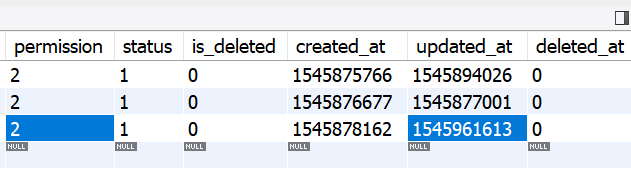
17、复制资源文件队列的作业执行失败,执行结果符合预期,发布日志已插入,且已将作业推送至来源回调队列,如图1
图1
PS E:\wwwroot\channel-pub-api> ./yii copy-asset-queue/info --color=0
Jobs
- waiting: 0
- delayed: 0
- reserved: 0
- done: 1
PS E:\wwwroot\channel-pub-api> ./yii upload-asset-queue/info --color=0
Jobs
- waiting: 0
- delayed: 0
- reserved: 0
- done: 0
PS E:\wwwroot\channel-pub-api> ./yii pub-article-queue/info --color=0
Jobs
- waiting: 0
- delayed: 0
- reserved: 0
- done: 0
PS E:\wwwroot\channel-pub-api> ./yii source-callback-queue/info --color=0
Jobs
- waiting: 1
- delayed: 0
- reserved: 0
- done: 0
18、run 命令获取并执行循环中的任务(来源回调队列),直到队列为空
PS E:\wwwroot\channel-pub-api> ./yii source-callback-queue/run --verbose=1 --isolate=1 --color=0
2018-11-23 16:20:16 [pid: 143548] - Worker is started
2018-11-23 16:20:16 [1] common\jobs\SourceCallbackJob (attempt: 1, pid: 143548) - Started
2018-11-23 16:20:17 [1] common\jobs\SourceCallbackJob (attempt: 1, pid: 143548) - Error (0.745 s)
> yii\httpclient\Exception: Curl error: #6 - Could not resolve host: www.source_callback_url.com
2018-11-23 16:20:17 [pid: 143548] - Worker is stopped (0:00:01)
19、来源回调队列的作业执行失败,执行结果符合预期,发布日志已更新,基于渠道的应用的任务ID更新发布日志(可回调次数减 1;回调状态,2:失败);如果可回调次数大于 0,将任务重新发送到来源回调队列,且延时 1 分钟运行(延时时间在生产环境设置为 10 分钟)。如图2、图3
图2 图3
PS E:\wwwroot\channel-pub-api> ./yii source-callback-queue/info --color=0
Jobs
- waiting: 0
- delayed: 1
- reserved: 0
- done: 1
PS E:\wwwroot\channel-pub-api> ./yii source-callback-queue/run --verbose=1 --isolate=1 --color=0
2018-11-23 16:23:16 [pid: 141492] - Worker is started
2018-11-23 16:23:16 [2] common\jobs\SourceCallbackJob (attempt: 1, pid: 141492) - Started
2018-11-23 16:23:16 [2] common\jobs\SourceCallbackJob (attempt: 1, pid: 141492) - Error (0.195 s)
> yii\httpclient\Exception: Curl error: #6 - Could not resolve host: www.source_callback_url.com
2018-11-23 16:23:16 [pid: 141492] - Worker is stopped (0:00:00)
PS E:\wwwroot\channel-pub-api> ./yii source-callback-queue/info --color=0
Jobs
- waiting: 0
- delayed: 1
- reserved: 0
- done: 2
PS E:\wwwroot\channel-pub-api> ./yii source-callback-queue/run --verbose=1 --isolate=1 --color=0
2018-11-23 16:25:16 [pid: 145080] - Worker is started
2018-11-23 16:25:16 [3] common\jobs\SourceCallbackJob (attempt: 1, pid: 145080) - Started
2018-11-23 16:25:16 [3] common\jobs\SourceCallbackJob (attempt: 1, pid: 145080) - Error (0.226 s)
> yii\httpclient\Exception: Curl error: #6 - Could not resolve host: www.source_callback_url.com
2018-11-23 16:25:16 [pid: 145080] - Worker is stopped (0:00:00)
PS E:\wwwroot\channel-pub-api> ./yii source-callback-queue/info --color=0
Jobs
- waiting: 0
- delayed: 0
- reserved: 0
- done: 3
20、POST http://api.channel-pub-api.localhost/qq/v1/articles/video?group_id=spider ,执行成功,特意让 media_absolute_url 的值是错误的,以测试复制资源文件队列的作业执行失败后的后续处理;特意让 source_callback_url 的值是正确的,以测试来源回调队列的作业执行成功后的后续处理
请求 Body
{
	"channel_app_source_uuids": ["bba4e024eba111e89fa754ee75d2ebc1"],
	"source": "spider",
	"source_uuid": "825e6d5e36468cc4bf536799ce3565cf",
	"source_pub_user_id": 1,
	"source_callback_url": "http://wjdev.chinamcloud.com:8609/cms/api/thirdPush/callBack",
	"article_category_id": 226,
	"title": "综艺节目 - 20181123 - 2",
	"author": "综艺节目 - 20181123 - 2",
	"source_article_id": 1,
	"media_absolute_url": "http://127.0.0.1/channel-pub-api/storage/spider/videos/3d35e17a32fb48cfb76f39a1b1bf33ce_h264_1200k_mp4",
	"tag": "综艺",
	"apply": 0,
	"desc": "综艺节目 - 20181123 - 2"
}
响应 Body
{
    "code": 10000,
    "message": "发布文章类型:视频(视频)的文章成功",
    "data": [
        {
            "channel_id": 1,
            "channel_code": "qq",
            "channel_type_id": 1,
            "channel_type_code": "qq_cw",
            "channel_app_source_id": 6,
            "channel_app_source_uuid": "bba4e024eba111e89fa754ee75d2ebc1",
            "task_id": 20,
            "status": 1,
            "created_at": 1542961817,
            "updated_at": 1542961817,
            "uuid": "01c9b588eefa11e8a7ba54ee75d2ebc1",
            "id": 20
        }
    ]
}
21、执行 SQL 语句如下:
SELECT * FROM `cpa_channel` WHERE (`code`='qq') AND (`is_deleted`=0)
SELECT * FROM `cpa_channel_app_source` WHERE (`uuid`='bba4e024eba111e89fa754ee75d2ebc1') AND (`is_deleted`=0)
SELECT * FROM `cpa_channel_type` WHERE (`code`='qq_cw') AND (`is_deleted`=0)
SELECT * FROM `cpa_qq_cw_app` WHERE (`channel_app_source_uuid`='bba4e024eba111e89fa754ee75d2ebc1') AND (`is_deleted`=0)
SELECT * FROM `cpa_article_type` WHERE (`code`='video') AND (`is_deleted`=0)
SELECT * FROM `cpa_qq_article_type` WHERE (`code`='multivideos') AND (`is_deleted`=0)
SELECT EXISTS(SELECT * FROM `cpa_article_category` WHERE (`cpa_article_category`.`id`=226) AND ((`is_deleted`=0) AND (`status`=1)))
SELECT * FROM `cpa_qq_article_category_multivideos` WHERE (`article_category_id`=226) AND (`is_deleted`=0)
INSERT INTO `cpa_task` (`group_id`, `source`, `source_uuid`, `source_pub_user_id`, `source_callback_url`, `channel_id`, `channel_code`, `channel_type_id`, `channel_type_code`, `status`, `created_at`, `updated_at`) VALUES ('spider', 'spider', '825e6d5e36468cc4bf536799ce3565cf', 1, 'http://wjdev.chinamcloud.com:8609/cms/api/thirdPush/callBack', 1, 'qq', 1, 'qq_cw', 1, 1542961817, 1542961817)
INSERT INTO `cpa_channel_app_task` (`channel_id`, `channel_code`, `channel_type_id`, `channel_type_code`, `channel_app_source_id`, `channel_app_source_uuid`, `task_id`, `status`, `created_at`, `updated_at`, `uuid`) VALUES (1, 'qq', 1, 'qq_cw', 6, 'bba4e024eba111e89fa754ee75d2ebc1', 20, 1, 1542961817, 1542961817, '01c9b588eefa11e8a7ba54ee75d2ebc1')
INSERT INTO `cpa_qq_cw_app_task` (`channel_app_task_id`, `channel_app_task_uuid`, `qq_cw_app_id`, `task_id`, `status`, `created_at`, `updated_at`) VALUES (20, '01c9b588eefa11e8a7ba54ee75d2ebc1', 5, 20, 1, 1542961817, 1542961817)
INSERT INTO `cpa_qq_article` (`group_id`, `article_category_id`, `title`, `author`, `source_article_id`, `qq_app_type`, `article_type_id`, `qq_article_type_id`, `qq_article_category_id`, `task_id`, `status`, `created_at`, `updated_at`) VALUES ('spider', 226, '综艺节目 - 20181123 - 2', '综艺节目 - 20181123 - 2', 1, 'cw', 3, 2, 2808, 20, 1, 1542961817, 1542961817)
INSERT INTO `cpa_qq_article_multivideos` (`media`, `tag`, `desc`, `apply`, `qq_article_id`, `category`, `md5`, `vid`, `task_id`, `status`, `created_at`, `updated_at`) VALUES ('', '综艺', '综艺节目 - 20181123 - 2', 0, 20, 2808, '', '', 20, 1, 1542961817, 1542961817)
INSERT INTO `cpa_asset` (`channel_id`, `channel_code`, `channel_type_id`, `channel_type_code`, `source`, `type`, `absolute_url`, `relative_path`, `size`, `task_id`, `channel_article_id`, `status`, `is_deleted`, `created_at`, `updated_at`, `deleted_at`) VALUES (1, 'qq', 1, 'qq_cw', 'spider', 'video', 'http://127.0.0.1/channel-pub-api/storage/spider/videos/3d35e17a32fb48cfb76f39a1b1bf33ce_h264_1200k_mp4', '', 0, 20, 20, 1, 0, 1542961817, 1542961817, 0)
22、查看 4 个队列的状态信息
PS E:\wwwroot\channel-pub-api> ./yii copy-asset-queue/info --color=0
Jobs
- waiting: 1
- delayed: 0
- reserved: 0
- done: 1
PS E:\wwwroot\channel-pub-api> ./yii upload-asset-queue/info --color=0
Jobs
- waiting: 0
- delayed: 0
- reserved: 0
- done: 0
PS E:\wwwroot\channel-pub-api> ./yii pub-article-queue/info --color=0
Jobs
- waiting: 0
- delayed: 0
- reserved: 0
- done: 0
PS E:\wwwroot\channel-pub-api> ./yii source-callback-queue/info --color=0
Jobs
- waiting: 0
- delayed: 0
- reserved: 0
- done: 3
23、run 命令获取并执行循环中的任务(复制资源文件队列),直到队列为空
PS E:\wwwroot\channel-pub-api> ./yii copy-asset-queue/run --verbose=1 --isolate=1 --color=0
2018-11-23 16:36:40 [pid: 146364] - Worker is started
2018-11-23 16:36:40 [2] common\jobs\CopyAssetJob (attempt: 1, pid: 146364) - Started
2018-11-23 16:36:41 [2] common\jobs\CopyAssetJob (attempt: 1, pid: 146364) - Error (0.180 s)
> yii\web\NotFoundHttpException: Source resource file: 0, does not exist
2018-11-23 16:36:41 [pid: 146364] - Worker is stopped (0:00:01)
24、复制资源文件队列的作业执行失败,执行结果符合预期,发布日志已插入,且已将作业推送至来源回调队列,如图4
图4
PS E:\wwwroot\channel-pub-api> ./yii copy-asset-queue/info --color=0
Jobs
- waiting: 0
- delayed: 0
- reserved: 0
- done: 2
PS E:\wwwroot\channel-pub-api> ./yii upload-asset-queue/info --color=0
Jobs
- waiting: 0
- delayed: 0
- reserved: 0
- done: 0
PS E:\wwwroot\channel-pub-api> ./yii pub-article-queue/info --color=0
Jobs
- waiting: 0
- delayed: 0
- reserved: 0
- done: 0
PS E:\wwwroot\channel-pub-api> ./yii source-callback-queue/info --color=0
Jobs
- waiting: 1
- delayed: 0
- reserved: 0
- done: 3
25、run 命令获取并执行循环中的任务(来源回调队列),直到队列为空
PS E:\wwwroot\channel-pub-api> ./yii source-callback-queue/run --verbose=1 --isolate=1 --color=0
2018-11-23 16:38:53 [pid: 141652] - Worker is started
2018-11-23 16:38:54 [4] common\jobs\SourceCallbackJob (attempt: 1, pid: 141652) - Started
2018-11-23 16:38:54 [4] common\jobs\SourceCallbackJob (attempt: 1, pid: 141652) - Done (0.623 s)
2018-11-23 16:38:55 [pid: 141652] - Worker is stopped (0:00:02)
26、来源回调队列的作业执行成功,执行结果符合预期,发布日志已更新,基于渠道的应用的任务ID更新发布日志(可回调次数减 1;回调状态,1:成功)。如图5、图6
图5 图6
PS E:\wwwroot\channel-pub-api> ./yii source-callback-queue/info --color=0
Jobs
- waiting: 0
- delayed: 0
- reserved: 0
- done: 4
27、资源服务(企鹅号的内容网站应用的视频文件分片上传,队列任务执行成功后,调用相应服务,否则,插入发布日志)的实现。编辑 \common\services\QqCwAssetService.php
<pre class="wp-block-syntaxhighlighter-code">

<?php
/**
 * Created by PhpStorm.
 * User: Qiang Wang
 * Date: 2018/10/24
 * Time: 14:01
 */

namespace common\services;

use Yii;
use common\logics\ChannelType;
use common\logics\ChannelAppTask;
use common\logics\QqCwAppTask;
use common\logics\WxTaskQqCwTaskRelation;
use common\logics\Asset;
use common\logics\PubLog;
use common\jobs\UploadAssetJob;
use yii\helpers\Json;
use yii\web\NotFoundHttpException;
use yii\web\ServerErrorHttpException;
use yii\web\UnprocessableEntityHttpException;

/**
 * 企鹅号的内容网站应用的资源服务
 *
 * @author Qiang Wang <shuijingwanwq@163.com>
 * @since 1.0
 */
class QqCwAssetService extends Service
{
    /**
     * 复制资源文件队列的作业执行成功后的后续处理
     *
     * @param int $taskId 任务ID
     * 格式如下:1
     *
     * @throws NotFoundHttpException 如果未找到数据模型,将抛出 404 HTTP 异常
     * @throws UnprocessableEntityHttpException 如果找到数据模型,状态未启用,将抛出 422 HTTP 异常
     * @throws \yii\base\Exception if the directory could not be created (i.e. php error due to parallel changes)
     */
    public static function copyAssetExecHandler($taskId)
    {
        // 基于ID查找状态为启用的单个数据模型(任务)
        $taskEnabledItem = TaskService::findModelEnabledById($taskId);

        // 基于条件查找状态为启用的资源列表
        $assetEnabledWhere = [
            'channel_id' => $taskEnabledItem->channel_id,
            'channel_type_id' => $taskEnabledItem->channel_type_id,
            'type' => Asset::TYPE_VIDEO,
            'task_id' => $taskEnabledItem->id,
        ];
        $assetEnabledItems = Asset::findAllEnabledByWhere($assetEnabledWhere);

        if (empty($assetEnabledItems)) {

        } else {
            // 企鹅号的内容网站应用的视频文件分片上传,队列任务执行成功后,调用相应服务,否则,插入发布日志(异步)
            $assets = [];
            foreach ($assetEnabledItems as $assetEnabledItem) {
                $assets[] = [
                    'job_type' => UploadAssetJob::JOB_TYPE_VIDEO_MULTIPART,
                    'id' => $assetEnabledItem->id,
                ];
            }

            static::uploadAssetVideoMultipartAsync($taskId, $assets);
        }
    }

    /**
     * 复制资源文件队列的作业执行失败后的后续处理
     *
     * @param int $taskId 任务ID
     * 格式如下:1
     * @param object $eventError 事件错误
     *
     * @throws NotFoundHttpException 如果未找到数据模型,将抛出 404 HTTP 异常
     * @throws UnprocessableEntityHttpException 如果找到数据模型,状态未启用,将抛出 422 HTTP 异常
     * @throws \yii\base\Exception if the directory could not be created (i.e. php error due to parallel changes)
     */
    public static function copyAssetErrorHandler($taskId, $eventError)
    {
        // 基于ID查找状态为启用的单个数据模型(任务)
        $taskEnabledItem = TaskService::findModelEnabledById($taskId);

        // 基于任务ID查找状态为启用的资源列表
        $channelAppTaskEnabledItems = ChannelAppTask::findAllEnabledByTaskId($taskId);

        if (empty($channelAppTaskEnabledItems)) {
            throw new ServerErrorHttpException(Yii::t('common/error', Yii::t('common/error', Yii::t('common/error', '35021'), ['task_id' => $taskId])), 35021);
        }

        // 基于任务ID批量更新企鹅号的内容网站应用的任务(场景:复制资源文件队列的作业执行失败后,可发布次数减1,状态,3:发布中(已失败))
        QqCwAppTask::updateMultiplePublishErrorByTaskId($taskId);

        $pubLogDatas = [];
        foreach ($channelAppTaskEnabledItems as $key => $channelAppTaskEnabledItem) {
            // 基于渠道的应用的任务ID查找单个数据模型(企鹅号的内容网站应用的任务)
            $qqCwAppTaskItem = QqCwAppTaskService::findModelByChannelAppTaskId($channelAppTaskEnabledItem->id);
            $pubLogDatas[$key] = [
                'channel_app_source_uuid' => $channelAppTaskEnabledItem->channel_app_source_uuid,
                'channel_app_task_uuid' => $channelAppTaskEnabledItem->uuid,
                'channel_code' => $channelAppTaskEnabledItem->channel_code,
                'channel_type_code' => $channelAppTaskEnabledItem->channel_type_code,
                'channel_app_task_status' => $qqCwAppTaskItem->status,
            ];
        }

        // 发布任务失败后,插入发布日志,将作业推送至来源回调队列(异步)
        SourceCallbackService::sourceCallbackAsync($channelAppTaskEnabledItems, $eventError->getCode(), $eventError->getMessage(), $pubLogDatas, PubLog::STATUS_ERROR);

        // 基于企鹅号的内容网站应用的任务ID查找状态为启用的单个资源(微信公众帐号应用的任务与企鹅号的内容网站应用的任务的关联)
        $wxTaskQqCwTaskRelationItem = WxTaskQqCwTaskRelation::findOneEnabledByQqCwTaskId($taskEnabledItem->id);

        if (isset($wxTaskQqCwTaskRelationItem)) {
            WxAssetService::copyAssetErrorHandler($wxTaskQqCwTaskRelationItem->wx_task_id, $eventError);
        }

    }

    /**
     * 上传资源文件队列的作业执行成功后的后续处理
     *
     * @param int $assetId 资源ID
     * 格式如下:1
     *
     * @param int $channelAppTaskId 渠道的应用的任务ID
     * 格式如下:4
     *
     */
    public static function uploadAssetVideoMultipartExecHandler($assetId, $channelAppTaskId)
    {
    }

    /**
     * 上传资源文件队列的作业执行失败后的后续处理
     *
     * @param int $assetId 资源ID
     * 格式如下:1
     *
     * @param int $channelAppTaskId 渠道的应用的任务ID
     * 格式如下:4
     *
     * @param object $eventError 事件错误
     *
     * @throws NotFoundHttpException 如果未找到数据模型,将抛出 404 HTTP 异常
     * @throws UnprocessableEntityHttpException 如果找到数据模型,状态未启用,将抛出 422 HTTP 异常
     * @throws ServerErrorHttpException
     * @throws \Throwable
     */
    public static function uploadAssetVideoMultipartErrorHandler($assetId, $channelAppTaskId, $eventError)
    {
        // 基于ID查找状态为启用的单个数据模型(资源)
        $assetEnabledItem = AssetService::findModelEnabledById($assetId);

        if ($assetEnabledItem->type != Asset::TYPE_VIDEO) {
            throw new ServerErrorHttpException(Yii::t('common/error', '35040'), 35040);
        }

        // 基于ID查找状态为启用的单个数据模型(渠道的应用的任务)
        $channelAppTaskEnabledItem = ChannelAppTaskService::findModelEnabledById($channelAppTaskId);

        // 基于渠道的应用的任务ID更新企鹅号的内容网站应用的任务(场景:上传资源文件队列的作业执行失败后,可发布次数减1,状态,3:发布中(已失败))
        QqCwAppTask::updatePublishErrorByChannelAppTaskId($channelAppTaskEnabledItem->id);

        $channelAppTaskEnabledItems[] = $channelAppTaskEnabledItem;

        $pubLogDatas = [];
        foreach ($channelAppTaskEnabledItems as $key => $channelAppTaskEnabledItem) {
            // 基于渠道的应用的任务ID查找单个数据模型(企鹅号的内容网站应用的任务)
            $qqCwAppTaskItem = QqCwAppTaskService::findModelByChannelAppTaskId($channelAppTaskEnabledItem->id);
            $pubLogDatas[$key] = [
                'channel_app_source_uuid' => $channelAppTaskEnabledItem->channel_app_source_uuid,
                'channel_app_task_uuid' => $channelAppTaskEnabledItem->uuid,
                'channel_code' => $channelAppTaskEnabledItem->channel_code,
                'channel_type_code' => $channelAppTaskEnabledItem->channel_type_code,
                'channel_app_task_status' => $qqCwAppTaskItem->status,
            ];
        }

        // 发布任务失败后,插入发布日志,将作业推送至来源回调队列(异步)
        SourceCallbackService::sourceCallbackAsync($channelAppTaskEnabledItems, $eventError->getCode(), $eventError->getMessage(), $pubLogDatas, PubLog::STATUS_ERROR);

        // 基于ID查找状态为启用的单个数据模型(任务)
        $taskEnabledItem = TaskService::findModelEnabledById($assetEnabledItem->task_id);

        // 基于企鹅号的内容网站应用的任务ID查找状态为启用的单个资源(微信公众帐号应用的任务与企鹅号的内容网站应用的任务的关联)
        $wxTaskQqCwTaskRelationItem = WxTaskQqCwTaskRelation::findOneEnabledByQqCwTaskId($taskEnabledItem->id);

        if (isset($wxTaskQqCwTaskRelationItem)) {
            WxAssetService::qqCwUploadAssetVideoMultipartErrorHandler($wxTaskQqCwTaskRelationItem->wx_task_id, $eventError);
        }

        // 判断任务的渠道的类型代码
        if ($taskEnabledItem->channel_type_code != ChannelType::CODE_QQ_CW) {
            throw new ServerErrorHttpException(Yii::t('common/error', '35032'), 35032);
        }

        // 基于渠道的应用的任务ID查找单个数据模型(企鹅号的内容网站应用的任务)
        $qqCwAppTaskItem = QqCwAppTaskService::findModelByChannelAppTaskId($channelAppTaskId);

        // 企鹅号的内容网站应用的视频文件分片上传失败后的后续处理
        $qqCwVideoMultipartUploadService = new QqCwVideoMultipartUploadService();
        $result = $qqCwVideoMultipartUploadService->uploadErrorHandler($assetId, $qqCwAppTaskItem->id);

    }

    /**
     * 企鹅号的内容网站应用的视频文件分片上传,队列任务执行成功后,调用相应服务,否则,插入发布日志(异步)
     *
     * @param int $taskId 任务ID
     * 格式如下:1
     *
     * @param array $assets 多个资源ID
     * 格式如下:
     * [
     *     [
     *         'job_type' => 'video_multipart', // 作业类型,video_multipart:视频文件分片
     *         'id' => 2, // ID
     *     ],
     *     [
     *         'job_type' => 'video_multipart', // 作业类型,video_multipart:视频文件分片
     *         'id' => 4, // ID
     *     ],
     * ]
     *
     * @throws NotFoundHttpException 如果未找到数据模型,将抛出 404 HTTP 异常
     */
    public static function uploadAssetVideoMultipartAsync($taskId, $assets)
    {
        // 基于任务ID查找状态为启用的资源列表
        $channelAppTaskEnabledItems = ChannelAppTask::findAllEnabledByTaskId($taskId);

        foreach ($channelAppTaskEnabledItems as $channelAppTaskEnabledItem) {

            // 基于渠道的应用的任务ID查找单个数据模型(企鹅号的内容网站应用的任务)
            $qqCwAppTaskItem = QqCwAppTaskService::findModelByChannelAppTaskId($channelAppTaskEnabledItem->id);
            // 更新企鹅号的内容网站应用的任务状态,2:发布中
            $qqCwAppTaskItem->status = QqCwAppTask::STATUS_PUBLISH;
            $qqCwAppTaskItem->save();

            // 将任务发送到队列,通过标准工作人员进行处理
            Yii::$app->uploadAssetQueue->push(new UploadAssetJob([
                'channelAppTaskId' => $channelAppTaskEnabledItem->id,
                'assets' => $assets,
            ]));
        }
    }

    /**
     * 企鹅号的内容网站应用的视频文件分片上传(同步)
     *
     * @param int $assetId 资源ID
     * 格式如下:1
     *
     * @param int $channelAppTaskId 渠道的应用的任务ID
     * 格式如下:4
     *
     * @throws NotFoundHttpException 如果未找到数据模型,将抛出 404 HTTP 异常
     * @throws UnprocessableEntityHttpException 如果找到数据模型,状态未启用,将抛出 422 HTTP 异常
     * @throws ServerErrorHttpException
     * @throws \Throwable
     */
    public static function uploadAssetVideoMultipartSync($assetId, $channelAppTaskId)
    {
        // 基于ID查找状态为启用的单个数据模型(资源)
        $assetEnabledItem = AssetService::findModelEnabledById($assetId);

        if ($assetEnabledItem->type != Asset::TYPE_VIDEO) {
            throw new ServerErrorHttpException(Yii::t('common/error', '35040'), 35040);
        }

        // 基于ID查找状态为启用的单个数据模型(渠道的应用的任务)
        $channelAppTaskEnabledItem = ChannelAppTaskService::findModelEnabledById($channelAppTaskId);

        // 基于ID查找状态为启用的单个数据模型(任务)
        $taskEnabledItem = TaskService::findModelEnabledById($assetEnabledItem->task_id);

        // 判断任务的渠道的类型代码
        if ($taskEnabledItem->channel_type_code != ChannelType::CODE_QQ_CW) {
            throw new ServerErrorHttpException(Yii::t('common/error', '35032'), 35032);
        }

        // 基于渠道的应用的任务ID查找单个数据模型(企鹅号的内容网站应用的任务)
        $qqCwAppTaskItem = QqCwAppTaskService::findModelByChannelAppTaskId($channelAppTaskId);

        // 基于ID查找状态为启用的单个数据模型(企鹅号的内容网站应用)
        $qqCwAppEnabledItem = QqCwAppService::findModelEnabledById($qqCwAppTaskItem->qq_cw_app_id);

        // 企鹅号的内容网站应用的视频文件分片上传
        $qqCwVideoMultipartUploadService = new QqCwVideoMultipartUploadService();
        $result = $qqCwVideoMultipartUploadService->upload($assetId, $qqCwAppTaskItem->id);
    }
}

</pre>
28、上传资源文件队列作业的实现,编辑 \common\jobs\UploadAssetJob.php
<pre class="wp-block-syntaxhighlighter-code">

<?php
/**
 * Created by PhpStorm.
 * User: Qiang Wang
 * Date: 2018/10/24
 * Time: 17:17
 */

namespace common\jobs;

use Yii;
use common\logics\ChannelType;
use common\logics\Asset;
use common\services\TaskService;
use common\services\ChannelAppTaskService;
use yii\helpers\ArrayHelper;
use yii\web\ServerErrorHttpException;
use yii\web\UnprocessableEntityHttpException;

/**
 * 上传资源文件
 *
 * @author Qiang Wang <shuijingwanwq@163.com>
 * @since 1.0
 */
class UploadAssetJob extends Job
{
    const JOB_TYPE_VIDEO_MULTIPART = 'video_multipart'; //作业类型:视频文件分片

    public $channelAppTaskId;
    public $assets;

    /*
     * @throws UnprocessableEntityHttpException
     * @throws ServerErrorHttpException 如果基于任务ID查找状态为启用的资源列表为空,将抛出 500 HTTP 异常
     */
    public function execute($queue)
    {
        // 查找状态为启用的数据模型(渠道的类型)
        $channelTypeEnabledItems = ChannelType::find()->isDeletedNo()->enabled()->all();

        // 基于ID查找状态为启用的单个数据模型(渠道的应用的任务)
        $channelAppTaskEnabledItem = ChannelAppTaskService::findModelEnabledById($this->channelAppTaskId);

        // 基于ID查找状态为启用的单个数据模型(任务)
        $taskEnabledItem = TaskService::findModelEnabledById($channelAppTaskEnabledItem->task_id);

        // 基于任务ID查找状态为启用的资源列表
        $assetEnabledItems = Asset::findAllEnabledByTaskId($taskEnabledItem->id);

        if (empty($assetEnabledItems)) {
            throw new ServerErrorHttpException(Yii::t('common/error', Yii::t('common/error', Yii::t('common/error', '35020'), ['task_id' => $taskEnabledItem->id])), 35020);
        }

        // 获取基于任务ID查找状态为启用的资源列表的id值列表
        $assetEnabledIds = ArrayHelper::getColumn($assetEnabledItems, 'id');
        // 不属于当前任务ID下的资源ID
        $notBelongIds = [];
        // 作业类型不支持的资源ID
        $jobTypeNotSupportIds = [];
        // 作业类型与渠道的类型代码不匹配的资源ID
        $notMatchChannelTypeCodeIds = [];

        $assets = $this->assets;
        foreach ($this->assets as $assetKey => $asset) {

            $assetJobType = $taskEnabledItem->channel_type_code . '_' . $asset['job_type'];

            // 不属于当前任务ID下的资源ID
            if (!in_array($asset['id'], $assetEnabledIds)) {
                $notBelongIds[] = $asset['id'];
            }

            // 作业类型不支持的资源ID
            if (!in_array($asset['job_type'], [self::JOB_TYPE_VIDEO_MULTIPART])) {
                $jobTypeNotSupportIds[] = $assetJobType;
            }

            // 作业类型与渠道的类型代码不匹配的资源ID
            $matchChannelTypeCode = false;
            foreach ($channelTypeEnabledItems as $itemKey => $channelTypeEnabledItem) {
                $pos = strpos($assetJobType, $channelTypeEnabledItem->code);
                if ($pos !== false) {
                    $assets[$assetKey]['service_class'] = 'common\services\\' . str_replace(' ', '', ucwords(str_replace('_', ' ', $channelTypeEnabledItem->code))) . 'AssetService'; // 例:common\services\QqCwAssetService
                    $assets[$assetKey]['service_action'] = 'uploadAsset' . str_replace(' ', '', ucwords(str_replace('_', ' ', $asset['job_type']))) . 'Sync'; // 例:uploadAssetVideoMultipartSync
                    $matchChannelTypeCode = true;
                    break;
                }
            }
            if (!$matchChannelTypeCode) {
                $notMatchChannelTypeCodeIds[] = $assetJobType;
            }
        }

        if (!empty($notBelongIds)) {
            $notBelongIds = implode(",", $notBelongIds);
            throw new UnprocessableEntityHttpException(Yii::t('common/error', Yii::t('common/error', Yii::t('common/error', '35025'), ['not_belong_ids' => $notBelongIds, 'task_id' => $taskEnabledItem->id])), 35025);
        }

        if (!empty($jobTypeNotSupportIds)) {
            $jobTypeNotSupportIds = implode(",", array_unique($jobTypeNotSupportIds));
            throw new UnprocessableEntityHttpException(Yii::t('common/error', Yii::t('common/error', Yii::t('common/error', '35026'), ['job_type_not_support_ids' => $jobTypeNotSupportIds])), 35026);
        }

        if (!empty($notMatchChannelTypeCodeIds)) {
            $notMatchChannelTypeCodeIds = implode(",", array_unique($notMatchChannelTypeCodeIds));
            throw new UnprocessableEntityHttpException(Yii::t('common/error', Yii::t('common/error', Yii::t('common/error', '35027'), ['not_match_channel_type_code_ids' => $notMatchChannelTypeCodeIds])), 35027);
        }

        // 基于作业类型调用相应上传服务
        foreach ($assets as $asset) {
            $serviceAction = $asset['service_action'];
            $asset['service_class']::$serviceAction($asset['id'], $this->channelAppTaskId);
        }

    }
}

</pre>
29、企鹅号的内容网站应用的视频文件分片上传的具体实现,编辑 \common\services\QqCwVideoMultipartUploadService.php
<pre class="wp-block-syntaxhighlighter-code">

<?php
/**
 * Created by PhpStorm.
 * User: Qiang Wang
 * Date: 2018/10/29
 * Time: 14:45
 */

namespace common\services;

use Yii;
use common\logics\QqArticle;
use common\logics\QqTransaction;
use common\logics\QqVideoMultipartUpload;
use common\logics\http\qq_api\Video as HttpQqApiVideo;
use yii\web\ServerErrorHttpException;

/**
 * Class QqCwVideoMultipartUploadService
 * @package qq\services
 *
 * @author Qiang Wang <shuijingwanwq@163.com>
 * @since 1.0
 */
class QqCwVideoMultipartUploadService extends Service
{
    /**
     * HTTP请求,申请企鹅号的内容网站应用的视频文件分片上传的唯一事务ID
     *
     * @param array $data 数据
     * 格式如下:
     *
     * [
     *     'accessToken' => 'KCK0TIV8NDY44ONAEFI2QW', // 企鹅平台企鹅号应用授权调用凭据
     *     'size' => 9135849, // 视频文件大小,单位(字节)
     *     'md5' => 'd081c619ef7dc62eb2aa29c7c83c6f26', // 视频文件MD5值
     *     'sha' => '28a1076b867bed8202df5b3f656b798148e58ced', // 视频文件SHA-1值
     * ]
     *
     * @return array
     * 格式如下:
     *
     * [
     *     'transaction_id' => '780930255958621794', // 上传的唯一事务ID
     * ]
     *
     * @throws ServerErrorHttpException
     */
    public function httpUploadReady($data)
    {
        /* HTTP请求,申请企鹅号的内容网站应用的视频文件分片上传的唯一事务ID */
        $httpQqApiVideo = new HttpQqApiVideo();
        $uploadReady = $httpQqApiVideo->clientUploadReady($data);

        if ($uploadReady === false) {
            if ($httpQqApiVideo->hasErrors()) {
                foreach ($httpQqApiVideo->getFirstErrors() as $message) {
                    $firstErrors = $message;
                    break;
                }
                throw new ServerErrorHttpException(Yii::t('common/error', Yii::t('common/error', Yii::t('common/error', '35042'), ['firstErrors' => $firstErrors])), 35042);
            } elseif (!$httpQqApiVideo->hasErrors()) {
                throw new ServerErrorHttpException('Penguin\'s content website application api HTTP requests fail for unknown reasons.');
            }
        }

        return $uploadReady['data'];
    }

    /**
     * HTTP请求,企鹅号的内容网站应用的视频文件分片上传
     * @param array $data 数据
     * 格式如下:
     *
     * [
     *     'accessToken' => 'LQVHLUQDNEKIDBFARJ1OOA', // 企鹅平台企鹅号应用授权调用凭据
     *     'transactionId' => '780930287703152921', // 上传的唯一事务ID
     *     'mediatrunk' => 'E:/wwwroot/channel-pub-api/storage/channel-pub-api/videos/2018/10/27/1540632234.9842.66697370.mp4', // 视频 mediatrunk 文件
     *     'startOffset' => 0, // 分片的起始位置(从0开始计数)
     * ]
     *
     * @return array
     * 格式如下:
     *
     * [
     *     'end_offset' => 2198151, // 分片的结束位置
     *     'start_offset' => 2198151, // 分片的起始位置
     *     'transaction_id' => 780930255958621794, // 上传的唯一事务ID
     * ]
     *
     * @throws ServerErrorHttpException
     */
    public function httpUploadTrunk($data)
    {
        /* HTTP请求,企鹅号的内容网站应用的视频文件分片上传 */
        $httpQqApiVideo = new HttpQqApiVideo();
        $uploadTrunk = $httpQqApiVideo->clientUploadTrunk($data);

        if ($uploadTrunk === false) {
            if ($httpQqApiVideo->hasErrors()) {
                foreach ($httpQqApiVideo->getFirstErrors() as $message) {
                    $firstErrors = $message;
                    break;
                }
                throw new ServerErrorHttpException(Yii::t('common/error', Yii::t('common/error', Yii::t('common/error', '35042'), ['firstErrors' => $firstErrors])), 35042);
            } elseif (!$httpQqApiVideo->hasErrors()) {
                throw new ServerErrorHttpException('Penguin\'s content website application api HTTP requests fail for unknown reasons.');
            }
        }

        return $uploadTrunk['data'];
    }

    /**
     * 企鹅号的内容网站应用的视频文件分片上传
     *
     * @param int $assetId 资源ID
     * 格式如下:1
     *
     * @param int $qqCwAppTaskId 企鹅号的内容网站应用的任务ID
     * 格式如下:6
     *
     * @throws ServerErrorHttpException
     * @throws \Throwable
     */
    public function upload($assetId, $qqCwAppTaskId)
    {
        // 基于ID查找状态为启用的单个数据模型(资源)
        $assetEnabledItem = AssetService::findModelEnabledById($assetId);

        // 基于ID查找状态为启用的单个数据模型(任务)
        $taskEnabledItem = TaskService::findModelEnabledById($assetEnabledItem->task_id);

        // 基于ID查找状态为发布中的单个数据模型(企鹅号的内容网站应用的任务)
        $qqCwAppTaskPublishItem = QqCwAppTaskService::findModelPublishById($qqCwAppTaskId);

        // 基于ID查找状态为启用的单个数据模型(企鹅号的内容网站应用)
        $qqCwAppEnabledItem = QqCwAppService::findModelEnabledById($qqCwAppTaskPublishItem->qq_cw_app_id);

        // 基于企鹅号的内容网站应用ID获取有效的 Access Token
        $qqCwAccessTokenService = new QqCwAccessTokenService();
        $accessTokenValidity = $qqCwAccessTokenService->getAccessTokenValidityByQqCwAppId($qqCwAppEnabledItem->id);

        // 基于资源ID、企鹅号的应用的任务ID获取企鹅号的视频文件分片上传的单个数据模型
        $qqVideoMultipartUploadItem = $this->getModelByAssetIdAndQqAppTaskId($assetId, $qqCwAppTaskPublishItem->id);

        $data = [
            'assetId' => $qqVideoMultipartUploadItem->asset_id,
            'qqAppTaskId' => $qqVideoMultipartUploadItem->qq_app_task_id,
            'qqAppId' => $qqVideoMultipartUploadItem->qq_app_id,
            'qqAppType' => $qqVideoMultipartUploadItem->qq_app_type,
            'size' => $qqVideoMultipartUploadItem->size,
            'md5' => $qqVideoMultipartUploadItem->md5,
            'sha' => $qqVideoMultipartUploadItem->sha,
            'transactionId' => (string) $qqVideoMultipartUploadItem->transaction_id,
            'mediatrunk' => $qqVideoMultipartUploadItem->mediatrunk,
            'startOffset' => $qqVideoMultipartUploadItem->start_offset,
            'endOffset' => $qqVideoMultipartUploadItem->end_offset,
            'vid' => $qqVideoMultipartUploadItem->vid,
            'status' => $qqVideoMultipartUploadItem->status,
        ];

        // 文件切片
        AssetService::cut(Yii::$app->params['channelPubApi']['asset'][$assetEnabledItem->type]['basePath'] . $qqVideoMultipartUploadItem->mediatrunk, HttpQqApiVideo::CUT_SIZE);
        // 获取需要切片的文件的路径信息
        $pathInfo = pathinfo(Yii::$app->params['channelPubApi']['asset'][$assetEnabledItem->type]['basePath'] . $qqVideoMultipartUploadItem->mediatrunk);

        // 判断分片的起始位置与分片的结束位置是否等于视频文件大小,如果相等则中断分片上传,否则继续执行分片上传
        $i = 0;
        while ($qqVideoMultipartUploadItem->start_offset != $qqVideoMultipartUploadItem->size && $qqVideoMultipartUploadItem->end_offset != $qqVideoMultipartUploadItem->size) {
            // file_put_contents('E:/wwwroot/channel-pub-api/qq/runtime/while_' . $assetId . '_' . $qqCwAppId . '_' . $qqVideoMultipartUploadItem->start_offset . '_' . $qqVideoMultipartUploadItem->end_offset . '_' . time() . '.txt', $assetId);
            // HTTP请求,企鹅号的内容网站应用的视频文件分片上传
            $httpUploadTrunkData = [
                'accessToken' => $accessTokenValidity->access_token,
                'transactionId' => $qqVideoMultipartUploadItem->transaction_id,
                'mediatrunk' => $pathInfo['dirname'] . '/' . $pathInfo['filename'] . '_' . $i . '.' . $pathInfo['extension'],
                'startOffset' => $qqVideoMultipartUploadItem->start_offset,
            ];
            $uploadTrunkData = $this->httpUploadTrunk($httpUploadTrunkData);

            // 基于资源ID、企鹅号的内容网站应用ID插入/更新数据至企鹅号的内容网站应用的视频文件分片上传
            $data['startOffset'] = $uploadTrunkData['start_offset'];
            $data['endOffset'] = $uploadTrunkData['end_offset'];
            if ($uploadTrunkData['start_offset'] != $qqVideoMultipartUploadItem->size && $uploadTrunkData['end_offset'] != $qqVideoMultipartUploadItem->size) {
                $data['status'] = QqVideoMultipartUpload::STATUS_UPLOADING;
            } else {

                // HTTP请求,基于上传的唯一事务ID获取事务信息
                $qqTransactionService = new QqTransactionService();
                $qqTransactionServiceHttpTransactionInfoData = [
                    'accessToken' => $accessTokenValidity->access_token,
                    'transactionId' => $qqVideoMultipartUploadItem->transaction_id,
                ];
                $qqTransactionServiceHttpTransactionInfoResult = $qqTransactionService->httpTransactionInfo($qqTransactionServiceHttpTransactionInfoData);

                // 创建企鹅号的事务
                $qqTransaction = new QqTransaction();
                $qqTransaction->attributes = [
                    'group_id' => $taskEnabledItem->group_id,
                    'qq_app_task_id' => $qqVideoMultipartUploadItem->qq_app_task_id,
                    'qq_app_id' => $qqVideoMultipartUploadItem->qq_app_id,
                    'qq_app_type' => $qqVideoMultipartUploadItem->qq_app_type,
                    'qq_article_id' => 0,
                    'qq_video_multipart_upload_id' => $qqVideoMultipartUploadItem->id,
                    'transaction_id' => $qqVideoMultipartUploadItem->transaction_id,
                    'type' => $qqTransactionService::getTypeByHttpQqApiTransactionType($qqTransactionServiceHttpTransactionInfoResult['transaction_type']),
                    'transaction_ctime' => $qqTransactionServiceHttpTransactionInfoResult['transaction_ctime'],
                    'ext_err' => $qqTransactionServiceHttpTransactionInfoResult['ext_err'],
                    'transaction_err_msg' => $qqTransactionServiceHttpTransactionInfoResult['transaction_err_msg'],
                    'article_abstract' => $qqTransactionServiceHttpTransactionInfoResult['article_info']['article_abstract'],
                    'article_type' => $qqTransactionServiceHttpTransactionInfoResult['article_info']['article_type'],
                    'article_type_code' => '',
                    'article_url' => $qqTransactionServiceHttpTransactionInfoResult['article_info']['article_url'],
                    'article_imgurl' => $qqTransactionServiceHttpTransactionInfoResult['article_info']['article_imgurl'],
                    'article_title' => $qqTransactionServiceHttpTransactionInfoResult['article_info']['article_title'],
                    'article_pub_flag' => $qqTransactionServiceHttpTransactionInfoResult['article_info']['article_pub_flag'],
                    'article_pub_time' => $qqTransactionServiceHttpTransactionInfoResult['article_info']['article_pub_time'],
                    'article_video_title' => $qqTransactionServiceHttpTransactionInfoResult['article_info']['article_video_info']['title'],
                    'article_video_desc' => $qqTransactionServiceHttpTransactionInfoResult['article_info']['article_video_info']['desc'],
                    'article_video_type' => $qqTransactionServiceHttpTransactionInfoResult['article_info']['article_video_info']['type'],
                    'article_video_vid' => $qqTransactionServiceHttpTransactionInfoResult['article_info']['article_video_info']['vid'],
                    'task_id' => $assetEnabledItem->task_id,
                    'status' => QqTransaction::STATUS_PROCESSING,
                ];
                $qqTransactionServiceCreateResult = $qqTransactionService->create($qqTransaction);

                if ($qqTransactionServiceCreateResult['status'] === false) {
                    throw new ServerErrorHttpException($qqTransactionServiceCreateResult['message'], $qqTransactionServiceCreateResult['code']);
                }

                $data['status'] = QqVideoMultipartUpload::STATUS_UPLOADED;
            }
            $qqVideoMultipartUploadService = new QqVideoMultipartUploadService();
            $result = $qqVideoMultipartUploadService->saveModelByData($data);
            if ($result['status'] === false) {
                throw new ServerErrorHttpException($result['message'], $result['code']);
            }

            // 基于资源ID、企鹅号的应用的任务ID获取企鹅号的视频文件分片上传的单个数据模型
            $qqVideoMultipartUploadItem = $this->getModelByAssetIdAndQqAppTaskId($assetId, $qqCwAppTaskPublishItem->id);
            $i++;
        }

    }

    /**
     * 企鹅号的内容网站应用的视频文件分片上传失败后的后续处理
     *
     * @param int $assetId 资源ID
     * 格式如下:1
     *
     * @param int $qqCwAppTaskId 企鹅号的应用的任务ID
     * 格式如下:6
     *
     * @throws ServerErrorHttpException
     * @throws \Throwable
     */
    public function uploadErrorHandler($assetId, $qqCwAppTaskId)
    {

        // 基于资源ID、企鹅号的应用的任务ID查找单个数据模型(企鹅号的内容网站应用的视频文件分片上传)
        $qqVideoMultipartUploadItem = QqVideoMultipartUpload::find()->where(['asset_id' => $assetId, 'qq_app_task_id' => $qqCwAppTaskId, 'qq_app_type' => QqArticle::QQ_APP_TYPE_CW])->isDeletedNo()->one();

        if (isset($qqVideoMultipartUploadItem)) {
            $data = [
                'assetId' => $qqVideoMultipartUploadItem->asset_id,
                'qqAppTaskId' => $qqVideoMultipartUploadItem->qq_app_task_id,
                'qqAppId' => $qqVideoMultipartUploadItem->qq_app_id,
                'qqAppType' => $qqVideoMultipartUploadItem->qq_app_type,
                'size' => $qqVideoMultipartUploadItem->size,
                'md5' => $qqVideoMultipartUploadItem->md5,
                'sha' => $qqVideoMultipartUploadItem->sha,
                'transactionId' => (string) $qqVideoMultipartUploadItem->transaction_id,
                'mediatrunk' => $qqVideoMultipartUploadItem->mediatrunk,
                'startOffset' => $qqVideoMultipartUploadItem->start_offset,
                'endOffset' => $qqVideoMultipartUploadItem->end_offset,
                'vid' => $qqVideoMultipartUploadItem->vid,
                'status' => $qqVideoMultipartUploadItem->status,
            ];

            // 判断分片的起始位置与分片的结束位置是否等于视频文件大小,如果不相等则修改为,3:上传中(已失败)
            if ($qqVideoMultipartUploadItem->start_offset != $qqVideoMultipartUploadItem->size || $qqVideoMultipartUploadItem->end_offset != $qqVideoMultipartUploadItem->size) {
                $data['status'] = QqVideoMultipartUpload::STATUS_UPLOADING_ERROR;
                $qqVideoMultipartUploadService = new QqVideoMultipartUploadService();
                $result = $qqVideoMultipartUploadService->saveModelByData($data);
                if ($result['status'] === false) {
                    throw new ServerErrorHttpException($result['message'], $result['code']);
                }
            }
        }

    }

    /**
     * 基于资源ID、企鹅号的应用的任务ID获取企鹅号的视频文件分片上传的单个数据模型
     *
     * @param int $assetId 资源ID
     * 格式如下:1
     *
     * @param int $qqAppTaskId 企鹅号的应用的任务ID
     * 格式如下:6
     *
     * @return object
     * 格式如下:
     *
     * [
     *     'id' => 1, // ID
     *     'qq_app_task_id' => 2, // 企鹅号的应用的任务ID
     *     'qq_app_id' => 6, // 企鹅号的应用ID
     *     'qq_app_type' => 'cw', // 企鹅号的应用类型,cw:内容网站应用;tp:第三方服务平台应用
     *     'channel_app_source_id' => 8, // 渠道的应用的来源ID
     *     'channel_app_source_uuid' => '29e3c876d82811e8a95954ee75d2ebc1', // 渠道的应用的来源ID(UUID)
     *     'grant_type' => 'clientcredentials', // 授权类型,clientcredentials:企鹅号应用授权模式
     *     'access_token' => 'LR7WL2MAMTI8DFMIPSGEZG', // 企鹅平台企鹅号应用授权调用凭据
     *     'expires_in' => 7200, // 授权方接口调用凭据有效期,单位(秒)
     *     'expires_at' => 1540797813, // 授权方接口调用凭据有效截止时间
     *     'openid' => '9476dfbaaf799033718b4016f01f9590', // 企鹅平台企鹅号应用对应的企鹅媒体用户唯一标识
     *     'status' => 1, // 状态,0:禁用;1:启用
     *     'is_deleted' => 0, // 是否被删除,0:否;1:是
     *     'created_at' => 1540790913, // 创建时间
     *     'updated_at' => 1540790913, // 更新时间
     *     'deleted_at' => 0, // 删除时间
     * ]
     *
     * @throws ServerErrorHttpException
     * @throws \Throwable
     */
    public function getModelByAssetIdAndQqAppTaskId($assetId, $qqAppTaskId)
    {
        // 基于资源ID、企鹅号的应用的任务ID、企鹅号的应用类型,cw:内容网站应用查找单个数据模型(企鹅号的内容网站应用的视频文件分片上传)
        $qqVideoMultipartUploadItem = QqVideoMultipartUpload::find()->where(['asset_id' => $assetId, 'qq_app_task_id' => $qqAppTaskId, 'qq_app_type' => QqArticle::QQ_APP_TYPE_CW])->isDeletedNo()->one();

        // 返回模型
        if (isset($qqVideoMultipartUploadItem)) {
            return $qqVideoMultipartUploadItem;
        }

        // 基于ID查找状态为发布中的单个数据模型(企鹅号的内容网站应用的任务)
        $qqCwAppTaskPublishItem = QqCwAppTaskService::findModelPublishById($qqAppTaskId);

        // 基于ID查找状态为启用的单个数据模型(企鹅号的内容网站应用)
        $qqCwAppEnabledItem = QqCwAppService::findModelEnabledById($qqCwAppTaskPublishItem->qq_cw_app_id);

        // 基于ID查找状态为启用的单个数据模型(资源)
        $assetEnabledItem = AssetService::findModelEnabledById($assetId);

        // 基于企鹅号的内容网站应用ID获取有效的 Access Token
        $qqCwAccessTokenService = new QqCwAccessTokenService();
        $accessTokenValidity = $qqCwAccessTokenService->getAccessTokenValidityByQqCwAppId($qqCwAppEnabledItem->id);

        // 渠道发布的资源文件的绝对路径
        $assetAbsolutePath = Yii::$app->params['channelPubApi']['asset'][$assetEnabledItem->type]['basePath'] . $assetEnabledItem->relative_path;
        $assetMd5 = md5_file($assetAbsolutePath);
        $assetSha = sha1_file($assetAbsolutePath);

        // HTTP请求,申请企鹅号的内容网站应用的视频文件分片上传的唯一事务ID
        $httpUploadReadyData = [
            'accessToken' => $accessTokenValidity->access_token,
            'size' => $assetEnabledItem->size,
            'md5' => $assetMd5,
            'sha' => $assetSha,
        ];
        $uploadReadyData = $this->httpUploadReady($httpUploadReadyData);

        // 基于资源ID、企鹅号的内容网站应用ID插入/更新数据至企鹅号的内容网站应用的视频文件分片上传
        $data = [
            'assetId' => $assetId,
            'qqAppTaskId' => $qqAppTaskId,
            'qqAppId' => $qqCwAppEnabledItem->id,
            'qqAppType' => QqArticle::QQ_APP_TYPE_CW,
            'size' => $assetEnabledItem->size,
            'md5' => $assetMd5,
            'sha' => $assetSha,
            'transactionId' => (string) $uploadReadyData['transaction_id'],
            'mediatrunk' => $assetEnabledItem->relative_path,
            'startOffset' => 0,
            'endOffset' => 0,
            'vid' => '',
            'status' => QqVideoMultipartUpload::STATUS_WAIT_UPLOAD,
        ];
        $qqVideoMultipartUploadService = new QqVideoMultipartUploadService();
        $result = $qqVideoMultipartUploadService->saveModelByData($data);
        if ($result['status'] === false) {
            throw new ServerErrorHttpException($result['message'], $result['code']);
        }

        return $result['data'];

    }
}

</pre>
30、企鹅号授权的 Access Token 实现,编辑 \common\logics\http\qq_auth\AccessToken.php
<pre class="wp-block-syntaxhighlighter-code">

<?php
/**
 * Created by PhpStorm.
 * User: WangQiang
 * Date: 2018/08/28
 * Time: 15:33
 */

namespace common\logics\http\qq_auth;

use Yii;
use yii\web\ServerErrorHttpException;

/**
 * 企鹅号授权的 Access Token
 *
 * @author Qiang Wang <shuijingwanwq@163.com>
 * @since 1.0
 */
class AccessToken extends Model
{
    /**
     * HTTP请求,企鹅号的内容网站应用通过 Client ID 和 Client Secret 获取 Access Token
     * @param array $data 数据
     * 格式如下:
     *
     * [
     *     'grantType' => 'clientcredentials', // 授权类型,clientcredentials:企鹅号应用授权模式
     *     'clientId' => '41e05276490ed0936a7c947cf82cf285', // Client ID
     *     'clientSecret' => '3a9949ddccf861c3993bad2e21adbae0e863d618', // Client Secret
     * ]
     *
     * @return array|false
     *
     * 格式如下:
     *
     * 企鹅号的内容网站应用授权的 Access Token
     * [
     *     'message' => '', // 说明
     *     'data' => [ // 数据
     *         'access_token' => 'F2RM000PNSU9Q38L8NC_QQ', // 企鹅平台企鹅号应用授权调用凭据
     *         'expires_in' => 7200, // 授权方接口调用凭据有效期,单位(秒)
     *         'openid' => '9476dfbaaf799033718b4016f01f9590', // 企鹅平台企鹅号应用对应的企鹅媒体用户唯一标识
     *     ],
     * ]
     *
     * 失败(将错误保存在 [[yii\base\Model::errors]] 属性中)
     * false
     *
     * @throws ServerErrorHttpException 如果响应状态码不等于20x
     */
    public function clientAccessToken($data)
    {
        $response = Yii::$app->qqAuthHttp->createRequest()
            ->setMethod('post')
            ->setUrl('accesstoken')
            ->setData([
                'grant_type' => $data['grantType'],
                'client_id' => $data['clientId'],
                'client_secret' => $data['clientSecret'],
            ])
            ->send();
        // 检查响应状态码是否等于20x
        if ($response->isOk) {
            // 检查业务逻辑是否成功
            if ($response->data['code'] === '0') {
                $responseData = ['message' => '', 'data' => $response->data['data']];
                return $responseData;
            } else {
                $this->addError('id', $response->data['msg']);
                return false;
            }
        } else {
            throw new ServerErrorHttpException(Yii::t('common/error', Yii::t('common/error', Yii::t('common/error', '35038'), ['statusCode' => $response->getStatusCode()])), 35038);
        }
    }
}

</pre>
31、企鹅号接口的视频实现,编辑 \common\logics\http\qq_api\Video.php
<pre class="wp-block-syntaxhighlighter-code">

<?php
/**
 * Created by PhpStorm.
 * User: Qiang Wang
 * Date: 2018/10/26
 * Time: 15:33
 */

namespace common\logics\http\qq_api;

use Yii;
use yii\httpclient\Client;
use yii\web\ServerErrorHttpException;

/**
 * 企鹅号接口的视频
 *
 * @author Qiang Wang <shuijingwanwq@163.com>
 * @since 1.0
 */
class Video extends Model
{
    const CUT_SIZE = 104857600; //视频分片上传的切片大小:100M

    /**
     * HTTP请求,申请企鹅号的内容网站应用的视频文件分片上传的唯一事务ID
     *
     * @param array $data 数据
     * 格式如下:
     * [
     *     'accessToken' => 'KCK0TIV8NDY44ONAEFI2QW', // 企鹅平台企鹅号应用授权调用凭据
     *     'size' => 9135849, // 视频文件大小,单位(字节)
     *     'md5' => 'd081c619ef7dc62eb2aa29c7c83c6f26', // 视频文件MD5值
     *     'sha' => '28a1076b867bed8202df5b3f656b798148e58ced', // 视频文件SHA-1值
     * ]
     *
     * @return array|false
     * 格式如下:
     * 企鹅号的内容网站应用的视频文件分片上传的唯一事务ID
     * [
     *     'message' => '', // 说明
     *     'data' => [ // 数据
     *         'transaction_id' => '780930255958621794', // 上传的唯一事务ID
     *     ],
     * ]
     *
     * 失败(将错误保存在 [[yii\base\Model::errors]] 属性中)
     * false
     *
     * @throws ServerErrorHttpException 如果响应状态码不等于20x
     */
    public function clientUploadReady($data)
    {
        $response = Yii::$app->qqApiHttps->createRequest()
            ->setMethod('post')
            ->setUrl('video/clientuploadready')
            ->setData([
                'access_token' => $data['accessToken'],
                'size' => $data['size'],
                'md5' => $data['md5'],
                'sha' => $data['sha'],
            ])
            ->send();
        // file_put_contents('E:/wwwroot/channel-pub-api/qq/runtime/client-upload-ready_' . $data['size'] . '_' . time() . '.txt', $response->data['data']['transaction_id']);
        // 检查响应状态码是否等于20x
        if ($response->isOk) {
            // 检查业务逻辑是否成功
            if ($response->data['code'] === 0) {
                $responseData = ['message' => '', 'data' => $response->data['data']];
                return $responseData;
            } else {
                $this->addError('id', $response->data['msg']);
                return false;
            }
        } else {
            throw new ServerErrorHttpException(Yii::t('common/error', Yii::t('common/error', Yii::t('common/error', '35041'), ['statusCode' => $response->getStatusCode()])), 35041);
        }
    }

    /**
     * HTTP请求,企鹅号的内容网站应用的视频文件分片上传
     *
     * @param array $data 数据
     * 格式如下:
     * [
     *     'accessToken' => 'LQVHLUQDNEKIDBFARJ1OOA', // 企鹅平台企鹅号应用授权调用凭据
     *     'transactionId' => '780930287703152921', // 上传的唯一事务ID
     *     'mediatrunk' => 'E:/wwwroot/channel-pub-api/storage/channel-pub-api/videos/2018/10/27/1540632234.9842.66697370.mp4', // 视频 mediatrunk 文件
     *     'startOffset' => 0, // 分片的起始位置(从0开始计数)
     * ]
     *
     * @return array|false
     * 格式如下:
     * 企鹅号的内容网站应用的视频文件分片上传
     * [
     *     'message' => '', // 说明
     *     'data' => [ // 数据
     *         'end_offset' => 2198151, // 分片的结束位置
     *         'start_offset' => 2198151, // 分片的起始位置
     *         'transaction_id' => 780930255958621794, // 上传的唯一事务ID
     *     ],
     * ]
     *
     * 失败(将错误保存在 [[yii\base\Model::errors]] 属性中)
     * false
     *
     * @throws ServerErrorHttpException 如果响应状态码不等于20x
     */
    public function clientUploadTrunk($data)
    {
        $response = Yii::$app->qqApiHttp->createRequest()
            ->setMethod('post')
            ->setUrl('video/clientuploadtrunk?access_token=' . $data['accessToken'] . '&transaction_id=' . $data['transactionId'] . '&start_offset=' . $data['startOffset'])
            ->addFile('mediatrunk', $data['mediatrunk'])
            ->send();
        // file_put_contents('E:/wwwroot/channel-pub-api/qq/runtime/client-upload-trunk_' . $data['transactionId'] . '_' . $data['startOffset'] . '_' . time() . '.txt', $response->data['code']);
        // 检查响应状态码是否等于20x
        if ($response->isOk) {
            // 检查业务逻辑是否成功
            if ($response->data['code'] === 0) {
                $responseData = ['message' => '', 'data' => $response->data['data']];
                return $responseData;
            } elseif ($response->data['code'] === 40027) { // 无效的事务ID
                $this->addError('id', $response->data['code']);
                return false;
            } else {
                $this->addError('id', $response->data['msg']);
                return false;
            }
        } else {
            throw new ServerErrorHttpException(Yii::t('common/error', Yii::t('common/error', Yii::t('common/error', '35041'), ['statusCode' => $response->getStatusCode()])), 35041);
        }

    }
}

</pre>
32、企鹅号接口的事务实现,编辑 \common\logics\http\qq_api\Transaction.php
<pre class="wp-block-syntaxhighlighter-code">

<?php
/**
 * Created by PhpStorm.
 * User: Qiang Wang
 * Date: 2018/10/30
 * Time: 18:41
 */

namespace common\logics\http\qq_api;

use Yii;
use yii\web\ServerErrorHttpException;

/**
 * 企鹅号接口的事务
 *
 * @author Qiang Wang <shuijingwanwq@163.com>
 * @since 1.0
 */
class Transaction extends Model
{
    const STATUS_SUCCESS = '成功'; //状态:成功
    const STATUS_ERROR = '失败'; //状态:失败
    const STATUS_PROCESSING = '处理中'; //状态:处理中

    const TYPE_ARTICLE = '文章'; //类型:文章
    const TYPE_VIDEO = '视频'; //类型:视频

    const ARTICLE_TYPE_NORMAL = '普通文章'; //文章类型:普通文章
    const ARTICLE_TYPE_IMAGES = '图文文章'; //文章类型:图文文章
    const ARTICLE_TYPE_MULTIVIDEOS = '视频文章'; //文章类型:视频文章
    const ARTICLE_TYPE_LIVE = '直播文章'; //文章类型:直播文章
    const ARTICLE_TYPE_RTMP_LIVE = 'RTMP直播文章'; //文章类型:RTMP直播文章

    const ARTICLE_PUB_FLAG_PUBLISHED = '发布成功'; //文章发布状态:发布成功
    const ARTICLE_PUB_FLAG_UNPUBLISHED = '未发布'; //文章发布状态:未发布
    const ARTICLE_PUB_FLAG_REVIEW = '审核中'; //文章发布状态:审核中

    /**
     * HTTP请求,基于上传的唯一事务ID获取事务信息
     *
     * @param array $data 数据
     * 格式如下:
     * [
     *     'accessToken' => 'LQVHLUQDNEKIDBFARJ1OOA', // 企鹅平台企鹅号应用授权调用凭据
     *     'transactionId' => '780931016953455275', // 上传的唯一事务ID
     * ]
     *
     * @return array|false
     * 格式如下:
     * 企鹅号的内容网站应用的视频文件分片上传的唯一事务ID
     * [
     *     'message' => 'SUCCESS', // 说明
     *     'data' => [ // 数据
     *         'transaction_id' => '780931016953455275', // 唯一事务id
     *         'transaction_status' => '处理中', // 事务处理状态,取值:成功,失败,处理中
     *         'ext_err' => '', //
     *         'transaction_err_msg' => '', //
     *         'transaction_type' => '视频', // 事务类型,取值:文章,视频
     *         'vid' => 'd0776lmbvso', // 视频文件唯一标示ID
     *         'transaction_ctime' => '2018-10-31 19:49:43', // 事务创建时间
     *         'article_info' => [ // 文章信息字段,当事务类型为文章时候有此内容
     *             'article_title' => '', // 文章标题
     *             'article_type' => '', // 文章类型,取值:普通文章,图文文章,视频文章,直播文章,RTMP直播文章
     *             'article_abstract' => '', // 文章摘要
     *             'article_imgurl' => '', // 文章封面图
     *             'article_pub_flag' => '', // 文章发布状态,取值:未发布,发布成功,审核中
     *             'article_pub_time' => '', // 文章发布时间
     *             'article_id' => '', // 上传的唯一事务ID
     *             'article_url' => '', // 文章快报链接
     *             'article_video_info' => [ // 视频文章信息字段,有此内容
     *                 'vid' => '', // 视频唯一id
     *                 'title' => '', // 视频标题
     *                 'desc' => '', // 视频描述
     *                 'type' => '', // 类型,视频
     *             ],
     *             'article_pid' => '', //
     *         ],
     *     ],
     * ]
     *
     * 失败(将错误保存在 [[yii\base\Model::errors]] 属性中)
     * false
     *
     * @throws ServerErrorHttpException 如果响应状态码不等于20x
     */
    public function clientInfo($data)
    {
        $response = Yii::$app->qqApiHttps->createRequest()
            ->setMethod('get')
            ->setUrl('transaction/infoclient')
            ->setData([
                'access_token' => $data['accessToken'],
                'transaction_id' => $data['transactionId'],
            ])
            ->send();
        // file_put_contents('E:/wwwroot/channel-pub-api/qq/runtime/client-info_' . $data['transactionId'] . time() . '.txt', $response->data['code']);
        // 检查响应状态码是否等于20x
        if ($response->isOk) {
            // 检查业务逻辑是否成功
            if ($response->data['code'] === 0) {
                $responseData = ['message' => $response->data['msg'], 'data' => $response->data['data']];
                return $responseData;
            } else {
                $this->addError('id', $response->data['msg']);
                return false;
            }
        } else {
            throw new ServerErrorHttpException(Yii::t('common/error', Yii::t('common/error', Yii::t('common/error', '35041'), ['statusCode' => $response->getStatusCode()])), 35041);
        }

    }
}

</pre>
33、队列(上传资源文件队列)事件处理器的实现,编辑 \common\components\queue\UploadAssetEventHandler.php
<pre class="wp-block-syntaxhighlighter-code">

<?php
/**
 * Created by PhpStorm.
 * User: Qiang Wang
 * Date: 2018/10/23
 * Time: 19:35
 */

namespace common\components\queue;

use Yii;
use common\logics\ChannelType;
use common\logics\Asset;
use common\services\TaskService;
use common\services\ChannelAppTaskService;
use common\jobs\UploadAssetJob;
use yii\base\Component;
use yii\helpers\ArrayHelper;
use yii\queue\ExecEvent;
use yii\web\NotFoundHttpException;
use yii\web\ServerErrorHttpException;
use yii\web\UnprocessableEntityHttpException;

/**
 * Class UploadAssetEventHandler
 * @package common\components\queue
 *
 * @author Qiang Wang <shuijingwanwq@163.com>
 * @since 1.0
 */
class UploadAssetEventHandler extends Component
{
    /**
     * @param ExecEvent $event
     * @throws NotFoundHttpException 如果未找到数据模型,将抛出 404 HTTP 异常
     * @throws UnprocessableEntityHttpException 如果找到数据模型,状态未启用,将抛出 422 HTTP 异常
     * @throws ServerErrorHttpException 如果基于任务ID查找状态为启用的资源列表为空,将抛出 500 HTTP 异常
     */
    public static function afterExec(ExecEvent $event)
    {
        $channelAppTaskId = $event->job->channelAppTaskId;

        // 基于ID查找状态为启用的单个数据模型(渠道的应用的任务)
        $channelAppTaskEnabledItem = ChannelAppTaskService::findModelEnabledById($channelAppTaskId);

        // 查找状态为启用的数据模型(渠道的类型)
        $channelTypeEnabledItems = ChannelType::find()->isDeletedNo()->enabled()->all();

        // 基于ID查找状态为启用的单个数据模型(任务)
        $taskEnabledItem = TaskService::findModelEnabledById($channelAppTaskEnabledItem->task_id);

        // 基于任务ID查找状态为启用的资源列表
        $assetEnabledItems = Asset::findAllEnabledByTaskId($taskEnabledItem->id);

        if (empty($assetEnabledItems)) {
            throw new ServerErrorHttpException(Yii::t('common/error', Yii::t('common/error', Yii::t('common/error', '35020'), ['task_id' => $taskEnabledItem->id])), 35020);
        }

        // 获取基于任务ID查找状态为启用的资源列表的id值列表
        $assetEnabledIds = ArrayHelper::getColumn($assetEnabledItems, 'id');
        // 不属于当前任务ID下的资源ID
        $notBelongIds = [];
        // 作业类型不支持的资源ID
        $jobTypeNotSupportIds = [];
        // 作业类型与渠道的类型代码不匹配的资源ID
        $notMatchChannelTypeCodeIds = [];

        $assets = $event->job->assets;
        foreach ($event->job->assets as $assetKey => $asset) {

            $assetJobType = $taskEnabledItem->channel_type_code . '_' . $asset['job_type'];

            // 不属于当前任务ID下的资源ID
            if (!in_array($asset['id'], $assetEnabledIds)) {
                $notBelongIds[] = $asset['id'];
            }

            // 作业类型不支持的资源ID
            if (!in_array($asset['job_type'], [UploadAssetJob::JOB_TYPE_VIDEO_MULTIPART])) {
                $jobTypeNotSupportIds[] = $assetJobType;
            }

            // 作业类型与渠道的类型代码不匹配的资源ID
            $matchChannelTypeCode = false;
            foreach ($channelTypeEnabledItems as $itemKey => $channelTypeEnabledItem) {
                $pos = strpos($assetJobType, $channelTypeEnabledItem->code);
                if ($pos !== false) {
                    $assets[$assetKey]['service_class'] = 'common\services\\' . str_replace(' ', '', ucwords(str_replace('_', ' ', $channelTypeEnabledItem->code))) . 'AssetService'; // 例:common\services\QqCwAssetService
                    $assets[$assetKey]['service_action'] = 'uploadAsset' . str_replace(' ', '', ucwords(str_replace('_', ' ', $asset['job_type']))) . 'ExecHandler'; // 例:uploadAssetVideoMultipartExecHandler
                    $matchChannelTypeCode = true;
                    break;
                }
            }
            if (!$matchChannelTypeCode) {
                $notMatchChannelTypeCodeIds[] = $assetJobType;
            }
        }

        if (!empty($notBelongIds)) {
            $notBelongIds = implode(",", $notBelongIds);
            throw new UnprocessableEntityHttpException(Yii::t('common/error', Yii::t('common/error', Yii::t('common/error', '35025'), ['not_belong_ids' => $notBelongIds, 'task_id' => $taskEnabledItem->id])), 35025);
        }

        if (!empty($jobTypeNotSupportIds)) {
            $jobTypeNotSupportIds = implode(",", array_unique($jobTypeNotSupportIds));
            throw new UnprocessableEntityHttpException(Yii::t('common/error', Yii::t('common/error', Yii::t('common/error', '35026'), ['job_type_not_support_ids' => $jobTypeNotSupportIds])), 35026);
        }

        if (!empty($notMatchChannelTypeCodeIds)) {
            $notMatchChannelTypeCodeIds = implode(",", array_unique($notMatchChannelTypeCodeIds));
            throw new UnprocessableEntityHttpException(Yii::t('common/error', Yii::t('common/error', Yii::t('common/error', '35027'), ['not_match_channel_type_code_ids' => $notMatchChannelTypeCodeIds])), 35027);
        }

        // 基于作业类型调用相应服务进行后续处理
        foreach ($assets as $asset) {
            $serviceAction = $asset['service_action'];
            $asset['service_class']::$serviceAction($asset['id'], $channelAppTaskId);
        }
    }

    /**
     * @param ExecEvent $event
     * @throws NotFoundHttpException 如果未找到数据模型,将抛出 404 HTTP 异常
     * @throws UnprocessableEntityHttpException 如果找到数据模型,状态未启用,将抛出 422 HTTP 异常
     * @throws ServerErrorHttpException 如果基于任务ID查找状态为启用的资源列表为空,将抛出 500 HTTP 异常
     */
    public static function afterError(ExecEvent $event)
    {
        $channelAppTaskId = $event->job->channelAppTaskId;

        // 基于ID查找状态为启用的单个数据模型(渠道的应用的任务)
        $channelAppTaskEnabledItem = ChannelAppTaskService::findModelEnabledById($channelAppTaskId);

        // 查找状态为启用的数据模型(渠道的类型)
        $channelTypeEnabledItems = ChannelType::find()->isDeletedNo()->enabled()->all();

        // 基于ID查找状态为启用的单个数据模型(任务)
        $taskEnabledItem = TaskService::findModelEnabledById($channelAppTaskEnabledItem->task_id);

        // 基于任务ID查找状态为启用的资源列表
        $assetEnabledItems = Asset::findAllEnabledByTaskId($taskEnabledItem->id);

        if (empty($assetEnabledItems)) {
            throw new ServerErrorHttpException(Yii::t('common/error', Yii::t('common/error', Yii::t('common/error', '35020'), ['task_id' => $taskEnabledItem->id])), 35020);
        }

        // 获取基于任务ID查找状态为启用的资源列表的id值列表
        $assetEnabledIds = ArrayHelper::getColumn($assetEnabledItems, 'id');
        // 不属于当前任务ID下的资源ID
        $notBelongIds = [];
        // 作业类型不支持的资源ID
        $jobTypeNotSupportIds = [];
        // 作业类型与渠道的类型代码不匹配的资源ID
        $notMatchChannelTypeCodeIds = [];

        $assets = $event->job->assets;
        foreach ($event->job->assets as $assetKey => $asset) {

            $assetJobType = $taskEnabledItem->channel_type_code . '_' . $asset['job_type'];

            // 不属于当前任务ID下的资源ID
            if (!in_array($asset['id'], $assetEnabledIds)) {
                $notBelongIds[] = $asset['id'];
            }

            // 作业类型不支持的资源ID
            if (!in_array($asset['job_type'], [UploadAssetJob::JOB_TYPE_VIDEO_MULTIPART])) {
                $jobTypeNotSupportIds[] = $assetJobType;
            }

            // 作业类型与渠道的类型代码不匹配的资源ID
            $matchChannelTypeCode = false;
            foreach ($channelTypeEnabledItems as $itemKey => $channelTypeEnabledItem) {
                $pos = strpos($assetJobType, $channelTypeEnabledItem->code);
                if ($pos !== false) {
                    $assets[$assetKey]['service_class'] = 'common\services\\' . str_replace(' ', '', ucwords(str_replace('_', ' ', $channelTypeEnabledItem->code))) . 'AssetService'; // 例:common\services\QqCwAssetService
                    $assets[$assetKey]['service_action'] = 'uploadAsset' . str_replace(' ', '', ucwords(str_replace('_', ' ', $asset['job_type']))) . 'ErrorHandler'; // 例:uploadAssetVideoMultipartErrorHandler
                    $matchChannelTypeCode = true;
                    break;
                }
            }
            if (!$matchChannelTypeCode) {
                $notMatchChannelTypeCodeIds[] = $assetJobType;
            }
        }

        if (!empty($notBelongIds)) {
            $notBelongIds = implode(",", $notBelongIds);
            throw new UnprocessableEntityHttpException(Yii::t('common/error', Yii::t('common/error', Yii::t('common/error', '35025'), ['not_belong_ids' => $notBelongIds, 'task_id' => $taskEnabledItem->id])), 35025);
        }

        if (!empty($jobTypeNotSupportIds)) {
            $jobTypeNotSupportIds = implode(",", array_unique($jobTypeNotSupportIds));
            throw new UnprocessableEntityHttpException(Yii::t('common/error', Yii::t('common/error', Yii::t('common/error', '35026'), ['job_type_not_support_ids' => $jobTypeNotSupportIds])), 35026);
        }

        if (!empty($notMatchChannelTypeCodeIds)) {
            $notMatchChannelTypeCodeIds = implode(",", array_unique($notMatchChannelTypeCodeIds));
            throw new UnprocessableEntityHttpException(Yii::t('common/error', Yii::t('common/error', Yii::t('common/error', '35027'), ['not_match_channel_type_code_ids' => $notMatchChannelTypeCodeIds])), 35027);
        }

        // 基于作业类型调用相应服务进行后续处理
        foreach ($assets as $asset) {
            $serviceAction = $asset['service_action'];
            $asset['service_class']::$serviceAction($asset['id'], $channelAppTaskId, $event->error);
        }
    }
}

</pre>
34、清空之前的测试数据,POST http://api.channel-pub-api.localhost/qq/v1/articles/video?group_id=spider ,执行成功,特意让 media_absolute_url 的值是正确的,以测试复制资源文件队列的作业执行成功后的后续处理,即企鹅号的内容网站应用的视频文件分片上传,队列任务执行成功后,调用相应服务,否则,插入发布日志(异步);且 media_absolute_url 所表示的文件是一个大小为 2.1 GB 的文件,以测试上传资源文件队列的作业执行失败后的后续处理。
请求 Body
{
	"channel_app_source_uuids": ["bba4e024eba111e89fa754ee75d2ebc1"],
	"source": "spider",
	"source_uuid": "825e6d5e36468cc4bf536799ce3565cf",
	"source_pub_user_id": 1,
	"source_callback_url": "http://wjdev.chinamcloud.com:8609/cms/api/thirdPush/callBack",
	"article_category_id": 226,
	"title": "综艺节目 - 20181126 - 1",
	"author": "综艺节目 - 20181126 - 1",
	"source_article_id": 1,
	"media_absolute_url": "http://127.0.0.1/channel-pub-api/storage/spider/videos/13f05f8f4633d8b9e9340089be533f7e_h264_500k_mp4.mp4",
	"tag": "综艺",
	"apply": 0,
	"desc": "综艺节目 - 20181126 - 1"
}
响应 Body
{
    "code": 10000,
    "message": "发布文章类型:视频(视频)的文章成功",
    "data": [
        {
            "channel_id": 1,
            "channel_code": "qq",
            "channel_type_id": 1,
            "channel_type_code": "qq_cw",
            "channel_app_source_id": 6,
            "channel_app_source_uuid": "bba4e024eba111e89fa754ee75d2ebc1",
            "task_id": 21,
            "status": 1,
            "created_at": 1543224918,
            "updated_at": 1543224918,
            "uuid": "96cc4ffef15e11e88b6b54ee75d2ebc1",
            "id": 21
        }
    ]
}
35、执行 SQL 语句如下:
SELECT * FROM `cpa_channel` WHERE (`code`='qq') AND (`is_deleted`=0)
SELECT * FROM `cpa_channel_app_source` WHERE (`uuid`='bba4e024eba111e89fa754ee75d2ebc1') AND (`is_deleted`=0)
SELECT * FROM `cpa_channel_type` WHERE (`code`='qq_cw') AND (`is_deleted`=0)
SELECT * FROM `cpa_qq_cw_app` WHERE (`channel_app_source_uuid`='bba4e024eba111e89fa754ee75d2ebc1') AND (`is_deleted`=0)
SELECT * FROM `cpa_article_type` WHERE (`code`='video') AND (`is_deleted`=0)
SELECT * FROM `cpa_qq_article_type` WHERE (`code`='multivideos') AND (`is_deleted`=0)
SELECT EXISTS(SELECT * FROM `cpa_article_category` WHERE (`cpa_article_category`.`id`=226) AND ((`is_deleted`=0) AND (`status`=1)))
SELECT * FROM `cpa_qq_article_category_multivideos` WHERE (`article_category_id`=226) AND (`is_deleted`=0)
INSERT INTO `cpa_task` (`group_id`, `source`, `source_uuid`, `source_pub_user_id`, `source_callback_url`, `channel_id`, `channel_code`, `channel_type_id`, `channel_type_code`, `status`, `created_at`, `updated_at`) VALUES ('spider', 'spider', '825e6d5e36468cc4bf536799ce3565cf', 1, 'http://wjdev.chinamcloud.com:8609/cms/api/thirdPush/callBack', 1, 'qq', 1, 'qq_cw', 1, 1543224918, 1543224918)
INSERT INTO `cpa_channel_app_task` (`channel_id`, `channel_code`, `channel_type_id`, `channel_type_code`, `channel_app_source_id`, `channel_app_source_uuid`, `task_id`, `status`, `created_at`, `updated_at`, `uuid`) VALUES (1, 'qq', 1, 'qq_cw', 6, 'bba4e024eba111e89fa754ee75d2ebc1', 21, 1, 1543224918, 1543224918, '96cc4ffef15e11e88b6b54ee75d2ebc1')
INSERT INTO `cpa_qq_cw_app_task` (`channel_app_task_id`, `channel_app_task_uuid`, `qq_cw_app_id`, `task_id`, `status`, `created_at`, `updated_at`) VALUES (21, '96cc4ffef15e11e88b6b54ee75d2ebc1', 5, 21, 1, 1543224919, 1543224919)
INSERT INTO `cpa_qq_article` (`group_id`, `article_category_id`, `title`, `author`, `source_article_id`, `qq_app_type`, `article_type_id`, `qq_article_type_id`, `qq_article_category_id`, `task_id`, `status`, `created_at`, `updated_at`) VALUES ('spider', 226, '综艺节目 - 20181126 - 1', '综艺节目 - 20181126 - 1', 1, 'cw', 3, 2, 2808, 21, 1, 1543224919, 1543224919)
INSERT INTO `cpa_qq_article_multivideos` (`media`, `tag`, `desc`, `apply`, `qq_article_id`, `category`, `md5`, `vid`, `task_id`, `status`, `created_at`, `updated_at`) VALUES ('', '综艺', '综艺节目 - 20181126 - 1', 0, 21, 2808, '', '', 21, 1, 1543224919, 1543224919)
INSERT INTO `cpa_asset` (`channel_id`, `channel_code`, `channel_type_id`, `channel_type_code`, `source`, `type`, `absolute_url`, `relative_path`, `size`, `task_id`, `channel_article_id`, `status`, `is_deleted`, `created_at`, `updated_at`, `deleted_at`) VALUES (1, 'qq', 1, 'qq_cw', 'spider', 'video', 'http://127.0.0.1/channel-pub-api/storage/spider/videos/13f05f8f4633d8b9e9340089be533f7e_h264_500k_mp4.mp4', '', 0, 21, 21, 1, 0, 1543224919, 1543224919, 0)
36、查看 4 个队列的状态信息
PS E:\wwwroot\channel-pub-api> ./yii copy-asset-queue/info --color=0
Jobs
- waiting: 1
- delayed: 0
- reserved: 0
- done: 0
PS E:\wwwroot\channel-pub-api> ./yii upload-asset-queue/info --color=0
Jobs
- waiting: 0
- delayed: 0
- reserved: 0
- done: 0
PS E:\wwwroot\channel-pub-api> ./yii pub-article-queue/info --color=0
Jobs
- waiting: 0
- delayed: 0
- reserved: 0
- done: 0
PS E:\wwwroot\channel-pub-api> ./yii source-callback-queue/info --color=0
Jobs
- waiting: 0
- delayed: 0
- reserved: 0
- done: 0
37、run 命令获取并执行循环中的任务(复制资源文件队列),直到队列为空
PS E:\wwwroot\channel-pub-api> ./yii copy-asset-queue/run --verbose=1 --isolate=1 --color=0
2018-11-26 17:40:44 [pid: 169228] - Worker is started
2018-11-26 17:40:45 [1] common\jobs\CopyAssetJob (attempt: 1, pid: 169228) - Started
2018-11-26 17:41:51 [1] common\jobs\CopyAssetJob (attempt: 1, pid: 169228) - Done (66.431 s)
2018-11-26 17:41:51 [pid: 169228] - Worker is stopped (0:01:07)
38、复制资源文件队列的作业执行成功,执行结果符合预期,已批量更新资源,且已将作业推送至上传资源文件队列,如图7
图7
PS E:\wwwroot\channel-pub-api> ./yii copy-asset-queue/info --color=0
Jobs
- waiting: 0
- delayed: 0
- reserved: 0
- done: 1
PS E:\wwwroot\channel-pub-api> ./yii upload-asset-queue/info --color=0
Jobs
- waiting: 1
- delayed: 0
- reserved: 0
- done: 0
PS E:\wwwroot\channel-pub-api> ./yii pub-article-queue/info --color=0
Jobs
- waiting: 0
- delayed: 0
- reserved: 0
- done: 0
PS E:\wwwroot\channel-pub-api> ./yii source-callback-queue/info --color=0
Jobs
- waiting: 0
- delayed: 0
- reserved: 0
- done: 0
39、run 命令获取并执行循环中的任务(上传资源文件队列),直到队列为空,在执行任务的过程中,特意使用翻墙软件(网络质量较差),以测试上传资源文件队列的作业执行失败后的后续处理。基于渠道的应用的任务ID更新企鹅号的内容网站应用的任务(场景:上传资源文件队列的作业执行失败后,可发布次数减1,状态,3:发布中(已失败));插入发布日志,将作业推送至来源回调队列(异步);基于资源ID、企鹅号的应用的任务ID查找单个数据模型(企鹅号的内容网站应用的视频文件分片上传),如果存在,则更新为,3:上传中(已失败)。如图8
图8
PS E:\wwwroot\channel-pub-api> ./yii upload-asset-queue/run --verbose=1 --isolate=1 --color=0
2018-11-26 17:57:46 [pid: 172564] - Worker is started
2018-11-26 17:57:46 [1] common\jobs\UploadAssetJob (attempt: 1, pid: 172564) - Started
2018-11-26 18:00:43 [1] common\jobs\UploadAssetJob (attempt: 1, pid: 172564) - Error (176.710 s)
> yii\httpclient\Exception: Curl error: #6 - Could not resolve host: api.om.qq.com
2018-11-26 18:00:43 [pid: 172564] - Worker is stopped (0:02:57)
PS E:\wwwroot\channel-pub-api> ./yii copy-asset-queue/info --color=0
Jobs
- waiting: 0
- delayed: 0
- reserved: 0
- done: 1
PS E:\wwwroot\channel-pub-api> ./yii upload-asset-queue/info --color=0
Jobs
- waiting: 0
- delayed: 0
- reserved: 0
- done: 1
PS E:\wwwroot\channel-pub-api> ./yii pub-article-queue/info --color=0
Jobs
- waiting: 0
- delayed: 0
- reserved: 0
- done: 0
PS E:\wwwroot\channel-pub-api> ./yii source-callback-queue/info --color=0
Jobs
- waiting: 1
- delayed: 0
- reserved: 0
- done: 0
40、清空之前的测试数据,POST http://api.channel-pub-api.localhost/qq/v1/articles/video?group_id=spider ,执行成功,特意让 media_absolute_url 的值是正确的,以测试复制资源文件队列的作业执行成功后的后续处理,即企鹅号的内容网站应用的视频文件分片上传,队列任务执行成功后,调用相应服务,否则,插入发布日志(异步);且 media_absolute_url 所表示的文件是一个大小为 8.44 MB 的文件,以测试上传资源文件队列的作业执行成功后的后续处理
请求 Body
{
	"channel_app_source_uuids": ["bba4e024eba111e89fa754ee75d2ebc1"],
	"source": "spider",
	"source_uuid": "825e6d5e36468cc4bf536799ce3565cf",
	"source_pub_user_id": 1,
	"source_callback_url": "http://wjdev.chinamcloud.com:8609/cms/api/thirdPush/callBack",
	"article_category_id": 226,
	"title": "综艺节目 - 20181126 - 2",
	"author": "综艺节目 - 20181126 - 2",
	"source_article_id": 1,
	"media_absolute_url": "http://127.0.0.1/channel-pub-api/storage/spider/videos/3d35e17a32fb48cfb76f39a1b1bf33ce_h264_1200k_mp4.mp4",
	"tag": "综艺",
	"apply": 0,
	"desc": "综艺节目 - 20181126 - 2"
}
响应 Body
{
    "code": 10000,
    "message": "发布文章类型:视频(视频)的文章成功",
    "data": [
        {
            "channel_id": 1,
            "channel_code": "qq",
            "channel_type_id": 1,
            "channel_type_code": "qq_cw",
            "channel_app_source_id": 6,
            "channel_app_source_uuid": "bba4e024eba111e89fa754ee75d2ebc1",
            "task_id": 22,
            "status": 1,
            "created_at": 1543227265,
            "updated_at": 1543227265,
            "uuid": "0d54f23ef16411e8abbe54ee75d2ebc1",
            "id": 22
        }
    ]
}
41、查看 4 个队列的状态信息
PS E:\wwwroot\channel-pub-api> ./yii copy-asset-queue/info --color=0
Jobs
- waiting: 1
- delayed: 0
- reserved: 0
- done: 0
PS E:\wwwroot\channel-pub-api> ./yii upload-asset-queue/info --color=0
Jobs
- waiting: 0
- delayed: 0
- reserved: 0
- done: 0
PS E:\wwwroot\channel-pub-api> ./yii pub-article-queue/info --color=0
Jobs
- waiting: 0
- delayed: 0
- reserved: 0
- done: 0
PS E:\wwwroot\channel-pub-api> ./yii source-callback-queue/info --color=0
Jobs
- waiting: 0
- delayed: 0
- reserved: 0
- done: 0
42、run 命令获取并执行循环中的任务(复制资源文件队列),直到队列为空
PS E:\wwwroot\channel-pub-api> ./yii copy-asset-queue/run --verbose=1 --isolate=1 --color=0
2018-11-26 18:15:48 [pid: 168344] - Worker is started
2018-11-26 18:15:48 [1] common\jobs\CopyAssetJob (attempt: 1, pid: 168344) - Started
2018-11-26 18:15:49 [1] common\jobs\CopyAssetJob (attempt: 1, pid: 168344) - Done (0.440 s)
2018-11-26 18:15:49 [pid: 168344] - Worker is stopped (0:00:01)
43、复制资源文件队列的作业执行成功,执行结果符合预期,已批量更新资源,且已将作业推送至上传资源文件队列
PS E:\wwwroot\channel-pub-api> ./yii copy-asset-queue/info --color=0
Jobs
- waiting: 0
- delayed: 0
- reserved: 0
- done: 1
PS E:\wwwroot\channel-pub-api> ./yii upload-asset-queue/info --color=0
Jobs
- waiting: 1
- delayed: 0
- reserved: 0
- done: 0
PS E:\wwwroot\channel-pub-api> ./yii pub-article-queue/info --color=0
Jobs
- waiting: 0
- delayed: 0
- reserved: 0
- done: 0
PS E:\wwwroot\channel-pub-api> ./yii source-callback-queue/info --color=0
Jobs
- waiting: 0
- delayed: 0
- reserved: 0
- done: 0
44、run 命令获取并执行循环中的任务(上传资源文件队列),直到队列为空,在执行任务的过程中,特意退出翻墙软件(网络质量较好),以测试上传资源文件队列的作业执行成功后的后续处理,暂时无相应处理,方法为空。事务表中已经存在相应记录,如图9
图9
PS E:\wwwroot\channel-pub-api> ./yii upload-asset-queue/run --verbose=1 --isolate=1 --color=0
2018-11-26 18:23:08 [pid: 173512] - Worker is started
2018-11-26 18:23:08 [4] common\jobs\UploadAssetJob (attempt: 1, pid: 173512) - Started
2018-11-26 18:23:17 [4] common\jobs\UploadAssetJob (attempt: 1, pid: 173512) - Done (8.575 s)
2018-11-26 18:23:17 [pid: 173512] - Worker is stopped (0:00:09)
45、企鹅号的内容网站应用的视频事务控制器,同步接口的视频事务的实现,编辑 \console\controllers\QqCwTransactionVideoController.php
<pre class="wp-block-syntaxhighlighter-code">

<?php
/**
 * @link http://www.yiiframework.com/
 * @copyright Copyright (c) 2008 Yii Software LLC
 * @license http://www.yiiframework.com/license/
 */

namespace console\controllers;

use Yii;
use console\models\Channel;
use console\models\ChannelType;
use console\models\QqArticle;
use console\models\QqTransaction;
use console\services\ChannelService;
use console\services\ChannelTypeService;
use console\services\QqCwAccessTokenService;
use console\services\QqTransactionService;
use console\services\QqCwTransactionService;
use console\services\QqVideoMultipartUploadService;
use yii\console\Controller;
use yii\console\ExitCode;
use yii\web\NotFoundHttpException;
use yii\web\ServerErrorHttpException;

/**
 * 企鹅号的内容网站应用的视频事务控制器
 *
 * @author Qiang Wang <shuijingwanwq@163.com>
 * @since 1.0
 */
class QqCwTransactionVideoController extends Controller
{
    /**
     * 控制台命令:获取企鹅号的内容网站应用的企鹅号接口的视频事务,同步至企鹅号的内容网站应用的企鹅号的视频事务  qq-cw-transaction-video/sync(qq-cw-transaction-video/sync)
     *
     * 1、输入数据验证规则
     * (1)查询渠道代码,qq:企鹅号是否存在,如果不存在,则返回失败
     * (2)判断渠道代码,qq:企鹅号的状态是否启用,如果未启用,则返回失败
     * (3)如果渠道的类型代码,qq_cw:企鹅号的内容网站应用,查询渠道的类型代码,qq_cw:企鹅号的内容网站应用是否存在,如果不存在,则返回失败
     * (4)如果渠道的类型代码,qq_cw:企鹅号的内容网站应用,判断渠道的类型代码,qq_cw:企鹅号的内容网站应用的状态是否启用,如果未启用,则返回失败
     *
     * 2、操作数据(事务)
     * (1)查询企鹅号的应用类型,cw:内容网站应用 && 类型,2:视频 && 状态,3:处理中的20条记录,基于ID顺序排列(企鹅号的事务)
     * (2)如果企鹅号的事务列表不为空,遍历处理(单个处理后延缓执行 10 秒),如果为空(延缓执行 60 秒),则退出
     * (3)基于ID查找单个数据模型(企鹅号的事务),判断企鹅号的事务状态,如果不为,3:处理中,则跳出本次循环
     * (4)基于企鹅号的内容网站应用ID获取有效的 Access Token
     * (5)HTTP请求,基于上传的唯一事务ID获取事务信息
     * (6)基于企鹅号接口的事务类型获取企鹅号的事务类型
     * (7)基于企鹅号接口的事务状态获取企鹅号的事务状态
     * (8)判断企鹅号的事务状态,如果为,3:处理中,则跳出本次循环
     * (9)判断企鹅号的事务状态,如果为,1:成功
     * (10)基于企鹅号的应用的视频文件分片上传ID查找状态为已上传的单个数据模型(企鹅号的内容网站应用的视频文件分片上传)
     * (11)如果未找到数据模型,将抛出 404 HTTP 异常
     * (12)如果找到数据模型,状态未启用,将抛出 422 HTTP 异常
     * (13)更新企鹅号的视频文件分片上传的视频文件唯一标示ID
     * (14)更新企鹅号的事务的状态,1:成功
     * (15)判断更新企鹅号的事务时受影响的行数,是否等于 1,如果不等于 1,则跳出本次循环
     * (16)企鹅号的内容网站应用的企鹅号的视频事务成功后的后续处理,例:QqCwTransactionService::videoExecHandler($qqTransactionId)
     * (17)判断企鹅号的事务状态,如果为,2:失败
     * (18)更新企鹅号的事务的状态,2:失败
     * (19)企鹅号的内容网站应用的企鹅号的视频事务失败后的后续处理,例:QqCwTransactionService::videoErrorHandler($qqTransactionId)
     *
     * 3、企鹅号的内容网站应用的企鹅号的视频事务成功后的后续处理
     * (1)基于ID查找状态为成功的单个数据模型(企鹅号的事务)
     * (2)如果未找到数据模型,将抛出 404 HTTP 异常
     * (3)如果找到数据模型,状态未成功,将抛出 422 HTTP 异常
     * (4)判断企鹅号的应用类型,如果不是,cw:内容网站应用,将抛出 422 HTTP 异常
     * (5)判断类型,如果不是,2:视频,将抛出 422 HTTP 异常
     * (6)基于企鹅号的内容网站应用的任务ID查找状态为启用的单个数据模型(微信公众帐号应用的任务与企鹅号的内容网站应用的任务的关联)
     * (7)如果找到数据模型(微信公众帐号应用的任务与企鹅号的内容网站应用的任务的关联),基于微信公众帐号应用的任务ID查找状态为启用的资源列表
     * (8)如果找到数据模型(微信公众帐号应用的任务与企鹅号的内容网站应用的任务的关联),获取微信公众帐号应用的任务与企鹅号的内容网站应用的任务的关联的企鹅号的内容网站应用的任务ID值列表
     * (9)如果找到数据模型(微信公众帐号应用的任务与企鹅号的内容网站应用的任务的关联),基于任务ID查询企鹅号的应用类型,cw:内容网站应用 && 类型,2:视频 && 状态,1:成功的资源列表
     * (10)如果找到数据模型(微信公众帐号应用的任务与企鹅号的内容网站应用的任务的关联),判断微信公众帐号应用的任务与企鹅号的内容网站应用的任务的关联数量和事务数量是否相等,如果相等,则遍历资源列表,基于ID查找状态为发布中的单个数据模型(企鹅号的内容网站应用的任务),企鹅号的内容网站应用的发布文章类型:视频(视频)的文章至企鹅号平台,队列任务执行成功后,调用相应服务,否则,插入发布日志(异步),调用:WxAssetService::qqCwTransactionVideoExecHandler($taskId)
     * (11)如果未找到数据模型(微信公众帐号应用的任务与企鹅号的内容网站应用的任务的关联),基于ID查找状态为发布中的单个数据模型(企鹅号的内容网站应用的任务)
     * (12)如果未找到数据模型(微信公众帐号应用的任务与企鹅号的内容网站应用的任务的关联),如果未找到数据模型(企鹅号的内容网站应用的任务),将抛出 404 HTTP 异常
     * (13)如果未找到数据模型(微信公众帐号应用的任务与企鹅号的内容网站应用的任务的关联),如果找到数据模型(企鹅号的内容网站应用的任务),状态未发布中,将抛出 422 HTTP 异常
     * (14)企鹅号的内容网站应用的发布文章类型:视频(视频)的文章至企鹅号平台,队列任务执行成功后,调用相应服务,否则,插入发布日志(异步)
     *
     * 4、企鹅号的内容网站应用的企鹅号的视频事务失败后的后续处理
     * (1)基于ID查找状态为失败的单个数据模型(企鹅号的事务)
     * (2)如果未找到数据模型,将抛出 404 HTTP 异常
     * (3)如果找到数据模型,状态未失败,将抛出 422 HTTP 异常
     * (4)判断企鹅号的应用类型,如果不是,cw:内容网站应用,将抛出 422 HTTP 异常
     * (5)判断类型,如果不是,2:视频,将抛出 422 HTTP 异常
     * (6)基于ID查找状态为发布中的单个数据模型(企鹅号的内容网站应用的任务)
     * (7)如果未找到数据模型(企鹅号的内容网站应用的任务),将抛出 404 HTTP 异常
     * (8)如果找到数据模型(企鹅号的内容网站应用的任务),状态未发布中,将抛出 422 HTTP 异常
     * (9)基于ID查找状态为启用的单个数据模型(渠道的应用的任务)
     * (10)如果未找到数据模型,将抛出 404 HTTP 异常
     * (11)如果找到数据模型,状态未启用,将抛出 422 HTTP 异常
     * (12)基于渠道的应用的任务ID更新企鹅号的内容网站应用的任务(场景:企鹅号的视频事务失败后,可发布次数减1,状态,3:发布中(已失败))
     * (13)发布任务失败后,插入发布日志,将作业推送至来源回调队列(异步)
     * (14)基于企鹅号的内容网站应用的任务ID查找状态为启用的单个资源(微信公众帐号应用的任务与企鹅号的内容网站应用的任务的关联),如果存在,调用:WxAssetService::qqCwTransactionVideoErrorHandler($taskId, $errorCode, $errorMessage)
     *
     * @throws NotFoundHttpException 如果未找到数据模型,将抛出 404 HTTP 异常
     * @throws ServerErrorHttpException
     * @throws \Throwable
     */
    public function actionSync()
    {
        // 基于代码查找状态为启用的单个数据模型(渠道)
        $channelEnabledItem = ChannelService::findModelEnabledByCode(Channel::CODE_QQ);

        // 基于代码查找状态为启用的单个数据模型(渠道的类型)
        $channelTypeEnabledItem = ChannelTypeService::findModelEnabledByCode(ChannelType::CODE_QQ_CW);

        // 查询企鹅号的应用类型,cw:内容网站应用 && 类型,2:视频 && 状态,3:处理中的20条记录,基于ID顺序排列
        $qqTransactionVideoItems = QqTransaction::find()->where(['qq_app_type' => QqArticle::QQ_APP_TYPE_CW, 'type' => QqTransaction::TYPE_VIDEO])->isDeletedNo()->processing()->orderBy(['id' => SORT_ASC])->limit(20)->all();

        if ($qqTransactionVideoItems) {
            foreach ($qqTransactionVideoItems as $qqTransactionVideoItem) {
                // 基于ID查找单个数据模型(企鹅号的事务)
                $qqTransactionVideoItem = QqTransaction::findOne($qqTransactionVideoItem->id);
                // 判断企鹅号的事务状态,如果不为,3:处理中,则跳出本次循环
                if($qqTransactionVideoItem->status != QqTransaction::STATUS_PROCESSING){
                    continue;
                }

                // 基于企鹅号的内容网站应用ID获取有效的 Access Token
                $qqCwAccessTokenService = new QqCwAccessTokenService();
                $accessTokenValidity = $qqCwAccessTokenService->getAccessTokenValidityByQqCwAppId($qqTransactionVideoItem->qq_app_id);

                // HTTP请求,基于上传的唯一事务ID获取事务信息
                $qqTransactionService = new QqTransactionService();
                $qqTransactionServiceHttpTransactionInfoData = [
                    'accessToken' => $accessTokenValidity->access_token,
                    'transactionId' => $qqTransactionVideoItem->transaction_id,
                ];
                $qqTransactionServiceHttpTransactionInfoResult = $qqTransactionService->httpTransactionInfo($qqTransactionServiceHttpTransactionInfoData);

                // 基于企鹅号接口的事务状态获取企鹅号的事务状态
                $qqTransactionStatus = QqTransactionService::getStatusByHttpQqApiTransactionStatus($qqTransactionServiceHttpTransactionInfoResult['transaction_status']);

                // 判断企鹅号的事务状态,如果为,3:处理中,则跳出本次循环
                if ($qqTransactionStatus == QqTransaction::STATUS_PROCESSING) {
                    continue;
                }

                /* 判断企鹅号的事务状态 */
                if ($qqTransactionStatus == QqTransaction::STATUS_SUCCESS) { // 状态,1:成功
                    // 基于企鹅号的应用的视频文件分片上传ID查找状态为已上传的单个数据模型(企鹅号的内容网站应用的视频文件分片上传)
                    $qqVideoMultipartUploadItem = QqVideoMultipartUploadService::findModelUploadedById($qqTransactionVideoItem->qq_video_multipart_upload_id);

                    /* 操作数据(事务) */
                    $transaction = Yii::$app->db->beginTransaction();
                    try {
                        // 更新企鹅号的视频文件分片上传的视频文件唯一标示ID
                        $qqVideoMultipartUploadService = new QqVideoMultipartUploadService();
                        $qqVideoMultipartUploadItem->vid = $qqTransactionServiceHttpTransactionInfoResult['vid'];
                        $qqVideoMultipartUploadServiceUpdateResult = $qqVideoMultipartUploadService->update($qqVideoMultipartUploadItem);
                        if ($qqVideoMultipartUploadServiceUpdateResult['status'] === false) {
                            throw new ServerErrorHttpException($qqVideoMultipartUploadServiceUpdateResult['message'], $qqVideoMultipartUploadServiceUpdateResult['code']);
                        }

                        // 更新企鹅号的事务的状态,1:成功
                        $qqTransactionVideoItem->status = QqTransaction::STATUS_SUCCESS;
                        $qqTransactionVideoItemUpdateResult = $qqTransactionVideoItem->update();
                        if ($qqTransactionVideoItemUpdateResult !== false) {

                        } elseif ($qqTransactionVideoItem->hasErrors()) {
                            foreach ($qqTransactionVideoItem->getFirstErrors() as $message) {
                                $firstErrors = $message;
                                break;
                            }
                            throw new ServerErrorHttpException(Yii::t('common/error', Yii::t('common/error', Yii::t('common/error', '35087'), ['model' => $qqTransactionVideoItem->formName(), 'first_errors' => $firstErrors])), 35087);
                        } elseif (!$qqTransactionVideoItem->hasErrors()) {
                            throw new ServerErrorHttpException('Failed to update the object for unknown reason.');
                        }

                        $transaction->commit();
                    } catch(\Throwable $e) {
                        $transaction->rollBack();
                        throw $e;
                    }

                    // 判断更新企鹅号的事务时受影响的行数,是否等于 1,如果不等于 1,则跳出本次循环
                    if ($qqTransactionVideoItemUpdateResult != 1) {
                        continue;
                    }

                    // 企鹅号的内容网站应用的企鹅号的视频事务成功后的后续处理
                    QqCwTransactionService::videoExecHandler($qqTransactionVideoItem->id);

                } elseif ($qqTransactionStatus == QqTransaction::STATUS_ERROR) { // 状态,2:失败
                    // 更新企鹅号的事务的状态,2:失败
                    $qqTransactionVideoItem->ext_err = $qqTransactionServiceHttpTransactionInfoResult['ext_err'];
                    $qqTransactionVideoItem->transaction_err_msg = $qqTransactionServiceHttpTransactionInfoResult['transaction_err_msg'];
                    $qqTransactionVideoItem->status = QqTransaction::STATUS_ERROR;
                    $qqTransactionServiceUpdateResult = $qqTransactionService->update($qqTransactionVideoItem);
                    if ($qqTransactionServiceUpdateResult['status'] === false) {
                        throw new ServerErrorHttpException($qqTransactionServiceUpdateResult['message'], $qqTransactionServiceUpdateResult['code']);
                    }

                    // 企鹅号的内容网站应用的企鹅号的视频事务失败后的后续处理
                    QqCwTransactionService::videoErrorHandler($qqTransactionVideoItem->id);
                }
            }

            // 延缓执行 10 秒
            sleep(Yii::$app->params['qqTransaction']['isEmptyNoSleepTime']);
        } else {
            // 延缓执行 60 秒
            sleep(Yii::$app->params['qqTransaction']['isEmptyYesSleepTime']);
        }

        return ExitCode::OK;
    }

}


</pre>
46、企鹅号的内容网站应用的文章事务控制器,同步接口的文章事务的实现,编辑 \console\controllers\QqCwTransactionArticleController.php
<pre class="wp-block-syntaxhighlighter-code">

<?php
/**
 * @link http://www.yiiframework.com/
 * @copyright Copyright (c) 2008 Yii Software LLC
 * @license http://www.yiiframework.com/license/
 */

namespace console\controllers;

use Yii;
use console\models\Channel;
use console\models\ChannelType;
use console\models\QqArticle;
use console\models\QqTransaction;
use console\models\http\qq_api\Transaction as HttpQqApiTransaction;
use console\services\ChannelService;
use console\services\ChannelTypeService;
use console\services\QqCwAccessTokenService;
use console\services\QqTransactionService;
use console\services\QqCwTransactionService;
use yii\console\Controller;
use yii\console\ExitCode;
use yii\web\NotFoundHttpException;
use yii\web\ServerErrorHttpException;

/**
 * 企鹅号的内容网站应用的文章事务控制器
 *
 * @author Qiang Wang <shuijingwanwq@163.com>
 * @since 1.0
 */
class QqCwTransactionArticleController extends Controller
{
    /**
     * 控制台命令:获取企鹅号的内容网站应用的企鹅号接口的文章事务,同步至企鹅号的内容网站应用的企鹅号的文章事务  qq-cw-transaction-article/sync(qq-cw-transaction-article/sync)
     *
     * 1、输入数据验证规则
     * (1)查询渠道代码,qq:企鹅号是否存在,如果不存在,则返回失败
     * (2)判断渠道代码,qq:企鹅号的状态是否启用,如果未启用,则返回失败
     * (3)如果渠道的类型代码,qq_cw:企鹅号的内容网站应用,查询渠道的类型代码,qq_cw:企鹅号的内容网站应用是否存在,如果不存在,则返回失败
     * (4)如果渠道的类型代码,qq_cw:企鹅号的内容网站应用,判断渠道的类型代码,qq_cw:企鹅号的内容网站应用的状态是否启用,如果未启用,则返回失败
     *
     * 2、操作数据(事务)
     * (1)查询企鹅号的应用类型,cw:内容网站应用 && 类型,1:文章 && 状态,3:处理中 && 文章发布状态:审核中的20条记录,基于ID顺序排列(企鹅号的事务)
     * (2)如果企鹅号的事务列表不为空,遍历处理(单个处理后延缓执行 10 秒),如果为空(延缓执行 60 秒),则退出
     * (3)基于ID查找单个数据模型(企鹅号的事务),判断企鹅号的事务状态,如果不为,3:处理中,则跳出本次循环
     * (4)基于企鹅号的内容网站应用ID获取有效的 Access Token
     * (5)HTTP请求,基于上传的唯一事务ID获取事务信息
     * (6)基于企鹅号接口的事务类型获取企鹅号的事务类型
     * (7)基于企鹅号接口的事务状态获取企鹅号的事务状态
     * (8)判断企鹅号的事务状态,如果为,3:处理中,则跳出本次循环
     * (9)判断企鹅号的事务状态,如果为,1:成功 && 判断企鹅号的事务文章发布状态,如果为,审核中,则跳出本次循环
     * (10)判断企鹅号的事务状态,如果为,1:成功 && 判断企鹅号的事务文章发布状态,如果为,发布成功
     * (11)更新企鹅号的事务
     * (12)判断更新企鹅号的事务时受影响的行数,是否等于 1,如果不等于 1,则跳出本次循环
     * (13)企鹅号的内容网站应用的企鹅号的文章事务成功后,基于文章类型调用相应服务进行后续处理,例:QqCwTransactionService::articleMultivideosExecHandler($qqTransactionId)
     * (14)判断企鹅号的事务状态,如果为,2:失败 || (判断企鹅号的事务状态,如果为,1:成功 && 判断企鹅号的事务文章发布状态,如果为,未发布)
     * (15)更新企鹅号的事务
     * (16)企鹅号的内容网站应用的企鹅号的文章事务失败后,基于文章类型调用相应服务进行后续处理,例:QqCwTransactionService::articleMultivideosErrorHandler($qqTransactionId)
     *
     * 3、企鹅号的内容网站应用的企鹅号的文章事务成功后的后续处理
     * (1)基于ID查找状态为成功的单个数据模型(企鹅号的事务)
     * (2)如果未找到数据模型,将抛出 404 HTTP 异常
     * (3)如果找到数据模型,状态未成功,将抛出 422 HTTP 异常
     * (4)判断企鹅号的应用类型,如果不是,cw:内容网站应用,将抛出 422 HTTP 异常
     * (5)判断类型,如果不是,1:文章,将抛出 422 HTTP 异常
     * (6)基于ID查找状态为审核中的单个数据模型(企鹅号的内容网站应用的任务)
     * (7)如果未找到数据模型(企鹅号的内容网站应用的任务),将抛出 404 HTTP 异常
     * (8)如果找到数据模型(企鹅号的内容网站应用的任务),状态未审核中,将抛出 422 HTTP 异常
     * (9)基于ID查找状态为启用的单个数据模型(渠道的应用的任务)
     * (10)如果未找到数据模型(渠道的应用的任务),将抛出 404 HTTP 异常
     * (11)如果找到数据模型(渠道的应用的任务),状态未启用,将抛出 422 HTTP 异常
     * (12)基于渠道的应用的任务ID更新企鹅号的内容网站应用的任务(场景:企鹅号的文章事务成功后,可发布次数减1,状态,6:已发布)
     * (13)发布任务成功后,插入发布日志,将作业推送至来源回调队列(异步)
     * (14)基于企鹅号的内容网站应用的任务ID查找状态为启用的单个数据模型(微信公众帐号应用的任务与企鹅号的内容网站应用的任务的关联)
     * (15)如果找到数据模型(微信公众帐号应用的任务与企鹅号的内容网站应用的任务的关联),基于微信公众帐号应用的任务ID查找状态为启用的资源列表
     * (16)如果找到数据模型(微信公众帐号应用的任务与企鹅号的内容网站应用的任务的关联),获取微信公众帐号应用的任务与企鹅号的内容网站应用的任务的关联的企鹅号的内容网站应用的任务ID值列表
     * (17)如果找到数据模型(微信公众帐号应用的任务与企鹅号的内容网站应用的任务的关联),基于任务ID查询企鹅号的应用类型,cw:内容网站应用 && 类型,1:文章 && 状态,1:成功 && 文章发布状态,发布成功的资源列表
     * (18)如果找到数据模型(微信公众帐号应用的任务与企鹅号的内容网站应用的任务的关联),判断微信公众帐号应用的任务与企鹅号的内容网站应用的任务的关联数量和事务数量是否相等,如果相等,调用:WxArticleService::qqCwTransactionArticleVideoExecHandler($taskId)
     *
     * @throws NotFoundHttpException 如果未找到数据模型,将抛出 404 HTTP 异常
     * @throws ServerErrorHttpException
     * @throws \Throwable
     */
    public function actionSync()
    {
        // 基于代码查找状态为启用的单个数据模型(渠道)
        $channelEnabledItem = ChannelService::findModelEnabledByCode(Channel::CODE_QQ);

        // 基于代码查找状态为启用的单个数据模型(渠道的类型)
        $channelTypeEnabledItem = ChannelTypeService::findModelEnabledByCode(ChannelType::CODE_QQ_CW);

        // 查询企鹅号的应用类型,cw:内容网站应用 && 类型,1:文章 && 状态,3:处理中 && 文章发布状态:审核中的20条记录,基于ID顺序排列(企鹅号的事务)
        $qqTransactionArticleItems = QqTransaction::find()->where(['qq_app_type' => QqArticle::QQ_APP_TYPE_CW, 'type' => QqTransaction::TYPE_ARTICLE, 'article_pub_flag' => HttpQqApiTransaction::ARTICLE_PUB_FLAG_REVIEW])->isDeletedNo()->processing()->orderBy(['id' => SORT_ASC])->limit(20)->all();

        if ($qqTransactionArticleItems) {
            foreach ($qqTransactionArticleItems as $qqTransactionArticleItem) {
                // 基于ID查找单个数据模型(企鹅号的事务)
                $qqTransactionArticleItem = QqTransaction::findOne($qqTransactionArticleItem->id);
                // 判断企鹅号的事务状态,如果不为,3:处理中,则跳出本次循环
                if($qqTransactionArticleItem->status != QqTransaction::STATUS_PROCESSING){
                    continue;
                }

                // 基于企鹅号的内容网站应用ID获取有效的 Access Token
                $qqCwAccessTokenService = new QqCwAccessTokenService();
                $accessTokenValidity = $qqCwAccessTokenService->getAccessTokenValidityByQqCwAppId($qqTransactionArticleItem->qq_app_id);

                // HTTP请求,基于上传的唯一事务ID获取事务信息
                $qqTransactionService = new QqTransactionService();
                $qqTransactionServiceHttpTransactionInfoData = [
                    'accessToken' => $accessTokenValidity->access_token,
                    'transactionId' => $qqTransactionArticleItem->transaction_id,
                ];
                $qqTransactionServiceHttpTransactionInfoResult = $qqTransactionService->httpTransactionInfo($qqTransactionServiceHttpTransactionInfoData);

                // 基于企鹅号接口的事务状态获取企鹅号的事务状态
                $qqTransactionStatus = QqTransactionService::getStatusByHttpQqApiTransactionStatus($qqTransactionServiceHttpTransactionInfoResult['transaction_status']);

                // 判断企鹅号的事务状态,如果为,3:处理中,则跳出本次循环
                if ($qqTransactionStatus == QqTransaction::STATUS_PROCESSING) {
                    continue;
                }

                // 判断企鹅号的事务状态,如果为,1:成功 && 判断企鹅号的事务文章发布状态,如果为,审核中,则跳出本次循环
                if ($qqTransactionStatus == QqTransaction::STATUS_SUCCESS && $qqTransactionServiceHttpTransactionInfoResult['article_info']['article_pub_flag'] == HttpQqApiTransaction::ARTICLE_PUB_FLAG_REVIEW) {
                    continue;
                }

                // 更新企鹅号的事务
                $qqTransactionArticleItem->type = $qqTransactionService::getTypeByHttpQqApiTransactionType($qqTransactionServiceHttpTransactionInfoResult['transaction_type']);
                $qqTransactionArticleItem->transaction_ctime = $qqTransactionServiceHttpTransactionInfoResult['transaction_ctime'];
                $qqTransactionArticleItem->ext_err = $qqTransactionServiceHttpTransactionInfoResult['ext_err'];
                $qqTransactionArticleItem->transaction_err_msg = $qqTransactionServiceHttpTransactionInfoResult['transaction_err_msg'];
                $qqTransactionArticleItem->article_abstract = $qqTransactionServiceHttpTransactionInfoResult['article_info']['article_abstract'];
                $qqTransactionArticleItem->article_type = $qqTransactionServiceHttpTransactionInfoResult['article_info']['article_type'];
                $qqTransactionArticleItem->article_url = $qqTransactionServiceHttpTransactionInfoResult['article_info']['article_url'];
                $qqTransactionArticleItem->article_imgurl = $qqTransactionServiceHttpTransactionInfoResult['article_info']['article_imgurl'];
                $qqTransactionArticleItem->article_title = $qqTransactionServiceHttpTransactionInfoResult['article_info']['article_title'];
                $qqTransactionArticleItem->article_pub_flag = $qqTransactionServiceHttpTransactionInfoResult['article_info']['article_pub_flag'];
                $qqTransactionArticleItem->article_pub_time = $qqTransactionServiceHttpTransactionInfoResult['article_info']['article_pub_time'];
                $qqTransactionArticleItem->article_video_title = $qqTransactionServiceHttpTransactionInfoResult['article_info']['article_video_info']['title'];
                $qqTransactionArticleItem->article_video_desc = $qqTransactionServiceHttpTransactionInfoResult['article_info']['article_video_info']['desc'];
                $qqTransactionArticleItem->article_video_type = $qqTransactionServiceHttpTransactionInfoResult['article_info']['article_video_info']['type'];
                $qqTransactionArticleItem->article_video_vid = $qqTransactionServiceHttpTransactionInfoResult['article_info']['article_video_info']['vid'];
                $qqTransactionArticleItem->status = $qqTransactionStatus;

                /* 判断企鹅号的事务状态 */
                if ($qqTransactionStatus == QqTransaction::STATUS_SUCCESS && $qqTransactionServiceHttpTransactionInfoResult['article_info']['article_pub_flag'] == HttpQqApiTransaction::ARTICLE_PUB_FLAG_PUBLISHED) { // 状态,1:成功 && 文章发布状态,发布成功
                    // 更新企鹅号的事务
                    $qqTransactionVideoItemUpdateResult = $qqTransactionArticleItem->update();
                    if ($qqTransactionVideoItemUpdateResult !== false) {

                    } elseif ($qqTransactionArticleItem->hasErrors()) {
                        foreach ($qqTransactionArticleItem->getFirstErrors() as $message) {
                            $firstErrors = $message;
                            break;
                        }
                        throw new ServerErrorHttpException(Yii::t('common/error', Yii::t('common/error', Yii::t('common/error', '35087'), ['model' => $qqTransactionArticleItem->formName(), 'first_errors' => $firstErrors])), 35087);
                    } elseif (!$qqTransactionArticleItem->hasErrors()) {
                        throw new ServerErrorHttpException('Failed to update the object for unknown reason.');
                    }

                    // 判断更新企鹅号的事务时受影响的行数,是否等于 1,如果不等于 1,则跳出本次循环
                    if ($qqTransactionVideoItemUpdateResult != 1) {
                        continue;
                    }

                    $serviceAction = 'article' . str_replace(' ', '', ucwords(str_replace('_', ' ', $qqTransactionArticleItem->article_type_code))) . 'ExecHandler'; // 例:articleMultivideosExecHandler

                    // 企鹅号的内容网站应用的企鹅号的文章事务成功后,基于文章类型调用相应服务进行后续处理
                    QqCwTransactionService::$serviceAction($qqTransactionArticleItem->id);

                } elseif ($qqTransactionStatus == QqTransaction::STATUS_ERROR || ($qqTransactionStatus == QqTransaction::STATUS_SUCCESS && $qqTransactionServiceHttpTransactionInfoResult['article_info']['article_pub_flag'] == HttpQqApiTransaction::ARTICLE_PUB_FLAG_UNPUBLISHED)) { // 状态,2:失败 || (状态,1:成功 && 文章发布状态,未发布)
                    // 更新企鹅号的事务
                    $qqTransactionServiceUpdateResult = $qqTransactionService->update($qqTransactionArticleItem);
                    if ($qqTransactionServiceUpdateResult['status'] === false) {
                        throw new ServerErrorHttpException($qqTransactionServiceUpdateResult['message'], $qqTransactionServiceUpdateResult['code']);
                    }

                    $serviceAction = 'article' . str_replace(' ', '', ucwords(str_replace('_', ' ', $qqTransactionArticleItem->article_type_code))) . 'ErrorHandler'; // 例:articleMultivideosErrorHandler

                    // 企鹅号的内容网站应用的企鹅号的文章事务失败后,基于文章类型调用相应服务进行后续处理
                    QqCwTransactionService::$serviceAction($qqTransactionArticleItem->id);
                }
            }

            // 延缓执行 10 秒
            sleep(Yii::$app->params['qqTransaction']['isEmptyNoSleepTime']);
        } else {
            // 延缓执行 60 秒
            sleep(Yii::$app->params['qqTransaction']['isEmptyYesSleepTime']);
        }

        return ExitCode::OK;
    }

}


</pre>
47、企鹅号的内容网站应用的事务服务的实现,编辑 \common\services\QqCwTransactionService.php
<pre class="wp-block-syntaxhighlighter-code">

<?php
/**
 * Created by PhpStorm.
 * User: Qiang Wang
 * Date: 2018/11/29
 * Time: 13:19
 */

namespace common\services;

use Yii;
use common\logics\QqCwAppTask;
use common\logics\QqArticle;
use common\logics\QqTransaction;
use common\logics\WxTaskQqCwTaskRelation;
use common\logics\PubLog;
use common\logics\http\qq_api\Transaction as HttpQqApiTransaction;
use yii\helpers\ArrayHelper;
use yii\web\NotFoundHttpException;
use yii\web\UnprocessableEntityHttpException;

/**
 * Class QqCwTransactionService
 * @package common\services
 *
 * @author Qiang Wang <shuijingwanwq@163.com>
 * @since 1.0
 */
class QqCwTransactionService extends Service
{
    /**
     * 企鹅号的内容网站应用的企鹅号的视频事务成功后的后续处理
     *
     * @param int $qqTransactionId 企鹅号的事务ID
     * 格式如下:1
     *
     * @throws NotFoundHttpException 如果未找到数据模型,将抛出 404 HTTP 异常
     * @throws UnprocessableEntityHttpException 如果找到数据模型,状态未启用,将抛出 422 HTTP 异常
     * @throws \yii\base\Exception if the directory could not be created (i.e. php error due to parallel changes)
     */
    public static function videoExecHandler($qqTransactionId)
    {
        // 基于ID查找状态为成功的单个数据模型(企鹅号的事务)
        $qqTransactionVideoSuccessItem = QqTransactionService::findModelSuccessById($qqTransactionId);

        /* 判断企鹅号的应用类型,如果不是,cw:内容网站应用,将抛出 422 HTTP 异常 */
        if ($qqTransactionVideoSuccessItem->qq_app_type !== QqArticle::QQ_APP_TYPE_CW) {
            throw new UnprocessableEntityHttpException(Yii::t('common/error', Yii::t('common/error', Yii::t('common/error', '35060'), ['id' => $qqTransactionVideoSuccessItem->id])), 35060);
        }

        /* 判断类型,如果不是,2:视频,将抛出 422 HTTP 异常 */
        if ($qqTransactionVideoSuccessItem->type !== $qqTransactionVideoSuccessItem::TYPE_VIDEO) {
            throw new UnprocessableEntityHttpException(Yii::t('common/error', Yii::t('common/error', Yii::t('common/error', '35061'), ['id' => $qqTransactionVideoSuccessItem->id])), 35061);
        }

        // 基于企鹅号的内容网站应用的任务ID查找状态为启用的单个数据模型(微信公众帐号应用的任务与企鹅号的内容网站应用的任务的关联)
        $wxTaskQqCwTaskRelationItem = WxTaskQqCwTaskRelation::findOneEnabledByQqCwTaskId($qqTransactionVideoSuccessItem->task_id);
        if (isset($wxTaskQqCwTaskRelationItem)) {
            // 基于微信公众帐号应用的任务ID查找状态为启用的资源列表
            $wxTaskQqCwTaskRelationItems = WxTaskQqCwTaskRelation::findAllEnabledByWxTaskId($wxTaskQqCwTaskRelationItem->wx_task_id);

            // 获取微信公众帐号应用的任务与企鹅号的内容网站应用的任务的关联的企鹅号的内容网站应用的任务ID值列表
            $wxTaskQqCwTaskRelationQqCwTaskIds = ArrayHelper::getColumn($wxTaskQqCwTaskRelationItems, 'qq_cw_task_id');
            // 基于任务ID查询企鹅号的应用类型,cw:内容网站应用 && 类型,2:视频 && 状态,1:成功的资源列表
            $qqTransactionVideoSuccessItems = QqTransaction::find()->where(['qq_app_type' => QqArticle::QQ_APP_TYPE_CW, 'type' => QqTransaction::TYPE_VIDEO])->andWhere(['in', 'task_id', $wxTaskQqCwTaskRelationQqCwTaskIds])->isDeletedNo()->success()->all();
            // 判断微信公众帐号应用的任务与企鹅号的内容网站应用的任务的关联数量和事务数量是否相等,如果相等,则遍历资源列表
            if (count($wxTaskQqCwTaskRelationQqCwTaskIds) == count($qqTransactionVideoSuccessItems)) {
                foreach ($qqTransactionVideoSuccessItems as $qqTransactionVideoSuccessItem) {
                    // 基于ID查找状态为发布中的单个数据模型(企鹅号的内容网站应用的任务)
                    $QqCwAppTaskPublishItem = QqCwAppTaskService::findModelPublishById($qqTransactionVideoSuccessItem->qq_app_task_id);

                    // 企鹅号的内容网站应用的发布文章类型:视频(视频)的文章至企鹅号平台,队列任务执行成功后,调用相应服务,否则,插入发布日志(异步)
                    QqCwArticleService::pubArticleVideoAsync($QqCwAppTaskPublishItem->channel_app_task_id);
                }
            }

        } else {
            // 基于ID查找状态为发布中的单个数据模型(企鹅号的内容网站应用的任务)
            $QqCwAppTaskPublishItem = QqCwAppTaskService::findModelPublishById($qqTransactionVideoSuccessItem->qq_app_task_id);

            // 企鹅号的内容网站应用的发布文章类型:视频(视频)的文章至企鹅号平台,队列任务执行成功后,调用相应服务,否则,插入发布日志(异步)
            QqCwArticleService::pubArticleVideoAsync($QqCwAppTaskPublishItem->channel_app_task_id);
        }
    }

    /**
     * 企鹅号的内容网站应用的企鹅号的视频事务失败后的后续处理
     *
     * @param int $qqTransactionId 企鹅号的事务ID
     * 格式如下:1
     *
     * @throws NotFoundHttpException 如果未找到数据模型,将抛出 404 HTTP 异常
     * @throws UnprocessableEntityHttpException 如果找到数据模型,状态未启用,将抛出 422 HTTP 异常
     * @throws \yii\base\Exception if the directory could not be created (i.e. php error due to parallel changes)
     */
    public static function videoErrorHandler($qqTransactionId)
    {
        // 基于ID查找状态为失败的单个数据模型(企鹅号的事务)
        $qqTransactionVideoErrorItem = QqTransactionService::findModelErrorById($qqTransactionId);

        /* 判断企鹅号的应用类型,如果不是,cw:内容网站应用,将抛出 422 HTTP 异常 */
        if ($qqTransactionVideoErrorItem->qq_app_type !== QqArticle::QQ_APP_TYPE_CW) {
            throw new UnprocessableEntityHttpException(Yii::t('common/error', Yii::t('common/error', Yii::t('common/error', '35060'), ['id' => $qqTransactionVideoErrorItem->id])), 35060);
        }

        /* 判断类型,如果不是,2:视频,将抛出 422 HTTP 异常 */
        if ($qqTransactionVideoErrorItem->type !== $qqTransactionVideoErrorItem::TYPE_VIDEO) {
            throw new UnprocessableEntityHttpException(Yii::t('common/error', Yii::t('common/error', Yii::t('common/error', '35061'), ['id' => $qqTransactionVideoErrorItem->id])), 35061);
        }

        // 基于ID查找状态为发布中的单个数据模型(企鹅号的内容网站应用的任务)
        $QqCwAppTaskPublishItem = QqCwAppTaskService::findModelPublishById($qqTransactionVideoErrorItem->qq_app_task_id);

        // 基于ID查找状态为启用的单个数据模型(渠道的应用的任务)
        $channelAppTaskEnabledItem = ChannelAppTaskService::findModelEnabledById($QqCwAppTaskPublishItem->channel_app_task_id);

        // 基于渠道的应用的任务ID更新企鹅号的内容网站应用的任务(场景:企鹅号的视频事务失败后,可发布次数减1,状态,3:发布中(已失败))
        QqCwAppTask::updatePublishErrorByChannelAppTaskId($channelAppTaskEnabledItem->id);

        $channelAppTaskEnabledItems[] = $channelAppTaskEnabledItem;

        $pubLogDatas = [];
        foreach ($channelAppTaskEnabledItems as $key => $channelAppTaskEnabledItem) {
            // 基于渠道的应用的任务ID查找单个数据模型(企鹅号的内容网站应用的任务)
            $qqCwAppTaskItem = QqCwAppTaskService::findModelByChannelAppTaskId($channelAppTaskEnabledItem->id);
            $pubLogDatas[$key] = [
                'channel_app_source_uuid' => $channelAppTaskEnabledItem->channel_app_source_uuid,
                'channel_app_task_uuid' => $channelAppTaskEnabledItem->uuid,
                'channel_code' => $channelAppTaskEnabledItem->channel_code,
                'channel_type_code' => $channelAppTaskEnabledItem->channel_type_code,
                'channel_app_task_status' => $qqCwAppTaskItem->status,
            ];
        }

        $errorCode = 35088;
        $errorMessage = Yii::t('common/error', Yii::t('common/error', Yii::t('common/error', '35088'), ['error_message' => $qqTransactionVideoErrorItem->transaction_err_msg]));

        // 发布任务失败后,插入发布日志,将作业推送至来源回调队列(异步)
        SourceCallbackService::sourceCallbackAsync($channelAppTaskEnabledItems, $errorCode, $errorMessage, $pubLogDatas, PubLog::STATUS_ERROR);

        // 基于企鹅号的内容网站应用的任务ID查找状态为启用的单个资源(微信公众帐号应用的任务与企鹅号的内容网站应用的任务的关联)
        $wxTaskQqCwTaskRelationItem = WxTaskQqCwTaskRelation::findOneEnabledByQqCwTaskId($qqTransactionVideoErrorItem->task_id);

        if (isset($wxTaskQqCwTaskRelationItem)) {
            // file_put_contents('E:/wwwroot/channel-pub-api/qq/runtime/video-error-handler-' . $qqTransactionVideoErrorItem->id . '-' . $wxTaskQqCwTaskRelationItem->wx_task_id . '-' . time() . '.txt', '');
            WxAssetService::qqCwTransactionVideoErrorHandler($wxTaskQqCwTaskRelationItem->wx_task_id, $errorCode, $errorMessage);
        }
    }

    /**
     * 企鹅号的内容网站应用的企鹅号的视频文章事务成功后的后续处理
     *
     * @param int $qqTransactionId 企鹅号的事务ID
     * 格式如下:1
     *
     * @throws NotFoundHttpException 如果未找到数据模型,将抛出 404 HTTP 异常
     * @throws UnprocessableEntityHttpException 如果找到数据模型,状态未启用,将抛出 422 HTTP 异常
     * @throws \yii\base\Exception if the directory could not be created (i.e. php error due to parallel changes)
     */
    public static function articleMultivideosExecHandler($qqTransactionId)
    {
        // 基于ID查找状态为成功的单个数据模型(企鹅号的事务)
        $qqTransactionArticleSuccessItem = QqTransactionService::findModelSuccessById($qqTransactionId);

        /* 判断企鹅号的应用类型,如果不是,cw:内容网站应用,将抛出 422 HTTP 异常 */
        if ($qqTransactionArticleSuccessItem->qq_app_type !== QqArticle::QQ_APP_TYPE_CW) {
            throw new UnprocessableEntityHttpException(Yii::t('common/error', Yii::t('common/error', Yii::t('common/error', '35060'), ['id' => $qqTransactionArticleSuccessItem->id])), 35060);
        }

        /* 判断类型,如果不是,1:文章,将抛出 422 HTTP 异常 */
        if ($qqTransactionArticleSuccessItem->type !== $qqTransactionArticleSuccessItem::TYPE_ARTICLE) {
            throw new UnprocessableEntityHttpException(Yii::t('common/error', Yii::t('common/error', Yii::t('common/error', '35061'), ['id' => $qqTransactionArticleSuccessItem->id])), 35061);
        }

        // 基于ID查找状态为审核中的单个数据模型(企鹅号的内容网站应用的任务)
        $QqCwAppTaskPublishItem = QqCwAppTaskService::findModelReviewById($qqTransactionArticleSuccessItem->qq_app_task_id);

        // 基于ID查找状态为启用的单个数据模型(渠道的应用的任务)
        $channelAppTaskEnabledItem = ChannelAppTaskService::findModelEnabledById($QqCwAppTaskPublishItem->channel_app_task_id);

        // 基于渠道的应用的任务ID更新企鹅号的内容网站应用的任务(场景:企鹅号的文章事务成功后,可发布次数减1,状态,6:已发布)
        QqCwAppTask::updatePublishedByChannelAppTaskId($channelAppTaskEnabledItem->id);

        $channelAppTaskEnabledItems[] = $channelAppTaskEnabledItem;

        $pubLogDatas = [];
        foreach ($channelAppTaskEnabledItems as $key => $channelAppTaskEnabledItem) {
            // 基于渠道的应用的任务ID查找单个数据模型(企鹅号的内容网站应用的任务)
            $qqCwAppTaskItem = QqCwAppTaskService::findModelByChannelAppTaskId($channelAppTaskEnabledItem->id);
            $pubLogDatas[$key] = [
                'channel_app_source_uuid' => $channelAppTaskEnabledItem->channel_app_source_uuid,
                'channel_app_task_uuid' => $channelAppTaskEnabledItem->uuid,
                'channel_code' => $channelAppTaskEnabledItem->channel_code,
                'channel_type_code' => $channelAppTaskEnabledItem->channel_type_code,
                'channel_app_task_status' => $qqCwAppTaskItem->status,
            ];
        }

        $successCode = 25002;
        $successMessage = Yii::t('common/success', 25002);

        // 发布任务成功后,插入发布日志,将作业推送至来源回调队列(异步)
        SourceCallbackService::sourceCallbackAsync($channelAppTaskEnabledItems, $successCode, $successMessage, $pubLogDatas, PubLog::STATUS_SUCCESS);

        // 基于企鹅号的内容网站应用的任务ID查找状态为启用的单个数据模型(微信公众帐号应用的任务与企鹅号的内容网站应用的任务的关联)
        $wxTaskQqCwTaskRelationItem = WxTaskQqCwTaskRelation::findOneEnabledByQqCwTaskId($qqTransactionArticleSuccessItem->task_id);
        if (isset($wxTaskQqCwTaskRelationItem)) {
            // 基于微信公众帐号应用的任务ID查找状态为启用的资源列表
            $wxTaskQqCwTaskRelationItems = WxTaskQqCwTaskRelation::findAllEnabledByWxTaskId($wxTaskQqCwTaskRelationItem->wx_task_id);

            // 获取微信公众帐号应用的任务与企鹅号的内容网站应用的任务的关联的企鹅号的内容网站应用的任务ID值列表
            $wxTaskQqCwTaskRelationQqCwTaskIds = ArrayHelper::getColumn($wxTaskQqCwTaskRelationItems, 'qq_cw_task_id');
            // 基于任务ID查询企鹅号的应用类型,cw:内容网站应用 && 类型,1:文章 && 状态,1:成功 && 文章发布状态,发布成功的资源列表
            $qqTransactionArticleSuccessItems = QqTransaction::find()->where(['qq_app_type' => QqArticle::QQ_APP_TYPE_CW, 'type' => QqTransaction::TYPE_ARTICLE, 'article_pub_flag' => HttpQqApiTransaction::ARTICLE_PUB_FLAG_PUBLISHED])->andWhere(['in', 'task_id', $wxTaskQqCwTaskRelationQqCwTaskIds])->isDeletedNo()->success()->all();
            // 判断微信公众帐号应用的任务与企鹅号的内容网站应用的任务的关联数量和事务数量是否相等,如果相等,则遍历资源列表
            if (count($wxTaskQqCwTaskRelationQqCwTaskIds) == count($qqTransactionArticleSuccessItems)) {
                // file_put_contents('E:/wwwroot/channel-pub-api/qq/runtime/article-multivideos-exec-handler-' . $qqTransactionArticleSuccessItem->id . '-' . $wxTaskQqCwTaskRelationItem->wx_task_id . '-' . time() . '.txt', '');
                WxArticleService::qqCwTransactionArticleVideoExecHandler($wxTaskQqCwTaskRelationItem->wx_task_id);
            }

        }
    }

    /**
     * 企鹅号的内容网站应用的企鹅号的视频文章事务失败后的后续处理
     *
     * @param int $qqTransactionId 企鹅号的事务ID
     * 格式如下:1
     *
     * @throws NotFoundHttpException 如果未找到数据模型,将抛出 404 HTTP 异常
     * @throws UnprocessableEntityHttpException 如果找到数据模型,状态未启用,将抛出 422 HTTP 异常
     * @throws \yii\base\Exception if the directory could not be created (i.e. php error due to parallel changes)
     */
    public static function articleMultivideosErrorHandler($qqTransactionId)
    {
        // 基于ID查找状态为失败的单个数据模型(企鹅号的事务)
        $qqTransactionArticleErrorItem = QqTransactionService::findModelErrorById($qqTransactionId);

        /* 判断企鹅号的应用类型,如果不是,cw:内容网站应用,将抛出 422 HTTP 异常 */
        if ($qqTransactionArticleErrorItem->qq_app_type !== QqArticle::QQ_APP_TYPE_CW) {
            throw new UnprocessableEntityHttpException(Yii::t('common/error', Yii::t('common/error', Yii::t('common/error', '35060'), ['id' => $qqTransactionArticleErrorItem->id])), 35060);
        }

        /* 判断类型,如果不是,1:文章,将抛出 422 HTTP 异常 */
        if ($qqTransactionArticleErrorItem->type !== $qqTransactionArticleErrorItem::TYPE_ARTICLE) {
            throw new UnprocessableEntityHttpException(Yii::t('common/error', Yii::t('common/error', Yii::t('common/error', '35061'), ['id' => $qqTransactionArticleErrorItem->id])), 35061);
        }

        // 基于ID查找状态为审核中的单个数据模型(企鹅号的内容网站应用的任务)
        $QqCwAppTaskPublishItem = QqCwAppTaskService::findModelReviewById($qqTransactionArticleErrorItem->qq_app_task_id);

        // 基于ID查找状态为启用的单个数据模型(渠道的应用的任务)
        $channelAppTaskEnabledItem = ChannelAppTaskService::findModelEnabledById($QqCwAppTaskPublishItem->channel_app_task_id);

        // 基于渠道的应用的任务ID更新企鹅号的内容网站应用的任务(场景:企鹅号的文章事务失败后,可发布次数减1,状态,5:未发布)
        QqCwAppTask::updateUnpublishedByChannelAppTaskId($channelAppTaskEnabledItem->id);

        $channelAppTaskEnabledItems[] = $channelAppTaskEnabledItem;

        $pubLogDatas = [];
        foreach ($channelAppTaskEnabledItems as $key => $channelAppTaskEnabledItem) {
            // 基于渠道的应用的任务ID查找单个数据模型(企鹅号的内容网站应用的任务)
            $qqCwAppTaskItem = QqCwAppTaskService::findModelByChannelAppTaskId($channelAppTaskEnabledItem->id);
            $pubLogDatas[$key] = [
                'channel_app_source_uuid' => $channelAppTaskEnabledItem->channel_app_source_uuid,
                'channel_app_task_uuid' => $channelAppTaskEnabledItem->uuid,
                'channel_code' => $channelAppTaskEnabledItem->channel_code,
                'channel_type_code' => $channelAppTaskEnabledItem->channel_type_code,
                'channel_app_task_status' => $qqCwAppTaskItem->status,
            ];
        }

        $errorCode = 35095;
        $errorMessage = Yii::t('common/error', Yii::t('common/error', Yii::t('common/error', '35095'), ['error_message' => $qqTransactionArticleErrorItem->transaction_err_msg]));

        // 发布任务失败后,插入发布日志,将作业推送至来源回调队列(异步)
        SourceCallbackService::sourceCallbackAsync($channelAppTaskEnabledItems, $errorCode, $errorMessage, $pubLogDatas, PubLog::STATUS_ERROR);

        // 基于企鹅号的内容网站应用的任务ID查找状态为启用的单个资源(微信公众帐号应用的任务与企鹅号的内容网站应用的任务的关联)
        $wxTaskQqCwTaskRelationItem = WxTaskQqCwTaskRelation::findOneEnabledByQqCwTaskId($qqTransactionArticleErrorItem->task_id);

        if (isset($wxTaskQqCwTaskRelationItem)) {
            // file_put_contents('E:/wwwroot/channel-pub-api/qq/runtime/article-multivideos-error-handler-' . $qqTransactionArticleErrorItem->id . '-' . $wxTaskQqCwTaskRelationItem->wx_task_id . '-' . time() . '.txt', '');
            WxArticleService::qqCwTransactionArticleVideoErrorHandler($wxTaskQqCwTaskRelationItem->wx_task_id, $errorCode, $errorMessage);
        }
    }

}

</pre>
48、队列作业:发布文章,编辑 \common\jobs\PubArticleJob.php
<pre class="wp-block-syntaxhighlighter-code">

<?php
/**
 * Created by PhpStorm.
 * User: terryhong
 * Date: 2018/9/7
 * Time: 下午5:11
 */

namespace common\jobs;

use Yii;
use common\services\TaskService;
use common\services\ChannelAppTaskService;
use common\services\ArticleTypeService;
use yii\web\NotFoundHttpException;
use yii\web\UnprocessableEntityHttpException;

/**
 * 发布文章
 *
 * @author Qiang Wang <shuijingwanwq@163.com>
 * @since 1.0
 */
class PubArticleJob extends Job
{
    public $channelAppTaskId;

    /*
     * @throws NotFoundHttpException 如果未找到数据模型,将抛出 404 HTTP 异常
     * @throws UnprocessableEntityHttpException 如果找到数据模型,状态未启用,将抛出 422 HTTP 异常
     * @throws ServerErrorHttpException 如果基于任务ID查找状态为启用的资源列表为空,将抛出 500 HTTP 异常
     */
    public function execute($queue)
    {
        // 基于ID查找状态为启用的单个数据模型(渠道的应用的任务)
        $channelAppTaskEnabledItem = ChannelAppTaskService::findModelEnabledById($this->channelAppTaskId);

        // 基于ID查找状态为启用的单个数据模型(任务)
        $taskEnabledItem = TaskService::findModelEnabledById($channelAppTaskEnabledItem->task_id);

        $serviceClass = 'common\services\\' . str_replace(' ', '', ucwords(str_replace('_', ' ', $taskEnabledItem->channel_type_code))) . 'ArticleService'; // 例:common\services\QqCwArticleService

        $articleModel = 'common\logics\\' . str_replace(' ', '', ucwords(str_replace('_', ' ', $taskEnabledItem->channel_code))) . 'Article'; // 例:common\logics\QqArticle

        // 基于任务ID查找单个数据模型(渠道的文章)
        $articleModelItem = $articleModel::find()->where(['task_id' => $taskEnabledItem->id])->isDeletedNo()->one();

        // 如果未找到数据模型,将抛出 404 HTTP 异常
        if (!isset($articleModelItem)) {
            throw new NotFoundHttpException(Yii::t('common/error', Yii::t('common/error', Yii::t('common/error', '35091'), ['task_id' => $taskEnabledItem->id])), 35091);
        }

        /* 判断状态,如果未启用,将抛出 422 HTTP 异常 */
        if ($articleModelItem->status !== $articleModelItem::STATUS_ENABLED) {
            throw new UnprocessableEntityHttpException(Yii::t('common/error', Yii::t('common/error', Yii::t('common/error', '35092'), ['task_id' => $taskEnabledItem->id])), 35092);
        }

        // 基于ID查找状态为启用的单个数据模型(文章类型)
        $articleTypeEnabledItem = ArticleTypeService::findModelEnabledById($articleModelItem->article_type_id);

        $serviceAction = 'pubArticle' . str_replace(' ', '', ucwords(str_replace('_', ' ', $articleTypeEnabledItem->code))) . 'Sync'; // 例:pubArticleVideoSync

        $serviceClass::$serviceAction($this->channelAppTaskId);

    }

}

</pre>
49、队列事件处理器(每次成功执行作业后):调用相应服务(作业执行成功后)进行后续处理,调用相应服务失败(即服务抛出异常),仅插入系统日志;队列事件处理器(在作业执行期间发生未捕获的异常时):调用相应服务(作业执行失败后)进行后续处理,调用相应服务失败(即服务抛出异常),仅插入系统日志。编辑 \common\components\queue\PubArticleEventHandler.php
<pre class="wp-block-syntaxhighlighter-code">

<?php
/**
 * Created by PhpStorm.
 * User: Qiang Wang
 * Date: 2018/10/23
 * Time: 19:36
 */

namespace common\components\queue;

use Yii;
use common\services\TaskService;
use common\services\ChannelAppTaskService;
use common\services\ArticleTypeService;
use yii\base\Component;
use yii\queue\ExecEvent;
use yii\web\NotFoundHttpException;
use yii\web\UnprocessableEntityHttpException;

/**
 * Class PubArticleEventHandler
 * @package common\components\queue
 *
 * @author Qiang Wang <shuijingwanwq@163.com>
 * @since 1.0
 */
class PubArticleEventHandler extends Component
{
    /**
     * @param ExecEvent $event
     * @throws NotFoundHttpException 如果未找到数据模型,将抛出 404 HTTP 异常
     * @throws UnprocessableEntityHttpException 如果找到数据模型,状态未启用,将抛出 422 HTTP 异常
     */
    public static function afterExec(ExecEvent $event)
    {
        $channelAppTaskId = $event->job->channelAppTaskId;

        // 基于ID查找状态为启用的单个数据模型(渠道的应用的任务)
        $channelAppTaskEnabledItem = ChannelAppTaskService::findModelEnabledById($channelAppTaskId);

        // 基于ID查找状态为启用的单个数据模型(任务)
        $taskEnabledItem = TaskService::findModelEnabledById($channelAppTaskEnabledItem->task_id);

        $serviceClass = 'common\services\\' . str_replace(' ', '', ucwords(str_replace('_', ' ', $taskEnabledItem->channel_type_code))) . 'ArticleService'; // 例:common\services\QqCwArticleService

        $articleModel = 'common\logics\\' . str_replace(' ', '', ucwords(str_replace('_', ' ', $taskEnabledItem->channel_code))) . 'Article'; // 例:common\logics\QqArticle

        // 基于任务ID查找单个数据模型(渠道的文章)
        $articleModelItem = $articleModel::find()->where(['task_id' => $taskEnabledItem->id])->isDeletedNo()->one();

        // 如果未找到数据模型,将抛出 404 HTTP 异常
        if (!isset($articleModelItem)) {
            throw new NotFoundHttpException(Yii::t('common/error', Yii::t('common/error', Yii::t('common/error', '35091'), ['task_id' => $taskEnabledItem->id])), 35091);
        }

        /* 判断状态,如果未启用,将抛出 422 HTTP 异常 */
        if ($articleModelItem->status !== $articleModelItem::STATUS_ENABLED) {
            throw new UnprocessableEntityHttpException(Yii::t('common/error', Yii::t('common/error', Yii::t('common/error', '35092'), ['task_id' => $taskEnabledItem->id])), 35092);
        }

        // 基于ID查找状态为启用的单个数据模型(文章类型)
        $articleTypeEnabledItem = ArticleTypeService::findModelEnabledById($articleModelItem->article_type_id);

        $serviceAction = 'pubArticle' . str_replace(' ', '', ucwords(str_replace('_', ' ', $articleTypeEnabledItem->code))) . 'ExecHandler'; // 例:pubArticleVideoExecHandler

        $serviceClass::$serviceAction($channelAppTaskId);
    }

    /**
     * @param ExecEvent $event
     * @throws NotFoundHttpException 如果未找到数据模型,将抛出 404 HTTP 异常
     * @throws UnprocessableEntityHttpException 如果找到数据模型,状态未启用,将抛出 422 HTTP 异常
     */
    public static function afterError(ExecEvent $event)
    {
        $channelAppTaskId = $event->job->channelAppTaskId;

        // 基于ID查找状态为启用的单个数据模型(渠道的应用的任务)
        $channelAppTaskEnabledItem = ChannelAppTaskService::findModelEnabledById($channelAppTaskId);

        // 基于ID查找状态为启用的单个数据模型(任务)
        $taskEnabledItem = TaskService::findModelEnabledById($channelAppTaskEnabledItem->task_id);

        $serviceClass = 'common\services\\' . str_replace(' ', '', ucwords(str_replace('_', ' ', $taskEnabledItem->channel_type_code))) . 'ArticleService'; // 例:common\services\QqCwArticleService

        $articleModel = 'common\logics\\' . str_replace(' ', '', ucwords(str_replace('_', ' ', $taskEnabledItem->channel_code))) . 'Article'; // 例:common\logics\QqArticle

        // 基于任务ID查找单个数据模型(渠道的文章)
        $articleModelItem = $articleModel::find()->where(['task_id' => $taskEnabledItem->id])->isDeletedNo()->one();

        // 如果未找到数据模型,将抛出 404 HTTP 异常
        if (!isset($articleModelItem)) {
            throw new NotFoundHttpException(Yii::t('common/error', Yii::t('common/error', Yii::t('common/error', '35091'), ['task_id' => $taskEnabledItem->id])), 35091);
        }

        /* 判断状态,如果未启用,将抛出 422 HTTP 异常 */
        if ($articleModelItem->status !== $articleModelItem::STATUS_ENABLED) {
            throw new UnprocessableEntityHttpException(Yii::t('common/error', Yii::t('common/error', Yii::t('common/error', '35092'), ['task_id' => $taskEnabledItem->id])), 35092);
        }

        // 基于ID查找状态为启用的单个数据模型(文章类型)
        $articleTypeEnabledItem = ArticleTypeService::findModelEnabledById($articleModelItem->article_type_id);

        $serviceAction = 'pubArticle' . str_replace(' ', '', ucwords(str_replace('_', ' ', $articleTypeEnabledItem->code))) . 'ErrorHandler'; // 例:pubArticleVideoErrorHandler

        $serviceClass::$serviceAction($channelAppTaskId, $event->error);
    }
}

</pre>
50、企鹅号的内容网站应用的文章服务的实现,编辑 \common\services\QqCwArticleService.php
<pre class="wp-block-syntaxhighlighter-code">

<?php
/**
 * Created by PhpStorm.
 * User: Qiang Wang
 * Date: 2018/11/10
 * Time: 19:47
 */

namespace common\services;

use Yii;
use common\logics\Channel;
use common\logics\QqArticleVideoCreateParam;
use common\logics\ChannelType;
use common\logics\Task;
use common\logics\QqCwAppTask;
use common\logics\ArticleType;
use common\logics\QqArticleType;
use common\logics\ArticleCategory;
use common\logics\QqArticle;
use common\logics\QqArticleMultivideos;
use common\logics\WxTaskQqCwTaskRelation;
use common\logics\QqTransaction;
use common\logics\PubLog;
use common\logics\http\qq_api\Article as HttpQqApiArticle;
use common\logics\http\qq_api\Transaction as HttpQqApiTransaction;
use common\jobs\PubArticleJob;
use yii\web\NotFoundHttpException;
use yii\web\ServerErrorHttpException;
use yii\web\UnprocessableEntityHttpException;

class QqCwArticleService extends Service
{
    /**
     * 发布文章队列的作业执行成功后的后续处理
     *
     * @param int $channelAppTaskId 渠道的应用的任务ID
     * 格式如下:4
     *
     */
    public static function pubArticleVideoExecHandler($channelAppTaskId)
    {
    }

    /**
     * 发布文章队列在作业执行失败后的后续处理
     *
     * @param int $channelAppTaskId 渠道的应用的任务ID
     * 格式如下:4
     *
     * @param object $eventError 事件错误
     *
     * @throws NotFoundHttpException 如果未找到数据模型,将抛出 404 HTTP 异常
     * @throws UnprocessableEntityHttpException 如果找到数据模型,状态未启用,将抛出 422 HTTP 异常
     * @throws ServerErrorHttpException
     * @throws \Throwable
     */
    public static function pubArticleVideoErrorHandler($channelAppTaskId, $eventError)
    {
        // 基于ID查找状态为启用的单个数据模型(渠道的应用的任务)
        $channelAppTaskEnabledItem = ChannelAppTaskService::findModelEnabledById($channelAppTaskId);

        // 基于渠道的应用的任务ID更新企鹅号的内容网站应用的任务(场景:发布文章队列的作业执行失败后,可发布次数减1,状态,3:发布中(已失败))
        QqCwAppTask::updatePublishErrorByChannelAppTaskId($channelAppTaskEnabledItem->id);

        $channelAppTaskEnabledItems[] = $channelAppTaskEnabledItem;

        $pubLogDatas = [];
        foreach ($channelAppTaskEnabledItems as $key => $channelAppTaskEnabledItem) {
            // 基于渠道的应用的任务ID查找单个数据模型(企鹅号的内容网站应用的任务)
            $qqCwAppTaskItem = QqCwAppTaskService::findModelByChannelAppTaskId($channelAppTaskEnabledItem->id);
            $pubLogDatas[$key] = [
                'channel_app_source_uuid' => $channelAppTaskEnabledItem->channel_app_source_uuid,
                'channel_app_task_uuid' => $channelAppTaskEnabledItem->uuid,
                'channel_code' => $channelAppTaskEnabledItem->channel_code,
                'channel_type_code' => $channelAppTaskEnabledItem->channel_type_code,
                'channel_app_task_status' => $qqCwAppTaskItem->status,
            ];
        }

        // 发布任务失败后,插入发布日志,将作业推送至来源回调队列(异步)
        SourceCallbackService::sourceCallbackAsync($channelAppTaskEnabledItems, $eventError->getCode(), $eventError->getMessage(), $pubLogDatas, PubLog::STATUS_ERROR);

        // 基于ID查找状态为启用的单个数据模型(任务)
        $taskEnabledItem = TaskService::findModelEnabledById($channelAppTaskEnabledItem->task_id);

        // 基于企鹅号的内容网站应用的任务ID查找状态为启用的单个资源(微信公众帐号应用的任务与企鹅号的内容网站应用的任务的关联)
        $wxTaskQqCwTaskRelationItem = WxTaskQqCwTaskRelation::findOneEnabledByQqCwTaskId($taskEnabledItem->id);

        if (isset($wxTaskQqCwTaskRelationItem)) {
            WxArticleService::qqCwPubArticleVideoErrorHandler($wxTaskQqCwTaskRelationItem->wx_task_id, $eventError);
        }

    }

    /**
     * 企鹅号的内容网站应用的发布文章类型:视频(视频)的文章至企鹅号平台,队列任务执行成功后,调用相应服务,否则,插入发布日志(异步)
     *
     * @param int $channelAppTaskId 渠道的应用的任务ID
     * 格式如下:37
     *
     * @throws NotFoundHttpException 如果未找到数据模型,将抛出 404 HTTP 异常
     * @throws UnprocessableEntityHttpException 如果找到数据模型,状态未启用,将抛出 422 HTTP 异常
     */
    public static function pubArticleVideoAsync($channelAppTaskId)
    {
        // 基于ID查找状态为启用的单个数据模型(渠道的应用的任务)
        $channelAppTaskEnabledItem = ChannelAppTaskService::findModelEnabledById($channelAppTaskId);

        // 将任务发送到队列,通过标准工作人员进行处理
        Yii::$app->pubArticleQueue->push(new PubArticleJob([
            'channelAppTaskId' => $channelAppTaskEnabledItem->id,
        ]));
    }

    /**
     * 企鹅号的内容网站应用的发布文章类型:视频(视频)的文章至企鹅号平台(同步)
     *
     * @param int $channelAppTaskId 渠道的应用的任务ID
     * 格式如下:37
     *
     * @throws NotFoundHttpException 如果未找到数据模型,将抛出 404 HTTP 异常
     * @throws UnprocessableEntityHttpException 如果找到数据模型,状态未启用,将抛出 422 HTTP 异常
     * @throws ServerErrorHttpException
     * @throws \Throwable
     */
    public static function pubArticleVideoSync($channelAppTaskId)
    {
        // 基于ID查找状态为启用的单个数据模型(渠道的应用的任务)
        $channelAppTaskEnabledItem = ChannelAppTaskService::findModelEnabledById($channelAppTaskId);

        // 基于ID查找状态为启用的单个数据模型(任务)
        $taskEnabledItem = TaskService::findModelEnabledById($channelAppTaskEnabledItem->task_id);

        // 基于任务ID查找状态为启用的单个数据模型(企鹅号的文章)
        $qqArticleEnabledItem = QqArticleService::findModelEnabledByTaskId($taskEnabledItem->id);

        // 基于企鹅号的文章ID查找状态为启用的单个数据模型(企鹅号的文章类型(视频)的文章)
        $qqArticleMultivideosEnabledItem = QqArticleMultivideosService::findModelEnabledByQqArticleId($qqArticleEnabledItem->id);

        // 基于渠道的应用的任务ID查找状态为发布中的单个数据模型(企鹅号的内容网站应用的任务)
        $qqCwAppTaskItem = QqCwAppTaskService::findModelPublishByChannelAppTaskId($channelAppTaskId);

        // 基于ID查找状态为启用的单个数据模型(企鹅号的内容网站应用)
        $qqCwAppEnabledItem = QqCwAppService::findModelEnabledById($qqCwAppTaskItem->qq_cw_app_id);

        // 基于企鹅号的内容网站应用ID获取有效的 Access Token
        $qqCwAccessTokenService = new QqCwAccessTokenService();
        $accessTokenValidity = $qqCwAccessTokenService->getAccessTokenValidityByQqCwAppId($qqCwAppEnabledItem->id);

        // 基于企鹅号的应用类型、类型、企鹅号的应用的任务ID查找状态为成功的单个数据模型(企鹅号的事务)
        $qqTransactionSuccessItem = QqTransactionService::findModelSuccessByQqAppTypeAndTypeAndQqAppTaskId(QqArticle::QQ_APP_TYPE_CW, QqTransaction::TYPE_VIDEO, $qqCwAppTaskItem->id);

        // 基于企鹅号的应用的视频文件分片上传ID查找状态为已上传的单个数据模型(企鹅号的内容网站应用的视频文件分片上传)
        $qqCwVideoMultipartUploadUploadedItem = QqVideoMultipartUploadService::findModelUploadedById($qqTransactionSuccessItem->qq_video_multipart_upload_id);

        // 子字符串替换,将 ,替换为 空格
        $tag = str_replace(',', ' ', $qqArticleMultivideosEnabledItem->tag);

        // HTTP请求,基于企鹅号的内容网站应用的视频文件唯一标示ID发布视频文章
        $httpPubVideoData = [
            'accessToken' => $accessTokenValidity->access_token,
            'title' => $qqArticleEnabledItem->title,
            'tag' => $tag,
            'category' => $qqArticleMultivideosEnabledItem->category,
            'desc' => $qqArticleMultivideosEnabledItem->desc,
            'vid' => $qqCwVideoMultipartUploadUploadedItem->vid,
            'apply' => $qqArticleMultivideosEnabledItem->apply,
        ];
        $pubVideoData = static::httpPubVideo($httpPubVideoData);
        // $pubVideoData = ['transaction_id' => 780935222316202025];

        // HTTP请求,基于视频文章的唯一事务ID获取事务信息
        $qqTransactionService = new QqTransactionService();
        $qqTransactionServiceHttpTransactionInfoData = [
            'accessToken' => $accessTokenValidity->access_token,
            'transactionId' => $pubVideoData['transaction_id'],
        ];
        $qqTransactionServiceHttpTransactionInfoResult = $qqTransactionService->httpTransactionInfo($qqTransactionServiceHttpTransactionInfoData);

        // 创建企鹅号的事务
        $qqTransaction = new QqTransaction();
        $qqTransaction->attributes = [
            'group_id' => $taskEnabledItem->group_id,
            'qq_app_task_id' => $qqCwVideoMultipartUploadUploadedItem->qq_app_task_id,
            'qq_app_id' => $qqCwVideoMultipartUploadUploadedItem->qq_app_id,
            'qq_app_type' => QqArticle::QQ_APP_TYPE_CW,
            'qq_article_id' => $qqArticleEnabledItem->id,
            'qq_video_multipart_upload_id' => 0,
            'transaction_id' => (string) $pubVideoData['transaction_id'],
            'type' => $qqTransactionService::getTypeByHttpQqApiTransactionType($qqTransactionServiceHttpTransactionInfoResult['transaction_type']),
            'transaction_ctime' => $qqTransactionServiceHttpTransactionInfoResult['transaction_ctime'],
            'ext_err' => $qqTransactionServiceHttpTransactionInfoResult['ext_err'],
            'transaction_err_msg' => $qqTransactionServiceHttpTransactionInfoResult['transaction_err_msg'],
            'article_abstract' => $qqTransactionServiceHttpTransactionInfoResult['article_info']['article_abstract'],
            'article_type' => $qqTransactionServiceHttpTransactionInfoResult['article_info']['article_type'],
            'article_type_code' => QqArticleType::CODE_MULTIVIDEOS,
            'article_url' => $qqTransactionServiceHttpTransactionInfoResult['article_info']['article_url'],
            'article_imgurl' => $qqTransactionServiceHttpTransactionInfoResult['article_info']['article_imgurl'],
            'article_title' => $qqTransactionServiceHttpTransactionInfoResult['article_info']['article_title'],
            'article_pub_flag' => HttpQqApiTransaction::ARTICLE_PUB_FLAG_REVIEW,
            'article_pub_time' => $qqTransactionServiceHttpTransactionInfoResult['article_info']['article_pub_time'],
            'article_video_title' => $qqTransactionServiceHttpTransactionInfoResult['article_info']['article_video_info']['title'],
            'article_video_desc' => $qqTransactionServiceHttpTransactionInfoResult['article_info']['article_video_info']['desc'],
            'article_video_type' => $qqTransactionServiceHttpTransactionInfoResult['article_info']['article_video_info']['type'],
            'article_video_vid' => $qqTransactionServiceHttpTransactionInfoResult['article_info']['article_video_info']['vid'],
            'task_id' => $taskEnabledItem->id,
            'status' => QqTransaction::STATUS_PROCESSING,
        ];
        $qqTransactionServiceCreateResult = $qqTransactionService->create($qqTransaction);
        if ($qqTransactionServiceCreateResult['status'] === false) {
            throw new ServerErrorHttpException($qqTransactionServiceCreateResult['message'], $qqTransactionServiceCreateResult['code']);
        }

        // 更新企鹅号的内容网站应用的任务状态,4:审核中
        $qqCwAppTaskService = new QqCwAppTaskService();
        $qqCwAppTaskItem->status = QqCwAppTask::STATUS_REVIEW;
        $qqCwAppTaskServiceUpdateResult = $qqCwAppTaskService->update($qqCwAppTaskItem);
        if ($qqCwAppTaskServiceUpdateResult['status'] === false) {
            throw new ServerErrorHttpException($qqCwAppTaskServiceUpdateResult['message'], $qqCwAppTaskServiceUpdateResult['code']);
        }
    }

    /**
     * HTTP请求,基于企鹅号的内容网站应用的视频文件唯一标示ID发布视频文章
     * @param array $data 数据
     * 格式如下:
     *
     * [
     *     'accessToken' => 'QVBII-BJMBCYQZ9XYU3OAQ', // 企鹅平台企鹅号应用授权调用凭据
     *     'title' => '标题 - 20180901 - 1', // 视频文章标题
     *     'tag' => '北上广深 租金 上涨', // 视频文章标签
     *     'category' => 100, // 视频分类,即企鹅号的文章类型(视频)的文章分类ID
     *     'desc' => '视频描述', // 视频描述
     *     'vid' => 'j0789dzdjut', // 视频文件唯一标示ID
     *     'apply' => 0, // 是否申请原创文章,0:否;1:是(需要用户具有发表视频原创文章资格否则无效)
     * ]
     *
     * @return array
     * 格式如下:
     *
     * [
     *     'transaction_id' => 780930255958621794, // 视频文章的唯一事务ID
     * ]
     *
     * @throws ServerErrorHttpException
     */
    public static function httpPubVideo($data)
    {
        /* HTTP请求,基于企鹅号的内容网站应用的视频文件唯一标示ID发布视频文章 */
        $httpQqApiArticle = new HttpQqApiArticle();
        $pubVideo = $httpQqApiArticle->clientPubVideo($data);

        if ($pubVideo === false) {
            if ($httpQqApiArticle->hasErrors()) {
                foreach ($httpQqApiArticle->getFirstErrors() as $message) {
                    $firstErrors = $message;
                    break;
                }
                throw new ServerErrorHttpException(Yii::t('common/error', Yii::t('common/error', Yii::t('common/error', '35042'), ['firstErrors' => $firstErrors])), 35042);
            } elseif (!$httpQqApiArticle->hasErrors()) {
                throw new ServerErrorHttpException('Penguin\'s content website application api HTTP requests fail for unknown reasons.');
            }
        }

        return $pubVideo['data'];
    }

    /**
     * 发布视频(视频)的文章至渠道发布(提供给其他渠道使用),输入数据验证规则可参考:发布文章类型:视频(视频)的文章至渠道发布  /articles/video(article/video-create)
     *
     * @param array $data 数据
     * 格式如下:
     *
     * [
     *     'source' => 'spider', // 来源,xContent:内容库;vms:视频管理系统;cms:内容管理系统;spider:自媒体;channel-pub-api:渠道发布接口
     *     'source_uuid' => '825e6d5e36468cc4bf536799ce3565cf', // 来源ID(UUID)
     *     'source_pub_user_id' => 1, // 来源发布用户ID
     *     'source_callback_url' => 'source_callback_url', // 来源回调地址
     *     'article_category_id' => 1, // 文章分类ID
     *     'title' => '标题 - 20180901 - 1', // 标题
     *     'author' => '作者 - 20180901 - 1', // 作者
     *     'source_article_id' => 1, // 来源文章ID
     *     'media_absolute_url' => 'http://127.0.0.1/channel-pub-api/storage/spider/videos/7月份北上广深等十大城市租金环比上涨 看东方 20180820 高清_高清.mp4', // 视频文件的绝对URL
     *     'tag' => '北上广深,租金,上涨', // 视频文章标签,以英文半角逗号分隔,最多5个,每个标签最多8个字
     *     'apply' => 0, // 是否申请原创文章,0:否;1:是(需要用户具有发表视频原创文章资格否则无效)
     *     'desc' => '视频描述', // 视频描述
     *     'group_id' => 'spider', // 租户ID
     * ]
     *
     * @param string $channelTypeCode 渠道的类型代码
     *
     * @return array
     * 格式如下:
     *
     * [
     *     'status' => true, // 成功
     *     'code' => 10000, // 返回码
     *     'message' => '发布文章类型:视频(视频)的文章成功', // 说明
     *     'data' => [ // array
     *         [ // object
     *             'channel_id' => 1, // 渠道ID
     *             'channel_code' => 'qq', // 渠道代码,qq:企鹅号;wx:微信公众帐号
     *             'channel_type_id' => 1, // 渠道的类型ID
     *             'channel_type_code' => 'qq_cw', // 渠道的类型代码,qq_cw:企鹅号的内容网站应用;qq_tp:企鹅号的第三方服务平台应用;wx:微信公众帐号应用
     *             'channel_app_source_id' => 1, // 渠道的应用的来源ID
     *             'channel_app_source_uuid' => 'a3f87610e17011e88f0154ee75d2ebc1', // 渠道的应用的来源ID(UUID)
     *             'task_id' => 8, // 任务ID
     *             'status' => 1, // 状态,0:禁用;1:启用
     *             'created_at' => 1541730602, // 创建时间
     *             'updated_at' => 1541730602, // 更新时间
     *             'uuid' => '5ce1f7f2e3c711e8bc2354ee75d2ebc1', // 渠道的应用的任务ID(UUID)
     *             'id' => 13, // ID
     *         ],
     *     ]
     * ]
     *
     * [
     *     'status' => false, // 失败
     *     'code' => 35024, // 返回码
     *     'message' => '文章类型代码:video,的状态为未启用', // 说明
     * ]
     *
     * @throws UnprocessableEntityHttpException
     * @throws ServerErrorHttpException
     * @throws \Throwable
     */
    public function videoCreate($data, $channelTypeCode)
    {
        // 判断渠道的类型代码
        if ($channelTypeCode == ChannelType::CODE_WX) {
            // 基于 Client ID 查找状态为启用的单个数据模型(企鹅号的内容网站应用)
            $qqCwAppEnabledItem = QqCwAppService::findModelEnabledByClientId(Yii::$app->params['qqAuth']['cwApp']['clientId']);
        } else {
            // 基于 Client ID 查找状态为启用的单个数据模型(企鹅号的内容网站应用)
            $qqCwAppEnabledItem = QqCwAppService::findModelEnabledByClientId(Yii::$app->params['qqAuth']['cwApp']['clientId']);
        }

        $data['channel_app_source_uuids'] = [$qqCwAppEnabledItem->channel_app_source_uuid];

        // 基于代码查找状态为启用的单个数据模型(渠道)
        $channelEnabledItem = ChannelService::findModelEnabledByCode(Channel::CODE_QQ);

        /* 视频(视频)的文章发布参数 */
        $qqArticleVideoCreateParam = new QqArticleVideoCreateParam();
        // 把请求数据填充到模型中
        if (!$qqArticleVideoCreateParam->load($data, '')) {
            return ['status' => false, 'code' =>35073, 'message' => Yii::t('common/error', '35073')];
        }
        // 验证模型
        if (!$qqArticleVideoCreateParam->validate()) {
            $qqArticleVideoCreateParamResult = self::handleValidateError($qqArticleVideoCreateParam);
            if ($qqArticleVideoCreateParamResult['status'] === false) {
                return ['status' => false, 'code' =>$qqArticleVideoCreateParamResult['code'], 'message' => $qqArticleVideoCreateParamResult['message']];
            }
        }

        /* 基于文章类型代码定义场景 */
        $scenario = QqArticle::SCENARIO_VIDEO_CREATE;

        /* 实例化多个模型 */

        // 渠道的应用的来源
        if (!is_array($data['channel_app_source_uuids'])) {
            return ['status' => false, 'code' =>35073, 'message' => Yii::t('common/error', '35073')];
        }
        // 基于多个UUID返回状态为启用,且渠道的类型代码必须一致的数据模型(渠道的应用的来源)列表
        $channelAppSourceEnabledItems = ChannelAppSourceService::findModelsEnabledByUuids($data['channel_app_source_uuids']);

        // 获取、判断渠道的类型代码,获取应用的数据模型列表
        $channelTypeCode = $channelAppSourceEnabledItems[$data['channel_app_source_uuids'][0]]->channel_type_code;
        if ($channelTypeCode == ChannelType::CODE_QQ_CW) {
            // 基于代码查找状态为启用的单个数据模型(渠道的类型)
            $channelTypeEnabledItem = ChannelTypeService::findModelEnabledByCode(ChannelType::CODE_QQ_CW);
            // 基于多个UUID返回状态为启用的数据模型(企鹅号的内容网站应用)列表
            $qqAppEnabledItems = QqCwAppService::findModelsEnabledByChannelAppSourceUuids($data['channel_app_source_uuids']);
        } else {
            throw new UnprocessableEntityHttpException(Yii::t('common/error', Yii::t('common/error', Yii::t('common/error', '35074'), ['channel_type_code' => $channelTypeCode])), 35074);
        }

        // 任务
        $task = new Task([
            'scenario' => Task::SCENARIO_CREATE,
        ]);
        // 转换视频(视频)的文章发布参数,多模型的填充、验证的实现
        $data[$task->formName()] = [
            'group_id' => $data['group_id'],
            'source' => $qqArticleVideoCreateParam->source,
            'source_uuid' => $qqArticleVideoCreateParam->source_uuid,
            'source_pub_user_id' => $qqArticleVideoCreateParam->source_pub_user_id,
            'source_callback_url' => $qqArticleVideoCreateParam->source_callback_url,
        ];
        $taskResult = self::handleLoadAndValidate($task, $data);
        if ($taskResult['status'] === false) {
            return ['status' => false, 'code' =>$taskResult['code'], 'message' => $taskResult['message']];
        }

        // 基于代码查找状态为启用的单个数据模型(文章类型)
        $articleTypeEnabledItem = ArticleTypeService::findModelEnabledByCode(ArticleType::CODE_VIDEO);

        // 基于代码查找状态为启用的单个数据模型(企鹅号的文章类型)
        $qqArticleTypeEnabledItem = QqArticleTypeService::findModelEnabledByCode(QqArticleType::CODE_MULTIVIDEOS);

        // 文章分类
        $articleCategory = new ArticleCategory([
            'scenario' => $scenario,
        ]);
        // 转换视频(视频)的文章发布参数,多模型的填充、验证的实现
        $data[$articleCategory->formName()]['id'] = $qqArticleVideoCreateParam->article_category_id;
        $articleCategoryResult = self::handleLoadAndValidate($articleCategory, $data);
        if ($articleCategoryResult['status'] === false) {
            return ['status' => false, 'code' =>$articleCategoryResult['code'], 'message' => $articleCategoryResult['message']];
        }

        // 基于文章分类ID查找状态为启用的单个数据模型(企鹅号的文章类型(视频)的文章分类)
        $qqArticleCategoryMultivideosEnabledItem = QqArticleCategoryMultivideosService::findModelEnabledByArticleCategoryId($qqArticleVideoCreateParam->article_category_id);

        // 企鹅号的文章
        $model = new QqArticle([
            'scenario' => QqArticle::SCENARIO_CREATE,
        ]);
        // 转换视频(视频)的文章发布参数,多模型的填充、验证的实现
        $data[$model->formName()] = [
            'group_id' => $data['group_id'],
            'article_category_id' => $qqArticleVideoCreateParam->article_category_id,
            'title' => $qqArticleVideoCreateParam->title,
            'author' => $qqArticleVideoCreateParam->author,
            'source_article_id' => $qqArticleVideoCreateParam->source_article_id,
        ];
        $modelResult = self::handleLoadAndValidate($model, $data);
        if ($modelResult['status'] === false) {
            return ['status' => false, 'code' =>$modelResult['code'], 'message' => $modelResult['message']];
        }

        // 企鹅号的文章类型(视频)的文章
        $qqArticleMultivideos = new QqArticleMultivideos([
            'scenario' => QqArticleMultivideos::SCENARIO_CREATE,
        ]);
        // 转换视频(视频)的文章发布参数,多模型的填充、验证的实现
        $data[$qqArticleMultivideos->formName()] = [
            'media' => $qqArticleVideoCreateParam->media_absolute_url,
            'tag' => $qqArticleVideoCreateParam->tag,
            'desc' => $qqArticleVideoCreateParam->desc,
            'apply' => $qqArticleVideoCreateParam->apply,
        ];
        $qqArticleMultivideosResult = self::handleLoadAndValidate($qqArticleMultivideos, $data);
        if ($qqArticleMultivideosResult['status'] === false) {
            return ['status' => false, 'code' =>$qqArticleMultivideosResult['code'], 'message' => $qqArticleMultivideosResult['message']];
        }

        /* 操作数据(事务) */

        $qqArticleService = new QqArticleService();

        $result = $qqArticleService->videoCreate($channelEnabledItem, $channelTypeEnabledItem, $channelAppSourceEnabledItems, $qqAppEnabledItems, $articleTypeEnabledItem, $qqArticleTypeEnabledItem, $qqArticleCategoryMultivideosEnabledItem, $task, $model, $qqArticleMultivideos, false);
        if ($result['status'] === false) {
            throw new ServerErrorHttpException($result['message'], $result['code']);
        }

        return ['status' => true, 'code' =>10000, 'message' => Yii::t('common/success', '25001'), 'data' => $result['data']];
    }

    /**
     * 处理模型填充与验证
     * @param object $model 模型
     * @param array $requestParams 请求参数
     * @return array
     * 格式如下:
     *
     * [
     *     'status' => true, // 成功
     * ]
     *
     * [
     *     'status' => false, // 失败
     *     'code' => 35024, // 返回码
     *     'message' => '数据验证失败:企鹅号ID(UUID)是无效的。', // 说明
     * ]
     *
     * @throws ServerErrorHttpException
     */
    public static function handleLoadAndValidate($model, $requestParams)
    {
        // 把请求数据填充到模型中
        if (!$model->load($requestParams)) {
            return ['status' => false, 'code' => 35073, 'message' => Yii::t('common/error', '35073')];
        }
        // 验证模型
        if (!$model->validate()) {
            return self::handleValidateError($model);
        }

        return ['status' => true];
    }

    /**
     * 处理模型错误
     * @param object $model 模型
     * @return array
     * 格式如下:
     *
     * [
     *     'status' => false, // 失败
     *     'code' => 35024, // 返回码
     *     'message' => '数据验证失败:代码是无效的。', // 说明
     * ]
     *
     * @throws ServerErrorHttpException
     */
    public static function handleValidateError($model)
    {
        if ($model->hasErrors()) {
            $response = Yii::$app->getResponse();
            $response->setStatusCode(422, 'Data Validation Failed.');
            foreach ($model->getFirstErrors() as $message) {
                $firstErrors = $message;
                break;
            }
            return ['status' => false, 'code' => 35024, 'message' => Yii::t('common/error', Yii::t('common/error', Yii::t('common/error', '35024'), ['firstErrors' => $firstErrors]))];
        } elseif (!$model->hasErrors()) {
            throw new ServerErrorHttpException('Failed to create the object for unknown reason.');
        }
    }

    /**
     * 处理模型错误
     * @param array $models 模型列表
     * @return array
     * 格式如下:
     *
     * [
     *     'status' => false, // 失败
     *     'code' => 35024, // 返回码
     *     'message' => '数据验证失败:代码是无效的。', // 说明
     * ]
     *
     * @throws ServerErrorHttpException
     */
    public static function handleValidateMultipleError($models)
    {
        foreach ($models as $model) {
            if ($model->hasErrors()) {
                $response = Yii::$app->getResponse();
                $response->setStatusCode(422, 'Data Validation Failed.');
                foreach ($model->getFirstErrors() as $message) {
                    $firstErrors = $message;
                    break;
                }
                return ['status' => false, 'code' => 35024, 'message' => Yii::t('common/error', Yii::t('common/error', Yii::t('common/error', '35024'), ['firstErrors' => $firstErrors]))];
            }
        }

        throw new ServerErrorHttpException('Failed to create the object for unknown reason.');
    }
}

</pre>
51、从头开始,测试一遍一切正常的流程,一篇文章同时发布至 2 个企鹅号(且 2 个均成功,在最后一道流程),POST http://api.channel-pub-api.localhost/qq/v1/articles/video?group_id=spider
请求 Body
{
	"channel_app_source_uuids": ["dc74d79ef6ca11e88b4654ee75d2ebc1", "0102512cf6cb11e89b1754ee75d2ebc1"],
	"source": "spider",
	"source_uuid": "825e6d5e36468cc4bf536799ce3565cf",
	"source_pub_user_id": 1,
	"source_callback_url": "http://wjdev.chinamcloud.com:8609/cms/api/thirdPush/callBack",
	"article_category_id": 110,
	"title": "Flutter移动应用:动画的介绍",
	"author": "华栖云秀",
	"source_article_id": 1,
	"media_absolute_url": "http://127.0.0.1/channel-pub-api/storage/spider/videos/flutter-animation-00-00-intro-1940143128.mp4",
	"tag": "Flutter,移动,应用,动画,介绍",
	"apply": 0,
	"desc": "这个课程我们会学一下怎么样创建和使用 Flutter 里的 Animation .. 也就是动画 .. 先了解一下 AnimationController .. 动画控制器 .. 它可以控制动画的运行状态 .."
}
响应 Body
{
    "code": 10000,
    "message": "发布文章类型:视频(视频)的文章成功",
    "data": [
        {
            "channel_id": 1,
            "channel_code": "qq",
            "channel_type_id": 1,
            "channel_type_code": "qq_cw",
            "channel_app_source_id": 11,
            "channel_app_source_uuid": "dc74d79ef6ca11e88b4654ee75d2ebc1",
            "task_id": 81,
            "status": 1,
            "created_at": 1543975716,
            "updated_at": 1543975716,
            "uuid": "ace019b2f83211e8a1e154ee75d2ebc1",
            "id": 91
        },
        {
            "channel_id": 1,
            "channel_code": "qq",
            "channel_type_id": 1,
            "channel_type_code": "qq_cw",
            "channel_app_source_id": 12,
            "channel_app_source_uuid": "0102512cf6cb11e89b1754ee75d2ebc1",
            "task_id": 81,
            "status": 1,
            "created_at": 1543975716,
            "updated_at": 1543975716,
            "uuid": "ace1aff2f83211e888c154ee75d2ebc1",
            "id": 92
        }
    ]
}
52、执行 SQL 语句如下:
SELECT * FROM `cpa_channel` WHERE (`code`='qq') AND (`is_deleted`=0)
SELECT * FROM `cpa_channel_app_source` WHERE (`uuid` IN ('dc74d79ef6ca11e88b4654ee75d2ebc1', '0102512cf6cb11e89b1754ee75d2ebc1')) AND (`is_deleted`=0)
SELECT * FROM `cpa_channel_type` WHERE (`code`='qq_cw') AND (`is_deleted`=0)
SELECT * FROM `cpa_qq_cw_app` WHERE (`channel_app_source_uuid` IN ('dc74d79ef6ca11e88b4654ee75d2ebc1', '0102512cf6cb11e89b1754ee75d2ebc1')) AND (`is_deleted`=0)
SELECT * FROM `cpa_article_type` WHERE (`code`='video') AND (`is_deleted`=0)
SELECT * FROM `cpa_qq_article_type` WHERE (`code`='multivideos') AND (`is_deleted`=0)
SELECT EXISTS(SELECT * FROM `cpa_article_category` WHERE (`cpa_article_category`.`id`=110) AND ((`is_deleted`=0) AND (`status`=1)))
SELECT * FROM `cpa_qq_article_category_multivideos` WHERE (`article_category_id`=110) AND (`is_deleted`=0)
INSERT INTO `cpa_task` (`group_id`, `source`, `source_uuid`, `source_pub_user_id`, `source_callback_url`, `channel_id`, `channel_code`, `channel_type_id`, `channel_type_code`, `status`, `created_at`, `updated_at`) VALUES ('spider', 'spider', '825e6d5e36468cc4bf536799ce3565cf', 1, 'http://wjdev.chinamcloud.com:8609/cms/api/thirdPush/callBack', 1, 'qq', 1, 'qq_cw', 1, 1543975716, 1543975716)
INSERT INTO `cpa_channel_app_task` (`channel_id`, `channel_code`, `channel_type_id`, `channel_type_code`, `channel_app_source_id`, `channel_app_source_uuid`, `task_id`, `status`, `created_at`, `updated_at`, `uuid`) VALUES (1, 'qq', 1, 'qq_cw', 11, 'dc74d79ef6ca11e88b4654ee75d2ebc1', 81, 1, 1543975716, 1543975716, 'ace019b2f83211e8a1e154ee75d2ebc1')
INSERT INTO `cpa_qq_cw_app_task` (`channel_app_task_id`, `channel_app_task_uuid`, `qq_cw_app_id`, `task_id`, `status`, `created_at`, `updated_at`) VALUES (91, 'ace019b2f83211e8a1e154ee75d2ebc1', 8, 81, 1, 1543975716, 1543975716)
INSERT INTO `cpa_channel_app_task` (`channel_id`, `channel_code`, `channel_type_id`, `channel_type_code`, `channel_app_source_id`, `channel_app_source_uuid`, `task_id`, `status`, `created_at`, `updated_at`, `uuid`) VALUES (1, 'qq', 1, 'qq_cw', 12, '0102512cf6cb11e89b1754ee75d2ebc1', 81, 1, 1543975716, 1543975716, 'ace1aff2f83211e888c154ee75d2ebc1')
INSERT INTO `cpa_qq_cw_app_task` (`channel_app_task_id`, `channel_app_task_uuid`, `qq_cw_app_id`, `task_id`, `status`, `created_at`, `updated_at`) VALUES (92, 'ace1aff2f83211e888c154ee75d2ebc1', 9, 81, 1, 1543975716, 1543975716)
INSERT INTO `cpa_qq_article` (`group_id`, `article_category_id`, `title`, `author`, `source_article_id`, `qq_app_type`, `article_type_id`, `qq_article_type_id`, `qq_article_category_id`, `task_id`, `status`, `created_at`, `updated_at`) VALUES ('spider', 110, 'Flutter移动应用:动画的介绍', '华栖云秀', 1, 'cw', 3, 2, 807, 81, 1, 1543975716, 1543975716)
INSERT INTO `cpa_qq_article_multivideos` (`media`, `tag`, `desc`, `apply`, `qq_article_id`, `category`, `md5`, `vid`, `task_id`, `status`, `created_at`, `updated_at`) VALUES ('', 'Flutter,移动,应用,动画,介绍', '这个课程我们会学一下怎么样创建和使用 Flutter 里的 Animation .. 也就是动画 .. 先了解一下 AnimationController .. 动画控制器 .. 它可以控制动画的运行状态 ..', 0, 73, 807, '', '', 81, 1, 1543975716, 1543975716)
INSERT INTO `cpa_asset` (`channel_id`, `channel_code`, `channel_type_id`, `channel_type_code`, `source`, `type`, `absolute_url`, `relative_path`, `size`, `task_id`, `channel_article_id`, `status`, `is_deleted`, `created_at`, `updated_at`, `deleted_at`) VALUES (1, 'qq', 1, 'qq_cw', 'spider', 'video', 'http://127.0.0.1/channel-pub-api/storage/spider/videos/flutter-animation-00-00-intro-1940143128.mp4', '', 0, 81, 73, 1, 0, 1543975716, 1543975716, 0)
53、查看 4 个队列的状态信息
PS E:\wwwroot\channel-pub-api> ./yii copy-asset-queue/info --color=0
Jobs
- waiting: 1
- delayed: 0
- reserved: 0
- done: 0
PS E:\wwwroot\channel-pub-api> ./yii upload-asset-queue/info --color=0
Jobs
- waiting: 0
- delayed: 0
- reserved: 0
- done: 0
PS E:\wwwroot\channel-pub-api> ./yii pub-article-queue/info --color=0
Jobs
- waiting: 0
- delayed: 0
- reserved: 0
- done: 0
PS E:\wwwroot\channel-pub-api> ./yii source-callback-queue/info --color=0
Jobs
- waiting: 0
- delayed: 0
- reserved: 0
- done: 0
54、run 命令获取并执行循环中的任务(复制资源文件队列),直到队列为空,复制资源文件队列的作业执行成功,执行结果符合预期,已将作业推送至上传资源队列
PS E:\wwwroot\channel-pub-api> ./yii copy-asset-queue/run --verbose=1 --isolate=1 --color=0
2018-12-05 10:10:36 [pid: 22424] - Worker is started
2018-12-05 10:10:37 [1] common\jobs\CopyAssetJob (attempt: 1, pid: 22424) - Started
2018-12-05 10:10:37 [1] common\jobs\CopyAssetJob (attempt: 1, pid: 22424) - Done (0.261 s)
2018-12-05 10:10:37 [pid: 22424] - Worker is stopped (0:00:01)
PS E:\wwwroot\channel-pub-api> ./yii copy-asset-queue/info --color=0
Jobs
- waiting: 0
- delayed: 0
- reserved: 0
- done: 1
PS E:\wwwroot\channel-pub-api> ./yii upload-asset-queue/info --color=0
Jobs
- waiting: 2
- delayed: 0
- reserved: 0
- done: 0
PS E:\wwwroot\channel-pub-api> ./yii pub-article-queue/info --color=0
Jobs
- waiting: 0
- delayed: 0
- reserved: 0
- done: 0
PS E:\wwwroot\channel-pub-api> ./yii source-callback-queue/info --color=0
Jobs
- waiting: 0
- delayed: 0
- reserved: 0
- done: 0
55、run 命令获取并执行循环中的任务(上传资源文件队列),直到队列为空,上传资源文件队列的作业执行成功,执行结果符合预期,视频事务记录已经插入至事务表中,如图10
图10
PS E:\wwwroot\channel-pub-api> ./yii upload-asset-queue/run --verbose=1 --isolate=1 --color=0
2018-12-05 10:11:52 [pid: 20084] - Worker is started
2018-12-05 10:11:52 [1] common\jobs\UploadAssetJob (attempt: 1, pid: 20084) - Started
2018-12-05 10:11:58 [1] common\jobs\UploadAssetJob (attempt: 1, pid: 20084) - Done (5.706 s)
2018-12-05 10:11:58 [2] common\jobs\UploadAssetJob (attempt: 1, pid: 20084) - Started
2018-12-05 10:12:03 [2] common\jobs\UploadAssetJob (attempt: 1, pid: 20084) - Done (5.028 s)
2018-12-05 10:12:04 [pid: 20084] - Worker is stopped (0:00:12)
PS E:\wwwroot\channel-pub-api> ./yii copy-asset-queue/info --color=0
Jobs
- waiting: 0
- delayed: 0
- reserved: 0
- done: 1
PS E:\wwwroot\channel-pub-api> ./yii upload-asset-queue/info --color=0
Jobs
- waiting: 0
- delayed: 0
- reserved: 0
- done: 2
PS E:\wwwroot\channel-pub-api> ./yii pub-article-queue/info --color=0
Jobs
- waiting: 0
- delayed: 0
- reserved: 0
- done: 0
PS E:\wwwroot\channel-pub-api> ./yii source-callback-queue/info --color=0
Jobs
- waiting: 0
- delayed: 0
- reserved: 0
- done: 0
56、控制台命令:获取企鹅号的内容网站应用的企鹅号接口的视频事务,同步至企鹅号的内容网站应用的企鹅号的视频事务,执行结果符合预期,已将作业推送至发布文章队列
PS E:\wwwroot\channel-pub-api> ./yii qq-cw-transaction-video/sync
PS E:\wwwroot\channel-pub-api> ./yii copy-asset-queue/info --color=0
Jobs
- waiting: 0
- delayed: 0
- reserved: 0
- done: 1
PS E:\wwwroot\channel-pub-api> ./yii upload-asset-queue/info --color=0
Jobs
- waiting: 0
- delayed: 0
- reserved: 0
- done: 2
PS E:\wwwroot\channel-pub-api> ./yii pub-article-queue/info --color=0
Jobs
- waiting: 2
- delayed: 0
- reserved: 0
- done: 0
PS E:\wwwroot\channel-pub-api> ./yii source-callback-queue/info --color=0
Jobs
- waiting: 0
- delayed: 0
- reserved: 0
- done: 0
57、run 命令获取并执行循环中的任务(发布文章队列),直到队列为空,发布文章队列的作业执行成功,执行结果符合预期,文章事务记录已经插入至事务表中,如图11
图11
PS E:\wwwroot\channel-pub-api> ./yii pub-article-queue/run --verbose=1 --isolate=1 --color=0
2018-12-05 10:13:56 [pid: 19856] - Worker is started
2018-12-05 10:13:56 [1] common\jobs\PubArticleJob (attempt: 1, pid: 19856) - Started
2018-12-05 10:13:58 [1] common\jobs\PubArticleJob (attempt: 1, pid: 19856) - Done (2.107 s)
2018-12-05 10:13:59 [2] common\jobs\PubArticleJob (attempt: 1, pid: 19856) - Started
2018-12-05 10:14:01 [2] common\jobs\PubArticleJob (attempt: 1, pid: 19856) - Done (2.107 s)
2018-12-05 10:14:01 [pid: 19856] - Worker is stopped (0:00:05)
PS E:\wwwroot\channel-pub-api> ./yii copy-asset-queue/info --color=0
Jobs
- waiting: 0
- delayed: 0
- reserved: 0
- done: 1
PS E:\wwwroot\channel-pub-api> ./yii upload-asset-queue/info --color=0
Jobs
- waiting: 0
- delayed: 0
- reserved: 0
- done: 2
PS E:\wwwroot\channel-pub-api> ./yii pub-article-queue/info --color=0
Jobs
- waiting: 0
- delayed: 0
- reserved: 0
- done: 2
PS E:\wwwroot\channel-pub-api> ./yii source-callback-queue/info --color=0
Jobs
- waiting: 0
- delayed: 0
- reserved: 0
- done: 0
58、控制台命令:获取企鹅号的内容网站应用的企鹅号接口的文章事务,同步至企鹅号的内容网站应用的企鹅号的文章事务,执行结果符合预期,文章事务记录已经更新至事务表中,且已将作业推送至来源回调队列
PS E:\wwwroot\channel-pub-api> ./yii qq-cw-transaction-article/sync
PS E:\wwwroot\channel-pub-api> ./yii copy-asset-queue/info --color=0
Jobs
- waiting: 0
- delayed: 0
- reserved: 0
- done: 1
PS E:\wwwroot\channel-pub-api> ./yii upload-asset-queue/info --color=0
Jobs
- waiting: 0
- delayed: 0
- reserved: 0
- done: 2
PS E:\wwwroot\channel-pub-api> ./yii pub-article-queue/info --color=0
Jobs
- waiting: 0
- delayed: 0
- reserved: 0
- done: 2
PS E:\wwwroot\channel-pub-api> ./yii source-callback-queue/info --color=0
Jobs
- waiting: 2
- delayed: 0
- reserved: 0
- done: 0
59、run 命令获取并执行循环中的任务(来源回调队列),直到队列为空,来源回调队列的作业执行成功,执行结果符合预期,已经更新至发布日志表中
PS E:\wwwroot\channel-pub-api> ./yii source-callback-queue/run --verbose=1 --isolate=1 --color=0
2018-12-05 10:49:54 [pid: 25376] - Worker is started
2018-12-05 10:49:54 [1] common\jobs\SourceCallbackJob (attempt: 1, pid: 25376) - Started
2018-12-05 10:50:06 [1] common\jobs\SourceCallbackJob (attempt: 1, pid: 25376) - Error (11.899 s)
> yii\httpclient\Exception: Curl error: #6 - Could not resolve host: wjdev.chinamcloud.com
2018-12-05 10:50:07 [2] common\jobs\SourceCallbackJob (attempt: 1, pid: 25376) - Started
2018-12-05 10:50:07 [2] common\jobs\SourceCallbackJob (attempt: 1, pid: 25376) - Done (0.424 s)
2018-12-05 10:50:07 [pid: 25376] - Worker is stopped (0:00:13)
PS E:\wwwroot\channel-pub-api> ./yii copy-asset-queue/info --color=0
Jobs
- waiting: 0
- delayed: 0
- reserved: 0
- done: 1
PS E:\wwwroot\channel-pub-api> ./yii upload-asset-queue/info --color=0
Jobs
- waiting: 0
- delayed: 0
- reserved: 0
- done: 2
PS E:\wwwroot\channel-pub-api> ./yii pub-article-queue/info --color=0
Jobs
- waiting: 0
- delayed: 0
- reserved: 0
- done: 2
PS E:\wwwroot\channel-pub-api> ./yii source-callback-queue/info --color=0
Jobs
- waiting: 0
- delayed: 1
- reserved: 0
- done: 2
PS E:\wwwroot\channel-pub-api> ./yii source-callback-queue/run --verbose=1 --isolate=1 --color=0
2018-12-05 11:00:10 [pid: 25616] - Worker is started
2018-12-05 11:00:10 [3] common\jobs\SourceCallbackJob (attempt: 1, pid: 25616) - Started
2018-12-05 11:00:14 [3] common\jobs\SourceCallbackJob (attempt: 1, pid: 25616) - Done (3.800 s)
2018-12-05 11:00:14 [pid: 25616] - Worker is stopped (0:00:04)
PS E:\wwwroot\channel-pub-api> ./yii source-callback-queue/info --color=0
Jobs
- waiting: 0
- delayed: 0
- reserved: 0
- done: 3
60、分别登录企鹅号,文章已经发布成功,如图12、13
图12 图13
61、查看事务表中的信息,打开文章快报链接:http://kuaibao.qq.com/s/20181205V0E6C600 、http://kuaibao.qq.com/s/20181205V0E6DU00 ,结果符合预期,可以正常打开
62、总结,整体程序结构如下:
0:未实现
1:已经实现
2:待实现
3:不实现

// 复制资源文件队列作业:复制来源的资源文件至渠道发布的资源目录
\common\jobs\CopyAssetJob.php execute($queue)    1


// 资源服务,复制来源的资源文件至渠道发布的资源目录,返回相对路径(同步)
AssetService.php copyAssetsSync($source, $assets)    1


// 复制资源文件队列事件处理器,复制资源文件队列的作业执行成功后
\common\components\queue\CopyAssetEventHandler.php afterExec(ExecEvent $event)    1
// 复制资源文件队列事件处理器,复制资源文件队列的作业执行失败后
\common\components\queue\CopyAssetEventHandler.php afterError(ExecEvent $event)    1


// 企鹅号的内容网站应用的资源服务,复制资源文件队列的作业执行成功后的后续处理
QqCwAssetService.php copyAssetExecHandler($taskId)    1
// 企鹅号的第三方服务平台应用的资源服务,复制资源文件队列的作业执行成功后的后续处理
QqTpAssetService.php copyAssetExecHandler($taskId)    0
// 微信公众帐号应用的资源服务,复制资源文件队列的作业执行成功后的后续处理
WxAssetService.php copyAssetExecHandler($taskId)    1


// 企鹅号的内容网站应用的资源服务,复制资源文件队列的作业执行失败后的后续处理
QqCwAssetService.php copyAssetErrorHandler($taskId, $eventError)    1
// 企鹅号的第三方服务平台应用的资源服务,复制资源文件队列的作业执行失败后的后续处理
QqTpAssetService.php copyAssetErrorHandler($taskId, $eventError)    0
// 微信公众帐号应用的资源服务,复制资源文件队列的作业执行失败后的后续处理
WxAssetService.php copyAssetErrorHandler($taskId, $eventError)    1


// 上传资源文件队列作业:上传资源文件
\common\jobs\UploadAssetJob.php execute($queue)    1


// 企鹅号的内容网站应用的资源服务,企鹅号的内容网站应用的视频文件分片上传(同步)
QqCwAssetService.php uploadAssetVideoMultipartSync($assetId, $channelAppTaskId)    1
// 企鹅号的第三方服务平台应用的资源服务,企鹅号的第三方服务平台应用的视频文件分片上传(同步)
QqTpAssetService.php uploadAssetVideoMultipartSync($assetId, $channelAppTaskId)    0
// 微信公众帐号应用的资源服务,微信公众帐号应用的资源上传(同步)
WxAssetService.php uploadAssetSync($assetId, $channelAppTaskId)    0
// 微信公众帐号应用的资源服务,企鹅号的内容网站应用的视频文件分片上传(同步)
WxAssetService.php qqCwUploadAssetVideoMultipartSync($taskId)    3


// 上传资源文件队列事件处理器,上传资源文件队列的作业执行成功后
\common\components\queue\UploadAssetEventHandler.php afterExec(ExecEvent $event)    1
// 上传资源文件队列事件处理器,上传资源文件队列的作业执行失败后
\common\components\queue\UploadAssetEventHandler.php afterError(ExecEvent $event)    1


// 企鹅号的内容网站应用的资源服务,上传资源文件队列的作业执行成功后的后续处理
QqCwAssetService.php uploadAssetVideoMultipartExecHandler($assetId, $channelAppTaskId)    1(留空)
// 企鹅号的第三方服务平台应用的资源服务,上传资源文件队列的作业执行成功后的后续处理
QqTpAssetService.php uploadAssetVideoMultipartExecHandler($assetId, $channelAppTaskId)    0
// 微信公众帐号应用的资源服务,上传资源文件队列的作业执行成功后的后续处理
WxAssetService.php uploadAssetExecHandler($assetId, $channelAppTaskId)    0
// 微信公众帐号应用的资源服务,企鹅号的内容网站应用的上传资源文件队列的作业执行成功后的后续处理
WxAssetService.php qqCwUploadAssetVideoMultipartExecHandler($taskId)    3


// 企鹅号的内容网站应用的资源服务,上传资源文件队列的作业执行失败后的后续处理
QqCwAssetService.php uploadAssetVideoMultipartErrorHandler($assetId, $channelAppTaskId, $eventError)    1
// 企鹅号的第三方服务平台应用的资源服务,上传资源文件队列的作业执行失败后的后续处理
QqTpAssetService.php uploadAssetVideoMultipartErrorHandler($assetId, $channelAppTaskId, $eventError)    0
// 微信公众帐号应用的资源服务,上传资源文件队列的作业执行失败后的后续处理
WxAssetService.php uploadAssetErrorHandler($assetId, $channelAppTaskId, $eventError)    0
// 微信公众帐号应用的资源服务,企鹅号的内容网站应用的上传资源文件队列的作业执行失败后的后续处理
WxAssetService.php qqCwUploadAssetVideoMultipartErrorHandler($taskId, $eventError)    1


// 企鹅号的内容网站应用的视频事务控制器,同步接口的视频事务
QqCwTransactionVideoController.php actionSync()    1
// 企鹅号的第三方服务平台应用的视频事务控制器,同步接口的视频事务
QqTpTransactionVideoController.php actionSync()    0


// 企鹅号的内容网站应用的事务服务,企鹅号的内容网站应用的企鹅号的视频事务成功后的后续处理
QqCwTransactionService.php videoExecHandler($qqTransactionId)    1
// 企鹅号的第三方服务平台应用的事务服务,企鹅号的第三方服务平台应用的企鹅号的视频事务成功后的后续处理
QqTpTransactionService.php videoExecHandler($qqTransactionId)    0
// 微信公众帐号应用的资源服务,企鹅号的第三方服务平台应用的企鹅号的视频事务成功后的后续处理
WxAssetService.php qqCwTransactionVideoExecHandler($taskId)    3


// 企鹅号的内容网站应用的事务服务,企鹅号的内容网站应用的企鹅号的视频事务失败后的后续处理
QqCwTransactionService.php videoErrorHandler($qqTransactionId)    1
// 企鹅号的第三方服务平台应用的事务服务,企鹅号的第三方服务平台应用的企鹅号的视频事务失败后的后续处理
QqTpTransactionService.php videoErrorHandler($qqTransactionId)    0
// 微信公众帐号应用的资源服务,企鹅号的第三方服务平台应用的企鹅号的视频事务失败后的后续处理
WxAssetService.php qqCwTransactionVideoErrorHandler($taskId, $errorCode, $errorMessage)    2


// 发布文章队列作业:发布文章
\common\jobs\PubArticleJob.php execute($queue)    1


// 企鹅号的内容网站应用的文章服务,企鹅号的内容网站应用的发布文章类型:视频(视频)的文章至企鹅号平台(同步)
QqCwArticleService.php pubArticleVideoSync($channelAppTaskId)    1
// 企鹅号的第三方服务平台应用的文章服务,企鹅号的第三方服务平台应用的发布文章类型:视频(视频)的文章至企鹅号平台(同步)
QqTpArticleService.php pubArticleVideoSync($channelAppTaskId)    0
// 微信公众帐号应用的文章服务,微信公众帐号应用的发布文章类型:视频(视频)的文章至微信公众帐号平台(同步)
WxArticleService.php pubArticleVideoSync($channelAppTaskId)    0
// 微信公众帐号应用的文章服务,企鹅号的内容网站应用的发布文章类型:视频(视频)的文章至企鹅号平台(同步)
WxArticleService.php qqCwPubArticleVideoSync($taskId)    3


// 发布文章队列事件处理器,发布文章队列的作业执行成功后
\common\components\queue\PubArticleEventHandler.php afterExec(ExecEvent $event)    1
// 发布文章队列事件处理器,发布文章队列的作业执行失败后
\common\components\queue\PubArticleEventHandler.php afterError(ExecEvent $event)    1


// 企鹅号的内容网站应用的文章服务,发布文章队列的作业执行成功后的后续处理
QqCwArticleService.php pubArticleVideoExecHandler($channelAppTaskId)    1(留空)
// 企鹅号的第三方服务平台应用的文章服务,发布文章队列的作业执行成功后的后续处理
QqTpArticleService.php pubArticleVideoExecHandler($channelAppTaskId)    0
// 微信公众帐号应用的文章服务,发布文章队列的作业执行成功后的后续处理
WxArticleService.php pubArticleVideoExecHandler($channelAppTaskId)    0
// 微信公众帐号应用的文章服务,企鹅号的内容网站应用的发布文章队列的作业执行成功后的后续处理
WxArticleService.php qqCwPubArticleVideoExecHandler($taskId)    3


// 企鹅号的内容网站应用的文章服务,发布文章队列的作业执行失败后的后续处理
QqCwArticleService.php pubArticleVideoErrorHandler($channelAppTaskId, $eventError)    1
// 企鹅号的第三方服务平台应用的文章服务,发布文章队列的作业执行失败后的后续处理
QqTpArticleService.php pubArticleVideoErrorHandler($channelAppTaskId, $eventError)    0
// 微信公众帐号应用的文章服务,发布文章队列的作业执行失败后的后续处理
WxArticleService.php pubArticleVideoErrorHandler($channelAppTaskId, $eventError)    1
// 微信公众帐号应用的文章服务,企鹅号的内容网站应用的发布文章队列的作业执行失败后的后续处理
WxArticleService.php qqCwPubArticleVideoErrorHandler($taskId, $eventError)    1


// 企鹅号的内容网站应用的文章事务控制器,同步接口的文章事务
QqCwTransactionArticleController.php actionSync()    1
// 企鹅号的第三方服务平台应用的文章事务控制器,同步接口的文章事务
QqTpTransactionArticleController.php actionSync()    0


// 企鹅号的内容网站应用的事务服务,企鹅号的内容网站应用的企鹅号的视频文章事务成功后的后续处理
QqCwTransactionService.php articleMultivideosExecHandler($qqTransactionId)    1
// 企鹅号的第三方服务平台应用的事务服务,企鹅号的内容网站应用的企鹅号的视频文章事务成功后的后续处理
QqTpTransactionService.php articleMultivideosExecHandler($qqTransactionId)    0
// 微信公众帐号应用的文章服务,企鹅号的内容网站应用的企鹅号的视频文章事务成功后的后续处理
WxArticleService.php qqCwTransactionArticleVideoExecHandler($taskId)    2


// 企鹅号的内容网站应用的事务服务,企鹅号的内容网站应用的企鹅号的视频文章事务失败后的后续处理
QqCwTransactionService.php articleMultivideosErrorHandler($qqTransactionId)    1
// 企鹅号的第三方服务平台应用的事务服务,企鹅号的内容网站应用的企鹅号的视频文章事务失败后的后续处理
QqTpTransactionService.php articleMultivideosErrorHandler($qqTransactionId)    0
// 微信公众帐号应用的文章服务,企鹅号的内容网站应用的企鹅号的视频文章事务失败后的后续处理
WxArticleService.php qqCwTransactionArticleVideoErrorHandler($taskId, $errorCode, $errorMessage)    2


// 来源回调队列作业:来源回调
\common\jobs\SourceCallbackJob.php execute($queue)    1


// 来源回调队列事件处理器,来源回调队列的作业执行成功后
\common\components\queue\SourceCallbackEventHandler.php afterExec(ExecEvent $event)    1
// 来源回调队列事件处理器,来源回调队列的作业执行失败后
\common\components\queue\SourceCallbackEventHandler.php afterError(ExecEvent $event)    1


// 来源回调服务,来源回调队列的作业执行成功后的后续处理
SourceCallbackService.php sourceCallbackExecHandler($channelAppTaskId)    1
// 来源回调服务,来源回调队列的作业执行失败后的后续处理
SourceCallbackService.php sourceCallbackErrorHandler($channelAppTaskId)    1