Can’t update the Play Store app after self-built VPN? Don’t toss wstunnel, the problem is in the Clash diversion rules
1. Problems
On Android phones, I maintain two sets of self-built VPN schemes at the same time:
- Scenario A (Vultr + Pure WireGuard Singapore Node): The PLAY store page is normally opened, the application update is stable, and there is a normal download progress bar.
- Scenario B (ZgoCloud + Wstunnel + Wireguard + Clash Verge Rev Los Angeles Node): The PLAY store page can be opened, but once you click ‘Update’, it has been stuck in the ‘Waiting’ state, without any download progress, and finally failed.
![[截图 1:Play 商店更新界面,应用卡在“等待中”]](https://www.shuijingwanwq.com/wp-content/uploads/2026/06/1-3.jpg)
[截图 1:Play 商店更新界面,应用卡在“等待中”]
Option A can be updated normally, but Option B cannot——The link difference between the two servers to the Play Store makes the problem look like caused by the server area or network quality.
So, I started a long ‘error investigation journey’.
2. Initial judgment and wrong direction
According to the phenomenon, I initially locked the suspicious direction at the following angles:
- Server geographic difference: Singapore vs Los Angeles, guessing a higher delay caused the update to fail.
- Additional delays introduced by the WSTunnel package: WSTUnnel wraps another layer of WebSocket + TLS on top of WireGuard, causing the link to become longer.
- Google Play is sensitive to long connections: Think the update mechanism of the Play Store cannot tolerate the delayed fluctuation caused by WSTUnnel.
- MTU sharding problem: It is suspected that multiple encapsulations cause MTU mismatch and data packets are discarded.
Based on these judgments, I even conceived three ‘optimization solutions’:
| Program | Thinking | Purpose |
|---|---|---|
| Option 1: Diversion architecture | play store go pure wireguard, other traffic go wstunnel | Reduce Play Traffic Delay |
| Option 2: iptables multi-port Wireguard | Client random port (20000–60000) → iptables NAT → server 51820 | Avoid port conflicts and QoS restrictions |
| Scenario 3: WSTUnnel underlying optimization | Adjust TLS Buffer, WebSocket Frame Size, try QUIC | Reduce tunnel layer overhead |
Final conclusion: All three options are all in the wrong direction. The source of the problem is not on WSTUnnel or on the network link. Reference:Complete troubleshooting and schema optimization for Google Play update exceptions on Android
3. Key turning point: FLCLASH log exposes real problems
On Android, I use flclash (the Android client of the Clash Meta kernel) to view the real-time request log and find an exception:
![[截图 1:FlClash 请求日志截图,显示 play.googleapis.com 等域名走了 Proxy]](https://www.shuijingwanwq.com/wp-content/uploads/2026/06/1-4.jpg)
[截图 1:FlClash 请求日志截图,显示 play.googleapis.com 等域名走了 Proxy]
The log shows:
play.googleapis.com→ Proxyplay-fe.googleapis.com→ Proxyandroid.googleapis.com→ Proxy
That is, the traffic related to the Play StoreAll through the proxy link. This excludes the possibility of ‘direct connection’ or ‘DNS pollution’.
But the problem comes with it:Why do these domain names go as an agent, but why does the update get stuck?
After further analysis, I realized that the core problem is actually very simple:Google Play’s download resources (APK installation package) are hosted on the global CDN, and the agent node is located in Los Angeles. When the download request passes through the proxy, the traffic goes around half the earth, and the speed is extremely slow or even timed out. It’s not a wstunnel pot, and it’s not a MTU problem – it’s just that the diversion rules are not fine enough.
4. Correct Solution: Use GeoSite’s Ready-to-Created Rule Set to Finely Diversion
The Clash Meta kernel is built-in geosite Rules set, which is based on the domain name database maintained by the community, can automatically identify which domain names need agents and which can be directly connected.
The core idea is simple:
| Traffic type | Target | Tactics |
|---|---|---|
| Google Core Services (Account Verification, Store Home, OAuth) | keep available | go agent (Proxy) |
| Google CDN resources (gvt1.com, googleusercontent.com, etc.) | Accelerate download | go straight (directed) |
| domestic traffic | accelerate access | Go straight |
4.1 Modify the Clash configuration file
in the Clash configuration file Rules: section, add the DNS fallback-filter domain list and add the following two rules:
# DNS配置(优化:为国内CDN域名单独指定DNS,避免污染)
dns:
  fallback-filter:
    geoip: true
    # 新增:强制这些国内CDN域名使用nameserver,避免被fallback解析到境外IP
    domain:
      - +.googleapis.cn
      - +.gvt1.com
      - +.gvt3.com
      - +.googleusercontent.com

rules:
  # 高优先级:Wstunnel 服务器直连
  - IP-CIDR,你的Wstunnel服务器IP/32,DIRECT

  # ==== 现成规则集 ====
  - GEOSITE,google,Proxy      # Google 核心服务走代理
  - GEOSITE,youtube,Proxy     # YouTube 走代理

  # DNS 解析直连
  - DOMAIN,dns.alidns.com,DIRECT

  # 本地局域网直连
  - IP-CIDR,127.0.0.1/8,DIRECT
  - IP-CIDR,10.0.0.0/8,DIRECT
  - IP-CIDR,172.16.0.0/12,DIRECT
  - IP-CIDR,192.168.0.0/16,DIRECT

  # 邮件端口走代理(解决 Thunderbird 发信问题)
  - DST-PORT,587,Proxy
  - DST-PORT,465,Proxy

  # 国内流量直连
  - DOMAIN-SUFFIX,cn,DIRECT
  - GEOIP,CN,DIRECT

  # 兜底:其他全部走代理
  - MATCH,Proxy
4.2 Why geosite, google Can solve the problem?
geosite, google The bottom layer of the rule set contains a set of fine sub-rules that intelligently streams Google’s different services:
- Authentication and API domain names(such as
accounts.google.com,android.googleapis.com)→ go agent - Download CDN Domain Name(such as
play.googleapis.com,gvt1.com,googleusercontent.com)→ go straight
The advantage of this ‘smart shunting’ is that you don’t need to manually maintain any list of domain names, and the rule set is automatically synchronized with the Clash kernel update.
4.3 Configuration points
geosite, googlemust begeoip,cnAndMatchBefore, otherwise it will not take effect. Clash rules areMatched from top to bottom, once hit will stop.geoip,cnkeep enabled, to ensure that the domestic CDN node is recognized as a direct connection.- DNS configuration optimization: in
fallback-filterAdddomain:list, mandatorygvt1.com,googleusercontent.comDomestic CDN domain names are resolved using domestic DNS to avoid being resolved by Fallback servers to overseas IPs.
5. Verification results
After the configuration modification is completed, after reloading the Clash:
- Play Store Page: Normal load, browsing is not affected.
- app download: The progress bar appears normally and the speed is stable.
- Clash log:
play.googleapis.comMatchgeosite, googlerules, but still goProxy(because the rule set will still proxy control signaling on demand); at the same timegvt1.comWait for the CDN domain name to begeoip,cnIdentify as direct.
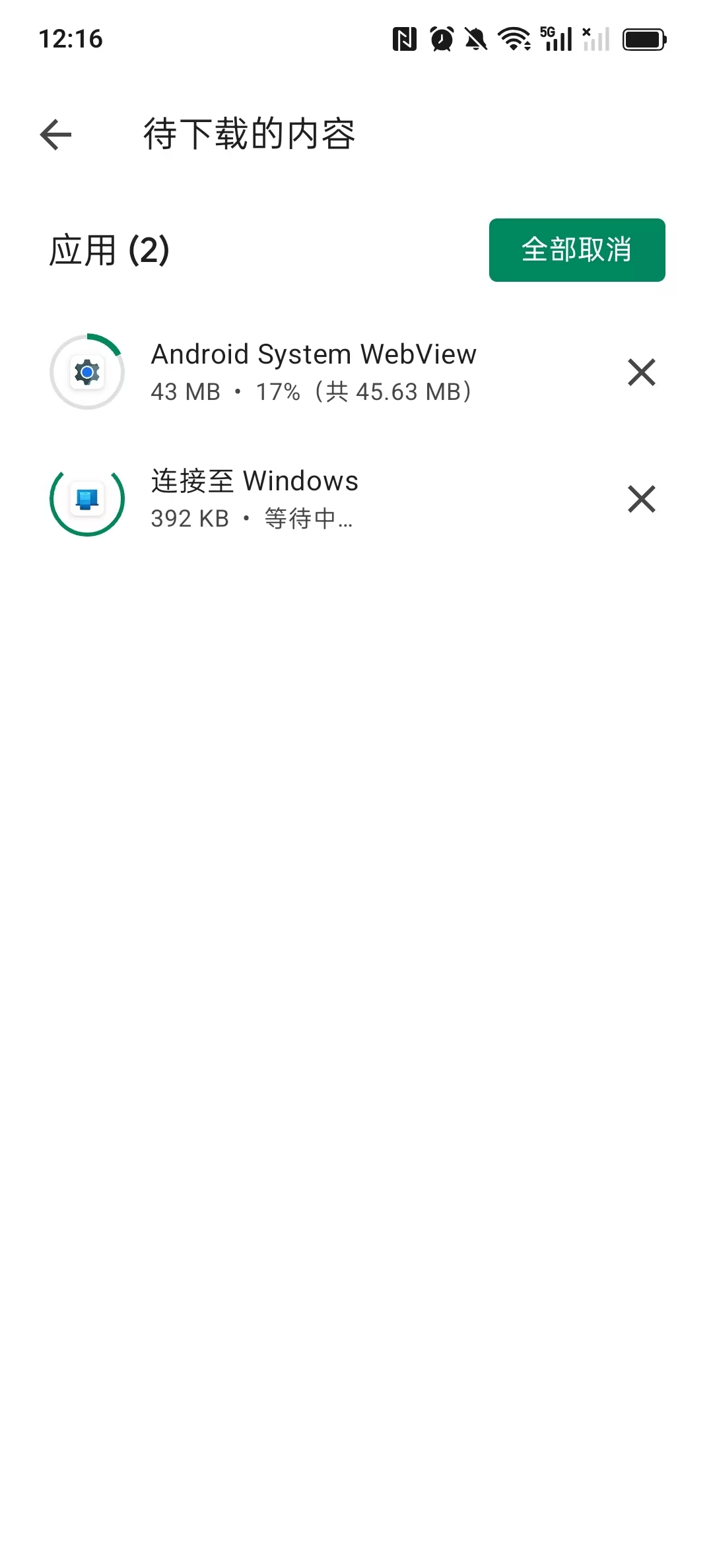
[截图 2:Play 商店更新界面,显示两个应用正常下载]
At this point, the Play Store update problem that lasted for several days was completely resolved.
6. Reflection and summary
Looking back, the biggest detour of this investigation is ‘Prematurely attribute the problem to the underlying network‘—Wstunnel, although the long link, is not the root cause of the update to get stuck. The real crux is that Clash shunt rules are not fine enough: All the traffic of Google related domain names is sent into the proxy tunnel, resulting in the CDN download traffic that should be directly connected to the detour.
| misjudgment direction | actual reason | Conclusion |
|---|---|---|
| wstunnel delay | Diversion rules are not fine | ❌ |
| MTU sharding | Diversion rules are not fine | ❌ |
| server area | Diversion rules are not fine | ❌ |
| iptables multiport | Diversion rules are not fine | ❌ |
Three-line configuration to solve the problem of three months: Ultimately only need to add in the Clash configuration geosite, google, proxy One line (plus the corresponding DNS optimization), all problems are solved.
Environmental reference: android + flclash (clash meta kernel) + self-built wstunnel + wireguard + clash verge rev scheme.
Hope this blog can help friends who are scratching their heads for the Play Store update. If you have a similar experience, please leave a message to exchange.
Refuse to toss | Exclusive WireGuard VPN generation service
This channel has long measured various network optimization plans.The self-use line has been running continuously and steadily for more than 1 month, and there is no disconnection record in the whole process. If you don’t want to step on the pit and toss the complicated server and protocol configuration repeatedly, please contact me for an exclusive solution.
Service content:
✅ Remote construction: Deploy a dedicated VPN on your own server, complete data control, once and for all.
✅ Free trial benefits: New users can applyFree trial for a month of my self-built node, to experience the ultimate stability and speed.
✅ Effect guarantee: Deeply optimize the shunting rules to completely solve the problem of stuck and connection timeouts in daily use.
Contact:
Telegram: @shuijingwan
WeChat: 13980074657
Mailbox:shuijingwanwq@gmail.com