Clash Verge Rev + Wireguard + WSTunnel Stable Configuration Practice (2): Minimum Correction of DNS Contaminated by Google
⚠️ Experimental description (important)
This article is the second part of a series of practice, continuation(1): The principle of minimalism and the construction of the first editionexperimental technical exploration.
The current configuration is still in the validation stage:
- Not guaranteed to apply to all network environments
- It is not recommended to directly copy for production or critical business
- The main purpose is to verify the feasibility of ‘simple rule model + minimum DNS overwriting’
The network environment, DNS behavior and VPS line quality in different regions will have an impact on the final effect.
If it runs stably in the future, this description will be removed in the final chapter, and it will be released as a reference stable plan.
1. Phenomenon: Google timeout, WireGuard is normal
In the previous article (1), I built a minimalist WireGuard split configuration based on the MetaCubex dataset. The core principles are:Do not overwrite DNS, give the default value of the Clash Verge Rev kernel.
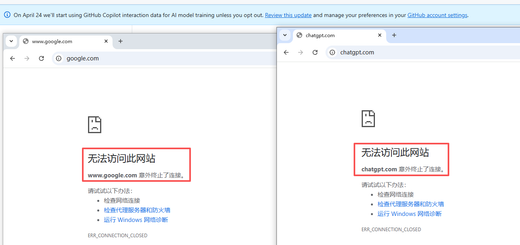
After the online test, the domestic website access is normal and the multi-device behavior is the same, but google.com never open. View the Clash Verge Rev log and the following warning appears:
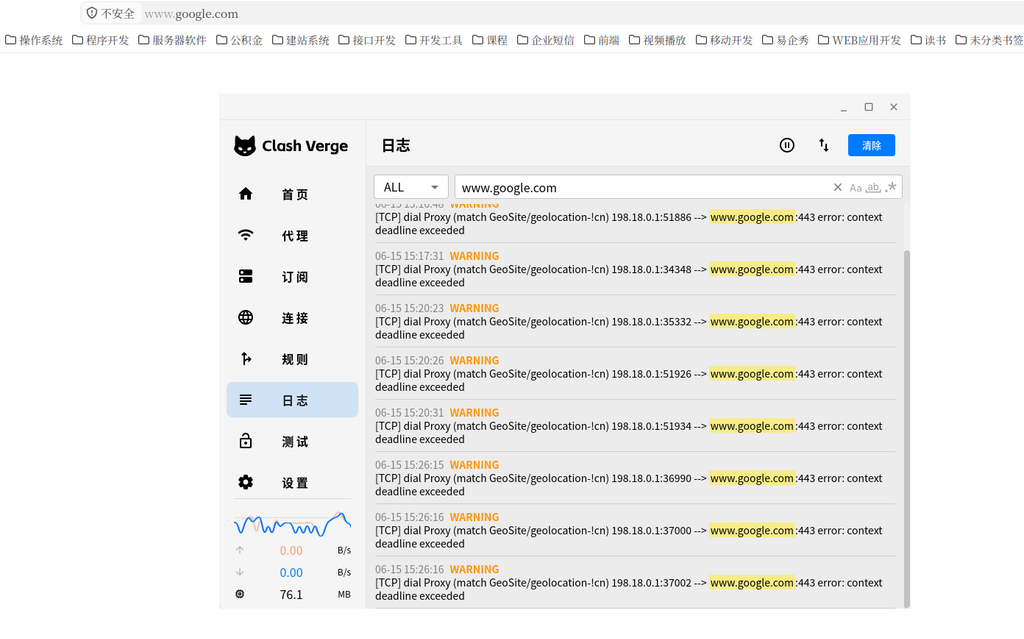
Key information:
[TCP] dial Proxy (match GeoSite/geolocation-!cn) 198.18.0.1:56278
    --> www.google.com:443 error: context deadline exceeded
- The shunt rule is correct:
google.comHitgeosite, geolocation-!cn, went in correctlyProxygroup. - Fake-ip works fine: source address
198.18.0.1It is the fake IP returned by Clash, indicating that the client thinks that it is communicating with the local, and the connection has been taken over by Clash. - The error type is
Context Deadline Exceeded, which means that the TCP handshake cannot be completed.
But check at this time zgocloud-wg The status of the WireGuard node itself, the delay test result is normal:
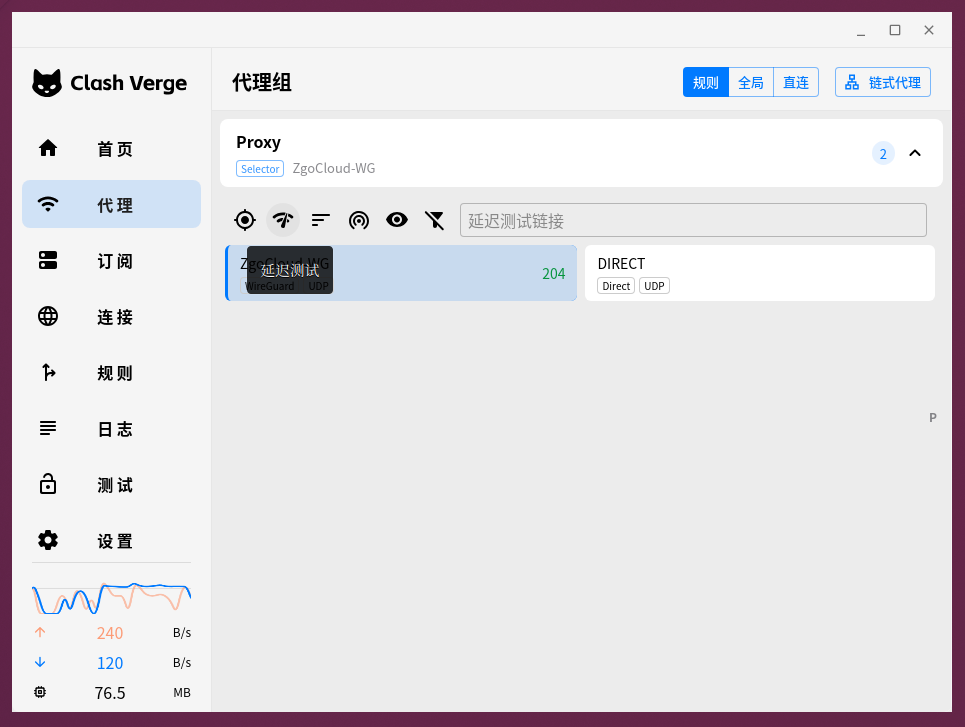
204ms Delay Description Wireguard handshake and base connectivity are completely normal. If the tunnel is broken, the delay will show directly timeout or red fork.
2. Reason positioning: DNS pollution, fallback has not gone as an agent
The apparent contradictory phenomenon points to a conclusion:There is no problem with the proxy tunnel itself, the problem is that ‘the destination IP of the proxy to connect is wrong’.
In the minimalist V1 configuration,dns Some did not explicitly write anything, and all depend on the default values of the Clash Verge Rev kernel. In the final configuration after the merge, DNS is roughly equivalent to:
dns:
  enable: true
  ipv6: false
  enhanced-mode: fake-ip
  fake-ip-range: 198.18.0.1/16
No NameServer, and no fallback And Proxy field.
At this time, Clash will use the system default DNS (usually the operator allocates or 114.114.114.114) to resolve all domain names. In the continental network environment,google.com The DNS resolution will be contaminated and return an incorrect IP. Fake-IP mode will return 198.18.0.x to the client, but the Clash behind it will hold that Contaminated real IP to establish connections.
Even if this connection follow-up matching rules, through the WireGuard tunnel exit, the WireGuard remote access is still the wrong IP, which naturally fails to complete the TCP handshake, and finally timeout.
Essential reason: Fallback (overseas domain name resolution) DNS queries are directly sent from the local connection, and there is no agent, so it is polluted.
3. Correction concept: only need to overwrite, do not do any redundancy
The old experience tells me that in order to prevent pollution, we must let the DNS query of overseas domain namesIssued through a proxy tunnel, get the correct IP. However, this revision strictly follows the core goals in (1):No extra rules are introduced, no complex DNS systems.
The final decision is only on the subscription file zgocloud-metacubex-v1.yaml , add a very short dns block,Only overwrite the fields that need to be changed, the rest still trusts the kernel defaults.
Final append DNS overwrite (only 6 lines)
dns:
  nameserver:
    - https://dns.alidns.com/dns-query   # 国内域名使用阿里 DoH,直连
  proxy: Proxy                            # 让 fallback 查询走代理
  fallback:
    - tls://1.1.1.1:853                  # 境外域名使用 Cloudflare DoT
  fallback-filter:
    geoip: true
    geoip-code: CN                        # 只有非 CN 域名才触发 fallback
Why are these six lines enough?
enable: true,ipv6: false,Enhanced-Mode: Fake-IP,fake-ip-rangeAll to the kernel default value,No need to rewrite.NameServerDirectly connected to Ali DOH, responsible for the resolution of all CN domain names, keep the domestic access speed unchanged, and will not be polluted.fallbackDOT pointing to Cloudflare, which is specially used to resolve non-CN domain names (such asgoogle.com).Proxy: Proxyis the only key: it forcesfallbackquery throughProxyGroups (that is, zgocloud-wg) are issued, not local direct connections. This completely bypasses the local DNS pollution and gets the correct Google IP.fallback-filterUsegeoip: true+geoip-code: cnLet Clash automatically judge the geographic location of the domain name according to the IP library. Only the non-CN domain name can go to Fallback, and the domestic domain name can honestly go to the NameServer without interfering with each other.
The entire modification did not add any list of domain names, introduced new rules, and maintained a minimalist structure.
4. Enable new configuration
After modifying the local subscription file, in the Clash Verge Rev’s Profiles On the page, click ‘Reactivate subscription’ in the upper right corner to reload the configuration and restart the kernel (because my subscription is a local file, the effect is equivalent to reloading the kernel).
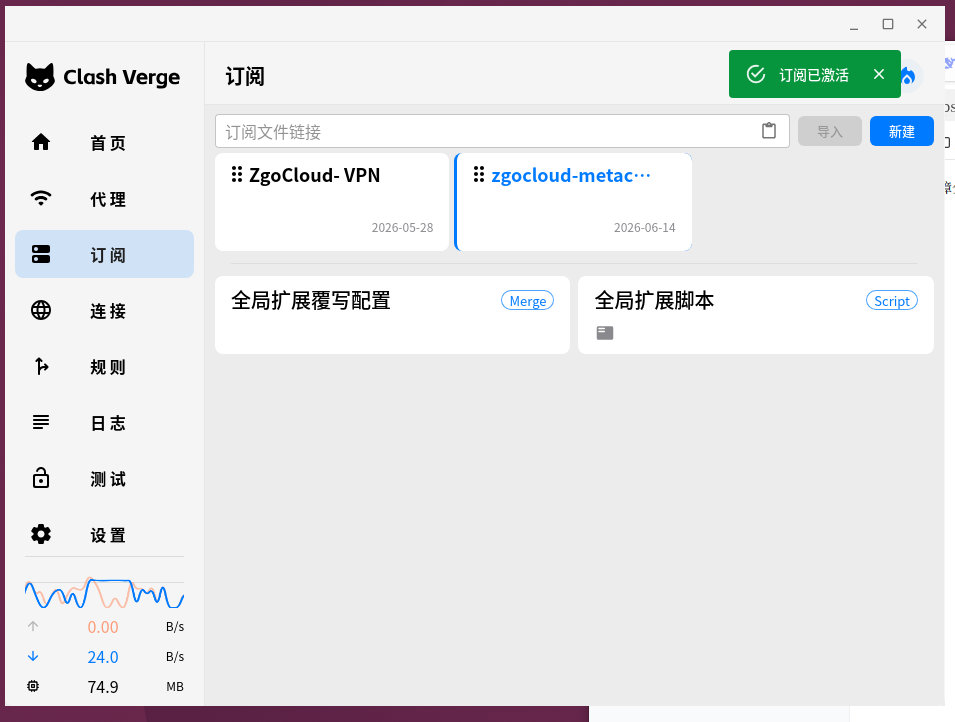
After restarting, clear the browser cache and visit again google.com, the page was successfully opened. no longer appear in the log deadline Exceeded timeout warning.
5. Full test results
Use Clash Verge Rev’s built-in connection test to detect 13 commonly used targets:
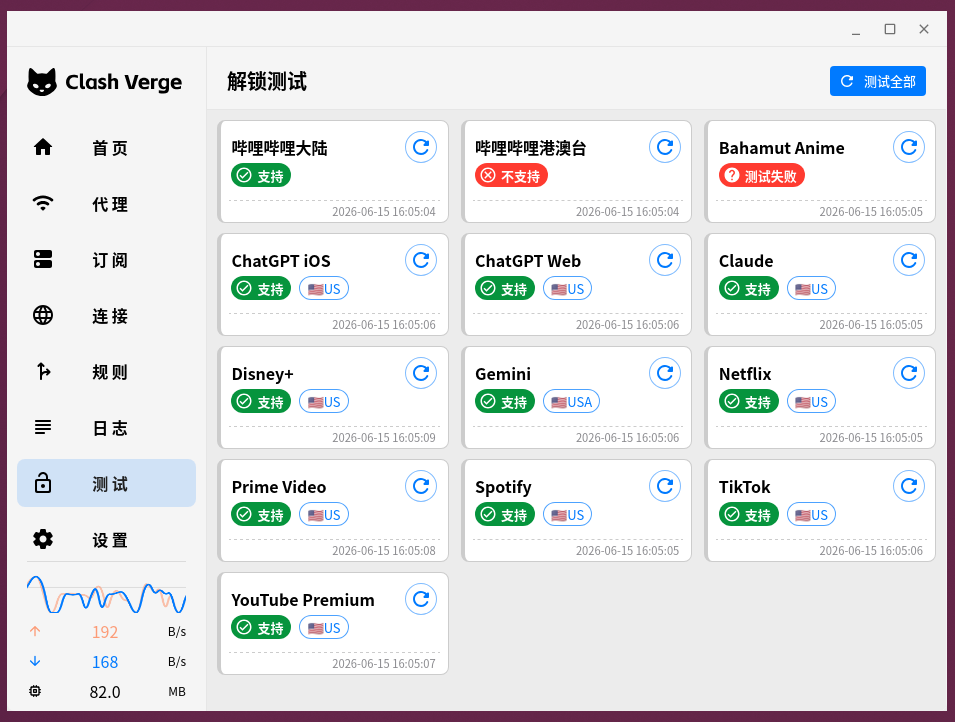
Pass (11 items): Google, Youtube, GitHub, Netflix, etc. are all normal, including Google Play, email sending, etc., the previous versions of the previous version of the problem are also stable.
Failed (2 items):Bilibili Hong Kong, Macao and Taiwan And bahamut animation crazy.
These two services require strict Taiwan IP(Bahamut is even locked in Taiwan), and my Wireguard export is located in Los Angeles, USA, so it is restricted by the region. This has nothing to do with the configuration file, and is determined by the geographic location of the export IP. If there is a need for viewing in the future, you can increase the Taiwan node and join the rule diversion, but under the current minimalist model, this is an optional extension and does not affect conventional use.
6. The overall configuration of the final configuration (including detailed comments and modification guidelines)
# ==============================================
# ZgoCloud + Wstunnel + WireGuard
# MetaCubeX 极简稳定版 v2 (minimal DNS fix)
#
# 特点:
# - 最小化 DNS 覆写(仅防污染)
# - 不使用 SMTP / Google / YouTube 特殊规则
# - 基于 GEOSITE + GEOIP
# - 结构最小化,便于排错
# ==============================================

# ----- 通用设置 -----
profile:
  store-selected: true   # 记住用户在 Proxy 组中手动选择的节点(重启后不丢失)

# ----- DNS 最小覆写(防污染) -----
dns:
  # 国内域名解析:使用阿里公共 DNS over HTTPS,直连不经过代理
  nameserver:
    - https://dns.alidns.com/dns-query

  # 【关键】让所有 DNS 查询(特别是 fallback)都通过代理组 Proxy 发出,避免本地 DNS 污染
  proxy: Proxy

  # 境外域名解析:使用 Cloudflare DNS over TLS,解析结果由代理隧道保护
  fallback:
    - tls://1.1.1.1:853

  # 只让非中国 IP 的域名使用 fallback,国内域名强制走 nameserver
  fallback-filter:
    geoip: true
    geoip-code: CN

# ----- 代理节点定义 -----
proxies:
  - name: ZgoCloud-WG          # 节点名称,可自定义
    type: wireguard            # 类型:WireGuard
    server: 127.0.0.1          # 【必须修改】WireGuard 服务器的地址(此处为本地 wstunnel 映射端口)
    port: 51820                # 【必须修改】WireGuard 端口

    ip: xxx               # 【必须修改】分配给本机的 WireGuard 内网 IP

    public-key: xxx     # 【必须修改】服务器公钥
    private-key: xxx    # 【必须修改】本机私钥
    pre-shared-key: xxx # 【必须修改】预共享密钥

    udp: true                  # 启用 UDP 转发
    mtu: 1280                  # MTU,若遇部分网站卡顿可尝试调整为 1200 或 1000

# ----- 代理组 -----
proxy-groups:
  - name: Proxy               # 代理组名称,被分流规则引用
    type: select              # 类型:手动选择
    proxies:
      - ZgoCloud-WG           # 主代理节点
      - DIRECT                # 直连(不走代理)

# ----- 分流规则(基于地理数据集) -----
rules:
  # Wstunnel 服务器 IP 强制直连,避免隧道自身流量回环(no-resolve 表示仅匹配 IP 规则,不触发 DNS 解析)
  - IP-CIDR,154.21.196.249/32,DIRECT,no-resolve   # 【必须修改】替换为你的 Wstunnel 服务器公网 IP

  # 本地/私有网络直连
  - GEOSITE,private,DIRECT
  - GEOIP,private,DIRECT,no-resolve

  # 中国大陆域名和 IP 直连,保证国内访问速度
  - GEOSITE,cn,DIRECT
  - GEOIP,CN,DIRECT,no-resolve

  # 所有非中国大陆域名走代理
  - GEOSITE,geolocation-!cn,Proxy

  # 未匹配到任何规则的流量,默认走代理(防止泄漏)
  - MATCH,Proxy
📋 Instructions for use
- Save configuration
Save the full content above as a local configuration file (such aszgocloud-metacubex-v2.yaml). - Modify required fields
According to your actual environment, modify all 【Must be modified】 Values at the mark:
server/ / *port: Corresponding to the address and port of your WSTUNnel local listeningIP: your WireGuard Intranet IP- Three sets of keys:
public-key,private-key,pre-shared-key ip-cidrip in: your wstunnel server public ip
- Enable in Clash Verge Rev
- Enter Profiles page, click Add local file and activate (or right-click to reactivate the subscription) in the upper right corner.
- It is recommended to turn on TUN mode(GUI is enabled with one key), and the system agent is turned off to achieve global takeover.
- Daily use and troubleshooting
- If all temporary connections are required, you can
ProxyGroup manual selectiondirected. - If some websites are stuck or timed out, you can try to
mtureduce to1200Or1000. - If you encounter problems, first check the WireGuard delay, the WSTUnnel process status, and the DNS resolution records in the Clash log.
7. Summary
From ‘minimalized without overwriting DNS’ to ‘adding only 6 lines of anti-pollution overwriting’, this correction still maintains the clean and maintainable of the entire configuration system. It does not introduce new shunting logic, nor adds any special domain name rules, just a Proxy: Proxy, let the overseas DNS query go to the agent, and solve the pollution problem in the mainland environment.
Final effect:
- The domestic website is directly connected, the speed has no effect
- Stable access to overseas services such as Google
- Multi-device behavior is consistent
- The investigation logic is still clear: only see Wireguard, TUN and VPS if there is a problem
If you need to unlock Taiwan streaming in the future, you may expand the proxy group and rules in (3), but that will be an optional enhancement on demand without destroying the current stable base.
Series articles:
- (a)From Complex to Minimalist: Minimalist Principles and First Edition Construction
- (2) This article: Minimum correction of DNS polluted by Google
![[截图 5:Clash 规则片段,突出显示新增的两行 DST-PORT 规则]](https://www.shuijingwanwq.com/wp-content/uploads/2026/06/5-8-520x245.png)
![[截图 2:Play 商店更新界面,显示两个应用正常下载]](https://www.shuijingwanwq.com/wp-content/uploads/2026/06/2-2-520x245.jpg)