

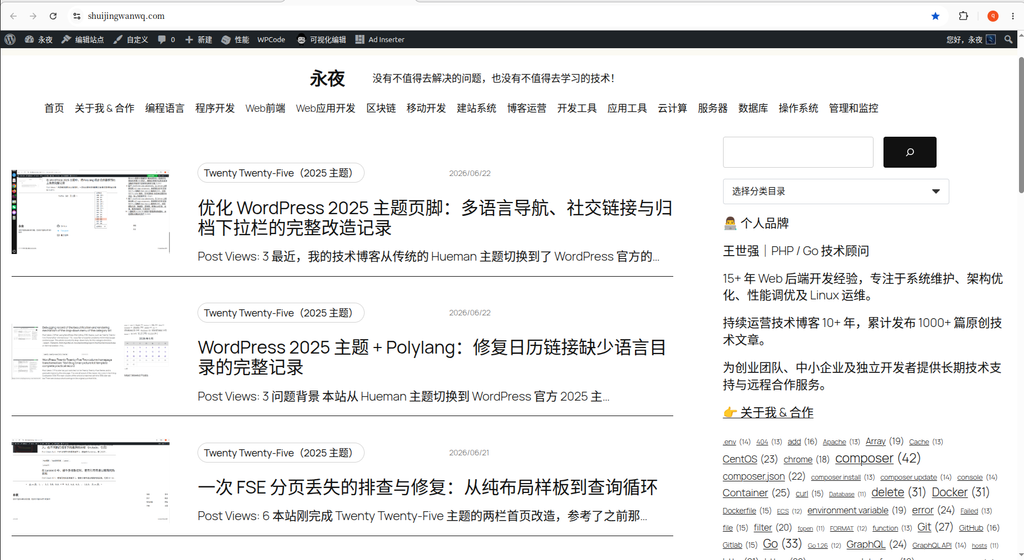
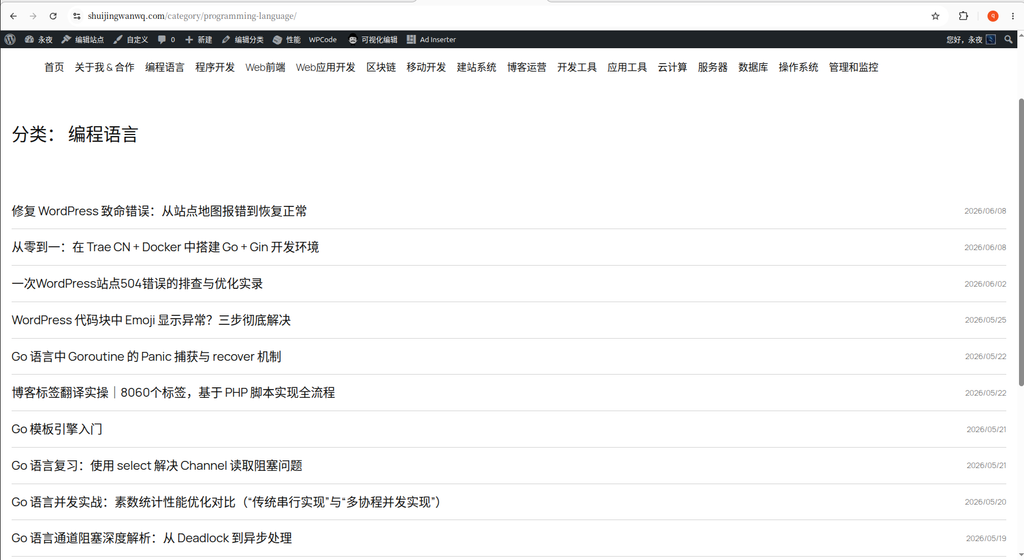
While optimizing my tech blog recently, I ran into a minor pain point. The homepage (shuijingwanwq.com) uses a classic, information-rich layout with an image on the left, text on the right, and a right sidebar (see Figure 1). However, the category pages (for example, .../category/programming-language/) still retain a single-column, title-only list. The right side lacks a sidebar, and the left list has no excerpts, making it look very sparse. The visual effect on both sides is highly inconsistent.
To unify the style, I decided to modify the category page template to match the homepage with a two-column layout, introducing a sidebar on the right and increasing the height on the left by adding excerpts. Below is the specific modification process, focusing on the block structure in the FSE editor.
1. Copying the Homepage Sidebar Structure
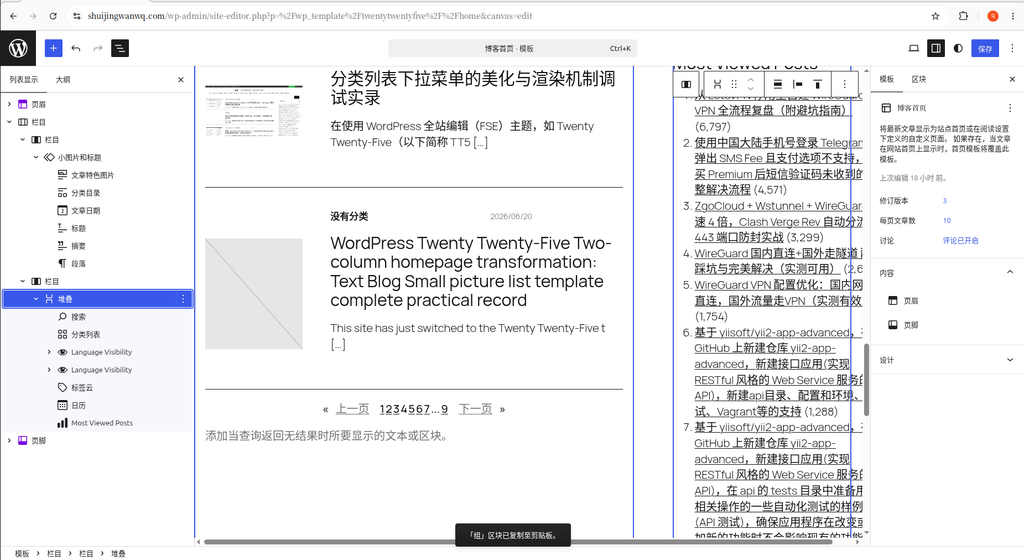
The first step is very quick. From the homepage, use the “Edit Site” feature to enter the editor and click on any block in the right sidebar. Since my right sidebar is composed of multiple stacked blocks, I directly selected the “Stack” block that contains the search, category dropdown, personal bio, tag cloud, and other features. Once selected, I pressed Ctrl + C to copy it.
2. Converting the Category Page to a Two-Column Layout and Pasting the Sidebar
For the second step, I exited the homepage editor and entered the “All Archives” template (this is the generic template for archive pages like categories and tags).
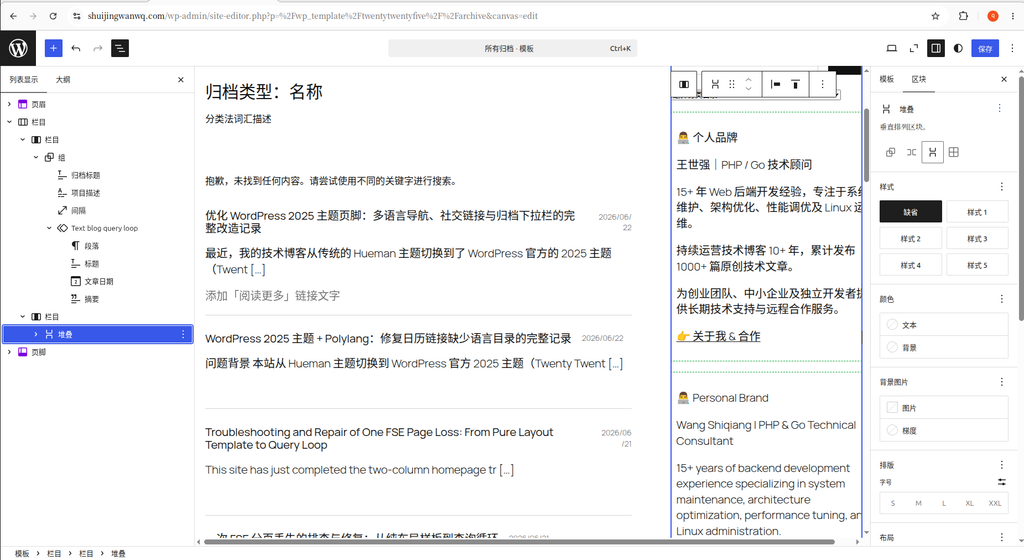
In the editor, I first changed the original single-column layout into a left-right two-column structure. Then, in the empty “Column” on the right, I pressed Ctrl + V to paste the sidebar I had just copied.
The underlying editor block structure in Figure 4 is as follows:
- Left main column (content area):
组(Group)归档标题(Archive Title)项目描述(Term Description)间隔(Spacer)Text blog query loop(Query Loop block)
- Right sidebar:
栏目(Column)堆叠(Stack) —— [Note: This is the entire sidebar block copied directly from the homepage, including the personal bio, tag cloud, etc.]
3. Optimizing the Left List Height and Redundant Right Blocks
Through the modifications shown in Figure 4, the category page now has a sidebar. However, because it is a title-only list, the left side is too short and severely mismatches the tall right sidebar.
Therefore, I expanded 文章模板 (Post Template) inside the left Text blog query loop and added an “Excerpt” block so that the content preview of each article stretches the left height. At the same time, I went back to the right sidebar and deleted the “Most Viewed Posts” block, which took up a lot of height and was unnecessary.
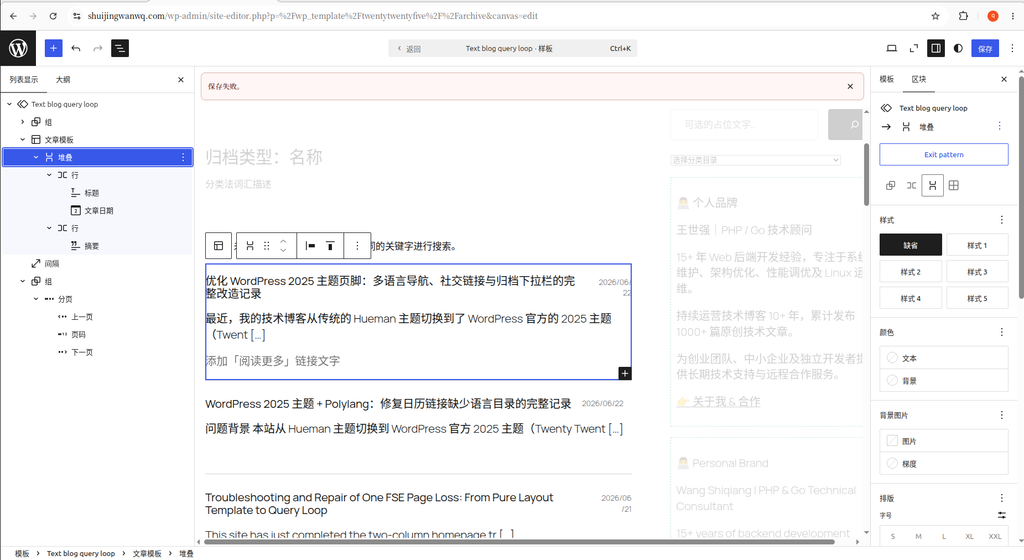
At this point, the block hierarchy on both sides was finalized as follows:
- Left main column (refined to the structure in Figure 5):
组(Group)归档标题项目描述间隔Text blog query loop组文章模板 (Post Template)堆叠(Stack)行(Row): Contains标题 (Title),文章日期 (Post Date)行(Row): Contains摘要 (Post Excerpt)—— [Newly added]
- Right sidebar:
栏目(Column)堆叠(Stack) —— [Removed the Most Viewed Posts block, height reduced]
4. Initial Results and Line-Wrap Pain Points
After the above modifications, the number of posts displayed on the blog category page remains at 10.
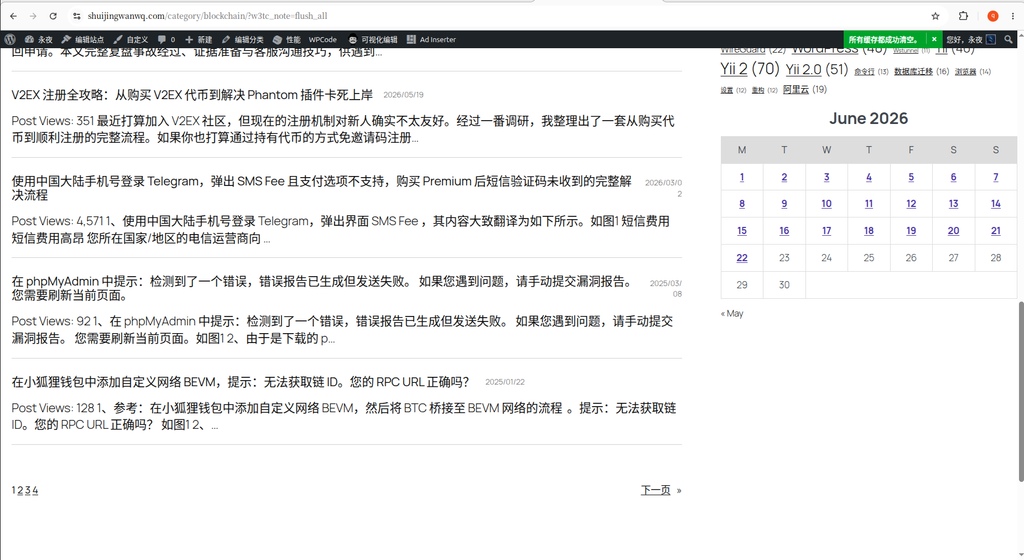
- Chinese environment test (Figure 6): The height of the left list and the right sidebar are basically aligned.
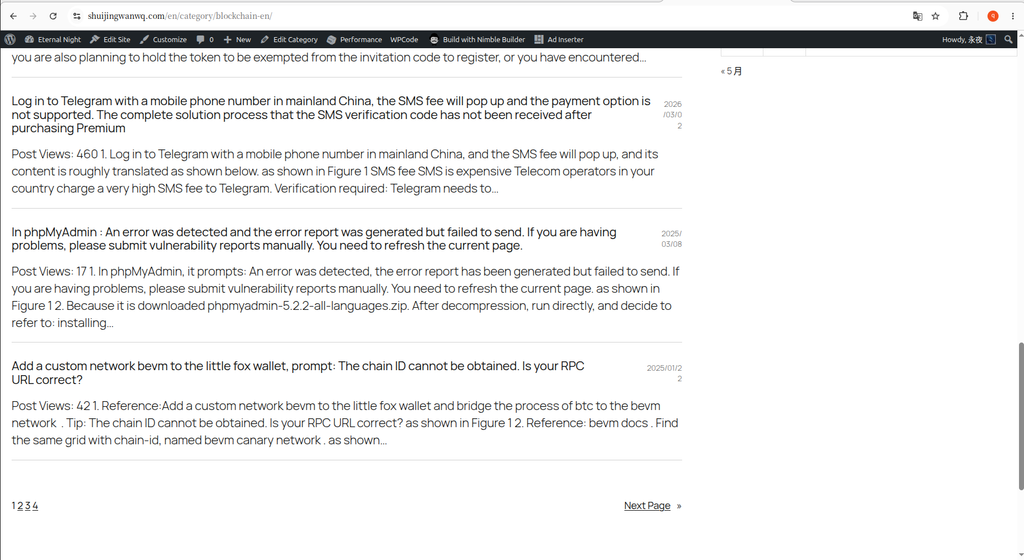
- English environment test (Figure 7): Because English words are longer, the left side is noticeably taller than the right (this issue is temporarily accepted as a compromise).
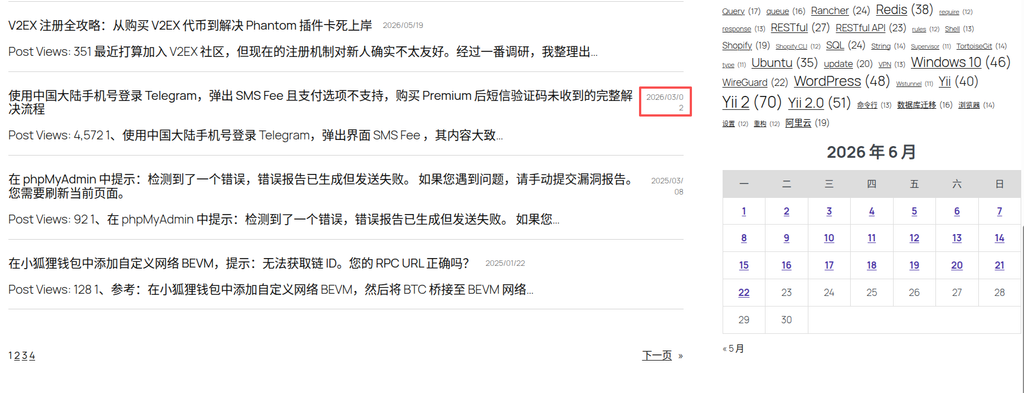
- A new pain point emerges (Figure 8): I found that under the structure of a “Row” nested inside a “Group”, if an article title is too long, the
文章日期on the right gets squeezed onto two lines. This happens in both Chinese and English environments, resulting in a poor visual effect.
5. Ultimate Optimization: Using “Columns” to Perfectly Solve Date Wrapping
To solve the date wrapping issue caused by the “Row + Group” structure, I ultimately abandoned the original nested structure. Inside 文章模板, I directly replaced it with a “Columns” block. The outermost 堆叠 was also removed, making the structure flatter and more stable.
The final editor block structure text in Figure 9 is as follows:
- Left main column (content area):
组(Group)归档标题项目描述间隔Text blog query loop组文章模板 (Post Template)栏目 (Columns)—— [The final adopted solution, completely replacing the previous “Stack + Row” nested structure]左列 (Column): Contains文章标题 (Post Title), width set to 85%, block layout alignment set to “Align Left”.右列 (Column): Contains文章日期 (Post Date), width set to 15%, block layout alignment set to “Align Right”.
摘要 (Post Excerpt)—— [Placed below the columns]
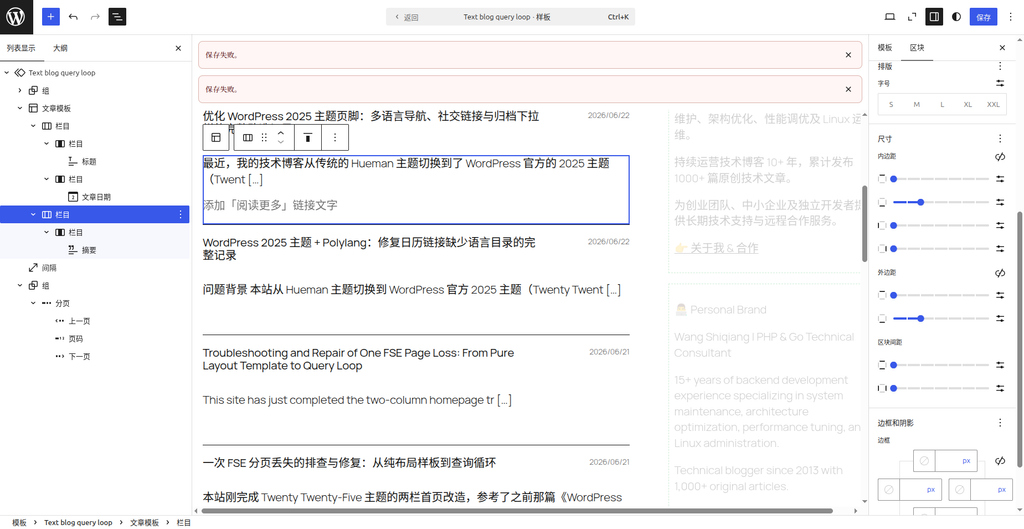
By removing the complex outer “Stack” and directly using the underlying “Columns” block within the post template, assigning them fixed width ratios of 85% and 15% respectively, this problem was easily resolved. No matter how long the title is, the percentage-based space automatically compresses the title, without squeezing the date on the right with its fixed proportion. Meanwhile, the perfect left-right alignment makes the typography much more standardized.
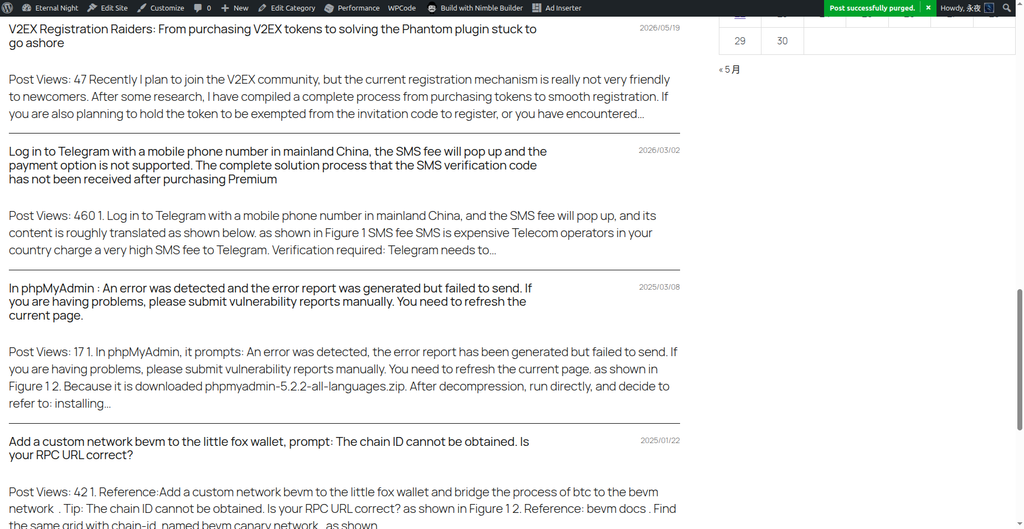
Figure 10 shows the final front-end display effect. Whether in a Chinese or English environment, no matter how long the left title is, the publication date on the right safely stays on a single line, and the overall left-right height alignment is perfect.
Summary:
In WordPress block themes (FSE), using Ctrl+C and Ctrl+V to copy a sidebar directly across templates is highly efficient. If the list block on a category page encounters layout compression issues, upgrading from a “Row” structure to a “Columns” structure, combined with precise percentage-based width allocation, is often the ultimate solution. It not only solves alignment and line-wrapping issues across different languages but also makes the typography of multilingual sites more robust and easier to maintain.