

During WordPress theme migrations, we often encounter various compatibility issues. Among them, Emoji handling is a common but easily overlooked detail. This article shares my findings and decision-making process regarding Emoji handling code when migrating from the Hueman theme to the Twenty Twenty-Five theme.
🔍 Background
Before the migration, my old theme was the classic Hueman theme, and I used the SyntaxHighlighter Evolved plugin for code highlighting. To optimize site performance, I added code to disable WordPress’s default Emoji handling in the theme’s functions.php:
// 彻底禁用 WordPress 前端 Emoji 转换为图片
remove_filter( 'the_content', 'wp_staticize_emoji' );
remove_filter( 'the_excerpt', 'wp_staticize_emoji' );
remove_filter( 'comment_text', 'wp_staticize_emoji' );
// 同时移除 Emoji 的 JS/CSS(提升加载速度)
remove_action( 'wp_head', 'print_emoji_detection_script', 7 );
remove_action( 'admin_print_scripts', 'print_emoji_detection_script' );
remove_action( 'wp_print_styles', 'print_emoji_styles' );
remove_action( 'admin_print_styles', 'print_emoji_styles' );
remove_filter( 'the_content_feed', 'wp_staticize_emoji' );
remove_filter( 'comment_text_rss', 'wp_staticize_emoji' );
remove_filter( 'wp_mail', 'wp_staticize_emoji_for_email' );This code prevents WordPress from automatically converting text Emojis (like 😊) into image tags (<img src="...">), thereby reducing unnecessary HTTP requests and resource loading.
🚀 Migrating to the New Theme
After switching to the Twenty Twenty-Five theme recommended by WordPress, and adopting the Code Block Pro plugin as the code highlighting solution, I noticed an interesting phenomenon:
Emoji Handling in the Old Theme
In the old theme, Emojis displayed correctly within code blocks using the SyntaxHighlighter Evolved plugin. This was because the disabling code prevented WordPress from generating image-based Emojis, allowing text-based Emojis (Unicode characters) to remain unconverted and display normally. Reference: WordPress 代码块中 Emoji 显示异常?三步彻底解决
Emoji Handling in the New Theme
In the new theme, I observed the following:
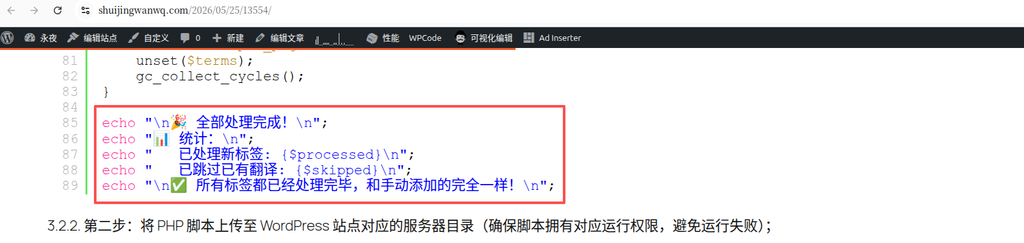
- Emojis in old posts display normally: As shown in Figure 1, in articles written under the old theme, Emojis still display as text and have not been converted to images.
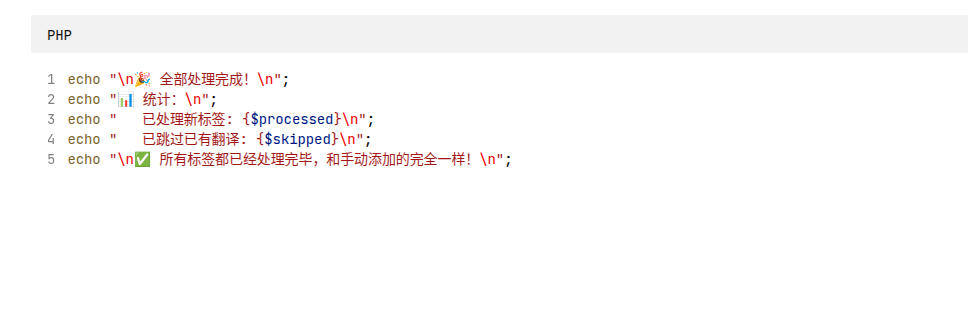
- Emojis in new posts are also normal: As shown in Figure 2, in new articles written using the Code Block Pro plugin, Emojis have not been converted to images either.
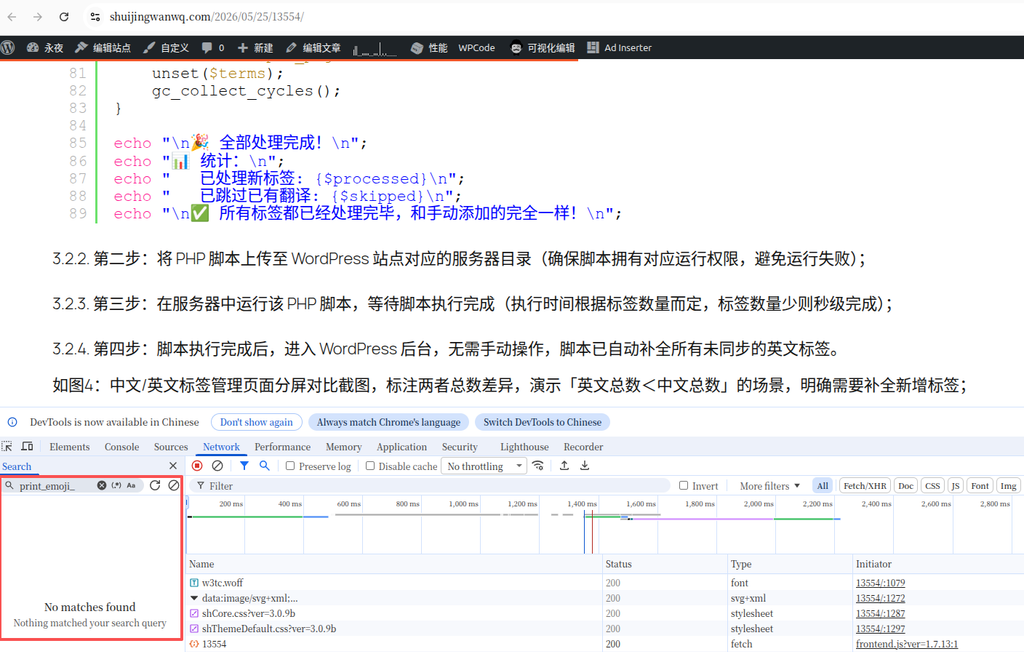
- Network inspection confirms: As shown in Figure 3, searching for “print_emoji_” in the browser’s Network panel returns no results, indicating that the new theme indeed does not load WordPress’s Emoji-related resources.
📊 Analysis and Conclusion
Based on the above observations, I draw the following conclusions:
- The new theme has optimized Emoji handling: The Twenty Twenty-Five theme appears to have a more efficient Emoji handling mechanism built-in, no longer converting text Emojis to images, thereby avoiding unnecessary resource loading.
- The disabling code is no longer necessary: Since the new theme has already resolved the Emoji image conversion issue, the disabling code I added previously has become redundant in the new theme.
- Performance impact: Removing this code will not affect Emoji display (text-based Emojis will still display normally) while reducing code redundancy.
✅ Migration Recommendations
Based on the above analysis, I recommend: Remove the code that disables Emojis: There is no need to keep the Emoji-disabling code in the wpcode PHP snippet, allowing the new theme to maintain its native handling method.
📝 Summary
When migrating WordPress themes, not all custom code from the old theme needs to be retained. Particularly for features like Emoji handling, the new theme may already have a more optimized solution built-in. Through actual testing and verification, we can make more informed decisions to ensure the site maintains full functionality while achieving better performance.
During this migration, I confirmed through observation and testing that the new Twenty Twenty-Five theme handles Emoji display well, so the previously added disabling code can be safely removed. This not only reduces code redundancy but also allows the site to better leverage the new theme’s optimization features.
I hope this article helps you with your WordPress theme migration! If you have similar experiences or questions, feel free to share them in the comments section.