Help customers to remotely troubleshoot vultr Wireguard without handshake and cannot access the Internet problem (full record)
Preface
A few days ago, a reader found me on WeChat and sent such a message:
‘Hello, I followed the server according to the process of your blog article, and the server firewall is also opened, but there is still no handshake prompt for the mobile phone to modify the port, and I can’t access the Internet. Is this a problem?’
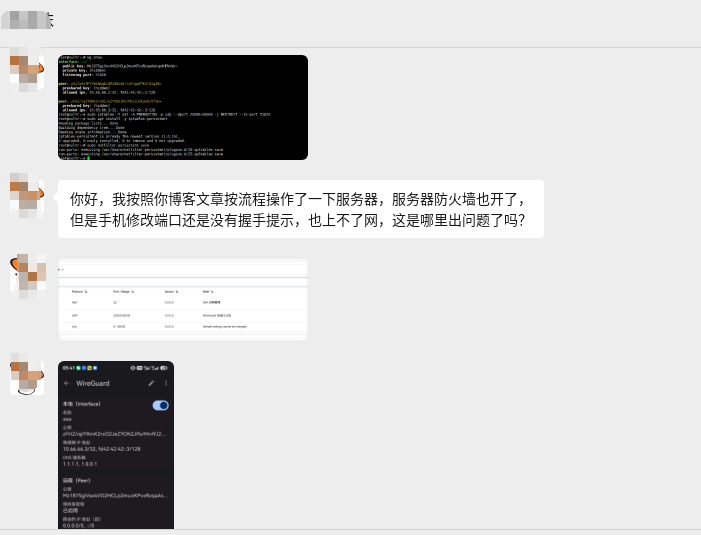
He is referring to two articles on my blog:
- ‘From LetsVPN Discontinued to Self-Build WireGuard VPN Full Process Review (with Pit Relief Guide)’
- ‘Self-built WireGuard solution port is frequently blocked and the ultimate minimalist solution (nanny level can be reproduced)’
It stands to reason that if you refer to one more article‘WireGuard self-built VPN occasional unavailability, full review’, he should be able to solve it himself. However, since the customer came to the door, I will help him remotely check it, and record the whole process for reference.
Step 1: Get the server permission and start the investigation
I asked the client for the SSH login information, first see what is going on on the server.
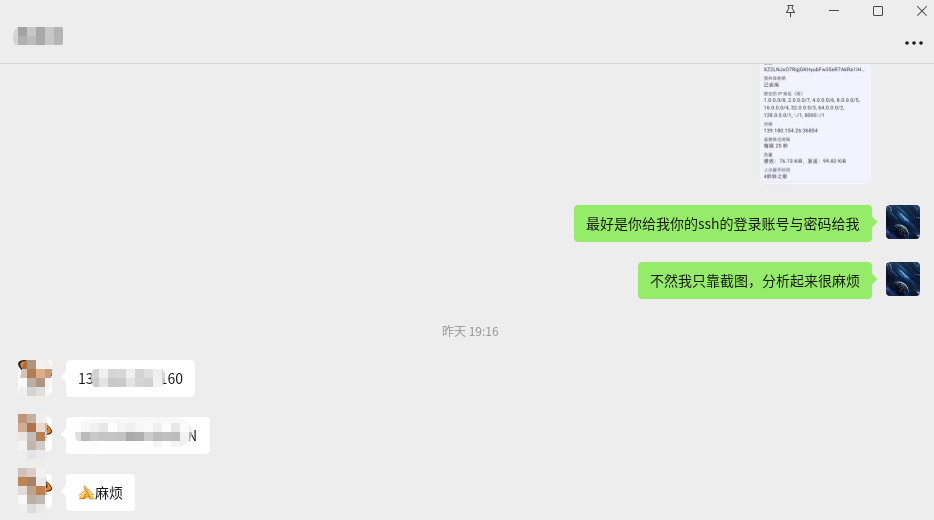
After logging in, first check the WireGuard service status and the currently active iptables rules.
1. View WireGuard status
wg show
output:
interface: wg0
  public key: Mz1875giVsx4VO2HCLp2muoKPvxRzqaAskxpdHPkkWc=
  private key: (hidden)
  listening port: 51820

peer: oGifzA+TPY7W1AmqEc0R18Wv4dr/sFHguP7kCr81gX8=
  preshared key: (hidden)
  allowed ips: 10.66.66.2/32, fd42:42:42::2/128

peer: zFHZ//qIYRmK2rxO2JeZYON2JPo/Mni9J2kaeUIVfxk=
  preshared key: (hidden)
  allowed ips: 10.66.66.3/32, fd42:42:42::3/128
The WireGuard service itself is normal, with peer configuration, listening to port 51820, butNo Latest Handshake (last handshake time), which means that the phone does not have a handshake with the server at all.
2. View the prerouting port forwarding rules
iptables -t nat -L PREROUTING -n -v --line-numbers
output:
Chain PREROUTING (policy ACCEPT 0 packets, 0 bytes)
num   pkts bytes target     prot opt in     out     source               destination
1      330 59076 REDIRECT   udp  --  *      *       0.0.0.0/0            0.0.0.0/0            udp dpts:20000:60000 redir ports 51820
2        0     0 REDIRECT   udp  --  *      *       0.0.0.0/0            0.0.0.0/0            udp dpts:20000:60000 redir ports 51820
Two found hereExactly the same redirect rule, there is a pkts=0(never hit), this is caused by repeated execution of the command before, it does not affect the function but is not clean enough. Just delete one:
iptables -t nat -D PREROUTING 2
Check again, there is only one left:
Chain PREROUTING (policy ACCEPT 0 packets, 0 bytes)
num   pkts bytes target     prot opt in     out     source               destination
1      330 59076 REDIRECT   udp  --  *      *       0.0.0.0/0            0.0.0.0/0            udp dpts:20000:60000 redir ports 51820
3. Save the rules
netfilter-persistent save
output:
run-parts: executing /usr/share/netfilter-persistent/plugins.d/15-ip4tables save
run-parts: executing /usr/share/netfilter-persistent/plugins.d/25-ip6tables save
4. Confirm that iptables-persistent is installed
dpkg -l iptables-persistent
||/ Name                Version      Architecture Description
+++-===================-============-============-=====================================================
ii  iptables-persistent 1.0.16       all          boot-time loader for netfilter rules, iptables plugin
ii Indicates that it has been installed, no problem.
Step 2: Locate the core problem – the default drop of the Input chain
Next check the Input chain (inbound traffic filtering):
iptables -L INPUT -n -v --line-numbers
output:
Chain INPUT (policy DROP 237K packets, 13M bytes)
num   pkts bytes target     prot opt in     out     source               destination
1        0     0 ACCEPT     udp  --  *      *       0.0.0.0/0            0.0.0.0/0            udp dpt:54712
2    1009K  477M ufw-before-logging-input  all  --  *      *       0.0.0.0/0            0.0.0.0/0
3    1009K  477M ufw-before-input  all  --  *      *       0.0.0.0/0            0.0.0.0/0
4     237K   13M ufw-after-input  all  --  *      *       0.0.0.0/0            0.0.0.0/0
5     237K   13M ufw-after-logging-input  all  --  *      *       0.0.0.0/0            0.0.0.0/0
6     237K   13M ufw-reject-input  all  --  *      *       0.0.0.0/0            0.0.0.0/0
7     237K   13M ufw-track-input  all  --  *      *       0.0.0.0/0            0.0.0.0/0
The problem is found!
- The default policy of the Input chain is drop(discard all inbound traffic)
- Currently only released
UDP DPT:54712(may be a temporary port),No release UDP 20000-60000 or 51820 - Although the vultr background firewall (screenshot 4) has been properly released UDP 20000-60000, butThe iptables input chain inside the server directly discards the packets
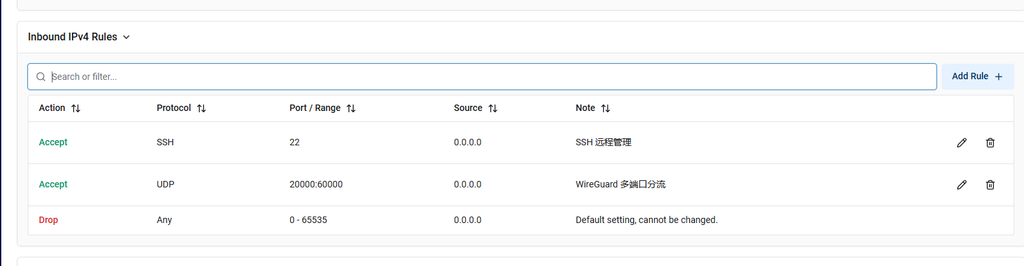
This is the fundamental reason why the phone always has no handshake.
Fix: release UDP 20000-60000
iptables -I INPUT 1 -p udp --dport 20000:60000 -j ACCEPT
The verification rules have taken effect:
iptables -L INPUT -n -v --line-numbers | head -5
Chain INPUT (policy DROP 237K packets, 13M bytes)
num   pkts bytes target     prot opt in     out     source               destination
1        0     0 ACCEPT     udp  --  *      *       0.0.0.0/0            0.0.0.0/0            udp dpts:20000:60000
2        0     0 ACCEPT     udp  --  *      *       0.0.0.0/0            0.0.0.0/0            udp dpt:54712
3    1009K  477M ufw-before-logging-input  all  --  *      *       0.0.0.0/0            0.0.0.0/0
The first rule has been inserted correctly and will be released first.
save rules
netfilter-persistent save
Step 3: Solve the Internet Problem – IP Forward + Forward + NAT
After releasing the input, the phone should be able to complete the handshake, butMay not be online yet(visit Google, etc.). You also need to configure IP forwarding, forward chain playback and NAT camouflage.
Enable IP forwarding
sysctl -w net.ipv4.ip_forward=1
grep -q "net.ipv4.ip_forward=1" /etc/sysctl.conf || echo "net.ipv4.ip_forward=1" >> /etc/sysctl.conf
Release the forward chain
iptables -P FORWARD ACCEPT
iptables -A FORWARD -i wg0 -j ACCEPT
iptables -A FORWARD -o wg0 -j ACCEPT
Add nat camouflage (snat/masquerade)
Allow mobile traffic from the server’s public network IP to access the external network.
Automatically obtain public network cards and WireGuard subnets:
PUBLIC_IFACE=$(ip route | grep default | awk '{print $5}')
WG_SUBNET=$(grep -oP 'Address\s*=\s*\K[0-9.]+/[0-9]+' /etc/wireguard/wg0.conf 2>/dev/null | head -1 | cut -d/ -f1 | sed 's/\.[0-9]*$/.0\/24/')
WG_SUBNET=${WG_SUBNET:-10.0.0.0/24}
PUBLIC_IFACE=${PUBLIC_IFACE:-eth0}
iptables -t nat -A POSTROUTING -s ${WG_SUBNET} -o ${PUBLIC_IFACE} -j MASQUERADE
output:
已添加 NAT 伪装 (子网: 10.66.66.0/24, 网卡: enp1s0)
Save all rules
netfilter-persistent save
Restart the WireGuard service
systemctl restart wg-quick@wg0
Step 4: Verify the repair results
Check the WireGuard status:
wg show
output:
interface: wg0
  public key: Mz1875giVsx4VO2HCLp2muoKPvxRzqaAskxpdHPkkWc=
  private key: (hidden)
  listening port: 51820

peer: zFHZ//qIYRmK2rxO2JeZYON2JPo/Mni9J2kaeUIVfxk=
  preshared key: (hidden)
  endpoint: 117.176.187.98:24535
  allowed ips: 10.66.66.3/32, fd42:42:42::3/128
  latest handshake: 1 minute, 4 seconds ago
  transfer: 28.48 KiB received, 40.54 KiB sent

peer: oGifzA+TPY7W1AmqEc0R18Wv4dr/sFHguP7kCr81gX8=
  preshared key: (hidden)
  allowed ips: 10.66.66.2/32, fd42:42:42::2/128
Latest Handshake: 1 Minute, 4 Seconds Ago – The handshake was successful!
Mobile terminal verification
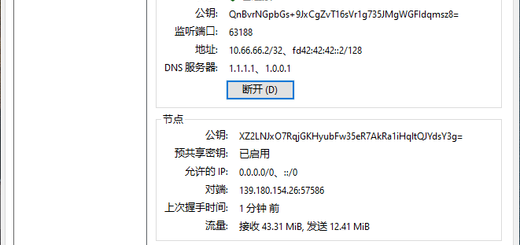
After I imported the WireGuard configuration on my phone, screenshot 5 shows:
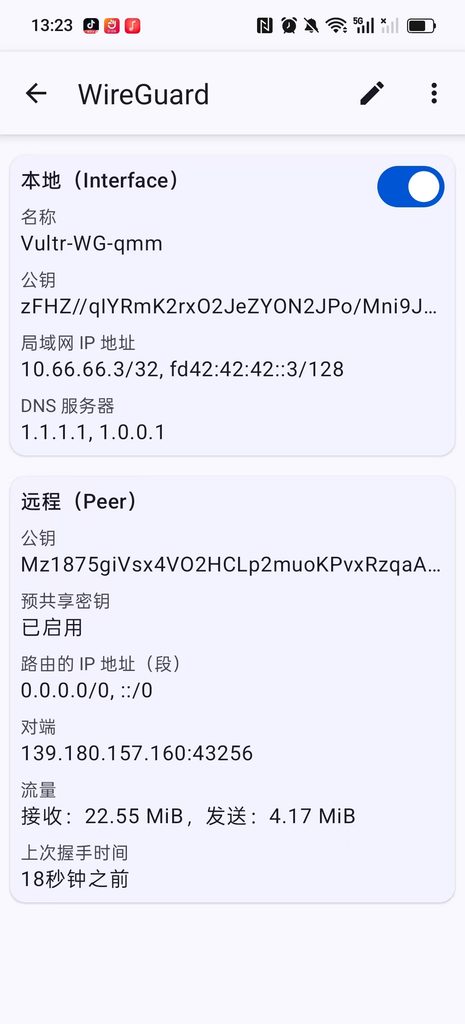
- Last handshake time: 18 seconds before
- Received: 22.55 MIB, send: 4.17 MIB
Traffic is already being transmitted normally.
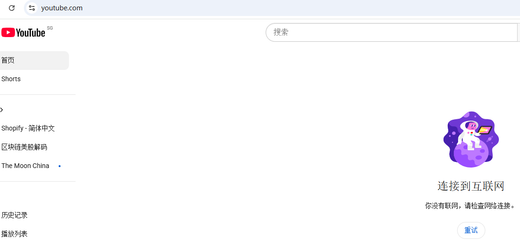
Then open the browser to access Google:

Google opens normally, the problem is completely solved!
Summary of the root cause of the problem
| check | Status | Explanation |
|---|---|---|
| WireGuard service | ✅ Normal | Monitor 51820 with peer configuration |
| vultr background firewall | ✅ Correct | Released UDP 20000-60000 |
| prerouting redirect | ✅ Correct | Redirect 20000-60000 to 51820 |
| iptables-persistent | ✅ Installed | Rules are persistent |
| Input chain release UDP 20000-60000 | ❌ Missing | INPUT default DROP causes the handshake to be discarded |
| IP forwarding (net.ipv4.ip_forward) | ❌ Not turned on | Unable to route VPN traffic |
| Forward Chain Release WG0 | ❌ Not configured | Unable to forward VPN packets |
| nat masquerade | ❌ Not configured | Mobile phone traffic cannot go out from the public IP |
Core question: Customers are only configured prerouting redirect, but ignore Input Rules for the release of the chain. Although the port firewall of the vultr background is released, the iptables inside the server Input The default chain policy is drop, directly discard all inbound packets.
Secondary questions: IP forwarding and NAT camouflage are not turned on, resulting in no access to the Internet even if the handshake is successful.
Summary of complete repair commands
If you have similar problems (no handshake, no internet access), under the premise of ensuring that the prerouting rule is configured, you can fix the following commands:
# 1. 放行 UDP 端口范围(解决 INPUT DROP 导致无握手)
iptables -I INPUT 1 -p udp --dport 20000:60000 -j ACCEPT

# 2. 开启 IP 转发
sysctl -w net.ipv4.ip_forward=1
grep -q "net.ipv4.ip_forward=1" /etc/sysctl.conf || echo "net.ipv4.ip_forward=1" >> /etc/sysctl.conf

# 3. 放通 FORWARD 链
iptables -P FORWARD ACCEPT
iptables -A FORWARD -i wg0 -j ACCEPT
iptables -A FORWARD -o wg0 -j ACCEPT

# 4. 添加 NAT 伪装(自动获取网卡和子网)
PUBLIC_IFACE=$(ip route | grep default | awk '{print $5}')
WG_SUBNET=$(grep -oP 'Address\s*=\s*\K[0-9.]+/[0-9]+' /etc/wireguard/wg0.conf 2>/dev/null | head -1 | cut -d/ -f1 | sed 's/\.[0-9]*$/.0\/24/')
WG_SUBNET=${WG_SUBNET:-10.0.0.0/24}
PUBLIC_IFACE=${PUBLIC_IFACE:-eth0}
iptables -t nat -A POSTROUTING -s ${WG_SUBNET} -o ${PUBLIC_IFACE} -j MASQUERADE

# 5. 保存规则
netfilter-persistent save

# 6. 重启 WireGuard
systemctl restart wg-quick@wg0
dot
- vultr background firewall ≠ iptables inside the server
The background release port is only ‘allowing traffic to reach the server network card’, but the internaliptables inputThe chain may still discard traffic. Always checkInputchain strategy, ifdrop, must explicitly release the desired port. preroutingredirect only does port conversion, not responsible for releaseNatglossypreroutingThe chain takes effect before routing decisions, but ifInputThe chain is discarded, and the redirected traffic still cannot reach the WireGuard service.- Mobile Internet access requires IP forwarding and NAT
If the mobile phone needs to access the external network (Google, ChatGPT, etc.), it must be turned onnet.ipv4.ip_forward=1, let goforwardchain, and addmasqueraderules. - Check the subnets in the WireGuard profile
NAT camouflage needs to use the correct subnet (such as10.66.66.0/24), otherwise the traffic cannot be routed correctly.
Epilogue
The problem with this client is actually quite typical:Port forwarding is configured, but inbound release and routing forwarding are ignored. During the investigation process, you only need to check the iptables rules one by one, and you can quickly locate the problem.
I hope this record can help friends who have similar problems. If you also want to build your own WireGuard VPN but don’t want to toss, please contact me for an exclusive solution.