

Environment: Ubuntu 26.04 + Google Chrome Stable, 60 tabs (about 50 different domains). Compared memory differences against the same configuration on Windows 10, gradually optimizing from 2GB at idle and 19GB under full load down to a reasonable range.
1. Symptom: Massive Memory Discrepancy Across Systems
1. Original Problem
- Windows 10: 4 windows, 60 tabs (50 different domains), Chrome memory stable at 6–8GB;
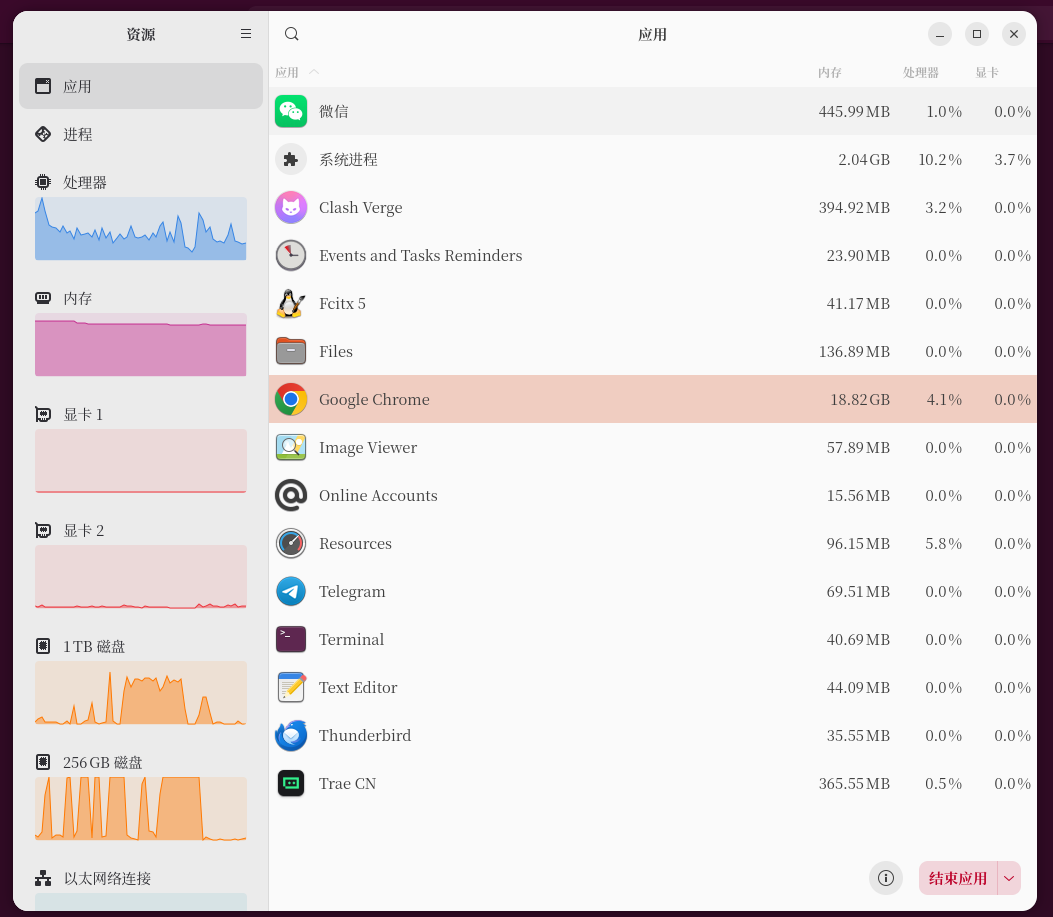
- Ubuntu default Chrome: With the same number of tabs, a single tab at idle takes ≈2.0–2.4GB. Opening all 60 tabs pushes memory straight up to 18–20GB, more than double that of Windows.
Figure 1: Screenshot of system-wide memory usage with 60 tabs before optimization (original full load 19GB+)
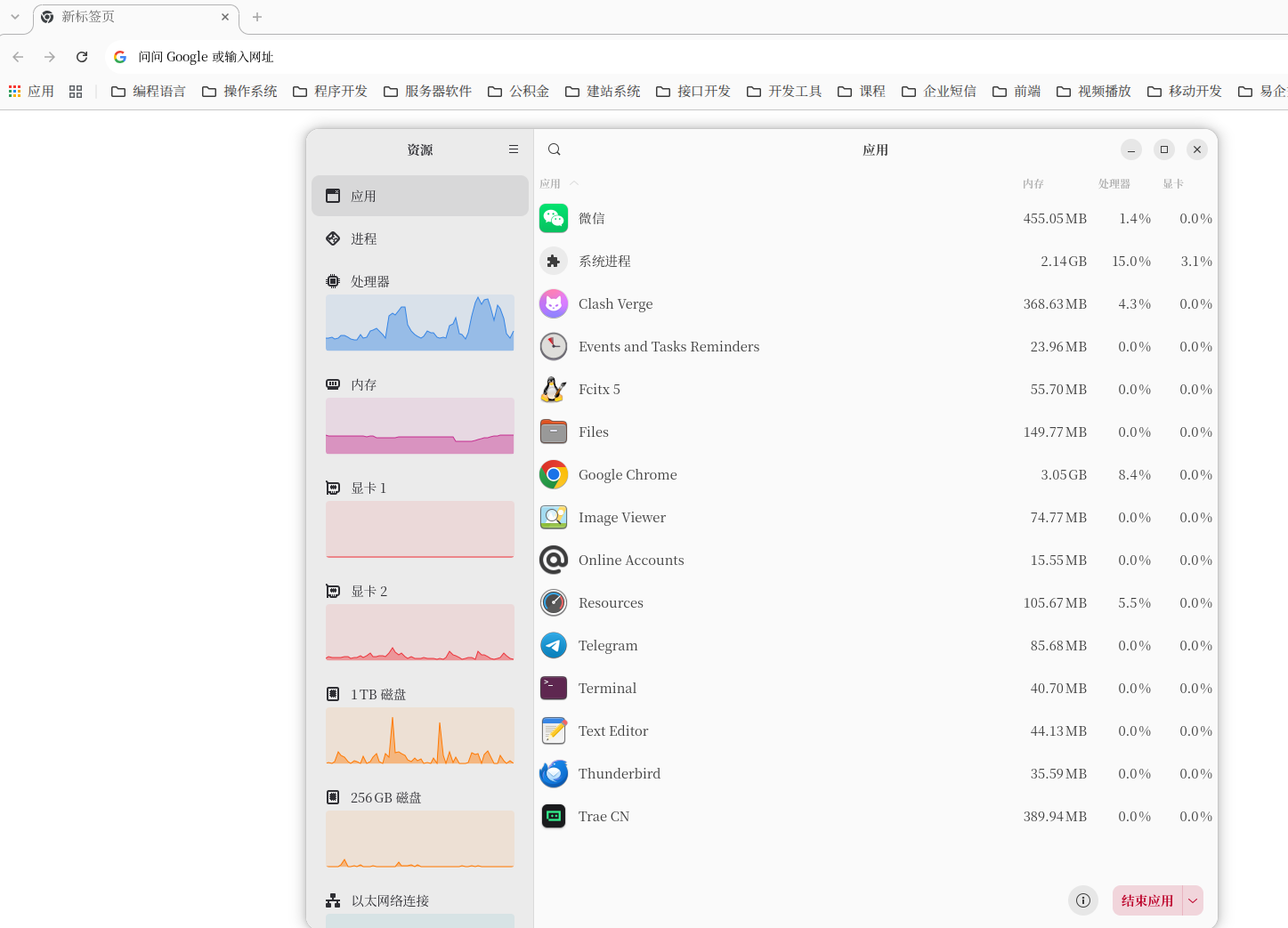
- Reference comparison: Chrome idle usage in the same environment also reached 3GB.
Figure 2: Chrome idle usage in the same environment also reaches 3GB
2. Root Cause Conclusion
Chrome on Linux forces the “Site Isolation” security mechanism by default: pages from different domains are forced to create independent sandboxed renderer processes. 50 domains means at least 50 isolated processes. Chrome on Windows intelligently merges same-origin processes, naturally resulting in lower memory usage.
After a fresh install of Ubuntu, I signed in to the Chrome browser, which automatically synced cloud data to the local machine.
Note: Site Isolation can be disabled via startup parameters, but this slightly lowers the browser’s vulnerability isolation security level. Wallet users can weigh the trade-offs as needed. This article does not implement Option 2; it is documented here only for reference.
2. Step-by-Step Optimization (Google account login, bookmarks, and passwords retained throughout; browser config not reset)
(1) Sync Streamlining: Cut hidden background sync processes at the source
Path: Settings → You and Google → Customize sync
✅ Enable only 3 items: Bookmarks, Addresses and more, Passwords and passkeys
❌ Turn off everything else: History, Extensions, Settings, Open tabs, Reading list, and remaining sync items
Figure 6: Screenshot of Google account custom sync checkbox configuration
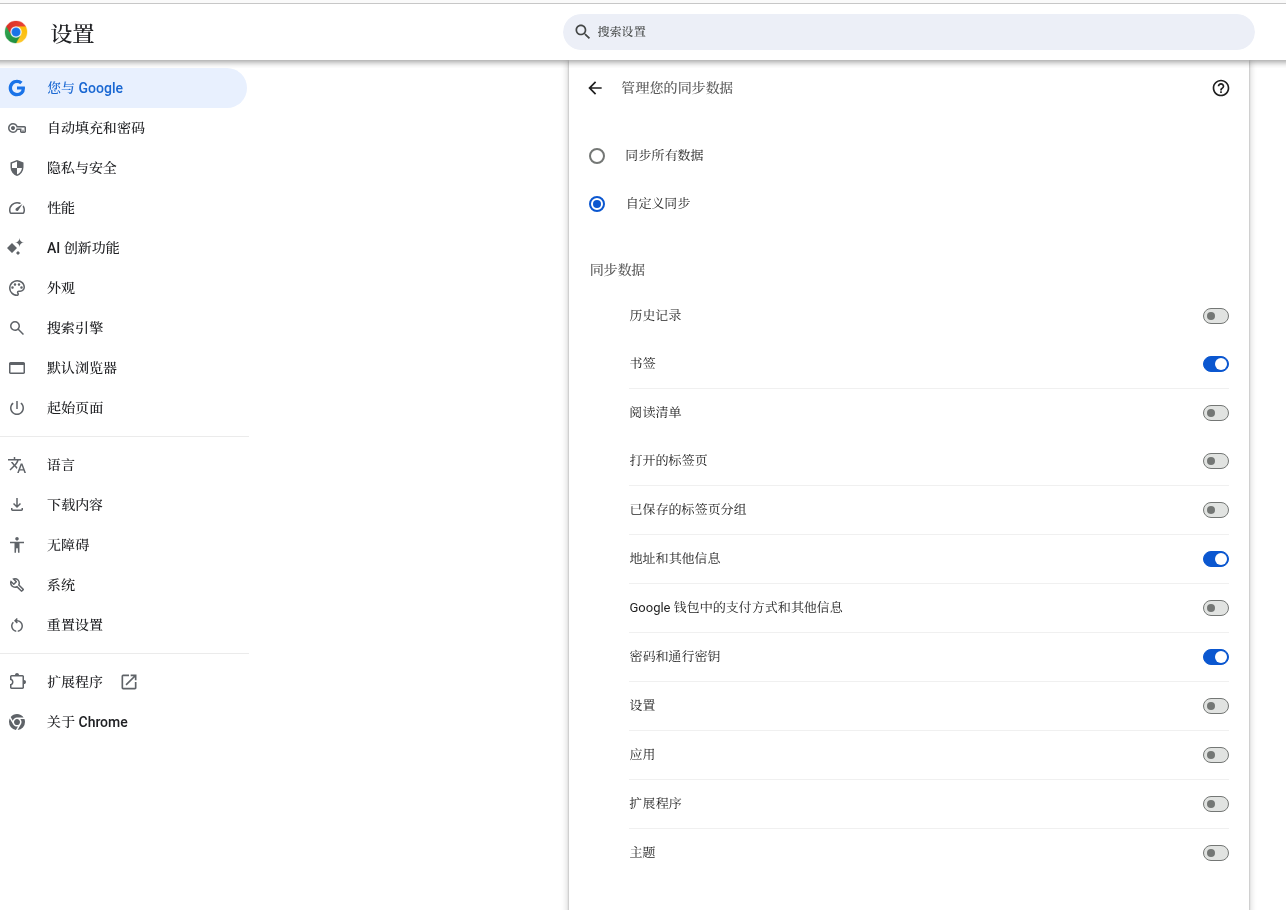
Effect: Extensions and browser configurations from old devices are no longer synced from the cloud, eliminating background sync services stealthily consuming memory.
(2) System Optimization: Disable background persistence and hardware AI preloading
Path: Settings → System
- Disable:
关闭Google Chrome后继续运行后台应用 - Disable:
使用图形加速功能 - Disable:
设备端AI
Figure 5: Screenshot of the three disabled system settings configurations
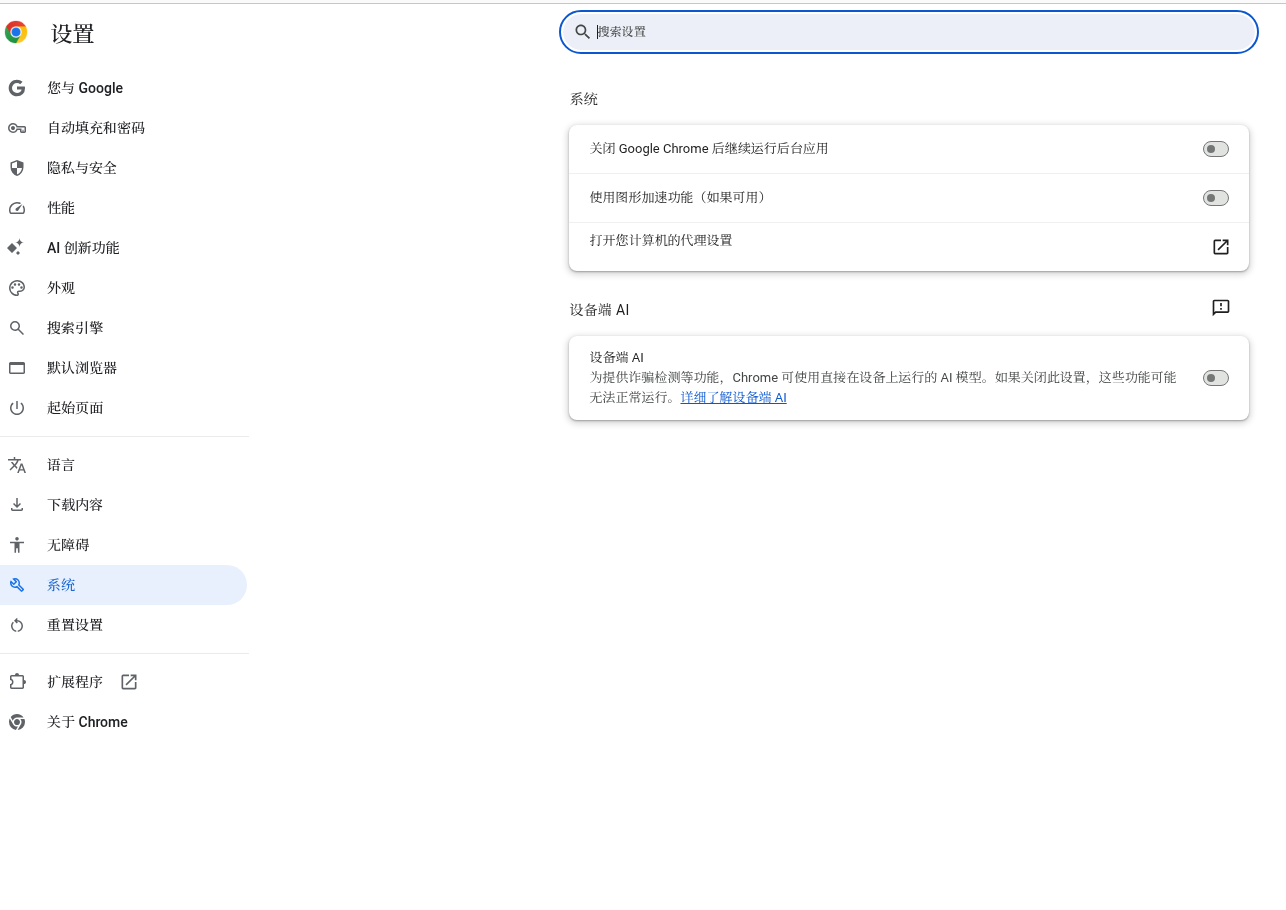
Effect: Eliminates residual background processes, graphics card anomaly leaks, and local AI models persistently occupying memory.
(3) Privacy and Security Optimization: Disable ad tracking and background site persistence
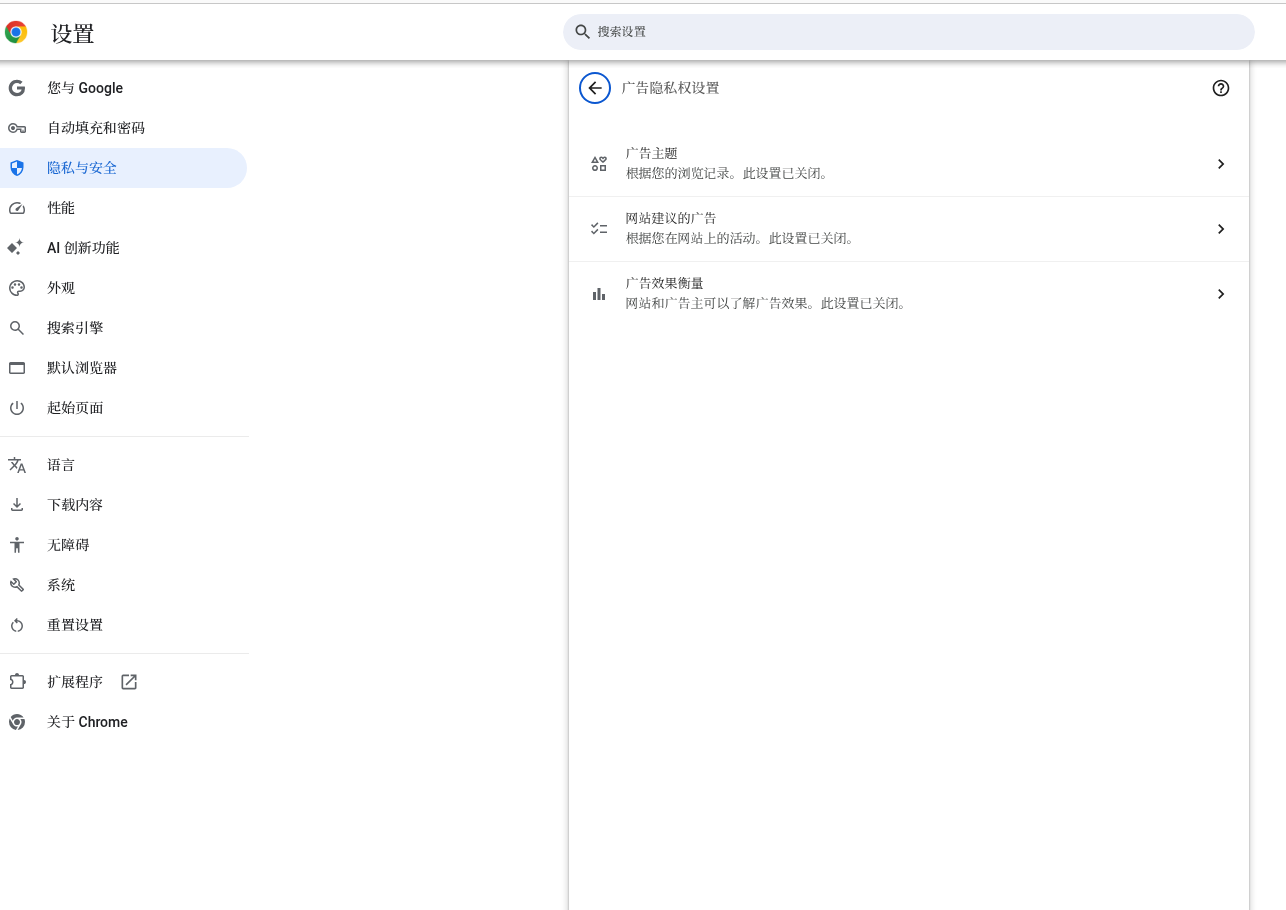
- Ad privacy settings: Turn off all three—ad topics, site-suggested ads, and ad measurement—to stop browsing data collection and personalization processes;
Figure 7: Screenshot of the ad privacy settings interface with everything disabled
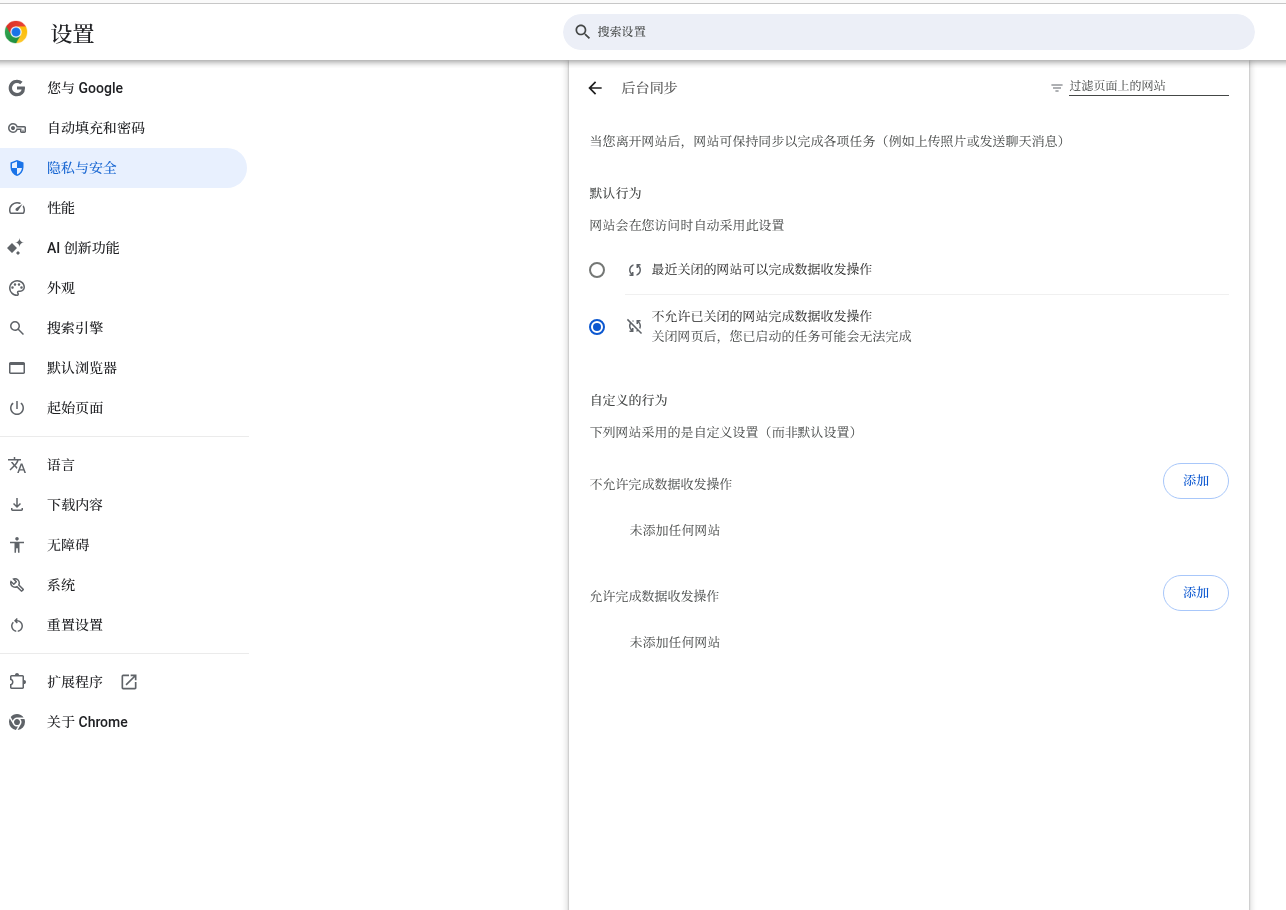
- Site settings → Background sync: Globally prohibit sites from silently sending and receiving data in the background; child processes are destroyed immediately when the page is closed.
Figure 8: Screenshot of the site background sync permission disabled setting
(4) Performance Configuration: Maximize memory reclamation
Path: Settings → Performance
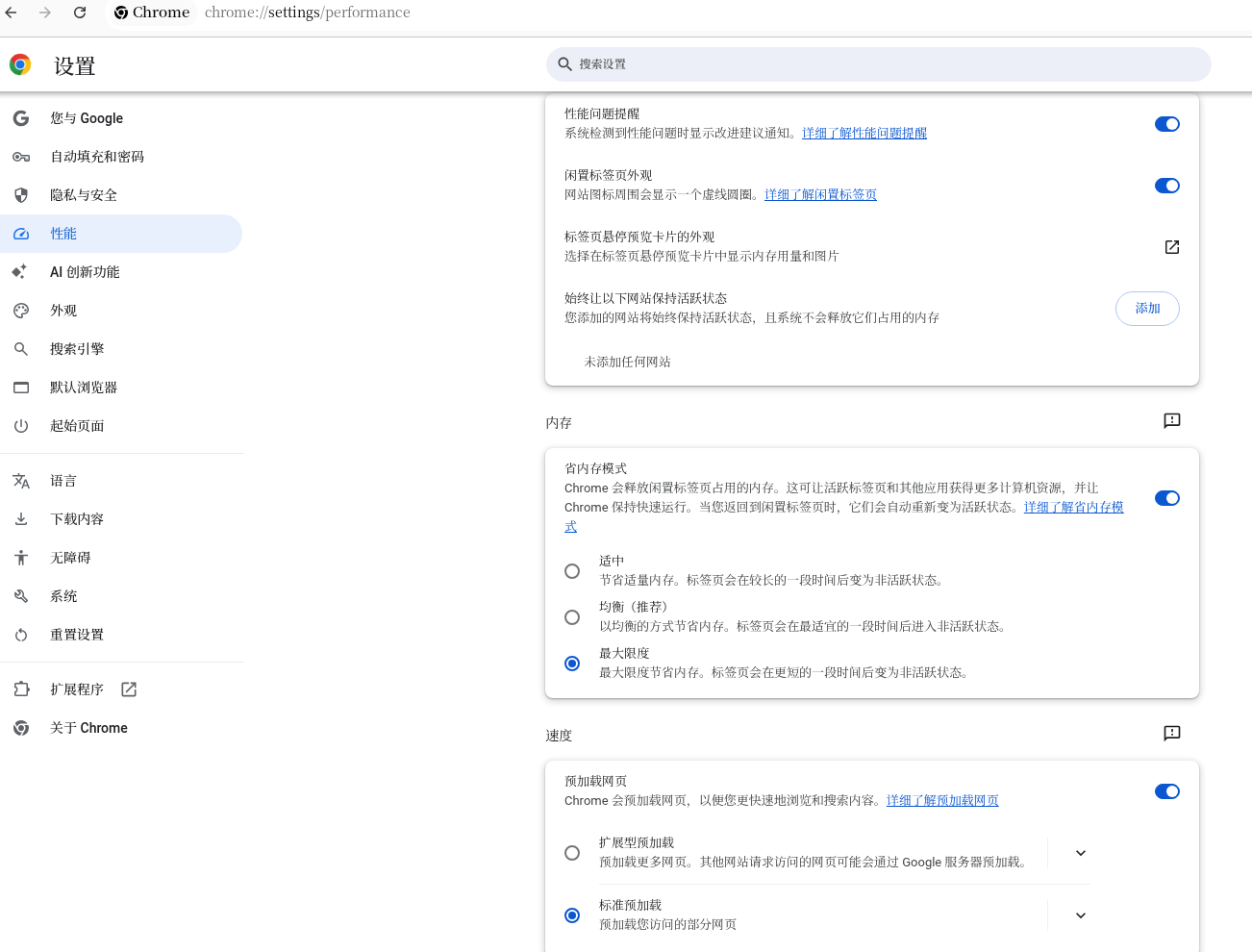
- Memory Saver: Set to Maximum, with no whitelisted persistent sites;
Figure 9: Screenshot of Memory Saver set to Maximum on the Performance page
(5) Extension Streamlining: Temporarily enable wallet extensions only as needed
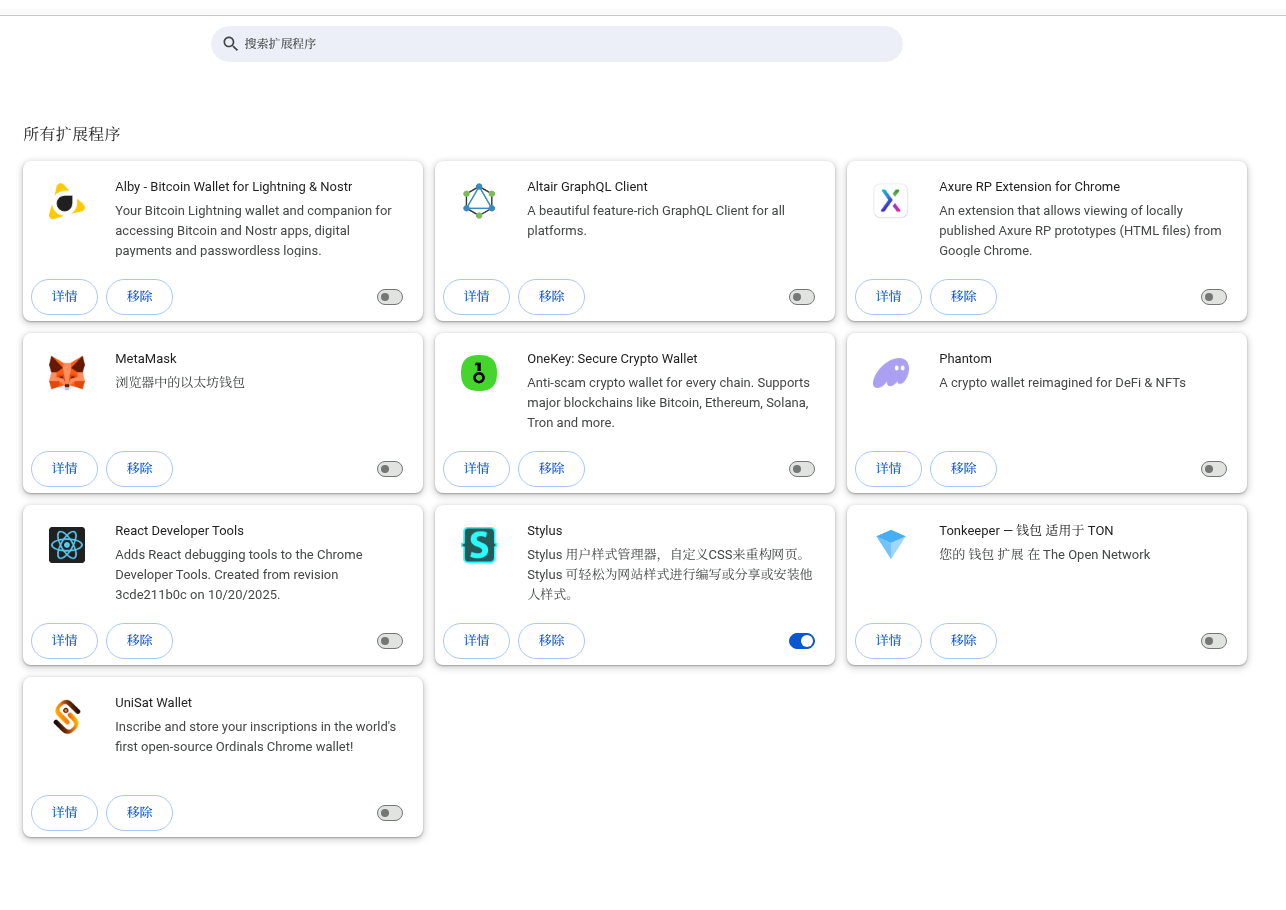
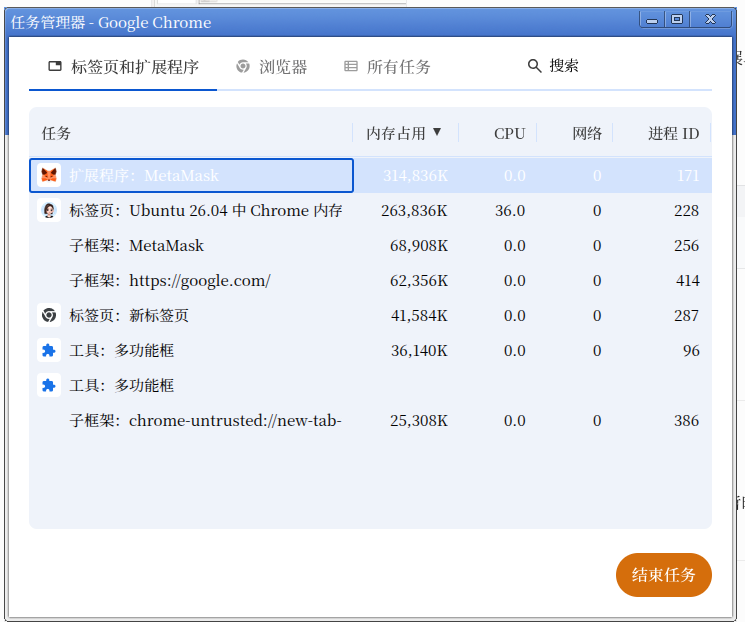
Wallet extensions like Phantom and MetaMask on this machine are all disabled, leaving only the Stylus style plugin enabled.
Figure 4: Screenshot of enabled status on the extensions management page
Common issue with Linux wallet extensions: They continuously poll RPC on-chain data while idle, making them highly prone to memory leaks. Disable them whenever they are not actively in use.
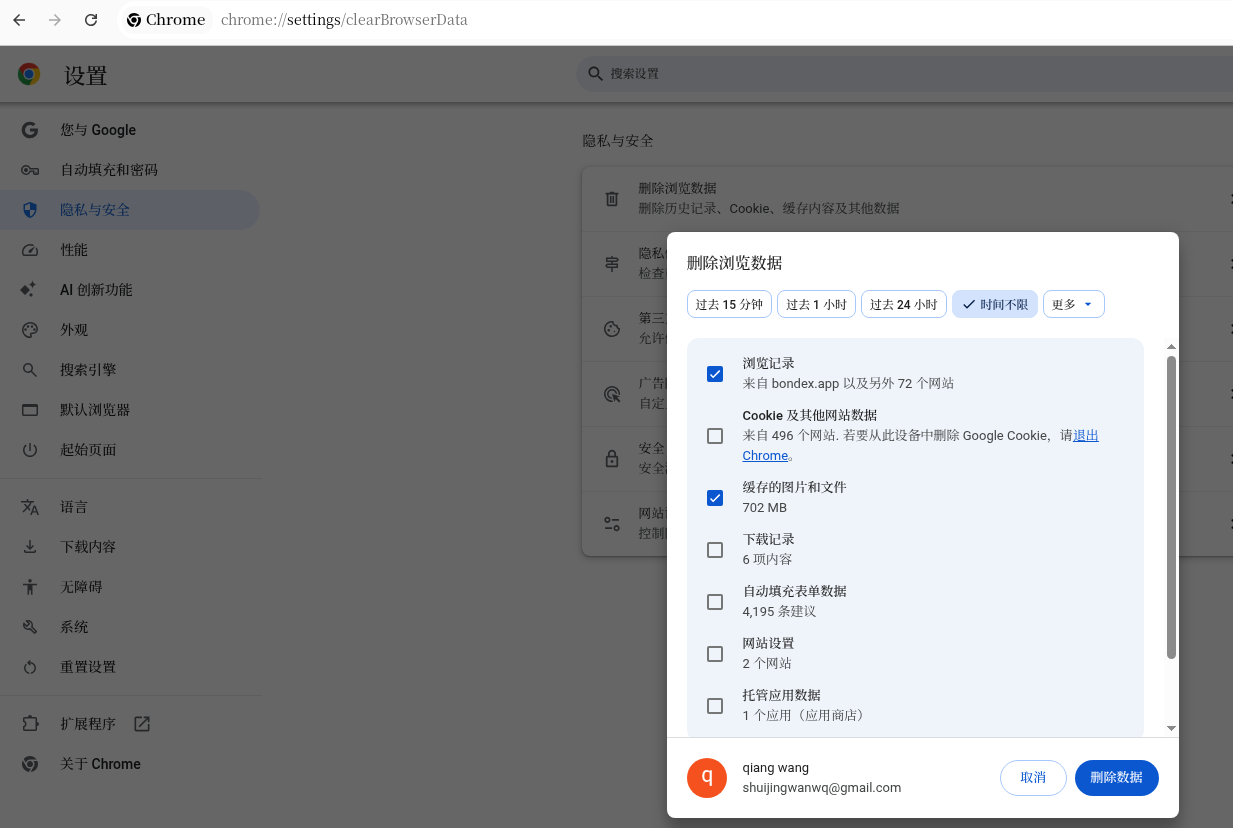
(6) Cache Cleanup: Periodically clear redundant disk cache (the key memory reduction operation this time)
Shortcut Ctrl+Shift+Delete, Time range: All time
Check: Browsing history, Cached images and files; Uncheck: Cookies, Passwords, Form data.
Figure 11: Screenshot of clear browsing data checkbox configuration
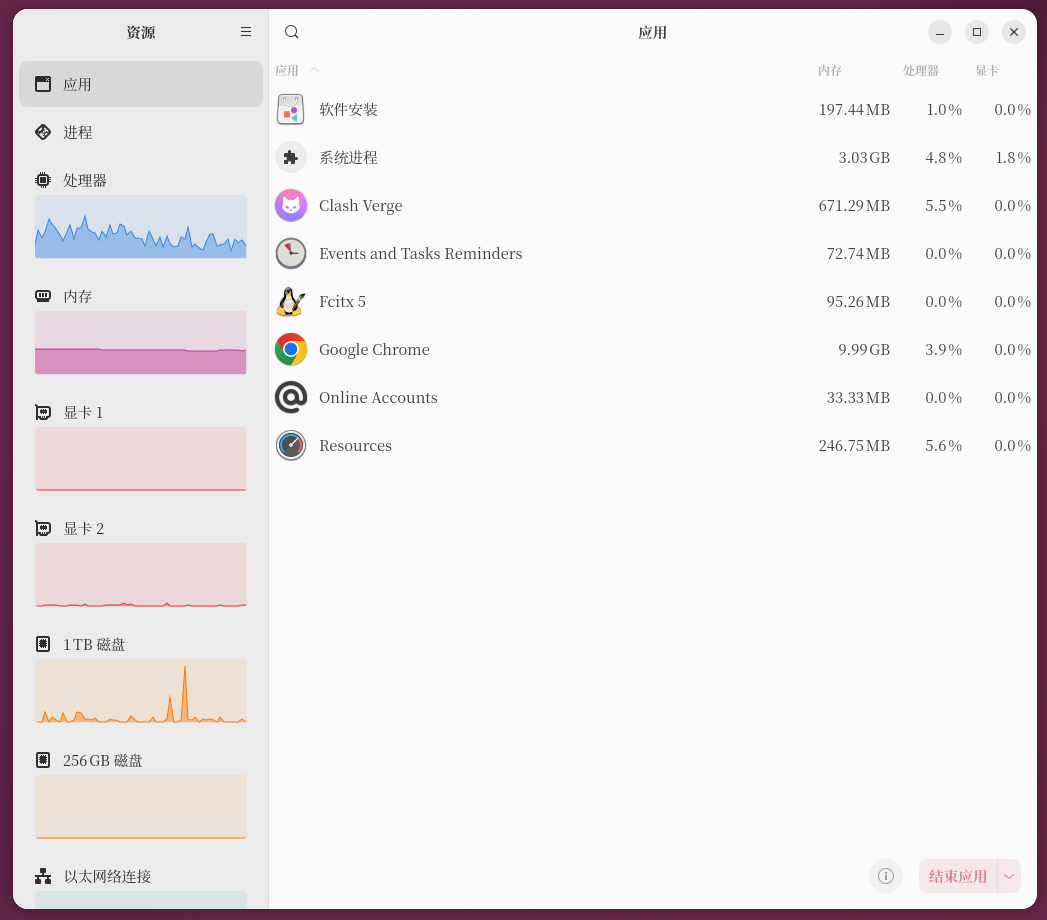
Memory under full load before cleanup: 18.55GB; after clearing cache + restarting Chrome: full load dropped directly to 9.99GB, a single optimization freeing nearly 9GB of redundant memory.
Figure 12: Screenshot of system-wide memory after clearing cache and restarting (around 10GB after optimization)
Optimization logic: Resource caches accumulated over long browsing sessions remain persistently mounted in memory. Periodic cleanup is the key to long-term memory control.
3. Two Long-Term Optimization Options (Choose one; Option 2 was not implemented in this article)
Option 1 | Retain native Site Isolation (Highly recommended, optimal for wallet security, currently in use in this article)
Suitable for long-term Web3 wallet users who do not want to sacrifice sandbox security:
- Open tabs in batches: Open only 15–20 tabs at a time; rely on “Maximum memory savings” to automatically reclaim memory for idle tabs;
- Archive low-frequency tabs: Install OneTab to consolidate idle tabs and destroy excess renderer processes;
- Maintenance cycle: Repeat the cache + history cleanup operation every 30 days.
Option 2 | Disable Site Isolation (Ultimate memory control, aligns with Firefox usage, not implemented in this article, theoretical reference only)
If you need to further reduce memory, disable forced domain isolation via startup parameters:
--disable-site-isolation-trials --disable-background-networking --disable-preconnectTheoretically, memory for 60 tabs can be compressed to 7–8GB after configuration; disabling isolation slightly reduces security protection, so test it yourself as needed.
4. Summary of Data Comparison Before and After Optimization
| Usage Scenario | Ubuntu Native Chrome (Unoptimized) | Fully optimized + cache cleared (Site Isolation retained) | Isolation disabled parameter added (Theoretical optimal, untested) | Windows 10 Same Config | Firefox Ubuntu |
|---|---|---|---|---|---|
| Idle single tab | 2.0–2.4GB | 1.8–2.0GB | 1.1–1.3GB | 1.2–1.4GB | 1.2GB |
| 60 tabs / 50 different domains | 18–20GB | 9.5–10GB | 7.5–9GB | 6–8GB | 7–9GB |
Figure 3: Chrome Task Manager process usage details
5. Conclusion
- The high memory usage of Chrome on Linux is fundamentally driven by the compounding of three major factors: the Site Isolation mechanism, web cache accumulation, and background polling by wallet extensions;
- If you prefer not to modify underlying startup parameters, you can cut memory usage by nearly half simply through “streamlining sync + maximizing performance settings + periodically clearing cache + opening tabs in batches”;
- If you pursue ultimate memory savings and are not sensitive to security trade-offs, append the Site Isolation disable parameters to directly align memory performance with Windows/Firefox.
Target audience: Heavy Linux desktop Chrome multi-tab users, frequent Web3 wallet users