





![[截图 2:浏览器 Network 中直接请求 translate.yandex.net]](https://media.shuijingwanwq.com/2026/07/2-16-1024x568.png)


InPrevious articleWe have verified that the large language model is not competent for the precise matching of a large amount of structured data. To be completely cleared /en/tag/ For the Chinese redundant URL under the path, we must return to the engineering scheme.
This article will be used as a practical tutorial, how to start from scratch, and complete the automated mapping processing of tags through the Go language combined with Baidu Translation API.
Step 1: Apply for Baidu Translation API voucher
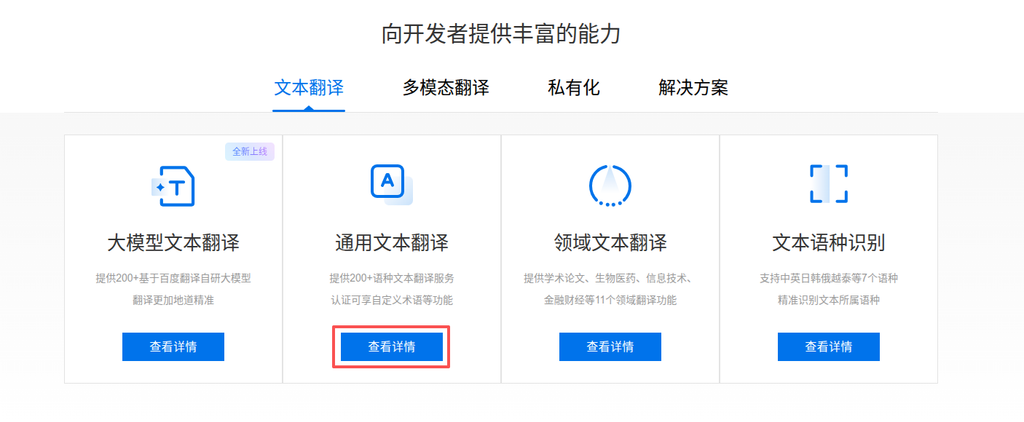
In order to realize the accurate conversion of Chinese labels to English, we need to use mature machine translation services. Here is the Baidu Translation open platform, which provides the basic general text translation API, and the standard version has a free quota per month, which is fully enough for this cleaning task.
Log in to Baidu Translation Open Platform, and open the ‘General Text Translation’ service on the console.
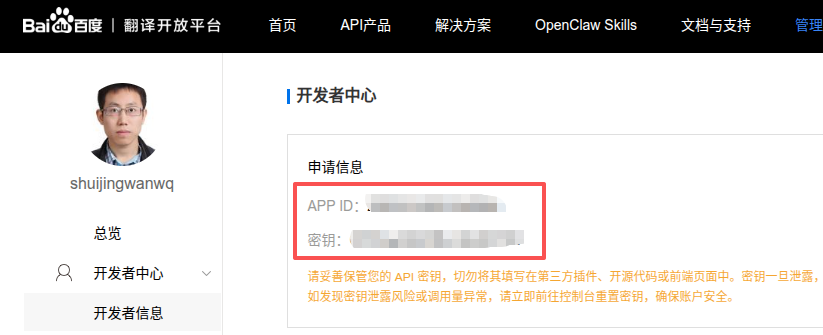
After opening, enter the developer center, get your App ID And key. Please keep these two vouchers properly, and the subsequent code will be called as an environment variable.
Step 2: Initialize the project on GitHub
Specification works start with version control. Create a new repository on GitHub, named Tag-merge. To simplify the initialization process, check Add README.mdand in .gitignore Select from template go, which will automatically help us ignore the binary files generated by compilation.
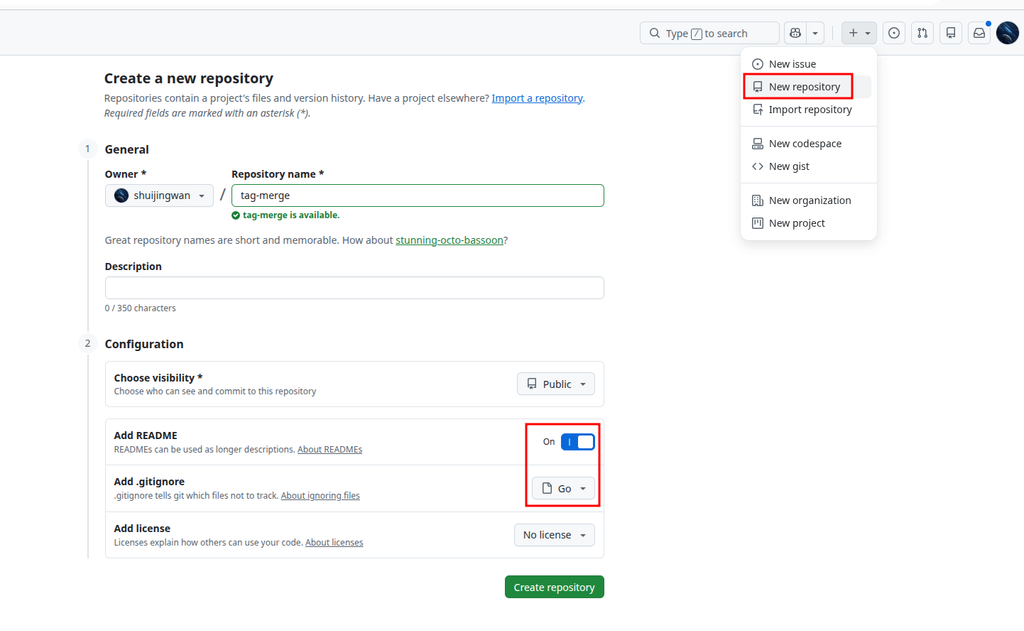
After cloning the repository to the local, we enter the project directory in the terminal, ready to build the development environment.
Step 3: Project environment construction and code writing
In order to ensure the consistency of the environment and do not pollute the host, we use Docker for containerized development. The core directory structure of the project is as follows:
tag-merge/
├── .devcontainer/          # 容器开发环境配置(可选)
│   ├── devcontainer.json   # 容器开发环境配置文件
├── data/                   # 存放从数据库导出的原始 CSV 文件
│   ├── zh_tags.csv         # 中文标签库
│   └── en_tags.csv         # 英文标签库
├── output/                 # 存放程序运行后生成的结果文件
│   └── tag_mapping_result.csv
├── .env.example            # 环境变量示例文件
├── .env                    # 环境变量真实文件(已被 .gitignore 忽略)
├── .gitignore
├── docker-compose.yml
├── Dockerfile
├── go.mod
├── main.go                 # 核心业务逻辑
└── README.md
1. Configure environment variables
Create in the project root directory .env file, fill in the Baidu API credentials just obtained:
BAIDU_APP_ID=你的APPID
BAIDU_SECRET_KEY=你的密钥
2. Orchestrate Docker containers
Write docker-compose.yml, will .env The variables in the container environment are injected into the container environment, and at the same time data And output Directory to communicate with files.
3. Writing Core Go Logic
main.go The core processing process is as follows:
- read and parse
en_tags.csv, with the label name and slug as the key, to build the hash index. - read and iterate
zh_tags.csvEach line in Chinese tags. - Call Baidu Translate API to translate the Chinese label name into English.
- Crash the translation results in the English label index.
- If it hits, it is recorded as ‘API matching success’; if missed, the translation result is reserved and recorded as ‘API is not matched (Slug is recommended)’.
- Write the full result to
output/tag_mapping_result.csv, in order to prevent Excel garbled characters, output the UTF-8 BOM header before writing.
At the same time, taking into account the QPS limit of Baidu Translation Standard Edition (1 time per second), the loop of the code has been added 1.1 second of sleeping intervals.
Step 4: Run the script and data processing
Execute the following commands in the terminal, start the container and run the script:
# 构建并后台启动容器
docker compose up -d --build

# 进入容器终端
docker exec -it tag-merge sh

# 在容器内初始化依赖
go mod tidy

# 执行处理脚本
go run main.go
After the script is run, it takes about 65 minutes to process 3592 pieces of data due to the 1.1 second frequency limit sleep. The progress and matching situation can be clearly seen from the terminal log.
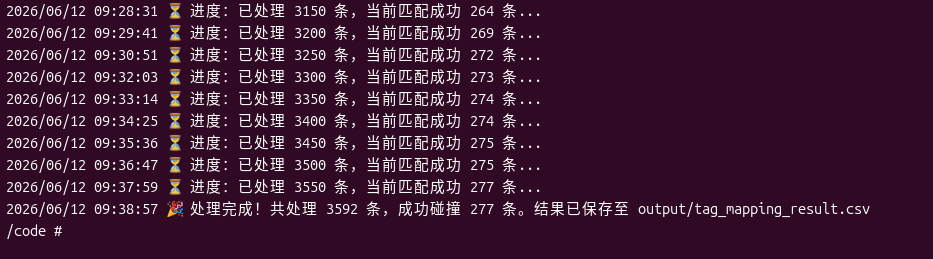
After waiting patiently, the final output of the script is completed promptly:A total of 3592 pieces were processed, and 277 successfully collided. This means that there are 277 Chinese labels that have found an exact correspondence in the English library, and can be merged directly.
Step 5: Verify the processing results
Exit the container, we are in the host output The generated ones can be found in the directory tag_mapping_result.csv. Open the file to view, the result format is regular and in line with expectations.
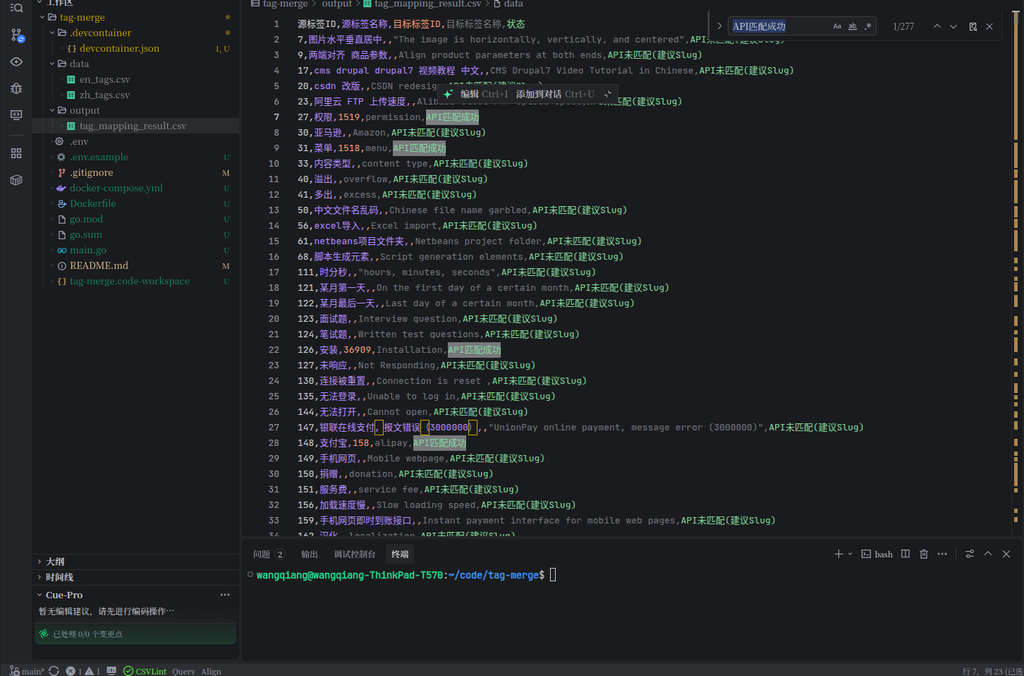
There are five core fields in the CSV file:
- Source tag ID / source tag name: The original Chinese label information.
- Target Label ID / Target Label Name: Match the successful English tag information.
- Status:
API matching success: The translated English has been found in the library (such as: Alipay -> Alipay), which is the highest priority processing item, which can be merged directly in WordPress.API is not matched (slug is recommended): There is no such tag in the English library, but an accurate English translation is provided (such as: slow loading speed -> slow loading speed), which can be used as a reference for subsequently adding English tags.
Summary
Through the combination of Go script and Baidu translation API, we have replaced the uncontrollable large model in a deterministic engineering way, and successfully completed the preliminary cleaning of multi-language labels. 277 accurate match results provide reliable data support for subsequent database operations.
However, 277 only accounted for 7.7% of the full data, and there are still a large number of long-tail labels that need to be further screened and processed. In the next article, I will share how to safely perform tag merge and delete operations in WordPress based on this CSV result, completely eliminated /en/tag/ The Chinese redundant URL below.
WordPress Maintenance, Performance Optimization & Blog Growth Consulting
I have been running my personal technology blog for more than 10 years and have published over 1,000 original articles. My long-term practice covers WordPress website maintenance, CDN / Cloudflare configuration, caching optimization, Google SEO, ad monetization, and multilingual website operations.
If your WordPress website is slow, unstable, affected by plugin conflicts, showing caching issues, having AdSense display problems, or facing CDN / Cloudflare / DNS configuration uncertainty, feel free to contact me for remote troubleshooting.
Ideal For:
✅ Personal blog owners
✅ WordPress website operators
✅ Independent developers and content creators
✅ SaaS website owners
✅ Website owners who want better speed and stability
What I Offer:
✅ WordPress performance optimization
✅ Cloudflare / CDN / caching configuration checks
✅ Plugin conflict and layout issue troubleshooting
✅ AdSense display issue troubleshooting
✅ Basic SEO structure review
✅ Blog growth and monetization consulting
If you would like to discuss your website, please contact me and mention: WordPress Maintenance Consultation.
Contact Me:
Telegram: @shuijingwan
WeChat: 13980074657
Email: shuijingwanwq@gmail.com
Leave a Reply