

Earlier today, I wrote an article comparing the translation quality of AutoPoly Free, Yandex Translate, and the Yandex web version:
From AutoPoly to the Yandex Web Version: A WordPress English Auto-Translation Quality Test
That article focused on one core question:
Can English articles generated by AutoPoly Free with Yandex translation be published directly?
The conclusion was fairly clear: AutoPoly Free works for creating English article drafts, keeping the Polylang relationship, and preserving the basic WordPress structure. But the English body text produced by Yandex still feels mechanical and lacks article-level context between paragraphs. It is useful as a first draft, but not good enough as the final version of a high-quality English article.
So I naturally moved on to another question:
If I switch AutoPoly’s translation engine from Yandex to OpenAI, can it automatically generate English articles close to the quality of my current ChatGPT Plus manual rewriting workflow?
This article records my further analysis of that path.
1. My Current WordPress English Translation Workflow
My current workflow for handling English articles looks roughly like this:
AutoPoly 免费版
  ↓
自动创建英文文章草稿 / 保留 Polylang 关联
  ↓
我从中文文章代码编辑器中复制完整内容
  ↓
粘贴给 ChatGPT Plus
  ↓
按固定规则做英文完整重译
  ↓
复制英文标题、摘要、正文
  ↓
手动粘贴回英文文章编辑器
  ↓
人工检查后发布
The advantage of this workflow is quality.
ChatGPT Plus processes the entire article instead of translating isolated paragraphs one by one. It can understand the article context, technical background, and the logic between sections, and it can rewrite a Chinese technical blog post into a more natural English technical article.
I usually give it very explicit rules:
保留 Gutenberg 区块结构
保留 HTML 标签
保留短代码
保留图片占位
保留代码块
保留 wp:kevinbatdorf/code-block-pro 结构
代码块内容默认不翻译
产品名、命令、路径、域名、URL 不翻译
英文要自然、可信、适合海外技术读者阅读
This is no longer just “Chinese to English translation.” It is closer to rebuilding a Chinese technical blog post into an English technical blog post.
But the problem is also obvious: the whole process is still highly manual.
I have to copy, paste, wait, copy again, and paste again for every article. That is acceptable in the short term, but if I want to maintain the English site continuously or process a large number of older posts, this workflow is hard to scale.
That is why AutoPoly Pro naturally came to mind.
2. An Important Finding from the Previous Test
In the previous article, I also had an important finding:
When AutoPoly Free uses Yandex, it does not appear to have the WordPress backend request Yandex on its behalf. It behaves more like a browser-side frontend call.
The rough request path is:
浏览器前端
  ↓
translate.yandex.net
In other words, the Yandex translation in the free version is closer to a frontend Widget / JSONP-style call.
This matters a lot for the following analysis.
Because if I later switch to AutoPoly Pro + OpenAI API, the first thing I need to confirm is:
Is the OpenAI API request sent from the browser frontend, or from the WordPress backend server?
This affects not only security, but also whether I can actually make the workflow run in my current server environment.
3. The AutoPoly Pro Features That Actually Attract Me
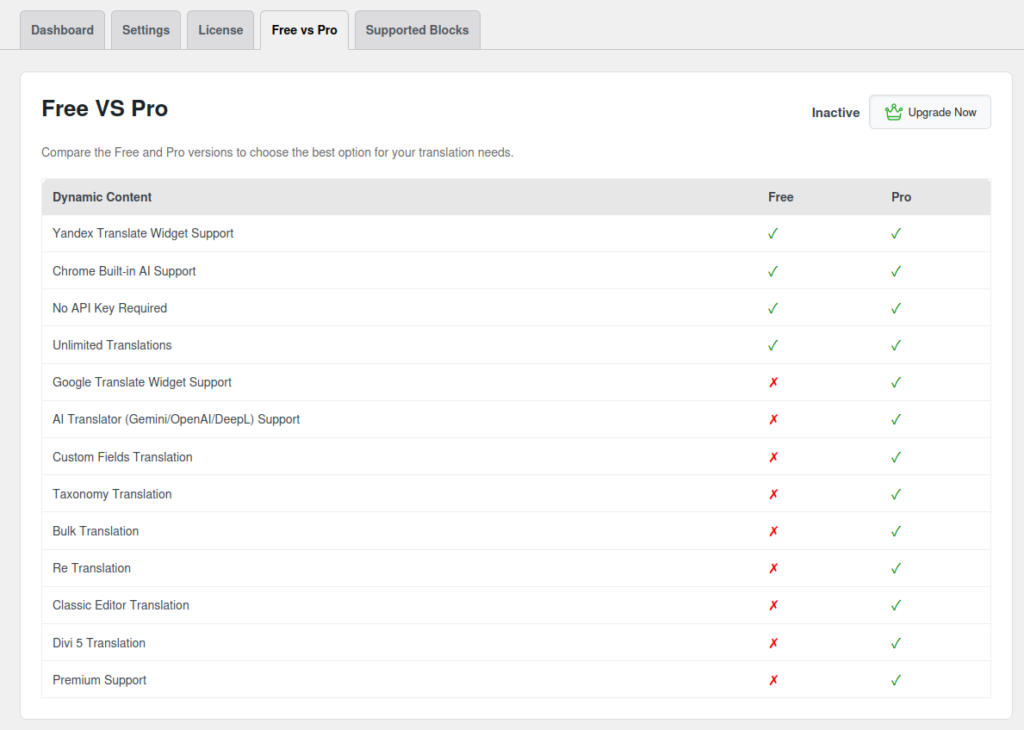
Based on the feature comparison between AutoPoly Free and Pro, the most attractive part of the Pro version is not the Google Translate Widget, but the following capabilities:
AI Translator(Gemini / OpenAI / DeepL)
Bulk Translation
Re Translation
Custom Fields Translation
Taxonomy Translation
Premium Support
Three of them matter most to me:
- OpenAI support could theoretically improve English quality with stronger models, instead of continuing to rely on traditional machine translation tools like Yandex.
- Re Translation is very important. I already have many English drafts created by AutoPoly Free, so what I really need later is to reprocess existing English articles, not create new ones every time.
- Bulk Translation only becomes meaningful after the single-article workflow proves stable. Only then would it make sense to consider batch-processing some older posts.
If these three features are truly stable, my workflow may be able to change from:
AutoPoly Free 初稿
  ↓
ChatGPT Plus 手动重译
  ↓
手动粘贴回 WordPress
to:
AutoPoly Pro + OpenAI
  ↓
自动翻译英文草稿
  ↓
我只做人工审核
That looks very close to the automation workflow I want.
4. My Biggest Concern Is Not OpenAI, but Code Block Protection
For a normal blog, the main questions after adding OpenAI may be translation quality and cost.
But for my blog, the most critical question is actually:
When AutoPoly Pro calls OpenAI, will it translate or break code blocks?
My articles often contain content like this:
wp:kevinbatdorf/code-block-pro
wp:code
pre
code
textarea
shortcode
HTML block
命令行
Nginx 配置
JSON 配置
路径
域名
URL
If a translation plugin sends these parts directly to an AI model and lets the model decide what should or should not be translated, the risk is high.
This is especially true for code blocks such as wp:kevinbatdorf/code-block-pro. It is not a simple pre/code block. It contains a full structure including Gutenberg comments, JSON attributes, textarea, pre.shiki, span.line, and more.
If it gets simplified, escaped, rearranged, or mistranslated, the article may not be restored correctly.
So my initial judgment was this: if AutoPoly Pro simply sends the full article to OpenAI and relies on a prompt saying “do not translate code blocks,” I would not feel comfortable using it.
A safer implementation should work like this:
先识别不可翻译区块
  ↓
锁住代码块、短代码、HTML block、图片结构
  ↓
只翻译自然语言内容
  ↓
再把原始结构还原
Later, I found an important clue on AutoPoly’s Supported Blocks page.
5. The Supported Blocks Mechanism Made Me Reconsider AutoPoly
One important clarification: Supported Blocks is not exclusive to AutoPoly Pro. It is already available in the free version.
This is also why I started to reassess AutoPoly.
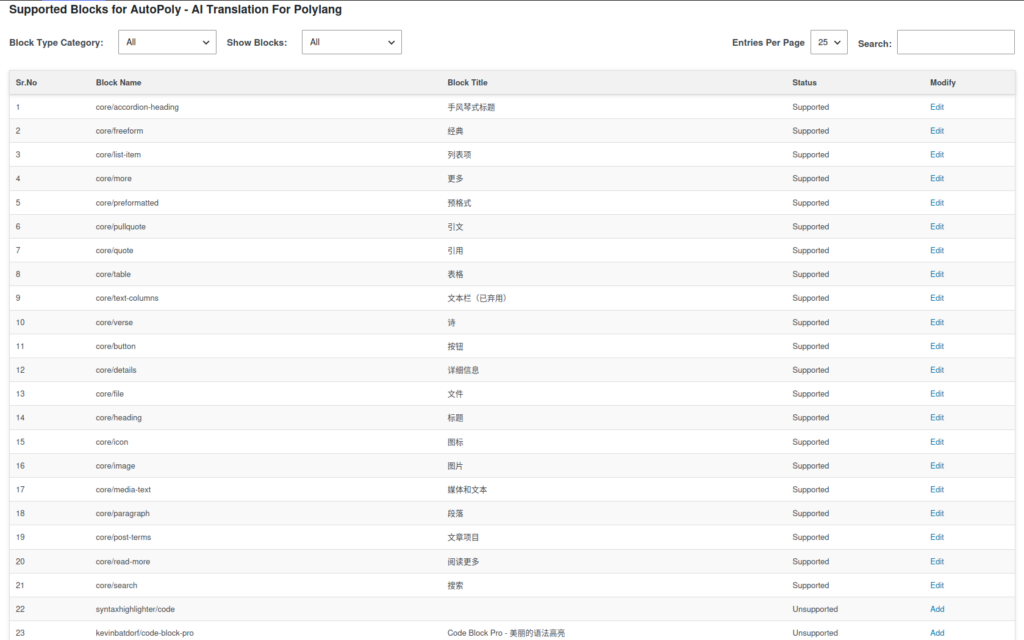
On AutoPoly’s Supported Blocks page, you can see the status of different Gutenberg blocks.
What reassured me is that these code-related blocks are marked as Unsupported by default:
kevinbatdorf/code-block-pro
syntaxhighlighter/code
core/code
core/html
This suggests that AutoPoly probably does not simply send the entire post_content to the translation service as-is. Instead, it likely parses Gutenberg blocks first, then decides whether to translate each block based on whether it is Supported.
A more reasonable understanding is:
Supported block
  → 提取其中可翻译的自然语言内容

Unsupported block
  → 跳过翻译,原样保留
If this understanding is correct, AutoPoly is more reliable in terms of structural protection than I initially expected.
In that case, the core risk of AutoPoly Pro + OpenAI is no longer “will it completely break code-block-pro,” but another question:
After it uses OpenAI for translation, can the English quality get close to a full-article rewrite by ChatGPT Plus?
However, there are still some details that need adjustment.
For example, I noticed that core/preformatted is Supported by default. That may be fine for an ordinary site, but for a technical blog, preformatted blocks are often used for command-line output, logs, or configuration snippets.
So if I continue using AutoPoly later, whether Free or Pro, I would first consider changing this block to Unsupported:
core/preformatted
This can reduce the risk of commands, logs, or configuration being translated by mistake.
As for core/verse, my first reaction was also to mark it as Unsupported. But after thinking about it, my blog does contain Chinese poetry, yet those poems are not placed inside the Chinese article body. They are shown on the left side of the language-switching row, mainly to avoid leaving that side visually empty.
So core/verse does not have much impact on my article-body translation workflow. I can keep observing it later instead of treating it as a must-change item right now.
These blocks, on the other hand, can remain Supported:
core/paragraph
core/heading
core/list-item
core/quote
core/pullquote
core/table
core/button
core/details
core/media-text
These are where normal natural-language content is mainly located.
6. Context Aware Should Handle Style, Not All Structural Protection
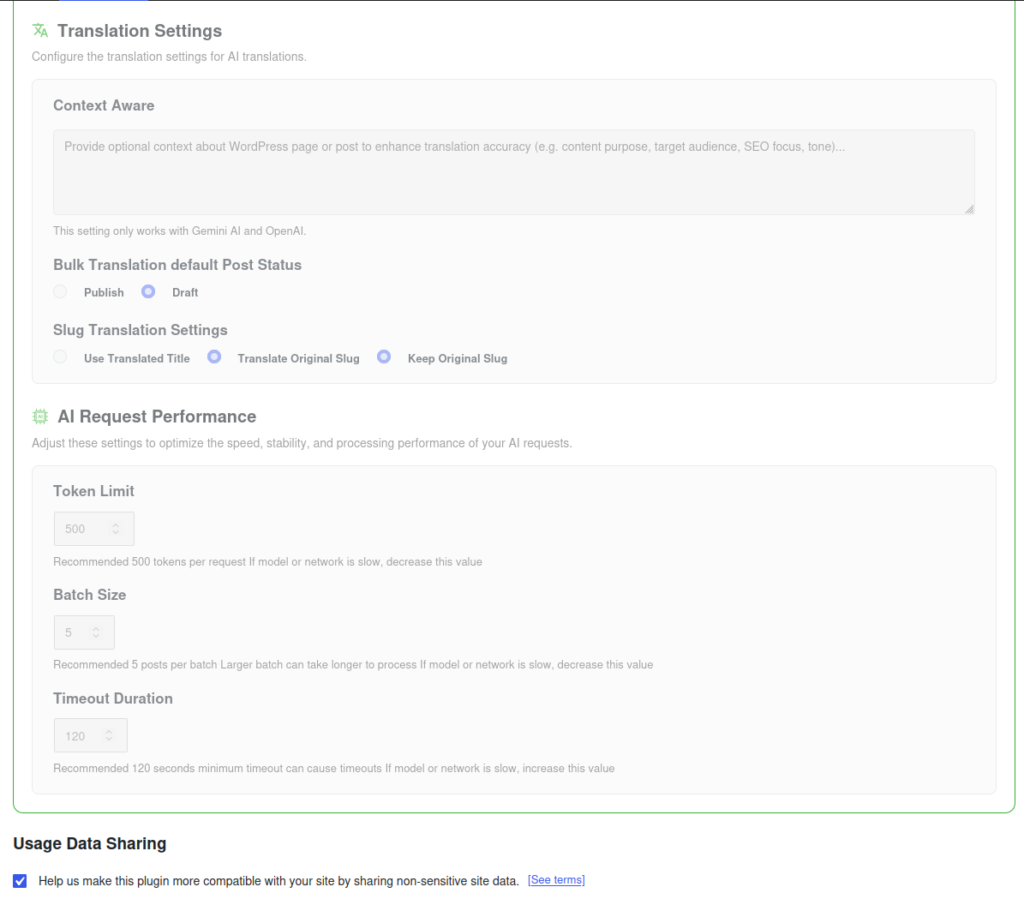
AutoPoly Pro includes a Context Aware input field in its settings, used to provide translation context to Gemini or OpenAI.
At first, I wanted to put all the translation rules I normally give ChatGPT Plus into this field.
But after looking at the Supported Blocks mechanism, I think the role of this field should be adjusted.
Structural protection should mainly be handled by AutoPoly’s block support mechanism, while Context Aware is better suited for controlling translation style.
For example, it could be written like this:
Translate and rewrite the content as a natural, credible English technical blog post for overseas developers and technical readers.

Use clear and practical technical English. Avoid literal machine translation and avoid overly promotional wording.

Keep the original meaning, troubleshooting process, technical conclusions, and personal experience intact.

Preserve inline code, commands, file paths, domains, URLs, plugin names, product names, shortcodes, and technical identifiers exactly.

Do not change the structure or meaning of WordPress blocks that the plugin marks as unsupported.
This is more appropriate than simply writing “do not translate code blocks.”
Whether code blocks are sent for translation should not depend on the AI model’s self-discipline. It should be controlled at the plugin level.
7. Another Key Question: Is the OpenAI Request Sent from the Browser or the Server?
As I continued the analysis, I found another more fundamental question:
When AutoPoly Pro calls the OpenAI API, is the request sent from the browser side or the WordPress server side?
This is a very important question.
If the request is sent from the browser side, like this:
浏览器
  ↓
api.openai.com
Then I need to worry about whether the OpenAI API key could be exposed in the browser Network panel, JavaScript, localStorage, or page source.
That would not be safe enough for long-term use.
If the request is sent from the server side, like this:
WordPress 服务器
  ↓
api.openai.com
That would be more reasonable from an API key security perspective.
But this leads to another practical issue: my main WordPress site is deployed on Alibaba Cloud ECS in Hangzhou, and a server in mainland China may not be able to access the OpenAI API reliably.
So the question becomes:
浏览器端调用
  → API Key 安全风险更高

服务器端调用
  → 阿里云服务器可能访问不了 OpenAI API
This is something that must be confirmed before the AutoPoly Pro + OpenAI path can actually be implemented.
If I continue testing later, I would first ask the official support team these questions:
1. OpenAI API 请求是在浏览器端还是 WordPress 服务器端发出?
2. 如果是服务器端,是否使用 WordPress HTTP API,例如 wp_remote_post?
3. 是否支持 WordPress 代理常量?
4. 是否支持自定义 OpenAI-compatible API Base URL?
5. 如果服务器无法直接访问 api.openai.com,有没有推荐方案?
The custom API Base URL is especially important.
If it is supported, I could consider using an overseas gateway service instead of having the Hangzhou Alibaba Cloud server access OpenAI directly.
The ideal structure may look like this:
WordPress / AutoPoly Pro
  ↓
自定义 OpenAI-compatible API Gateway
  ↓
OpenAI API
This would be much more stable than trying to configure a global VPN or proxy on the production server.
8. The Real Reason I Paused the Purchase Was Payment
At this point in the analysis, I actually felt fairly positive about the technical direction of AutoPoly Pro.
If I only look at the plugin features, it is definitely worth testing.
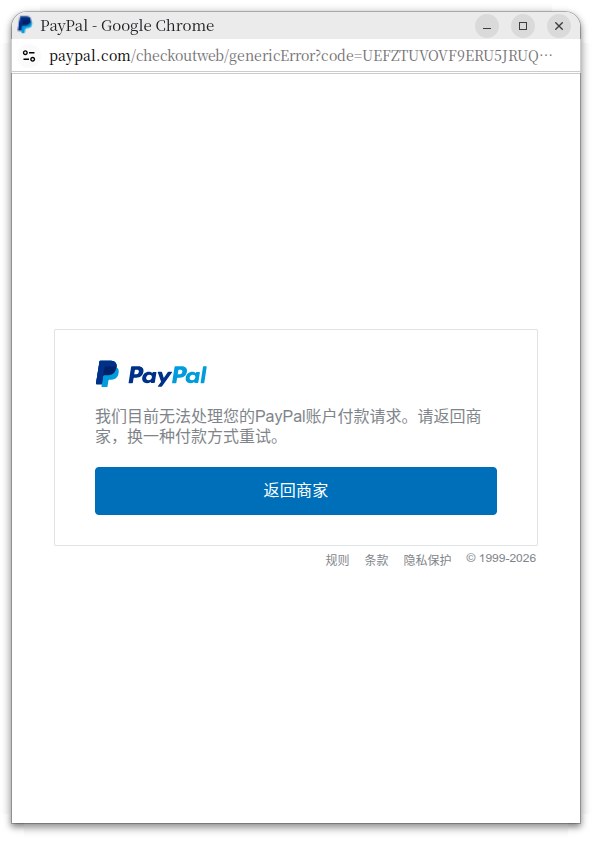
But when I actually tried to purchase it, I ran into a more practical problem: international payment.
The AutoPoly Pro checkout page supports credit cards and PayPal. My current problem is:
没有可用的国际信用卡
PayPal 余额为 0
PayPal 不能像支付宝一样直接用人民币充值余额
中国银行银联借记卡绑定 PayPal 失败
At first, I thought having a PayPal account would be enough to pay. After testing, I found that this assumption was wrong.
If the PayPal balance is 0 and there is no linked payment source such as a Visa or Mastercard that can be used for cross-border payments, PayPal still cannot complete the payment to an overseas merchant.
There is also a knock-on issue here.
Even if I managed to buy AutoPoly Pro through some other method this time, using the OpenAI API later would still require a working payment method.
In other words, what I am missing is not just “a way to pay for one plugin,” but a stable international payment channel for developer tools.
AutoPoly Pro
  → 需要支付

OpenAI API
  → 需要支付

海外 VPS / SaaS / 插件订阅
  → 后续仍然需要支付
This made me realize that at the current stage, directly switching the main workflow to AutoPoly Pro + OpenAI API is not realistic.
9. So Is AutoPoly Pro + OpenAI API Worth It?
From a purely technical perspective, my current judgment is:
AutoPoly Pro + OpenAI API
  技术上值得测试
  结构保护机制比我最初想象更可靠
  Supported Blocks 机制对技术博客非常关键
  Re Translation 和 Bulk Translation 很有价值
But if I look at my current practical conditions, the conclusion is different:
支付方式没有解决
OpenAI API 账单方式没有解决
阿里云服务器访问 OpenAI API 的问题没有验证
OpenAI 请求是否支持代理或自定义 API Base URL 也没有确认
So I will not make AutoPoly Pro + OpenAI API my main workflow immediately.
It is more like a mid-term option than something I can implement right now.
At the current stage, it is more suitable for me to keep using:
AutoPoly 免费版
  ↓
创建英文文章和 Polylang 关联
  ↓
ChatGPT Plus
  ↓
人工做高质量英文重译
  ↓
手动审核发布
This workflow is manual, but it is already stable, and it does not require me to solve OpenAI API billing, server networking, plugin compatibility, and other issues at the same time.
10. How I Would Continue Testing Later
If I test AutoPoly Pro again later, I would start with a minimal validation instead of directly batch-translating older articles.
The testing order should be:
第一步:确认 OpenAI 请求位置
浏览器端?服务器端?

第二步:确认 API Key 是否安全
是否出现在 Network、JS、localStorage 或页面源码中?

第三步:确认阿里云服务器能否调用 OpenAI
如果失败,是否支持代理或自定义 API Base URL?

第四步:用一篇复杂技术文章测试
必须包含 code-block-pro、wp:code、图片、表格、短代码

第五步:对比 ChatGPT Plus 手动重译结果
重点看英文自然度、上下文连贯性、正文完整性

第六步:只保存 Draft,不自动发布
确认安全后再考虑批量
Only after all these checks pass could AutoPoly Pro + OpenAI API become a real main workflow.
Otherwise, it can at most serve as a “high-quality first draft generator,” not a full replacement for manual rewriting with ChatGPT Plus.
11. Current Conclusion
After this analysis, my view of AutoPoly Pro + OpenAI API became much clearer.
This is not a simple “buy Pro and the English translation quality problem is solved” situation.
What needs to be solved is the entire chain:
WordPress Gutenberg 结构保护
  ↓
AutoPoly Supported Blocks 配置
  ↓
OpenAI 翻译质量
  ↓
API 请求位置
  ↓
服务器网络访问能力
  ↓
OpenAI API 支付方式
  ↓
人工审核和发布流程
AutoPoly Pro already looks close to usable in the first half of the workflow, especially because the Supported Blocks mechanism gives me more confidence in its structural protection.
However, it is worth emphasizing again that Supported Blocks itself is not a Pro-only feature. It is a basic capability already provided by AutoPoly Free. The real added value of Pro mainly comes from OpenAI / Gemini / DeepL, Re Translation, Bulk Translation, Custom Fields Translation, Taxonomy Translation, and similar features.
But the second half of the workflow — OpenAI API calls, server networking, and international payment — is still a clear barrier for me right now.
So my temporary decision is:
Continue using AutoPoly Free to create English articles and maintain the Polylang relationship. For high-quality final English versions, I will still use ChatGPT Plus for manual full-article rewriting. AutoPoly Pro + OpenAI API will remain a future automation direction, but I will not rush to switch to it.
Although this attempt did not end with a purchase or a direct workflow switch, it was not wasted effort.
At least it helped me confirm one thing: the real bottleneck right now is not “whether AI can translate,” but whether the entire automation workflow can be implemented in a stable, controllable, and low-risk way.